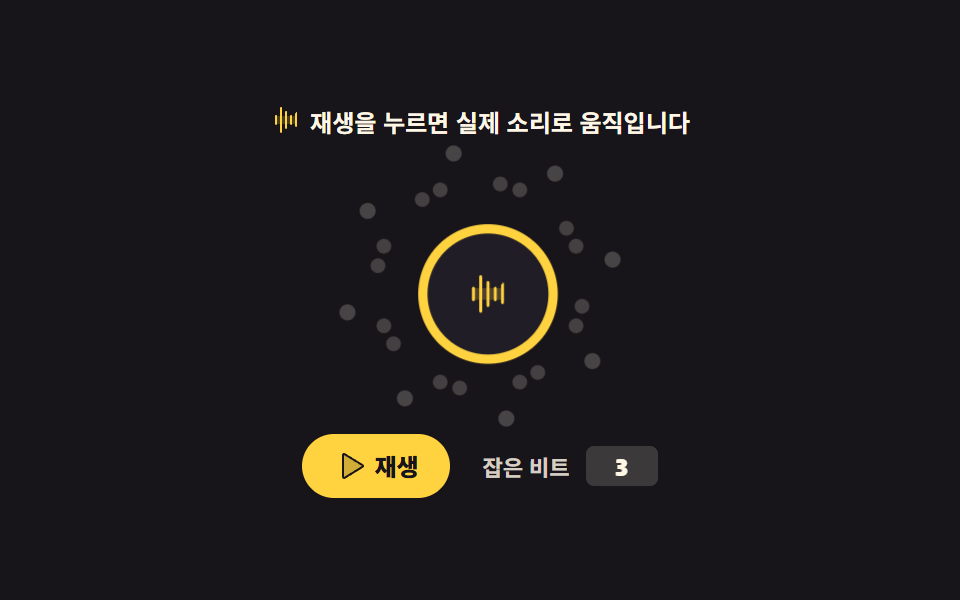
04ビート反応パーティクル
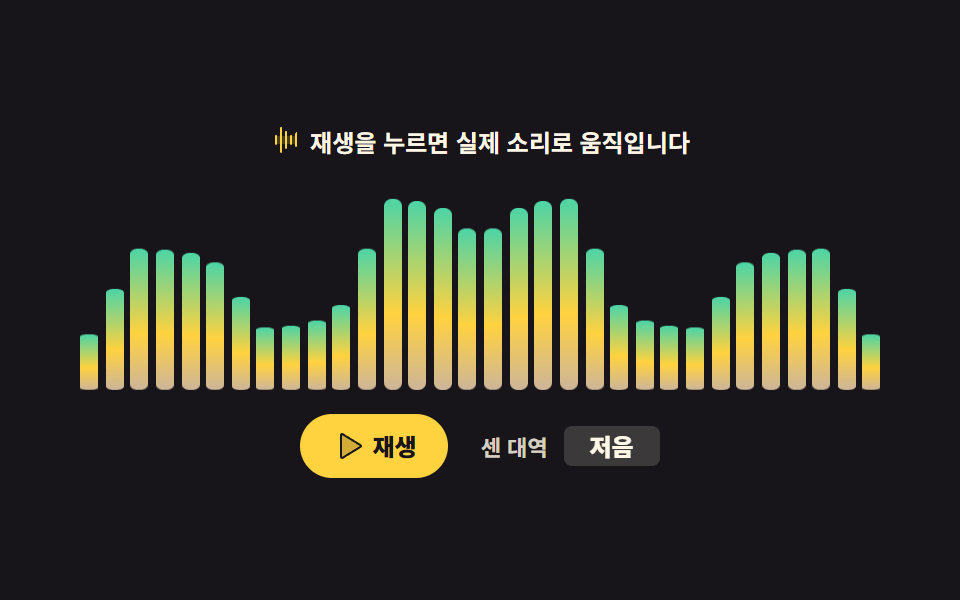
低音のエネルギーが直前の平均を超えた瞬間をビートとみなし、そのときだけ粒を一層ぶん広げます。しきい値を固定値でなく平均比で取ると、曲が静かになってもビートを取りこぼしません。
使いどころイベントページのヒーロー背景、音楽リリースのランディング
scaleopacityrequestAnimationFrame
<svg width="0" height="0" style="position:absolute" aria-hidden="true">
  <defs>
    <symbol id="ico-waveform" viewBox="0 0 256 256" fill="currentColor"><path d="M208 96v64H48V96Z" opacity=".2"/><path d="M56 96v64a8 8 0 0 1-16 0V96a8 8 0 0 1 16 0m32-72a8 8 0 0 0-8 8v192a8 8 0 0 0 16 0V32a8 8 0 0 0-8-8m40 32a8 8 0 0 0-8 8v128a8 8 0 0 0 16 0V64a8 8 0 0 0-8-8m40 32a8 8 0 0 0-8 8v64a8 8 0 0 0 16 0V96a8 8 0 0 0-8-8m40-16a8 8 0 0 0-8 8v96a8 8 0 0 0 16 0V72a8 8 0 0 0-8-8"/></symbol>
    <symbol id="ico-play" viewBox="0 0 256 256" fill="currentColor"><path d="M228.23 134.69L84.15 222.81A8 8 0 0 1 72 216.12V39.88a8 8 0 0 1 12.15-6.69l144.08 88.12a7.82 7.82 0 0 1 0 13.38" opacity=".2"/><path d="M232.4 114.49L88.32 26.35a16 16 0 0 0-16.2-.3A15.86 15.86 0 0 0 64 39.87v176.26A15.94 15.94 0 0 0 80 232a16.07 16.07 0 0 0 8.36-2.35l144.04-88.14a15.88 15.88 0 0 0 0-27.02M80 215.94V40l143.83 88Z"/></symbol>
    <symbol id="ico-pause" viewBox="0 0 256 256" fill="currentColor"><path d="M208 48v160a8 8 0 0 1-8 8h-40a8 8 0 0 1-8-8V48a8 8 0 0 1 8-8h40a8 8 0 0 1 8 8M96 40H56a8 8 0 0 0-8 8v160a8 8 0 0 0 8 8h40a8 8 0 0 0 8-8V48a8 8 0 0 0-8-8" opacity=".2"/><path d="M200 32h-40a16 16 0 0 0-16 16v160a16 16 0 0 0 16 16h40a16 16 0 0 0 16-16V48a16 16 0 0 0-16-16m0 176h-40V48h40zM96 32H56a16 16 0 0 0-16 16v160a16 16 0 0 0 16 16h40a16 16 0 0 0 16-16V48a16 16 0 0 0-16-16m0 176H56V48h40z"/></symbol>
  </defs>
</svg>
<main class="stage">
<div class="bp is-demo" id="bp">
  <p class="bp__hint"><svg class="bp__ico" aria-hidden="true"><use href="#ico-waveform"/></svg><span>再生を押すと実際の音で動きます</span></p>
  <div class="bp__field" id="field" aria-hidden="true"><div class="bp__core" id="core"><svg class="bp__coreIco" aria-hidden="true"><use href="#ico-waveform"/></svg></div></div>
  <div class="bp__foot">
    <button class="bp__play" id="play" type="button" aria-pressed="false">
      <svg class="bp__ico bp__ico--play" aria-hidden="true"><use href="#ico-play"/></svg>
      <svg class="bp__ico bp__ico--pause" aria-hidden="true"><use href="#ico-pause"/></svg>
      <span id="playLabel">再生</span>
    </button>
    <p class="bp__count">
      <span class="bp__countLabel">拾ったビート</span>
      <b class="bp__countBox">
        <span class="bp__countText" id="beatText" aria-live="polite">0</span>
        <span class="bp__loop" aria-hidden="true"><i>1</i><i>3</i><i>5</i><i>7</i></span>
      </b>
    </p>
  </div>
</div>
</main>@use "../../../../site/static/demo-tokens" as *;
// 비트 반응 입자 — 저음 에너지가 자기 이동 평균을 넘는 순간(=비트)에만 겹 하나가 터진다.
// 코어는 늘 그 자리에 있는다 — 입자의 퇴장이 주인공이 되면 대표 이미지가 빈 화면이 된다(255 실측).
// 미리보기(.is-demo)는 2초에 네 번 비트가 도는 CSS 루프. 재생을 누르면 진짜 판정이 겹에 불을 붙인다.
$duration: $dur-quick;
$easing: $ease-pop;
$color: $stage-yellow;
@include stage($stage-ink);
.bp { display: flex; flex-direction: column; align-items: center; gap: $sp-2; width: 100%; }
.bp__hint {
display: flex; align-items: center; gap: $sp-1; margin: 0;
font-weight: 700; font-size: clamp(11px, 3vw, 12px); color: $subject-cream;
}
.bp__ico { width: 16px; height: 16px; color: $color; }
// --rest 는 점이 쉬는 반경, --fly 는 비트에 터지는 반경. 좁은 화면에서는 이 값만 줄인다(루프는 그대로).
.bp__field { position: relative; width: 172px; height: 132px; --rest: 52px; --fly: 84px; }
.bp__ring { position: absolute; inset: 0; }
.bp__dot {
position: absolute; left: 50%; top: 50%; width: 8px; height: 8px; margin: -4px 0 0 -4px;
border-radius: 50%; background: rgba($subject-cream, .38);
transform: rotate(var(--a)) translateY(calc(-1 * var(--rest))) scale(1);
}
// 코어 — 입자가 흩어져도 화면의 주인공으로 남는다. 커질 땐 자기 중심에서(규칙 8).
.bp__core {
position: absolute; left: 50%; top: 50%; width: 52px; height: 52px; margin: -26px 0 0 -26px;
display: grid; place-items: center; border-radius: 50%;
background: #211d26; border: 4px solid $color;
}
.bp__coreIco { width: 20px; height: 20px; color: $color; }
// 실제 비트가 오면 JS 가 클래스를 붙인다 — 일회성 transform 이지 루프가 아니다
.bp__ring--hit .bp__dot { animation: bpBurst $easing 480ms 1 both; }
.bp__core--hit { animation: bpThump $easing 480ms 1 both; }
@keyframes bpBurst {
0% { transform: rotate(var(--a)) translateY(calc(-1 * var(--rest))) scale(1); opacity: 1; }
100% { transform: rotate(var(--a)) translateY(calc(-1 * var(--fly))) scale(.4); opacity: 0; }
}
@keyframes bpThump {
0% { transform: scale(1); }
35% { transform: scale(1.18); }
100% { transform: scale(1); }
}
.bp__foot { display: flex; align-items: center; justify-content: center; gap: $sp-4; width: 100%; }
.bp__play {
display: inline-flex; align-items: center; gap: $sp-1;
border: 0; border-radius: $r-pill; padding: $sp-2 $sp-4;
background: $color; color: $subject-ink; cursor: pointer;
font-family: inherit; font-weight: 800; font-size: clamp(11px, 3vw, 12px); line-height: 1;
}
.bp__ico--pause { display: none; }
.bp__play[aria-pressed="true"] .bp__ico--play { display: none; }
.bp__play[aria-pressed="true"] .bp__ico--pause { display: inline-block; }
.bp__play .bp__ico { color: $subject-ink; }
.bp__count { margin: 0; display: flex; align-items: center; gap: $sp-2; }
.bp__countLabel { font-weight: 700; font-size: clamp(10px, 2.6vw, 11px); color: rgba($subject-cream, .82); }
.bp__countBox {
position: relative; display: grid; place-items: center;
min-width: 28px; height: 20px; border-radius: $r-xs; padding: 0 $sp-1;
background: rgba($subject-cream, .16); color: $subject-cream;
font-weight: 800; font-size: clamp(11px, 3vw, 12px); line-height: 1;
}
.bp__loop { position: absolute; inset: 0; display: grid; place-items: center; visibility: hidden; }
.bp__loop i { grid-area: 1 / 1; font-style: normal; visibility: hidden; }
// ── 격자 미리보기 루프 ─────────────────────────────────────────────
// 2초에 비트 네 번(2Hz) — 4번은 점멸이 아니라 파동이다(점들은 부드러운 감쇠 곡선으로 사라진다).
// 겹 넷은 서로 500ms 간격. animation 단축을 안 쓰고 낱개 속성만(240 실측).
.bp.is-demo .bp__dot {
animation-name: bpLoop; animation-duration: $dur-loop; animation-timing-function: $easing;
animation-iteration-count: infinite;
animation-delay: calc(var(--i) * -500ms);
}
// 미리보기에서 쉬는 상태의 점은 옅은 헤일로 — 폭 0 이 아니라 반투명 링으로 대기한다
@keyframes bpLoop {
0% { transform: rotate(var(--a)) translateY(calc(-1 * var(--rest))) scale(.92); opacity: .5; }
2% { transform: rotate(var(--a)) translateY(calc(-1 * var(--rest) - 2px)) scale(1.5); opacity: 1; }
30% { transform: rotate(var(--a)) translateY(calc(-1 * var(--fly))) scale(.4); opacity: 0; }
46% { transform: rotate(var(--a)) translateY(calc(-1 * var(--rest))) scale(.92); opacity: .5; }
100% { transform: rotate(var(--a)) translateY(calc(-1 * var(--rest))) scale(.92); opacity: .5; }
}
.bp.is-demo .bp__core {
animation-name: bpCoreLoop; animation-duration: 500ms; animation-timing-function: $easing;
animation-iteration-count: infinite;
}
@keyframes bpCoreLoop {
0% { transform: scale(1); }
22% { transform: scale(1.16); }
100% { transform: scale(1); }
}
// 잡은 비트 수도 1 → 3 → 5 → 7 로 컷. 지연 구간에 fill-mode 를 두지 않는다(작성 상태가 이미 숨김).
.bp.is-demo .bp__countText { color: transparent; }
.bp.is-demo .bp__loop { visibility: visible; }
.bp.is-demo .bp__loop i {
animation-name: bpBeatNum; animation-duration: $dur-loop; animation-timing-function: steps(1, end);
animation-iteration-count: infinite;
}
.bp.is-demo .bp__loop i:nth-child(1) { animation-delay: 0ms; }
.bp.is-demo .bp__loop i:nth-child(2) { animation-delay: 500ms; }
.bp.is-demo .bp__loop i:nth-child(3) { animation-delay: 1000ms; }
.bp.is-demo .bp__loop i:nth-child(4) { animation-delay: 1500ms; }
@keyframes bpBeatNum {
0%, 24% { visibility: visible; }
25%, 100% { visibility: hidden; }
}
@media (max-width: 340px) {
.bp { gap: 0; }
.bp__field { width: 140px; height: 104px; --rest: 40px; --fly: 58px; }
.bp__dot { width: 6px; height: 6px; margin: -3px 0 0 -3px; }
.bp__core { width: 44px; height: 44px; margin: -22px 0 0 -22px; }
.bp__foot { gap: $sp-2; }
.bp__play { padding: $sp-1 $sp-3; }
}
// reduce 에서는 루프와 실제 반응을 다 끈다 — 코어와 헤일로만 남아 화면이 비지 않는다
@media (prefers-reduced-motion: reduce) {
.bp.is-demo .bp__dot,
.bp.is-demo .bp__core,
.bp.is-demo .bp__loop i { animation: none !important; }
.bp.is-demo .bp__countText { color: $subject-cream !important; }
.bp.is-demo .bp__loop { visibility: hidden !important; }
.bp__ring--hit .bp__dot,
.bp__core--hit { animation: none !important; }
}html, body {
margin: 0;
overflow: hidden;
}
.stage {
box-sizing: border-box;
min-height: 100vh;
display: grid;
place-items: center;
margin: 0;
background: #17141a;
font-family: -apple-system, "Segoe UI", "Noto Sans KR", sans-serif;
padding: clamp(8px, 4vw, 24px);
}
.bp {
display: flex;
flex-direction: column;
align-items: center;
gap: 8px;
width: 100%;
}
.bp__hint {
display: flex;
align-items: center;
gap: 4px;
margin: 0;
font-weight: 700;
font-size: clamp(11px, 3vw, 12px);
color: #fff7e6;
}
.bp__ico {
width: 16px;
height: 16px;
color: #ffd23f;
}
.bp__field {
position: relative;
width: 172px;
height: 132px;
--rest: 52px;
--fly: 84px;
}
.bp__ring {
position: absolute;
inset: 0;
}
.bp__dot {
position: absolute;
left: 50%;
top: 50%;
width: 8px;
height: 8px;
margin: -4px 0 0 -4px;
border-radius: 50%;
background: rgba(255, 247, 230, 0.38);
transform: rotate(var(--a)) translateY(calc(-1 * var(--rest))) scale(1);
}
.bp__core {
position: absolute;
left: 50%;
top: 50%;
width: 52px;
height: 52px;
margin: -26px 0 0 -26px;
display: grid;
place-items: center;
border-radius: 50%;
background: #211d26;
border: 4px solid #ffd23f;
}
.bp__coreIco {
width: 20px;
height: 20px;
color: #ffd23f;
}
.bp__ring--hit .bp__dot {
animation: bpBurst cubic-bezier(0.2, 1.4, 0.4, 1) 480ms 1 both;
}
.bp__core--hit {
animation: bpThump cubic-bezier(0.2, 1.4, 0.4, 1) 480ms 1 both;
}
@keyframes bpBurst {
0% {
transform: rotate(var(--a)) translateY(calc(-1 * var(--rest))) scale(1);
opacity: 1;
}
100% {
transform: rotate(var(--a)) translateY(calc(-1 * var(--fly))) scale(0.4);
opacity: 0;
}
}
@keyframes bpThump {
0% {
transform: scale(1);
}
35% {
transform: scale(1.18);
}
100% {
transform: scale(1);
}
}
.bp__foot {
display: flex;
align-items: center;
justify-content: center;
gap: 16px;
width: 100%;
}
.bp__play {
display: inline-flex;
align-items: center;
gap: 4px;
border: 0;
border-radius: 999px;
padding: 8px 16px;
background: #ffd23f;
color: #17141a;
cursor: pointer;
font-family: inherit;
font-weight: 800;
font-size: clamp(11px, 3vw, 12px);
line-height: 1;
}
.bp__ico--pause {
display: none;
}
.bp__play[aria-pressed=true] .bp__ico--play {
display: none;
}
.bp__play[aria-pressed=true] .bp__ico--pause {
display: inline-block;
}
.bp__play .bp__ico {
color: #17141a;
}
.bp__count {
margin: 0;
display: flex;
align-items: center;
gap: 8px;
}
.bp__countLabel {
font-weight: 700;
font-size: clamp(10px, 2.6vw, 11px);
color: rgba(255, 247, 230, 0.82);
}
.bp__countBox {
position: relative;
display: grid;
place-items: center;
min-width: 28px;
height: 20px;
border-radius: 4px;
padding: 0 4px;
background: rgba(255, 247, 230, 0.16);
color: #fff7e6;
font-weight: 800;
font-size: clamp(11px, 3vw, 12px);
line-height: 1;
}
.bp__loop {
position: absolute;
inset: 0;
display: grid;
place-items: center;
visibility: hidden;
}
.bp__loop i {
grid-area: 1/1;
font-style: normal;
visibility: hidden;
}
.bp.is-demo .bp__dot {
animation-name: bpLoop;
animation-duration: 2s;
animation-timing-function: cubic-bezier(0.2, 1.4, 0.4, 1);
animation-iteration-count: infinite;
animation-delay: calc(var(--i) * -500ms);
}
@keyframes bpLoop {
0% {
transform: rotate(var(--a)) translateY(calc(-1 * var(--rest))) scale(0.92);
opacity: 0.5;
}
2% {
transform: rotate(var(--a)) translateY(calc(-1 * var(--rest) - 2px)) scale(1.5);
opacity: 1;
}
30% {
transform: rotate(var(--a)) translateY(calc(-1 * var(--fly))) scale(0.4);
opacity: 0;
}
46% {
transform: rotate(var(--a)) translateY(calc(-1 * var(--rest))) scale(0.92);
opacity: 0.5;
}
100% {
transform: rotate(var(--a)) translateY(calc(-1 * var(--rest))) scale(0.92);
opacity: 0.5;
}
}
.bp.is-demo .bp__core {
animation-name: bpCoreLoop;
animation-duration: 500ms;
animation-timing-function: cubic-bezier(0.2, 1.4, 0.4, 1);
animation-iteration-count: infinite;
}
@keyframes bpCoreLoop {
0% {
transform: scale(1);
}
22% {
transform: scale(1.16);
}
100% {
transform: scale(1);
}
}
.bp.is-demo .bp__countText {
color: transparent;
}
.bp.is-demo .bp__loop {
visibility: visible;
}
.bp.is-demo .bp__loop i {
animation-name: bpBeatNum;
animation-duration: 2s;
animation-timing-function: steps(1, end);
animation-iteration-count: infinite;
}
.bp.is-demo .bp__loop i:nth-child(1) {
animation-delay: 0ms;
}
.bp.is-demo .bp__loop i:nth-child(2) {
animation-delay: 500ms;
}
.bp.is-demo .bp__loop i:nth-child(3) {
animation-delay: 1000ms;
}
.bp.is-demo .bp__loop i:nth-child(4) {
animation-delay: 1500ms;
}
@keyframes bpBeatNum {
0%, 24% {
visibility: visible;
}
25%, 100% {
visibility: hidden;
}
}
@media (max-width: 340px) {
.bp {
gap: 0;
}
.bp__field {
width: 140px;
height: 104px;
--rest: 40px;
--fly: 58px;
}
.bp__dot {
width: 6px;
height: 6px;
margin: -3px 0 0 -3px;
}
.bp__core {
width: 44px;
height: 44px;
margin: -22px 0 0 -22px;
}
.bp__foot {
gap: 8px;
}
.bp__play {
padding: 4px 12px;
}
}
@media (prefers-reduced-motion: reduce) {
.bp.is-demo .bp__dot,
.bp.is-demo .bp__core,
.bp.is-demo .bp__loop i {
animation: none !important;
}
.bp.is-demo .bp__countText {
color: #fff7e6 !important;
}
.bp.is-demo .bp__loop {
visibility: hidden !important;
}
.bp__ring--hit .bp__dot,
.bp__core--hit {
animation: none !important;
}
}var root = document.getElementById('bp');
var field = document.getElementById('field');
var core = document.getElementById('core');
var playBtn = document.getElementById('play');
var playLabel = document.getElementById('playLabel');
var beatText = document.getElementById('beatText');
var RING_COUNT = 4, DOT_COUNT = 8;
var rings = [];
// 겹 넷 × 점 여덟. 겹마다 시작 각을 11.25도 민다 — 쉬는 상태에서는 점 서른두 개가 동그란 헤일로가 되고,
// 터질 때는 겹마다 다른 방향으로 흩어진다. --i 는 겹 번호이자 미리보기 루프의 음수 지연 배수다.
for (var r = 0; r < RING_COUNT; r++) {
var ring = document.createElement('div');
ring.className = 'bp__ring';
for (var d = 0; d < DOT_COUNT; d++) {
var dot = document.createElement('i');
dot.className = 'bp__dot';
dot.style.setProperty('--a', (((d * 45 + r * 11.25) % 360)).toFixed(2) + 'deg');
dot.style.setProperty('--i', String(r));
ring.appendChild(dot);
}
field.insertBefore(ring, core);
rings.push(ring);
}
var ctx = null, analyser = null, freq = null, timer = 0, playing = false;
var bassAvg = 0, lastBeatAt = 0, beats = 0, ringTurn = 0;
function buildAudio() {
ctx = new (window.AudioContext || window.webkitAudioContext)();
analyser = ctx.createAnalyser();
analyser.fftSize = 128;
analyser.smoothingTimeConstant = 0.5;
freq = new Uint8Array(analyser.frequencyBinCount);
var out = ctx.createGain();
out.gain.value = 0.08;
out.connect(analyser);
analyser.connect(ctx.destination);
// 킥 — 낮은 사인파를 0.5초마다 한 번씩 쳐서 2초에 네 번 비트(120BPM). 低音 대역을 명확히 치고 빠진다.
var kick = ctx.createOscillator();
var kickAmp = ctx.createGain();
kick.type = 'sine';
kick.frequency.value = 70;
kickAmp.gain.value = 0;
for (var b = 0; b < 128; b++) {
var at = ctx.currentTime + b * 0.5;
kickAmp.gain.setValueAtTime(1, at);
kickAmp.gain.exponentialRampToValueAtTime(0.004, at + 0.3);
}
kick.connect(kickAmp); kickAmp.connect(out); kick.start();
// 패드 — "평균보다 큰 순간"이 성립하려면 바닥 에너지가 필요하다. 킥이 없는 사이 저음의 평균을 만든다.
[110, 164.81, 220].forEach(function (hz) {
var pad = ctx.createOscillator();
var padAmp = ctx.createGain();
pad.type = 'sawtooth';
pad.frequency.value = hz;
padAmp.gain.value = 0.035;
pad.connect(padAmp); padAmp.connect(out); pad.start();
});
}
function fire(el, hitClass) {
el.classList.remove(hitClass);
void el.offsetWidth; // 같은 클래스를 다시 걸어 일회성 애니메이션을 처음부터 돌린다
el.classList.add(hitClass);
}
function draw() {
analyser.getByteFrequencyData(freq);
var bass = 0;
for (var k = 0; k < 4; k++) { bass += freq[k]; }
bass = bass / (4 * 255);
var now = performance.now();
// 비트 판정: 低音 에너지가 직전 구간의 이동 평균 × 1.3 을 넘는 순간이다.
// 고정 문턱(예: "에너지 0.5 이상")은 곡이 조용해지면 비트를 아예 못 잡고 시끄러워지면 매 순간을 비트로 만든다 —
// 평균 대비 계수여야 셈여림이 바뀌어도 비트를 놓치지 않는다. 220ms 최소 간격은 한 번 친 킥을 두 번 세는 것을 막는다.
if (bass > bassAvg * 1.3 && bass > 0.14 && now - lastBeatAt > 220) {
lastBeatAt = now;
beats += 1;
beatText.textContent = String(beats);
fire(rings[ringTurn % RING_COUNT], 'bp__ring--hit');
fire(core, 'bp__core--hit');
ringTurn += 1;
}
bassAvg += (bass - bassAvg) * 0.12;
timer = requestAnimationFrame(draw);
}
playBtn.addEventListener('click', function () {
root.classList.remove('is-demo');
if (!ctx) { buildAudio(); }
playing = !playing;
playBtn.setAttribute('aria-pressed', playing ? 'true' : 'false');
playLabel.textContent = playing ? '停止' : '再生';
// 자동재생 정책: AudioContext 는 사용자 제스처 안에서 resume() 해야 소리가 난다.
if (playing) { ctx.resume(); timer = requestAnimationFrame(draw); }
else { ctx.suspend(); cancelAnimationFrame(timer); }
});// BeatParticles — vanilla 판(run/291/demo/04-audio-viz-beat-particles/index.html) 의 React 포트.
// 저음 에너지가 자기 이동 평균을 넘는 순간(비트)에 겹 하나가 터진다. 코어는 늘 그 자리에 남는다.
import { useEffect, useRef, useState } from "react";
import type { CSSProperties } from "react";
import styles from "./BeatParticles.module.scss";
export type BeatParticlesProps = {
/** 격자 미리보기용 2초 자동 루프. 재생을 누르면 꺼진다 */
demo?: boolean;
duration?: number;
easing?: string;
color?: string;
};
type Vars = CSSProperties & { "--duration"?: string; "--easing"?: string; "--color"?: string };
type DotVars = CSSProperties & { "--a"?: string; "--i"?: string };
/** ambient 타입에 useRef<T> 의 null 합집합이 없어 로컬로 좁힌다 */
type Box<T> = { current: T };
const RING_COUNT = 4;
const DOT_COUNT = 8;
export default function BeatParticles({
demo = true,
duration = 220,
easing = "cubic-bezier(.2, 1.4, .4, 1)",
color = "#ffd23f",
}: BeatParticlesProps) {
const [live, setLive] = useState(demo);
const [playing, setPlaying] = useState(false);
const [beats, setBeats] = useState(0);
const [hitRing, setHitRing] = useState(-1);
const [coreHit, setCoreHit] = useState(false);
const ctxBox = useRef(null) as Box<AudioContext | null>;
const nodeBox = useRef(null) as Box<AnalyserNode | null>;
const frameBox = useRef(0) as Box<number>;
const avgBox = useRef(0) as Box<number>;
const lastBeatBox = useRef(0) as Box<number>;
const turnBox = useRef(0) as Box<number>;
const vars: Vars = { "--duration": `${duration}ms`, "--easing": easing, "--color": color };
useEffect(() => {
return () => {
cancelAnimationFrame(frameBox.current);
if (ctxBox.current) {
ctxBox.current.close();
}
};
}, []);
function buildAudio() {
const ctx = new AudioContext();
const analyser = ctx.createAnalyser();
analyser.fftSize = 128;
analyser.smoothingTimeConstant = 0.5;
const out = ctx.createGain();
out.gain.value = 0.08;
out.connect(analyser);
analyser.connect(ctx.destination);
// 킥 — 낮은 사인파를 0.5초마다 한 번씩 쳐서 2초에 네 번 비트(120BPM).
const kick = ctx.createOscillator();
const kickAmp = ctx.createGain();
kick.type = "sine";
kick.frequency.value = 70;
kickAmp.gain.value = 0;
for (let b = 0; b < 128; b++) {
const at = ctx.currentTime + b * 0.5;
kickAmp.gain.setValueAtTime(1, at);
kickAmp.gain.exponentialRampToValueAtTime(0.004, at + 0.3);
}
kick.connect(kickAmp);
kickAmp.connect(out);
kick.start();
// 패드 — "평균보다 큰 순간"이 성립하려면 바닥 에너지가 필요하다.
[110, 164.81, 220].forEach((hz) => {
const pad = ctx.createOscillator();
const padAmp = ctx.createGain();
pad.type = "sawtooth";
pad.frequency.value = hz;
padAmp.gain.value = 0.035;
pad.connect(padAmp);
padAmp.connect(out);
pad.start();
});
ctxBox.current = ctx;
nodeBox.current = analyser;
}
function draw() {
const analyser = nodeBox.current;
if (!analyser) {
return;
}
const freq = new Uint8Array(analyser.frequencyBinCount);
analyser.getByteFrequencyData(freq);
let bass = 0;
for (let k = 0; k < 4; k++) {
bass += freq[k];
}
bass = bass / (4 * 255);
const now = performance.now();
// 비트 판정: 저음 에너지가 직전 구간의 이동 평균 × 1.3 을 넘는 순간이다(고정 문턱은 셈여림에 약하다).
if (bass > avgBox.current * 1.3 && bass > 0.14 && now - lastBeatBox.current > 220) {
lastBeatBox.current = now;
turnBox.current += 1;
setBeats(turnBox.current);
setHitRing(turnBox.current % RING_COUNT);
setCoreHit(true);
window.setTimeout(() => setCoreHit(false), 460);
}
avgBox.current += (bass - avgBox.current) * 0.12;
frameBox.current = requestAnimationFrame(draw);
}
function toggle() {
setLive(false);
if (!ctxBox.current) {
buildAudio();
}
const ctx = ctxBox.current;
if (!ctx) {
return;
}
const next = !playing;
setPlaying(next);
// 자동재생 정책: AudioContext 는 사용자 제스처 뒤 resume() 해야 소리가 난다.
if (next) {
ctx.resume();
frameBox.current = requestAnimationFrame(draw);
} else {
ctx.suspend();
cancelAnimationFrame(frameBox.current);
}
}
const cls = [styles.root, live ? styles.isDemo : ""].filter(Boolean).join(" ");
const rings = Array.from({ length: RING_COUNT }, (_, r) => (
<div className={[styles.ring, hitRing === r ? styles.ringHit : ""].join(" ")} key={r}>
{Array.from({ length: DOT_COUNT }, (_, d) => {
const dotVars: DotVars = {
"--a": (((d * 45 + r * 11.25) % 360)).toFixed(2) + "deg",
"--i": String(r),
};
return <i className={styles.dot} key={d} style={dotVars} />;
})}
</div>
));
return (
<main className={styles.stage} style={vars}>
<svg width="0" height="0" style={{ position: "absolute" }} aria-hidden="true">
<defs>
<symbol id="ico-waveform" viewBox="0 0 256 256" fill="currentColor">
<path d="M208 96v64H48V96Z" opacity=".2" />
<path d="M56 96v64a8 8 0 0 1-16 0V96a8 8 0 0 1 16 0m32-72a8 8 0 0 0-8 8v192a8 8 0 0 0 16 0V32a8 8 0 0 0-8-8m40 32a8 8 0 0 0-8 8v128a8 8 0 0 0 16 0V64a8 8 0 0 0-8-8m40 32a8 8 0 0 0-8 8v64a8 8 0 0 0 16 0V96a8 8 0 0 0-8-8m40-16a8 8 0 0 0-8 8v96a8 8 0 0 0 16 0V72a8 8 0 0 0-8-8" />
</symbol>
<symbol id="ico-play" viewBox="0 0 256 256" fill="currentColor">
<path d="M228.23 134.69L84.15 222.81A8 8 0 0 1 72 216.12V39.88a8 8 0 0 1 12.15-6.69l144.08 88.12a7.82 7.82 0 0 1 0 13.38" opacity=".2" />
<path d="M232.4 114.49L88.32 26.35a16 16 0 0 0-16.2-.3A15.86 15.86 0 0 0 64 39.87v176.26A15.94 15.94 0 0 0 80 232a16.07 16.07 0 0 0 8.36-2.35l144.04-88.14a15.88 15.88 0 0 0 0-27.02M80 215.94V40l143.83 88Z" />
</symbol>
<symbol id="ico-pause" viewBox="0 0 256 256" fill="currentColor">
<path d="M208 48v160a8 8 0 0 1-8 8h-40a8 8 0 0 1-8-8V48a8 8 0 0 1 8-8h40a8 8 0 0 1 8 8M96 40H56a8 8 0 0 0-8 8v160a8 8 0 0 0 8 8h40a8 8 0 0 0 8-8V48a8 8 0 0 0-8-8" opacity=".2" />
<path d="M200 32h-40a16 16 0 0 0-16 16v160a16 16 0 0 0 16 16h40a16 16 0 0 0 16-16V48a16 16 0 0 0-16-16m0 176h-40V48h40zM96 32H56a16 16 0 0 0-16 16v160a16 16 0 0 0 16 16h40a16 16 0 0 0 16-16V48a16 16 0 0 0-16-16m0 176H56V48h40z" />
</symbol>
</defs>
</svg>
<div className={cls}>
<p className={styles.hint}>
<svg className={styles.ico} aria-hidden="true">
<use href="#ico-waveform" />
</svg>
<span>재생을 누르면 실제 소리로 움직입니다</span>
</p>
<div className={styles.field} aria-hidden="true">
{rings}
<div className={[styles.core, coreHit ? styles.coreHit : ""].join(" ")}>
<svg className={styles.coreIco} aria-hidden="true">
<use href="#ico-waveform" />
</svg>
</div>
</div>
<div className={styles.foot}>
<button className={styles.play} type="button" aria-pressed={playing} onClick={toggle}>
<svg className={[styles.ico, playing ? styles.icoHidden : ""].join(" ")} aria-hidden="true">
<use href="#ico-play" />
</svg>
<svg className={[styles.ico, playing ? "" : styles.icoHidden].join(" ")} aria-hidden="true">
<use href="#ico-pause" />
</svg>
<span>{playing ? "정지" : "재생"}</span>
</button>
<p className={styles.count}>
<span className={styles.countLabel}>잡은 비트</span>
<b className={styles.countBox}>
<span className={styles.countText} aria-live="polite">
{beats}
</span>
<span className={styles.loop} aria-hidden="true">
<i>1</i>
<i>3</i>
<i>5</i>
<i>7</i>
</span>
</b>
</p>
</div>
</div>
</main>
);
}04 ビート反応パーティクル — 計測 累積面積 4.8% · 動いたフレーム 23/23GODRICH オリジナル · SCSS と React は zip に同梱 · オーディオビジュアライザー 作り方 9選 — 棒からマイクまで
このデモが属する記事
 オーディオビジュアライザー 作り方 9選 — 棒からマイクまでオーディオビジュアライザー 作り方とは、鳴っている音の強さ・高さ・リズムを画面の動きに変える UI を、Web Audio API と CSS だけで作ることです。ここにある9点は棒スペクトラムからマイク入力まで、音源ファイルもライブラリも この記事のデモをすべて見る