08マイク入力の可視化
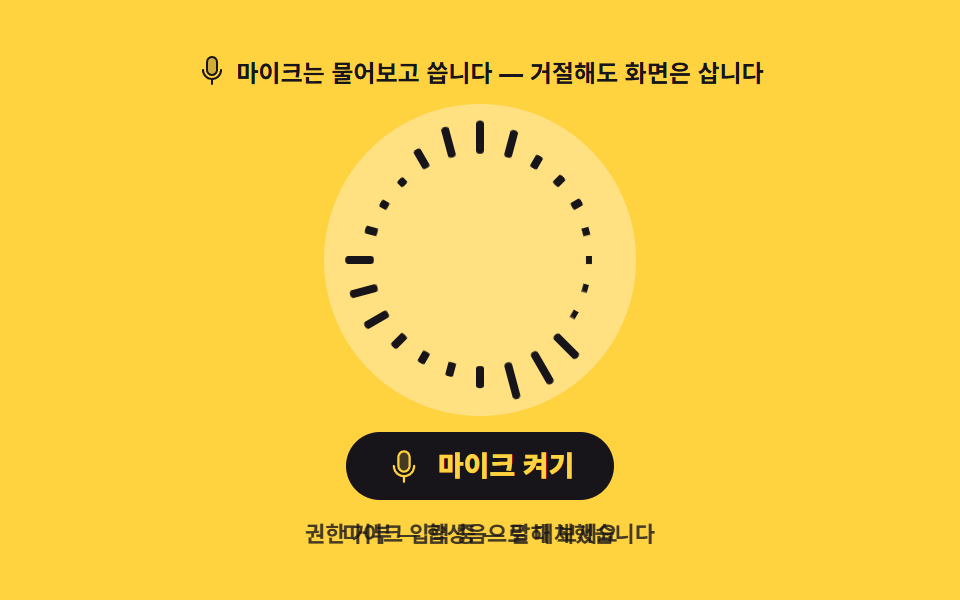
マイクの許可を求め、許可すれば声が、拒否すれば合成音が同じリングを動かします。拒否も正常な経路として扱わないと、画面が空のまま残ります。
使いどころ音声録音の開始画面、ビデオ会議入室前のマイク確認
getUserMediaaria-livecreateOscillator
<svg width="0" height="0" style="position:absolute" aria-hidden="true">
  <defs>
    <symbol id="ico-microphone" viewBox="0 0 256 256" fill="currentColor"><path d="M168 64v64a40 40 0 0 1-40 40a40 40 0 0 1-40-40V64a40 40 0 0 1 40-40a40 40 0 0 1 40 40" opacity=".2"/><path d="M128 176a48.05 48.05 0 0 0 48-48V64a48 48 0 0 0-96 0v64a48.05 48.05 0 0 0 48 48M96 64a32 32 0 0 1 64 0v64a32 32 0 0 1-64 0Zm40 143.6V240a8 8 0 0 1-16 0v-32.4A80.11 80.11 0 0 1 48 128a8 8 0 0 1 16 0a64 64 0 0 0 128 0a8 8 0 0 1 16 0a80.11 80.11 0 0 1-72 79.6"/></symbol>
  </defs>
</svg>
<main class="stage">
<div class="mi is-demo" id="mi">
  <p class="mi__hint"><svg class="mi__ico" aria-hidden="true"><use href="#ico-microphone"/></svg><span>マイクは許可を取って使います — 拒否しても画面は生きます</span></p>
  <div class="mi__dial" aria-hidden="true"><div class="mi__bars" id="bars"></div></div>
  <button class="mi__btn" id="micBtn" type="button" aria-pressed="false">
    <svg class="mi__btnIco" aria-hidden="true"><use href="#ico-microphone"/></svg>
    <span id="micLabel">マイクをオン</span>
  </button>
  <p class="mi__status" aria-live="polite"><span id="status">ボタンを押すとマイクの許可を求めます</span><span class="mi__statusLoop" aria-hidden="true"><i>マイクの許可を待っています</i><i>マイク入力中 — 話してみてください</i><i>許可されません — 合成音に切り替えました</i></span></p>
</div>
</main>
@use "../../../../site/static/demo-tokens" as *;
// 마이크 입력 시각화 — getUserMedia 로 권한을 물어 허락되면 목소리가, 거절되면 합성음이 같은 고리를 움직인다.
// 거절은 catch 로 잡는 정상 경로다 — 여기서 화면이 비면 "권한 거절 = 고장"이라는 인상을 준다.
// 노랑 무대 위 글자는 전부 잉크($subject-ink) — 크림 글자는 3.1:1 로 미달이다(285 실측).
$duration: $dur-quick;
$easing: $ease-spring;
$color: $subject-ink;
@include stage($stage-yellow);
.mi { display: flex; flex-direction: column; align-items: center; gap: $sp-2; width: 100%; }
.mi__hint {
display: flex; align-items: center; gap: $sp-1; margin: 0;
font-weight: 700; font-size: clamp(11px, 3vw, 12px); color: $color;
}
.mi__ico { width: 16px; height: 16px; color: $color; }
.mi__dial { position: relative; width: 156px; height: 156px; border-radius: 50%; background: rgba($subject-cream, .4); }
.mi__bars { position: absolute; inset: 0; }
// 고리 막대 — 01 원형과 같은 원리: 아래 끝이 원의 중심에 닿고, 반지름만큼 나간 자리에서 바깥으로 자란다.
.mi__bar {
position: absolute; left: 50%; bottom: 50%; width: 4px; height: 20px; margin-left: -2px;
border-radius: $r-xs;
background: $color;
transform-origin: 50% 100%;
transform: rotate(calc(var(--i) * 1turn / 24)) translateY(-53px) scaleY(var(--h, .14));
transition: transform $duration $ease-out;
}
.mi__btn {
display: inline-flex; align-items: center; gap: $sp-2;
border: 0; border-radius: $r-pill; padding: $sp-2 $sp-5;
background: $color; color: $stage-yellow; cursor: pointer;
font-family: inherit; font-weight: 800; font-size: clamp(12px, 3.4vw, 14px); line-height: 1;
}
.mi__btnIco { width: 18px; height: 18px; color: $stage-yellow; }
.mi__status { position: relative; margin: 0; min-height: 16px;
font-weight: 700; font-size: clamp(10px, 2.6vw, 11px); color: rgba($subject-ink, .8);
}
// ── 격자 미리보기 루프 ─────────────────────────────────────────────
// 고리가 파도치고(음수 지연 위상), 상태 글자는 「권한을 기다립니다」→「마이크 입력 중」→「권한 거부 — 합성음으로 대체했습니다」
// 로 컷 교체 — 미리보기가 실사용의 세 상태를 그대로 보여준다. 컷만으로는 프레임이 모자라니 막대 파도가 채운다.
// 막대는 잉크 단색이라 밝기 반전이 없다 — 광과민성과 무관하다.
.mi.is-demo .mi__bar {
animation-name: miWave; animation-duration: $dur-loop; animation-timing-function: $easing;
animation-iteration-count: infinite; animation-fill-mode: backwards;
animation-delay: calc(var(--i) * -83ms);
transition: none;
}
@keyframes miWave {
0% { transform: rotate(calc(var(--i) * 1turn / 24)) translateY(-53px) scaleY(.14); }
14% { transform: rotate(calc(var(--i) * 1turn / 24)) translateY(-53px) scaleY(.95); }
28% { transform: rotate(calc(var(--i) * 1turn / 24)) translateY(-53px) scaleY(.32); }
42% { transform: rotate(calc(var(--i) * 1turn / 24)) translateY(-53px) scaleY(.72); }
56% { transform: rotate(calc(var(--i) * 1turn / 24)) translateY(-53px) scaleY(.2); }
70% { transform: rotate(calc(var(--i) * 1turn / 24)) translateY(-53px) scaleY(.84); }
84% { transform: rotate(calc(var(--i) * 1turn / 24)) translateY(-53px) scaleY(.28); }
100% { transform: rotate(calc(var(--i) * 1turn / 24)) translateY(-53px) scaleY(.14); }
}
.mi.is-demo .mi__status { color: transparent; }
.mi.is-demo .mi__statusLoop { visibility: visible; }
// 같은 격자 칸에 세 상태를 겹쳐 두고 steps 로 하나씩 보여준다(01 대역 이름과 같은 패턴)
.mi__statusLoop { position: absolute; inset: 0; display: grid; place-items: center; visibility: hidden; }
.mi.is-demo .mi__statusLoop i {
grid-area: 1 / 1; font-style: normal; visibility: hidden; text-align: center;
font-weight: 700; font-size: clamp(10px, 2.6vw, 11px); color: rgba($subject-ink, .8);
animation-name: miStatusLoop; animation-duration: $dur-loop; animation-timing-function: steps(1, end);
animation-iteration-count: infinite;
}
.mi.is-demo .mi__statusLoop i:nth-child(1) { animation-delay: 0ms; }
.mi.is-demo .mi__statusLoop i:nth-child(2) { animation-delay: 666ms; }
.mi.is-demo .mi__statusLoop i:nth-child(3) { animation-delay: 1332ms; }
@keyframes miStatusLoop {
0%, 33% { visibility: visible; }
34%, 100% { visibility: hidden; }
}
@media (max-width: 340px) {
.mi { gap: $sp-1; }
.mi__dial { width: 96px; height: 96px; }
.mi__bar { height: 13px; width: 3px; margin-left: -1.5px; transform: rotate(calc(var(--i) * 1turn / 24)) translateY(-34px) scaleY(var(--h, .14)); }
.mi__btn { padding: $sp-1 $sp-3; }
}
// reduce 에서는 파도를 멈춘다 — 고리와 버튼, 상태 글자가 남는다
@media (prefers-reduced-motion: reduce) {
.mi.is-demo .mi__bar,
.mi.is-demo .mi__statusLoop i { animation: none !important; }
.mi.is-demo .mi__status { color: rgba($subject-ink, .8) !important; }
.mi.is-demo .mi__statusLoop { visibility: hidden !important; }
.mi__bar { transition: none !important; }
}html, body {
margin: 0;
overflow: hidden;
}
.stage {
box-sizing: border-box;
min-height: 100vh;
display: grid;
place-items: center;
margin: 0;
background: #ffd23f;
font-family: -apple-system, "Segoe UI", "Noto Sans KR", sans-serif;
padding: clamp(8px, 4vw, 24px);
}
.mi {
display: flex;
flex-direction: column;
align-items: center;
gap: 8px;
width: 100%;
}
.mi__hint {
display: flex;
align-items: center;
gap: 4px;
margin: 0;
font-weight: 700;
font-size: clamp(11px, 3vw, 12px);
color: #17141a;
}
.mi__ico {
width: 16px;
height: 16px;
color: #17141a;
}
.mi__dial {
position: relative;
width: 156px;
height: 156px;
border-radius: 50%;
background: rgba(255, 247, 230, 0.4);
}
.mi__bars {
position: absolute;
inset: 0;
}
.mi__bar {
position: absolute;
left: 50%;
bottom: 50%;
width: 4px;
height: 20px;
margin-left: -2px;
border-radius: 4px;
background: #17141a;
transform-origin: 50% 100%;
transform: rotate(calc(var(--i) * 1turn / 24)) translateY(-53px) scaleY(var(--h, 0.14));
transition: transform 220ms ease-out;
}
.mi__btn {
display: inline-flex;
align-items: center;
gap: 8px;
border: 0;
border-radius: 999px;
padding: 8px 20px;
background: #17141a;
color: #ffd23f;
cursor: pointer;
font-family: inherit;
font-weight: 800;
font-size: clamp(12px, 3.4vw, 14px);
line-height: 1;
}
.mi__btnIco {
width: 18px;
height: 18px;
color: #ffd23f;
}
.mi__status {
position: relative;
margin: 0;
min-height: 16px;
font-weight: 700;
font-size: clamp(10px, 2.6vw, 11px);
color: rgba(23, 20, 26, 0.8);
}
.mi.is-demo .mi__bar {
animation-name: miWave;
animation-duration: 2s;
animation-timing-function: cubic-bezier(0.2, 0.8, 0.2, 1);
animation-iteration-count: infinite;
animation-fill-mode: backwards;
animation-delay: calc(var(--i) * -83ms);
transition: none;
}
@keyframes miWave {
0% {
transform: rotate(calc(var(--i) * 1turn / 24)) translateY(-53px) scaleY(0.14);
}
14% {
transform: rotate(calc(var(--i) * 1turn / 24)) translateY(-53px) scaleY(0.95);
}
28% {
transform: rotate(calc(var(--i) * 1turn / 24)) translateY(-53px) scaleY(0.32);
}
42% {
transform: rotate(calc(var(--i) * 1turn / 24)) translateY(-53px) scaleY(0.72);
}
56% {
transform: rotate(calc(var(--i) * 1turn / 24)) translateY(-53px) scaleY(0.2);
}
70% {
transform: rotate(calc(var(--i) * 1turn / 24)) translateY(-53px) scaleY(0.84);
}
84% {
transform: rotate(calc(var(--i) * 1turn / 24)) translateY(-53px) scaleY(0.28);
}
100% {
transform: rotate(calc(var(--i) * 1turn / 24)) translateY(-53px) scaleY(0.14);
}
}
.mi.is-demo .mi__status {
color: transparent;
}
.mi.is-demo .mi__statusLoop {
visibility: visible;
}
.mi__statusLoop {
position: absolute;
inset: 0;
display: grid;
place-items: center;
visibility: hidden;
}
.mi.is-demo .mi__statusLoop i {
grid-area: 1/1;
font-style: normal;
visibility: hidden;
text-align: center;
font-weight: 700;
font-size: clamp(10px, 2.6vw, 11px);
color: rgba(23, 20, 26, 0.8);
animation-name: miStatusLoop;
animation-duration: 2s;
animation-timing-function: steps(1, end);
animation-iteration-count: infinite;
}
.mi.is-demo .mi__statusLoop i:nth-child(1) {
animation-delay: 0ms;
}
.mi.is-demo .mi__statusLoop i:nth-child(2) {
animation-delay: 666ms;
}
.mi.is-demo .mi__statusLoop i:nth-child(3) {
animation-delay: 1332ms;
}
@keyframes miStatusLoop {
0%, 33% {
visibility: visible;
}
34%, 100% {
visibility: hidden;
}
}
@media (max-width: 340px) {
.mi {
gap: 4px;
}
.mi__dial {
width: 96px;
height: 96px;
}
.mi__bar {
height: 13px;
width: 3px;
margin-left: -1.5px;
transform: rotate(calc(var(--i) * 1turn / 24)) translateY(-34px) scaleY(var(--h, 0.14));
}
.mi__btn {
padding: 4px 12px;
}
}
@media (prefers-reduced-motion: reduce) {
.mi.is-demo .mi__bar,
.mi.is-demo .mi__statusLoop i {
animation: none !important;
}
.mi.is-demo .mi__status {
color: rgba(23, 20, 26, 0.8) !important;
}
.mi.is-demo .mi__statusLoop {
visibility: hidden !important;
}
.mi__bar {
transition: none !important;
}
}var root = document.getElementById('mi');
var barBox = document.getElementById('bars');
var micBtn = document.getElementById('micBtn');
var micLabel = document.getElementById('micLabel');
var statusEl = document.getElementById('status');
var BAR_COUNT = 24;
var bars = [];
// 고리 막대 24개 — 마이크가 허락되면 목소리가, 거절되면 합성음이 **같은 막대**를 움직인다.
// 두 경로가 같은 그림을 공유해야 "거절 = 실패 화면"이 아니라 "거절 = 다른 음원" 이 된다.
for (var i = 0; i < BAR_COUNT; i++) {
var bar = document.createElement('span');
bar.className = 'mi__bar';
bar.style.setProperty('--i', String(i));
bar.setAttribute('data-band', String(Math.abs((i % 16) - 8)));
barBox.appendChild(bar);
bars.push(bar);
}
var ctx = null, analyser = null, freq = null, timer = 0, running = false, micOn = false;
function ensureCtx() {
if (ctx) { return; }
ctx = new (window.AudioContext || window.webkitAudioContext)();
analyser = ctx.createAnalyser();
analyser.fftSize = 256; // 256 → 빈 간격 187.5Hz — 폴백 사인파(220Hz)와 목소리 기본주파수가 맵핑된 빈에 들어온다
analyser.smoothingTimeConstant = 0.7;
freq = new Uint8Array(analyser.frequencyBinCount);
analyser.connect(ctx.destination);
}
function fallbackTone() {
// 거절 폴백 — 낮은 사인파 하나. 목소리보다 조용하고 규칙적이라 "합성음으로 돌아갔다"가 한눈에 보인다.
var osc = ctx.createOscillator();
var amp = ctx.createGain();
osc.type = 'sine';
osc.frequency.value = 220;
amp.gain.value = 0;
for (var beat = 0; beat < 128; beat++) {
var at = ctx.currentTime + beat * 0.5;
amp.gain.setValueAtTime(0.5, at);
amp.gain.exponentialRampToValueAtTime(0.02, at + 0.4);
}
osc.connect(amp); amp.connect(analyser); osc.start();
}
function draw() {
analyser.getByteFrequencyData(freq);
for (var i = 0; i < bars.length; i++) {
var band = Number(bars[i].getAttribute('data-band'));
var v = freq[band + 1] / 255;
bars[i].style.setProperty('--h', (0.1 + v * 0.9).toFixed(3));
}
timer = requestAnimationFrame(draw);
}
micBtn.addEventListener('click', function () {
root.classList.remove('is-demo');
if (running) { stopAll(); return; }
ensureCtx();
// 자동재생 정책: AudioContext 는 사용자 제스처 안에서 resume() 해야 한다.
ctx.resume();
micBtn.setAttribute('aria-pressed', 'true');
micLabel.textContent = 'オフ';
statusEl.textContent = 'マイクの許可を待っています';
micOn = false;
var p = (navigator.mediaDevices && navigator.mediaDevices.getUserMedia)
? navigator.mediaDevices.getUserMedia({ audio: true })
: Promise.reject(new Error('no mediaDevices'));
p.then(function (stream) {
micOn = true;
var src = ctx.createMediaStreamSource(stream);
src.connect(analyser); // 스피커로 돌려주지 않는다 — 하울링이 일어난다
statusEl.textContent = 'マイク入力中 — 話してみてください';
running = true;
timer = requestAnimationFrame(draw);
}).catch(function () {
// 거절은 정상 경로다 — 화면이 비지 않게 합성음이 같은 고리를 잇는다.
micOn = false;
fallbackTone();
statusEl.textContent = '許可されません — 合成音に切り替えました';
running = true;
timer = requestAnimationFrame(draw);
});
});
function stopAll() {
cancelAnimationFrame(timer);
if (ctx) { ctx.suspend(); }
running = false;
micBtn.setAttribute('aria-pressed', 'false');
micLabel.textContent = 'マイクをオン';
statusEl.textContent = micOn ? 'マイクを止めました' : '合成音を止めました';
}// MicInput — vanilla 판(run/291/demo/08-audio-viz-mic-input/index.html) 의 React 포트.
// getUserMedia 로 권한을 물어 허락되면 목소리가, 거절되면 합성음이 같은 고리를 움직인다.
import { useEffect, useRef, useState } from "react";
import type { CSSProperties } from "react";
import styles from "./MicInput.module.scss";
export type MicInputProps = {
/** 격자 미리보기용 2초 자동 루프. 마이크를 누르면 꺼진다 */
demo?: boolean;
duration?: number;
easing?: string;
color?: string;
};
type Vars = CSSProperties & { "--duration"?: string; "--easing"?: string; "--color"?: string };
type BarVars = CSSProperties & { "--i"?: string; "--h"?: string };
/** ambient 타입에 useRef<T> 의 null 합집합이 없어 로컬로 좁힌다 */
type Box<T> = { current: T };
const BAR_COUNT = 24;
export default function MicInput({
demo = true,
duration = 220,
easing = "cubic-bezier(.2, .8, .2, 1)",
color = "#17141a",
}: MicInputProps) {
const [live, setLive] = useState(demo);
const [running, setRunning] = useState(false);
const [heights, setHeights] = useState<number[]>([]);
const [status, setStatus] = useState("버튼을 누르면 마이크 권한을 물어봅니다");
const [micLabel, setMicLabel] = useState("마이크 켜기");
const ctxBox = useRef(null) as Box<AudioContext | null>;
const nodeBox = useRef(null) as Box<AnalyserNode | null>;
const frameBox = useRef(0) as Box<number>;
const micOnBox = useRef(false);
const vars: Vars = { "--duration": `${duration}ms`, "--easing": easing, "--color": color };
useEffect(() => {
return () => {
cancelAnimationFrame(frameBox.current);
if (ctxBox.current) {
ctxBox.current.close();
}
};
}, []);
function ensureCtx() {
if (ctxBox.current) {
return;
}
const ctx = new AudioContext();
const analyser = ctx.createAnalyser();
analyser.fftSize = 256; // 256 → 빈 간격 187.5Hz — 폴백 사인파(220Hz)와 목소리 기본주파수가 맵핑된 빈에 들어온다
analyser.smoothingTimeConstant = 0.7;
analyser.connect(ctx.destination);
ctxBox.current = ctx;
nodeBox.current = analyser;
}
function fallbackTone() {
const ctx = ctxBox.current;
const analyser = nodeBox.current;
if (!ctx || !analyser) {
return;
}
// 거절 폴백 — 낮은 사인파 하나. "합성음으로 돌아갔다"가 한눈에 보인다.
const osc = ctx.createOscillator();
const amp = ctx.createGain();
osc.type = "sine";
osc.frequency.value = 220;
amp.gain.value = 0;
for (let beat = 0; beat < 128; beat++) {
const at = ctx.currentTime + beat * 0.5;
amp.gain.setValueAtTime(0.5, at);
amp.gain.exponentialRampToValueAtTime(0.02, at + 0.4);
}
osc.connect(amp);
amp.connect(analyser);
osc.start();
}
function draw() {
const analyser = nodeBox.current;
if (!analyser) {
return;
}
const freq = new Uint8Array(analyser.frequencyBinCount);
analyser.getByteFrequencyData(freq);
const next: number[] = [];
for (let i = 0; i < BAR_COUNT; i++) {
const band = Math.abs((i % 16) - 8);
next.push(0.1 + (freq[band + 1] / 255) * 0.9);
}
setHeights(next);
frameBox.current = requestAnimationFrame(draw);
}
function toggle() {
setLive(false);
if (running) {
stopAll();
return;
}
ensureCtx();
const ctx = ctxBox.current;
if (!ctx) {
return;
}
// 자동재생 정책: AudioContext 는 사용자 제스처 안에서 resume() 해야 한다.
ctx.resume();
setRunning(true);
setMicLabel("끄기");
setStatus("마이크 권한을 기다립니다");
micOnBox.current = false;
const p =
navigator.mediaDevices && navigator.mediaDevices.getUserMedia
? navigator.mediaDevices.getUserMedia({ audio: true })
: Promise.reject(new Error("no mediaDevices"));
p.then((stream) => {
micOnBox.current = true;
const src = ctx.createMediaStreamSource(stream);
src.connect(nodeBox.current as AnalyserNode); // 스피커로 돌려주지 않는다 — 하울링이 일어난다
setStatus("마이크 입력 중 — 말해 보세요");
frameBox.current = requestAnimationFrame(draw);
}).catch(() => {
// 거절은 정상 경로다 — 화면이 비지 않게 합성음이 같은 고리를 잇는다.
micOnBox.current = false;
fallbackTone();
setStatus("권한 거부 — 합성음으로 대체했습니다");
frameBox.current = requestAnimationFrame(draw);
});
}
function stopAll() {
cancelAnimationFrame(frameBox.current);
if (ctxBox.current) {
ctxBox.current.suspend();
}
setRunning(false);
setMicLabel("마이크 켜기");
setStatus(micOnBox.current ? "마이크를 멈췄습니다" : "합성음을 멈췄습니다");
}
const cls = [styles.root, live ? styles.isDemo : ""].filter(Boolean).join(" ");
return (
<main className={styles.stage} style={vars}>
<svg width="0" height="0" style={{ position: "absolute" }} aria-hidden="true">
<defs>
<symbol id="ico-microphone" viewBox="0 0 256 256" fill="currentColor">
<path d="M168 64v64a40 40 0 0 1-40 40a40 40 0 0 1-40-40V64a40 40 0 0 1 40-40a40 40 0 0 1 40 40" opacity=".2" />
<path d="M128 176a48.05 48.05 0 0 0 48-48V64a48 48 0 0 0-96 0v64a48.05 48.05 0 0 0 48 48M96 64a32 32 0 0 1 64 0v64a32 32 0 0 1-64 0Zm40 143.6V240a8 8 0 0 1-16 0v-32.4A80.11 80.11 0 0 1 48 128a8 8 0 0 1 16 0a64 64 0 0 0 128 0a8 8 0 0 1 16 0a80.11 80.11 0 0 1-72 79.6" />
</symbol>
</defs>
</svg>
<div className={cls}>
<p className={styles.hint}>
<svg className={styles.ico} aria-hidden="true">
<use href="#ico-microphone" />
</svg>
<span>마이크는 물어보고 씁니다 — 거절해도 화면은 삽니다</span>
</p>
<div className={styles.dial} aria-hidden="true">
<div className={styles.bars}>
{Array.from({ length: BAR_COUNT }, (_, i) => {
const barVars: BarVars = { "--i": String(i) };
if (heights[i] !== undefined) {
barVars["--h"] = heights[i].toFixed(3);
}
return <span className={styles.bar} key={i} style={barVars} />;
})}
</div>
</div>
<button className={styles.btn} type="button" aria-pressed={running} onClick={toggle}>
<svg className={styles.btnIco} aria-hidden="true">
<use href="#ico-microphone" />
</svg>
<span>{micLabel}</span>
</button>
<p className={styles.status} aria-live="polite">
<span>{status}</span>
<span className={styles.statusLoop} aria-hidden="true">
<i>마이크 권한을 기다립니다</i>
<i>마이크 입력 중 — 말해 보세요</i>
<i>권한 거부 — 합성음으로 대체했습니다</i>
</span>
</p>
</div>
</main>
);
}08 マイク入力の可視化 — 計測 累積面積 2.504% · 動いたフレーム 23/23GODRICH オリジナル · SCSS と React は zip に同梱 · オーディオビジュアライザー 作り方 9選 — 棒からマイクまで
このデモが属する記事
 オーディオビジュアライザー 作り方 9選 — 棒からマイクまでオーディオビジュアライザー 作り方とは、鳴っている音の強さ・高さ・リズムを画面の動きに変える UI を、Web Audio API と CSS だけで作ることです。ここにある9点は棒スペクトラムからマイク入力まで、音源ファイルもライブラリも この記事のデモをすべて見る