02ボーダーを走る光
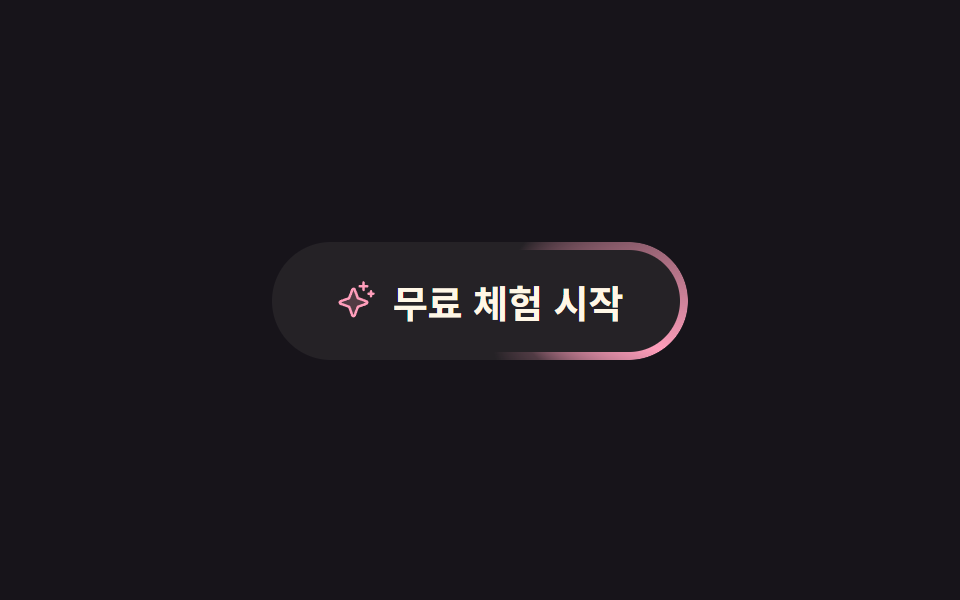
明るい点がボタンの縁を途切れずに何周も回ります。円錐グラデーション全体を回転させ、枠線の太さ分だけマスクで残します。
使いどころ無料トライアル開始のように画面で一つだけ押してほしいボタンに、静止状態でも視線を留めたいとき
conic-gradientmask-composite@property --angle
<main class="stage">
  <button class="glow" type="button">
    <span class="glow__ic" aria-hidden="true"><svg viewBox="0 0 256 256" width="20" height="20"><g fill="currentColor"><path d="m194.82 151.43l-55.09 20.3l-20.3 55.09a7.92 7.92 0 0 1-14.86 0l-20.3-55.09l-55.09-20.3a7.92 7.92 0 0 1 0-14.86l55.09-20.3l20.3-55.09a7.92 7.92 0 0 1 14.86 0l20.3 55.09l55.09 20.3a7.92 7.92 0 0 1 0 14.86" opacity=".2"/><path d="M197.58 129.06L146 110l-19-51.62a15.92 15.92 0 0 0-29.88 0L78 110l-51.62 19a15.92 15.92 0 0 0 0 29.88L78 178l19 51.62a15.92 15.92 0 0 0 29.88 0L146 178l51.62-19a15.92 15.92 0 0 0 0-29.88ZM137 164.22a8 8 0 0 0-4.74 4.74L112 223.85L91.78 169a8 8 0 0 0-4.78-4.78L32.15 144L87 123.78a8 8 0 0 0 4.78-4.78L112 64.15L132.22 119a8 8 0 0 0 4.74 4.74L191.85 144ZM144 40a8 8 0 0 1 8-8h16V16a8 8 0 0 1 16 0v16h16a8 8 0 0 1 0 16h-16v16a8 8 0 0 1-16 0V48h-16a8 8 0 0 1-8-8m104 48a8 8 0 0 1-8 8h-8v8a8 8 0 0 1-16 0v-8h-8a8 8 0 0 1 0-16h8v-8a8 8 0 0 1 16 0v8h8a8 8 0 0 1 8 8"/></g></svg></span>
    <span class="glow__label">無料トライアル</span>
  </button>
</main>
@use "../../../../site/static/demo-tokens" as *;
// 변형은 이 세 줄만 바꾼다
$duration: $dur-loop;
$easing: linear;
$color: $subject-pink;
// 각도를 등록하지 않으면 conic-gradient 의 from 값이 보간되지 않아 러너가 아예 안 돈다
@property --angle {
syntax: "<angle>";
inherits: false;
initial-value: 0deg;
}
@include stage($stage-ink);
.glow {
position: relative;
display: inline-flex;
align-items: center;
gap: $sp-2;
border: 0;
cursor: pointer;
padding: $sp-4 $sp-8;
border-radius: $r-pill;
background: rgba($subject-cream, .06);
color: $subject-cream;
font-family: inherit;
font-size: clamp(15px, 4.5vw, 19px);
font-weight: 700;
}
// 테두리만 남기는 마스크: 바깥 사각형에서 content-box 를 빼면 테두리 굵기만 남는다
.glow::before {
content: "";
position: absolute;
inset: 0;
border-radius: inherit;
padding: $sp-1;
background: conic-gradient(from var(--angle),
rgba($color, 0) 0deg,
rgba($color, 0) 232deg,
rgba($color, 1) 300deg,
rgba($color, .2) 330deg,
rgba($color, 0) 360deg);
-webkit-mask: linear-gradient(#fff 0 0) content-box, linear-gradient(#fff 0 0);
-webkit-mask-composite: xor;
mask-composite: exclude;
animation: glow-run $duration $easing infinite;
}
.glow__ic { display: inline-flex; color: $color; }
// 0deg → 360deg 는 같은 그림이라 끝과 처음이 맞물린다. 340deg 에서 끊으면 매 바퀴 튄다
@keyframes glow-run {
to { --angle: 360deg; }
}
@media (prefers-reduced-motion: reduce) {
.glow::before { animation: none; background: rgba($color, .7); }
}@property --angle {
syntax: "<angle>";
inherits: false;
initial-value: 0deg;
}
html, body {
margin: 0;
overflow: hidden;
}
.stage {
box-sizing: border-box;
min-height: 100vh;
display: grid;
place-items: center;
margin: 0;
background: #17141a;
font-family: -apple-system, "Segoe UI", "Noto Sans KR", sans-serif;
padding: clamp(8px, 4vw, 24px);
}
.glow {
position: relative;
display: inline-flex;
align-items: center;
gap: 8px;
border: 0;
cursor: pointer;
padding: 16px 32px;
border-radius: 999px;
background: rgba(255, 247, 230, 0.06);
color: #fff7e6;
font-family: inherit;
font-size: clamp(15px, 4.5vw, 19px);
font-weight: 700;
}
.glow::before {
content: "";
position: absolute;
inset: 0;
border-radius: inherit;
padding: 4px;
background: conic-gradient(from var(--angle), rgba(255, 158, 187, 0) 0deg, rgba(255, 158, 187, 0) 232deg, #ff9ebb 300deg, rgba(255, 158, 187, 0.2) 330deg, rgba(255, 158, 187, 0) 360deg);
-webkit-mask: linear-gradient(#fff 0 0) content-box, linear-gradient(#fff 0 0);
-webkit-mask-composite: xor;
mask-composite: exclude;
animation: glow-run 2s linear infinite;
}
.glow__ic {
display: inline-flex;
color: #ff9ebb;
}
@keyframes glow-run {
to {
--angle: 360deg;
}
}
@media (prefers-reduced-motion: reduce) {
.glow::before {
animation: none;
background: rgba(255, 158, 187, 0.7);
}
}import type { CSSProperties } from "react";
import styles from "./GlowRunnerButton.module.scss";
export type GlowRunnerButtonProps = {
label?: string;
duration?: number;
easing?: string;
color?: string;
};
type Vars = CSSProperties & { "--duration"?: string; "--easing"?: string; "--color"?: string };
export default function GlowRunnerButton({
label = "Start free trial",
duration = 2000,
easing = "linear",
color = "#ff9ebb",
}: GlowRunnerButtonProps) {
const vars: Vars = { "--duration": `${duration}ms`, "--easing": easing, "--color": color };
return (
<button type="button" className={styles.glow} style={vars}>
<span className={styles.label}>{label}</span>
</button>
);
}02 ボーダーを走る光 — 計測 累積面積 1.381% · 動いたフレーム 23/23GODRICH オリジナル · SCSS と React は zip に同梱 · css ボタン ホバー アニメーション 9選 — 受賞級の定番テク
このデモが属する記事
 css ボタン ホバー アニメーション 9選 — 受賞級の定番テクcss ボタン ホバー アニメーションとは、ポインターが近づいたときにボタンが返す反応を、合図の種類ごとに整理したものです。9 つのうち 1 つは、押すとボタンが円になるまで縮んでスピナーが回り、チェックを描いてから元の幅へ戻ります。 この記事のデモをすべて見る