07押し込みの反動(スクワッシュ)
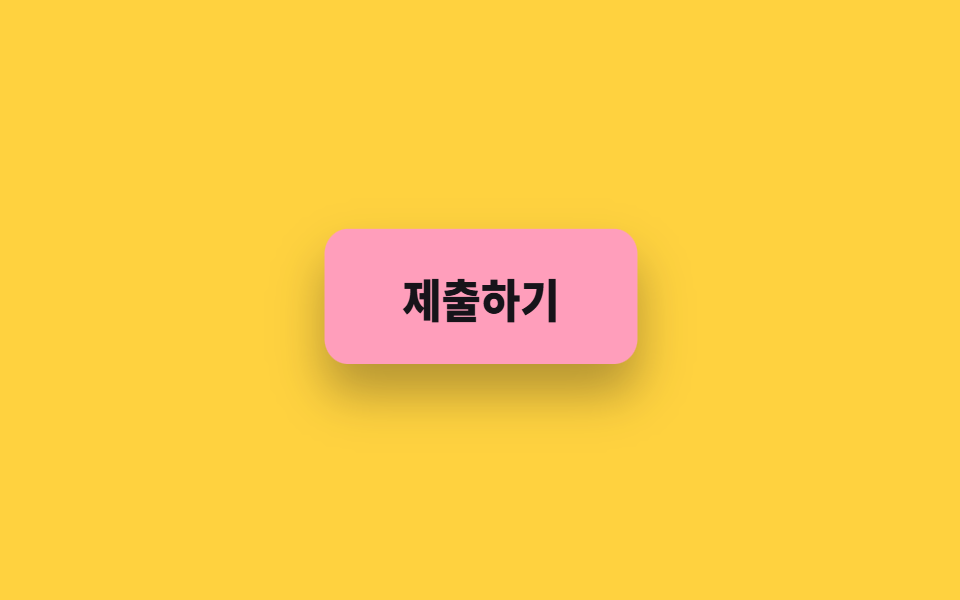
押した瞬間にボタンが縦に潰れて横へ広がり、離すと二度跳ね返ってから戻ります。影も同じ拍で薄くなります。
使いどころモバイルでタップ反応が即座に見えるべきボタン、とくにネットワーク応答が遅くなりうる送信ボタン
scale$ease-popbox-shadow
<main class="stage">
  <button class="squash is-demo" type="button"><span class="squash__label">送信する</span></button>
</main>
@use "../../../../site/static/demo-tokens" as *;
// 변형은 이 세 줄만 바꾼다
$duration: $dur-loop;
$easing: $ease-pop;
$color: $subject-pink;
@include stage($stage-yellow);
.squash {
border: 0;
cursor: pointer;
padding: $sp-4 $sp-10;
border-radius: $r-control;
background: $color;
color: $subject-ink;
font-family: inherit;
font-size: clamp(17px, 5vw, 22px);
font-weight: 800;
box-shadow: $shadow-raised;
transform-origin: center bottom;
}
.squash.is-demo { animation: squash-press $duration $easing infinite; }
// 눌림(scale 1.06/.88) → 반동(.97/1.06) → 안착. 100% 가 0% 와 같은 값이라 되감기가 없다
@keyframes squash-press {
0%, 34% { transform: scale(1, 1); box-shadow: $shadow-raised; }
46% { transform: scale(1.06, .88); box-shadow: $shadow-press; }
60% { transform: scale(.97, 1.06); box-shadow: $shadow-raised; }
72% { transform: scale(1.02, .98); box-shadow: $shadow-raised; }
86%, 100% { transform: scale(1, 1); box-shadow: $shadow-raised; }
}
// 손으로 눌렀을 때도 같은 눌림 값
.squash:active {
animation: none;
transform: scale(1.06, .88);
box-shadow: $shadow-press;
}
@media (prefers-reduced-motion: reduce) {
.squash.is-demo { animation: none; }
.squash:active { transform: none; }
}html, body {
margin: 0;
overflow: hidden;
}
.stage {
box-sizing: border-box;
min-height: 100vh;
display: grid;
place-items: center;
margin: 0;
background: #ffd23f;
font-family: -apple-system, "Segoe UI", "Noto Sans KR", sans-serif;
padding: clamp(8px, 4vw, 24px);
}
.squash {
border: 0;
cursor: pointer;
padding: 16px 40px;
border-radius: 12px;
background: #ff9ebb;
color: #17141a;
font-family: inherit;
font-size: clamp(17px, 5vw, 22px);
font-weight: 800;
box-shadow: 0 14px 24px rgba(23, 20, 26, 0.32);
transform-origin: center bottom;
}
.squash.is-demo {
animation: squash-press 2s cubic-bezier(0.2, 1.4, 0.4, 1) infinite;
}
@keyframes squash-press {
0%, 34% {
transform: scale(1, 1);
box-shadow: 0 14px 24px rgba(23, 20, 26, 0.32);
}
46% {
transform: scale(1.06, 0.88);
box-shadow: 0 6px 12px rgba(23, 20, 26, 0.32);
}
60% {
transform: scale(0.97, 1.06);
box-shadow: 0 14px 24px rgba(23, 20, 26, 0.32);
}
72% {
transform: scale(1.02, 0.98);
box-shadow: 0 14px 24px rgba(23, 20, 26, 0.32);
}
86%, 100% {
transform: scale(1, 1);
box-shadow: 0 14px 24px rgba(23, 20, 26, 0.32);
}
}
.squash:active {
animation: none;
transform: scale(1.06, 0.88);
box-shadow: 0 6px 12px rgba(23, 20, 26, 0.32);
}
@media (prefers-reduced-motion: reduce) {
.squash.is-demo {
animation: none;
}
.squash:active {
transform: none;
}
}import type { CSSProperties } from "react";
import styles from "./SquashPressButton.module.scss";
export type SquashPressButtonProps = {
label?: string;
duration?: number;
easing?: string;
color?: string;
};
type Vars = CSSProperties & { "--duration"?: string; "--easing"?: string; "--color"?: string };
export default function SquashPressButton({
label = "Submit",
duration = 2000,
easing = "cubic-bezier(.2,1.4,.4,1)",
color = "#ff9ebb",
}: SquashPressButtonProps) {
const vars: Vars = { "--duration": `${duration}ms`, "--easing": easing, "--color": color };
return (
<button type="button" className={styles.squash} style={vars}>
{label}
</button>
);
}07 押し込みの反動(スクワッシュ) — 計測 累積面積 5.59% · 動いたフレーム 13/23GODRICH オリジナル · SCSS と React は zip に同梱 · css ボタン ホバー アニメーション 9選 — 受賞級の定番テク
このデモが属する記事
 css ボタン ホバー アニメーション 9選 — 受賞級の定番テクcss ボタン ホバー アニメーションとは、ポインターが近づいたときにボタンが返す反応を、合図の種類ごとに整理したものです。9 つのうち 1 つは、押すとボタンが円になるまで縮んでスピナーが回り、チェックを描いてから元の幅へ戻ります。 この記事のデモをすべて見る