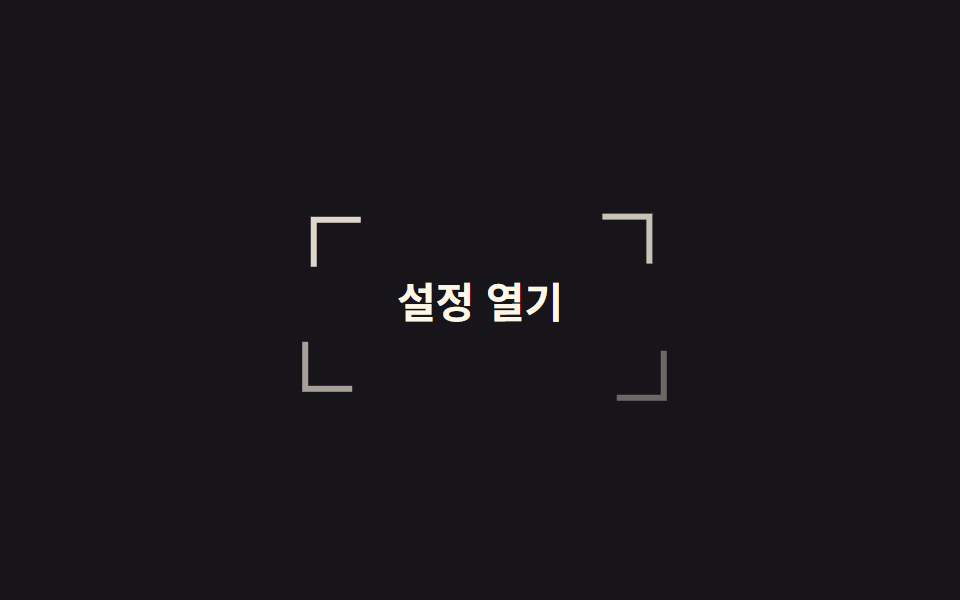
08コーナーブラケットの照準
四隅の L 字パーツが外から内へ集まり、ボタンを囲む枠を完成させます。パーツごとに違うのは削る二辺と進む方向だけで、移動距離は同じです。
使いどころキーボードフォーカスの表示を既定の青枠ではなくデザインに取り込みたいダッシュボード・管理画面
translatefocus-visible순차 지연
<main class="stage">
  <button class="brk is-demo" type="button">
    <span class="brk__c brk__c--tl" aria-hidden="true"></span>
    <span class="brk__c brk__c--tr" aria-hidden="true"></span>
    <span class="brk__c brk__c--bl" aria-hidden="true"></span>
    <span class="brk__c brk__c--br" aria-hidden="true"></span>
    <span class="brk__label">設定を開く</span>
  </button>
</main>
@use "../../../../site/static/demo-tokens" as *;
// 변형은 이 세 줄만 바꾼다
$duration: $dur-loop;
$easing: $ease-spring;
$color: $subject-cream;
@include stage($stage-ink);
.brk {
position: relative;
border: 0;
cursor: pointer;
padding: $sp-4 $sp-8;
border-radius: 0;
background: transparent;
color: $color;
font-family: inherit;
font-size: clamp(16px, 5vw, 21px);
font-weight: 700;
}
// 조각 넷은 같은 크기·같은 이동 거리. 다른 건 어느 쪽 변을 지우느냐뿐이다
.brk__c {
position: absolute;
width: 22px;
height: 22px;
border: 3px solid $color;
--tx: -18px;
--ty: -18px;
}
.brk__c--tl { top: -8px; left: -8px; border-right: 0; border-bottom: 0; --i: 0; }
.brk__c--tr { top: -8px; right: -8px; border-left: 0; border-bottom: 0; --tx: 18px; --i: 1; }
.brk__c--bl { bottom: -8px; left: -8px; border-right: 0; border-top: 0; --ty: 18px; --i: 2; }
.brk__c--br { bottom: -8px; right: -8px; border-left: 0; border-top: 0; --tx: 18px; --ty: 18px; --i: 3; }
.brk.is-demo .brk__c {
animation: brk-close $duration $easing infinite;
animation-delay: calc(var(--i) * 60ms);
}
// 모였다가 다시 흩어져 시작 위치로 돌아온다. 모인 상태에서 끝내면 매 바퀴 조각이 순간이동한다
@keyframes brk-close {
0% { translate: var(--tx) var(--ty); opacity: 0; }
38%, 66% { translate: 0 0; opacity: 1; }
100% { translate: var(--tx) var(--ty); opacity: 0; }
}
// 키보드 포커스에도 같은 조준선
.brk:focus-visible {
outline: none;
.brk__c { animation: none; translate: 0 0; opacity: 1; }
}
@media (prefers-reduced-motion: reduce) {
.brk.is-demo .brk__c { animation: none; translate: 0 0; opacity: 1; }
}html, body {
margin: 0;
overflow: hidden;
}
.stage {
box-sizing: border-box;
min-height: 100vh;
display: grid;
place-items: center;
margin: 0;
background: #17141a;
font-family: -apple-system, "Segoe UI", "Noto Sans KR", sans-serif;
padding: clamp(8px, 4vw, 24px);
}
.brk {
position: relative;
border: 0;
cursor: pointer;
padding: 16px 32px;
border-radius: 0;
background: transparent;
color: #fff7e6;
font-family: inherit;
font-size: clamp(16px, 5vw, 21px);
font-weight: 700;
}
.brk__c {
position: absolute;
width: 22px;
height: 22px;
border: 3px solid #fff7e6;
--tx: -18px;
--ty: -18px;
}
.brk__c--tl {
top: -8px;
left: -8px;
border-right: 0;
border-bottom: 0;
--i: 0;
}
.brk__c--tr {
top: -8px;
right: -8px;
border-left: 0;
border-bottom: 0;
--tx: 18px;
--i: 1;
}
.brk__c--bl {
bottom: -8px;
left: -8px;
border-right: 0;
border-top: 0;
--ty: 18px;
--i: 2;
}
.brk__c--br {
bottom: -8px;
right: -8px;
border-left: 0;
border-top: 0;
--tx: 18px;
--ty: 18px;
--i: 3;
}
.brk.is-demo .brk__c {
animation: brk-close 2s cubic-bezier(0.2, 0.8, 0.2, 1) infinite;
animation-delay: calc(var(--i) * 60ms);
}
@keyframes brk-close {
0% {
translate: var(--tx) var(--ty);
opacity: 0;
}
38%, 66% {
translate: 0 0;
opacity: 1;
}
100% {
translate: var(--tx) var(--ty);
opacity: 0;
}
}
.brk:focus-visible {
outline: none;
}
.brk:focus-visible .brk__c {
animation: none;
translate: 0 0;
opacity: 1;
}
@media (prefers-reduced-motion: reduce) {
.brk.is-demo .brk__c {
animation: none;
translate: 0 0;
opacity: 1;
}
}import type { CSSProperties } from "react";
import styles from "./CornerBracketButton.module.scss";
export type CornerBracketButtonProps = {
label?: string;
duration?: number;
easing?: string;
color?: string;
};
type Vars = CSSProperties & { "--duration"?: string; "--easing"?: string; "--color"?: string };
const corners = ["tl", "tr", "bl", "br"] as const;
export default function CornerBracketButton({
label = "Open settings",
duration = 2000,
easing = "cubic-bezier(.2,.8,.2,1)",
color = "#fff7e6",
}: CornerBracketButtonProps) {
const vars: Vars = { "--duration": `${duration}ms`, "--easing": easing, "--color": color };
return (
<button type="button" className={styles.brk} style={vars}>
{corners.map((c) => (
<span key={c} className={`${styles.c} ${styles[c]}`} aria-hidden="true" />
))}
<span className={styles.label}>{label}</span>
</button>
);
}08 コーナーブラケットの照準 — 計測 累積面積 2.501% · 動いたフレーム 19/23GODRICH オリジナル · SCSS と React は zip に同梱 · css ボタン ホバー アニメーション 9選 — 受賞級の定番テク
このデモが属する記事
 css ボタン ホバー アニメーション 9選 — 受賞級の定番テクcss ボタン ホバー アニメーションとは、ポインターが近づいたときにボタンが返す反応を、合図の種類ごとに整理したものです。9 つのうち 1 つは、押すとボタンが円になるまで縮んでスピナーが回り、チェックを描いてから元の幅へ戻ります。 この記事のデモをすべて見る