02再生・バッファ二重リング
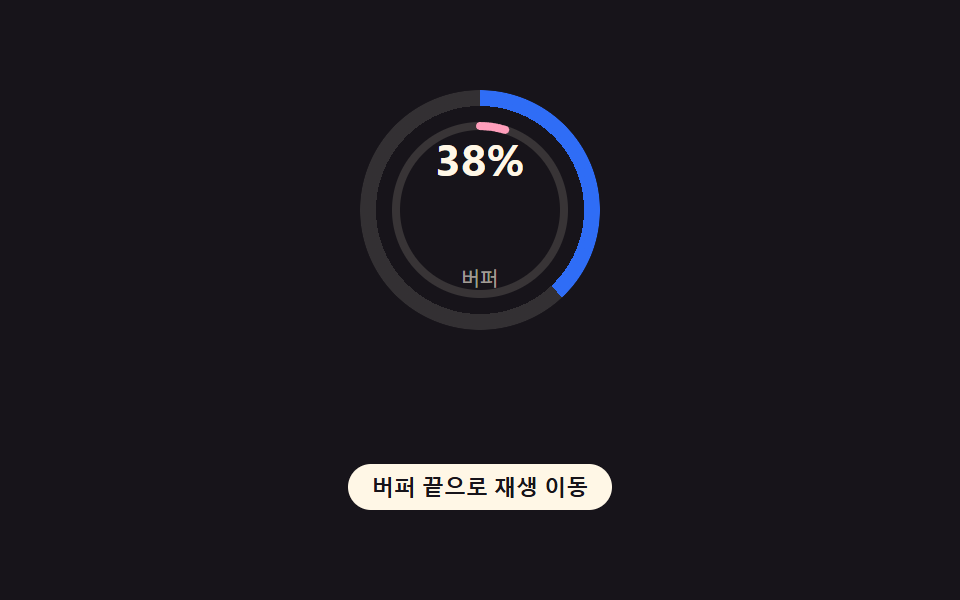
円形リングを二重に重ね、外側リングは今までに受け取ったバッファ量を、内側リングは実際の再生位置を一緒に描く(329の単一リング+数字、035の単色ゾーン切り替えとは異なる実演 — バッファが再生位置よりどれだけ先行しているかが二つのリングの間隔で見える)。
使いどころ動画のシークバー、オーディオストリーミングプレーヤー
conic-gradientstroke-dashoffset--buffer-pct
<main class="stage">
<div class="ringWrap is-demo" id="ringWrap" role="progressbar" aria-label="バッファ進捗" aria-valuemin="0" aria-valuemax="100" aria-valuenow="0">
  <div class="bufferRing" id="bufferRing"></div>
  <svg class="playRing" id="playRing" viewBox="0 0 120 120" aria-hidden="true">
    <circle class="playTrack" cx="60" cy="60" r="42"></circle>
    <circle class="playValue" id="playValue" cx="60" cy="60" r="42"></circle>
  </svg>
  <div class="readout">
    <span class="pct" id="bufferPct">0%</span>
    <span class="label">バッファ</span>
  </div>
</div>
<button class="jumpBtn" id="jumpBtn" type="button">再生をバッファの末尾へ移動</button>
</main>
@use "../../../../site/static/demo-tokens" as *;
// 변수 3개
$duration: $dur-loop;
$easing: $ease-out;
$color: $subject-blue;
// 계산 겹: index.html 의 apply() 가 버퍼·재생 퍼센트를 conic-gradient 정지점(%)과
// SVG 둘레 길이(stroke-dashoffset)로 바꾼다 — 두 링 사이 간격이 곧 "버퍼가 재생을 얼마나 앞서는가"다.
@include stage($stage-ink);
main.stage { position: relative; flex-direction: column; gap: $sp-4; display: grid; place-items: center; }
.ringWrap {
--ring-w: 6px;
--buffer-pct: 0%;
position: relative;
width: 120px;
height: 120px;
}
.bufferRing {
position: absolute;
inset: 0;
border-radius: 50%;
background: conic-gradient($color var(--buffer-pct), rgba($subject-cream, .12) 0);
mask: radial-gradient(farthest-side, transparent calc(100% - var(--ring-w) - 2px), #000 calc(100% - var(--ring-w) - 2px));
-webkit-mask: radial-gradient(farthest-side, transparent calc(100% - var(--ring-w) - 2px), #000 calc(100% - var(--ring-w) - 2px));
transition: background 40ms linear;
}
.playRing {
position: absolute;
inset: 0;
width: 100%;
height: 100%;
transform: rotate(-90deg);
transform-origin: center;
}
.playTrack {
fill: none;
stroke: rgba($subject-cream, .14);
stroke-width: 4;
}
.playValue {
fill: none;
stroke: $subject-pink;
stroke-linecap: round;
transition: stroke-dashoffset $easing 40ms;
}
.readout {
position: absolute;
inset: 0;
display: grid;
place-items: center;
text-align: center;
}
.pct {
display: block;
font-size: 22px;
font-weight: 700;
color: $subject-cream;
}
.label {
display: block;
font-size: 10px;
color: rgba($subject-cream, .6);
}
.jumpBtn {
appearance: none;
border: none;
border-radius: $r-pill;
padding: $sp-1 $sp-3;
font-size: 11px;
font-weight: 600;
color: $subject-ink;
background: $subject-cream;
cursor: pointer;
&:focus-visible { outline: 2px solid $subject-blue-light; outline-offset: 2px; }
}
@media (max-width: 340px) {
.ringWrap { width: 92px; height: 92px; }
.pct { font-size: 18px; }
.jumpBtn { font-size: 10px; }
}
// reduce: 실사용 경로 적용 — 링 값 전환(트랜지션)만 끈다. 값 자체(퍼센트)는 그대로 보여야 의미가 있다
@media (prefers-reduced-motion: reduce) {
.bufferRing, .playValue { transition: none; }
}html, body {
margin: 0;
overflow: hidden;
}
.stage {
box-sizing: border-box;
min-height: 100vh;
display: grid;
place-items: center;
margin: 0;
background: #17141a;
font-family: -apple-system, "Segoe UI", "Noto Sans KR", sans-serif;
padding: clamp(8px, 4vw, 24px);
}
main.stage {
position: relative;
flex-direction: column;
gap: 16px;
display: grid;
place-items: center;
}
.ringWrap {
--ring-w: 6px;
--buffer-pct: 0%;
position: relative;
width: 120px;
height: 120px;
}
.bufferRing {
position: absolute;
inset: 0;
border-radius: 50%;
background: conic-gradient(#2f6df6 var(--buffer-pct), rgba(255, 247, 230, 0.12) 0);
mask: radial-gradient(farthest-side, transparent calc(100% - var(--ring-w) - 2px), #000 calc(100% - var(--ring-w) - 2px));
-webkit-mask: radial-gradient(farthest-side, transparent calc(100% - var(--ring-w) - 2px), #000 calc(100% - var(--ring-w) - 2px));
transition: background 40ms linear;
}
.playRing {
position: absolute;
inset: 0;
width: 100%;
height: 100%;
transform: rotate(-90deg);
transform-origin: center;
}
.playTrack {
fill: none;
stroke: rgba(255, 247, 230, 0.14);
stroke-width: 4;
}
.playValue {
fill: none;
stroke: #ff9ebb;
stroke-linecap: round;
transition: stroke-dashoffset ease-out 40ms;
}
.readout {
position: absolute;
inset: 0;
display: grid;
place-items: center;
text-align: center;
}
.pct {
display: block;
font-size: 22px;
font-weight: 700;
color: #fff7e6;
}
.label {
display: block;
font-size: 10px;
color: rgba(255, 247, 230, 0.6);
}
.jumpBtn {
appearance: none;
border: none;
border-radius: 999px;
padding: 4px 12px;
font-size: 11px;
font-weight: 600;
color: #17141a;
background: #fff7e6;
cursor: pointer;
}
.jumpBtn:focus-visible {
outline: 2px solid #5b8cf8;
outline-offset: 2px;
}
@media (max-width: 340px) {
.ringWrap {
width: 92px;
height: 92px;
}
.pct {
font-size: 18px;
}
.jumpBtn {
font-size: 10px;
}
}
@media (prefers-reduced-motion: reduce) {
.bufferRing, .playValue {
transition: none;
}
}(function () {
var BUFFER_RING_STROKE_WIDTH = 6; // px — 변형이 6→14 로 바꾸는 값
var LOOP_MS = 2000; // 캡처 창과 같은 한 사이클
var TICK_MS = 50;
var PLAY_R = 42;
var CIRC = 2 * Math.PI * PLAY_R;
var wrap = document.getElementById('ringWrap');
var bufferRing = document.getElementById('bufferRing');
var playValue = document.getElementById('playValue');
var bufferPctEl = document.getElementById('bufferPct');
var jumpBtn = document.getElementById('jumpBtn');
var reduce = window.matchMedia('(prefers-reduced-motion: reduce)').matches;
wrap.style.setProperty('--ring-w', BUFFER_RING_STROKE_WIDTH + 'px');
playValue.style.strokeWidth = '4';
playValue.setAttribute('stroke-dasharray', CIRC.toFixed(2));
function easeInOut(x) { return x < 0.5 ? 2 * x * x : 1 - Math.pow(-2 * x + 2, 2) / 2; }
function lerp(a, b, t) { return a + (b - a) * t; }
var manualPlay = null;
// バッファ 퍼센트·再生 퍼센트를 각도(그라디언트 정지점)·둘레 길이(stroke-dashoffset)로 바꾸는 산술
function apply(bufferFrac, playFrac) {
var bp = Math.round(bufferFrac * 100);
bufferRing.style.setProperty('--buffer-pct', bp + '%');
var offset = CIRC * (1 - playFrac);
playValue.style.strokeDashoffset = offset.toFixed(2);
bufferPctEl.textContent = bp + '%';
wrap.setAttribute('aria-valuenow', String(bp));
}
function tick(elapsedMs) {
var t = (elapsedMs % LOOP_MS) / LOOP_MS;
var bufferFrac = lerp(0.32, 0.95, t);
var playFrac = manualPlay !== null ? manualPlay : lerp(0.04, 0.8, easeInOut(t));
apply(bufferFrac, Math.min(playFrac, bufferFrac));
}
var timer = null;
var start = 0;
function loop() { tick(performance.now() - start); }
function human() {
if (wrap.classList.contains('is-demo')) {
wrap.classList.remove('is-demo');
window.clearInterval(timer);
timer = null;
}
}
jumpBtn.addEventListener('click', function () {
human();
var bp = parseFloat(bufferRing.style.getPropertyValue('--buffer-pct')) / 100;
manualPlay = bp;
apply(bp, bp);
});
if (!reduce) {
start = performance.now();
tick(0);
timer = window.setInterval(loop, TICK_MS);
} else {
// reduce: 실사용 경로 — 링은 계속 진행률을 나타내야 하므로 애니메이션(전환)만 끄고 값은 정적으로 한 번 그린다
apply(0.62, 0.4);
}
})();import { useEffect, useRef } from 'react';
import styles from './BufferingProgressRing.module.scss';
const BUFFER_RING_STROKE_WIDTH = 6; // px — 변형이 6→14 로 바꾸는 값
const LOOP_MS = 2000;
const TICK_MS = 50;
const PLAY_R = 42;
const CIRC = 2 * Math.PI * PLAY_R;
function easeInOut(x: number) {
return x < 0.5 ? 2 * x * x : 1 - Math.pow(-2 * x + 2, 2) / 2;
}
function lerp(a: number, b: number, t: number) {
return a + (b - a) * t;
}
export default function BufferingProgressRing() {
const wrapRef = useRef<HTMLDivElement>(null);
const bufferRingRef = useRef<HTMLDivElement>(null);
const playValueRef = useRef<SVGCircleElement>(null);
const bufferPctRef = useRef<HTMLSpanElement>(null);
const jumpBtnRef = useRef<HTMLButtonElement>(null);
useEffect(() => {
const wrap = wrapRef.current;
const bufferRing = bufferRingRef.current;
const playValue = playValueRef.current;
const bufferPctEl = bufferPctRef.current;
const jumpBtn = jumpBtnRef.current;
if (!wrap || !bufferRing || !playValue || !bufferPctEl || !jumpBtn) return undefined;
const reduce = window.matchMedia('(prefers-reduced-motion: reduce)').matches;
wrap.style.setProperty('--ring-w', BUFFER_RING_STROKE_WIDTH + 'px');
playValue.style.strokeWidth = '4';
playValue.setAttribute('stroke-dasharray', CIRC.toFixed(2));
let manualPlay: number | null = null;
function apply(bufferFrac: number, playFrac: number) {
if (!bufferRing || !playValue || !bufferPctEl || !wrap) return;
const bp = Math.round(bufferFrac * 100);
bufferRing.style.setProperty('--buffer-pct', bp + '%');
const offset = CIRC * (1 - playFrac);
playValue.style.strokeDashoffset = offset.toFixed(2);
bufferPctEl.textContent = bp + '%';
wrap.setAttribute('aria-valuenow', String(bp));
}
function tick(elapsedMs: number) {
const t = (elapsedMs % LOOP_MS) / LOOP_MS;
const bufferFrac = lerp(0.32, 0.95, t);
const playFrac = manualPlay !== null ? manualPlay : lerp(0.04, 0.8, easeInOut(t));
apply(bufferFrac, Math.min(playFrac, bufferFrac));
}
let timer: ReturnType<typeof window.setInterval> | null = null;
let start = 0;
function loop() {
tick(performance.now() - start);
}
function human() {
if (wrap && wrap.classList.contains(styles['is-demo'])) {
wrap.classList.remove(styles['is-demo']);
if (timer !== null) window.clearInterval(timer);
timer = null;
}
}
function onJump() {
human();
if (!bufferRing) return;
const bp = parseFloat(bufferRing.style.getPropertyValue('--buffer-pct')) / 100;
manualPlay = bp;
apply(bp, bp);
}
jumpBtn.addEventListener('click', onJump);
if (!reduce) {
start = performance.now();
tick(0);
timer = window.setInterval(loop, TICK_MS);
} else {
// reduce: 실사용 경로 — 링은 계속 진행률을 나타내야 하므로 애니메이션(전환)만 끄고 값은 정적으로 한 번 그린다
apply(0.62, 0.4);
}
return () => {
if (timer !== null) window.clearInterval(timer);
jumpBtn.removeEventListener('click', onJump);
};
}, []);
return (
<>
<div
className={`${styles.ringWrap} ${styles['is-demo']}`}
ref={wrapRef}
role="progressbar"
aria-label="버퍼 진행률"
aria-valuemin={0}
aria-valuemax={100}
aria-valuenow={0}
>
<div className={styles.bufferRing} ref={bufferRingRef} />
<svg className={styles.playRing} viewBox="0 0 120 120" aria-hidden="true">
<circle className={styles.playTrack} cx={60} cy={60} r={42} />
<circle className={styles.playValue} ref={playValueRef} cx={60} cy={60} r={42} />
</svg>
<div className={styles.readout}>
<span className={styles.pct} ref={bufferPctRef}>0%</span>
<span className={styles.label}>버퍼</span>
</div>
</div>
<button className={styles.jumpBtn} ref={jumpBtnRef} type="button">버퍼 끝으로 재생 이동</button>
</>
);
}02 再生・バッファ二重リング — 計測 累積面積 1.778% · 動いたフレーム 23/23GODRICH オリジナル · SCSS と React は zip に同梱 · バッファ 表示 アニメーション 9種 — スピナーから画質バッジまで
このデモが属する記事
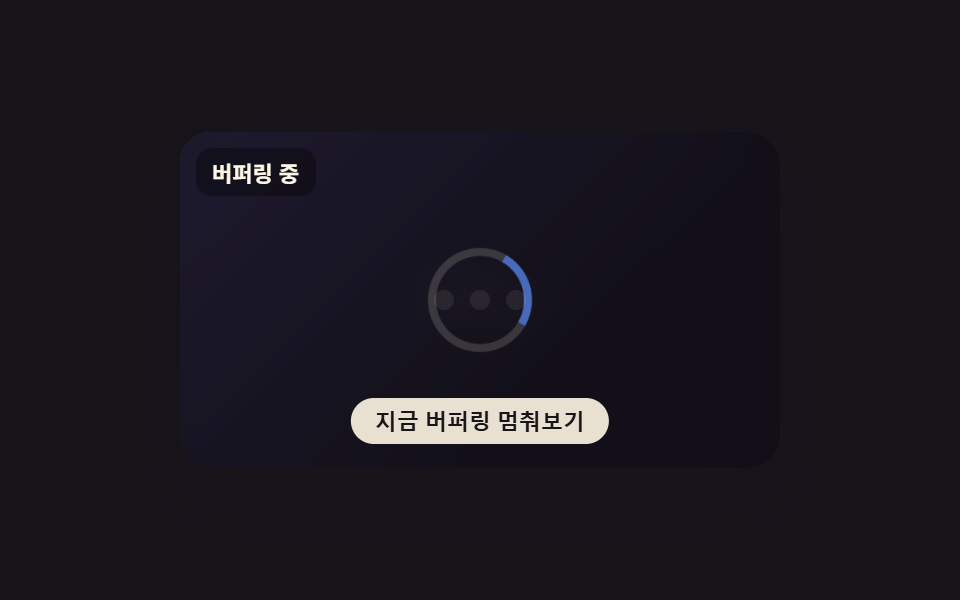 バッファ 表示 アニメーション 9種 — スピナーから画質バッジまでこのバッファ 表示 9種のうち、1つは再生位置とバッファ位置を二重リングで一緒に描き、1つは波形をバッファされた分だけ明るく塗りつぶし、1つはバッファ不足で画質が下がったバッジを表示します。 この記事のデモをすべて見る