03信号強度バーのバッファ表示
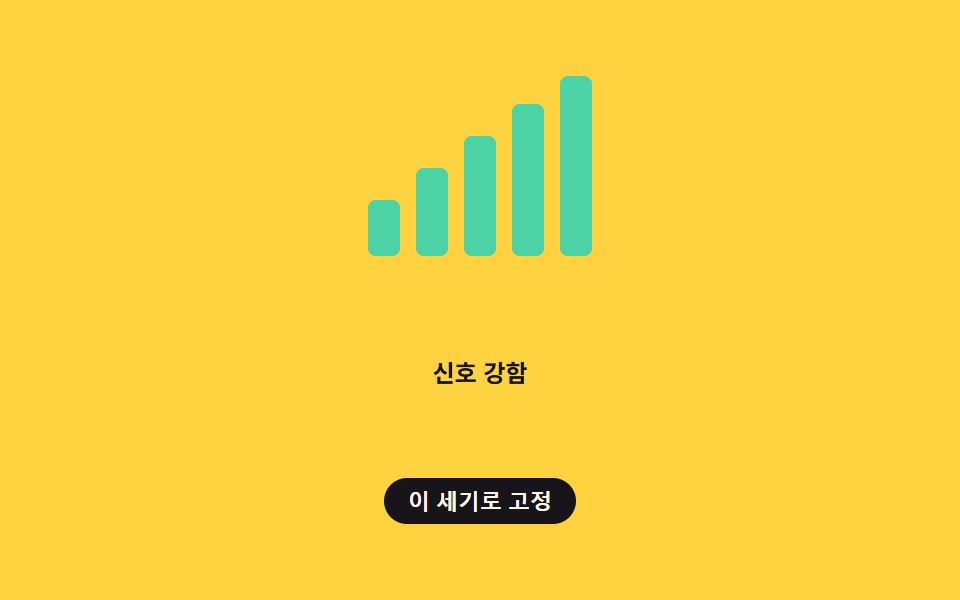
信号の強さを表す4〜5本のバーがバッファリング速度に合わせて順に明るくなったり暗くなったりを繰り返し、点灯している本数で今の受信速度が速いか遅いかを示す。
使いどころ通話・ビデオ会議の接続状態、配信アプリの上部バー
--bar-leveltransform: scaleYsetInterval
<main class="stage">
<div class="meter is-demo" id="meter" role="img" aria-label="ネットワーク信号強度">
  <span class="bar" data-i="0"></span>
  <span class="bar" data-i="1"></span>
  <span class="bar" data-i="2"></span>
  <span class="bar" data-i="3"></span>
  <span class="bar" data-i="4"></span>
</div>
<p class="readout" id="readout">信号普通</p>
<button class="pinBtn" id="pinBtn" type="button" aria-pressed="false">この強さで固定</button>
</main>
@use "../../../../site/static/demo-tokens" as *;
// 변수 3개
$duration: $dur-quick;
$easing: $ease-out;
$color: $subject-mint;
// 계산 겹: index.html 의 tick() 이 결정론적 합성파를 만들고, 목표 레벨과 표시 레벨 차이가
// CHANGE_MARGIN 을 넘고 HOLD_TICKS 만큼 유지될 때만 레벨을 바꾼다 — 값 흔들림(플리커)을 막는 히스테리시스.
@include stage($stage-yellow);
.meter {
display: flex;
align-items: flex-end;
gap: $sp-2;
height: 90px;
}
.bar {
--bar-level: .22;
display: block;
width: 16px;
border-radius: $r-xs;
background: $color;
// 막대는 바닥(baseline)에 붙어 자라는 계기판이라 origin 을 bottom 으로 둔다 (rule 8 예외: 시작 변에서 자라는 요소)
transform-origin: bottom;
transform: scaleY(var(--bar-level));
transition: transform $duration $easing;
&:nth-child(1) { height: 28px; }
&:nth-child(2) { height: 44px; }
&:nth-child(3) { height: 60px; }
&:nth-child(4) { height: 76px; }
&:nth-child(5) { height: 90px; }
}
.readout {
margin: $sp-3 0 0;
font-size: 12px;
font-weight: 600;
color: $subject-ink;
text-align: center;
}
.pinBtn {
appearance: none;
border: none;
margin-top: $sp-2;
border-radius: $r-pill;
padding: $sp-1 $sp-3;
font-size: 11px;
font-weight: 600;
color: $subject-cream;
background: $subject-ink;
cursor: pointer;
&:focus-visible { outline: 2px solid $subject-blue; outline-offset: 2px; }
&[aria-pressed="true"] { background: $subject-orange-deep; }
}
@media (max-width: 340px) {
.meter { height: 64px; gap: $sp-1; }
.bar { width: 12px; }
.bar:nth-child(1) { height: 20px; }
.bar:nth-child(2) { height: 30px; }
.bar:nth-child(3) { height: 42px; }
.bar:nth-child(4) { height: 54px; }
.bar:nth-child(5) { height: 64px; }
.readout, .pinBtn { font-size: 10px; }
}
// reduce: 실사용 경로 적용 — 막대 높이 전환만 끈다. 레벨 값 자체는 그대로 반영해야 신호 정보가 전달된다
@media (prefers-reduced-motion: reduce) {
.bar { transition: none; }
}html, body {
margin: 0;
overflow: hidden;
}
.stage {
box-sizing: border-box;
min-height: 100vh;
display: grid;
place-items: center;
margin: 0;
background: #ffd23f;
font-family: -apple-system, "Segoe UI", "Noto Sans KR", sans-serif;
padding: clamp(8px, 4vw, 24px);
}
.meter {
display: flex;
align-items: flex-end;
gap: 8px;
height: 90px;
}
.bar {
--bar-level: .22;
display: block;
width: 16px;
border-radius: 4px;
background: #4cd4a6;
transform-origin: bottom;
transform: scaleY(var(--bar-level));
transition: transform 220ms ease-out;
}
.bar:nth-child(1) {
height: 28px;
}
.bar:nth-child(2) {
height: 44px;
}
.bar:nth-child(3) {
height: 60px;
}
.bar:nth-child(4) {
height: 76px;
}
.bar:nth-child(5) {
height: 90px;
}
.readout {
margin: 12px 0 0;
font-size: 12px;
font-weight: 600;
color: #17141a;
text-align: center;
}
.pinBtn {
appearance: none;
border: none;
margin-top: 8px;
border-radius: 999px;
padding: 4px 12px;
font-size: 11px;
font-weight: 600;
color: #fff7e6;
background: #17141a;
cursor: pointer;
}
.pinBtn:focus-visible {
outline: 2px solid #2f6df6;
outline-offset: 2px;
}
.pinBtn[aria-pressed=true] {
background: #c93000;
}
@media (max-width: 340px) {
.meter {
height: 64px;
gap: 4px;
}
.bar {
width: 12px;
}
.bar:nth-child(1) {
height: 20px;
}
.bar:nth-child(2) {
height: 30px;
}
.bar:nth-child(3) {
height: 42px;
}
.bar:nth-child(4) {
height: 54px;
}
.bar:nth-child(5) {
height: 64px;
}
.readout, .pinBtn {
font-size: 10px;
}
}
@media (prefers-reduced-motion: reduce) {
.bar {
transition: none;
}
}(function () {
var BAR_COUNT = 5;
var TICK_MS = 90; // 신호 재측정 간격
var CHANGE_MARGIN = 0.6; // 히스테리시스 — 표시 레벨을 바꾸려면 이만큼은 벌어져야 한다(레벨 단위)
var HOLD_TICKS = 3; // 새 레벨이 이 틱 수만큼 계속 유지돼야 실제로 바뀐다
var meter = document.getElementById('meter');
var bars = Array.prototype.slice.call(meter.querySelectorAll('.bar'));
var readout = document.getElementById('readout');
var pinBtn = document.getElementById('pinBtn');
var reduce = window.matchMedia('(prefers-reduced-motion: reduce)').matches;
var labels = ['信号弱い', '信号弱い', '信号普通', '信号良好', '信号強い'];
var displayLevel = 2;
var pendingLevel = 2;
var pendingCount = 0;
var pinned = null;
function clamp(v, lo, hi) { return Math.min(hi, Math.max(lo, v)); }
// 결정론적 합성파로 "속도"를 흉내내고, 그 값을 0~5 레벨로 양자화한 뒤 히스테리시스를 거친다
function rawSpeed(ms) {
var w = 0.5 + 0.5 * Math.sin(ms / 700) + 0.25 * Math.sin(ms / 233) + 0.15 * Math.sin(ms / 97);
return clamp(w, 0, 1.35);
}
function paint(level) {
bars.forEach(function (b, i) {
b.style.setProperty('--bar-level', i < level ? '1' : '.22');
});
readout.textContent = labels[clamp(level, 0, 4)];
meter.setAttribute('aria-label', 'ネットワーク信号強度 ' + level + ' / ' + BAR_COUNT);
}
function tick(ms) {
if (pinned !== null) return;
var raw = rawSpeed(ms) * BAR_COUNT;
var targetLevel = clamp(Math.round(raw), 0, BAR_COUNT);
if (targetLevel !== displayLevel && Math.abs(raw - displayLevel) > CHANGE_MARGIN) {
if (targetLevel === pendingLevel) {
pendingCount++;
} else {
pendingLevel = targetLevel;
pendingCount = 1;
}
if (pendingCount >= HOLD_TICKS) {
displayLevel = pendingLevel;
pendingCount = 0;
}
} else {
pendingCount = 0;
pendingLevel = displayLevel;
}
paint(displayLevel);
}
var timer = null;
var start = 0;
function loop() { tick(performance.now() - start); }
function human() {
if (meter.classList.contains('is-demo')) {
meter.classList.remove('is-demo');
window.clearInterval(timer);
timer = null;
}
}
pinBtn.addEventListener('click', function () {
human();
if (pinned === null) {
pinned = displayLevel;
pinBtn.setAttribute('aria-pressed', 'true');
pinBtn.textContent = '固定を解除';
} else {
pinned = null;
pinBtn.setAttribute('aria-pressed', 'false');
pinBtn.textContent = 'この強さで固定';
}
});
if (!reduce) {
start = performance.now();
tick(0);
timer = window.setInterval(loop, TICK_MS);
} else {
// reduce: 실사용 경로 — 막대 높이 전환은 멈추고 마지막 측정 레벨 하나로 고정해 보여준다
paint(3);
}
})();import { useEffect, useRef } from 'react';
import styles from './BufferingNetworkSignalBars.module.scss';
const BAR_COUNT = 5;
const TICK_MS = 90; // 신호 재측정 간격
const CHANGE_MARGIN = 0.6; // 히스테리시스 — 표시 레벨을 바꾸려면 이만큼은 벌어져야 한다(레벨 단위)
const HOLD_TICKS = 3; // 새 레벨이 이 틱 수만큼 계속 유지돼야 실제로 바뀐다
const LABELS = ['신호 약함', '신호 약함', '신호 보통', '신호 양호', '신호 강함'];
function clamp(v: number, lo: number, hi: number) {
return Math.min(hi, Math.max(lo, v));
}
export default function BufferingNetworkSignalBars() {
const meterRef = useRef<HTMLDivElement>(null);
const barRefs = useRef<(HTMLSpanElement | null)[]>([]);
const readoutRef = useRef<HTMLParagraphElement>(null);
const pinBtnRef = useRef<HTMLButtonElement>(null);
useEffect(() => {
const meter = meterRef.current;
const readout = readoutRef.current;
const pinBtn = pinBtnRef.current;
const bars = barRefs.current;
if (!meter || !readout || !pinBtn || !bars) return undefined;
const reduce = window.matchMedia('(prefers-reduced-motion: reduce)').matches;
let displayLevel = 2;
let pendingLevel = 2;
let pendingCount = 0;
let pinned: number | null = null;
// 결정론적 합성파로 "속도"를 흉내내고, 그 값을 0~5 레벨로 양자화한 뒤 히스테리시스를 거친다
function rawSpeed(ms: number) {
const w = 0.5 + 0.5 * Math.sin(ms / 700) + 0.25 * Math.sin(ms / 233) + 0.15 * Math.sin(ms / 97);
return clamp(w, 0, 1.35);
}
function paint(level: number) {
bars!.forEach((b, i) => {
if (b) b.style.setProperty('--bar-level', i < level ? '1' : '.22');
});
if (readout) readout.textContent = LABELS[clamp(level, 0, 4)];
if (meter) meter.setAttribute('aria-label', '네트워크 신호 세기 ' + level + ' / ' + BAR_COUNT);
}
function tick(ms: number) {
if (pinned !== null) return;
const raw = rawSpeed(ms) * BAR_COUNT;
const targetLevel = clamp(Math.round(raw), 0, BAR_COUNT);
if (targetLevel !== displayLevel && Math.abs(raw - displayLevel) > CHANGE_MARGIN) {
if (targetLevel === pendingLevel) {
pendingCount++;
} else {
pendingLevel = targetLevel;
pendingCount = 1;
}
if (pendingCount >= HOLD_TICKS) {
displayLevel = pendingLevel;
pendingCount = 0;
}
} else {
pendingCount = 0;
pendingLevel = displayLevel;
}
paint(displayLevel);
}
let timer: ReturnType<typeof window.setInterval> | null = null;
let start = 0;
function loop() {
tick(performance.now() - start);
}
function human() {
if (meter && meter.classList.contains(styles['is-demo'])) {
meter.classList.remove(styles['is-demo']);
if (timer !== null) window.clearInterval(timer);
timer = null;
}
}
function onPin() {
human();
if (!pinBtn) return;
if (pinned === null) {
pinned = displayLevel;
pinBtn.setAttribute('aria-pressed', 'true');
pinBtn.textContent = '고정 풀기';
} else {
pinned = null;
pinBtn.setAttribute('aria-pressed', 'false');
pinBtn.textContent = '이 세기로 고정';
}
}
pinBtn.addEventListener('click', onPin);
if (!reduce) {
start = performance.now();
tick(0);
timer = window.setInterval(loop, TICK_MS);
} else {
// reduce: 실사용 경로 — 막대 높이 전환은 멈추고 마지막 측정 레벨 하나로 고정해 보여준다
paint(3);
}
return () => {
if (timer !== null) window.clearInterval(timer);
pinBtn.removeEventListener('click', onPin);
};
}, []);
return (
<>
<div className={`${styles.meter} ${styles['is-demo']}`} ref={meterRef} role="img" aria-label="네트워크 신호 세기">
{[0, 1, 2, 3, 4].map((i) => (
<span key={i} className={styles.bar} ref={(el: HTMLSpanElement | null) => { if (barRefs.current) barRefs.current[i] = el; }} />
))}
</div>
<p className={styles.readout} ref={readoutRef}>신호 보통</p>
<button className={styles.pinBtn} ref={pinBtnRef} type="button" aria-pressed="false">이 세기로 고정</button>
</>
);
}03 信号強度バーのバッファ表示 — 計測 累積面積 2.558% · 動いたフレーム 13/23GODRICH オリジナル · SCSS と React は zip に同梱 · バッファ 表示 アニメーション 9種 — スピナーから画質バッジまで
このデモが属する記事
 バッファ 表示 アニメーション 9種 — スピナーから画質バッジまでこのバッファ 表示 9種のうち、1つは再生位置とバッファ位置を二重リングで一緒に描き、1つは波形をバッファされた分だけ明るく塗りつぶし、1つはバッファ不足で画質が下がったバッジを表示します。 この記事のデモをすべて見る