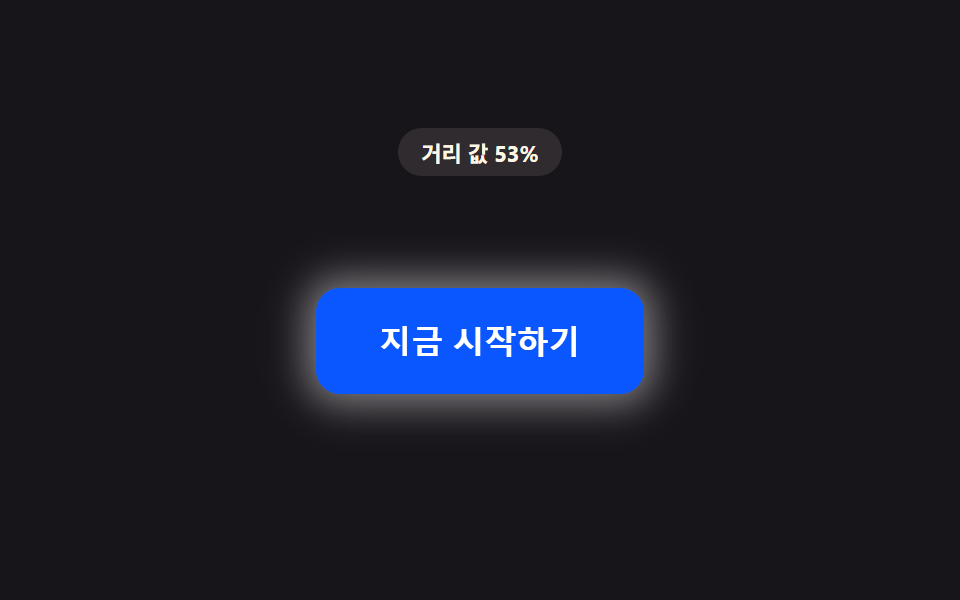
01距離値の分だけ後光が広がるボタン
カーソルとボタンの間の距離値が縮む間、ボタンを包む光の半径値が次第に広がり明るさも共に上がる。
使いどころLPのCTAボタン強調
PROX_GLOW_RADIUS_MAX_PXdistanceToButtonsyntheticOffset

<main class="stage">
<div class="pg is-demo" id="pg">
  <p class="pg__badge" id="pgBadge">距離値 100%</p>
  <div class="pg__scene" id="pgScene">
    <button class="pg__btn" id="pgBtn" type="button">今すぐ始める</button>
  </div>
</div>
</main>
@use "../../../../site/static/demo-tokens" as *;
// 핵심: pointermove 로 커서–버튼 중심 거리(px)를 재고 1 - clamp(d / PROX_RADIUS_PX) 로
// 거리 값(0~1)을 만든다. 그 값이 후광의 blur-radius·spread·밝기를 함께 키운다.
// 계산 한 겹: 매 프레임 lerp 로 목표값을 관성 있게 뒤쫓는다(속성 트윈이 아니라 계산).
$duration: $dur-loop;
$easing: linear;
$color: $subject-blue-deep;
@include stage($stage-ink);
.pg {
display: grid;
gap: $sp-4;
justify-items: center;
}
.pg__badge {
margin: 0;
padding: $sp-1 $sp-3;
border-radius: $r-pill;
background: rgba(255, 247, 230, .1);
color: $subject-cream;
font-weight: 700;
font-size: 11px;
font-variant-numeric: tabular-nums;
}
.pg__scene {
padding: $sp-10;
}
.pg__btn {
border: 0;
cursor: pointer;
padding: $sp-4 $sp-8;
border-radius: $r-control;
background: $color;
color: $subject-cream;
font-size: 16px;
font-weight: 700;
will-change: box-shadow, filter;
}
.pg__btn:focus-visible {
outline: 2px solid $subject-cream;
outline-offset: 3px;
}
@media (max-width: 340px) {
.pg__scene { padding: $sp-6; }
.pg__btn { padding: $sp-3 $sp-6; font-size: 14px; }
}
@media (prefers-reduced-motion: reduce) {
.pg__btn { transition: none; }
}html, body {
margin: 0;
overflow: hidden;
}
.stage {
box-sizing: border-box;
min-height: 100vh;
display: grid;
place-items: center;
margin: 0;
background: #17141a;
font-family: -apple-system, "Segoe UI", "Noto Sans KR", sans-serif;
padding: clamp(8px, 4vw, 24px);
}
.pg {
display: grid;
gap: 16px;
justify-items: center;
}
.pg__badge {
margin: 0;
padding: 4px 12px;
border-radius: 999px;
background: rgba(255, 247, 230, 0.1);
color: #fff7e6;
font-weight: 700;
font-size: 11px;
font-variant-numeric: tabular-nums;
}
.pg__scene {
padding: 40px;
}
.pg__btn {
border: 0;
cursor: pointer;
padding: 16px 32px;
border-radius: 12px;
background: #0a4fe8;
color: #fff7e6;
font-size: 16px;
font-weight: 700;
will-change: box-shadow, filter;
}
.pg__btn:focus-visible {
outline: 2px solid #fff7e6;
outline-offset: 3px;
}
@media (max-width: 340px) {
.pg__scene {
padding: 24px;
}
.pg__btn {
padding: 12px 24px;
font-size: 14px;
}
}
@media (prefers-reduced-motion: reduce) {
.pg__btn {
transition: none;
}
}(function () {
// PROX_GLOW_RADIUS_MAX_PX — 변형 1: 40 → 80 로 늘리면 후광이 버튼 전체를 덮을 만큼 크게 번진다.
var PROX_GLOW_RADIUS_MAX_PX = 40;
var PROX_RADIUS_PX = 170;
var LERP = 0.18;
var root = document.getElementById('pg');
var scene = document.getElementById('pgScene');
var btn = document.getElementById('pgBtn');
var badge = document.getElementById('pgBadge');
var reduce = window.matchMedia('(prefers-reduced-motion: reduce)').matches;
function clamp(v, lo, hi) { return Math.max(lo, Math.min(hi, v)); }
var targetP = 0;
var curP = 0;
var hasPointer = false;
function distanceToButton(x, y) {
var r = btn.getBoundingClientRect();
var cx = r.left + r.width / 2;
var cy = r.top + r.height / 2;
return Math.hypot(x - cx, y - cy);
}
function render(p) {
var blurRadius = p * PROX_GLOW_RADIUS_MAX_PX;
var spread = p * PROX_GLOW_RADIUS_MAX_PX * 0.3;
var alpha = (0.18 + p * 0.55).toFixed(2);
btn.style.boxShadow = '0 0 ' + blurRadius.toFixed(1) + 'px ' + spread.toFixed(1) + 'px rgba(255,247,230,' + alpha + ')';
btn.style.filter = 'brightness(' + (1 + p * 0.22).toFixed(3) + ')';
badge.textContent = '距離値 ' + Math.round((1 - p) * 100) + '%';
}
// 자동 시연: 가상 커서가 궤도(반지름이 2초 동안 0 → 최대 → 0)를 돌며 접근·이탈을 만든다.
function syntheticOffset(t) {
var ang = t * 1.7;
var rad = 110 * (1 + Math.cos(t * Math.PI));
return [Math.cos(ang) * rad, Math.sin(ang) * rad];
}
var startTime = null;
function loop(now) {
if (startTime === null) { startTime = now; }
var t = (now - startTime) / 1000;
if (!hasPointer && !reduce) {
var r = btn.getBoundingClientRect();
var cx = r.left + r.width / 2;
var cy = r.top + r.height / 2;
var off = syntheticOffset(t);
var d = Math.hypot(off[0], off[1]);
targetP = clamp(1 - d / PROX_RADIUS_PX, 0, 1);
void cx; void cy;
}
curP += (targetP - curP) * LERP;
render(curP);
requestAnimationFrame(loop);
}
scene.addEventListener('pointermove', function (e) {
hasPointer = true;
root.classList.remove('is-demo');
var d = distanceToButton(e.clientX, e.clientY);
targetP = clamp(1 - d / PROX_RADIUS_PX, 0, 1);
if (reduce) { curP = targetP; render(curP); }
});
scene.addEventListener('pointerleave', function () {
hasPointer = false;
targetP = 0;
if (reduce) { curP = 0; render(0); }
});
btn.addEventListener('focus', function () {
hasPointer = true;
targetP = 1;
if (reduce) { curP = 1; render(1); }
});
btn.addEventListener('blur', function () {
hasPointer = false;
targetP = 0;
if (reduce) { curP = 0; render(0); }
});
if (reduce) {
render(0);
} else {
requestAnimationFrame(loop);
}
})();// ProximityGlowButton — vanilla 판(run/408/demo/01-btn-proximity-glow-radius-grow/index.html) 의 React 포트.
// 버튼까지 거리 값(0~1)을 lerp 로 관성 있게 따라가며 후광(box-shadow blur·spread)과 밝기(filter)를 계산한다.
// 포인터가 없을 때(자동 시연)는 궤도 반지름이 2초 동안 0 → 최대 → 0 으로 도는 가상 커서 거리로 같은 계산을 돌린다.
import { useEffect, useRef, useState } from "react";
import type { PointerEvent as ReactPointerEvent } from "react";
import styles from "./ProximityGlowButton.module.scss";
type Box<T> = { current: T };
// PROX_GLOW_RADIUS_MAX_PX — 변형 1: 40 → 80 로 늘리면 후광이 버튼 전체를 덮을 만큼 크게 번진다.
const PROX_GLOW_RADIUS_MAX_PX = 40;
const PROX_RADIUS_PX = 170;
const LERP = 0.18;
function clamp(v: number, lo: number, hi: number): number {
return Math.max(lo, Math.min(hi, v));
}
function syntheticOffset(t: number): [number, number] {
const ang = t * 1.7;
const rad = 110 * (1 + Math.cos(t * Math.PI));
return [Math.cos(ang) * rad, Math.sin(ang) * rad];
}
export default function ProximityGlowButton() {
const sceneRef = useRef<HTMLDivElement | null>(null);
const btnRef = useRef<HTMLButtonElement | null>(null);
const badgeRef = useRef<HTMLParagraphElement | null>(null);
const targetPRef = useRef<number>(0) as Box<number>;
const curPRef = useRef<number>(0) as Box<number>;
const hasPointerRef = useRef<boolean>(false) as Box<boolean>;
const frameRef = useRef<number>(0) as Box<number>;
const t0Ref = useRef<number>(0) as Box<number>;
const [demo, setDemo] = useState(true);
const [reduce, setReduce] = useState(false);
function render(p: number): void {
const btn = btnRef.current;
const badge = badgeRef.current;
if (!btn || !badge) return;
const blurRadius = p * PROX_GLOW_RADIUS_MAX_PX;
const spread = p * PROX_GLOW_RADIUS_MAX_PX * 0.3;
const alpha = (0.18 + p * 0.55).toFixed(2);
btn.style.boxShadow = "0 0 " + blurRadius.toFixed(1) + "px " + spread.toFixed(1) + "px rgba(255,247,230," + alpha + ")";
btn.style.filter = "brightness(" + (1 + p * 0.22).toFixed(3) + ")";
badge.textContent = "거리 값 " + Math.round((1 - p) * 100) + "%";
}
function distanceToButton(x: number, y: number): number {
const btn = btnRef.current;
if (!btn) return PROX_RADIUS_PX;
const r = btn.getBoundingClientRect();
const cx = r.left + r.width / 2;
const cy = r.top + r.height / 2;
return Math.hypot(x - cx, y - cy);
}
useEffect(() => {
setReduce(window.matchMedia("(prefers-reduced-motion: reduce)").matches);
}, []);
useEffect(() => {
if (reduce) {
render(0);
return;
}
function loop(now: number): void {
if (t0Ref.current === 0) t0Ref.current = now;
const t = (now - t0Ref.current) / 1000;
if (!hasPointerRef.current) {
const off = syntheticOffset(t);
const d = Math.hypot(off[0], off[1]);
targetPRef.current = clamp(1 - d / PROX_RADIUS_PX, 0, 1);
}
curPRef.current += (targetPRef.current - curPRef.current) * LERP;
render(curPRef.current);
frameRef.current = requestAnimationFrame(loop);
}
frameRef.current = requestAnimationFrame(loop);
return () => cancelAnimationFrame(frameRef.current);
}, [reduce]);
function onPointerMove(event: ReactPointerEvent<HTMLDivElement>): void {
hasPointerRef.current = true;
setDemo(false);
const d = distanceToButton(event.clientX, event.clientY);
targetPRef.current = clamp(1 - d / PROX_RADIUS_PX, 0, 1);
if (reduce) { curPRef.current = targetPRef.current; render(curPRef.current); }
}
function onPointerLeave(): void {
hasPointerRef.current = false;
targetPRef.current = 0;
if (reduce) { curPRef.current = 0; render(0); }
}
function onFocus(): void {
hasPointerRef.current = true;
targetPRef.current = 1;
if (reduce) { curPRef.current = 1; render(1); }
}
function onBlur(): void {
hasPointerRef.current = false;
targetPRef.current = 0;
if (reduce) { curPRef.current = 0; render(0); }
}
const cls = [styles.pg, demo ? styles.isDemo : ""].filter(Boolean).join(" ");
return (
<main className={styles.stage}>
<div className={cls}>
<p className={styles.badge} ref={badgeRef}>거리 값 100%</p>
<div className={styles.scene} ref={sceneRef} onPointerMove={onPointerMove} onPointerLeave={onPointerLeave}>
<button className={styles.btn} ref={btnRef} type="button" onFocus={onFocus} onBlur={onBlur}>지금 시작하기</button>
</div>
</div>
</main>
);
}01 距離値の分だけ後光が広がるボタン — 計測 累積面積 20.583% · 動いたフレーム 22/23GODRICH オリジナル · SCSS と React は zip に同梱 · css ボタン ホバー エフェクト 9選 — 距離の値で変わる
このデモが属する記事
 css ボタン ホバー エフェクト 9選 — 距離の値で変わるもしカーソルがまだボタンから少し離れていれば、距離の値はまだ大きいままだ。その値が縮むにつれて1番は後光の半径を広げ、6番は枠線を描き進め、9番は周囲の粒子密度を満たす。css ボタン ホバー エフェクト を探すと、この9つのボタンは同じ距 この記事のデモをすべて見る