04ブロックサイズが時間から計算されて縮むモザイク解像
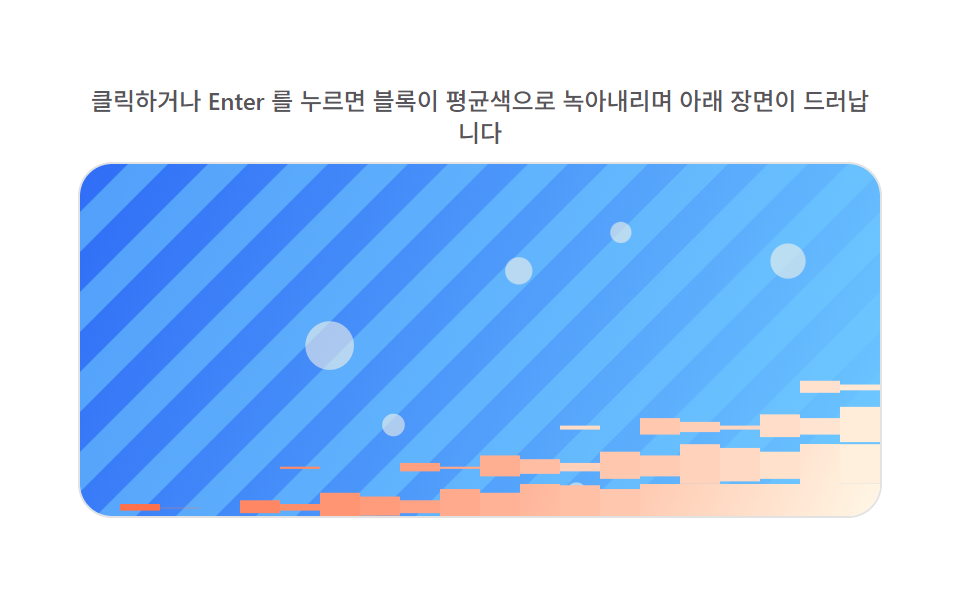
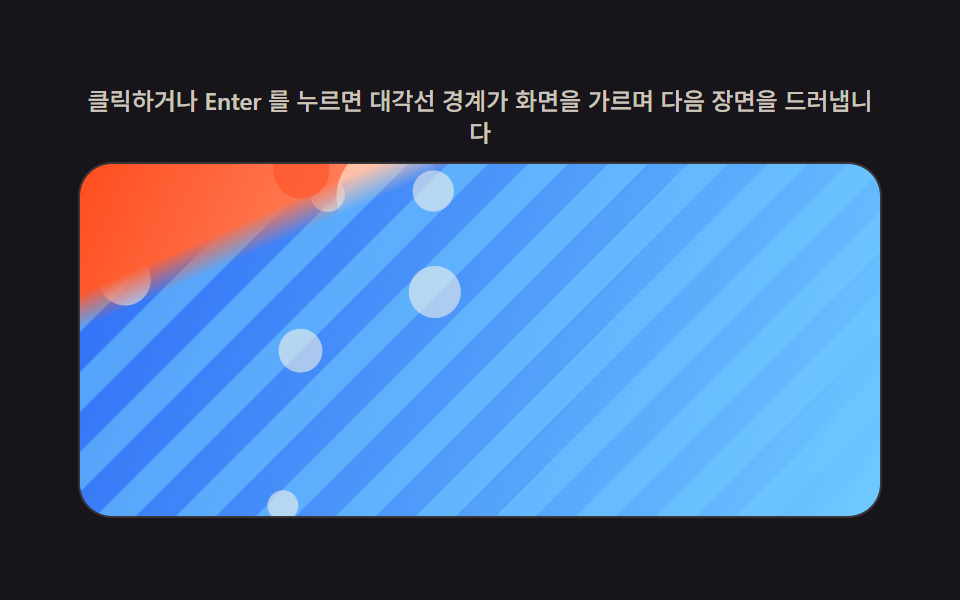
画像をまず大きな四角ブロックごとの平均色で覆ってぼんやり見せ、行と列から計算した順序でブロックごとの色の四角形の高さを毎フレーム縮めて下の元画像を現し、モザイクが溶け落ちるように結ぶ。
使いどころ商品画像の読み込み完了演出
avgColormeltOrderdrawImage
<main class="stage">
<div class="rv is-demo" id="rv">
  <p class="rv__hint"><span>クリックまたはEnterキーを押すと、ブロックが平均色に溶け落ち下の場面が現れます</span></p>
  <div class="rv__panel" id="panel" tabindex="0" role="button" aria-label="ブロックサイズが時間で計算されて縮むモザイクリゾルブをもう一度再生">
    <canvas class="rv__cv" id="cv" aria-hidden="true"></canvas>
  </div>
</div>
</main>
@use "../../../../site/static/demo-tokens" as *;
// 계산 겹(리빌 판정)은 index.html 의 PRECOMPUTE()/RENDER() 에 있다. 여기는 무대·레이아웃만.
$duration: $dur-loop;
$easing: $ease-out;
$color: $subject-blue-deep;
@include stage($stage-paper);
.rv {
--img-a1: #{$stage-orange};
--img-a2: #{$subject-cream};
--img-b1: #{$subject-blue};
--img-b2: #{$subject-sky};
--accent: #{$color};
display: flex;
flex-direction: column;
align-items: center;
gap: $sp-2;
width: min(400px, 92vw);
}
.rv__hint {
margin: 0;
color: rgba($subject-ink, .72);
font-size: 12px;
font-weight: 500;
line-height: 1.35;
text-align: center;
}
.rv__panel {
position: relative;
width: 100%;
height: 176px;
border-radius: $r-card;
overflow: hidden;
cursor: pointer;
box-shadow: 0 0 0 1px rgba($subject-ink, .12);
transition: box-shadow $duration $easing;
}
.rv__panel:hover {
box-shadow: 0 0 0 1px $color;
}
.rv__panel:focus-visible {
outline: 2px solid $color;
outline-offset: 2px;
}
.rv__cv {
display: block;
width: 100%;
height: 100%;
}
@media (max-width: 340px) {
.rv__hint { font-size: 11px; }
.rv__panel, .rv__cv { height: 120px; }
}
@media (prefers-reduced-motion: reduce) {
.rv__panel { transition: none; }
}html, body {
margin: 0;
overflow: hidden;
}
.stage {
box-sizing: border-box;
min-height: 100vh;
display: grid;
place-items: center;
margin: 0;
background: #ffffff;
font-family: -apple-system, "Segoe UI", "Noto Sans KR", sans-serif;
padding: clamp(8px, 4vw, 24px);
}
.rv {
--img-a1: #ff4d1f;
--img-a2: #fff7e6;
--img-b1: #2f6df6;
--img-b2: #6ec8ff;
--accent: #0a4fe8;
display: flex;
flex-direction: column;
align-items: center;
gap: 8px;
width: min(400px, 92vw);
}
.rv__hint {
margin: 0;
color: rgba(23, 20, 26, 0.72);
font-size: 12px;
font-weight: 500;
line-height: 1.35;
text-align: center;
}
.rv__panel {
position: relative;
width: 100%;
height: 176px;
border-radius: 16px;
overflow: hidden;
cursor: pointer;
box-shadow: 0 0 0 1px rgba(23, 20, 26, 0.12);
transition: box-shadow 2s ease-out;
}
.rv__panel:hover {
box-shadow: 0 0 0 1px #0a4fe8;
}
.rv__panel:focus-visible {
outline: 2px solid #0a4fe8;
outline-offset: 2px;
}
.rv__cv {
display: block;
width: 100%;
height: 100%;
}
@media (max-width: 340px) {
.rv__hint {
font-size: 11px;
}
.rv__panel, .rv__cv {
height: 120px;
}
}
@media (prefers-reduced-motion: reduce) {
.rv__panel {
transition: none;
}
}(function () {
var root = document.getElementById('rv');
var panel = document.getElementById('panel');
var cv = document.getElementById('cv');
var ctx = cv.getContext('2d');
var reduce = window.matchMedia('(prefers-reduced-motion: reduce)').matches;
var isDemo = true;
// 결정론 난수 — 이 데모는 Math.random 을 쓰지 않는다. LCG(선형합동생성기) 하나로 장면을 만든다.
function makeLcg(seed) {
var s = seed >>> 0;
return function () { s = (s * 1664525 + 1013904223) >>> 0; return s / 4294967296; };
}
var css = getComputedStyle(root);
function tok(name, fb) { var v = css.getPropertyValue(name); return v ? (v.trim() || fb) : fb; }
var COLOR_A1 = tok('--img-a1', '#ff5a2e');
var COLOR_A2 = tok('--img-a2', '#fff3e6');
var COLOR_B1 = tok('--img-b1', '#2e6bff');
var COLOR_B2 = tok('--img-b2', '#bfe4ff');
var W = 0, H = 0, dpr = 1;
var bufA = document.createElement('canvas');
var bufB = document.createElement('canvas');
var bctxA = bufA.getContext('2d');
var bctxB = bufB.getContext('2d');
// 장면 A(따뜻한 톤)·B(차가운 톤) — 전부 캔버스로 직접 그린다. 외부 사진·파일 0.
function paintScene(bctx, w, h, seed, warm) {
var rng = makeLcg(seed);
var g = bctx.createLinearGradient(0, 0, w, h);
if (warm) { g.addColorStop(0, COLOR_A1); g.addColorStop(1, COLOR_A2); }
else { g.addColorStop(0, COLOR_B1); g.addColorStop(1, COLOR_B2); }
bctx.fillStyle = g;
bctx.fillRect(0, 0, w, h);
bctx.globalAlpha = 0.55;
if (warm) {
for (var i = 0; i < 8; i++) {
bctx.fillStyle = i % 2 ? COLOR_A2 : COLOR_A1;
bctx.beginPath();
bctx.arc(rng() * w, rng() * h, 12 + rng() * 30, 0, Math.PI * 2);
bctx.fill();
}
} else {
var bandW = Math.max(14, w * 0.05);
for (var x = -h; x < w + h; x += bandW * 2) {
bctx.fillStyle = COLOR_B2;
bctx.beginPath();
bctx.moveTo(x, 0); bctx.lineTo(x + bandW, 0); bctx.lineTo(x + bandW - h, h); bctx.lineTo(x - h, h);
bctx.closePath(); bctx.fill();
}
for (var j = 0; j < 6; j++) {
bctx.fillStyle = COLOR_A2;
bctx.beginPath(); bctx.arc(rng() * w, rng() * h, 5 + rng() * 9, 0, Math.PI * 2); bctx.fill();
}
}
bctx.globalAlpha = 1;
}
var SEED_A = 401, SEED_B = 402;
var PLAY_MS = 900;
var BLOCK_PX = 20; // 블록 크기 — 변형: 20px -> 34px(더 굵은 모자이크)
var MELT_WINDOW = 0.16;
var cols, rows, avgColor, meltOrder;
function PRECOMPUTE() {
cols = Math.ceil(W / BLOCK_PX); rows = Math.ceil(H / BLOCK_PX);
var data = bctxA.getImageData(0, 0, cv.width, cv.height).data;
var bw = Math.round(BLOCK_PX * dpr), bh = Math.round(BLOCK_PX * dpr);
avgColor = []; meltOrder = new Float32Array(cols * rows);
for (var r = 0; r < rows; r++) {
for (var c = 0; c < cols; c++) {
var sx = Math.round(c * BLOCK_PX * dpr), sy = Math.round(r * BLOCK_PX * dpr);
var ex = Math.min(cv.width, sx + bw), ey = Math.min(cv.height, sy + bh);
var sr = 0, sg = 0, sb = 0, cnt = 0;
for (var y = sy; y < ey; y += 2) {
for (var x = sx; x < ex; x += 2) {
var k = (y * cv.width + x) * 4;
sr += data[k]; sg += data[k + 1]; sb += data[k + 2]; cnt++;
}
}
cnt = cnt || 1;
avgColor[r * cols + c] = "rgb(" + Math.round(sr / cnt) + "," + Math.round(sg / cnt) + "," + Math.round(sb / cnt) + ")";
meltOrder[r * cols + c] = Math.min(1, r / rows * 0.7 + c / cols * 0.3 + ((r * 7 + c * 3) % 5) / 5 * 0.1);
}
}
}
function RENDER(p) {
ctx.drawImage(bufB, 0, 0, W, H);
for (var r = 0; r < rows; r++) {
for (var c = 0; c < cols; c++) {
var order = meltOrder[r * cols + c];
var bx = c * BLOCK_PX, by = r * BLOCK_PX;
if (order > p) {
var sx = Math.round(c * BLOCK_PX * dpr), sy = Math.round(r * BLOCK_PX * dpr);
ctx.drawImage(bufA, sx, sy, Math.round(BLOCK_PX * dpr), Math.round(BLOCK_PX * dpr), bx, by, BLOCK_PX, BLOCK_PX);
} else if (order > p - MELT_WINDOW) {
var u = (p - order) / MELT_WINDOW;
var h = BLOCK_PX * (1 - u);
ctx.fillStyle = avgColor[r * cols + c];
ctx.fillRect(bx, by + BLOCK_PX * u * 0.6, BLOCK_PX, h);
}
}
}
}
function fit() {
var r = panel.getBoundingClientRect();
dpr = window.devicePixelRatio || 1;
W = r.width; H = r.height;
cv.width = Math.round(W * dpr); cv.height = Math.round(H * dpr);
ctx.setTransform(dpr, 0, 0, dpr, 0, 0);
bufA.width = bufB.width = cv.width;
bufA.height = bufB.height = cv.height;
bctxA.setTransform(dpr, 0, 0, dpr, 0, 0);
bctxB.setTransform(dpr, 0, 0, dpr, 0, 0);
paintScene(bctxA, W, H, SEED_A, true);
paintScene(bctxB, W, H, SEED_B, false);
PRECOMPUTE();
}
function human() { if (isDemo) { root.classList.remove('is-demo'); isDemo = false; } }
var progress = 0, target = 0, playT0 = 0, playFrom = 0, playing = false;
function easeInOut(t) { return t < 0.5 ? 2 * t * t : 1 - Math.pow(-2 * t + 2, 2) / 2; }
function play() {
// 실사용 경로 — 클릭·Enter·Space 로 두 장면을 다시 전환한다.
human();
playFrom = progress; target = progress < 0.5 ? 1 : 0;
playT0 = 0; playing = true;
}
function stepPlay(now) {
if (!playing) return;
if (!playT0) playT0 = now;
var t = Math.min(1, (now - playT0) / PLAY_MS);
progress = playFrom + (target - playFrom) * easeInOut(t);
if (t >= 1) { playing = false; progress = target; }
}
var DRIVE_PERIOD_MS = 2000; // 렌더 캐처 창(설정 초=2.0)과 같은 주기 — 시연 전용
var driveStart = 0;
function triangle(frac) { return frac < 0.5 ? frac * 2 : 2 - frac * 2; }
function driveTick(now) {
if (!driveStart) driveStart = now;
if (isDemo) { // .is-demo && !reduce 경로에서만 실행된다(아래 reduce 분기)
var frac = ((now - driveStart) % DRIVE_PERIOD_MS) / DRIVE_PERIOD_MS;
progress = triangle(frac);
}
requestAnimationFrame(driveTick);
}
function frame(now) {
stepPlay(now);
RENDER(progress);
requestAnimationFrame(frame);
}
window.addEventListener('resize', fit);
fit();
if (reduce) {
// reduce — 자동 루프 없음, 계산은 그대로 둘고 즉시 전환만 허용한다.
root.classList.add('is-still');
progress = 0.5; RENDER(progress);
panel.addEventListener('click', function () { human(); progress = progress < 0.5 ? 1 : 0; RENDER(progress); });
panel.addEventListener('keydown', function (e) {
if (e.key === 'Enter' || e.key === ' ') { e.preventDefault(); human(); progress = progress < 0.5 ? 1 : 0; RENDER(progress); }
});
} else {
panel.addEventListener('click', play);
panel.addEventListener('keydown', function (e) {
if (e.key === 'Enter' || e.key === ' ') { e.preventDefault(); play(); }
});
requestAnimationFrame(frame);
requestAnimationFrame(driveTick);
}
})();import { useEffect, useRef } from "react";
import styles from "./PixelMosaicMelt.module.scss";
export default function PixelMosaicMelt() {
const rootRef = useRef<HTMLDivElement | null>(null);
const panelRef = useRef<HTMLDivElement | null>(null);
const cvRef = useRef<HTMLCanvasElement | null>(null);
useEffect(() => {
const root = rootRef.current;
const panel = panelRef.current;
const cv = cvRef.current;
if (!root || !panel || !cv) return;
const ctx = cv.getContext("2d");
if (!ctx) return;
const reduce = window.matchMedia("(prefers-reduced-motion: reduce)").matches;
let isDemo = true;
// 결정론 난수 — 이 데모는 Math.random 을 쓰지 않는다. LCG(선형합동생성기) 하나로 장면을 만든다.
function makeLcg(seed: number) {
let s = seed >>> 0;
return function () {
s = (s * 1664525 + 1013904223) >>> 0;
return s / 4294967296;
};
}
const css = getComputedStyle(root);
function tok(name: string, fb: string) {
const v = css.getPropertyValue(name);
return v ? v.trim() || fb : fb;
}
const COLOR_A1 = tok("--img-a1", "#ff5a2e");
const COLOR_A2 = tok("--img-a2", "#fff3e6");
const COLOR_B1 = tok("--img-b1", "#2e6bff");
const COLOR_B2 = tok("--img-b2", "#bfe4ff");
let W = 0;
let H = 0;
let dpr = 1;
const bufA = document.createElement("canvas");
const bufB = document.createElement("canvas");
const bctxA = bufA.getContext("2d");
const bctxB = bufB.getContext("2d");
if (!bctxA || !bctxB) return;
// 장면 A(따뜻한 톤)·B(차가운 톤) — 전부 캔버스로 직접 그린다. 외부 사진·파일 0.
function paintScene(bctx: CanvasRenderingContext2D, w: number, h: number, seed: number, warm: boolean) {
const rng = makeLcg(seed);
const g = bctx.createLinearGradient(0, 0, w, h);
if (warm) {
g.addColorStop(0, COLOR_A1);
g.addColorStop(1, COLOR_A2);
} else {
g.addColorStop(0, COLOR_B1);
g.addColorStop(1, COLOR_B2);
}
bctx.fillStyle = g;
bctx.fillRect(0, 0, w, h);
bctx.globalAlpha = 0.55;
if (warm) {
for (let i = 0; i < 8; i++) {
bctx.fillStyle = i % 2 ? COLOR_A2 : COLOR_A1;
bctx.beginPath();
bctx.arc(rng() * w, rng() * h, 12 + rng() * 30, 0, Math.PI * 2);
bctx.fill();
}
} else {
const bandW = Math.max(14, w * 0.05);
for (let x = -h; x < w + h; x += bandW * 2) {
bctx.fillStyle = COLOR_B2;
bctx.beginPath();
bctx.moveTo(x, 0);
bctx.lineTo(x + bandW, 0);
bctx.lineTo(x + bandW - h, h);
bctx.lineTo(x - h, h);
bctx.closePath();
bctx.fill();
}
for (let j = 0; j < 6; j++) {
bctx.fillStyle = COLOR_A2;
bctx.beginPath();
bctx.arc(rng() * w, rng() * h, 5 + rng() * 9, 0, Math.PI * 2);
bctx.fill();
}
}
bctx.globalAlpha = 1;
}
const SEED_A = 401;
const SEED_B = 402;
const PLAY_MS = 900;
const BLOCK_PX = 20; // 블록 크기 — 변형: 20px -> 34px(더 굵은 모자이크)
const MELT_WINDOW = 0.16;
let cols = 0;
let rows = 0;
let avgColor: string[] = [];
let meltOrder: Float32Array | null = null;
function PRECOMPUTE() {
cols = Math.ceil(W / BLOCK_PX);
rows = Math.ceil(H / BLOCK_PX);
const data = bctxA!.getImageData(0, 0, cv!.width, cv!.height).data;
const bw = Math.round(BLOCK_PX * dpr);
const bh = Math.round(BLOCK_PX * dpr);
avgColor = [];
meltOrder = new Float32Array(cols * rows);
for (let r = 0; r < rows; r++) {
for (let c = 0; c < cols; c++) {
const sx = Math.round(c * BLOCK_PX * dpr);
const sy = Math.round(r * BLOCK_PX * dpr);
const ex = Math.min(cv!.width, sx + bw);
const ey = Math.min(cv!.height, sy + bh);
let sr = 0;
let sg = 0;
let sb = 0;
let cnt = 0;
for (let y = sy; y < ey; y += 2) {
for (let x = sx; x < ex; x += 2) {
const k = (y * cv!.width + x) * 4;
sr += data[k];
sg += data[k + 1];
sb += data[k + 2];
cnt++;
}
}
cnt = cnt || 1;
avgColor[r * cols + c] = `rgb(${Math.round(sr / cnt)},${Math.round(sg / cnt)},${Math.round(sb / cnt)})`;
meltOrder[r * cols + c] = Math.min(1, (r / rows) * 0.7 + (c / cols) * 0.3 + (((r * 7 + c * 3) % 5) / 5) * 0.1);
}
}
}
function RENDER(p: number) {
ctx!.drawImage(bufB, 0, 0, W, H);
const mo = meltOrder!;
for (let r = 0; r < rows; r++) {
for (let c = 0; c < cols; c++) {
const order = mo[r * cols + c];
const bx = c * BLOCK_PX;
const by = r * BLOCK_PX;
if (order > p) {
const sx = Math.round(c * BLOCK_PX * dpr);
const sy = Math.round(r * BLOCK_PX * dpr);
ctx!.drawImage(bufA, sx, sy, Math.round(BLOCK_PX * dpr), Math.round(BLOCK_PX * dpr), bx, by, BLOCK_PX, BLOCK_PX);
} else if (order > p - MELT_WINDOW) {
const u = (p - order) / MELT_WINDOW;
const blockH = BLOCK_PX * (1 - u);
ctx!.fillStyle = avgColor[r * cols + c];
ctx!.fillRect(bx, by + BLOCK_PX * u * 0.6, BLOCK_PX, blockH);
}
}
}
}
function fit() {
const r = panel!.getBoundingClientRect();
dpr = window.devicePixelRatio || 1;
W = r.width;
H = r.height;
cv!.width = Math.round(W * dpr);
cv!.height = Math.round(H * dpr);
ctx!.setTransform(dpr, 0, 0, dpr, 0, 0);
bufA.width = bufB.width = cv!.width;
bufA.height = bufB.height = cv!.height;
bctxA!.setTransform(dpr, 0, 0, dpr, 0, 0);
bctxB!.setTransform(dpr, 0, 0, dpr, 0, 0);
paintScene(bctxA!, W, H, SEED_A, true);
paintScene(bctxB!, W, H, SEED_B, false);
PRECOMPUTE();
}
function human() {
if (isDemo) {
root!.classList.remove("is-demo");
isDemo = false;
}
}
let progress = 0;
let target = 0;
let playT0 = 0;
let playFrom = 0;
let playing = false;
function easeInOut(t: number) {
return t < 0.5 ? 2 * t * t : 1 - Math.pow(-2 * t + 2, 2) / 2;
}
function play() {
// 실사용 경로 — 클릭·Enter·Space 로 두 장면을 다시 전환한다.
human();
playFrom = progress;
target = progress < 0.5 ? 1 : 0;
playT0 = 0;
playing = true;
}
function stepPlay(now: number) {
if (!playing) return;
if (!playT0) playT0 = now;
const t = Math.min(1, (now - playT0) / PLAY_MS);
progress = playFrom + (target - playFrom) * easeInOut(t);
if (t >= 1) {
playing = false;
progress = target;
}
}
const DRIVE_PERIOD_MS = 2000; // 렌더 캐처 창(설정 초=2.0)과 같은 주기 — 시연 전용
let driveStart = 0;
let rafFrame = 0;
let rafDrive = 0;
function triangle(frac: number) {
return frac < 0.5 ? frac * 2 : 2 - frac * 2;
}
function driveTick(now: number) {
if (!driveStart) driveStart = now;
if (isDemo) {
// .is-demo && !reduce 경로에서만 실행된다(아래 reduce 분기)
const frac = ((now - driveStart) % DRIVE_PERIOD_MS) / DRIVE_PERIOD_MS;
progress = triangle(frac);
}
rafDrive = requestAnimationFrame(driveTick);
}
function frame(now: number) {
stepPlay(now);
RENDER(progress);
rafFrame = requestAnimationFrame(frame);
}
function onClick() {
play();
}
function onKeyDown(e: Event) {
const ke = e as KeyboardEvent;
if (ke.key === "Enter" || ke.key === " ") {
ke.preventDefault();
play();
}
}
function onClickReduce() {
human();
progress = progress < 0.5 ? 1 : 0;
RENDER(progress);
}
function onKeyDownReduce(e: Event) {
const ke = e as KeyboardEvent;
if (ke.key === "Enter" || ke.key === " ") {
ke.preventDefault();
human();
progress = progress < 0.5 ? 1 : 0;
RENDER(progress);
}
}
window.addEventListener("resize", fit);
fit();
if (reduce) {
// reduce — 자동 루프 없음, 계산은 그대로 두고 즉시 전환만 허용한다.
root.classList.add("is-still");
progress = 0.5;
RENDER(progress);
panel.addEventListener("click", onClickReduce);
panel.addEventListener("keydown", onKeyDownReduce);
} else {
panel.addEventListener("click", onClick);
panel.addEventListener("keydown", onKeyDown);
rafFrame = requestAnimationFrame(frame);
rafDrive = requestAnimationFrame(driveTick);
}
return () => {
window.removeEventListener("resize", fit);
cancelAnimationFrame(rafFrame);
cancelAnimationFrame(rafDrive);
if (reduce) {
panel.removeEventListener("click", onClickReduce);
panel.removeEventListener("keydown", onKeyDownReduce);
} else {
panel.removeEventListener("click", onClick);
panel.removeEventListener("keydown", onKeyDown);
}
};
}, []);
return (
<main className={styles.stage}>
<div className={`${styles.root} is-demo`} ref={rootRef}>
<p className={styles.hint}>
<span>클릭하거나 Enter 를 누르면 블록이 평균색으로 녹아내리며 아래 장면이 드러납니다</span>
</p>
<div
className={styles.panel}
ref={panelRef}
tabIndex={0}
role="button"
aria-label="블록 크기가 시간으로 계산되어 줄어드는 모자이크 리졸브 다시 재생"
>
<canvas className={styles.cv} ref={cvRef} aria-hidden="true" />
</div>
</div>
</main>
);
}04 ブロックサイズが時間から計算されて縮むモザイク解像 — 計測 累積面積 48.051% · 動いたフレーム 22/23GODRICH オリジナル · SCSS と React は zip に同梱 · 画像 切り替え エフェクト 9種 — キャンバスが計算するリビール
このデモが属する記事
 画像 切り替え エフェクト 9種 — キャンバスが計算するリビール画像 切り替え エフェクト 9種のうち、1つはピクセルの対角座標から通過時刻を計算して斜めに掃き、1つは格子マスごとにノイズしきい値を先に計算して不規則だが再現される順で現れ、1つは固定シードで横列オフセットを計算し毎回同じ順でグリッチが揃 この記事のデモをすべて見る