09雲の中の発光 — 幹なしで霧の中に瞬く雲間放電
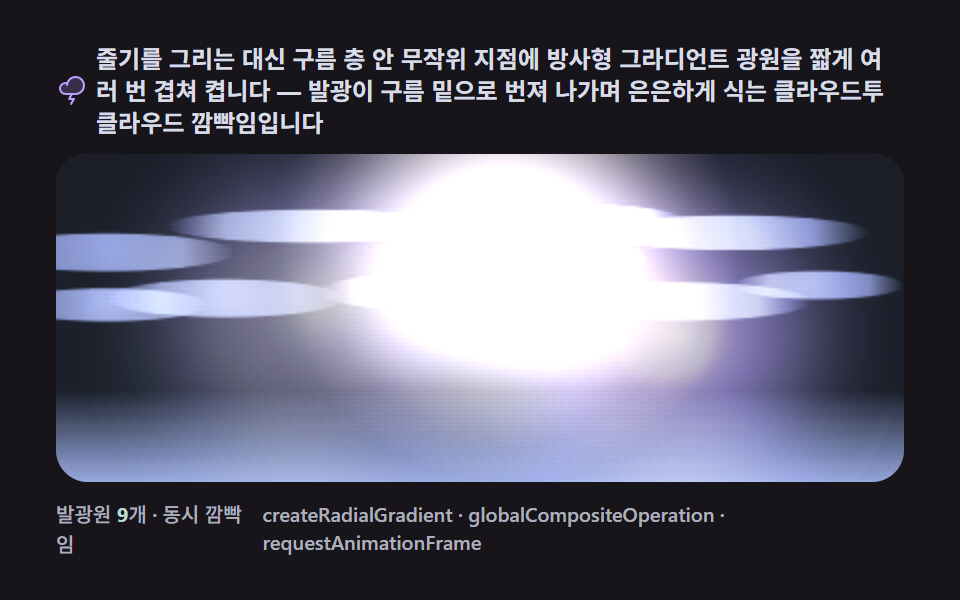
稲妻の幹を描く代わりに雲の中のランダムな地点へ放射状グラデーションの光源を短く何度も重ねて灯すと、幹の見えない雲間放電特有のほのかな瞬きになります。
使いどころ暗雲背景の雰囲気演出、天気ウィジェットの嵐状態アニメーション
createRadialGradientglobalCompositeOperationrequestAnimationFrame
<main class="stage">
<div class="cd is-demo" id="cdRoot">
  <p class="cd__hint">
    <svg class="cd__ico" viewBox="0 0 256 256" aria-hidden="true"><g fill="currentColor"><path d="M224 92a68 68 0 0 1-68 68H76a44 44 0 1 1 14.2-85.66v.11A68.06 68.06 0 0 1 224 92" opacity=".2"/><path d="M156 16a76.2 76.2 0 0 0-71.08 48.76A53 53 0 0 0 76 64a52 52 0 0 0 0 104h37.87l-16.73 27.88A8 8 0 0 0 104 208h25.87l-16.73 27.88a8 8 0 0 0 13.72 8.24l24-40A8 8 0 0 0 144 192h-25.87l14.4-24H156a76 76 0 0 0 0-152m0 136H76a36 36 0 0 1 0-72a38 38 0 0 1 4.78.31q-.56 3.57-.77 7.23a8 8 0 0 0 16 .92A60.06 60.06 0 1 1 156 152"/></g></svg>
    <span>幹を描く代わりに、雲の層の中のランダムな地点に放射状グラデーションの光源を短く何度も重ねて灯します — 発光が雲の下へ広がりながら淡く冷めていく雲間放電の明滅です</span>
  </p>
  <div class="cd__field" id="cdField" role="application" aria-label="雲の中の発光明滅 実験パネル" tabindex="0">
    <canvas class="cd__cv" id="cdCv"></canvas>
  </div>
  <div class="cd__bar">
    <span class="cd__meta">発光源 <b class="cd__val" id="cdVal">9</b>個・同時明滅</span>
    <span class="cd__meta cd__meta--dim">createRadialGradient・globalCompositeOperation・requestAnimationFrame</span>
  </div>
</div>
</main>
@use "../../../../site/static/demo-tokens" as *;
// 구름 속 발광(09). CSS 애니메이션·@keyframes 를 아예 두지 않는다 —
// 움직임은 전부 캔버스 rAF 루프(구름 층 안 방사형 그라디언트 광원 펄스 + 잔광 확산)가 만든다.
// 무대는 어스름 잉크. 파스텔 고정 팔레트를 --bolt-* 로 편 편 공통 규격.
$duration: $dur-loop;
$easing: $ease-out;
$color: $subject-lilac;
@include stage($stage-ink);
// ── 편 공통 파스텔 팔레트(BD26: vivid 순색 없음) ──
$bolt-ink: #1b1e26; // 어스름 무대
$bolt-sky: #323749; // 하늘 깊은 슬레이트
$bolt-slab: #4b5170; // 구름 덩어리 슬레이트
$bolt-veil: #565c7a; // 구름 밝은 면 — 한 단 밝은 슬레이트
$bolt-core: #f6e7ff; // 발광 코어 — 밝은 파스텔 라벤더
$bolt-lilac: #b9a0ff; // 발광 라일락
$bolt-mint: #b9ddd1; // 발광 차가운 광
$bolt-pink: #ffb9c8; // 발광 따뜻한 광
$bolt-node: #d8dce6; // 메타 글자 안개색
.cd {
// 렌더러가 읽는 색 — JS 는 getComputedStyle 로 --bolt-* 를 받아 쓴다
--bolt-ink: #{$bolt-ink};
--bolt-sky: #{$bolt-sky};
--bolt-slab: #{$bolt-slab};
--bolt-veil: #{$bolt-veil};
--bolt-core: #{$bolt-core};
--bolt-lilac: #{$bolt-lilac};
--bolt-mint: #{$bolt-mint};
--bolt-pink: #{$bolt-pink};
--bolt-node: #{$bolt-node};
display: flex; flex-direction: column; gap: $sp-2;
width: 100%; max-width: 424px;
}
.cd__hint {
display: flex; align-items: center; gap: $sp-1; margin: 0;
font-weight: 700; font-size: clamp(10px, 2.8vw, 12px); line-height: 1.35;
color: $bolt-node; // 잉크 무대 위 — 안개색 글자(대비 9.8:1)
}
.cd__ico { width: 16px; height: 16px; flex: 0 0 auto; color: $bolt-lilac; }
.cd__field {
// 09 는 칩 이름(createRadialGradient)이 길어 메타 바가 두 줄로 접힌다 —
// 카드 전체가 480x300 창을 넘지 않게(BD8) 필드를 16px 낮춘다
position: relative; height: 164px;
border-radius: $r-card; overflow: hidden;
background: $bolt-ink;
box-shadow: inset 0 0 0 1px rgba($bolt-node, .18);
}
.cd__field:focus-visible { outline: 2px solid $bolt-lilac; outline-offset: 2px; }
.cd__cv { display: block; width: 100%; height: 100%; }
.cd__bar { display: flex; align-items: baseline; justify-content: space-between; gap: $sp-2; }
.cd__meta { font-size: 10px; font-weight: 500; color: rgba($bolt-node, .78); }
.cd__val { color: $bolt-mint; font-weight: 700; } // 잉크 위 민트 라벨(대비 9.4:1)
.cd__meta--dim { font-size: 10px; }
@media (max-width: 340px) {
.cd { gap: $sp-1; }
.cd__field { height: 100px; }
.cd__meta--dim { display: none; }
}
// reduce — rAF 를 돌리지 않고 발광이 켜진 한 장만 남긴다(JS 가 is-still 부착).
@media (prefers-reduced-motion: reduce) {
.cd.is-still .cd__field { cursor: default !important; }
}html, body {
margin: 0;
overflow: hidden;
}
.stage {
box-sizing: border-box;
min-height: 100vh;
display: grid;
place-items: center;
margin: 0;
background: #17141a;
font-family: -apple-system, "Segoe UI", "Noto Sans KR", sans-serif;
padding: clamp(8px, 4vw, 24px);
}
.cd {
--bolt-ink: #1b1e26;
--bolt-sky: #323749;
--bolt-slab: #4b5170;
--bolt-veil: #565c7a;
--bolt-core: #f6e7ff;
--bolt-lilac: #b9a0ff;
--bolt-mint: #b9ddd1;
--bolt-pink: #ffb9c8;
--bolt-node: #d8dce6;
display: flex;
flex-direction: column;
gap: 8px;
width: 100%;
max-width: 424px;
}
.cd__hint {
display: flex;
align-items: center;
gap: 4px;
margin: 0;
font-weight: 700;
font-size: clamp(10px, 2.8vw, 12px);
line-height: 1.35;
color: #d8dce6;
}
.cd__ico {
width: 16px;
height: 16px;
flex: 0 0 auto;
color: #b9a0ff;
}
.cd__field {
position: relative;
height: 164px;
border-radius: 16px;
overflow: hidden;
background: #1b1e26;
box-shadow: inset 0 0 0 1px rgba(216, 220, 230, 0.18);
}
.cd__field:focus-visible {
outline: 2px solid #b9a0ff;
outline-offset: 2px;
}
.cd__cv {
display: block;
width: 100%;
height: 100%;
}
.cd__bar {
display: flex;
align-items: baseline;
justify-content: space-between;
gap: 8px;
}
.cd__meta {
font-size: 10px;
font-weight: 500;
color: rgba(216, 220, 230, 0.78);
}
.cd__val {
color: #b9ddd1;
font-weight: 700;
}
.cd__meta--dim {
font-size: 10px;
}
@media (max-width: 340px) {
.cd {
gap: 4px;
}
.cd__field {
height: 100px;
}
.cd__meta--dim {
display: none;
}
}
@media (prefers-reduced-motion: reduce) {
.cd.is-still .cd__field {
cursor: default !important;
}
}// 구름 속 발광(09). 번개 줄기를 그리지 않는다 — 구름 층(슬레이트 타원 뭉게 여러 겹) 안의
// 무작위 지점에 방사형 그라디언트 광원을 짧게 여러 번 켜 클라우드투클라우드 방전의
// 은은한 깜빡임을 만든다. 광원은 'lighter' 합성으로 구름에 누적되고, 매 프레임 하늘을
// 아주 조금 어둡게 덧칠해 잔광이 구름 밑으로 번지며 천천히 식는다.
(function () {
// ── 변형 상수 블록 — 아래 값 하나만 바꿔 변형 3종을 만든다 ──
var PULSE_COUNT = 9; // 주기마다 켜지는 발광 펄스 수 — 늘리면 하늘이 더 바쁘다
var GLOW_RADIUS = 0.95; // 발광 반경(구름 높이 기준 비율) — 키우면 광이 더 넓게 번진다
var CYCLE_MS = 500; // 펄스 스케줄 반복 주기(2000ms 의 약수 — gif 가 안 끊긴다)
// ────────────────────────────────────────────────────
var root = document.getElementById('cdRoot');
var field = document.getElementById('cdField');
var cv = document.getElementById('cdCv');
var ctx = cv.getContext('2d');
var valOut = document.getElementById('cdVal');
// 시드 고정 PRNG — mulberry32. 펄스 스케줄이 매 실행 같은 리듬으로 흐른다
var SEED = 0x517c09;
var prngState = SEED >>> 0;
function rand() {
prngState = (prngState + 0x6D2B79F5) >>> 0;
var t = prngState;
t = Math.imul(t ^ (t >>> 15), t | 1);
t ^= t + Math.imul(t ^ (t >>> 7), t | 61);
return ((t ^ (t >>> 14)) >>> 0) / 4294967296;
}
// 색은 CSS 커스텀 프로퍼티(--bolt-*)에서 getComputedStyle 로 읽는다
var css = getComputedStyle(root);
function tokRGB(name) {
var s = css.getPropertyValue(name).trim();
var hx = s.length === 4
? s.charAt(1) + s.charAt(1) + s.charAt(2) + s.charAt(2) + s.charAt(3) + s.charAt(3)
: s.slice(1);
return [parseInt(hx.slice(0, 2), 16), parseInt(hx.slice(2, 4), 16), parseInt(hx.slice(4, 6), 16)];
}
var C_INK = tokRGB('--bolt-ink');
var C_SKY = tokRGB('--bolt-sky');
var C_SLAB = tokRGB('--bolt-slab');
var C_VEIL = tokRGB('--bolt-veil');
var C_CORE = tokRGB('--bolt-core');
var C_LILAC = tokRGB('--bolt-lilac');
var C_MINT = tokRGB('--bolt-mint');
var C_PINK = tokRGB('--bolt-pink');
var GLOWS = [C_LILAC, C_MINT, C_PINK, C_LILAC, C_MINT, C_LILAC]; // 펄스마다 돌려 쓰는 광색
function rgba(c, a) { return 'rgba(' + c[0] + ',' + c[1] + ',' + c[2] + ',' + a + ')'; }
var reduce = window.matchMedia('(prefers-reduced-motion: reduce)').matches;
var W = 0, H = 0;
var raf = 0, t0 = -1;
var STILL_T = 120; // reduce 에서 그리는 시각(ms) — 발광 두세 개가 켜진 순간
var CLOUD_H = 0; // 구름 층 세로 폭(px) — fit() 에서 정한다
// ── 구름 — 화면 비율 타원 여러 겹. 뒤에서 앞으로 겹쳐 뭉게 형태를 만든다 ──
var CLOUDS_FR = [
[0.06, 0.30, 0.30, 0.115, 0], [0.30, 0.22, 0.34, 0.10, 1], [0.55, 0.32, 0.30, 0.12, 0],
[0.80, 0.24, 0.32, 0.105, 1], [0.20, 0.44, 0.28, 0.115, 1], [0.48, 0.42, 0.34, 0.125, 0],
[0.74, 0.45, 0.30, 0.115, 1], [0.06, 0.46, 0.24, 0.10, 1], [0.62, 0.20, 0.24, 0.09, 0],
[0.90, 0.40, 0.20, 0.085, 0]
]; // [x, y, rx, ry, 앞/뒤] — 좌표는 화면 비율
var clouds = [];
// ── 펄스 스케줄 — 한 주기(500ms) 안에서 각 펄스의 시작 시각과 자리 ──
var pulses = [];
function buildSchedule() {
prngState = SEED >>> 0;
pulses = [];
for (var i = 0; i < PULSE_COUNT; i++) {
pulses.push({
t0: i * (CYCLE_MS / PULSE_COUNT) + rand() * 18, // 순차 발생 — 몰아치는 느낌
dur: 110 + rand() * 120, // 짧게 켜졌다 식는 펄스 길이
x: (0.10 + rand() * 0.80) * W,
y: (0.16 + rand() * 0.62) * CLOUD_H,
col: GLOWS[i % GLOWS.length]
});
}
}
function pulseAlpha(p, t) {
var u = t - p.t0;
if (u < 0 || u > p.dur) return 0;
// 빠르게 차오르고(20%) 이후 지수로 식는 봉투
if (u < p.dur * 0.2) return u / (p.dur * 0.2);
var k = 1 - (u - p.dur * 0.2) / (p.dur * 0.8);
return k * k;
}
// 구름 층 한 장 — 밑으로 갈수록 어두운 세로 그라디언트 타원
function drawCloud(c) {
var g = ctx.createRadialGradient(c.x, c.y - c.ry * 0.3, c.rx * 0.08, c.x, c.y, c.rx);
var top = c.front ? C_VEIL : C_SLAB;
g.addColorStop(0, rgba(top, 0.95));
g.addColorStop(0.55, rgba(C_SLAB, 0.9));
g.addColorStop(1, rgba(C_SLAB, 0));
ctx.fillStyle = g;
ctx.save();
ctx.translate(c.x, c.y);
ctx.scale(1, c.ry / c.rx);
ctx.beginPath();
ctx.arc(0, 0, c.rx, 0, Math.PI * 2);
ctx.restore();
ctx.fill();
}
function draw(t, dt) {
// 하늘 — 매 프레임 아주 조금 어둡게 덧칠해 잔광이 몇 프레임 남게 한다.
// 구름 정적 층을 오프스크린 캔버스에 미리 그려 두고 매 프레임 'lighter' 로 얹는다.
ctx.globalCompositeOperation = 'source-over';
ctx.fillStyle = rgba(C_INK, 0.20);
ctx.fillRect(0, 0, W, H);
ctx.globalCompositeOperation = 'lighter';
ctx.drawImage(cloudLayer, 0, 0);
// 발광 펄스 — 구름 층 안 방사형 그라디언트 광원을 겹쳐 켠다
for (var i = 0; i < pulses.length; i++) {
var p = pulses[i];
var a = pulseAlpha(p, t);
if (a <= 0.01) continue;
var r = CLOUD_H * GLOW_RADIUS * (0.55 + a * 0.45);
var g = ctx.createRadialGradient(p.x, p.y, 1, p.x, p.y, r);
g.addColorStop(0, rgba(C_CORE, a * 0.62));
g.addColorStop(0.3, rgba(p.col, a * 0.42));
g.addColorStop(1, rgba(p.col, 0));
ctx.fillStyle = g;
// 그리기 범위를 캔버스 안으로 자른다 — 창 크기 전환이 rAF 사이에 끼면 반지름이
// 캔버스를 넘어 내부 비트맵이 확장되고 scrollWidth 넘침(BD8)으로 잡힌다
var gx0 = Math.max(0, p.x - r), gy0 = Math.max(0, p.y - r);
var gx1 = Math.min(W, p.x + r), gy1 = Math.min(H, p.y + r);
ctx.fillRect(gx0, gy0, gx1 - gx0, gy1 - gy0);
}
ctx.globalCompositeOperation = 'source-over';
}
// 구름 정적 층 — 화면 크기가 바뀔 때만 다시 그린다
var cloudLayer = document.createElement('canvas');
function paintCloudLayer() {
cloudLayer.width = Math.max(1, Math.round(W));
cloudLayer.height = Math.max(1, Math.round(H));
var c2 = cloudLayer.getContext('2d');
clouds = CLOUDS_FR.map(function (f) {
return { x: f[0] * W, y: f[1] * H, rx: f[2] * W * 0.5, ry: f[3] * H * 0.5, front: f[4] === 1 };
});
c2.globalCompositeOperation = 'source-over';
c2.clearRect(0, 0, W, H);
var order = clouds.slice().sort(function (a, b) { return a.front - b.front; }); // 뒤 구름부터
for (var i = 0; i < order.length; i++) {
var c = order[i];
var g = c2.createRadialGradient(c.x, c.y - c.ry * 0.3, c.rx * 0.08, c.x, c.y, c.rx);
g.addColorStop(0, rgba(c.front ? C_VEIL : C_SLAB, 0.32));
g.addColorStop(0.55, rgba(C_SLAB, 0.26));
g.addColorStop(1, rgba(C_SLAB, 0));
c2.fillStyle = g;
c2.save();
c2.translate(c.x, c.y);
c2.scale(1, c.ry / c.rx);
c2.beginPath();
c2.arc(0, 0, c.rx, 0, Math.PI * 2);
c2.restore();
c2.fill();
}
// 하늘 바닥 — 지평선 어스름
var sky = c2.createLinearGradient(0, H * 0.72, 0, H);
sky.addColorStop(0, rgba(C_SKY, 0));
sky.addColorStop(1, rgba(C_SKY, 0.5));
c2.fillStyle = sky;
c2.fillRect(0, H * 0.72, W, H * 0.28);
}
function fit() {
var r = field.getBoundingClientRect();
W = r.width; H = r.height;
CLOUD_H = H * 0.78; // 구름 층 세로 폭 — 発光源 자리·반경의 기준
cv.width = Math.round(W); cv.height = Math.round(H);
paintCloudLayer();
ctx.fillStyle = rgba(C_INK, 1);
ctx.fillRect(0, 0, W, H);
}
function frame(now) {
if (t0 < 0) t0 = now;
var t = (now - t0) % CYCLE_MS;
draw(t);
raf = requestAnimationFrame(frame);
}
window.addEventListener('resize', function () { fit(); if (reduce) draw(STILL_T); });
fit();
buildSchedule();
if (reduce) {
draw(STILL_T);
root.classList.add('is-still');
} else {
raf = requestAnimationFrame(frame);
}
})();// CloudFlicker — vanilla 판(run/316/demo/09-lightning-cloud-flicker-ambient/index.html) 의 React 포트.
// 줄기 없이 구름 층(슬레이트 타원 뭉게 여러 겹) 안 무작위 지점에 방사형 그라디언트 광원을
// 짧게 여러 번 켜 클라우드투클라우드 방전의 은은한 깜빡임을 만든다. 매 프레임 하늘을
// 조금씩 어둡게 덧칠해 잔광이 구름 밑으로 번지며 천천히 식는다.
import { useEffect, useRef, useState } from "react";
import type { CSSProperties } from "react";
import styles from "./CloudFlicker.module.scss";
export type CloudFlickerProps = {
duration?: string;
easing?: string;
color?: string;
pulseCount?: number; // 주기마다 켜지는 발광 펄스 수 — 늘리면 하늘이 더 바쁘다
glowRadius?: number; // 발광 반경(구름 높이 기준 비율) — 키우면 광이 더 넓게 번진다
cycleMs?: number; // 펄스 스케줄 반복 주기(2000ms 의 약수 — gif 가 안 끊긴다)
};
type Vars = CSSProperties & { "--duration"?: string; "--easing"?: string; "--color"?: string };
type Box<T> = { current: T };
type RGB = [number, number, number];
type Cloud = { x: number; y: number; rx: number; ry: number; front: boolean };
type Pulse = { t0: number; dur: number; x: number; y: number; col: RGB };
type Colors = { ink: RGB; sky: RGB; slab: RGB; veil: RGB; core: RGB; lilac: RGB; mint: RGB; pink: RGB };
const FIELD_LABEL = "구름 속 발광 깜빡임 실험판";
const STILL_T = 120; // reduce 에서 그리는 시각(ms) — 발광 두세 개가 켜진 순간
const SEED = 0x517c09;
// [x, y, rx, ry, 앞/뒤] — 좌표는 화면 비율
const CLOUDS_FR: [number, number, number, number, number][] = [
[0.06, 0.30, 0.30, 0.115, 0], [0.30, 0.22, 0.34, 0.10, 1], [0.55, 0.32, 0.30, 0.12, 0],
[0.80, 0.24, 0.32, 0.105, 1], [0.20, 0.44, 0.28, 0.115, 1], [0.48, 0.42, 0.34, 0.125, 0],
[0.74, 0.45, 0.30, 0.115, 1], [0.06, 0.46, 0.24, 0.10, 1], [0.62, 0.20, 0.24, 0.09, 0],
[0.90, 0.40, 0.20, 0.085, 0],
];
function makePRNG(seed: number): () => number {
let s = seed >>> 0;
return function () {
s = (s + 0x6d2b79f5) >>> 0;
let t = s;
t = Math.imul(t ^ (t >>> 15), t | 1);
t ^= t + Math.imul(t ^ (t >>> 7), t | 61);
return ((t ^ (t >>> 14)) >>> 0) / 4294967296;
};
}
export default function CloudFlicker({
duration = "2s",
easing = "cubic-bezier(.2, .8, .2, 1)",
color = "#b9a0ff",
pulseCount = 9,
glowRadius = 0.95,
cycleMs = 500,
}: CloudFlickerProps) {
const rootRef = useRef<HTMLDivElement | null>(null);
const fieldRef = useRef<HTMLDivElement | null>(null);
const cvRef = useRef<HTMLCanvasElement | null>(null);
const ctxRef = useRef<CanvasRenderingContext2D | null>(null);
const sizeRef = useRef({ w: 0, h: 0 }) as Box<{ w: number; h: number }>;
const colRef = useRef<Colors | null>(null);
const countRef = useRef(pulseCount) as Box<number>;
const radiusRef = useRef(glowRadius) as Box<number>;
const cycleRef = useRef(cycleMs) as Box<number>;
const pulsesRef = useRef<Pulse[]>([]) as Box<Pulse[]>;
const cloudLayerRef = useRef<HTMLCanvasElement | null>(null);
const rafRef = useRef(0) as Box<number>;
const [still, setStill] = useState(false);
const vars: Vars = { "--duration": duration, "--easing": easing, "--color": color };
function reduced(): boolean {
return window.matchMedia("(prefers-reduced-motion: reduce)").matches;
}
function tokRGB(root: HTMLDivElement, name: string): RGB {
const s = getComputedStyle(root).getPropertyValue(name).trim();
const hx = s.length === 4
? s.charAt(1) + s.charAt(1) + s.charAt(2) + s.charAt(2) + s.charAt(3) + s.charAt(3)
: s.slice(1);
return [parseInt(hx.slice(0, 2), 16), parseInt(hx.slice(2, 4), 16), parseInt(hx.slice(4, 6), 16)];
}
function rgba(c: RGB, a: number): string { return "rgba(" + c[0] + "," + c[1] + "," + c[2] + "," + a + ")"; }
function glows(col: Colors): RGB[] {
return [col.lilac, col.mint, col.pink, col.lilac, col.mint, col.lilac];
}
// 펄스 스케줄 — 한 주기 안에서 각 펄스의 시작 시각과 자리. 시드를 되돌려 같은 리듬이 반복된다
function buildSchedule(): void {
const rand = makePRNG(SEED);
const { w: W, h: H } = sizeRef.current;
const CLOUD_H = H * 0.78;
const GLOWS = colRef.current ? glows(colRef.current) : [];
const pulses: Pulse[] = [];
for (let i = 0; i < countRef.current; i++) {
pulses.push({
t0: i * (cycleRef.current / countRef.current) + rand() * 18,
dur: 110 + rand() * 120,
x: (0.10 + rand() * 0.80) * W,
y: (0.16 + rand() * 0.62) * CLOUD_H,
col: GLOWS.length ? GLOWS[i % GLOWS.length] : [185, 160, 255],
});
}
pulsesRef.current = pulses;
}
function pulseAlpha(p: Pulse, t: number): number {
const u = t - p.t0;
if (u < 0 || u > p.dur) return 0;
if (u < p.dur * 0.2) return u / (p.dur * 0.2);
const k = 1 - (u - p.dur * 0.2) / (p.dur * 0.8);
return k * k;
}
// 구름 정적 층 — 오프스크린 캔버스에 미리 그려 매 프레임 'lighter' 로 얹는다
function paintCloudLayer(): void {
const col = colRef.current;
const layer = cloudLayerRef.current;
if (!col || !layer) return;
const { w: W, h: H } = sizeRef.current;
layer.width = Math.max(1, Math.round(W));
layer.height = Math.max(1, Math.round(H));
const c2 = layer.getContext("2d");
if (!c2) return;
const clouds: Cloud[] = CLOUDS_FR.map((f) => ({
x: f[0] * W, y: f[1] * H, rx: f[2] * W * 0.5, ry: f[3] * H * 0.5, front: f[4] === 1,
}));
c2.globalCompositeOperation = "source-over";
c2.clearRect(0, 0, W, H);
const order = clouds.slice().sort((a, b) => Number(a.front) - Number(b.front));
for (let i = 0; i < order.length; i++) {
const c = order[i];
const g = c2.createRadialGradient(c.x, c.y - c.ry * 0.3, c.rx * 0.08, c.x, c.y, c.rx);
g.addColorStop(0, rgba(c.front ? col.veil : col.slab, 0.32));
g.addColorStop(0.55, rgba(col.slab, 0.26));
g.addColorStop(1, rgba(col.slab, 0));
c2.fillStyle = g;
c2.save();
c2.translate(c.x, c.y);
c2.scale(1, c.ry / c.rx);
c2.beginPath();
c2.arc(0, 0, c.rx, 0, Math.PI * 2);
c2.restore();
c2.fill();
}
// 하늘 바닥 — 지평선 어스름
const sky = c2.createLinearGradient(0, H * 0.72, 0, H);
sky.addColorStop(0, rgba(col.sky, 0));
sky.addColorStop(1, rgba(col.sky, 0.5));
c2.fillStyle = sky;
c2.fillRect(0, H * 0.72, W, H * 0.28);
}
function draw(t: number): void {
const ctx = ctxRef.current;
const col = colRef.current;
const layer = cloudLayerRef.current;
if (!ctx || !col || !layer) return;
const { w: W, h: H } = sizeRef.current;
const CLOUD_H = H * 0.78;
ctx.globalCompositeOperation = "source-over";
ctx.fillStyle = rgba(col.ink, 0.20);
ctx.fillRect(0, 0, W, H);
ctx.globalCompositeOperation = "lighter";
ctx.drawImage(layer, 0, 0);
const pulses = pulsesRef.current;
for (let i = 0; i < pulses.length; i++) {
const p = pulses[i];
const a = pulseAlpha(p, t);
if (a <= 0.01) continue;
const r = CLOUD_H * radiusRef.current * (0.55 + a * 0.45);
const g = ctx.createRadialGradient(p.x, p.y, 1, p.x, p.y, r);
g.addColorStop(0, rgba(col.core, a * 0.62));
g.addColorStop(0.3, rgba(p.col, a * 0.42));
g.addColorStop(1, rgba(p.col, 0));
ctx.fillStyle = g;
const gx0 = Math.max(0, p.x - r), gy0 = Math.max(0, p.y - r);
const gx1 = Math.min(W, p.x + r), gy1 = Math.min(H, p.y + r);
ctx.fillRect(gx0, gy0, gx1 - gx0, gy1 - gy0);
}
ctx.globalCompositeOperation = "source-over";
}
function fit(): void {
const field = fieldRef.current;
const cv = cvRef.current;
if (!field || !cv) return;
const ctx = cv.getContext("2d");
if (!ctx) return;
const r = field.getBoundingClientRect();
sizeRef.current.w = r.width;
sizeRef.current.h = r.height;
cv.width = Math.round(r.width);
cv.height = Math.round(r.height);
ctxRef.current = ctx;
paintCloudLayer();
const col = colRef.current;
if (col) { ctx.fillStyle = rgba(col.ink, 1); ctx.fillRect(0, 0, r.width, r.height); }
}
let t0 = -1;
function frame(now: number): void {
if (t0 < 0) t0 = now;
const t = (now - t0) % cycleRef.current;
draw(t);
rafRef.current = requestAnimationFrame(frame);
}
useEffect(() => {
const root = rootRef.current;
if (!root) return;
countRef.current = pulseCount;
radiusRef.current = glowRadius;
cycleRef.current = cycleMs;
colRef.current = {
ink: tokRGB(root, "--bolt-ink"),
sky: tokRGB(root, "--bolt-sky"),
slab: tokRGB(root, "--bolt-slab"),
veil: tokRGB(root, "--bolt-veil"),
core: tokRGB(root, "--bolt-core"),
lilac: tokRGB(root, "--bolt-lilac"),
mint: tokRGB(root, "--bolt-mint"),
pink: tokRGB(root, "--bolt-pink"),
};
if (!cloudLayerRef.current) cloudLayerRef.current = document.createElement("canvas");
fit();
buildSchedule();
function onResize(): void { fit(); buildSchedule(); if (reduced()) draw(STILL_T); }
window.addEventListener("resize", onResize);
if (reduced()) {
draw(STILL_T);
setStill(true);
} else {
rafRef.current = requestAnimationFrame(frame);
}
return () => {
window.removeEventListener("resize", onResize);
cancelAnimationFrame(rafRef.current);
};
// eslint-disable-next-line react-hooks/exhaustive-deps
}, [pulseCount, glowRadius, cycleMs]);
const rootCls = still ? `${styles.cd} ${styles.isStill}` : styles.cd;
return (
<main className={styles.stage}>
<div className={rootCls} ref={rootRef} style={vars}>
<p className={styles.hint}>
<svg className={styles.ico} viewBox="0 0 256 256" aria-hidden="true"><g fill="currentColor"><path d="M224 92a68 68 0 0 1-68 68H76a44 44 0 1 1 14.2-85.66v.11A68.06 68.06 0 0 1 224 92" opacity=".2" /><path d="M156 16a76.2 76.2 0 0 0-71.08 48.76A53 53 0 0 0 76 64a52 52 0 0 0 0 104h37.87l-16.73 27.88A8 8 0 0 0 104 208h25.87l-16.73 27.88a8 8 0 0 0 13.72 8.24l24-40A8 8 0 0 0 144 192h-25.87l14.4-24H156a76 76 0 0 0 0-152m0 136H76a36 36 0 0 1 0-72a38 38 0 0 1 4.78.31q-.56 3.57-.77 7.23a8 8 0 0 0 16 .92A60.06 60.06 0 1 1 156 152" /></g></svg>
<span>줄기를 그리는 대신 구름 층 안 무작위 지점에 방사형 그라디언트 광원을 짧게 여러 번 겹쳐 켭니다 — 발광이 구름 밑으로 번져 나가며 은은하게 식는 클라우드투클라우드 깜빡임입니다</span>
</p>
<div className={styles.field} ref={fieldRef} role="application" aria-label={FIELD_LABEL} tabIndex={0}>
<canvas className={styles.cv} ref={cvRef}></canvas>
</div>
<div className={styles.bar}>
<span className={styles.meta}>발광원 <b className={styles.val}>9</b>개 · 동시 깜빡임</span>
<span className={styles.metaDim}>createRadialGradient · globalCompositeOperation · requestAnimationFrame</span>
</div>
</div>
</main>
);
}09 雲の中の発光 — 幹なしで霧の中に瞬く雲間放電 — 計測 累積面積 45.795% · 動いたフレーム 23/23GODRICH オリジナル · SCSS と React は zip に同梱 · キャンバス 稲妻 エフェクト 作り方9種 — フラクタル中点変位で落ちる雷
このデモが属する記事
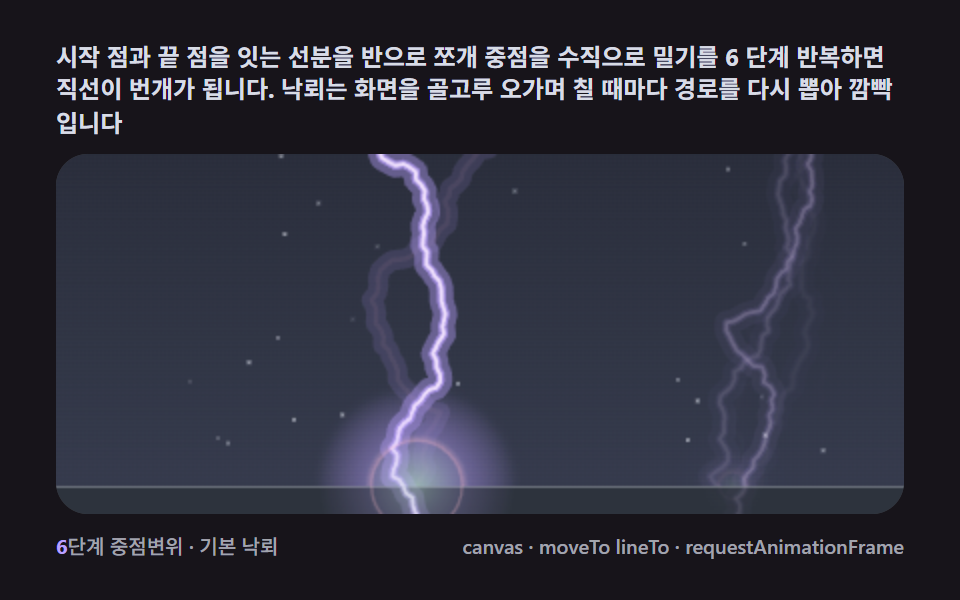 キャンバス 稲妻 エフェクト 作り方9種 — フラクタル中点変位で落ちる雷稲妻 エフェクト 作り方とは、雷の画像を貼る仕事ではなく、まっすぐな線分を再帰的に割っていく計算のことです。ライブラリ·WebGL なしで線分を再帰的に割る中点変位ひとつで稲妻の枝が自ら分岐します。始点と終点を結ぶ線の中点を垂直方向へ乱数の この記事のデモをすべて見る