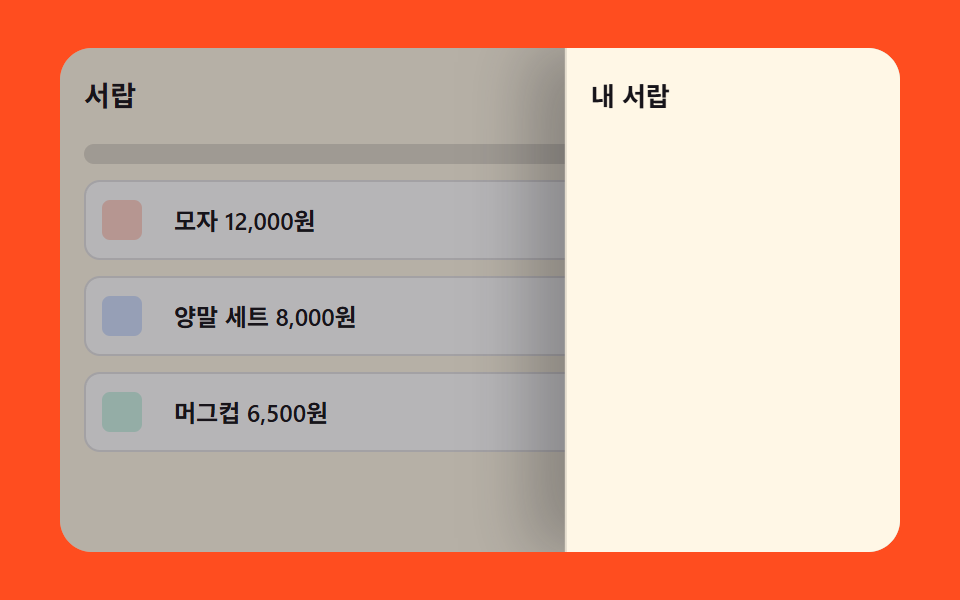
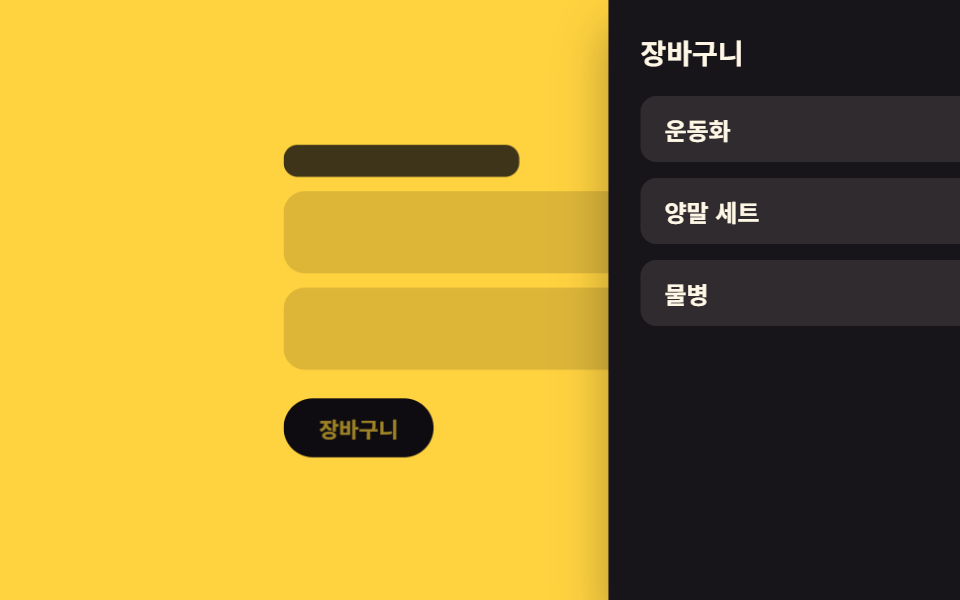
02背景縮小 — パネルが開いた分だけ背後の画面の大きさの値が縮む奥行き表現
パネルの開いた進行度の値が大きくなるほど、背後の画面の大きさの値と暗さの値が同じ割合で縮んでパネルが手前に浮いたように見え、閉じる進行度ではその2つの値が同じ割合で戻ります。
使いどころモバイルショッピングアプリのカート、コマースサイト
MIN_SCALEMAX_DIMeaseInOutCubic
<main class="stage">
<div class="cdbd is-demo" id="cdbd">
  <div class="cdbd__page" id="cdbdPage">
    <div class="cdbd__bar"></div>
    <div class="cdbd__card"></div>
    <div class="cdbd__card"></div>
    <button class="cdbd__toggle" id="cdbdToggle" type="button">カート</button>
  </div>
  <aside class="cdbd__panel" id="cdbdPanel">
    <header class="cdbd__head"><span>カート</span><b>3</b></header>
    <ul class="cdbd__list">
      <li>スニーカー</li>
      <li>ソックスセット</li>
      <li>水筒</li>
    </ul>
  </aside>
</div>
</main>
@use "../../../../site/static/demo-tokens" as *;
// 계산 겹: 열림 진행 값(0~1)을 easeInOutCubic() 으로 보간해 뒤 화면의 scale·brightness 값을
// 같은 비율로 도출한다(apply()) — 두 속성을 따로 애니메이션하지 않고 한 계산에서 나온다.
$duration: $dur-base;
$easing: $ease-out;
$color: $subject-ink;
@include stage($stage-yellow);
.stage { position: relative; overflow: hidden; }
.cdbd__page {
display: flex;
flex-direction: column;
align-items: stretch;
gap: $sp-2;
width: min(220px, 66vw);
transform-origin: center;
will-change: transform, filter;
}
.cdbd__bar {
height: 18px;
border-radius: $r-sm;
background: rgba(23, 20, 26, .8);
width: 60%;
}
.cdbd__card {
height: 46px;
border-radius: $r-control;
background: rgba(23, 20, 26, .14);
}
.cdbd__toggle {
margin-top: $sp-2;
border: 0;
border-radius: $r-pill;
padding: $sp-2 $sp-5;
background: $color;
color: $stage-yellow;
font-family: inherit;
font-weight: 700;
font-size: 12px;
cursor: pointer;
align-self: flex-start;
}
.cdbd__panel {
position: fixed;
top: 0;
right: 0;
bottom: 0;
width: min(70%, 230px);
box-sizing: border-box;
display: flex;
flex-direction: column;
gap: $sp-3;
padding: $sp-4;
background: $color;
color: $subject-cream;
transform: translateX(100%);
box-shadow: $shadow-raised;
}
.cdbd__head {
display: flex;
align-items: center;
justify-content: space-between;
font-weight: 700;
font-size: 14px;
}
.cdbd__list {
list-style: none;
margin: 0;
padding: 0;
display: flex;
flex-direction: column;
gap: $sp-2;
}
.cdbd__list li {
padding: $sp-2 $sp-3;
border-radius: $r-sm;
background: rgba(255, 247, 230, .1);
font-size: 12px;
font-weight: 600;
}
@media (max-width: 340px) {
.cdbd__page { width: min(180px, 62vw); }
.cdbd__card { height: 36px; }
.cdbd__panel { width: min(76%, 190px); padding: $sp-3; gap: $sp-2; }
}
@media (prefers-reduced-motion: reduce) {
.cdbd__page, .cdbd__panel { transition: none !important; }
}html, body {
margin: 0;
overflow: hidden;
}
.stage {
box-sizing: border-box;
min-height: 100vh;
display: grid;
place-items: center;
margin: 0;
background: #ffd23f;
font-family: -apple-system, "Segoe UI", "Noto Sans KR", sans-serif;
padding: clamp(8px, 4vw, 24px);
}
.stage {
position: relative;
overflow: hidden;
}
.cdbd__page {
display: flex;
flex-direction: column;
align-items: stretch;
gap: 8px;
width: min(220px, 66vw);
transform-origin: center;
will-change: transform, filter;
}
.cdbd__bar {
height: 18px;
border-radius: 8px;
background: rgba(23, 20, 26, 0.8);
width: 60%;
}
.cdbd__card {
height: 46px;
border-radius: 12px;
background: rgba(23, 20, 26, 0.14);
}
.cdbd__toggle {
margin-top: 8px;
border: 0;
border-radius: 999px;
padding: 8px 20px;
background: #17141a;
color: #ffd23f;
font-family: inherit;
font-weight: 700;
font-size: 12px;
cursor: pointer;
align-self: flex-start;
}
.cdbd__panel {
position: fixed;
top: 0;
right: 0;
bottom: 0;
width: min(70%, 230px);
box-sizing: border-box;
display: flex;
flex-direction: column;
gap: 12px;
padding: 16px;
background: #17141a;
color: #fff7e6;
transform: translateX(100%);
box-shadow: 0 14px 24px rgba(23, 20, 26, 0.32);
}
.cdbd__head {
display: flex;
align-items: center;
justify-content: space-between;
font-weight: 700;
font-size: 14px;
}
.cdbd__list {
list-style: none;
margin: 0;
padding: 0;
display: flex;
flex-direction: column;
gap: 8px;
}
.cdbd__list li {
padding: 8px 12px;
border-radius: 8px;
background: rgba(255, 247, 230, 0.1);
font-size: 12px;
font-weight: 600;
}
@media (max-width: 340px) {
.cdbd__page {
width: min(180px, 62vw);
}
.cdbd__card {
height: 36px;
}
.cdbd__panel {
width: min(76%, 190px);
padding: 12px;
gap: 8px;
}
}
@media (prefers-reduced-motion: reduce) {
.cdbd__page, .cdbd__panel {
transition: none !important;
}
}(function () {
var root = document.getElementById('cdbd');
var page = document.getElementById('cdbdPage');
var panel = document.getElementById('cdbdPanel');
var toggle = document.getElementById('cdbdToggle');
// 계산 겹: 패널의 열림 진행 값(progress, 0~1)을 이징 함수로 보간해 뒤 화면의 크기 값과
// 어둡기 값을 같은 비율로 계산한다 — scale·filter 를 각자 애니메이션하지 않고 한 값에서 둘을 도출한다.
function easeInOutCubic(p) {
return p < 0.5 ? 4 * p * p * p : 1 - Math.pow(-2 * p + 2, 3) / 2;
}
var DURATION_S = 0.5;
var MIN_SCALE = 0.86;
var MAX_DIM = 0.5;
var isOpen = false;
var raf = null;
function apply(progress) {
var eased = easeInOutCubic(Math.min(1, Math.max(0, progress)));
var scale = 1 - eased * (1 - MIN_SCALE);
var dim = eased * MAX_DIM;
page.style.transform = 'scale(' + scale.toFixed(4) + ')';
page.style.filter = 'brightness(' + (1 - dim).toFixed(3) + ')';
panel.style.transform = 'translateX(' + ((1 - eased) * 100).toFixed(2) + '%)';
}
function run(closing) {
if (raf) { cancelAnimationFrame(raf); }
var start = performance.now();
var from = closing ? 1 : 0;
var to = closing ? 0 : 1;
function frame(now) {
var t = Math.min(1, (now - start) / (DURATION_S * 1000));
apply(from + (to - from) * t);
if (t < 1) {
raf = requestAnimationFrame(frame);
} else {
raf = null;
isOpen = !closing;
}
}
raf = requestAnimationFrame(frame);
}
function stopAutoplay() {
if (autoplayTimer) { clearInterval(autoplayTimer); autoplayTimer = null; }
}
toggle.addEventListener('click', function () {
root.classList.remove('is-demo');
stopAutoplay();
run(isOpen);
});
var autoplayTimer = null;
function autoplayTick() { run(isOpen); }
var reduce = window.matchMedia('(prefers-reduced-motion: reduce)').matches;
if (reduce) {
apply(1);
} else {
run(false);
autoplayTimer = setInterval(autoplayTick, 900);
}
})();import { useEffect, useRef } from "react";
import type { CSSProperties } from "react";
import styles from "./CartDrawerBackdropDepthScale.module.scss";
export type CartDrawerBackdropDepthScaleProps = {
duration?: number;
color?: string;
};
// 계산 겹: 열림 진행 값(0~1)을 easeInOutCubic() 으로 보간해 뒤 화면의 크기 값과
// 어둡기 값을 같은 비율로 계산한다 — scale·filter 를 각자 애니메이션하지 않고 한 값에서 둘을 도출한다.
function easeInOutCubic(p: number): number {
return p < 0.5 ? 4 * p * p * p : 1 - Math.pow(-2 * p + 2, 3) / 2;
}
const MIN_SCALE = 0.86;
const MAX_DIM = 0.5;
export default function CartDrawerBackdropDepthScale({
duration = 500,
color = "#17141a",
}: CartDrawerBackdropDepthScaleProps) {
const rootRef = useRef<HTMLDivElement | null>(null);
const pageRef = useRef<HTMLDivElement | null>(null);
const panelRef = useRef<HTMLElement | null>(null);
const isOpenRef = useRef(false);
const rafRef = useRef<number | null>(null);
const timerRef = useRef<ReturnType<typeof setInterval> | null>(null);
useEffect(() => {
function apply(progress: number) {
const page = pageRef.current;
const panel = panelRef.current;
if (!page || !panel) return;
const eased = easeInOutCubic(Math.min(1, Math.max(0, progress)));
const scale = 1 - eased * (1 - MIN_SCALE);
const dim = eased * MAX_DIM;
page.style.transform = `scale(${scale.toFixed(4)})`;
page.style.filter = `brightness(${(1 - dim).toFixed(3)})`;
panel.style.transform = `translateX(${((1 - eased) * 100).toFixed(2)}%)`;
}
function run(closing: boolean) {
if (rafRef.current) cancelAnimationFrame(rafRef.current);
const start = performance.now();
const from = closing ? 1 : 0;
const to = closing ? 0 : 1;
function frame(now: number) {
const t = Math.min(1, (now - start) / duration);
apply(from + (to - from) * t);
if (t < 1) {
rafRef.current = requestAnimationFrame(frame);
} else {
rafRef.current = null;
isOpenRef.current = !closing;
}
}
rafRef.current = requestAnimationFrame(frame);
}
function stopAutoplay() {
if (timerRef.current) {
clearInterval(timerRef.current);
timerRef.current = null;
}
}
const toggle = () => {
rootRef.current?.classList.remove(styles.isDemo);
stopAutoplay();
run(!!isOpenRef.current);
};
const toggleEl = rootRef.current?.querySelector<HTMLButtonElement>(`.${styles.toggle}`);
toggleEl?.addEventListener("click", toggle);
const reduce = window.matchMedia("(prefers-reduced-motion: reduce)").matches;
if (reduce) {
apply(1);
} else {
run(false);
timerRef.current = setInterval(() => run(!!isOpenRef.current), 900);
}
return () => {
stopAutoplay();
if (rafRef.current) cancelAnimationFrame(rafRef.current);
toggleEl?.removeEventListener("click", toggle);
};
}, [duration]);
return (
<div ref={rootRef} className={`${styles.stage} ${styles.isDemo}`} style={{ "--color": color } as CSSProperties}>
<div ref={pageRef} className={styles.page}>
<div className={styles.bar} />
<div className={styles.card} />
<div className={styles.card} />
<button className={styles.toggle} type="button">장바구니</button>
</div>
<aside ref={panelRef} className={styles.panel}>
<header className={styles.head}><span>장바구니</span><b>3</b></header>
<ul className={styles.list}>
<li>운동화</li>
<li>양말 세트</li>
<li>물병</li>
</ul>
</aside>
</div>
);
}02 背景縮小 — パネルが開いた分だけ背後の画面の大きさの値が縮む奥行き表現 — 計測 累積面積 55.719% · 動いたフレーム 15/23GODRICH オリジナル · SCSS と React は zip に同梱 · カート ドロワー UIパターン9選 — スプリングからバッジ慣性まで
このデモが属する記事
 カート ドロワー UIパターン9選 — スプリングからバッジ慣性まで9つのうち1つは開く位置の値が目標を少し超えてからばね曲線に沿って戻り、1つは引く距離の値が基準を超えると抵抗が強まり、もう1つは個数の値が変わるたびにアイコン上の数字が毎フレーム残りの差の一部だけ追いつきます。この9つがカート ドロワーの この記事のデモをすべて見る