09バッジ数の慣性 — 変わった値へ少しずつ追いつくアイコン上の数字
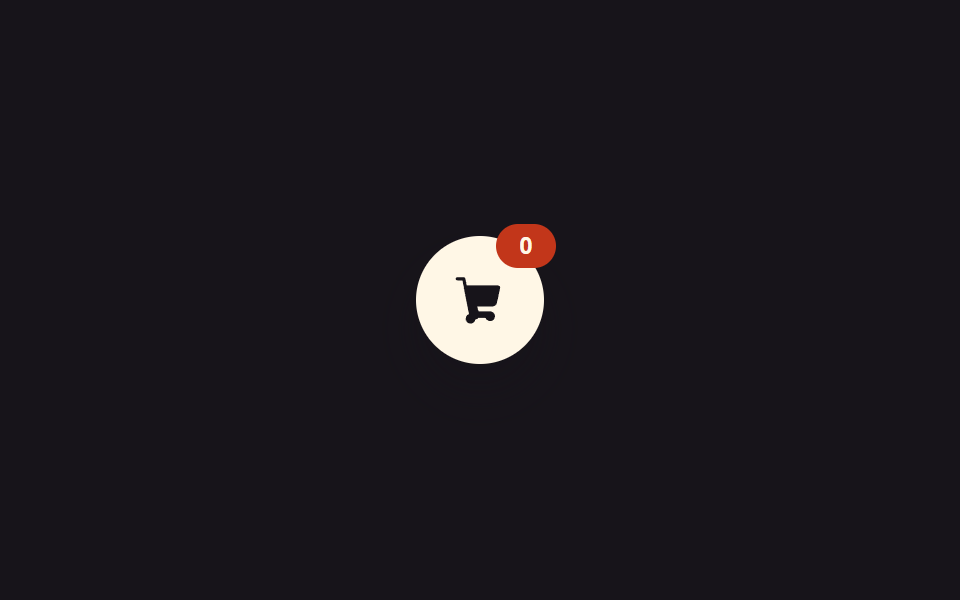
入っている個数の値が変わった状態になると、アイコン上の数字は一度に値へ届かず、毎フレーム残りの差の値の一部だけ追いつく慣性の値を経て到達し、その間数字の大きさの値も一瞬大きくなってから縮みます。
使いどころカートアイコンの個数表示
lerptargetdisplayed
<main class="stage">
<div class="cbci is-demo" id="cbci">
  <button class="cbci__fab" id="cbciAdd" type="button" aria-label="追加">
    <svg viewBox="0 0 256 256" width="26" height="26" aria-hidden="true"><g fill="currentColor"><path d="M222.14 58.87A8 8 0 0 0 216 56H62.68L56.16 22.35A8 8 0 0 0 48 16H16a8 8 0 0 0 0 16h25.6l32 165.4A24 24 0 1 0 105.14 224a23.94 23.94 0 0 0 15.5-8h34.72a23.94 23.94 0 1 0 22.32-32h-51a8 8 0 0 1-7.86-6.43L114.68 160H188a24 24 0 0 0 23.53-19.24l16.29-75.63A8 8 0 0 0 222.14 58.87Z"/></g></svg>
    <span class="cbci__badge" id="cbciBadge">0</span>
  </button>
</div>
</main>
@use "../../../../site/static/demo-tokens" as *;
// 계산 겹: 표시 숫자가 목표 숫자를 매 프레임 lerp() 로 따라잡는다(tick(), index.html) —
// 값이 바뀔 때마다 즉시 세지 않고 차이를 매 프레임 조금씩 줄이는 관성 계산이다.
$duration: $dur-quick;
$easing: $ease-pop;
$color: $error;
@include stage($stage-ink);
.stage { position: relative; }
.cbci__fab {
position: relative;
width: 64px;
height: 64px;
border: 0;
border-radius: $r-pill;
background: $subject-cream;
color: $subject-ink;
display: grid;
place-items: center;
cursor: pointer;
box-shadow: $shadow-raised;
}
.cbci__badge {
position: absolute;
top: -6px;
right: -6px;
min-width: 22px;
height: 22px;
padding: 0 $sp-1;
border-radius: $r-pill;
background: $color;
color: $subject-cream;
font-family: inherit;
font-weight: 700;
font-size: 12px;
display: grid;
place-items: center;
transform-origin: center;
}
@media (max-width: 340px) {
.cbci__fab { width: 52px; height: 52px; }
.cbci__badge { min-width: 18px; height: 18px; font-size: 10px; }
}
@media (prefers-reduced-motion: reduce) {
.cbci__badge { transition: none !important; }
}html, body {
margin: 0;
overflow: hidden;
}
.stage {
box-sizing: border-box;
min-height: 100vh;
display: grid;
place-items: center;
margin: 0;
background: #17141a;
font-family: -apple-system, "Segoe UI", "Noto Sans KR", sans-serif;
padding: clamp(8px, 4vw, 24px);
}
.stage {
position: relative;
}
.cbci__fab {
position: relative;
width: 64px;
height: 64px;
border: 0;
border-radius: 999px;
background: #fff7e6;
color: #17141a;
display: grid;
place-items: center;
cursor: pointer;
box-shadow: 0 14px 24px rgba(23, 20, 26, 0.32);
}
.cbci__badge {
position: absolute;
top: -6px;
right: -6px;
min-width: 22px;
height: 22px;
padding: 0 4px;
border-radius: 999px;
background: #c2361a;
color: #fff7e6;
font-family: inherit;
font-weight: 700;
font-size: 12px;
display: grid;
place-items: center;
transform-origin: center;
}
@media (max-width: 340px) {
.cbci__fab {
width: 52px;
height: 52px;
}
.cbci__badge {
min-width: 18px;
height: 18px;
font-size: 10px;
}
}
@media (prefers-reduced-motion: reduce) {
.cbci__badge {
transition: none !important;
}
}(function () {
var root = document.getElementById('cbci');
var addBtn = document.getElementById('cbciAdd');
var badge = document.getElementById('cbciBadge');
// 계산 겹: 표시 숫자(displayed)가 목표 숫자(target)를 매 프레임 향해 관성 lerp() 로
// 따라잡는다 — 값이 바뀔 때마다 다시 세지 않고, 두 값의 차이를 매 프레임 조금씩 줄인다.
function lerp(a, b, t) { return a + (b - a) * t; }
var target = 0;
var displayed = 0;
var raf = null;
function tick() {
displayed = lerp(displayed, target, 0.16);
var shown = Math.round(displayed);
badge.textContent = String(shown);
var pulse = 1 + Math.min(0.3, Math.abs(target - displayed) / (target + 1) * 0.6);
badge.style.transform = 'scale(' + pulse.toFixed(3) + ')';
if (Math.abs(target - displayed) > 0.03) {
raf = requestAnimationFrame(tick);
} else {
displayed = target;
badge.textContent = String(target);
badge.style.transform = 'scale(1)';
raf = null;
}
}
function kick() {
if (!raf) { raf = requestAnimationFrame(tick); }
}
function addOne() {
target += 1;
if (target > 9) { target = 0; displayed = 0; badge.textContent = '0'; }
kick();
}
addBtn.addEventListener('click', function () {
root.classList.remove('is-demo');
stopAutoplay();
addOne();
});
var autoplayTimer = null;
function stopAutoplay() {
if (autoplayTimer) { clearInterval(autoplayTimer); autoplayTimer = null; }
}
var reduce = window.matchMedia('(prefers-reduced-motion: reduce)').matches;
if (!reduce) {
autoplayTimer = setInterval(addOne, 380);
}
})();import { useEffect, useRef } from "react";
import type { CSSProperties } from "react";
import styles from "./CartDrawerBadgeCountInertia.module.scss";
export type CartDrawerBadgeCountInertiaProps = {
duration?: number;
color?: string;
};
// 계산 겹: 목표 수량으로 즉시 점프하지 않고 매 프레임 lerp() 로 표시 숫자를 목표 쪽으로
// 끌어당긴다(관성) — 거리(distance)가 클수록 배지 pulse 스케일도 함께 커진다.
function lerp(a: number, b: number, t: number): number {
return a + (b - a) * t;
}
const INERTIA = 0.16;
const MAX_COUNT = 9;
const TICK_MS = 380;
export default function CartDrawerBadgeCountInertia({
color = "#c2361a",
}: CartDrawerBadgeCountInertiaProps) {
const rootRef = useRef<HTMLDivElement | null>(null);
const badgeRef = useRef<HTMLSpanElement | null>(null);
const fabRef = useRef<HTMLButtonElement | null>(null);
const targetRef = useRef(0);
const displayedRef = useRef(0);
const rafRef = useRef<number | null>(null);
const timerRef = useRef<ReturnType<typeof setInterval> | null>(null);
useEffect(() => {
const badge = badgeRef.current;
const fab = fabRef.current;
if (!badge || !fab) return;
function ensureLoop() {
if (rafRef.current) return;
const step = () => {
const target = targetRef.current ?? 0;
const dist = target - (displayedRef.current ?? 0);
displayedRef.current = lerp(displayedRef.current ?? 0, target, INERTIA);
const shown = Math.round(displayedRef.current ?? 0);
badge!.textContent = String(shown);
const pulse = 1 + Math.min(0.4, Math.abs(dist) * 0.05);
badge!.style.transform = `scale(${pulse.toFixed(3)})`;
if (Math.abs(dist) > 0.02) {
rafRef.current = requestAnimationFrame(step);
} else {
displayedRef.current = target;
badge!.textContent = String(target);
badge!.style.transform = "scale(1)";
rafRef.current = null;
}
};
rafRef.current = requestAnimationFrame(step);
}
function addOne() {
const t = targetRef.current ?? 0;
targetRef.current = t >= MAX_COUNT ? 0 : t + 1;
ensureLoop();
}
function stopAutoplay() {
if (timerRef.current) {
clearInterval(timerRef.current);
timerRef.current = null;
}
}
const onClick = () => {
rootRef.current?.classList.remove(styles.isDemo);
stopAutoplay();
addOne();
};
fab.addEventListener("click", onClick);
const reduce = window.matchMedia("(prefers-reduced-motion: reduce)").matches;
if (!reduce) {
timerRef.current = setInterval(addOne, TICK_MS);
}
return () => {
stopAutoplay();
if (rafRef.current) cancelAnimationFrame(rafRef.current);
fab.removeEventListener("click", onClick);
};
}, []);
return (
<div ref={rootRef} className={`${styles.stage} ${styles.isDemo}`} style={{ "--color": color } as CSSProperties}>
<button ref={fabRef} type="button" className={styles.fab} aria-label="담기">
<svg viewBox="0 0 256 256" width="26" height="26" aria-hidden="true">
<g fill="currentColor">
<path opacity=".5" d="M216 48h-40v-8a24 24 0 0 0-24-24h-48a24 24 0 0 0-24 24v8H40a8 8 0 0 0 0 16h8v144a16 16 0 0 0 16 16h128a16 16 0 0 0 16-16V64h8a8 8 0 0 0 0-16ZM96 40a8 8 0 0 1 8-8h48a8 8 0 0 1 8 8v8H96Zm96 168H64V64h128Z" />
</g>
</svg>
<span ref={badgeRef} className={styles.badge}>0</span>
</button>
</div>
);
}09 バッジ数の慣性 — 変わった値へ少しずつ追いつくアイコン上の数字 — 計測 累積面積 0.232% · 動いたフレーム 22/23GODRICH オリジナル · SCSS と React は zip に同梱 · カート ドロワー UIパターン9選 — スプリングからバッジ慣性まで
このデモが属する記事
 カート ドロワー UIパターン9選 — スプリングからバッジ慣性まで9つのうち1つは開く位置の値が目標を少し超えてからばね曲線に沿って戻り、1つは引く距離の値が基準を超えると抵抗が強まり、もう1つは個数の値が変わるたびにアイコン上の数字が毎フレーム残りの差の一部だけ追いつきます。この9つがカート ドロワーの この記事のデモをすべて見る