08コードと結果を交互に見る窓
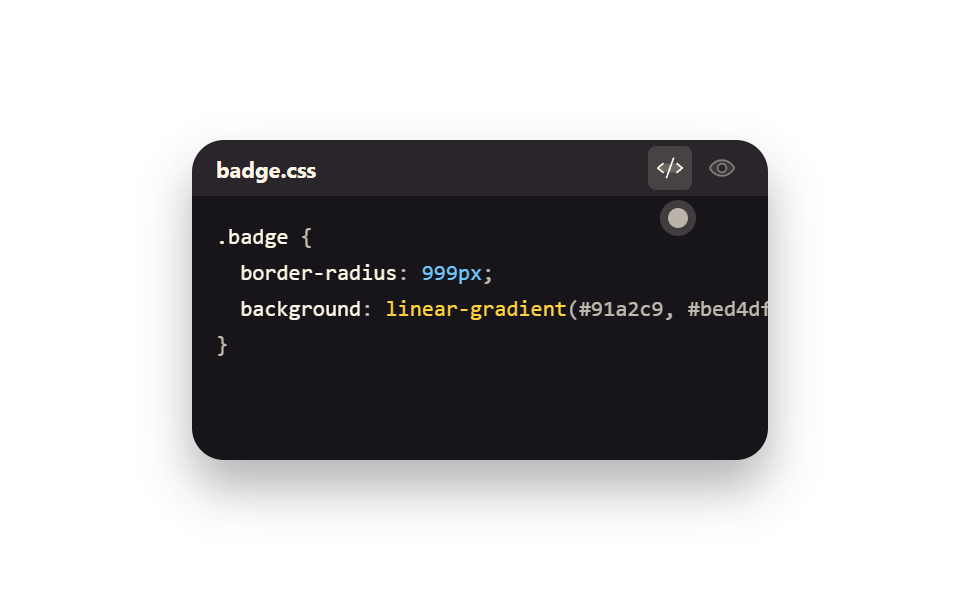
同じ窓がコードとそのコードが描く結果を交互に見せ、切り替えは1フレームで断ち切るので2つの層が半透明に重なりません。選んだ側は aria-pressed にも残り、2つのボタンのどちらが入っているか分かります。
使いどころ結果を見ないとコードが分からない CSS 効果の紹介
aria-pressedsteps(1, end)visibility
<main class="stage">
  <div class="rps is-demo" id="rps">
    <div class="rps__head">
      <span class="rps__file">badge.css</span>
      <div class="rps__tabs">
        <button class="rps__tab is-on" id="rps-code-btn" type="button" aria-pressed="true" aria-label="コードを見る">
          <svg viewBox="0 0 256 256" width="14" height="14" aria-hidden="true"><g fill="currentColor"><path d="m240 128l-48 40H64l-48-40l48-40h128Z" opacity=".2"/><path d="M69.12 94.15L28.5 128l40.62 33.85a8 8 0 1 1-10.24 12.29l-48-40a8 8 0 0 1 0-12.29l48-40a8 8 0 0 1 10.24 12.3m176 27.7l-48-40a8 8 0 1 0-10.24 12.3L227.5 128l-40.62 33.85a8 8 0 1 0 10.24 12.29l48-40a8 8 0 0 0 0-12.29m-82.39-89.37a8 8 0 0 0-10.25 4.79l-64 176a8 8 0 0 0 4.79 10.26A8.1 8.1 0 0 0 96 224a8 8 0 0 0 7.52-5.27l64-176a8 8 0 0 0-4.79-10.25"/></g></svg>
        </button>
        <button class="rps__tab" id="rps-eye-btn" type="button" aria-pressed="false" aria-label="結果を見る">
          <svg viewBox="0 0 256 256" width="14" height="14" aria-hidden="true"><g fill="currentColor"><path d="M128 56c-80 0-112 72-112 72s32 72 112 72s112-72 112-72s-32-72-112-72m0 112a40 40 0 1 1 40-40a40 40 0 0 1-40 40" opacity=".2"/><path d="M247.31 124.76c-.35-.79-8.82-19.58-27.65-38.41C194.57 61.26 162.88 48 128 48S61.43 61.26 36.34 86.35C17.51 105.18 9 124 8.69 124.76a8 8 0 0 0 0 6.5c.35.79 8.82 19.57 27.65 38.4C61.43 194.74 93.12 208 128 208s66.57-13.26 91.66-38.34c18.83-18.83 27.3-37.61 27.65-38.4a8 8 0 0 0 0-6.5M128 192c-30.78 0-57.67-11.19-79.93-33.25A133.5 133.5 0 0 1 25 128a133.3 133.3 0 0 1 23.07-30.75C70.33 75.19 97.22 64 128 64s57.67 11.19 79.93 33.25A133.5 133.5 0 0 1 231.05 128c-7.21 13.46-38.62 64-103.05 64m0-112a48 48 0 1 0 48 48a48.05 48.05 0 0 0-48-48m0 80a32 32 0 1 1 32-32a32 32 0 0 1-32 32"/></g></svg>
        </button>
      </div>
    </div>
    <div class="rps__stage">
      <span class="rps__ptr" id="rps-ptr" aria-hidden="true"></span>
      <pre class="rps__face rps__face--code" id="rps-code" aria-hidden="false"><code><span class="ln"><span class="k">.badge</span> <span class="c">{</span></span><span class="ln">  <span class="k">border-radius</span><span class="c">:</span> <span class="n">999px</span><span class="c">;</span></span><span class="ln">  <span class="k">background</span><span class="c">:</span> <span class="s">linear-gradient</span><span class="c">(#91a2c9, #bed4df);</span></span><span class="ln"><span class="c">}</span></span></code></pre>
      <div class="rps__face rps__face--result" id="rps-result" aria-hidden="true">
        <div class="rps__card" id="rps-card">
          <span class="rps__badge" id="rps-badge">新着</span>
        </div>
      </div>
    </div>
  </div>
</main>
@use "../../../../site/static/demo-tokens" as *;
$duration: $dur-loop;
$easing: $ease-spring;
$color: $subject-blue;
@include stage($stage-paper);
// 구문 색 — 어두운 패널
$syn-key: $stage-orange;
$syn-str: $stage-yellow;
$syn-num: $subject-sky;
$syn-dim: rgba($subject-cream, .72);
$syn-txt: $subject-cream;
.rps {
box-sizing: border-box;
width: 288px;
border-radius: $r-card;
overflow: hidden;
box-shadow: $shadow-raised;
background: $stage-ink;
}
.rps__head {
display: flex;
align-items: center;
gap: $sp-2;
height: 28px;
padding: 0 $sp-3;
color: $syn-dim;
background: rgba(255, 247, 230, .08);
}
.rps__file { font-size: 11px; font-weight: 700; color: $syn-txt; }
.rps__tabs { display: flex; align-items: center; gap: $sp-1; margin-left: auto; }
.rps__tab {
display: inline-flex;
width: 22px;
height: 22px;
align-items: center;
justify-content: center;
padding: 0;
border: 0;
border-radius: $r-xs;
background: transparent;
color: $syn-dim;
opacity: .55;
cursor: pointer;
}
.rps__tab.is-on { opacity: 1; color: $syn-txt; background: rgba(255, 247, 230, .14); }
.rps__tab:focus-visible { outline: 2px solid $subject-cream; outline-offset: 2px; }
.rps__stage {
position: relative;
box-sizing: border-box;
height: 132px;
padding: $sp-3;
font-family: ui-monospace, "SFMono-Regular", Menlo, Consolas, monospace;
font-size: 11px;
line-height: 18px;
}
.rps__ptr {
position: absolute;
top: 6px;
right: 40px;
width: 10px;
height: 10px;
border-radius: 50%;
background: rgba(255, 247, 230, .7);
box-shadow: 0 0 0 4px rgba(255, 247, 230, .18);
pointer-events: none;
}
.rps__face {
box-sizing: border-box;
position: absolute;
inset: $sp-3;
margin: 0;
padding: 0;
color: $syn-txt;
}
.rps__face--code { opacity: 1; visibility: visible; }
.rps__face--result { opacity: 0; visibility: hidden; }
.rps__face--code .n { color: $syn-num; }
.rps__face--code .s { color: $syn-str; }
.rps__face--code .c { color: $syn-dim; }
.ln { display: block; }
.rps__face--result { display: grid; place-items: center; }
.rps__card {
position: relative;
width: 160px;
height: 84px;
border-radius: $r-card;
background: linear-gradient($subject-blue, $subject-sky);
box-shadow: $shadow-press;
transform: scale(.94);
}
.rps__badge {
position: absolute;
top: -8px;
left: -8px;
padding: $sp-1 $sp-2;
border-radius: $r-pill;
background: $stage-orange;
color: $subject-cream;
font-size: 11px;
font-weight: 700;
opacity: 0;
transform: translateY(6px);
}
// ── 자동 루프 (2s) ────────────────────────────────────
// 0~14% 포인터가 eye 로 · 16% 컷 결과 면 · 18~40% 카드·배지 등장 · 44~68% 포인터 복귀 ·
// 70% 컷 코드 면(즉시 원문 그대로 보임) · 86~100% 정지
.rps.is-demo .rps__ptr {
animation-name: rps-ptr;
animation-duration: $duration;
animation-timing-function: linear;
animation-iteration-count: infinite;
}
.rps.is-demo #rps-code-btn {
animation-name: rps-tab-code;
animation-duration: $duration;
animation-timing-function: linear;
animation-iteration-count: infinite;
}
.rps.is-demo #rps-eye-btn {
animation-name: rps-tab-eye;
animation-duration: $duration;
animation-timing-function: linear;
animation-iteration-count: infinite;
}
.rps.is-demo #rps-code {
animation-name: rps-code;
animation-duration: $duration;
animation-timing-function: linear;
animation-iteration-count: infinite;
}
.rps.is-demo #rps-result {
animation-name: rps-result;
animation-duration: $duration;
animation-timing-function: linear;
animation-iteration-count: infinite;
}
.rps.is-demo #rps-card {
animation-name: rps-card;
animation-duration: $duration;
animation-timing-function: linear;
animation-iteration-count: infinite;
}
.rps.is-demo #rps-badge {
animation-name: rps-badge;
animation-duration: $duration;
animation-timing-function: linear;
animation-iteration-count: infinite;
}
@keyframes rps-ptr {
0% { transform: translate(0, 0); }
14% { transform: translate(24px, 0); animation-timing-function: $easing; }
44% { transform: translate(24px, 0); }
68% { transform: translate(0, 0); animation-timing-function: $easing; }
100% { transform: translate(0, 0); }
}
@keyframes rps-tab-code {
0% { opacity: 1; }
16% { opacity: .55; animation-timing-function: steps(1, end); }
70% { opacity: 1; animation-timing-function: steps(1, end); }
100% { opacity: 1; }
}
@keyframes rps-tab-eye {
0% { opacity: .55; }
16% { opacity: 1; animation-timing-function: steps(1, end); }
70% { opacity: .55; animation-timing-function: steps(1, end); }
100% { opacity: .55; }
}
@keyframes rps-code {
0% { opacity: 1; visibility: visible; animation-timing-function: steps(1, end); }
16% { opacity: 0; visibility: hidden; animation-timing-function: steps(1, end); }
70% { opacity: 1; visibility: visible; animation-timing-function: steps(1, end); }
100% { opacity: 1; visibility: visible; }
}
@keyframes rps-result {
0% { opacity: 0; visibility: hidden; animation-timing-function: steps(1, end); }
16% { opacity: 1; visibility: visible; animation-timing-function: steps(1, end); }
70% { opacity: 0; visibility: hidden; animation-timing-function: steps(1, end); }
100% { opacity: 0; visibility: hidden; }
}
@keyframes rps-card {
0% { transform: scale(.94); }
18% { transform: scale(.94); animation-timing-function: $easing; }
40% { transform: scale(1); }
70% { transform: scale(1); }
100% { transform: scale(.94); }
}
@keyframes rps-badge {
0% { opacity: 0; transform: translateY(6px); }
18% { opacity: 0; transform: translateY(6px); animation-timing-function: $easing; }
40% { opacity: 1; transform: translateY(0); }
70% { opacity: 1; transform: translateY(0); }
100% { opacity: 0; transform: translateY(6px); }
}
@media (max-width: 340px) {
.rps { width: 100%; }
.rps__stage { font-size: 10px; line-height: 16px; padding: $sp-2; height: 124px; }
.rps__face { inset: $sp-2; }
}
@media (prefers-reduced-motion: reduce) {
.rps.is-demo .rps__ptr,
.rps.is-demo #rps-code-btn,
.rps.is-demo #rps-eye-btn,
.rps.is-demo #rps-code,
.rps.is-demo #rps-result,
.rps.is-demo #rps-card,
.rps.is-demo #rps-badge { animation: none !important; }
.rps.is-demo #rps-code { opacity: 1; visibility: visible; }
.rps.is-demo #rps-result { opacity: 0; visibility: hidden; }
}html, body {
margin: 0;
overflow: hidden;
}
.stage {
box-sizing: border-box;
min-height: 100vh;
display: grid;
place-items: center;
margin: 0;
background: #ffffff;
font-family: -apple-system, "Segoe UI", "Noto Sans KR", sans-serif;
padding: clamp(8px, 4vw, 24px);
}
.rps {
box-sizing: border-box;
width: 288px;
border-radius: 16px;
overflow: hidden;
box-shadow: 0 14px 24px rgba(23, 20, 26, 0.32);
background: #17141a;
}
.rps__head {
display: flex;
align-items: center;
gap: 8px;
height: 28px;
padding: 0 12px;
color: rgba(255, 247, 230, 0.72);
background: rgba(255, 247, 230, 0.08);
}
.rps__file {
font-size: 11px;
font-weight: 700;
color: #fff7e6;
}
.rps__tabs {
display: flex;
align-items: center;
gap: 4px;
margin-left: auto;
}
.rps__tab {
display: inline-flex;
width: 22px;
height: 22px;
align-items: center;
justify-content: center;
padding: 0;
border: 0;
border-radius: 4px;
background: transparent;
color: rgba(255, 247, 230, 0.72);
opacity: 0.55;
cursor: pointer;
}
.rps__tab.is-on {
opacity: 1;
color: #fff7e6;
background: rgba(255, 247, 230, 0.14);
}
.rps__tab:focus-visible {
outline: 2px solid #fff7e6;
outline-offset: 2px;
}
.rps__stage {
position: relative;
box-sizing: border-box;
height: 132px;
padding: 12px;
font-family: ui-monospace, "SFMono-Regular", Menlo, Consolas, monospace;
font-size: 11px;
line-height: 18px;
}
.rps__ptr {
position: absolute;
top: 6px;
right: 40px;
width: 10px;
height: 10px;
border-radius: 50%;
background: rgba(255, 247, 230, 0.7);
box-shadow: 0 0 0 4px rgba(255, 247, 230, 0.18);
pointer-events: none;
}
.rps__face {
box-sizing: border-box;
position: absolute;
inset: 12px;
margin: 0;
padding: 0;
color: #fff7e6;
}
.rps__face--code {
opacity: 1;
visibility: visible;
}
.rps__face--result {
opacity: 0;
visibility: hidden;
}
.rps__face--code .n {
color: #6ec8ff;
}
.rps__face--code .s {
color: #ffd23f;
}
.rps__face--code .c {
color: rgba(255, 247, 230, 0.72);
}
.ln {
display: block;
}
.rps__face--result {
display: grid;
place-items: center;
}
.rps__card {
position: relative;
width: 160px;
height: 84px;
border-radius: 16px;
background: linear-gradient(#2f6df6, #6ec8ff);
box-shadow: 0 6px 12px rgba(23, 20, 26, 0.32);
transform: scale(0.94);
}
.rps__badge {
position: absolute;
top: -8px;
left: -8px;
padding: 4px 8px;
border-radius: 999px;
background: #ff4d1f;
color: #fff7e6;
font-size: 11px;
font-weight: 700;
opacity: 0;
transform: translateY(6px);
}
.rps.is-demo .rps__ptr {
animation-name: rps-ptr;
animation-duration: 2s;
animation-timing-function: linear;
animation-iteration-count: infinite;
}
.rps.is-demo #rps-code-btn {
animation-name: rps-tab-code;
animation-duration: 2s;
animation-timing-function: linear;
animation-iteration-count: infinite;
}
.rps.is-demo #rps-eye-btn {
animation-name: rps-tab-eye;
animation-duration: 2s;
animation-timing-function: linear;
animation-iteration-count: infinite;
}
.rps.is-demo #rps-code {
animation-name: rps-code;
animation-duration: 2s;
animation-timing-function: linear;
animation-iteration-count: infinite;
}
.rps.is-demo #rps-result {
animation-name: rps-result;
animation-duration: 2s;
animation-timing-function: linear;
animation-iteration-count: infinite;
}
.rps.is-demo #rps-card {
animation-name: rps-card;
animation-duration: 2s;
animation-timing-function: linear;
animation-iteration-count: infinite;
}
.rps.is-demo #rps-badge {
animation-name: rps-badge;
animation-duration: 2s;
animation-timing-function: linear;
animation-iteration-count: infinite;
}
@keyframes rps-ptr {
0% {
transform: translate(0, 0);
}
14% {
transform: translate(24px, 0);
animation-timing-function: cubic-bezier(0.2, 0.8, 0.2, 1);
}
44% {
transform: translate(24px, 0);
}
68% {
transform: translate(0, 0);
animation-timing-function: cubic-bezier(0.2, 0.8, 0.2, 1);
}
100% {
transform: translate(0, 0);
}
}
@keyframes rps-tab-code {
0% {
opacity: 1;
}
16% {
opacity: 0.55;
animation-timing-function: steps(1, end);
}
70% {
opacity: 1;
animation-timing-function: steps(1, end);
}
100% {
opacity: 1;
}
}
@keyframes rps-tab-eye {
0% {
opacity: 0.55;
}
16% {
opacity: 1;
animation-timing-function: steps(1, end);
}
70% {
opacity: 0.55;
animation-timing-function: steps(1, end);
}
100% {
opacity: 0.55;
}
}
@keyframes rps-code {
0% {
opacity: 1;
visibility: visible;
animation-timing-function: steps(1, end);
}
16% {
opacity: 0;
visibility: hidden;
animation-timing-function: steps(1, end);
}
70% {
opacity: 1;
visibility: visible;
animation-timing-function: steps(1, end);
}
100% {
opacity: 1;
visibility: visible;
}
}
@keyframes rps-result {
0% {
opacity: 0;
visibility: hidden;
animation-timing-function: steps(1, end);
}
16% {
opacity: 1;
visibility: visible;
animation-timing-function: steps(1, end);
}
70% {
opacity: 0;
visibility: hidden;
animation-timing-function: steps(1, end);
}
100% {
opacity: 0;
visibility: hidden;
}
}
@keyframes rps-card {
0% {
transform: scale(0.94);
}
18% {
transform: scale(0.94);
animation-timing-function: cubic-bezier(0.2, 0.8, 0.2, 1);
}
40% {
transform: scale(1);
}
70% {
transform: scale(1);
}
100% {
transform: scale(0.94);
}
}
@keyframes rps-badge {
0% {
opacity: 0;
transform: translateY(6px);
}
18% {
opacity: 0;
transform: translateY(6px);
animation-timing-function: cubic-bezier(0.2, 0.8, 0.2, 1);
}
40% {
opacity: 1;
transform: translateY(0);
}
70% {
opacity: 1;
transform: translateY(0);
}
100% {
opacity: 0;
transform: translateY(6px);
}
}
@media (max-width: 340px) {
.rps {
width: 100%;
}
.rps__stage {
font-size: 10px;
line-height: 16px;
padding: 8px;
height: 124px;
}
.rps__face {
inset: 8px;
}
}
@media (prefers-reduced-motion: reduce) {
.rps.is-demo .rps__ptr,
.rps.is-demo #rps-code-btn,
.rps.is-demo #rps-eye-btn,
.rps.is-demo #rps-code,
.rps.is-demo #rps-result,
.rps.is-demo #rps-card,
.rps.is-demo #rps-badge {
animation: none !important;
}
.rps.is-demo #rps-code {
opacity: 1;
visibility: visible;
}
.rps.is-demo #rps-result {
opacity: 0;
visibility: hidden;
}
}// 실제 동작: 버튼 두 개가 코드 면 / 결과 면을 서로 바꾼다. aria-pressed 가 실제로 갱신된다
(function () {
var root = document.getElementById('rps');
var codeBtn = document.getElementById('rps-code-btn');
var eyeBtn = document.getElementById('rps-eye-btn');
var codeFace = document.getElementById('rps-code');
var resultFace = document.getElementById('rps-result');
function setView(showResult) {
root.classList.remove('is-demo');
codeBtn.setAttribute('aria-pressed', String(!showResult));
eyeBtn.setAttribute('aria-pressed', String(showResult));
codeBtn.classList.toggle('is-on', !showResult);
eyeBtn.classList.toggle('is-on', showResult);
codeFace.style.opacity = showResult ? '0' : '1';
codeFace.style.visibility = showResult ? 'hidden' : 'visible';
resultFace.style.opacity = showResult ? '1' : '0';
resultFace.style.visibility = showResult ? 'visible' : 'hidden';
codeFace.setAttribute('aria-hidden', String(showResult));
resultFace.setAttribute('aria-hidden', String(!showResult));
}
codeBtn.addEventListener('click', function () { setView(false); });
eyeBtn.addEventListener('click', function () { setView(true); });
})();import { useState } from "react";
import type { CSSProperties } from "react";
import styles from "./ResultPreviewSplit.module.scss";
export type ResultPreviewSplitProps = {
fileName?: string;
codeLabel?: string;
resultLabel?: string;
badgeLabel?: string;
/** 자동 재생 루프 (갤러리용). 사람이 누르면 꺼진다 */
demo?: boolean;
duration?: number;
easing?: string;
color?: string;
};
type Vars = CSSProperties & { "--duration"?: string; "--easing"?: string; "--color"?: string };
function CodeIcon() {
return (
<svg viewBox="0 0 256 256" width="14" height="14" aria-hidden="true">
<g fill="currentColor">
<path d="m240 128l-48 40H64l-48-40l48-40h128Z" opacity=".2" />
<path d="M69.12 94.15L28.5 128l40.62 33.85a8 8 0 1 1-10.24 12.29l-48-40a8 8 0 0 1 0-12.29l48-40a8 8 0 0 1 10.24 12.3m176 27.7l-48-40a8 8 0 1 0-10.24 12.3L227.5 128l-40.62 33.85a8 8 0 1 0 10.24 12.29l48-40a8 8 0 0 0 0-12.29m-82.39-89.37a8 8 0 0 0-10.25 4.79l-64 176a8 8 0 0 0 4.79 10.26A8.1 8.1 0 0 0 96 224a8 8 0 0 0 7.52-5.27l64-176a8 8 0 0 0-4.79-10.25" />
</g>
</svg>
);
}
function EyeIcon() {
return (
<svg viewBox="0 0 256 256" width="14" height="14" aria-hidden="true">
<g fill="currentColor">
<path d="M128 56c-80 0-112 72-112 72s32 72 112 72s112-72 112-72s-32-72-112-72m0 112a40 40 0 1 1 40-40a40 40 0 0 1-40 40" opacity=".2" />
<path d="M247.31 124.76c-.35-.79-8.82-19.58-27.65-38.41C194.57 61.26 162.88 48 128 48S61.43 61.26 36.34 86.35C17.51 105.18 9 124 8.69 124.76a8 8 0 0 0 0 6.5c.35.79 8.82 19.57 27.65 38.4C61.43 194.74 93.12 208 128 208s66.57-13.26 91.66-38.34c18.83-18.83 27.3-37.61 27.65-38.4a8 8 0 0 0 0-6.5M128 192c-30.78 0-57.67-11.19-79.93-33.25A133.5 133.5 0 0 1 25 128a133.3 133.3 0 0 1 23.07-30.75C70.33 75.19 97.22 64 128 64s57.67 11.19 79.93 33.25A133.5 133.5 0 0 1 231.05 128c-7.21 13.46-38.62 64-103.05 64m0-112a48 48 0 1 0 48 48a48.05 48.05 0 0 0-48-48m0 80a32 32 0 1 1 32-32a32 32 0 0 1-32 32" />
</g>
</svg>
);
}
export default function ResultPreviewSplit({
fileName = "badge.css",
codeLabel = "View code",
resultLabel = "View result",
badgeLabel = "New",
demo = true,
duration = 2000,
easing = "cubic-bezier(.2,.8,.2,1)",
color = "#2f6df6",
}: ResultPreviewSplitProps) {
const [live, setLive] = useState(demo);
const [showResult, setShowResult] = useState(false);
function setView(next: boolean) {
setLive(false);
setShowResult(next);
}
const vars: Vars = { "--duration": `${duration}ms`, "--easing": easing, "--color": color };
const codeStyle: CSSProperties | undefined = live
? undefined
: { opacity: showResult ? 0 : 1, visibility: showResult ? "hidden" : "visible" };
const resultStyle: CSSProperties | undefined = live
? undefined
: { opacity: showResult ? 1 : 0, visibility: showResult ? "visible" : "hidden" };
return (
<div className={[styles.rps, live ? styles.isDemo : ""].join(" ")} style={vars}>
<div className={styles.head}>
<span className={styles.file}>{fileName}</span>
<div className={styles.tabs}>
<button
className={[styles.tab, styles.tabCode, !showResult ? styles.isOn : ""].join(" ")}
type="button"
aria-pressed={!showResult}
aria-label={codeLabel}
onClick={() => setView(false)}
>
<CodeIcon />
</button>
<button
className={[styles.tab, styles.tabEye, showResult ? styles.isOn : ""].join(" ")}
type="button"
aria-pressed={showResult}
aria-label={resultLabel}
onClick={() => setView(true)}
>
<EyeIcon />
</button>
</div>
</div>
<div className={styles.stage}>
<span className={styles.ptr} aria-hidden="true" />
<pre className={[styles.face, styles.faceCode].join(" ")} style={codeStyle} aria-hidden={showResult}>
<code>
<span className={styles.ln}><span className={styles.k}>.badge</span> <span className={styles.c}>{"{"}</span></span>
<span className={styles.ln}> <span className={styles.k}>border-radius</span><span className={styles.c}>:</span> <span className={styles.n}>999px</span><span className={styles.c}>;</span></span>
<span className={styles.ln}> <span className={styles.k}>background</span><span className={styles.c}>:</span> <span className={styles.s}>linear-gradient</span><span className={styles.c}>(#26f, #6cf);</span></span>
<span className={styles.ln}><span className={styles.c}>{"}"}</span></span>
</code>
</pre>
<div className={[styles.face, styles.faceResult].join(" ")} style={resultStyle} aria-hidden={!showResult}>
<div className={styles.card}>
<span className={styles.badge}>{badgeLabel}</span>
</div>
</div>
</div>
</div>
);
}08 コードと結果を交互に見る窓 — 計測 累積面積 11.172% · 動いたフレーム 16/23GODRICH オリジナル · SCSS と React は zip に同梱 · コードブロック UI 9選 — ハイライターなしで作るコード窓
このデモが属する記事
 コードブロック UI 9選 — ハイライターなしで作るコード窓コードブロックとは、記事やドキュメントに載せるプログラムのコードを読みやすく整える、角の丸い窓のことです。窓がただ飾るだけでなく、コピーできて、大事な行を指せて、長いときは畳める形になっていると、読む人は貼り付けまで一息に進めます。ここでは この記事のデモをすべて見る