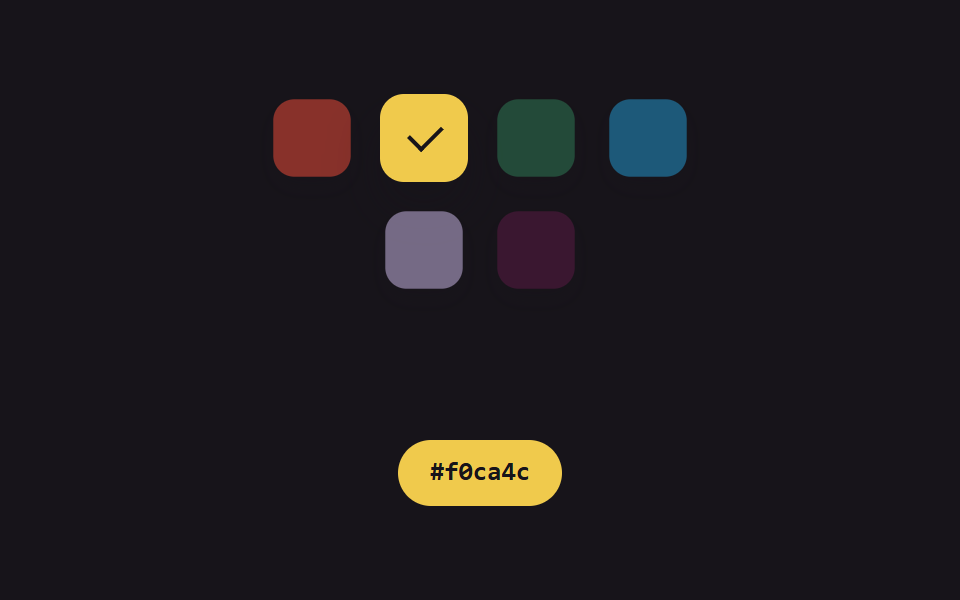
07スウォッチチップ — 明るさの値でチェックアイコンの対比を合わせるカラーピッカー
各スウォッチチップの色の明るさの値を計算し、明るい色には暗いチェックアイコン、暗い色には明るいチェックアイコンが出るよう対比を毎回合わせ直すカラーピッカーです。
使いどころクイックカラー選択パレット、ラベル・タグの色指定UI
role=radiogrouparia-checkedSWATCHES
<main class="stage">
<section class="panel" role="radiogroup" aria-label="カラースウォッチ">
  <span class="chip" data-i="0" role="radio" aria-checked="false" aria-label="スウォッチ1">
    <span class="check"></span>
  </span>
  <span class="chip" data-i="1" role="radio" aria-checked="false" aria-label="スウォッチ2">
    <span class="check"></span>
  </span>
  <span class="chip" data-i="2" role="radio" aria-checked="false" aria-label="スウォッチ3">
    <span class="check"></span>
  </span>
  <span class="chip" data-i="3" role="radio" aria-checked="false" aria-label="スウォッチ4">
    <span class="check"></span>
  </span>
  <span class="chip" data-i="4" role="radio" aria-checked="false" aria-label="スウォッチ5">
    <span class="check"></span>
  </span>
  <span class="chip" data-i="5" role="radio" aria-checked="false" aria-label="スウォッチ6">
    <span class="check"></span>
  </span>
</section>
<div class="readout" id="readout">
  <span class="hex" id="hex">#000000</span>
</div>
</main>@use "../../../../site/static/demo-tokens" as *;
@include stage($stage-ink);
.panel {
display: flex;
flex-wrap: wrap;
justify-content: center;
gap: $sp-3;
max-width: 220px;
margin: 0 0 $sp-4;
}
.chip {
position: relative;
width: 44px;
height: 44px;
border-radius: $r-control;
box-shadow: $shadow-press;
display: flex;
align-items: center;
justify-content: center;
opacity: .55;
transform: scale(.88);
&.is-selected {
opacity: 1;
transform: scale(1);
box-shadow: $shadow-raised;
}
}
.check {
width: 8px;
height: 14px;
border-right: 2px solid $subject-cream;
border-bottom: 2px solid $subject-cream;
transform: rotate(45deg) translate(-1px, -2px);
opacity: 0;
.is-selected & {
opacity: 1;
}
.is-selected.is-ink & {
border-color: $subject-ink;
}
}
.readout {
display: flex;
align-items: center;
justify-content: center;
padding: $sp-2 $sp-4;
border-radius: $r-pill;
color: $subject-cream;
&.is-ink {
color: $subject-ink;
}
}
.hex {
font-family: "Space Mono", ui-monospace, monospace;
font-weight: 700;
font-size: 13px;
line-height: 1.3;
}
@media (max-width: 340px) {
.panel { max-width: 168px; gap: $sp-2; }
.chip { width: 36px; height: 36px; }
}
@media (prefers-reduced-motion: reduce) {
.chip,
.check { transition: none; }
}html, body {
margin: 0;
overflow: hidden;
}
.stage {
box-sizing: border-box;
min-height: 100vh;
display: grid;
place-items: center;
margin: 0;
background: #17141a;
font-family: -apple-system, "Segoe UI", "Noto Sans KR", sans-serif;
padding: clamp(8px, 4vw, 24px);
}
.panel {
display: flex;
flex-wrap: wrap;
justify-content: center;
gap: 12px;
max-width: 220px;
margin: 0 0 16px;
}
.chip {
position: relative;
width: 44px;
height: 44px;
border-radius: 12px;
box-shadow: 0 6px 12px rgba(23, 20, 26, 0.32);
display: flex;
align-items: center;
justify-content: center;
opacity: 0.55;
transform: scale(0.88);
}
.chip.is-selected {
opacity: 1;
transform: scale(1);
box-shadow: 0 14px 24px rgba(23, 20, 26, 0.32);
}
.check {
width: 8px;
height: 14px;
border-right: 2px solid #fff7e6;
border-bottom: 2px solid #fff7e6;
transform: rotate(45deg) translate(-1px, -2px);
opacity: 0;
}
.is-selected .check {
opacity: 1;
}
.is-selected.is-ink .check {
border-color: #17141a;
}
.readout {
display: flex;
align-items: center;
justify-content: center;
padding: 8px 16px;
border-radius: 999px;
color: #fff7e6;
}
.readout.is-ink {
color: #17141a;
}
.hex {
font-family: "Space Mono", ui-monospace, monospace;
font-weight: 700;
font-size: 13px;
line-height: 1.3;
}
@media (max-width: 340px) {
.panel {
max-width: 168px;
gap: 8px;
}
.chip {
width: 36px;
height: 36px;
}
}
@media (prefers-reduced-motion: reduce) {
.chip,
.check {
transition: none;
}
}// 스와치 칩(07) — 각 칩 색의 밝기 값을 계산해, 밝은 색엔 어두운 체크 아이콘이
// 어두운 색엔 밝은 체크 아이콘이 뜨도록 대비를 매번 다시 맞춘다. 실키·실서버 요청 없음.
(function () {
var panelEl = document.querySelector('.panel');
var readoutEl = document.getElementById('readout');
var hexEl = document.getElementById('hex');
var chipEls = panelEl ? panelEl.querySelectorAll('.chip') : [];
if (!panelEl || !readoutEl || !hexEl || chipEls.length !== 6) return;
var reduce = window.matchMedia('(prefers-reduced-motion: reduce)').matches;
var CYCLE_MS = 2400;
var SWATCHES = [
{ h: 6, s: 78, l: 56 },
{ h: 46, s: 85, l: 62 },
{ h: 150, s: 45, l: 32 },
{ h: 200, s: 70, l: 46 },
{ h: 265, s: 40, l: 78 },
{ h: 320, s: 55, l: 22 }
];
var ORDER = [0, 1, 2, 3, 4, 5, 0];
var SEG_MS = CYCLE_MS / (ORDER.length - 1);
function hslToRgb(h, s, l) {
s /= 100; l /= 100;
var k = function (n) { return (n + h / 30) % 12; };
var a = s * Math.min(l, 1 - l);
var f = function (n) { return l - a * Math.max(-1, Math.min(k(n) - 3, Math.min(9 - k(n), 1))); };
return [Math.round(f(0) * 255), Math.round(f(8) * 255), Math.round(f(4) * 255)];
}
function toHex(n) {
return n.toString(16).padStart(2, '0');
}
var HEX = SWATCHES.map(function (c) {
var rgb = hslToRgb(c.h, c.s, c.l);
return { hex: '#' + toHex(rgb[0]) + toHex(rgb[1]) + toHex(rgb[2]), rgb: rgb };
});
SWATCHES.forEach(function (c, i) {
chipEls[i].style.background = 'hsl(' + c.h + 'deg ' + c.s + '% ' + c.l + '%)';
});
function apply(t) {
var idx = Math.min(ORDER.length - 2, Math.floor(t / SEG_MS));
var frac = (t % SEG_MS) / SEG_MS;
var selIndex = ORDER[frac < .5 ? idx : idx + 1];
for (var i = 0; i < chipEls.length; i++) {
var isSel = i === selIndex;
var rgb = HEX[i].rgb;
var brightness = (rgb[0] * 299 + rgb[1] * 587 + rgb[2] * 114) / 1000;
var ink = brightness > 150;
chipEls[i].classList.toggle('is-selected', isSel);
chipEls[i].classList.toggle('is-ink', ink);
chipEls[i].setAttribute('aria-checked', isSel ? 'true' : 'false');
}
hexEl.textContent = HEX[selIndex].hex;
readoutEl.style.background = chipEls[selIndex].style.background;
var selBrightness = (HEX[selIndex].rgb[0] * 299 + HEX[selIndex].rgb[1] * 587 + HEX[selIndex].rgb[2] * 114) / 1000;
readoutEl.classList.toggle('is-ink', selBrightness > 150);
}
if (reduce) {
apply(0);
return;
}
var start = null;
function loop(ts) {
if (start === null) start = ts;
var t = (ts - start) % CYCLE_MS;
apply(t);
requestAnimationFrame(loop);
}
requestAnimationFrame(loop);
})();import { useEffect, useRef } from "react";
import styles from "./ColorPickerSwatchChips.module.scss";
// 스와치 칩 — 각 칩 색의 밝기 값을 계산해, 밝은 색엔 어두운 체크 아이콘이
// 어두운 색엔 밝은 체크 아이콘이 뜨도록 대비를 매번 다시 맞춘다. 실키·실서버 요청 없음.
const CYCLE_MS = 2400;
const SWATCHES = [
{ h: 6, s: 78, l: 56 },
{ h: 46, s: 85, l: 62 },
{ h: 150, s: 45, l: 32 },
{ h: 200, s: 70, l: 46 },
{ h: 265, s: 40, l: 78 },
{ h: 320, s: 55, l: 22 },
];
const ORDER = [0, 1, 2, 3, 4, 5, 0];
const SEG_MS = CYCLE_MS / (ORDER.length - 1);
function hslToRgb(h: number, s: number, l: number): [number, number, number] {
s /= 100;
l /= 100;
const k = (n: number) => (n + h / 30) % 12;
const a = s * Math.min(l, 1 - l);
const f = (n: number) => l - a * Math.max(-1, Math.min(k(n) - 3, Math.min(9 - k(n), 1)));
return [Math.round(f(0) * 255), Math.round(f(8) * 255), Math.round(f(4) * 255)];
}
function toHex(n: number) {
return n.toString(16).padStart(2, "0");
}
const HEX = SWATCHES.map((c) => {
const rgb = hslToRgb(c.h, c.s, c.l);
return { hex: "#" + toHex(rgb[0]) + toHex(rgb[1]) + toHex(rgb[2]), rgb };
});
export default function ColorPickerSwatchChips() {
const panelRef = useRef<HTMLDivElement>(null);
const chip0 = useRef<HTMLSpanElement>(null);
const chip1 = useRef<HTMLSpanElement>(null);
const chip2 = useRef<HTMLSpanElement>(null);
const chip3 = useRef<HTMLSpanElement>(null);
const chip4 = useRef<HTMLSpanElement>(null);
const chip5 = useRef<HTMLSpanElement>(null);
const readoutRef = useRef<HTMLDivElement>(null);
const hexRef = useRef<HTMLSpanElement>(null);
useEffect(() => {
const panel = panelRef.current;
const readout = readoutRef.current;
const hexEl = hexRef.current;
const chips = [chip0.current, chip1.current, chip2.current, chip3.current, chip4.current, chip5.current];
if (!panel || !readout || !hexEl || chips.some((c) => !c)) return;
const reduce = window.matchMedia("(prefers-reduced-motion: reduce)").matches;
function apply(t: number) {
const idx = Math.min(ORDER.length - 2, Math.floor(t / SEG_MS));
const frac = (t % SEG_MS) / SEG_MS;
const selIndex = ORDER[frac < .5 ? idx : idx + 1];
chips.forEach((chip, i) => {
const isSel = i === selIndex;
const rgb = HEX[i].rgb;
const brightness = (rgb[0] * 299 + rgb[1] * 587 + rgb[2] * 114) / 1000;
const ink = brightness > 150;
chip!.classList.toggle(styles.isSelected, isSel);
chip!.classList.toggle(styles.isInk, ink);
chip!.setAttribute("aria-checked", isSel ? "true" : "false");
});
hexEl!.textContent = HEX[selIndex].hex;
readout!.style.background = `hsl(${SWATCHES[selIndex].h}deg ${SWATCHES[selIndex].s}% ${SWATCHES[selIndex].l}%)`;
const selBrightness = (HEX[selIndex].rgb[0] * 299 + HEX[selIndex].rgb[1] * 587 + HEX[selIndex].rgb[2] * 114) / 1000;
readout!.classList.toggle(styles.isInk, selBrightness > 150);
}
if (reduce) {
apply(0);
return;
}
let start: number | null = null;
let raf = 0;
function loop(ts: number) {
if (start === null) start = ts;
const t = (ts - start) % CYCLE_MS;
apply(t);
raf = requestAnimationFrame(loop);
}
raf = requestAnimationFrame(loop);
return () => cancelAnimationFrame(raf);
}, []);
const chipRefs = [chip0, chip1, chip2, chip3, chip4, chip5];
return (
<div className={styles.stage}>
<div className={styles.panel} ref={panelRef} role="radiogroup" aria-label="색상 스와치">
{chipRefs.map((r, i) => (
<span
key={i}
className={styles.chip}
ref={r}
role="radio"
aria-checked="false"
aria-label={`스와치 ${i + 1}`}
style={{ background: `hsl(${SWATCHES[i].h}deg ${SWATCHES[i].s}% ${SWATCHES[i].l}%)` }}
>
<span className={styles.check} />
</span>
))}
</div>
<div className={styles.readout} ref={readoutRef}>
<span className={styles.hex} ref={hexRef}>#000000</span>
</div>
</div>
);
}07 スウォッチチップ — 明るさの値でチェックアイコンの対比を合わせるカラーピッカー — 計測 累積面積 9.408% · 動いたフレーム 7/23GODRICH オリジナル · SCSS と React は zip に同梱 · html カラーピッカー デザイン9選 — ホイールから履歴色まで
このデモが属する記事
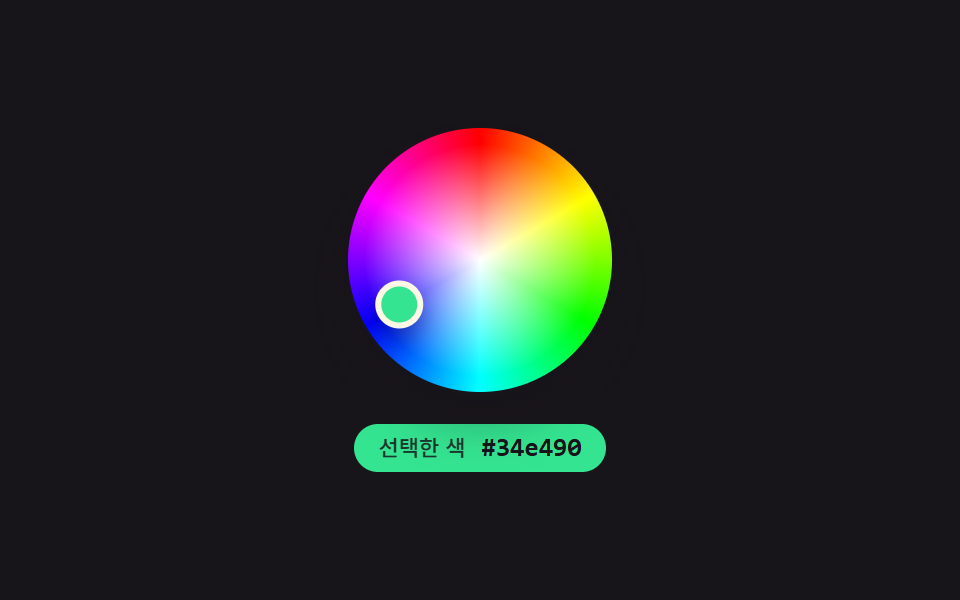 html カラーピッカー デザイン9選 — ホイールから履歴色まで「html カラーピッカー デザイン」で検索すると、色を選ぶ見た目だけを真似た静止画像がほとんど出てきます。ここで扱う9つの画面はその手前に計算の層を1枚重ねます。選択地点の角度が色相値へ求め直され、スウォッチの明るさで チェックアイコンの この記事のデモをすべて見る