08スポイト — 抽出された色の明るさでプレビューを求め直すカラーピッカー
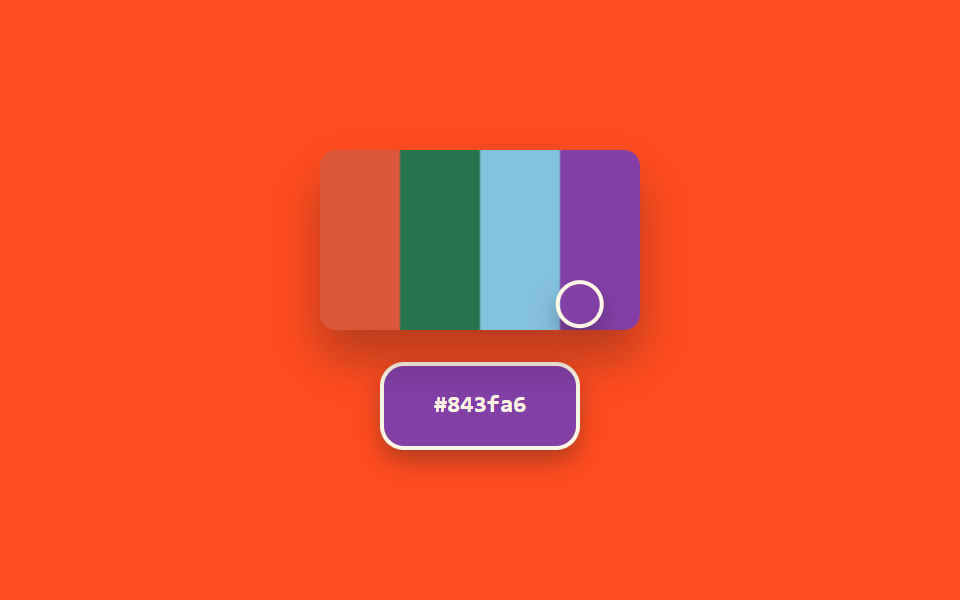
画面から抽出された色の明るさの値を計算し、その値によってプレビュー欄の文字色と枠線の太さが一緒に決め直されるスポイト型カラーピッカーです。
使いどころ画面色抽出ツール、デザインQAの色検証
getImageDataBANDSaria-hidden
<main class="stage">
<section class="panel">
  <div class="screenWrap">
    <canvas class="screen" id="screen" width="160" height="90" aria-hidden="true"></canvas>
    <div class="loupe" id="loupe"></div>
  </div>
  <div class="preview" id="preview">
    <span class="hex" id="hex">#000000</span>
  </div>
</section>
</main>
@use "../../../../site/static/demo-tokens" as *;
@include stage($stage-orange);
.panel {
display: flex;
flex-direction: column;
align-items: center;
gap: $sp-4;
}
.screenWrap {
position: relative;
width: 160px;
height: 90px;
border-radius: $r-sm;
overflow: hidden;
box-shadow: $shadow-raised;
}
.screen {
display: block;
width: 160px;
height: 90px;
}
.loupe {
position: absolute;
top: 0;
left: 0;
width: 20px;
height: 20px;
border-radius: $r-pill;
border: 2px solid $subject-cream;
box-shadow: $shadow-press;
pointer-events: none;
}
.preview {
display: flex;
align-items: center;
justify-content: center;
width: 96px;
height: 40px;
border-radius: $r-control;
border-style: solid;
border-color: $subject-cream;
color: $subject-cream;
box-shadow: $shadow-press;
&.is-ink {
color: $subject-ink;
border-color: $subject-ink;
}
}
.hex {
font-family: "Space Mono", ui-monospace, monospace;
font-weight: 700;
font-size: 12px;
line-height: 1.3;
}
@media (prefers-reduced-motion: reduce) {
.loupe,
.preview { transition: none; }
}html, body {
margin: 0;
overflow: hidden;
}
.stage {
box-sizing: border-box;
min-height: 100vh;
display: grid;
place-items: center;
margin: 0;
background: #ff4d1f;
font-family: -apple-system, "Segoe UI", "Noto Sans KR", sans-serif;
padding: clamp(8px, 4vw, 24px);
}
.panel {
display: flex;
flex-direction: column;
align-items: center;
gap: 16px;
}
.screenWrap {
position: relative;
width: 160px;
height: 90px;
border-radius: 8px;
overflow: hidden;
box-shadow: 0 14px 24px rgba(23, 20, 26, 0.32);
}
.screen {
display: block;
width: 160px;
height: 90px;
}
.loupe {
position: absolute;
top: 0;
left: 0;
width: 20px;
height: 20px;
border-radius: 999px;
border: 2px solid #fff7e6;
box-shadow: 0 6px 12px rgba(23, 20, 26, 0.32);
pointer-events: none;
}
.preview {
display: flex;
align-items: center;
justify-content: center;
width: 96px;
height: 40px;
border-radius: 12px;
border-style: solid;
border-color: #fff7e6;
color: #fff7e6;
box-shadow: 0 6px 12px rgba(23, 20, 26, 0.32);
}
.preview.is-ink {
color: #17141a;
border-color: #17141a;
}
.hex {
font-family: "Space Mono", ui-monospace, monospace;
font-weight: 700;
font-size: 12px;
line-height: 1.3;
}
@media (prefers-reduced-motion: reduce) {
.loupe,
.preview {
transition: none;
}
}// 스포이드(08) — 캔버스에서 커서 위치의 실제 픽셀 값을 getImageData 로 추출해
// 밝기 값을 계산하고, 그 값에 따라 プレビュー 글자색과 테두리 두께를 함께 다시 정한다.
// 브라우저 EyeDropper API 는 지원 범위가 좁아 쓰지 않는다 — 캔버스 픽셀 샘플링 시뮬레이션.
// 실키·실서버 요청 없음.
(function () {
var screenEl = document.getElementById('screen');
var loupeEl = document.getElementById('loupe');
var previewEl = document.getElementById('preview');
var hexEl = document.getElementById('hex');
if (!screenEl || !loupeEl || !previewEl || !hexEl || !screenEl.getContext) return;
var ctx = screenEl.getContext('2d');
if (!ctx) return;
var reduce = window.matchMedia('(prefers-reduced-motion: reduce)').matches;
var CANVAS_W = 160;
var CANVAS_H = 90;
var CYCLE_MS = 2600;
var MIN_BORDER = 1;
var MAX_BORDER = 6;
var BANDS = [
{ x0: 0, x1: 40, h: 10, s: 70, l: 55 },
{ x0: 40, x1: 80, h: 150, s: 50, l: 30 },
{ x0: 80, x1: 120, h: 200, s: 60, l: 70 },
{ x0: 120, x1: 160, h: 280, s: 45, l: 45 }
];
BANDS.forEach(function (b) {
ctx.fillStyle = 'hsl(' + b.h + 'deg ' + b.s + '% ' + b.l + '%)';
ctx.fillRect(b.x0, 0, b.x1 - b.x0, CANVAS_H);
});
function toHex(n) {
return n.toString(16).padStart(2, '0');
}
function apply(t) {
var p = (t / CYCLE_MS) % 1;
var triangle = p < .5 ? p * 2 : (1 - p) * 2;
var x = 8 + triangle * (CANVAS_W - 16);
var y = CANVAS_H / 2 + Math.sin(p * Math.PI * 4) * (CANVAS_H / 2 - 6);
var xi = Math.max(0, Math.min(CANVAS_W - 1, Math.round(x)));
var yi = Math.max(0, Math.min(CANVAS_H - 1, Math.round(y)));
var pixel = ctx.getImageData(xi, yi, 1, 1).data;
var r = pixel[0], g = pixel[1], b = pixel[2];
var hex = '#' + toHex(r) + toHex(g) + toHex(b);
var brightness = (r * 299 + g * 587 + b * 114) / 1000;
var ink = brightness > 150;
var borderPx = MIN_BORDER + (brightness / 255) * (MAX_BORDER - MIN_BORDER);
loupeEl.style.transform = 'translate(-50%, -50%) translate(' + x.toFixed(2) + 'px, ' + y.toFixed(2) + 'px)';
previewEl.style.background = hex;
previewEl.style.borderWidth = borderPx.toFixed(1) + 'px';
previewEl.classList.toggle('is-ink', ink);
hexEl.textContent = hex;
}
if (reduce) {
apply(0);
return;
}
var start = null;
function loop(ts) {
if (start === null) start = ts;
var t = (ts - start) % CYCLE_MS;
apply(t);
requestAnimationFrame(loop);
}
requestAnimationFrame(loop);
})();import { useEffect, useRef } from "react";
import styles from "./ColorPickerEyedropper.module.scss";
// 스포이드 — 캔버스에서 커서 위치의 실제 픽셀 값을 getImageData 로 추출해 밝기 값을
// 계산하고, 그 값에 따라 미리보기 글자색과 테두리 두께를 함께 다시 정한다.
// 브라우저 스포이드 API는 지원 범위가 좁아 쓰지 않는다 — 캔버스 픽셀 샘플링 시뮬레이션.
// 실키·실서버 요청 없음.
const CANVAS_W = 160;
const CANVAS_H = 90;
const CYCLE_MS = 2600;
const MIN_BORDER = 1;
const MAX_BORDER = 6;
const BANDS = [
{ x0: 0, x1: 40, h: 10, s: 70, l: 55 },
{ x0: 40, x1: 80, h: 150, s: 50, l: 30 },
{ x0: 80, x1: 120, h: 200, s: 60, l: 70 },
{ x0: 120, x1: 160, h: 280, s: 45, l: 45 },
];
function toHex(n: number) {
return n.toString(16).padStart(2, "0");
}
export default function ColorPickerEyedropper() {
const screenRef = useRef<HTMLCanvasElement>(null);
const loupeRef = useRef<HTMLDivElement>(null);
const previewRef = useRef<HTMLDivElement>(null);
const hexRef = useRef<HTMLSpanElement>(null);
useEffect(() => {
const screen = screenRef.current;
const loupe = loupeRef.current;
const preview = previewRef.current;
const hexEl = hexRef.current;
if (!screen || !loupe || !preview || !hexEl) return;
const ctx = screen.getContext("2d");
if (!ctx) return;
const reduce = window.matchMedia("(prefers-reduced-motion: reduce)").matches;
BANDS.forEach((b) => {
ctx.fillStyle = `hsl(${b.h}deg ${b.s}% ${b.l}%)`;
ctx.fillRect(b.x0, 0, b.x1 - b.x0, CANVAS_H);
});
function apply(t: number) {
const p = (t / CYCLE_MS) % 1;
const triangle = p < .5 ? p * 2 : (1 - p) * 2;
const x = 8 + triangle * (CANVAS_W - 16);
const y = CANVAS_H / 2 + Math.sin(p * Math.PI * 4) * (CANVAS_H / 2 - 6);
const xi = Math.max(0, Math.min(CANVAS_W - 1, Math.round(x)));
const yi = Math.max(0, Math.min(CANVAS_H - 1, Math.round(y)));
const pixel = ctx!.getImageData(xi, yi, 1, 1).data;
const r = pixel[0], g = pixel[1], b = pixel[2];
const hex = "#" + toHex(r) + toHex(g) + toHex(b);
const brightness = (r * 299 + g * 587 + b * 114) / 1000;
const ink = brightness > 150;
const borderPx = MIN_BORDER + (brightness / 255) * (MAX_BORDER - MIN_BORDER);
loupe!.style.transform = `translate(-50%, -50%) translate(${x.toFixed(2)}px, ${y.toFixed(2)}px)`;
preview!.style.background = hex;
preview!.style.borderWidth = `${borderPx.toFixed(1)}px`;
preview!.classList.toggle(styles.isInk, ink);
hexEl!.textContent = hex;
}
if (reduce) {
apply(0);
return;
}
let start: number | null = null;
let raf = 0;
function loop(ts: number) {
if (start === null) start = ts;
const t = (ts - start) % CYCLE_MS;
apply(t);
raf = requestAnimationFrame(loop);
}
raf = requestAnimationFrame(loop);
return () => cancelAnimationFrame(raf);
}, []);
return (
<div className={styles.stage}>
<section className={styles.panel}>
<div className={styles.screenWrap}>
<canvas className={styles.screen} ref={screenRef} width={CANVAS_W} height={CANVAS_H} aria-hidden="true" />
<div className={styles.loupe} ref={loupeRef} />
</div>
<div className={styles.preview} ref={previewRef}>
<span className={styles.hex} ref={hexRef}>#000000</span>
</div>
</section>
</div>
);
}08 スポイト — 抽出された色の明るさでプレビューを求め直すカラーピッカー — 計測 累積面積 8.365% · 動いたフレーム 23/23GODRICH オリジナル · SCSS と React は zip に同梱 · html カラーピッカー デザイン9選 — ホイールから履歴色まで
このデモが属する記事
 html カラーピッカー デザイン9選 — ホイールから履歴色まで「html カラーピッカー デザイン」で検索すると、色を選ぶ見た目だけを真似た静止画像がほとんど出てきます。ここで扱う9つの画面はその手前に計算の層を1枚重ねます。選択地点の角度が色相値へ求め直され、スウォッチの明るさで チェックアイコンの この記事のデモをすべて見る