02飛ばし打ちでも当たる検索
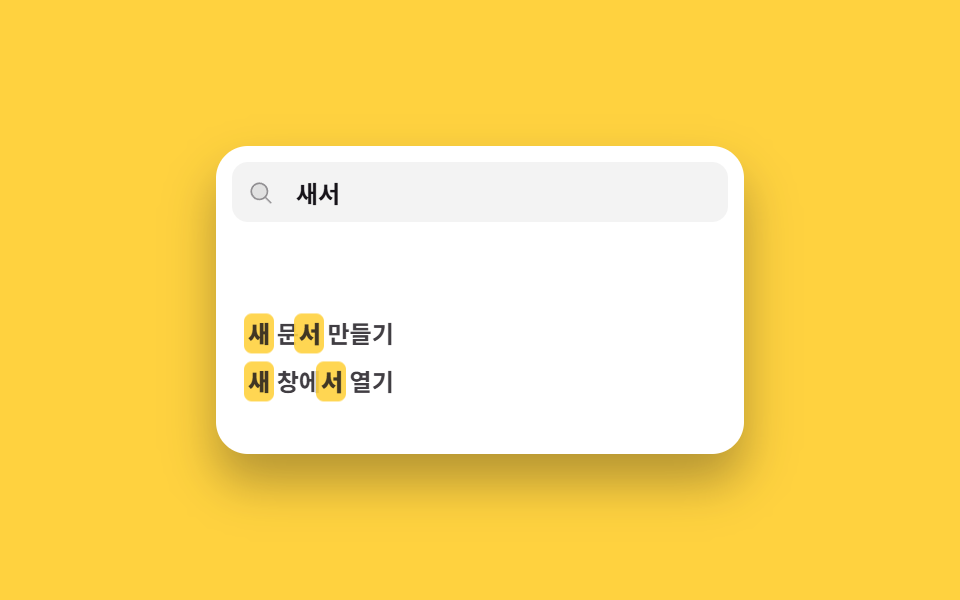
文字を続けて打たず飛ばして打っても順番さえ合えば当たり、一致した文字だけに蛍光の背景が付きます。
使いどころコマンド名が長く頭文字しか覚えていないリスト(設定画面・文書タイトル)に検索を付けるとき
markaria-activedescendantopacity
<main class="stage">
  <div class="pal is-demo" role="dialog" aria-modal="true" aria-label="コマンドパレット">
    <div class="pal__bar">
      <span class="pal__mag" aria-hidden="true"><svg viewBox="0 0 256 256" width="13" height="13"><g fill="currentColor"><path d="M192 112a80 80 0 1 1-80-80a80 80 0 0 1 80 80" opacity=".2"/><path d="m229.66 218.34l-50.06-50.06a88.21 88.21 0 1 0-11.32 11.31l50.06 50.07a8 8 0 0 0 11.32-11.32M40 112a72 72 0 1 1 72 72a72.08 72.08 0 0 1-72-72"/></g></svg></span>
      <input class="pal__input" id="q" type="text" role="combobox" aria-expanded="true" aria-controls="list" aria-label="コマンドを検索" placeholder="コマンドを検索" autocomplete="off">
      <span class="pal__ghost" aria-hidden="true">新書</span>
    </div>
    <div class="pal__box">
      <div class="pal__list" id="list" role="listbox" aria-label="コマンドパレット">
        <div class="pal__opt pal__opt--out" id="o1" role="option" aria-selected="false" tabindex="-1"><span class="pal__name">コメントを追加</span></div>
        <div class="pal__opt pal__opt--out" id="o2" role="option" aria-selected="false" tabindex="-1"><span class="pal__name">設定を開く</span></div>
        <div class="pal__opt pal__opt--hit" id="o3" role="option" aria-selected="false" tabindex="-1"><span class="pal__name"><mark class="pal__m">新</mark> 規<mark class="pal__m">書</mark> 類を作成</span></div>
        <div class="pal__opt pal__opt--hit" id="o4" role="option" aria-selected="false" tabindex="-1"><span class="pal__name"><mark class="pal__m">新</mark> しい文<mark class="pal__m">書</mark> を開く</span></div>
      </div>
    </div>
  </div>
</main>
@use "../../../../site/static/demo-tokens" as *;
$duration: $dur-quick;
$easing: $ease-spring;
$color: $subject-blue;
@include stage($stage-yellow);
.pal {
box-sizing: border-box;
width: min(264px, 88vw);
padding: $sp-2;
background: #fff;
border-radius: $r-card;
box-shadow: $shadow-raised;
font-family: -apple-system, "Segoe UI", "Noto Sans KR", sans-serif;
color: $subject-ink;
}
.pal__bar {
position: relative;
box-sizing: border-box;
height: 30px;
display: flex; align-items: center; gap: $sp-2;
padding: 0 $sp-2;
border-radius: $r-sm;
background: rgba(23, 20, 26, .05);
}
.pal__mag { display: inline-flex; color: rgba(23, 20, 26, .42); }
.pal__input {
flex: 1 1 auto;
min-width: 0;
border: 0; background: transparent;
font-family: inherit;
font-size: 12px; font-weight: 600;
color: $subject-ink;
}
.pal__input:focus-visible { outline: 2px solid $color; outline-offset: 2px; border-radius: $r-xs; }
// 자동 루프는 친 글자를 고스트로 겹쳐 보여주므로, 루프 동안에는 placeholder 를 비운다 (두 글자가 겹쳐 읽혔다)
.pal.is-demo .pal__input::placeholder { color: transparent; }
.pal__ghost {
position: absolute;
left: 32px; top: 50%;
transform: translateY(-50%);
font-size: 12px; font-weight: 700;
color: $subject-ink;
opacity: 0;
pointer-events: none;
}
.pal__box {
box-sizing: border-box;
height: 100px;
margin: $sp-2 0 0;
overflow: hidden;
}
.pal__list { padding: 0; }
.pal__opt {
box-sizing: border-box;
height: 24px;
display: flex; align-items: center;
padding: 0 $sp-2;
border-radius: $r-sm;
cursor: pointer;
}
.pal__opt.is-at { background: rgba(47, 109, 246, .12); }
.pal__name {
font-size: 12px; font-weight: 600;
color: rgba(23, 20, 26, .82);
white-space: nowrap;
}
.pal__m {
position: relative;
z-index: 0;
background: transparent;
color: inherit;
font-weight: 800;
}
.pal__m::before {
content: "";
position: absolute;
inset: -2px;
z-index: -1;
border-radius: $r-xs;
background: rgba(255, 210, 63, .9);
opacity: 0;
}
.pal__m.is-on::before { opacity: 1; }
// ── 자동 루프: 「새서」를 치면 안 맞는 두 줄이 한 프레임에 사라지고, 맞은 두 줄이 그 자리로 올라온다 ──
// 사라짐과 올라옴이 같은 자리를 지나므로 사라짐은 steps(1) 로 먼저 끊고 그다음 미끄러진다 (겹쳐 비치는 프레임 0)
.pal.is-demo .pal__ghost,
.pal.is-demo .pal__m::before { animation: cut-in $dur-loop steps(1, end) infinite; }
.pal.is-demo .pal__opt--out { animation: cut-out $dur-loop steps(1, end) infinite; }
.pal.is-demo .pal__opt--hit { animation: rise $dur-loop $easing infinite; }
@keyframes cut-in {
0%, 17% { opacity: 0; }
18%, 82% { opacity: 1; }
83%, 100% { opacity: 0; }
}
@keyframes cut-out {
0%, 17% { opacity: 1; }
18%, 82% { opacity: 0; }
83%, 100% { opacity: 1; }
}
@keyframes rise {
0%, 18% { transform: translateY(0); }
42%, 62% { transform: translateY(-48px); }
83%, 100% { transform: translateY(0); }
}
@media (prefers-reduced-motion: reduce) {
.pal.is-demo .pal__ghost,
.pal.is-demo .pal__m::before,
.pal.is-demo .pal__opt--out,
.pal.is-demo .pal__opt--hit { animation: none !important; }
.pal__ghost { opacity: 0; }
}html, body {
margin: 0;
overflow: hidden;
}
.stage {
box-sizing: border-box;
min-height: 100vh;
display: grid;
place-items: center;
margin: 0;
background: #ffd23f;
font-family: -apple-system, "Segoe UI", "Noto Sans KR", sans-serif;
padding: clamp(8px, 4vw, 24px);
}
.pal {
box-sizing: border-box;
width: min(264px, 88vw);
padding: 8px;
background: #fff;
border-radius: 16px;
box-shadow: 0 14px 24px rgba(23, 20, 26, 0.32);
font-family: -apple-system, "Segoe UI", "Noto Sans KR", sans-serif;
color: #17141a;
}
.pal__bar {
position: relative;
box-sizing: border-box;
height: 30px;
display: flex;
align-items: center;
gap: 8px;
padding: 0 8px;
border-radius: 8px;
background: rgba(23, 20, 26, 0.05);
}
.pal__mag {
display: inline-flex;
color: rgba(23, 20, 26, 0.42);
}
.pal__input {
flex: 1 1 auto;
min-width: 0;
border: 0;
background: transparent;
font-family: inherit;
font-size: 12px;
font-weight: 600;
color: #17141a;
}
.pal__input:focus-visible {
outline: 2px solid #2f6df6;
outline-offset: 2px;
border-radius: 4px;
}
.pal.is-demo .pal__input::placeholder {
color: transparent;
}
.pal__ghost {
position: absolute;
left: 32px;
top: 50%;
transform: translateY(-50%);
font-size: 12px;
font-weight: 700;
color: #17141a;
opacity: 0;
pointer-events: none;
}
.pal__box {
box-sizing: border-box;
height: 100px;
margin: 8px 0 0;
overflow: hidden;
}
.pal__list {
padding: 0;
}
.pal__opt {
box-sizing: border-box;
height: 24px;
display: flex;
align-items: center;
padding: 0 8px;
border-radius: 8px;
cursor: pointer;
}
.pal__opt.is-at {
background: rgba(47, 109, 246, 0.12);
}
.pal__name {
font-size: 12px;
font-weight: 600;
color: rgba(23, 20, 26, 0.82);
white-space: nowrap;
}
.pal__m {
position: relative;
z-index: 0;
background: transparent;
color: inherit;
font-weight: 800;
}
.pal__m::before {
content: "";
position: absolute;
inset: -2px;
z-index: -1;
border-radius: 4px;
background: rgba(255, 210, 63, 0.9);
opacity: 0;
}
.pal__m.is-on::before {
opacity: 1;
}
.pal.is-demo .pal__ghost,
.pal.is-demo .pal__m::before {
animation: cut-in 2s steps(1, end) infinite;
}
.pal.is-demo .pal__opt--out {
animation: cut-out 2s steps(1, end) infinite;
}
.pal.is-demo .pal__opt--hit {
animation: rise 2s cubic-bezier(0.2, 0.8, 0.2, 1) infinite;
}
@keyframes cut-in {
0%, 17% {
opacity: 0;
}
18%, 82% {
opacity: 1;
}
83%, 100% {
opacity: 0;
}
}
@keyframes cut-out {
0%, 17% {
opacity: 1;
}
18%, 82% {
opacity: 0;
}
83%, 100% {
opacity: 1;
}
}
@keyframes rise {
0%, 18% {
transform: translateY(0);
}
42%, 62% {
transform: translateY(-48px);
}
83%, 100% {
transform: translateY(0);
}
}
@media (prefers-reduced-motion: reduce) {
.pal.is-demo .pal__ghost,
.pal.is-demo .pal__m::before,
.pal.is-demo .pal__opt--out,
.pal.is-demo .pal__opt--hit {
animation: none !important;
}
.pal__ghost {
opacity: 0;
}
}// 실제 동작: 글자를 건너뛰어 쳐도 순서만 맞으면 걸린다(부분 수열). 맞은 글자만 mark 로 감싼다.
var pal = document.querySelector('.pal');
var input = document.getElementById('q');
var opts = [].slice.call(document.querySelectorAll('.pal__opt'));
var names = opts.map(function (o) { return o.querySelector('.pal__name').textContent; });
var at = -1;
function hits(name, q) {
var lower = name.toLowerCase(), need = q.toLowerCase();
var idx = [], i = 0;
for (var c = 0; c < need.length; c++) {
var k = lower.indexOf(need[c], i);
if (k < 0) return null;
idx.push(k); i = k + 1;
}
return idx;
}
function paint(name, idx) {
var html = '', last = 0;
idx.forEach(function (k) {
html += name.slice(last, k) + '<mark class="pal__m is-on">' + name[k] + '</mark>';
last = k + 1;
});
return html + name.slice(last);
}
function render(q) {
pal.classList.remove('is-demo');
opts.forEach(function (o, i) {
var idx = q ? hits(names[i], q) : [];
o.hidden = !idx;
if (idx) o.querySelector('.pal__name').innerHTML = idx.length ? paint(names[i], idx) : names[i];
});
at = -1;
}
input.addEventListener('input', function () { render(input.value.trim()); });
document.addEventListener('keydown', function (e) {
var vis = opts.filter(function (o) { return !o.hidden; });
if (e.key === 'ArrowDown' || e.key === 'ArrowUp') {
pal.classList.remove('is-demo');
at = Math.max(0, Math.min(at + (e.key === 'ArrowDown' ? 1 : -1), vis.length - 1));
vis.forEach(function (o, i) { o.classList.toggle('is-at', i === at); });
if (vis[at]) input.setAttribute('aria-activedescendant', vis[at].id);
e.preventDefault();
} else if (e.key === 'Enter' && vis[at]) {
vis.forEach(function (o) { o.setAttribute('aria-selected', String(o === vis[at])); });
e.preventDefault();
} else if (e.key === 'Escape') {
input.value = ''; render(''); input.focus({ preventScroll: true });
}
});import { useRef, useState } from "react";
import type { CSSProperties } from "react";
import styles from "./FuzzyPalette.module.scss";
export type FuzzyPaletteProps = {
placeholder?: string;
options?: string[];
duration?: number;
easing?: string;
color?: string;
};
type Vars = CSSProperties & { "--duration"?: string; "--easing"?: string; "--color"?: string };
type KeyEvt = { key: string; preventDefault: () => void };
type ChangeEvt = { target: { value: string } };
// 부분 수열 매칭 — 글자를 건너뛰어 쳐도 순서만 맞으면 걸린다. 맞은 자리를 그대로 돌려준다
export function fuzzy(name: string, query: string): number[] | null {
if (!query) return [];
const hay = name.toLowerCase();
const need = query.toLowerCase();
const hit: number[] = [];
let from = 0;
for (let c = 0; c < need.length; c++) {
const k = hay.indexOf(need[c], from);
if (k < 0) return null;
hit.push(k);
from = k + 1;
}
return hit;
}
function parts(name: string, hit: number[]) {
const out: { text: string; on: boolean }[] = [];
let last = 0;
hit.forEach((k) => {
if (k > last) out.push({ text: name.slice(last, k), on: false });
out.push({ text: name[k], on: true });
last = k + 1;
});
if (last < name.length) out.push({ text: name.slice(last), on: false });
return out;
}
export default function FuzzyPalette({
placeholder = "Search commands",
options = ["Add comment", "Open settings", "New document", "New window"],
duration = 220,
easing = "cubic-bezier(.2,.8,.2,1)",
color = "#2f6df6",
}: FuzzyPaletteProps) {
const [query, setQuery] = useState("");
const [at, setAt] = useState(-1);
const [picked, setPicked] = useState<string | null>(null);
const inputRef = useRef<HTMLInputElement>(null);
const vars: Vars = { "--duration": `${duration}ms`, "--easing": easing, "--color": color };
const visible = options
.map((name, i) => ({ name, i, hit: fuzzy(name, query.trim()) }))
.filter((row) => row.hit !== null);
return (
<div className={styles.pal} style={vars} role="dialog" aria-modal="true" aria-label="Command palette">
<div className={styles.bar}>
<span className={styles.mag} aria-hidden="true">
<svg viewBox="0 0 256 256" width="13" height="13">
<g fill="currentColor">
<path d="M192 112a80 80 0 1 1-80-80a80 80 0 0 1 80 80" opacity=".2" />
<path d="m229.66 218.34l-50.06-50.06a88.21 88.21 0 1 0-11.32 11.31l50.06 50.07a8 8 0 0 0 11.32-11.32M40 112a72 72 0 1 1 72 72a72.08 72.08 0 0 1-72-72" />
</g>
</svg>
</span>
<input
ref={inputRef}
className={styles.input}
type="text"
role="combobox"
aria-expanded="true"
aria-controls="fz-list"
aria-activedescendant={at >= 0 && visible[at] ? `fz-o${visible[at].i}` : undefined}
aria-label={placeholder}
placeholder={placeholder}
autoComplete="off"
value={query}
onChange={(e: ChangeEvt) => { setQuery(e.target.value); setAt(-1); }}
onKeyDown={(e: KeyEvt) => {
if (e.key === "ArrowDown" || e.key === "ArrowUp") {
e.preventDefault();
setAt((a) => Math.max(0, Math.min(a + (e.key === "ArrowDown" ? 1 : -1), visible.length - 1)));
} else if (e.key === "Enter" && visible[at]) {
e.preventDefault();
setPicked(visible[at].name);
} else if (e.key === "Escape") {
setQuery(""); setAt(-1);
inputRef.current?.focus({ preventScroll: true });
}
}}
/>
</div>
<div className={styles.box}>
<div className={styles.list} id="fz-list" role="listbox" aria-label="Command palette">
{visible.map((row, vi) => (
<div
key={row.name}
id={`fz-o${row.i}`}
className={`${styles.opt} ${vi === at ? styles.isAt : ""}`}
role="option"
aria-selected={row.name === picked}
tabIndex={-1}
onMouseMove={() => setAt(vi)}
onClick={() => setPicked(row.name)}
>
<span className={styles.name}>
{parts(row.name, row.hit ?? []).map((p, pi) =>
p.on ? <mark className={styles.mark} key={pi}>{p.text}</mark> : <span key={pi}>{p.text}</span>
)}
</span>
</div>
))}
</div>
</div>
</div>
);
}02 飛ばし打ちでも当たる検索 — 計測 累積面積 4.095% · 動いたフレーム 12/23GODRICH オリジナル · SCSS と React は zip に同梱 · 検索窓 デザイン css 9選 — Cmd+Kで開くパレット
このデモが属する記事
 検索窓 デザイン css 9選 — Cmd+Kで開くパレット検索窓 デザイン css の中でもコマンドパレットは、画面の上に浮かんでコマンドと文書を1つの欄から探すオーバーレイです。9つのうち1つは該当なしのときにむしろ行が増え、もう1つはリストを持たず入力欄だけを先に出します。 この記事のデモをすべて見る