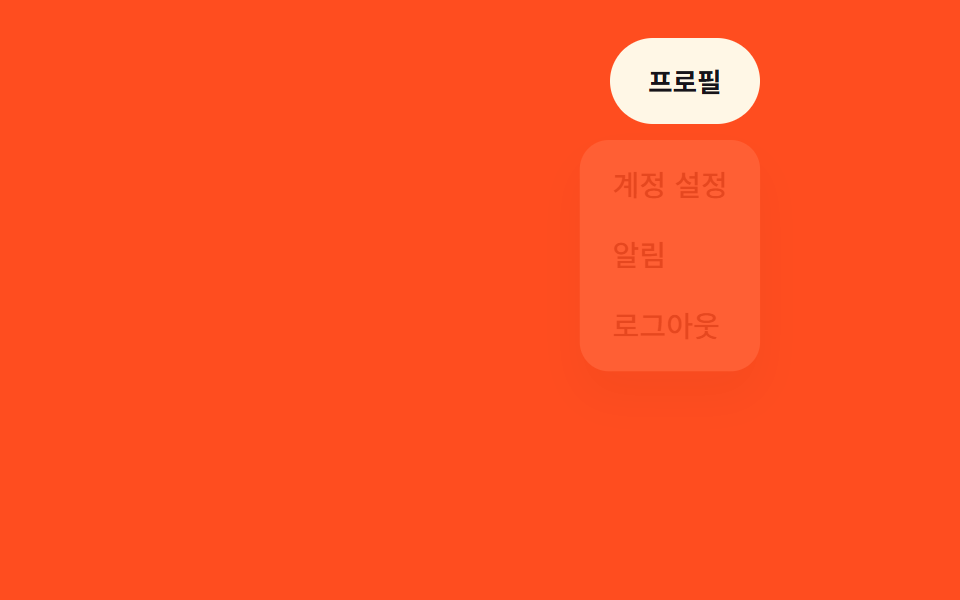
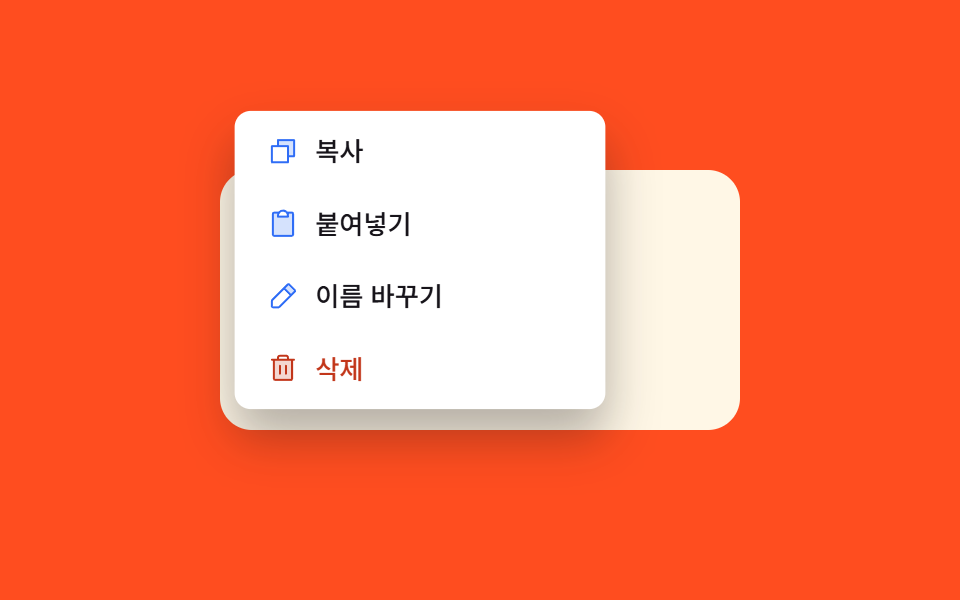
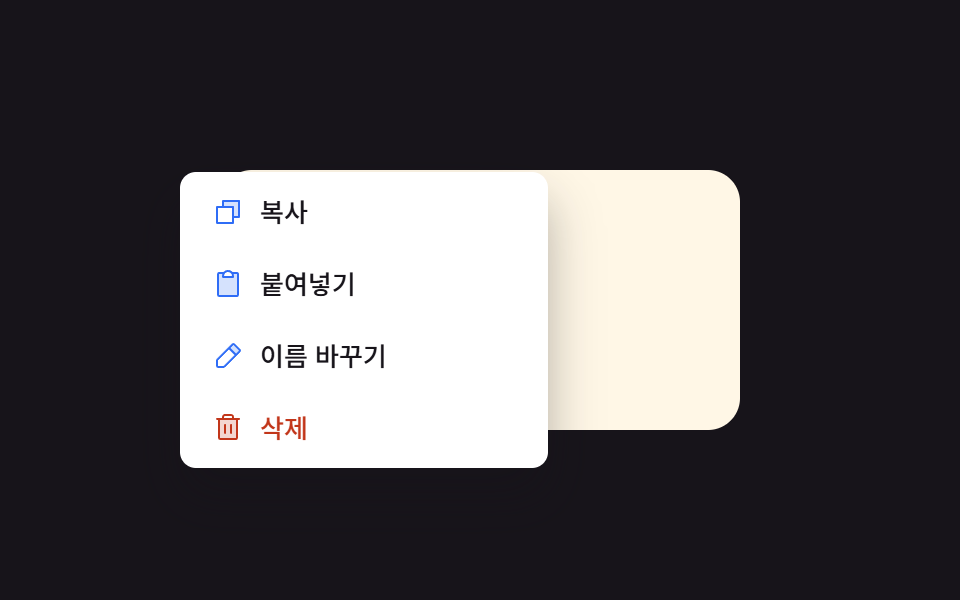
03スケールフェードイン — 大きさの値と透明度の値が小さい値から一緒に広がる方式
メニューが開いた状態になると大きさの値が小さい値から元の値まで、透明度の値が0から1まで同じ時間の間に一緒に変わり、閉じた状態になるとその値が逆に戻ります。
使いどころ短いアクションメニューを開く、表の行の右クリックメニュー
openAt(x, y)transform-origin: originX% originY%((x - left) / mw) * 100
<main class="stage">
<div class="cm is-demo" id="cm">
  <div class="cm__field" id="cmField">
    <span class="cm__hint">右クリック</span>
  </div>
  <div class="cm__menu" id="cmMenu" role="menu">
    <button class="cm__item" type="button" role="menuitem">
      <span class="cm__ic"><svg xmlns="http://www.w3.org/2000/svg" viewBox="0 0 256 256"><g fill="currentColor"><path d="M216 40v128h-48V88H88V40Z" opacity=".2"/><path d="M216 32H88a8 8 0 0 0-8 8v40H40a8 8 0 0 0-8 8v128a8 8 0 0 0 8 8h128a8 8 0 0 0 8-8v-40h40a8 8 0 0 0 8-8V40a8 8 0 0 0-8-8m-56 176H48V96h112Zm48-48h-32V88a8 8 0 0 0-8-8H96V48h112Z"/></g></svg></span>
      <span>コピー</span>
    </button>
    <button class="cm__item" type="button" role="menuitem">
      <span class="cm__ic"><svg xmlns="http://www.w3.org/2000/svg" viewBox="0 0 256 256"><g fill="currentColor"><path d="M208 48v168a8 8 0 0 1-8 8H56a8 8 0 0 1-8-8V48a8 8 0 0 1 8-8h40a39.83 39.83 0 0 0-8 24v8h80v-8a39.83 39.83 0 0 0-8-24h40a8 8 0 0 1 8 8" opacity=".2"/><path d="M200 32h-36.26a47.92 47.92 0 0 0-71.48 0H56a16 16 0 0 0-16 16v168a16 16 0 0 0 16 16h144a16 16 0 0 0 16-16V48a16 16 0 0 0-16-16m-72 0a32 32 0 0 1 32 32H96a32 32 0 0 1 32-32m72 184H56V48h26.75A47.9 47.9 0 0 0 80 64v8a8 8 0 0 0 8 8h80a8 8 0 0 0 8-8v-8a47.9 47.9 0 0 0-2.75-16H200Z"/></g></svg></span>
      <span>貼り付け</span>
    </button>
    <button class="cm__item" type="button" role="menuitem">
      <span class="cm__ic"><svg xmlns="http://www.w3.org/2000/svg" viewBox="0 0 256 256"><g fill="currentColor"><path d="M221.66 90.34L192 120l-56-56l29.66-29.66a8 8 0 0 1 11.31 0L221.66 79a8 8 0 0 1 0 11.34" opacity=".2"/><path d="m227.31 73.37l-44.68-44.69a16 16 0 0 0-22.63 0L36.69 152A15.86 15.86 0 0 0 32 163.31V208a16 16 0 0 0 16 16h44.69a15.86 15.86 0 0 0 11.31-4.69L227.31 96a16 16 0 0 0 0-22.63M92.69 208H48v-44.69l88-88L180.69 120ZM192 108.68L147.31 64l24-24L216 84.68Z"/></g></svg></span>
      <span>名前を変更</span>
    </button>
    <button class="cm__item cm__item--danger" type="button" role="menuitem">
      <span class="cm__ic"><svg xmlns="http://www.w3.org/2000/svg" viewBox="0 0 256 256"><g fill="currentColor"><path d="M200 56v152a8 8 0 0 1-8 8H64a8 8 0 0 1-8-8V56Z" opacity=".2"/><path d="M216 48h-40v-8a24 24 0 0 0-24-24h-48a24 24 0 0 0-24 24v8H40a8 8 0 0 0 0 16h8v144a16 16 0 0 0 16 16h128a16 16 0 0 0 16-16V64h8a8 8 0 0 0 0-16M96 40a8 8 0 0 1 8-8h48a8 8 0 0 1 8 8v8H96Zm96 168H64V64h128Zm-80-104v64a8 8 0 0 1-16 0v-64a8 8 0 0 1 16 0m48 0v64a8 8 0 0 1-16 0v-64a8 8 0 0 1 16 0"/></g></svg></span>
      <span>削除</span>
    </button>
  </div>
</div>
</main>@use "../../../../site/static/demo-tokens" as *;
// 계산 겹: 메뉴를 클릭 좌표 중심으로 배치한 뒤 화면 경계로 clamp 하고, 실제 클릭 점이 그 상자
// 안의 몇 % 지점에 놓였는지 되짚어(originFor()) transform-origin 으로 넘긴다 — 상자가 밀려도
// 확대는 항상 진짜 클릭 지점에서 시작한다.
@include stage($stage-orange);
.cm {
position: relative;
width: 100%;
height: 100%;
display: grid;
place-items: center;
}
.cm__field {
width: clamp(190px, 60vw, 260px);
height: 130px;
border-radius: $r-card;
background: $subject-cream;
color: $subject-ink;
display: grid;
place-items: center;
padding: $sp-3;
box-sizing: border-box;
font: 600 14px/1.3 -apple-system, "Segoe UI", "Noto Sans KR", sans-serif;
text-align: center;
user-select: none;
}
.cm__hint { opacity: .7; font-weight: 500; font-size: 12px; }
.cm__menu {
position: fixed;
top: 0;
left: 0;
min-width: 176px;
background: $stage-paper;
border-radius: $r-sm;
box-shadow: $shadow-raised;
padding: $sp-1;
display: grid;
gap: $sp-1;
opacity: 0;
transform: scale(.8);
transform-origin: 50% 50%;
pointer-events: none;
transition: opacity $dur-quick $ease-pop, transform $dur-quick $ease-pop;
z-index: 5;
&.is-open { opacity: 1; transform: scale(1); pointer-events: auto; }
}
.cm__item {
display: flex;
align-items: center;
gap: $sp-2;
padding: $sp-2 $sp-3;
border: 0;
background: none;
border-radius: $r-xs;
font: 500 13px/1.2 -apple-system, "Segoe UI", "Noto Sans KR", sans-serif;
color: $subject-ink;
cursor: pointer;
text-align: left;
&:hover, &:focus-visible { background: rgba($subject-ink, .08); }
&--danger { color: $error; }
}
.cm__ic {
width: 16px;
height: 16px;
flex: none;
color: $subject-blue;
svg { display: block; width: 100%; height: 100%; }
}
.cm__item--danger .cm__ic { color: $error; }
@media (max-width: 340px) {
.cm__field { width: 176px; height: 108px; font-size: 12px; padding: $sp-2; }
.cm__menu { min-width: 148px; }
.cm__item { padding: $sp-1 $sp-2; font-size: 12px; }
}
@media (prefers-reduced-motion: reduce) {
.cm__menu { transition: none; }
}html, body {
margin: 0;
overflow: hidden;
}
.stage {
box-sizing: border-box;
min-height: 100vh;
display: grid;
place-items: center;
margin: 0;
background: #ff4d1f;
font-family: -apple-system, "Segoe UI", "Noto Sans KR", sans-serif;
padding: clamp(8px, 4vw, 24px);
}
.cm {
position: relative;
width: 100%;
height: 100%;
display: grid;
place-items: center;
}
.cm__field {
width: clamp(190px, 60vw, 260px);
height: 130px;
border-radius: 16px;
background: #fff7e6;
color: #17141a;
display: grid;
place-items: center;
padding: 12px;
box-sizing: border-box;
font: 600 14px/1.3 -apple-system, "Segoe UI", "Noto Sans KR", sans-serif;
text-align: center;
user-select: none;
}
.cm__hint {
opacity: 0.7;
font-weight: 500;
font-size: 12px;
}
.cm__menu {
position: fixed;
top: 0;
left: 0;
min-width: 176px;
background: #ffffff;
border-radius: 8px;
box-shadow: 0 14px 24px rgba(23, 20, 26, 0.32);
padding: 4px;
display: grid;
gap: 4px;
opacity: 0;
transform: scale(0.8);
transform-origin: 50% 50%;
pointer-events: none;
transition: opacity 220ms cubic-bezier(0.2, 1.4, 0.4, 1), transform 220ms cubic-bezier(0.2, 1.4, 0.4, 1);
z-index: 5;
}
.cm__menu.is-open {
opacity: 1;
transform: scale(1);
pointer-events: auto;
}
.cm__item {
display: flex;
align-items: center;
gap: 8px;
padding: 8px 12px;
border: 0;
background: none;
border-radius: 4px;
font: 500 13px/1.2 -apple-system, "Segoe UI", "Noto Sans KR", sans-serif;
color: #17141a;
cursor: pointer;
text-align: left;
}
.cm__item:hover, .cm__item:focus-visible {
background: rgba(23, 20, 26, 0.08);
}
.cm__item--danger {
color: #c2361a;
}
.cm__ic {
width: 16px;
height: 16px;
flex: none;
color: #2f6df6;
}
.cm__ic svg {
display: block;
width: 100%;
height: 100%;
}
.cm__item--danger .cm__ic {
color: #c2361a;
}
@media (max-width: 340px) {
.cm__field {
width: 176px;
height: 108px;
font-size: 12px;
padding: 8px;
}
.cm__menu {
min-width: 148px;
}
.cm__item {
padding: 4px 8px;
font-size: 12px;
}
}
@media (prefers-reduced-motion: reduce) {
.cm__menu {
transition: none;
}
}(function () {
var field = document.getElementById('cmField');
var menu = document.getElementById('cmMenu');
var root = document.getElementById('cm');
var GAP = 6;
function openAt(x, y) {
var mw = menu.offsetWidth, mh = menu.offsetHeight;
var vw = document.documentElement.clientWidth, vh = document.documentElement.clientHeight;
// 계산 겹: 메뉴를 클릭 좌표가 중심에 오도록 배치한 뒤 화면 경계로 clamp 한다.
var left = Math.max(GAP, Math.min(x - mw / 2, vw - mw - GAP));
var top = Math.max(GAP, Math.min(y - mh / 2, vh - mh - GAP));
// 상자가 clamp 로 밀렸어도, 실제 클릭 점이 그 상자 안의 몇 % 지점인지 되짚어 origin 으로 쓴다.
var originX = Math.max(0, Math.min(100, ((x - left) / mw) * 100));
var originY = Math.max(0, Math.min(100, ((y - top) / mh) * 100));
menu.style.left = left.toFixed(0) + 'px';
menu.style.top = top.toFixed(0) + 'px';
menu.style.transformOrigin = originX.toFixed(1) + '% ' + originY.toFixed(1) + '%';
menu.classList.add('is-open');
}
function close() { menu.classList.remove('is-open'); }
field.addEventListener('contextmenu', function (e) {
e.preventDefault();
root.classList.remove('is-demo'); stopAutoplay();
openAt(e.clientX, e.clientY);
});
document.addEventListener('pointerdown', function (e) {
if (menu.classList.contains('is-open') && !menu.contains(e.target) && e.target !== field) { close(); }
});
menu.addEventListener('click', close);
// 자동 루프: 필드 안의 서로 다른 지점을 클릭해 origin 값이 매번 달라지는 것을 보여준다.
var points = [{ x: -30, y: -20 }, { x: 30, y: 15 }, { x: -10, y: 25 }, { x: 15, y: -25 }];
var tick = 0, autoTimer = null;
function autoTick() {
var step = tick % (points.length * 2);
if (step % 2 === 0) {
var r = field.getBoundingClientRect();
var p = points[step / 2];
openAt(r.left + r.width / 2 + p.x, r.top + r.height / 2 + p.y);
} else {
close();
}
tick++;
}
var reduce = window.matchMedia('(prefers-reduced-motion: reduce)').matches;
function stopAutoplay() { if (autoTimer) { clearInterval(autoTimer); autoTimer = null; } }
if (!reduce) { autoTimer = setInterval(autoTick, 260); autoTick(); }
})();import { useEffect, useRef } from "react";
import styles from "./ScaleFadeIn.module.scss";
const ICON_COPY = '<svg xmlns="http://www.w3.org/2000/svg" viewBox="0 0 256 256"><g fill="currentColor"><path d="M216 40v128h-48V88H88V40Z" opacity=".2"/><path d="M216 32H88a8 8 0 0 0-8 8v40H40a8 8 0 0 0-8 8v128a8 8 0 0 0 8 8h128a8 8 0 0 0 8-8v-40h40a8 8 0 0 0 8-8V40a8 8 0 0 0-8-8m-56 176H48V96h112Zm48-48h-32V88a8 8 0 0 0-8-8H96V48h112Z"/></g></svg>';
const ICON_PASTE = '<svg xmlns="http://www.w3.org/2000/svg" viewBox="0 0 256 256"><g fill="currentColor"><path d="M208 48v168a8 8 0 0 1-8 8H56a8 8 0 0 1-8-8V48a8 8 0 0 1 8-8h40a39.83 39.83 0 0 0-8 24v8h80v-8a39.83 39.83 0 0 0-8-24h40a8 8 0 0 1 8 8" opacity=".2"/><path d="M200 32h-36.26a47.92 47.92 0 0 0-71.48 0H56a16 16 0 0 0-16 16v168a16 16 0 0 0 16 16h144a16 16 0 0 0 16-16V48a16 16 0 0 0-16-16m-72 0a32 32 0 0 1 32 32H96a32 32 0 0 1 32-32m72 184H56V48h26.75A47.9 47.9 0 0 0 80 64v8a8 8 0 0 0 8 8h80a8 8 0 0 0 8-8v-8a47.9 47.9 0 0 0-2.75-16H200Z"/></g></svg>';
const ICON_RENAME = '<svg xmlns="http://www.w3.org/2000/svg" viewBox="0 0 256 256"><g fill="currentColor"><path d="M221.66 90.34L192 120l-56-56l29.66-29.66a8 8 0 0 1 11.31 0L221.66 79a8 8 0 0 1 0 11.34" opacity=".2"/><path d="m227.31 73.37l-44.68-44.69a16 16 0 0 0-22.63 0L36.69 152A15.86 15.86 0 0 0 32 163.31V208a16 16 0 0 0 16 16h44.69a15.86 15.86 0 0 0 11.31-4.69L227.31 96a16 16 0 0 0 0-22.63M92.69 208H48v-44.69l88-88L180.69 120ZM192 108.68L147.31 64l24-24L216 84.68Z"/></g></svg>';
const ICON_TRASH = '<svg xmlns="http://www.w3.org/2000/svg" viewBox="0 0 256 256"><g fill="currentColor"><path d="M200 56v152a8 8 0 0 1-8 8H64a8 8 0 0 1-8-8V56Z" opacity=".2"/><path d="M216 48h-40v-8a24 24 0 0 0-24-24h-48a24 24 0 0 0-24 24v8H40a8 8 0 0 0 0 16h8v144a16 16 0 0 0 16 16h128a16 16 0 0 0 16-16V64h8a8 8 0 0 0 0-16M96 40a8 8 0 0 1 8-8h48a8 8 0 0 1 8 8v8H96Zm96 168H64V64h128Zm-80-104v64a8 8 0 0 1-16 0v-64a8 8 0 0 1 16 0m48 0v64a8 8 0 0 1-16 0v-64a8 8 0 0 1 16 0"/></g></svg>';
export type ScaleFadeInProps = {
color?: string;
};
export default function ScaleFadeIn({
color = "#2f6df6",
}: ScaleFadeInProps) {
const rootRef = useRef<HTMLDivElement | null>(null);
useEffect(() => {
const root = rootRef.current;
if (!root) return;
const field = root.querySelector<HTMLDivElement>(`.${styles.field}`);
const menu = root.querySelector<HTMLDivElement>(`.${styles.menu}`);
if (!field || !menu) return;
const GAP = 6;
// 계산 겹: 메뉴를 클릭 좌표 중심으로 배치한 뒤 화면 경계로 clamp 하고, 실제 클릭 점이 그
// 상자 안의 몇 % 지점에 놓였는지 되짚어 transform-origin 으로 넘긴다 — 상자가 밀려도
// 확대는 항상 진짜 클릭 지점에서 시작한다.
function openAt(x: number, y: number) {
const mw = menu!.offsetWidth, mh = menu!.offsetHeight;
const vw = document.documentElement.clientWidth, vh = document.documentElement.clientHeight;
const left = Math.max(GAP, Math.min(x - mw / 2, vw - mw - GAP));
const top = Math.max(GAP, Math.min(y - mh / 2, vh - mh - GAP));
const originX = Math.max(0, Math.min(100, ((x - left) / mw) * 100));
const originY = Math.max(0, Math.min(100, ((y - top) / mh) * 100));
menu!.style.left = left.toFixed(0) + "px";
menu!.style.top = top.toFixed(0) + "px";
menu!.style.transformOrigin = originX.toFixed(1) + "% " + originY.toFixed(1) + "%";
menu!.classList.add(styles.open);
}
function close() { menu!.classList.remove(styles.open); }
function onContextMenu(e: MouseEvent) { e.preventDefault(); stopAutoplay(); openAt(e.clientX, e.clientY); }
function onDocDown(e: PointerEvent) {
if (menu!.classList.contains(styles.open) && !menu!.contains(e.target as Node) && e.target !== field) close();
}
field.addEventListener("contextmenu", onContextMenu);
document.addEventListener("pointerdown", onDocDown);
menu.addEventListener("click", close);
const points = [{ x: -30, y: -20 }, { x: 30, y: 15 }, { x: -10, y: 25 }, { x: 15, y: -25 }];
let tick = 0;
let autoTimer: number | null = null;
function autoTick() {
const step = tick % (points.length * 2);
if (step % 2 === 0) {
const r = field!.getBoundingClientRect();
const p = points[step / 2];
openAt(r.left + r.width / 2 + p.x, r.top + r.height / 2 + p.y);
} else {
close();
}
tick++;
}
function stopAutoplay() { if (autoTimer !== null) { window.clearInterval(autoTimer); autoTimer = null; } }
const reduce = window.matchMedia("(prefers-reduced-motion: reduce)").matches;
if (!reduce) { autoTimer = window.setInterval(autoTick, 260); autoTick(); }
return () => {
stopAutoplay();
field.removeEventListener("contextmenu", onContextMenu);
document.removeEventListener("pointerdown", onDocDown);
};
}, []);
return (
<div ref={rootRef} className={styles.stage}>
<div className={styles.cm}>
<div className={styles.field}>
<span className={styles.hint}>우클릭</span>
</div>
<div className={styles.menu} role="menu">
<button type="button" className={styles.item} role="menuitem">
<span className={styles.ic} style={{ color }} dangerouslySetInnerHTML={{ __html: ICON_COPY }} />
<span>복사</span>
</button>
<button type="button" className={styles.item} role="menuitem">
<span className={styles.ic} style={{ color }} dangerouslySetInnerHTML={{ __html: ICON_PASTE }} />
<span>붙여넣기</span>
</button>
<button type="button" className={styles.item} role="menuitem">
<span className={styles.ic} style={{ color }} dangerouslySetInnerHTML={{ __html: ICON_RENAME }} />
<span>이름 바꾸기</span>
</button>
<button type="button" className={`${styles.item} ${styles.danger}`} role="menuitem">
<span className={styles.ic} dangerouslySetInnerHTML={{ __html: ICON_TRASH }} />
<span>삭제</span>
</button>
</div>
</div>
</div>
);
}03 スケールフェードイン — 大きさの値と透明度の値が小さい値から一緒に広がる方式 — 計測 累積面積 37.249% · 動いたフレーム 7/23GODRICH オリジナル · SCSS と React は zip に同梱 · コンテキストメニュー UI 9選 — クリック座標の値でメニューが決まる仕組み
このデモが属する記事
 コンテキストメニュー UI 9選 — クリック座標の値でメニューが決まる仕組み9つのうち1つはクリックした画面座標の値がメニューの現れる位置の値をそのまま決め、1つはその位置の値が画面端に近い状態になると開く方向の値が反対に変わり、もう1つはサブメニューに入った深さの値だけメニューが横にずれて重なります。コンテキスト この記事のデモをすべて見る