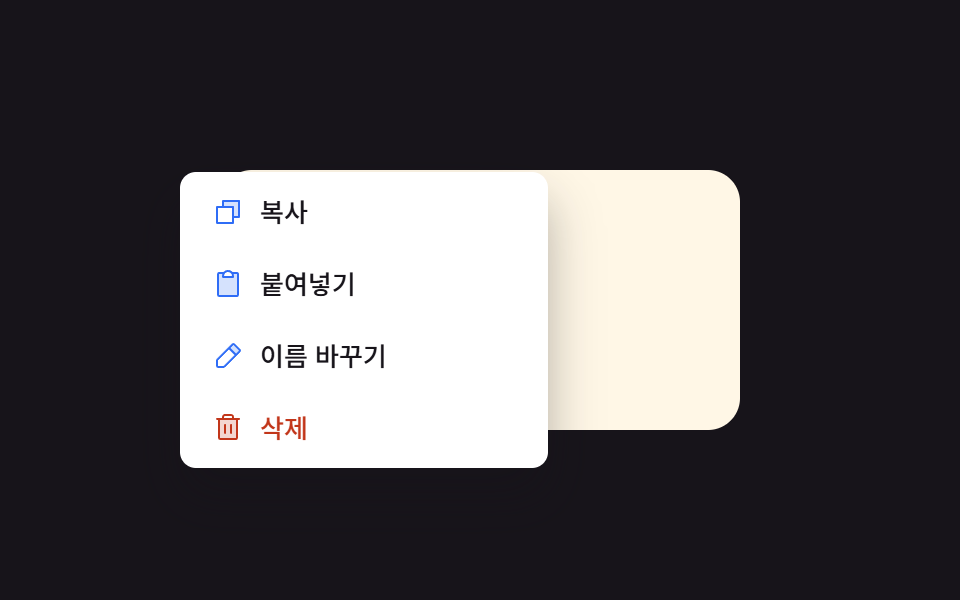
08深さ移動切り替え — 入った階層の値だけメニュー全体が横にずれる方式
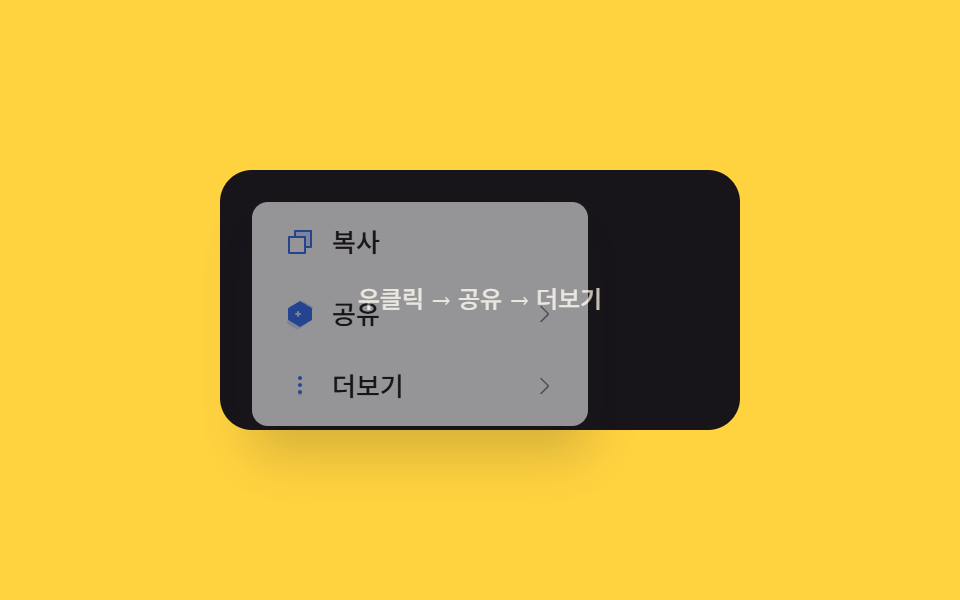
サブメニューに入った深さの値が1つ増えるたびにメニュー箱の横位置の値がそのサブメニューの幅の値だけ横にずれ、上の階層に戻った状態になると深さの値が減って位置の値が元に戻ります。
使いどころ複数階層のサブメニューを持つツール、モバイル画面の階層型メニュー
goTo(d)PANEL_W = 168translateX(-depth * PANEL_W)
<main class="stage">
<div class="cm is-demo" id="cm">
  <div class="cm__field" id="cmField">
    <span class="cm__hint">右クリック → 共有 → もっと見る</span>
  </div>
  <div class="cm__menu" id="cmMenu" role="menu">
    <div class="cm__track" id="cmTrack">
      <div class="cm__panel" data-depth="0">
        <button class="cm__item" type="button" role="menuitem"><span class="cm__ic"><svg xmlns="http://www.w3.org/2000/svg" viewBox="0 0 256 256"><g fill="currentColor"><path d="M216 40v128h-48V88H88V40Z" opacity=".2"/><path d="M216 32H88a8 8 0 0 0-8 8v40H40a8 8 0 0 0-8 8v128a8 8 0 0 0 8 8h128a8 8 0 0 0 8-8v-40h40a8 8 0 0 0 8-8V40a8 8 0 0 0-8-8m-56 176H48V96h112Zm48-48h-32V88a8 8 0 0 0-8-8H96V48h112Z"/></g></svg></span><span>コピー</span></button>
        <button class="cm__item" type="button" role="menuitem" data-open="1"><span class="cm__ic"><svg xmlns="http://www.w3.org/2000/svg" viewBox="0 0 256 256"><g fill="currentColor"><path d="M225.32 68.12L157.62 28a15.93 15.93 0 0 0-16.17.09l-67.7 40.72A16 16 0 0 0 66 82.55v78.06L30.68 181.79A16 16 0 0 0 30.6 209l67.7 40.72a15.93 15.93 0 0 0 16.17.08l67.7-40.72A16 16 0 0 0 190 195.36v-77.9l35.4-21.29a16 16 0 0 0 .08-27.19Z" opacity=".2"/><path d="M232.94 65a24 24 0 0 0-11.36-14.5L153.87 10.4a24 24 0 0 0-24.28.13L61.9 51.25A23.86 23.86 0 0 0 50 72.61v75.19l-9.94 6a24 24 0 0 0-2.62 39.29a1.4 1.4 0 0 0 .16.13l67.71 40.7a24 24 0 0 0 24.28-.13l67.7-40.72A23.85 23.85 0 0 0 209 174.6V99.34Z" opacity="0"/><path d="M136 128a8 8 0 0 1-8 8h-8v8a8 8 0 0 1-16 0v-8h-8a8 8 0 0 1 0-16h8v-8a8 8 0 0 1 16 0v8h8a8 8 0 0 1 8 8m84.72-49.14L128 24 35.28 78.86A8 8 0 0 0 32 85.42V170.6a8 8 0 0 0 3.28 6.46L128 232l92.72-54.94a8 8 0 0 0 3.28-6.46V85.42a8 8 0 0 0-3.28-6.56"/></g></svg></span><span>共有</span><span class="cm__caret"><svg xmlns="http://www.w3.org/2000/svg" viewBox="0 0 256 256"><path fill="currentColor" d="M181.66 133.66l-80 80a8 8 0 0 1-11.32-11.32L164.69 128L90.34 53.66a8 8 0 0 1 11.32-11.32l80 80a8 8 0 0 1 0 11.32"/></svg></span></button>
        <button class="cm__item" type="button" role="menuitem" data-open="2"><span class="cm__ic"><svg xmlns="http://www.w3.org/2000/svg" viewBox="0 0 256 256"><g fill="currentColor"><circle cx="128" cy="64" r="16" opacity=".2"/><circle cx="128" cy="192" r="16" opacity=".2"/><path d="M128 48a16 16 0 1 0 16 16a16 16 0 0 0-16-16m0 112a16 16 0 1 0 16 16a16 16 0 0 0-16-16m0-56a16 16 0 1 0 16 16a16 16 0 0 0-16-16"/></g></svg></span><span>もっと見る</span><span class="cm__caret"><svg xmlns="http://www.w3.org/2000/svg" viewBox="0 0 256 256"><path fill="currentColor" d="M181.66 133.66l-80 80a8 8 0 0 1-11.32-11.32L164.69 128L90.34 53.66a8 8 0 0 1 11.32-11.32l80 80a8 8 0 0 1 0 11.32"/></svg></span></button>
      </div>
      <div class="cm__panel" data-depth="1">
        <button class="cm__item cm__item--back" type="button" data-back="1">‹ 共有</button>
        <button class="cm__item" type="button" role="menuitem"><span>メッセンジャー</span></button>
        <button class="cm__item" type="button" role="menuitem"><span>リンクをコピー</span></button>
      </div>
      <div class="cm__panel" data-depth="2">
        <button class="cm__item cm__item--back" type="button" data-back="1">‹ もっと見る</button>
        <button class="cm__item cm__item--danger" type="button" role="menuitem"><span>削除</span></button>
        <button class="cm__item" type="button" role="menuitem"><span>プロパティ</span></button>
      </div>
    </div>
  </div>
</div>
</main>@use "../../../../site/static/demo-tokens" as *;
// 계산 겹: 현재 드릴다운 깊이(depth) 에 패널 폭(PANEL_W)을 곱한 값만큼 트랙 전체를 옆으로
// translateX 시켜, 깊이가 늘 때마다 다음 패널이 같은 폭만큼 밀려 들어오게 만든다.
@include stage($stage-yellow);
.cm {
position: relative;
width: 100%;
height: 100%;
display: grid;
place-items: center;
}
.cm__field {
width: clamp(190px, 60vw, 260px);
height: 130px;
border-radius: $r-card;
background: $subject-ink;
color: $subject-cream;
display: grid;
place-items: center;
padding: $sp-3;
box-sizing: border-box;
font: 600 14px/1.3 -apple-system, "Segoe UI", "Noto Sans KR", sans-serif;
text-align: center;
user-select: none;
}
.cm__hint { opacity: .8; font-weight: 500; font-size: 12px; }
.cm__menu {
position: fixed;
top: 0;
left: 0;
width: 168px;
background: $stage-paper;
border-radius: $r-sm;
box-shadow: $shadow-raised;
opacity: 0;
pointer-events: none;
overflow: hidden;
transition: opacity $dur-quick $ease-out;
z-index: 5;
&.is-open { opacity: 1; pointer-events: auto; }
}
.cm__track {
display: flex;
width: 100%;
transition: transform $dur-base $ease-pop;
}
.cm__panel {
flex: none;
width: 168px;
box-sizing: border-box;
padding: $sp-1;
display: grid;
gap: $sp-1;
align-content: start;
}
.cm__item {
display: flex;
align-items: center;
gap: $sp-2;
padding: $sp-2 $sp-3;
border: 0;
background: none;
border-radius: $r-xs;
font: 500 13px/1.2 -apple-system, "Segoe UI", "Noto Sans KR", sans-serif;
color: $subject-ink;
cursor: pointer;
text-align: left;
width: 100%;
&:hover, &:focus-visible { background: rgba($subject-ink, .08); }
&--back { color: rgba($subject-ink, .6); font-weight: 600; }
}
.cm__caret { margin-left: auto; width: 12px; height: 12px; color: rgba($subject-ink, .55); }
.cm__caret svg { display: block; width: 100%; height: 100%; }
.cm__ic {
width: 16px;
height: 16px;
flex: none;
color: $subject-blue;
svg { display: block; width: 100%; height: 100%; }
}
@media (max-width: 340px) {
.cm__field { width: 176px; height: 108px; font-size: 12px; padding: $sp-2; }
.cm__menu, .cm__panel { width: 144px; }
.cm__item { padding: $sp-1 $sp-2; font-size: 12px; }
}
@media (prefers-reduced-motion: reduce) {
.cm__menu, .cm__track { transition: none; }
}html, body {
margin: 0;
overflow: hidden;
}
.stage {
box-sizing: border-box;
min-height: 100vh;
display: grid;
place-items: center;
margin: 0;
background: #ffd23f;
font-family: -apple-system, "Segoe UI", "Noto Sans KR", sans-serif;
padding: clamp(8px, 4vw, 24px);
}
.cm {
position: relative;
width: 100%;
height: 100%;
display: grid;
place-items: center;
}
.cm__field {
width: clamp(190px, 60vw, 260px);
height: 130px;
border-radius: 16px;
background: #17141a;
color: #fff7e6;
display: grid;
place-items: center;
padding: 12px;
box-sizing: border-box;
font: 600 14px/1.3 -apple-system, "Segoe UI", "Noto Sans KR", sans-serif;
text-align: center;
user-select: none;
}
.cm__hint {
opacity: 0.8;
font-weight: 500;
font-size: 12px;
}
.cm__menu {
position: fixed;
top: 0;
left: 0;
width: 168px;
background: #ffffff;
border-radius: 8px;
box-shadow: 0 14px 24px rgba(23, 20, 26, 0.32);
opacity: 0;
pointer-events: none;
overflow: hidden;
transition: opacity 220ms ease-out;
z-index: 5;
}
.cm__menu.is-open {
opacity: 1;
pointer-events: auto;
}
.cm__track {
display: flex;
width: 100%;
transition: transform 300ms cubic-bezier(0.2, 1.4, 0.4, 1);
}
.cm__panel {
flex: none;
width: 168px;
box-sizing: border-box;
padding: 4px;
display: grid;
gap: 4px;
align-content: start;
}
.cm__item {
display: flex;
align-items: center;
gap: 8px;
padding: 8px 12px;
border: 0;
background: none;
border-radius: 4px;
font: 500 13px/1.2 -apple-system, "Segoe UI", "Noto Sans KR", sans-serif;
color: #17141a;
cursor: pointer;
text-align: left;
width: 100%;
}
.cm__item:hover, .cm__item:focus-visible {
background: rgba(23, 20, 26, 0.08);
}
.cm__item--back {
color: rgba(23, 20, 26, 0.6);
font-weight: 600;
}
.cm__caret {
margin-left: auto;
width: 12px;
height: 12px;
color: rgba(23, 20, 26, 0.55);
}
.cm__caret svg {
display: block;
width: 100%;
height: 100%;
}
.cm__ic {
width: 16px;
height: 16px;
flex: none;
color: #2f6df6;
}
.cm__ic svg {
display: block;
width: 100%;
height: 100%;
}
@media (max-width: 340px) {
.cm__field {
width: 176px;
height: 108px;
font-size: 12px;
padding: 8px;
}
.cm__menu, .cm__panel {
width: 144px;
}
.cm__item {
padding: 4px 8px;
font-size: 12px;
}
}
@media (prefers-reduced-motion: reduce) {
.cm__menu, .cm__track {
transition: none;
}
}(function () {
var field = document.getElementById('cmField');
var menu = document.getElementById('cmMenu');
var track = document.getElementById('cmTrack');
var root = document.getElementById('cm');
var GAP = 6, PANEL_W = 168, depth = 0;
function positionAt(x, y) {
var mw = menu.offsetWidth;
var vw = document.documentElement.clientWidth, vh = document.documentElement.clientHeight;
var mh = menu.offsetHeight || 160;
var px = Math.max(GAP, Math.min(x, vw - mw - GAP));
var py = Math.max(GAP, Math.min(y, vh - mh - GAP));
menu.style.left = px.toFixed(0) + 'px';
menu.style.top = py.toFixed(0) + 'px';
}
// 계산 겹: 깊이(depth) 값에 패널 폭(PANEL_W)을 곱해 트랙을 옆으로 밀어, 깊이가 1 늘 때마다
// 정확히 패널 하나만큼 다음 화면이 이어 들어오게 한다.
function goTo(d) {
depth = d;
track.style.transform = 'translateX(' + (-depth * PANEL_W) + 'px)';
}
function open(x, y) { positionAt(x, y); goTo(0); menu.classList.add('is-open'); }
function close() { menu.classList.remove('is-open'); goTo(0); }
menu.addEventListener('click', function (e) {
var openBtn = e.target.closest('[data-open]');
var backBtn = e.target.closest('[data-back]');
if (openBtn) goTo(parseInt(openBtn.getAttribute('data-open'), 10));
else if (backBtn) goTo(0);
});
field.addEventListener('contextmenu', function (e) {
e.preventDefault();
root.classList.remove('is-demo'); stopAutoplay();
open(e.clientX, e.clientY);
});
document.addEventListener('pointerdown', function (e) {
if (menu.classList.contains('is-open') && !menu.contains(e.target) && e.target !== field) close();
});
// 자동 루프: 메뉴를 연 뒤 depth 0 → 1(共有) → 0 → 2(もっと見る) 순으로 이동해 트랙이 패널 폭만큼
// 밀렸다가 되돌아오는 것을 보여준다.
var seq = [0, 1, 0, 2, 0];
var si = 0, autoTimer = null, opened = false;
function autoTick() {
if (!opened) { var r = field.getBoundingClientRect(); open(r.left + 16, r.top + 16); opened = true; return; }
goTo(seq[si % seq.length]);
si++;
if (si > seq.length + 1) { close(); opened = false; si = 0; }
}
var reduce = window.matchMedia('(prefers-reduced-motion: reduce)').matches;
function stopAutoplay() { if (autoTimer) { clearInterval(autoTimer); autoTimer = null; } }
if (!reduce) { autoTimer = setInterval(autoTick, 340); autoTick(); }
})();import { useEffect, useRef } from "react";
import styles from "./NestedDepthSlide.module.scss";
const ICON_COPY = '<svg xmlns="http://www.w3.org/2000/svg" viewBox="0 0 256 256"><g fill="currentColor"><path d="M216 40v128h-48V88H88V40Z" opacity=".2"/><path d="M216 32H88a8 8 0 0 0-8 8v40H40a8 8 0 0 0-8 8v128a8 8 0 0 0 8 8h128a8 8 0 0 0 8-8v-40h40a8 8 0 0 0 8-8V40a8 8 0 0 0-8-8m-56 176H48V96h112Zm48-48h-32V88a8 8 0 0 0-8-8H96V48h112Z"/></g></svg>';
const ICON_SHARE = '<svg xmlns="http://www.w3.org/2000/svg" viewBox="0 0 256 256"><g fill="currentColor"><path d="M225.32 68.12L157.62 28a15.93 15.93 0 0 0-16.17.09l-67.7 40.72A16 16 0 0 0 66 82.55v78.06L30.68 181.79A16 16 0 0 0 30.6 209l67.7 40.72a15.93 15.93 0 0 0 16.17.08l67.7-40.72A16 16 0 0 0 190 195.36v-77.9l35.4-21.29a16 16 0 0 0 .08-27.19Z" opacity=".2"/><path d="M232.94 65a24 24 0 0 0-11.36-14.5L153.87 10.4a24 24 0 0 0-24.28.13L61.9 51.25A23.86 23.86 0 0 0 50 72.61v75.19l-9.94 6a24 24 0 0 0-2.62 39.29a1.4 1.4 0 0 0 .16.13l67.71 40.7a24 24 0 0 0 24.28-.13l67.7-40.72A23.85 23.85 0 0 0 209 174.6V99.34Z" opacity="0"/><path d="M136 128a8 8 0 0 1-8 8h-8v8a8 8 0 0 1-16 0v-8h-8a8 8 0 0 1 0-16h8v-8a8 8 0 0 1 16 0v8h8a8 8 0 0 1 8 8m84.72-49.14L128 24 35.28 78.86A8 8 0 0 0 32 85.42V170.6a8 8 0 0 0 3.28 6.46L128 232l92.72-54.94a8 8 0 0 0 3.28-6.46V85.42a8 8 0 0 0-3.28-6.56"/></g></svg>';
const ICON_MORE = '<svg xmlns="http://www.w3.org/2000/svg" viewBox="0 0 256 256"><g fill="currentColor"><circle cx="128" cy="64" r="16" opacity=".2"/><circle cx="128" cy="192" r="16" opacity=".2"/><path d="M128 48a16 16 0 1 0 16 16a16 16 0 0 0-16-16m0 112a16 16 0 1 0 16 16a16 16 0 0 0-16-16m0-56a16 16 0 1 0 16 16a16 16 0 0 0-16-16"/></g></svg>';
const ICON_CARET = '<svg xmlns="http://www.w3.org/2000/svg" viewBox="0 0 256 256"><path fill="currentColor" d="M181.66 133.66l-80 80a8 8 0 0 1-11.32-11.32L164.69 128L90.34 53.66a8 8 0 0 1 11.32-11.32l80 80a8 8 0 0 1 0 11.32"/></svg>';
export type NestedDepthSlideProps = {
color?: string;
};
export default function NestedDepthSlide({
color = "#2f6df6",
}: NestedDepthSlideProps) {
const rootRef = useRef<HTMLDivElement | null>(null);
useEffect(() => {
const root = rootRef.current;
if (!root) return;
const field = root.querySelector<HTMLDivElement>(`.${styles.field}`);
const menu = root.querySelector<HTMLDivElement>(`.${styles.menu}`);
const track = root.querySelector<HTMLDivElement>(`.${styles.track}`);
if (!field || !menu || !track) return;
const GAP = 6, PANEL_W = 168;
let depth = 0;
function positionAt(x: number, y: number) {
const mw = menu!.offsetWidth;
const vw = document.documentElement.clientWidth, vh = document.documentElement.clientHeight;
const mh = menu!.offsetHeight || 160;
const px = Math.max(GAP, Math.min(x, vw - mw - GAP));
const py = Math.max(GAP, Math.min(y, vh - mh - GAP));
menu!.style.left = px.toFixed(0) + "px";
menu!.style.top = py.toFixed(0) + "px";
}
// 계산 겹: 깊이(depth) 값에 패널 폭(PANEL_W)을 곱해 트랙을 옆으로 밀어, 깊이가 1 늘 때마다
// 정확히 패널 하나만큼 다음 화면이 이어 들어오게 한다.
function goTo(d: number) {
depth = d;
track!.style.transform = "translateX(" + -depth * PANEL_W + "px)";
}
function open(x: number, y: number) { positionAt(x, y); goTo(0); menu!.classList.add(styles.open); }
function close() { menu!.classList.remove(styles.open); goTo(0); }
function onTrackClick(e: MouseEvent) {
const target = e.target as HTMLElement;
const openBtn = target.closest("[data-open]") as HTMLElement | null;
const backBtn = target.closest("[data-back]") as HTMLElement | null;
if (openBtn) goTo(parseInt(openBtn.getAttribute("data-open") || "0", 10));
else if (backBtn) goTo(0);
}
function onContextMenu(e: MouseEvent) { e.preventDefault(); stopAutoplay(); open(e.clientX, e.clientY); }
function onDocDown(e: PointerEvent) {
if (menu!.classList.contains(styles.open) && !menu!.contains(e.target as Node) && e.target !== field) close();
}
track.addEventListener("click", onTrackClick);
field.addEventListener("contextmenu", onContextMenu);
document.addEventListener("pointerdown", onDocDown);
// 자동 루프: 메뉴를 연 뒤 depth 0 → 1(공유) → 0 → 2(더보기) 순으로 이동해 트랙이 패널 폭만큼
// 밀렸다가 되돌아오는 것을 보여준다.
const seq = [0, 1, 0, 2, 0];
let si = 0, autoTimer: number | null = null, opened = false;
function autoTick() {
if (!opened) { const r = field!.getBoundingClientRect(); open(r.left + 16, r.top + 16); opened = true; return; }
goTo(seq[si % seq.length]);
si++;
if (si > seq.length + 1) { close(); opened = false; si = 0; }
}
function stopAutoplay() { if (autoTimer !== null) { window.clearInterval(autoTimer); autoTimer = null; } }
const reduce = window.matchMedia("(prefers-reduced-motion: reduce)").matches;
if (!reduce) { autoTimer = window.setInterval(autoTick, 340); autoTick(); }
return () => {
stopAutoplay();
track.removeEventListener("click", onTrackClick);
field.removeEventListener("contextmenu", onContextMenu);
document.removeEventListener("pointerdown", onDocDown);
};
}, []);
return (
<div ref={rootRef} className={styles.stage}>
<div className={styles.cm}>
<div className={styles.field}>
<span className={styles.hint}>우클릭 → 공유 → 더보기</span>
</div>
<div className={styles.menu} role="menu">
<div className={styles.track}>
<div className={styles.panel} data-depth="0">
<button type="button" className={styles.item} role="menuitem">
<span className={styles.ic} style={{ color }} dangerouslySetInnerHTML={{ __html: ICON_COPY }} />
<span>복사</span>
</button>
<button type="button" className={styles.item} role="menuitem" data-open="1">
<span className={styles.ic} style={{ color }} dangerouslySetInnerHTML={{ __html: ICON_SHARE }} />
<span>공유</span>
<span className={styles.caret} dangerouslySetInnerHTML={{ __html: ICON_CARET }} />
</button>
<button type="button" className={styles.item} role="menuitem" data-open="2">
<span className={styles.ic} style={{ color }} dangerouslySetInnerHTML={{ __html: ICON_MORE }} />
<span>더보기</span>
<span className={styles.caret} dangerouslySetInnerHTML={{ __html: ICON_CARET }} />
</button>
</div>
<div className={styles.panel} data-depth="1">
<button type="button" className={`${styles.item} ${styles.back}`} data-back="1">‹ 공유</button>
<button type="button" className={styles.item} role="menuitem"><span>메신저</span></button>
<button type="button" className={styles.item} role="menuitem"><span>링크 복사</span></button>
</div>
<div className={styles.panel} data-depth="2">
<button type="button" className={`${styles.item} ${styles.back}`} data-back="1">‹ 더보기</button>
<button type="button" className={styles.item} role="menuitem"><span>삭제</span></button>
<button type="button" className={styles.item} role="menuitem"><span>속성</span></button>
</div>
</div>
</div>
</div>
</div>
);
}08 深さ移動切り替え — 入った階層の値だけメニュー全体が横にずれる方式 — 計測 累積面積 15.822% · 動いたフレーム 8/23GODRICH オリジナル · SCSS と React は zip に同梱 · コンテキストメニュー UI 9選 — クリック座標の値でメニューが決まる仕組み
このデモが属する記事
 コンテキストメニュー UI 9選 — クリック座標の値でメニューが決まる仕組み9つのうち1つはクリックした画面座標の値がメニューの現れる位置の値をそのまま決め、1つはその位置の値が画面端に近い状態になると開く方向の値が反対に変わり、もう1つはサブメニューに入った深さの値だけメニューが横にずれて重なります。コンテキスト この記事のデモをすべて見る