03よれよれステッカーカードグリッド
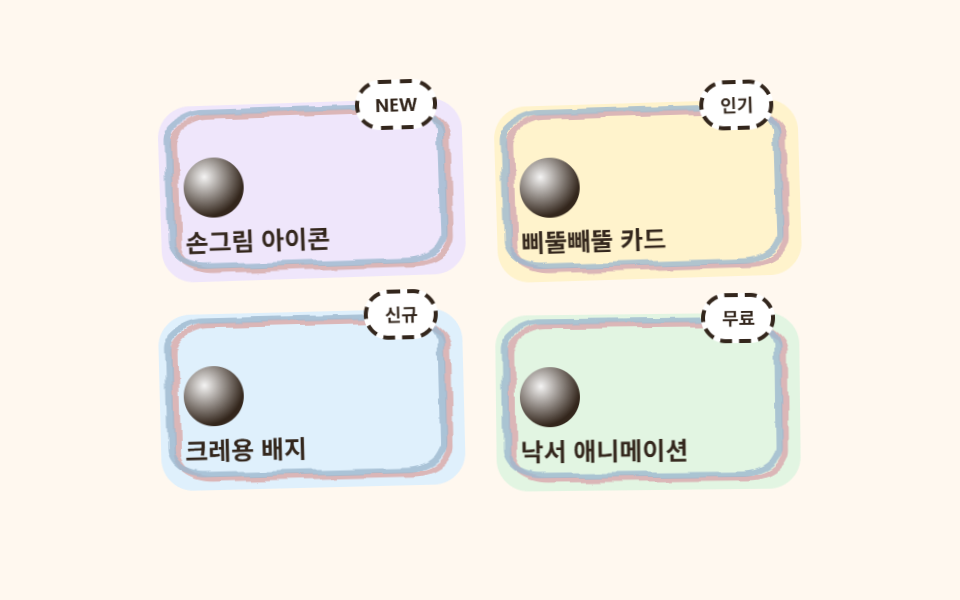
カードごとに四隅の半径をばらばらにして手で切り抜いた紙ステッカーのように見せ、枠線は色の違う2本の線をわずかにずらして重ね、クレヨンを2度引いたような質感を出します。カードは順番に少しずつ傾きます。
使いどころ機能紹介グリッド・商品・クラスカード
비대칭 border-radius이중선 오프셋2열→1열
<main class="stage">
  <svg width="0" height="0" style="position:absolute" aria-hidden="true" focusable="false">
    <filter id="rough3" x="-30%" y="-30%" width="160%" height="160%">
      <feTurbulence type="fractalNoise" baseFrequency="0.05 0.07" numOctaves="2" seed="12" result="n"/>
      <feDisplacementMap in="SourceGraphic" in2="n" scale="5" xChannelSelector="R" yChannelSelector="G"/>
    </filter>
  </svg>
  <div class="cardcrayon">
    <article class="cardcrayon__card cardcrayon__card--1">
      <svg class="cardcrayon__frame" viewBox="0 0 100 78" preserveAspectRatio="none" aria-hidden="true">
        <rect x="5" y="5" width="90" height="68" rx="12" class="cardcrayon__frame-rect cardcrayon__frame-rect--a" />
        <rect x="3" y="3" width="90" height="68" rx="12" class="cardcrayon__frame-rect cardcrayon__frame-rect--b" />
      </svg>
      <span class="cardcrayon__badge">NEW</span>
      <span class="cardcrayon__dot"></span>
      <p class="cardcrayon__label">手描きアイコン</p>
    </article>
    <article class="cardcrayon__card cardcrayon__card--2">
      <svg class="cardcrayon__frame" viewBox="0 0 100 78" preserveAspectRatio="none" aria-hidden="true">
        <rect x="5" y="5" width="90" height="68" rx="12" class="cardcrayon__frame-rect cardcrayon__frame-rect--a" />
        <rect x="3" y="3" width="90" height="68" rx="12" class="cardcrayon__frame-rect cardcrayon__frame-rect--b" />
      </svg>
      <span class="cardcrayon__badge">人気</span>
      <span class="cardcrayon__dot"></span>
      <p class="cardcrayon__label">よれよれカード</p>
    </article>
    <article class="cardcrayon__card cardcrayon__card--3">
      <svg class="cardcrayon__frame" viewBox="0 0 100 78" preserveAspectRatio="none" aria-hidden="true">
        <rect x="5" y="5" width="90" height="68" rx="12" class="cardcrayon__frame-rect cardcrayon__frame-rect--a" />
        <rect x="3" y="3" width="90" height="68" rx="12" class="cardcrayon__frame-rect cardcrayon__frame-rect--b" />
      </svg>
      <span class="cardcrayon__badge">新着</span>
      <span class="cardcrayon__dot"></span>
      <p class="cardcrayon__label">クレヨンバッジ</p>
    </article>
    <article class="cardcrayon__card cardcrayon__card--4">
      <svg class="cardcrayon__frame" viewBox="0 0 100 78" preserveAspectRatio="none" aria-hidden="true">
        <rect x="5" y="5" width="90" height="68" rx="12" class="cardcrayon__frame-rect cardcrayon__frame-rect--a" />
        <rect x="3" y="3" width="90" height="68" rx="12" class="cardcrayon__frame-rect cardcrayon__frame-rect--b" />
      </svg>
      <span class="cardcrayon__badge">無料</span>
      <span class="cardcrayon__dot"></span>
      <p class="cardcrayon__label">落書きアニメーション</p>
    </article>
  </div>
</main>@use "../../../../site/static/demo-tokens" as *;
$duration: $dur-loop; // 카드가 한 번 기우는 주기
$easing: $ease-spring; // 기우는 곡선
$color: $stage-ink; // 글자 색 기본값(토큰) — 아래 크레용 잉크로 덮는다
$crayon-paper: #fff8ef;
$crayon-ink: #33261c;
$crayon-red: #dbb6b7;
$crayon-yellow: #d1c5a2;
$crayon-blue: #9cb8ce;
$crayon-green: #6dbe6d;
$crayon-purple: #cbbfe0;
$crayon-purple-tint: #efe6fb;
$crayon-yellow-tint: #fff3cc;
$crayon-blue-tint: #dff0fc;
$crayon-green-tint: #e2f5e2;
@include stage($crayon-paper);
.cardcrayon {
display: grid;
grid-template-columns: repeat(2, minmax(0, 1fr));
gap: $sp-4;
width: clamp(220px, 80vw, 320px);
}
.cardcrayon__card {
position: relative;
box-sizing: border-box;
min-height: 88px;
display: flex;
flex-direction: column;
justify-content: flex-end;
gap: $sp-1;
padding: $sp-3;
border-radius: $r-card;
animation: cardTilt $duration $easing infinite;
}
.cardcrayon__card--1 { background: $crayon-purple-tint; animation-delay: 0ms; }
.cardcrayon__card--2 { background: $crayon-yellow-tint; animation-delay: 140ms; }
.cardcrayon__card--3 { background: $crayon-blue-tint; animation-delay: 280ms; }
.cardcrayon__card--4 { background: $crayon-green-tint; animation-delay: 420ms; }
// 테두리는 글자를 감싸지 않는 별도 SVG 레이어 — 빨강·파랑 두 선을 살짝 어긋나게 겹쳐 크레용 두 번 그은 느낌을 낸다
.cardcrayon__frame {
position: absolute;
inset: 0;
width: 100%;
height: 100%;
pointer-events: none;
filter: url(#rough3);
}
.cardcrayon__frame-rect {
fill: none;
stroke-width: 2.4;
}
.cardcrayon__frame-rect--a { stroke: $crayon-red; }
.cardcrayon__frame-rect--b { stroke: $crayon-blue; opacity: .8; }
.cardcrayon__badge {
position: absolute;
top: -10px;
right: $sp-3;
border: 2px dashed $crayon-ink;
border-radius: $r-pill;
background: $stage-paper;
color: $crayon-ink;
padding: $sp-1 $sp-2;
font-weight: 700;
font-size: 9px;
line-height: 1.4;
}
.cardcrayon__dot {
width: 30px;
height: 30px;
border-radius: 50%;
background: radial-gradient(circle at 35% 32%, rgba(255, 255, 255, .95), rgba(255, 255, 255, 0) 70%), $crayon-ink;
}
.cardcrayon__label {
margin: 0;
color: $crayon-ink;
font-weight: 700;
font-size: clamp(11px, 2.6vw, 13px);
line-height: 1.3;
}
// 데모: 카드 네 장이 순서대로 살짝씩 기운다
@keyframes cardTilt {
0%, 100% { transform: rotate(0deg) translateY(0); }
50% { transform: rotate(-2deg) translateY(-3px); }
}
@media (max-width: 340px), (max-height: 220px) {
.cardcrayon { gap: $sp-2; }
.cardcrayon__card { min-height: 68px; padding: $sp-2; }
.cardcrayon__dot { width: 22px; height: 22px; }
}
@media (prefers-reduced-motion: reduce) {
.cardcrayon__card { animation: none !important; transform: none; }
}html, body {
margin: 0;
overflow: hidden;
}
.stage {
box-sizing: border-box;
min-height: 100vh;
display: grid;
place-items: center;
margin: 0;
background: #fff8ef;
font-family: -apple-system, "Segoe UI", "Noto Sans KR", sans-serif;
padding: clamp(8px, 4vw, 24px);
}
.cardcrayon {
display: grid;
grid-template-columns: repeat(2, minmax(0, 1fr));
gap: 16px;
width: clamp(220px, 80vw, 320px);
}
.cardcrayon__card {
position: relative;
box-sizing: border-box;
min-height: 88px;
display: flex;
flex-direction: column;
justify-content: flex-end;
gap: 4px;
padding: 12px;
border-radius: 16px;
animation: cardTilt 2s cubic-bezier(0.2, 0.8, 0.2, 1) infinite;
}
.cardcrayon__card--1 {
background: #efe6fb;
animation-delay: 0ms;
}
.cardcrayon__card--2 {
background: #fff3cc;
animation-delay: 140ms;
}
.cardcrayon__card--3 {
background: #dff0fc;
animation-delay: 280ms;
}
.cardcrayon__card--4 {
background: #e2f5e2;
animation-delay: 420ms;
}
.cardcrayon__frame {
position: absolute;
inset: 0;
width: 100%;
height: 100%;
pointer-events: none;
filter: url(#rough3);
}
.cardcrayon__frame-rect {
fill: none;
stroke-width: 2.4;
}
.cardcrayon__frame-rect--a {
stroke: #dbb6b7;
}
.cardcrayon__frame-rect--b {
stroke: #9cb8ce;
opacity: 0.8;
}
.cardcrayon__badge {
position: absolute;
top: -10px;
right: 12px;
border: 2px dashed #33261c;
border-radius: 999px;
background: #ffffff;
color: #33261c;
padding: 4px 8px;
font-weight: 700;
font-size: 9px;
line-height: 1.4;
}
.cardcrayon__dot {
width: 30px;
height: 30px;
border-radius: 50%;
background: radial-gradient(circle at 35% 32%, rgba(255, 255, 255, 0.95), rgba(255, 255, 255, 0) 70%), #33261c;
}
.cardcrayon__label {
margin: 0;
color: #33261c;
font-weight: 700;
font-size: clamp(11px, 2.6vw, 13px);
line-height: 1.3;
}
@keyframes cardTilt {
0%, 100% {
transform: rotate(0deg) translateY(0);
}
50% {
transform: rotate(-2deg) translateY(-3px);
}
}
@media (max-width: 340px), (max-height: 220px) {
.cardcrayon {
gap: 8px;
}
.cardcrayon__card {
min-height: 68px;
padding: 8px;
}
.cardcrayon__dot {
width: 22px;
height: 22px;
}
}
@media (prefers-reduced-motion: reduce) {
.cardcrayon__card {
animation: none !important;
transform: none;
}
}import type { CSSProperties } from "react";
import styles from "./CardGridCrayon.module.scss";
export type CardGridCrayonItem = { label: string; badge: string; tint: "purple" | "yellow" | "blue" | "green" };
export type CardGridCrayonProps = {
items?: CardGridCrayonItem[];
duration?: number;
easing?: string;
color?: string;
};
type Vars = CSSProperties & { "--duration"?: string; "--easing"?: string; "--color"?: string };
const DEFAULT_ITEMS: CardGridCrayonItem[] = [
{ label: "손그림 아이콘", badge: "NEW", tint: "purple" },
{ label: "삐뚤빼뚤 카드", badge: "인기", tint: "yellow" },
{ label: "크레용 배지", badge: "신규", tint: "blue" },
{ label: "낙서 애니메이션", badge: "무료", tint: "green" },
];
export default function CardGridCrayon({
items = DEFAULT_ITEMS,
duration = 2000,
easing = "cubic-bezier(.2,.8,.2,1)",
color = "#ff5a5f",
}: CardGridCrayonProps) {
const vars: Vars = { "--duration": `${duration}ms`, "--easing": easing, "--color": color };
return (
<div className={styles.grid} style={vars}>
<svg width="0" height="0" style={{ position: "absolute" }} aria-hidden="true" focusable="false">
<filter id="cg-rough" x="-30%" y="-30%" width="160%" height="160%">
<feTurbulence type="fractalNoise" baseFrequency={0.06} numOctaves={2} seed={12} result="n" />
<feDisplacementMap in="SourceGraphic" in2="n" scale={5} xChannelSelector="R" yChannelSelector="G" />
</filter>
</svg>
{items.map((it, i) => (
<article key={it.label} className={`${styles.card} ${styles[`tint_${it.tint}`]}`} style={{ animationDelay: `${i * 140}ms` }}>
<svg className={styles.frame} viewBox="0 0 100 78" preserveAspectRatio="none" aria-hidden="true">
<rect x={5} y={5} width={90} height={68} rx={12} className={`${styles.frameRect} ${styles.frameRectA}`} />
<rect x={3} y={3} width={90} height={68} rx={12} className={`${styles.frameRect} ${styles.frameRectB}`} />
</svg>
<span className={styles.badge}>{it.badge}</span>
<span className={styles.dot} />
<p className={styles.label}>{it.label}</p>
</article>
))}
</div>
);
}03 よれよれステッカーカードグリッド — 計測 累積面積 13.402% · 動いたフレーム 23/23GODRICH オリジナル · SCSS と React は zip に同梱 · 手書き風 デザイン LPキット、クレヨン風セクション9選
このデモが属する記事
 手書き風 デザイン LPキット、クレヨン風セクション9選手書き風 デザインは、カードやボタンの周りに太くよれた輪郭線を描き、その輪郭線だけにSVGフィルターをかけて、定規で引いたのではなく手で描いたように見せるスタイルです。手で描いたと思ったら実は CSS だった、というのがこのキットの正体です この記事のデモをすべて見る