04ロケット型
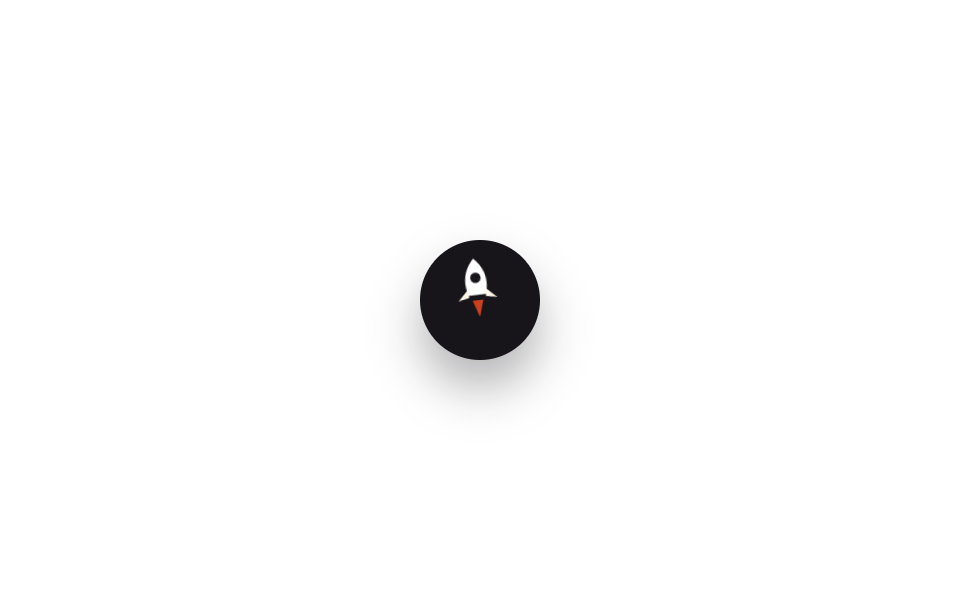
ボタン自体がロケットのアイコンで、ホバーすると機体が傾いてわずかに浮き上がり、後ろの炎が点滅して発射するような感覚を与えます。
使いどころゲーム・スタートアップのLP、遊び心が欲しいポートフォリオ
rotate+translateYopacity 깜빡임700ms
<main class="stage">
  <button type="button" class="totop is-demo" aria-label="トップへ発射">
    <svg class="totop__rocket" viewBox="0 0 24 28" aria-hidden="true">
      <path class="totop__body" d="M12 1 C17 6 18 12 16 18 L8 18 C6 12 7 6 12 1 Z"/>
      <circle class="totop__window" cx="12" cy="10" r="2.4"/>
      <path class="totop__fin totop__fin--l" d="M8 15 L3 20 L8 19 Z"/>
      <path class="totop__fin totop__fin--r" d="M16 15 L21 20 L16 19 Z"/>
      <path class="totop__flame" d="M9.5 18 L12 25 L14.5 18 Z"/>
    </svg>
  </button>
</main>
@use "../../../../site/static/demo-tokens" as *;
// ── 변수 3개 ──────────────────────────────────────────
$duration: 700ms;
$easing: $ease-out;
$color: $stage-orange; // 불꽃 색
@include stage($stage-paper);
.totop {
width: 60px; height: 60px;
border: 0;
border-radius: $r-pill;
background: $subject-ink;
display: grid;
place-items: center;
box-shadow: $shadow-raised;
cursor: pointer;
}
.totop__rocket {
width: 26px; height: 30px;
transform-origin: center bottom;
}
.totop__body { fill: $stage-paper; }
.totop__window { fill: $subject-ink; }
.totop__fin { fill: $subject-cream; }
.totop__flame {
fill: $color;
transform-origin: center top;
opacity: 0;
}
// 실제 사용: 마우스를 올리거나 포커스하면 1회 발사
.totop:hover .totop__rocket,
.totop:focus-visible .totop__rocket { animation: rocket-launch $duration $easing 1; }
.totop:hover .totop__flame,
.totop:focus-visible .totop__flame { animation: flame-flicker $duration $easing 1; }
// 데모 루프 — 같은 모양을 2초 주기 뒤쪽에 압축해 자동 재생 (064-02 와 같은 기법)
.totop.is-demo .totop__rocket { animation: rocket-launch-loop 2s $easing infinite; }
.totop.is-demo .totop__flame { animation: flame-flicker-loop 2s $easing infinite; }
@keyframes rocket-launch {
0% { transform: translateY(0) rotate(0deg); }
40% { transform: translateY(-9px) rotate(-9deg); }
100% { transform: translateY(-2px) rotate(-4deg); }
}
@keyframes flame-flicker {
0%, 100% { opacity: 0; transform: scaleY(.6); }
40% { opacity: 1; transform: scaleY(1.3); }
70% { opacity: .7; transform: scaleY(.9); }
}
@keyframes rocket-launch-loop {
0%, 55% { transform: translateY(0) rotate(0deg); }
75% { transform: translateY(-9px) rotate(-9deg); }
100% { transform: translateY(-2px) rotate(-4deg); }
}
@keyframes flame-flicker-loop {
0%, 55%, 100% { opacity: 0; transform: scaleY(.6); }
75% { opacity: 1; transform: scaleY(1.3); }
90% { opacity: .7; transform: scaleY(.9); }
}
@media (prefers-reduced-motion: reduce) {
.totop:hover .totop__rocket, .totop:focus-visible .totop__rocket,
.totop.is-demo .totop__rocket,
.totop:hover .totop__flame, .totop:focus-visible .totop__flame,
.totop.is-demo .totop__flame { animation: none; }
}html, body {
margin: 0;
overflow: hidden;
}
.stage {
box-sizing: border-box;
min-height: 100vh;
display: grid;
place-items: center;
margin: 0;
background: #ffffff;
font-family: -apple-system, "Segoe UI", "Noto Sans KR", sans-serif;
padding: clamp(8px, 4vw, 24px);
}
.totop {
width: 60px;
height: 60px;
border: 0;
border-radius: 999px;
background: #17141a;
display: grid;
place-items: center;
box-shadow: 0 14px 24px rgba(23, 20, 26, 0.32);
cursor: pointer;
}
.totop__rocket {
width: 26px;
height: 30px;
transform-origin: center bottom;
}
.totop__body {
fill: #ffffff;
}
.totop__window {
fill: #17141a;
}
.totop__fin {
fill: #fff7e6;
}
.totop__flame {
fill: #ff4d1f;
transform-origin: center top;
opacity: 0;
}
.totop:hover .totop__rocket,
.totop:focus-visible .totop__rocket {
animation: rocket-launch 700ms ease-out 1;
}
.totop:hover .totop__flame,
.totop:focus-visible .totop__flame {
animation: flame-flicker 700ms ease-out 1;
}
.totop.is-demo .totop__rocket {
animation: rocket-launch-loop 2s ease-out infinite;
}
.totop.is-demo .totop__flame {
animation: flame-flicker-loop 2s ease-out infinite;
}
@keyframes rocket-launch {
0% {
transform: translateY(0) rotate(0deg);
}
40% {
transform: translateY(-9px) rotate(-9deg);
}
100% {
transform: translateY(-2px) rotate(-4deg);
}
}
@keyframes flame-flicker {
0%, 100% {
opacity: 0;
transform: scaleY(0.6);
}
40% {
opacity: 1;
transform: scaleY(1.3);
}
70% {
opacity: 0.7;
transform: scaleY(0.9);
}
}
@keyframes rocket-launch-loop {
0%, 55% {
transform: translateY(0) rotate(0deg);
}
75% {
transform: translateY(-9px) rotate(-9deg);
}
100% {
transform: translateY(-2px) rotate(-4deg);
}
}
@keyframes flame-flicker-loop {
0%, 55%, 100% {
opacity: 0;
transform: scaleY(0.6);
}
75% {
opacity: 1;
transform: scaleY(1.3);
}
90% {
opacity: 0.7;
transform: scaleY(0.9);
}
}
@media (prefers-reduced-motion: reduce) {
.totop:hover .totop__rocket, .totop:focus-visible .totop__rocket,
.totop.is-demo .totop__rocket,
.totop:hover .totop__flame, .totop:focus-visible .totop__flame,
.totop.is-demo .totop__flame {
animation: none;
}
}import type { CSSProperties } from "react";
import styles from "./RocketButton.module.scss";
export type RocketButtonProps = {
/** 발사 애니메이션 시간 (기본 700ms) */
duration?: number;
easing?: string;
flameColor?: string;
};
type Vars = CSSProperties & { "--duration"?: string; "--easing"?: string; "--flame"?: string };
// 실제 사용: 마우스를 올리거나 키보드로 포커스하면 로켓이 한 번 발사된다. 상태 없이 CSS 로 처리한다
export default function RocketButton({
duration = 700,
easing = "ease-out",
flameColor = "#ff4d1f",
}: RocketButtonProps) {
const vars: Vars = { "--duration": `${duration}ms`, "--easing": easing, "--flame": flameColor };
return (
<button
type="button"
className={styles.totop}
style={vars}
aria-label="맨 위로 발사"
onClick={() => window.scrollTo({ top: 0, behavior: "smooth" })}
>
<svg className={styles.rocket} viewBox="0 0 24 28" aria-hidden="true">
<path className={styles.body} d="M12 1 C17 6 18 12 16 18 L8 18 C6 12 7 6 12 1 Z" />
<circle className={styles.window} cx="12" cy="10" r="2.4" />
<path className={styles.fin} d="M8 15 L3 20 L8 19 Z" />
<path className={styles.fin} d="M16 15 L21 20 L16 19 Z" />
<path className={styles.flame} d="M9.5 18 L12 25 L14.5 18 Z" />
</svg>
</button>
);
}04 ロケット型 — 計測 累積面積 0.289% · 動いたフレーム 10/23GODRICH オリジナル · SCSS と React は zip に同梱 · トップへ戻るボタン css アニメーション9選【CSSだけ・JS不要】
このデモが属する記事
 トップへ戻るボタン css アニメーション9選【CSSだけ・JS不要】トップへ戻るボタンとは、ページを下まで読んだあとにワンクリックで一番上へ戻してくれる小さなボタンのことです。この記事では「トップへ戻るボタン css」でよく探される9つの動きを、AOS・GSAPなしでそのまま使えるコードとしてまとめました。 この記事のデモをすべて見る