09日付入力のカスタム — 標準のカレンダーアイコンとフィールド背景を描き直す日付選択
標準で表示されるカレンダーアイコンとフィールド背景色を描き直し、他の入力フィールドとトーンを揃えます。
使いどころ予約フォームの日付選択、生年月日の入力フィールド
showPickercolor-scheme::-webkit-calendar-picker-indicator
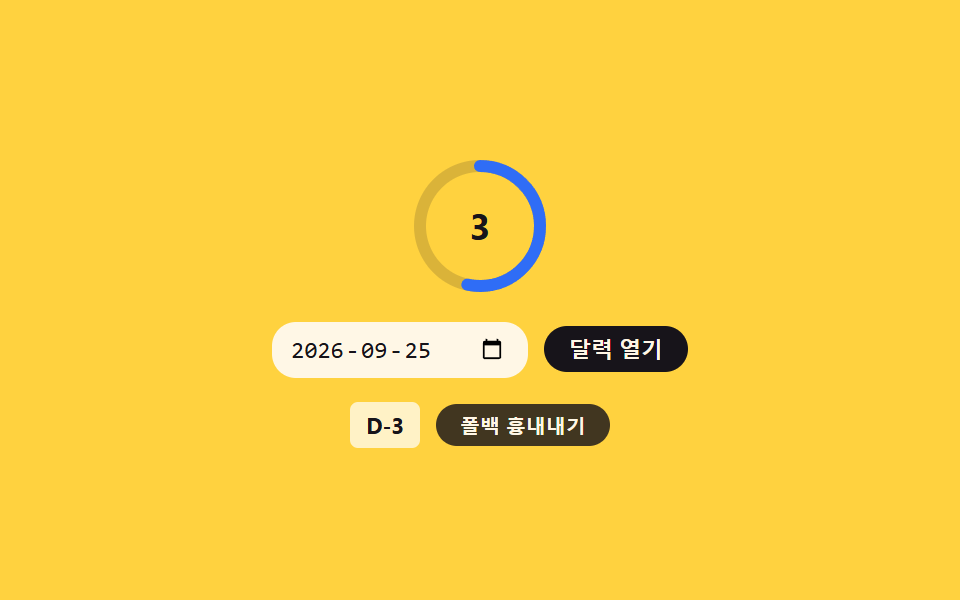
<main class="stage">
<div class="wrap is-demo" id="wrap">
  <div class="ringWrap">
    <svg class="ring" viewBox="0 0 72 72" aria-hidden="true">
      <circle class="ringTrack" cx="36" cy="36" r="30"></circle>
      <circle class="ringFill" id="ringFill" cx="36" cy="36" r="30"></circle>
    </svg>
    <span class="ringNum" id="ringNum">0</span>
  </div>
  <div class="row">
    <input class="dateInput" id="dateInput" type="date" value="2026-10-01">
    <button class="pickBtn" id="pickBtn" type="button">カレンダーを開く</button>
  </div>
  <div class="foot">
    <span class="daysLabel" id="daysLabel">D-9</span>
    <button class="simToggle" id="simToggle" type="button" aria-pressed="false">フォールバックを再現</button>
  </div>
</div>
</main>
@use "../../../../site/static/demo-tokens" as *;
// 계산 겹은 index.html 의 daysBetween()/CIRC 에 있다 — 실제 원 반지름에서 둘레를 구하고 남은 일수
// 비율을 stroke-dashoffset 에 반영한다(하드코딩 각도 아님). 여기는 링·입력·버튼의 모양만 맡는다.
@include stage($stage-yellow);
.wrap {
display: flex;
flex-direction: column;
align-items: center;
gap: $sp-3;
}
.ringWrap {
position: relative;
width: 72px;
height: 72px;
}
.ring {
width: 100%;
height: 100%;
transform: rotate(-90deg);
}
.ringTrack {
fill: none;
stroke: rgba($subject-ink, .16);
stroke-width: 6;
}
.ringFill {
fill: none;
stroke: $subject-blue;
stroke-width: 6;
stroke-linecap: round;
transition: stroke-dashoffset $dur-enter $ease-out;
}
.ringNum {
position: absolute;
inset: 0;
display: flex;
align-items: center;
justify-content: center;
color: $subject-ink;
font-size: 18px;
font-weight: 700;
}
.row {
display: flex;
align-items: center;
gap: $sp-2;
}
.dateInput {
border: none;
border-radius: $r-control;
background: $subject-cream;
color: $subject-ink;
padding: $sp-1 $sp-2;
font-size: 12px;
color-scheme: light;
// 폴백: 표준 픽커 아이콘을 모르는 환경도 입력 자체는 그대로 쓸 수 있다 — 배경만 살짝 맞춘다
&::-webkit-calendar-picker-indicator {
border-radius: $r-xs;
padding: $sp-1;
cursor: pointer;
}
&:focus-visible { outline: 2px solid $subject-blue-light; outline-offset: 2px; }
}
.pickBtn {
appearance: none;
border: none;
border-radius: $r-pill;
background: $subject-ink;
color: $subject-cream;
padding: $sp-1 $sp-3;
font-size: 11px;
font-weight: 600;
cursor: pointer;
transition: transform $dur-instant $ease-out;
&:active { transform: scale(.95); }
&:focus-visible { outline: 2px solid $subject-blue-light; outline-offset: 2px; }
}
.foot {
display: flex;
align-items: center;
gap: $sp-2;
}
.daysLabel {
color: $subject-ink;
font-size: 11px;
font-weight: 700;
background: rgba($stage-paper, .7);
padding: $sp-1 $sp-2;
border-radius: $r-xs;
}
.simToggle {
appearance: none;
border: none;
border-radius: $r-pill;
background: rgba($subject-ink, .82);
color: $subject-cream;
padding: $sp-1 $sp-3;
font-size: 10px;
font-weight: 600;
cursor: pointer;
transition: transform $dur-instant $ease-out;
&:active { transform: scale(.96); }
&[aria-pressed="true"] { background: $subject-orange-deep; }
&:focus-visible { outline: 2px solid $subject-blue-light; outline-offset: 2px; }
}
@media (max-width: 340px) {
.ringWrap { width: 60px; height: 60px; }
.ringNum { font-size: 15px; }
.dateInput { font-size: 11px; }
}
@media (prefers-reduced-motion: reduce) {
.ringFill { transition: none; }
.pickBtn, .simToggle { transition: none; }
}html, body {
margin: 0;
overflow: hidden;
}
.stage {
box-sizing: border-box;
min-height: 100vh;
display: grid;
place-items: center;
margin: 0;
background: #ffd23f;
font-family: -apple-system, "Segoe UI", "Noto Sans KR", sans-serif;
padding: clamp(8px, 4vw, 24px);
}
.wrap {
display: flex;
flex-direction: column;
align-items: center;
gap: 12px;
}
.ringWrap {
position: relative;
width: 72px;
height: 72px;
}
.ring {
width: 100%;
height: 100%;
transform: rotate(-90deg);
}
.ringTrack {
fill: none;
stroke: rgba(23, 20, 26, 0.16);
stroke-width: 6;
}
.ringFill {
fill: none;
stroke: #2f6df6;
stroke-width: 6;
stroke-linecap: round;
transition: stroke-dashoffset 600ms ease-out;
}
.ringNum {
position: absolute;
inset: 0;
display: flex;
align-items: center;
justify-content: center;
color: #17141a;
font-size: 18px;
font-weight: 700;
}
.row {
display: flex;
align-items: center;
gap: 8px;
}
.dateInput {
border: none;
border-radius: 12px;
background: #fff7e6;
color: #17141a;
padding: 4px 8px;
font-size: 12px;
color-scheme: light;
}
.dateInput::-webkit-calendar-picker-indicator {
border-radius: 4px;
padding: 4px;
cursor: pointer;
}
.dateInput:focus-visible {
outline: 2px solid #5b8cf8;
outline-offset: 2px;
}
.pickBtn {
appearance: none;
border: none;
border-radius: 999px;
background: #17141a;
color: #fff7e6;
padding: 4px 12px;
font-size: 11px;
font-weight: 600;
cursor: pointer;
transition: transform 140ms ease-out;
}
.pickBtn:active {
transform: scale(0.95);
}
.pickBtn:focus-visible {
outline: 2px solid #5b8cf8;
outline-offset: 2px;
}
.foot {
display: flex;
align-items: center;
gap: 8px;
}
.daysLabel {
color: #17141a;
font-size: 11px;
font-weight: 700;
background: rgba(255, 255, 255, 0.7);
padding: 4px 8px;
border-radius: 4px;
}
.simToggle {
appearance: none;
border: none;
border-radius: 999px;
background: rgba(23, 20, 26, 0.82);
color: #fff7e6;
padding: 4px 12px;
font-size: 10px;
font-weight: 600;
cursor: pointer;
transition: transform 140ms ease-out;
}
.simToggle:active {
transform: scale(0.96);
}
.simToggle[aria-pressed=true] {
background: #c93000;
}
.simToggle:focus-visible {
outline: 2px solid #5b8cf8;
outline-offset: 2px;
}
@media (max-width: 340px) {
.ringWrap {
width: 60px;
height: 60px;
}
.ringNum {
font-size: 15px;
}
.dateInput {
font-size: 11px;
}
}
@media (prefers-reduced-motion: reduce) {
.ringFill {
transition: none;
}
.pickBtn, .simToggle {
transition: none;
}
}(function () {
var RANGE_DAYS = 30; // 링이 가득 찰 때 기준이 되는 최대 남은 일수
var REFERENCE_DATE = new Date('2026-09-22T00:00:00');
var reduce = window.matchMedia('(prefers-reduced-motion: reduce)').matches;
var wrap = document.getElementById('wrap');
var dateInput = document.getElementById('dateInput');
var pickBtn = document.getElementById('pickBtn');
var ringFill = document.getElementById('ringFill');
var ringNum = document.getElementById('ringNum');
var daysLabel = document.getElementById('daysLabel');
var isDemo = true;
var CIRC = 2 * Math.PI * 30; // 실제 반지름에서 계산한 둘레 — 하드코딩 아님
ringFill.style.strokeDasharray = String(CIRC);
function human() { if (isDemo) { wrap.classList.remove('is-demo'); isDemo = false; } }
function daysBetween(a, b) {
var ms = b.getTime() - a.getTime();
return Math.round(ms / 86400000);
}
function render() {
var picked = new Date(dateInput.value + 'T00:00:00');
var days = daysBetween(REFERENCE_DATE, picked);
var ratio = Math.max(0, Math.min(1, days / RANGE_DAYS));
ringFill.style.strokeDashoffset = String(CIRC * (1 - ratio));
ringNum.textContent = String(days);
daysLabel.textContent = days >= 0 ? ('D-' + days) : ('D+' + Math.abs(days));
}
render();
dateInput.addEventListener('change', function () { human(); render(); });
// 표준 showPicker() 를 아는 환경이면 버튼이 진짜 달력을 띄우고, 모르는 환경은 입력에 초점만 준다
var hasShowPicker = 'showPicker' in HTMLInputElement.prototype;
pickBtn.addEventListener('click', function () {
human();
if (hasShowPicker && !wrap.classList.contains('force-fallback')) {
try { dateInput.showPicker(); } catch (err) { dateInput.focus({ preventScroll: true }); }
} else {
dateInput.focus({ preventScroll: true });
}
});
var simToggle = document.getElementById('simToggle');
var simOn = false;
function setSim(on) {
simOn = on;
wrap.classList.toggle('force-fallback', on);
simToggle.setAttribute('aria-pressed', String(on));
pickBtn.textContent = on ? '入力欄フォーカスのみ' : 'カレンダーを開く';
}
simToggle.addEventListener('click', function () { human(); setSim(!simOn); });
var DATES = ['2026-10-01', '2026-10-08', '2026-09-25', '2026-11-05', '2026-09-23'];
var di = 0;
var last = 0;
var STEP_MS = 320;
var phase = 0;
function loop(ts) {
if (!last) last = ts;
if (isDemo && !reduce && ts - last >= STEP_MS) {
last = ts;
phase = (phase + 1) % 3;
if (phase !== 1) {
dateInput.value = DATES[di % DATES.length];
di += 1;
render();
} else {
setSim(!simOn);
}
}
requestAnimationFrame(loop);
}
requestAnimationFrame(loop);
})();// DateInputStyling — vanilla 판(run/375/demo/09-compat-date-input-styling/index.html) 의 React 포트.
// 진짜 input[type=date] 를 그대로 쓰고, 남은 일수 비율을 원 둘레의 stroke-dashoffset 로 잡아 보여준다.
import { useEffect, useRef } from "react";
import styles from "./DateInputStyling.module.scss";
type Box<T> = { current: T };
const RANGE_DAYS = 30; // 링이 가득 찰 때 기준이 되는 최대 남은 일수
const REFERENCE_DATE = new Date("2026-09-22T00:00:00");
const STEP_MS = 320;
export default function DateInputStyling() {
const rootRef = useRef(null) as unknown as Box<HTMLDivElement>;
const dateInputRef = useRef(null) as unknown as Box<HTMLInputElement>;
const pickBtnRef = useRef(null) as unknown as Box<HTMLButtonElement>;
const ringFillRef = useRef(null) as unknown as Box<SVGCircleElement>;
const ringNumRef = useRef(null) as unknown as Box<HTMLSpanElement>;
const daysLabelRef = useRef(null) as unknown as Box<HTMLSpanElement>;
const simToggleRef = useRef(null) as unknown as Box<HTMLButtonElement>;
const rafRef = useRef(0) as unknown as Box<number>;
useEffect(() => {
const reduce = window.matchMedia("(prefers-reduced-motion: reduce)").matches;
const wrap = rootRef.current;
const dateInput = dateInputRef.current;
const pickBtn = pickBtnRef.current;
const ringFill = ringFillRef.current;
const ringNum = ringNumRef.current;
const daysLabel = daysLabelRef.current;
const simToggle = simToggleRef.current;
if (!wrap || !dateInput || !pickBtn || !ringFill || !ringNum || !daysLabel || !simToggle) return;
let isDemo = true;
const CIRC = 2 * Math.PI * 30; // 실제 반지름에서 계산한 둘레 — 하드코딩 아님
ringFill.style.strokeDasharray = String(CIRC);
function human() { if (isDemo) { wrap!.classList.remove(styles.isDemo); isDemo = false; } }
function daysBetween(a: Date, b: Date) {
const ms = b.getTime() - a.getTime();
return Math.round(ms / 86400000);
}
function render() {
const picked = new Date(dateInput!.value + "T00:00:00");
const days = daysBetween(REFERENCE_DATE, picked);
const ratio = Math.max(0, Math.min(1, days / RANGE_DAYS));
ringFill!.style.strokeDashoffset = String(CIRC * (1 - ratio));
ringNum!.textContent = String(days);
daysLabel!.textContent = days >= 0 ? ("D-" + days) : ("D+" + Math.abs(days));
}
render();
function onChange() { human(); render(); }
dateInput.addEventListener("change", onChange);
// 표준 showPicker() 를 아는 환경이면 버튼이 진짜 달력을 띄우고, 모르는 환경은 입력에 초점만 준다
const hasShowPicker = "showPicker" in HTMLInputElement.prototype;
function onPickClick() {
human();
if (hasShowPicker && !wrap!.classList.contains(styles.forceFallback)) {
try { dateInput!.showPicker(); } catch (err) { dateInput!.focus({ preventScroll: true }); }
} else {
dateInput!.focus({ preventScroll: true });
}
}
pickBtn.addEventListener("click", onPickClick);
let simOn = false;
function setSim(on: boolean) {
simOn = on;
wrap!.classList.toggle(styles.forceFallback, on);
simToggle!.setAttribute("aria-pressed", String(on));
pickBtn!.textContent = on ? "달력 초점만" : "달력 열기";
}
function onSimClick() { human(); setSim(!simOn); }
simToggle.addEventListener("click", onSimClick);
const DATES = ["2026-10-01", "2026-10-08", "2026-09-25", "2026-11-05", "2026-09-23"];
let di = 0;
let last = 0;
let phase = 0;
function loop(ts: number) {
if (!last) last = ts;
if (isDemo && !reduce && ts - last >= STEP_MS) {
last = ts;
phase = (phase + 1) % 3;
if (phase !== 1) {
dateInput!.value = DATES[di % DATES.length];
di += 1;
render();
} else {
setSim(!simOn);
}
}
rafRef.current = requestAnimationFrame(loop);
}
rafRef.current = requestAnimationFrame(loop);
return () => {
dateInput!.removeEventListener("change", onChange);
pickBtn!.removeEventListener("click", onPickClick);
simToggle!.removeEventListener("click", onSimClick);
cancelAnimationFrame(rafRef.current);
};
}, []);
return (
<main className={styles.stage}>
<div className={styles.wrap + " " + styles.isDemo} ref={rootRef}>
<div className={styles.ringWrap}>
<svg className={styles.ring} viewBox="0 0 72 72" aria-hidden="true">
<circle className={styles.ringTrack} cx="36" cy="36" r="30"></circle>
<circle className={styles.ringFill} ref={ringFillRef} cx="36" cy="36" r="30"></circle>
</svg>
<span className={styles.ringNum} ref={ringNumRef}>0</span>
</div>
<div className={styles.row}>
<input className={styles.dateInput} ref={dateInputRef} type="date" defaultValue="2026-10-01" />
<button className={styles.pickBtn} ref={pickBtnRef} type="button">달력 열기</button>
</div>
<div className={styles.foot}>
<span className={styles.daysLabel} ref={daysLabelRef}>D-9</span>
<button className={styles.simToggle} ref={simToggleRef} type="button" aria-pressed="false">폴백 흉내내기</button>
</div>
</div>
</main>
);
}09 日付入力のカスタム — 標準のカレンダーアイコンとフィールド背景を描き直す日付選択 — 計測 累積面積 3.485% · 動いたフレーム 18/23GODRICH オリジナル · SCSS と React は zip に同梱 · css ブラウザ対応 9選 — 実務で使うフォールバック集
このデモが属する記事
 css ブラウザ対応 9選 — 実務で使うフォールバック集9つのcss ブラウザ対応トリックのうち、1つはアドレスバーの開閉のたびに画面全体の高さを再計算し、1つは入力欄にフォーカスしても画面が拡大されないようロックし、1つはリストを端まで引っ張っても背景が一緒に揺れないよう止めます。 この記事のデモをすべて見る