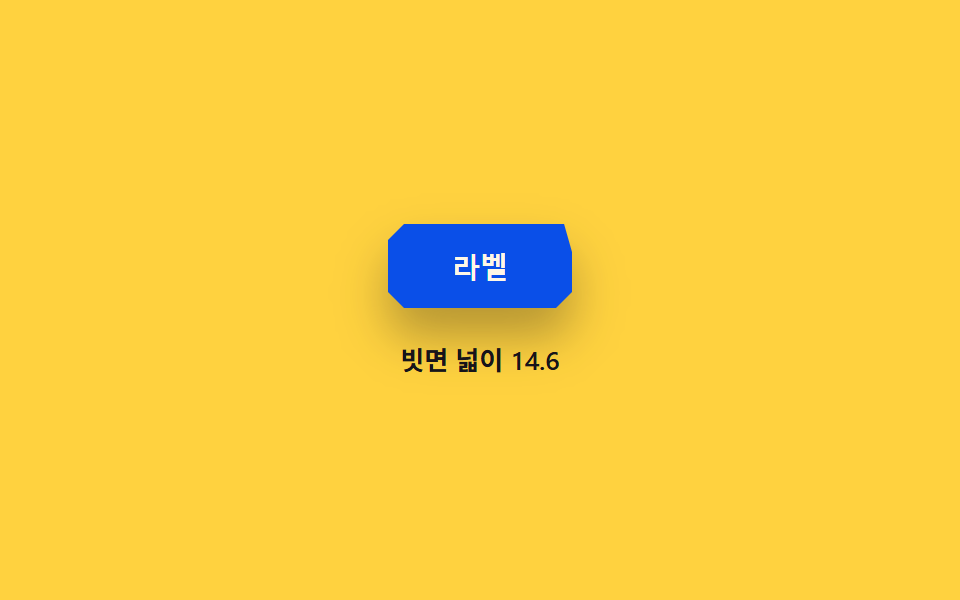
02ベベルチップ — ベベル角度の値が増すほどチップの角の面の幅の値が共に大きくなる方式
ベベル角度の値が8度から18度へ上がる間、面の幅の値は角度のタンジェントに沿って広がり、切断面が細い線から面へ育つ。
使いどころ値札・ラベルチップ、ステータスバッジ
BEVEL_DEGBEVEL_RY$subject-blue-deep
<main class="stage">
<div class="wrap is-demo" id="wrap">
  <button class="chip" id="chip" type="button" aria-pressed="false" aria-label="ベベル角度を切り替え">ラベル</button>
  <p class="readout" id="readout" aria-live="polite">斜面幅 14.0</p>
</div>
</main>
@use "../../../../site/static/demo-tokens" as *;
// 계산 겹은 index.html 에 있다 — 베벨 각도 값에서 가로축 반경을 tan() 으로 역산하고 빗변 길이를 빗면 넓이로 쓴다.
@include stage($stage-yellow);
.wrap {
display: flex;
flex-direction: column;
align-items: center;
gap: $sp-4;
}
.chip {
appearance: none;
border: none;
padding: $sp-3 $sp-8;
font-size: 14px;
font-weight: 700;
color: $subject-cream;
background: $subject-blue-deep;
corner-shape: bevel;
border-radius: $r-sm;
cursor: pointer;
transition: box-shadow $dur-quick $ease-out;
box-shadow: $shadow-raised;
&:hover { box-shadow: $shadow-press; }
&:focus-visible { outline: 2px solid $subject-ink; outline-offset: 3px; }
}
@supports not (corner-shape: bevel) {
.chip { border: 1px solid rgba($subject-cream, .3); }
}
.readout {
margin: 0;
color: $subject-ink;
font-size: 13px;
font-weight: 600;
font-variant-numeric: tabular-nums;
}
@media (max-width: 340px) {
.chip { padding: $sp-2 $sp-6; font-size: 13px; }
}
@media (prefers-reduced-motion: reduce) {
.chip { transition: none; }
}html, body {
margin: 0;
overflow: hidden;
}
.stage {
box-sizing: border-box;
min-height: 100vh;
display: grid;
place-items: center;
margin: 0;
background: #ffd23f;
font-family: -apple-system, "Segoe UI", "Noto Sans KR", sans-serif;
padding: clamp(8px, 4vw, 24px);
}
.wrap {
display: flex;
flex-direction: column;
align-items: center;
gap: 16px;
}
.chip {
appearance: none;
border: none;
padding: 12px 32px;
font-size: 14px;
font-weight: 700;
color: #fff7e6;
background: #0a4fe8;
corner-shape: bevel;
border-radius: 8px;
cursor: pointer;
transition: box-shadow 220ms ease-out;
box-shadow: 0 14px 24px rgba(23, 20, 26, 0.32);
}
.chip:hover {
box-shadow: 0 6px 12px rgba(23, 20, 26, 0.32);
}
.chip:focus-visible {
outline: 2px solid #17141a;
outline-offset: 3px;
}
@supports not (corner-shape: bevel) {
.chip {
border: 1px solid rgba(255, 247, 230, 0.3);
}
}
.readout {
margin: 0;
color: #17141a;
font-size: 13px;
font-weight: 600;
font-variant-numeric: tabular-nums;
}
@media (max-width: 340px) {
.chip {
padding: 8px 24px;
font-size: 13px;
}
}
@media (prefers-reduced-motion: reduce) {
.chip {
transition: none;
}
}(function () {
var BEVEL_DEG = 18; // 빗면이 도달하는 각도 상한 값 (변형 02 목표)
var MIN_DEG = 8; // 빗면 각도 하한 값
var BEVEL_RY = 14; // 계산 겹 상수: 세로축 半径 고정값(px) — 각도가 커질수록 가로축만 늘어나 빗면이 넓어진다
var BEVEL_MS = 2000; // 각도가 하한에서 상한까지 한 번 오가는 주기
var reduce = window.matchMedia('(prefers-reduced-motion: reduce)').matches;
var SUPPORTS = CSS.supports('corner-shape', 'bevel');
var wrap = document.getElementById('wrap');
var chip = document.getElementById('chip');
var readout = document.getElementById('readout');
var isDemo = true;
var manualDeg = null;
function human() { if (isDemo) { wrap.classList.remove('is-demo'); isDemo = false; } }
// 계산 겹: 베벨 각도 값에서 가로축 반경을 삼각비로 역산하고, 두 반경의 빗변 길이를 빗면 넓이로 삼는다
function applyAngle(deg) {
var rad = deg * Math.PI / 180;
var rx = BEVEL_RY * Math.tan(rad);
var facetWidth = Math.hypot(rx, BEVEL_RY);
if (SUPPORTS) {
chip.style.borderTopRightRadius = rx.toFixed(2) + 'px ' + BEVEL_RY + 'px';
} else {
// 근사 폴백: 대각 빗면 대신 같은 半径 크기의 둥근 모서리로 흉내
chip.style.borderTopRightRadius = facetWidth.toFixed(2) + 'px';
}
readout.textContent = '斜面幅 ' + facetWidth.toFixed(1);
}
chip.addEventListener('click', function () {
human();
manualDeg = manualDeg === BEVEL_DEG ? MIN_DEG : BEVEL_DEG;
chip.setAttribute('aria-pressed', String(manualDeg === BEVEL_DEG));
applyAngle(manualDeg);
});
var start = 0;
function loop(ts) {
if (!start) start = ts;
if (isDemo) {
if (reduce) {
applyAngle(BEVEL_DEG);
} else {
var t = ((ts - start) % BEVEL_MS) / BEVEL_MS;
var tri = t < 0.5 ? t * 2 : (1 - t) * 2;
applyAngle(MIN_DEG + (BEVEL_DEG - MIN_DEG) * tri);
}
}
requestAnimationFrame(loop);
}
requestAnimationFrame(loop);
})();// BevelChip — vanilla 판(run/372/demo/02-corner-shape-bevel-chip/index.html) 의 React 포트.
// 베벨 각도 값에서 가로축 반경을 tan() 으로 역산하고 빗변 길이를 빗면 넓이로 쓴다.
import { useEffect, useRef } from "react";
import styles from "./BevelChip.module.scss";
type Box<T> = { current: T };
const BEVEL_DEG = 18; // 빗면이 도달하는 각도 상한 값 (변형 02 목표)
const MIN_DEG = 8; // 빗면 각도 하한 값
const BEVEL_RY = 14; // 계산 겹 상수: 세로축 반경 고정값(px) — 각도가 커질수록 가로축만 늘어나 빗면이 넓어진다
const BEVEL_MS = 2000; // 각도가 하한에서 상한까지 한 번 오가는 주기
export default function BevelChip() {
const rootRef = useRef(null) as unknown as Box<HTMLDivElement>;
const chipRef = useRef(null) as unknown as Box<HTMLButtonElement>;
const readoutRef = useRef(null) as unknown as Box<HTMLParagraphElement>;
const rafRef = useRef(0) as unknown as Box<number>;
useEffect(() => {
const reduce = window.matchMedia("(prefers-reduced-motion: reduce)").matches;
const SUPPORTS = CSS.supports("corner-shape", "bevel");
const root = rootRef.current;
const chip = chipRef.current;
const readout = readoutRef.current;
if (!root || !chip || !readout) return;
let isDemo = true;
let manualDeg: number | null = null;
function human() { if (isDemo) { root!.classList.remove(styles.isDemo); isDemo = false; } }
// 계산 겹: 베벨 각도 값에서 가로축 반경을 삼각비로 역산하고, 두 반경의 빗변 길이를 빗면 넓이로 삼는다
function applyAngle(deg: number) {
const rad = deg * Math.PI / 180;
const rx = BEVEL_RY * Math.tan(rad);
const facetWidth = Math.hypot(rx, BEVEL_RY);
if (SUPPORTS) {
chip!.style.borderTopRightRadius = rx.toFixed(2) + "px " + BEVEL_RY + "px";
} else {
chip!.style.borderTopRightRadius = facetWidth.toFixed(2) + "px";
}
readout!.textContent = "빗면 넓이 " + facetWidth.toFixed(1);
}
function onClick() {
human();
manualDeg = manualDeg === BEVEL_DEG ? MIN_DEG : BEVEL_DEG;
chip!.setAttribute("aria-pressed", String(manualDeg === BEVEL_DEG));
applyAngle(manualDeg);
}
chip.addEventListener("click", onClick);
let start = 0;
function loop(ts: number) {
if (!start) start = ts;
if (isDemo) {
if (reduce) {
applyAngle(BEVEL_DEG);
} else {
const t = ((ts - start) % BEVEL_MS) / BEVEL_MS;
const tri = t < 0.5 ? t * 2 : (1 - t) * 2;
applyAngle(MIN_DEG + (BEVEL_DEG - MIN_DEG) * tri);
}
}
rafRef.current = requestAnimationFrame(loop);
}
rafRef.current = requestAnimationFrame(loop);
return () => {
chip.removeEventListener("click", onClick);
cancelAnimationFrame(rafRef.current);
};
}, []);
return (
<main className={styles.stage}>
<div className={styles.wrap + " " + styles.isDemo} ref={rootRef}>
<button
className={styles.chip}
ref={chipRef}
type="button"
aria-pressed="false"
aria-label="베벨 각도 전환"
>라벨</button>
<p className={styles.readout} ref={readoutRef} aria-live="polite">빗면 넓이 14.0</p>
</div>
</main>
);
}02 ベベルチップ — ベベル角度の値が増すほどチップの角の面の幅の値が共に大きくなる方式 — 計測 累積面積 0.326% · 動いたフレーム 23/23GODRICH オリジナル · SCSS と React は zip に同梱 · css corner-shape 9選 — border-radiusで切らない角の処理
このデモが属する記事
 css corner-shape 9選 — border-radiusで切らない角の処理9つのコーナー形状のうち、1つはスーパー楕円指数の値が円と四角の間を流れ、1つはsquircle比率の値でカードの角が補間され、1つはベベル角度の値が増すほど面の幅が広がります。この9つは、css corner-shape の対応を起動時に この記事のデモをすべて見る