07カスタムセレクトが開く
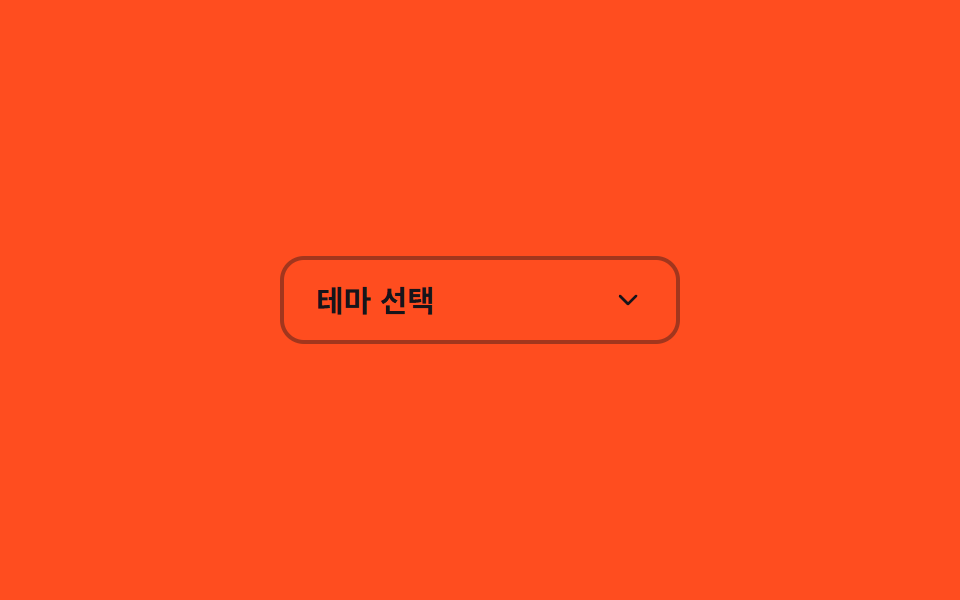
ネイティブの select の代わりにボタンとリストを自前で組み、開くとリストが scaleY で広がりシェブロンが180度回転する。
使いどころテーマ・並び替え基準の選択、デザインを合わせたいドロップダウン
aria-expandedscaleY220ms
<main class="stage">
  <div class="cs is-demo">
    <button type="button" class="cs__btn" aria-haspopup="listbox" aria-expanded="false" id="cs-btn">
      <span class="cs__value">テーマを選択</span>
      <svg class="cs__chevron" viewBox="0 0 24 24" aria-hidden="true"><polyline points="6 9 12 15 18 9"/></svg>
    </button>
    <ul class="cs__list" role="listbox" aria-labelledby="cs-btn">
      <li role="option" class="cs__opt">ライト</li>
      <li role="option" class="cs__opt">ダーク</li>
      <li role="option" class="cs__opt">システム</li>
    </ul>
    <span class="cs__bloom" aria-hidden="true"></span>
  </div>
</main>
@use "../../../../site/static/demo-tokens" as *;
// ── 변수 3개 ──────────────────────────────────────────
$duration: $dur-base; // 열리고 닫히는 시간
$easing: cubic-bezier(.3, 1.5, .4, 1); // 스프링 오버슛 — 목록 scaleY 가 1 을 지나 1.06 까지 뻗었다가 감아 들어간다
$color: $subject-ink; // 셰브론 색 — 주황 무대 위 전경은 잉크(크림은 3.11:1 미달)
@include stage($stage-orange);
.cs { position: relative; width: min(200px, 78vw); }
.cs__btn {
display: flex; align-items: center; justify-content: space-between;
width: 100%;
border: 2px solid rgba($subject-ink, .4);
border-radius: $r-control;
padding: $sp-3 $sp-4;
font-weight: 600;
font-size: clamp(13px, 3.8vw, 15px);
line-height: 1;
font-family: inherit;
color: $subject-ink; // 주황 면 위 크림 글자는 3.11:1 — 잉크로 5.50:1
background: transparent;
cursor: pointer;
}
.cs__chevron {
width: 16px; height: 16px;
fill: none; stroke: $color; stroke-width: 2;
stroke-linecap: round; stroke-linejoin: round;
transform: rotate(0deg);
transition: transform $duration $easing;
}
.cs.is-open .cs__chevron { transform: rotate(180deg); }
.cs__list {
position: absolute;
left: 0; right: 0; top: calc(100% + $sp-2);
margin: 0; padding: $sp-2;
list-style: none;
border-radius: $r-control;
background: $subject-cream;
box-shadow: $shadow-raised;
transform: scaleY(0);
transform-origin: top; // 규칙8: 버튼 아래변에서 펼침
opacity: 0;
pointer-events: none;
transition: transform $duration $easing, opacity $duration $easing;
}
.cs.is-open .cs__list { transform: scaleY(1); opacity: 1; pointer-events: auto; }
// 목록이 열리는 순간 버튼 중심에서 아래로 번지는 radial 글로우 확산 한 겹
.cs__bloom {
position: absolute;
left: 0; right: 0; top: calc(100% + $sp-2);
height: 48px;
background: radial-gradient(ellipse 70% 100% at 50% 0%, rgba($subject-cream, .35) 0%, rgba($subject-cream, 0) 70%);
opacity: 0;
pointer-events: none;
}
.cs.is-open .cs__bloom { animation: cs-bloom $dur-base $ease-out; }
@keyframes cs-bloom {
0% { opacity: 0; transform: scaleY(.5); }
40% { opacity: 1; transform: scaleY(1); }
100% { opacity: 0; transform: scaleY(1.1); }
}
.cs__opt {
padding: $sp-2 $sp-3;
border-radius: $r-sm;
font-weight: 500;
font-size: clamp(13px, 3.6vw, 14px);
line-height: 1;
font-family: inherit;
color: $subject-orange-deep; // 크림 면 위 주황 글자는 3.11:1 — deep 으로 5.04:1
&:hover { background: rgba($stage-orange, .08); }
}
@media (prefers-reduced-motion: reduce) {
.cs__chevron, .cs__list { transition: none; }
.cs.is-open .cs__bloom { animation: none; }
}html, body {
margin: 0;
overflow: hidden;
}
.stage {
box-sizing: border-box;
min-height: 100vh;
display: grid;
place-items: center;
margin: 0;
background: #ff4d1f;
font-family: -apple-system, "Segoe UI", "Noto Sans KR", sans-serif;
padding: clamp(8px, 4vw, 24px);
}
.cs {
position: relative;
width: min(200px, 78vw);
}
.cs__btn {
display: flex;
align-items: center;
justify-content: space-between;
width: 100%;
border: 2px solid rgba(23, 20, 26, 0.4);
border-radius: 12px;
padding: 12px 16px;
font-weight: 600;
font-size: clamp(13px, 3.8vw, 15px);
line-height: 1;
font-family: inherit;
color: #17141a;
background: transparent;
cursor: pointer;
}
.cs__chevron {
width: 16px;
height: 16px;
fill: none;
stroke: #17141a;
stroke-width: 2;
stroke-linecap: round;
stroke-linejoin: round;
transform: rotate(0deg);
transition: transform 300ms cubic-bezier(0.3, 1.5, 0.4, 1);
}
.cs.is-open .cs__chevron {
transform: rotate(180deg);
}
.cs__list {
position: absolute;
left: 0;
right: 0;
top: calc(100% + 8px);
margin: 0;
padding: 8px;
list-style: none;
border-radius: 12px;
background: #fff7e6;
box-shadow: 0 14px 24px rgba(23, 20, 26, 0.32);
transform: scaleY(0);
transform-origin: top;
opacity: 0;
pointer-events: none;
transition: transform 300ms cubic-bezier(0.3, 1.5, 0.4, 1), opacity 300ms cubic-bezier(0.3, 1.5, 0.4, 1);
}
.cs.is-open .cs__list {
transform: scaleY(1);
opacity: 1;
pointer-events: auto;
}
.cs__bloom {
position: absolute;
left: 0;
right: 0;
top: calc(100% + 8px);
height: 48px;
background: radial-gradient(ellipse 70% 100% at 50% 0%, rgba(255, 247, 230, 0.35) 0%, rgba(255, 247, 230, 0) 70%);
opacity: 0;
pointer-events: none;
}
.cs.is-open .cs__bloom {
animation: cs-bloom 300ms ease-out;
}
@keyframes cs-bloom {
0% {
opacity: 0;
transform: scaleY(0.5);
}
40% {
opacity: 1;
transform: scaleY(1);
}
100% {
opacity: 0;
transform: scaleY(1.1);
}
}
.cs__opt {
padding: 8px 12px;
border-radius: 8px;
font-weight: 500;
font-size: clamp(13px, 3.6vw, 14px);
line-height: 1;
font-family: inherit;
color: #c93000;
}
.cs__opt:hover {
background: rgba(255, 77, 31, 0.08);
}
@media (prefers-reduced-motion: reduce) {
.cs__chevron, .cs__list {
transition: none;
}
.cs.is-open .cs__bloom {
animation: none;
}
}// 실사용: 버튼 클릭으로 연다·닫는다. 데모(.is-demo)는 같은 클래스를 주기적으로 토글 (5줄)
var cs = document.querySelector('.cs');
var btn = cs.querySelector('.cs__btn');
var toggle = function () { cs.classList.toggle('is-open'); btn.setAttribute('aria-expanded', cs.classList.contains('is-open')); };
btn.addEventListener('click', toggle);
if (cs.classList.contains('is-demo')) setInterval(toggle, 500);import { useState } from "react";
import type { CSSProperties } from "react";
import styles from "./CustomSelectOpen.module.scss";
export type CustomSelectOpenProps = {
id?: string;
label?: string;
options?: string[];
duration?: number;
easing?: string;
color?: string;
};
type Vars = CSSProperties & { "--duration"?: string; "--easing"?: string; "--color"?: string };
export default function CustomSelectOpen({
id = "cs-btn",
label = "Choose theme",
options = ["Light", "Dark", "System"],
duration = 220,
easing = "cubic-bezier(.3,1.5,.4,1)",
color = "#17141a",
}: CustomSelectOpenProps) {
const [open, setOpen] = useState(false);
const vars: Vars = { "--duration": `${duration}ms`, "--easing": easing, "--color": color };
return (
<div className={open ? `${styles.cs} ${styles.open}` : styles.cs} style={vars}>
<button
type="button"
id={id}
className={styles.btn}
aria-haspopup="listbox"
aria-expanded={open}
onClick={() => setOpen((v) => !v)}
>
<span>{label}</span>
<svg className={styles.chevron} viewBox="0 0 24 24" aria-hidden="true"><polyline points="6 9 12 15 18 9" /></svg>
</button>
<ul className={styles.list} role="listbox" aria-labelledby={id}>
{options.map((opt) => (
<li key={opt} role="option" className={styles.opt}>{opt}</li>
))}
</ul>
<span className={styles.bloom} aria-hidden="true" />
</div>
);
}07 カスタムセレクトが開く — 計測 累積面積 18.322% · 動いたフレーム 16/23GODRICH オリジナル · SCSS と React は zip に同梱 · CSS 入力フォーム フォーカスアニメーション9選 一行でコピペOK
このデモが属する記事
 CSS 入力フォーム フォーカスアニメーション9選 一行でコピペOKcss 入力フォームのアニメーションは、クリックする前・クリックした瞬間・値を入力し終えたあとまで、ブラウザがすでに持っている:focus:focus-within:placeholder-shown:valid:invalidという状態を この記事のデモをすべて見る