06カード→詳細へズーム
クリックしたカードが画面いっぱいに拡大して詳細ページになる。
使いどころギャラリー・ニュースカード一覧
350ms모서리 반경 0으로배경 어둡게
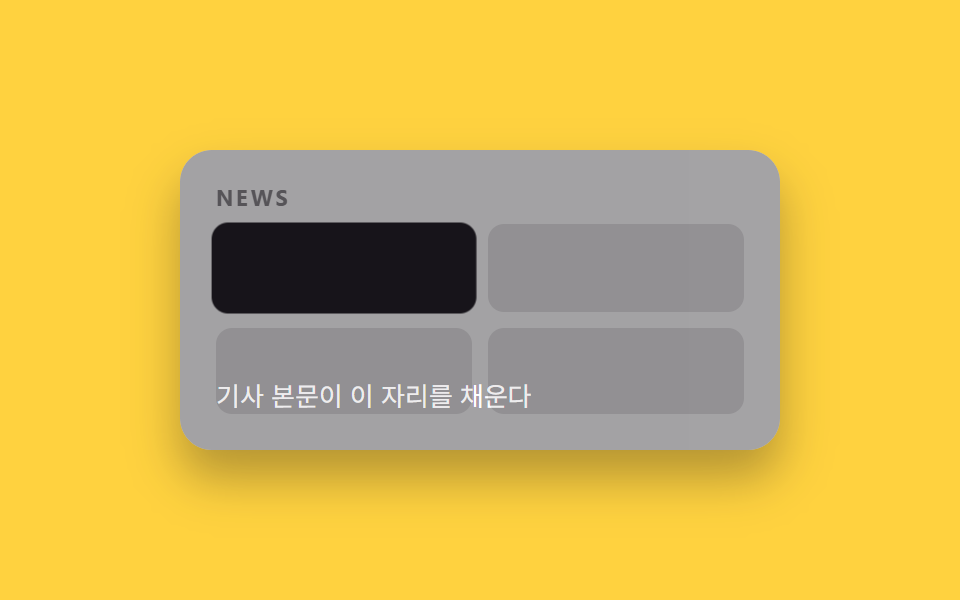
<main class="stage">
  <div class="pages is-demo">
    <section class="page page--grid">
      <p class="page__tag">NEWS</p>
      <div class="grid">
        <span class="cell cell--focus"></span>
        <span class="cell"></span>
        <span class="cell"></span>
        <span class="cell"></span>
      </div>
    </section>
    <div class="detail">
      <p class="detail__body">この場所に本文が入る</p>
    </div>
  </div>
</main>
@use "../../../../site/static/demo-tokens" as *;
// ── 변수 3개. 변형은 이것만 바꾼다 (값은 토큰에서 받는다) ──────
$duration: $dur-enter;
$easing: $ease-spring;
$color: $subject-ink;
// ── 데모 무대 ───────────────────────────────
@include stage($stage-yellow);
.pages { position: relative; width: min(300px, 88%); height: 150px; border-radius: $r-card; overflow: hidden; box-shadow: $shadow-raised; background: #fff; }
.page--grid { position: absolute; inset: 0; box-sizing: border-box; padding: clamp(12px, 5vw, 18px); display: flex; flex-direction: column; gap: 8px; }
.page__tag { margin: 0; font-weight: 700; font-size: clamp(9px, 2.6vw, 11px); line-height: 1; font-family: inherit; letter-spacing: .12em; color: $subject-ink; opacity: .55; }
.grid { display: grid; grid-template-columns: 1fr 1fr; gap: 8px; flex: 1; }
.cell { border-radius: 8px; background: $subject-ink; opacity: .12; }
.cell--focus { background: $color; opacity: 1; }
// 클릭한 카드(cell--focus)가 화면을 가득 채우도록 transform 으로만 확대한다.
.cell--focus {
position: relative;
animation: zoom-card $dur-loop $easing infinite;
}
.detail {
position: absolute; inset: 0; background: $color; color: #fff;
display: flex; align-items: flex-end; box-sizing: border-box; padding: clamp(12px, 5vw, 18px);
opacity: 0;
animation: zoom-detail $dur-loop $easing infinite;
}
.detail__body { margin: 0; font-weight: 400; font-size: clamp(11px, 3.2vw, 13px); line-height: 1.5; font-family: inherit; }
@keyframes zoom-card {
0%, 40% { transform: scale(1); }
70% { transform: scale(4); }
100% { transform: scale(1); }
}
@keyframes zoom-detail {
0%, 55% { opacity: 0; }
75%, 90% { opacity: 1; }
100% { opacity: 0; }
}
// ── 접근성: 움직임 줄이기 설정이면 최종 상태만 고정으로 ────────
@media (prefers-reduced-motion: reduce) {
.cell--focus, .detail { animation: none !important; }
.detail { opacity: 0; }
}html, body {
margin: 0;
overflow: hidden;
}
.stage {
box-sizing: border-box;
min-height: 100vh;
display: grid;
place-items: center;
margin: 0;
background: #ffd23f;
font-family: -apple-system, "Segoe UI", "Noto Sans KR", sans-serif;
padding: clamp(8px, 4vw, 24px);
}
.pages {
position: relative;
width: min(300px, 88%);
height: 150px;
border-radius: 16px;
overflow: hidden;
box-shadow: 0 14px 24px rgba(23, 20, 26, 0.32);
background: #fff;
}
.page--grid {
position: absolute;
inset: 0;
box-sizing: border-box;
padding: clamp(12px, 5vw, 18px);
display: flex;
flex-direction: column;
gap: 8px;
}
.page__tag {
margin: 0;
font-weight: 700;
font-size: clamp(9px, 2.6vw, 11px);
line-height: 1;
font-family: inherit;
letter-spacing: 0.12em;
color: #17141a;
opacity: 0.55;
}
.grid {
display: grid;
grid-template-columns: 1fr 1fr;
gap: 8px;
flex: 1;
}
.cell {
border-radius: 8px;
background: #17141a;
opacity: 0.12;
}
.cell--focus {
background: #17141a;
opacity: 1;
}
.cell--focus {
position: relative;
animation: zoom-card 2s cubic-bezier(0.2, 0.8, 0.2, 1) infinite;
}
.detail {
position: absolute;
inset: 0;
background: #17141a;
color: #fff;
display: flex;
align-items: flex-end;
box-sizing: border-box;
padding: clamp(12px, 5vw, 18px);
opacity: 0;
animation: zoom-detail 2s cubic-bezier(0.2, 0.8, 0.2, 1) infinite;
}
.detail__body {
margin: 0;
font-weight: 400;
font-size: clamp(11px, 3.2vw, 13px);
line-height: 1.5;
font-family: inherit;
}
@keyframes zoom-card {
0%, 40% {
transform: scale(1);
}
70% {
transform: scale(4);
}
100% {
transform: scale(1);
}
}
@keyframes zoom-detail {
0%, 55% {
opacity: 0;
}
75%, 90% {
opacity: 1;
}
100% {
opacity: 0;
}
}
@media (prefers-reduced-motion: reduce) {
.cell--focus, .detail {
animation: none !important;
}
.detail {
opacity: 0;
}
}import type { CSSProperties, ReactNode } from "react";
import styles from "./ZoomCardTransition.module.scss";
export type ZoomCardTransitionProps = {
/** "grid": 카드 목록, "detail": 확대된 상세 */
active: "grid" | "detail";
detail: ReactNode;
/** 확대가 끝나는 시간 (기본 600ms) */
duration?: number;
easing?: string;
color?: string;
className?: string;
};
type Vars = CSSProperties & { "--duration"?: string; "--easing"?: string; "--color"?: string };
export default function ZoomCardTransition({
active,
detail,
duration = 600,
easing = "cubic-bezier(.2,.8,.2,1)",
color = "#17141a",
className = "",
}: ZoomCardTransitionProps) {
const vars: Vars = { "--duration": `${duration}ms`, "--easing": easing, "--color": color };
return (
<div className={`${styles.pages} ${className}`} style={vars} data-active={active}>
<div className={styles.grid}>
<span className={styles.cellFocus} />
<span className={styles.cell} />
<span className={styles.cell} />
<span className={styles.cell} />
</div>
<div className={styles.detail}>{detail}</div>
</div>
);
}06 カード→詳細へズーム — 計測 累積面積 27.268% · 動いたフレーム 12/23GODRICH オリジナル · SCSS と React は zip に同梱 · 【JS最小・CSSだけ】css ページ遷移 アニメーション9選
このデモが属する記事
 【JS最小・CSSだけ】css ページ遷移 アニメーション9選css ページ遷移 アニメーションは、2枚の画面要素を opacity や transform、clip-path だけで重ねて、ライブラリなしにページ間の切り替えを表現する手法です。この記事では9種類を選び、グリッドではそれぞれ2秒ごとに この記事のデモをすべて見る