03グリッド⇔リスト表示切替
表示切替トグルのつまみが滑ると同時に、同じカード群がグリッド配置とリスト配置の間をその場で移動する。
使いどころ商品一覧・検索結果の表示切替
translate 좌표 전환라디오 :checkedtransition
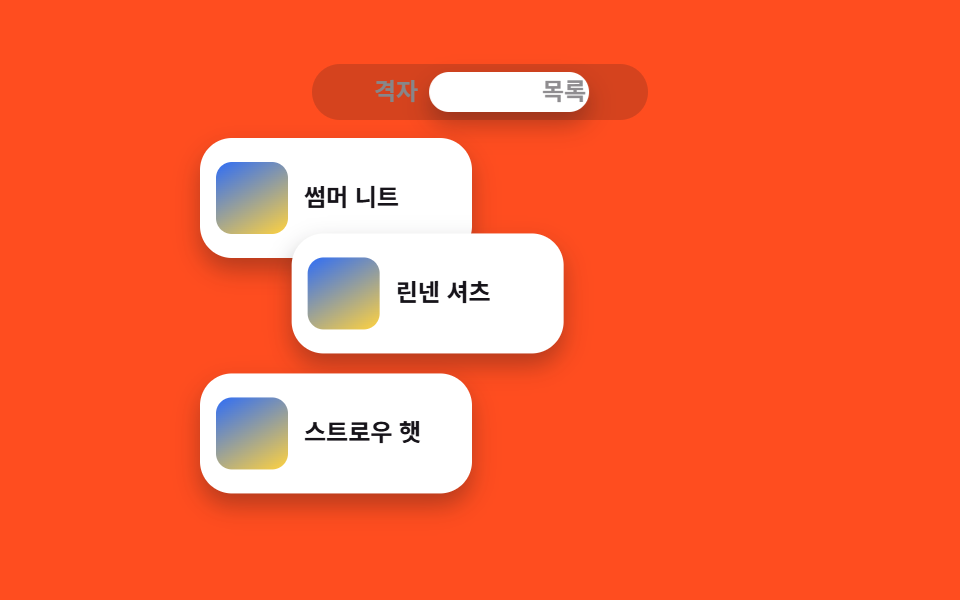
<main class="stage">
  <section class="vs is-demo" aria-label="同じカード3枚がグリッドとリスト配置を行き来する">
    <input class="vs__radio" type="radio" name="vs-218" id="vs-grid" checked>
    <input class="vs__radio" type="radio" name="vs-218" id="vs-list">
    <div class="vs__toggle" aria-hidden="true"><span class="vs__knob"></span></div>
    <div class="vs__toggle-labels">
      <label class="vs__label" for="vs-grid">グリッド</label>
      <label class="vs__label" for="vs-list">リスト</label>
    </div>
    <div class="vs__board">
      <article class="vs__card vs__card--1"><span class="vs__thumb" aria-hidden="true"></span><span class="vs__name">サマーニット</span></article>
      <article class="vs__card vs__card--2"><span class="vs__thumb" aria-hidden="true"></span><span class="vs__name">リネンシャツ</span></article>
      <article class="vs__card vs__card--3"><span class="vs__thumb" aria-hidden="true"></span><span class="vs__name">ストローハット</span></article>
    </div>
  </section>
</main>
@use "../../../../site/static/demo-tokens" as *;
$duration: $dur-base; // 카드가 배치를 바꾸는 시간
$easing: $ease-spring;
$color: $subject-blue; // 썸네일 색
@include stage($stage-orange);
.vs { width: 280px; max-width: 92vw; }
.vs__radio { position: absolute; opacity: 0; pointer-events: none; }
// ── 토글: 라디오 + 미끄러지는 손잡이 (JS 0줄) — 시각 요소는 형제로
.vs__toggle {
position: relative;
width: 168px;
height: 28px;
margin: 0 auto;
padding: 4px;
box-sizing: border-box;
border-radius: $r-pill;
background: rgba(23, 20, 26, .18);
}
.vs__knob {
position: absolute; top: 4px; bottom: 4px; left: 4px;
width: calc(50% - 4px);
box-sizing: border-box;
border-radius: $r-pill;
background: $stage-paper;
box-shadow: $shadow-press;
transform: translateX(0);
transition: transform $duration $easing;
}
#vs-list:checked ~ .vs__toggle .vs__knob { transform: translateX(100%); }
.vs__toggle-labels {
position: relative;
display: grid;
grid-template-columns: 1fr 1fr;
width: 168px;
margin: -28px auto $sp-3; // 글자를 토글 위에 얹는다
}
.vs__label {
padding: $sp-1 0;
font-weight: 700;
font-size: 12px;
font-family: inherit;
color: $stage-paper;
text-align: center;
cursor: pointer;
transition: color $dur-quick $easing;
}
#vs-grid:checked ~ .vs__toggle-labels .vs__label[for="vs-grid"],
#vs-list:checked ~ .vs__toggle-labels .vs__label[for="vs-list"] { color: $stage-ink; }
// ── 보드: 같은 카드 3장 (크기 고정), 배치만 transform 좌표로 바뀐다
.vs__board { position: relative; height: 200px; }
.vs__card {
position: absolute; left: 0; top: 0;
display: flex; align-items: center; gap: $sp-2;
box-sizing: border-box;
width: 136px;
height: 60px;
padding: $sp-2;
border-radius: $r-card;
background: $stage-paper;
box-shadow: $shadow-press;
transition: transform $duration $easing;
}
.vs__thumb {
flex: 0 0 auto;
width: 36px; height: 36px;
border-radius: $r-sm;
background: linear-gradient(150deg, $color, $stage-yellow);
}
.vs__name {
font-weight: 700;
font-size: 12px;
line-height: 1.2;
font-family: inherit;
color: $stage-ink;
}
// 격자 배치: 2열 — % 는 카드 자기 크기 기준이라 카드가 줄면 간격도 줄어든다
.vs__card--1 { transform: translate(0, 0); }
.vs__card--2 { transform: translate(calc(100% + 8px), 0); }
.vs__card--3 { transform: translate(0, calc(100% + 10px)); }
// 목록 배치: 한 줄씩 아래로
#vs-list:checked ~ .vs__board .vs__card--1 { transform: translate(0, 0); }
#vs-list:checked ~ .vs__board .vs__card--2 { transform: translate(0, calc(100% + 10px)); }
#vs-list:checked ~ .vs__board .vs__card--3 { transform: translate(0, calc(200% + 20px)); }
// 렌더·갤러리용 자동 루프: 격자→목록→격자를 2초 주기로
.vs.is-demo .vs__knob { animation: knob-loop $dur-loop $easing infinite; }
.vs.is-demo .vs__label[for="vs-grid"] { animation: lab-grid $dur-loop $easing infinite; }
.vs.is-demo .vs__label[for="vs-list"] { animation: lab-list $dur-loop $easing infinite; }
.vs.is-demo .vs__card--2 { animation: c2-loop $dur-loop $easing infinite; }
.vs.is-demo .vs__card--3 { animation: c3-loop $dur-loop $easing infinite; }
@keyframes knob-loop {
0%, 20%, 100% { transform: translateX(0); }
45%, 65% { transform: translateX(100%); }
}
@keyframes lab-grid { // 손잡이가 떠나자마자 색이 따라간다
0%, 24% { color: $stage-ink; }
32%, 68% { color: $stage-paper; }
78%, 100% { color: $stage-ink; }
}
@keyframes lab-list {
0%, 24% { color: $stage-paper; }
32%, 68% { color: $stage-ink; }
78%, 100% { color: $stage-paper; }
}
@keyframes c2-loop {
0%, 20%, 100% { transform: translate(calc(100% + 8px), 0); }
45%, 65% { transform: translate(0, calc(100% + 10px)); }
}
@keyframes c3-loop {
0%, 20%, 100% { transform: translate(0, calc(100% + 10px)); }
45%, 65% { transform: translate(0, calc(200% + 20px)); }
}
@media (max-width: 360px) { // 320×200 아이프레임 대응
.vs { width: 232px; }
.vs__toggle { width: 140px; height: 24px; }
.vs__toggle-labels { width: 140px; margin: -24px auto 8px; }
.vs__label { font-size: 11px; padding: 4px 0; }
.vs__board { height: 140px; }
.vs__card { width: 112px; height: 40px; padding: 4px; gap: 4px; }
.vs__thumb { width: 24px; height: 24px; }
.vs__name { font-size: 10px; }
}
@media (prefers-reduced-motion: reduce) {
.vs__knob, .vs__card, .vs__label { transition: none; }
.vs.is-demo .vs__knob,
.vs.is-demo .vs__card,
.vs.is-demo .vs__label { animation: none; } // 즉시 목표 배치로 전환
}html, body {
margin: 0;
overflow: hidden;
}
.stage {
box-sizing: border-box;
min-height: 100vh;
display: grid;
place-items: center;
margin: 0;
background: #ff4d1f;
font-family: -apple-system, "Segoe UI", "Noto Sans KR", sans-serif;
padding: clamp(8px, 4vw, 24px);
}
.vs {
width: 280px;
max-width: 92vw;
}
.vs__radio {
position: absolute;
opacity: 0;
pointer-events: none;
}
.vs__toggle {
position: relative;
width: 168px;
height: 28px;
margin: 0 auto;
padding: 4px;
box-sizing: border-box;
border-radius: 999px;
background: rgba(23, 20, 26, 0.18);
}
.vs__knob {
position: absolute;
top: 4px;
bottom: 4px;
left: 4px;
width: calc(50% - 4px);
box-sizing: border-box;
border-radius: 999px;
background: #ffffff;
box-shadow: 0 6px 12px rgba(23, 20, 26, 0.32);
transform: translateX(0);
transition: transform 300ms cubic-bezier(0.2, 0.8, 0.2, 1);
}
#vs-list:checked ~ .vs__toggle .vs__knob {
transform: translateX(100%);
}
.vs__toggle-labels {
position: relative;
display: grid;
grid-template-columns: 1fr 1fr;
width: 168px;
margin: -28px auto 12px;
}
.vs__label {
padding: 4px 0;
font-weight: 700;
font-size: 12px;
font-family: inherit;
color: #ffffff;
text-align: center;
cursor: pointer;
transition: color 220ms cubic-bezier(0.2, 0.8, 0.2, 1);
}
#vs-grid:checked ~ .vs__toggle-labels .vs__label[for=vs-grid],
#vs-list:checked ~ .vs__toggle-labels .vs__label[for=vs-list] {
color: #17141a;
}
.vs__board {
position: relative;
height: 200px;
}
.vs__card {
position: absolute;
left: 0;
top: 0;
display: flex;
align-items: center;
gap: 8px;
box-sizing: border-box;
width: 136px;
height: 60px;
padding: 8px;
border-radius: 16px;
background: #ffffff;
box-shadow: 0 6px 12px rgba(23, 20, 26, 0.32);
transition: transform 300ms cubic-bezier(0.2, 0.8, 0.2, 1);
}
.vs__thumb {
flex: 0 0 auto;
width: 36px;
height: 36px;
border-radius: 8px;
background: linear-gradient(150deg, #2f6df6, #ffd23f);
}
.vs__name {
font-weight: 700;
font-size: 12px;
line-height: 1.2;
font-family: inherit;
color: #17141a;
}
.vs__card--1 {
transform: translate(0, 0);
}
.vs__card--2 {
transform: translate(calc(100% + 8px), 0);
}
.vs__card--3 {
transform: translate(0, calc(100% + 10px));
}
#vs-list:checked ~ .vs__board .vs__card--1 {
transform: translate(0, 0);
}
#vs-list:checked ~ .vs__board .vs__card--2 {
transform: translate(0, calc(100% + 10px));
}
#vs-list:checked ~ .vs__board .vs__card--3 {
transform: translate(0, calc(200% + 20px));
}
.vs.is-demo .vs__knob {
animation: knob-loop 2s cubic-bezier(0.2, 0.8, 0.2, 1) infinite;
}
.vs.is-demo .vs__label[for=vs-grid] {
animation: lab-grid 2s cubic-bezier(0.2, 0.8, 0.2, 1) infinite;
}
.vs.is-demo .vs__label[for=vs-list] {
animation: lab-list 2s cubic-bezier(0.2, 0.8, 0.2, 1) infinite;
}
.vs.is-demo .vs__card--2 {
animation: c2-loop 2s cubic-bezier(0.2, 0.8, 0.2, 1) infinite;
}
.vs.is-demo .vs__card--3 {
animation: c3-loop 2s cubic-bezier(0.2, 0.8, 0.2, 1) infinite;
}
@keyframes knob-loop {
0%, 20%, 100% {
transform: translateX(0);
}
45%, 65% {
transform: translateX(100%);
}
}
@keyframes lab-grid {
0%, 24% {
color: #17141a;
}
32%, 68% {
color: #ffffff;
}
78%, 100% {
color: #17141a;
}
}
@keyframes lab-list {
0%, 24% {
color: #ffffff;
}
32%, 68% {
color: #17141a;
}
78%, 100% {
color: #ffffff;
}
}
@keyframes c2-loop {
0%, 20%, 100% {
transform: translate(calc(100% + 8px), 0);
}
45%, 65% {
transform: translate(0, calc(100% + 10px));
}
}
@keyframes c3-loop {
0%, 20%, 100% {
transform: translate(0, calc(100% + 10px));
}
45%, 65% {
transform: translate(0, calc(200% + 20px));
}
}
@media (max-width: 360px) {
.vs {
width: 232px;
}
.vs__toggle {
width: 140px;
height: 24px;
}
.vs__toggle-labels {
width: 140px;
margin: -24px auto 8px;
}
.vs__label {
font-size: 11px;
padding: 4px 0;
}
.vs__board {
height: 140px;
}
.vs__card {
width: 112px;
height: 40px;
padding: 4px;
gap: 4px;
}
.vs__thumb {
width: 24px;
height: 24px;
}
.vs__name {
font-size: 10px;
}
}
@media (prefers-reduced-motion: reduce) {
.vs__knob, .vs__card, .vs__label {
transition: none;
}
.vs.is-demo .vs__knob,
.vs.is-demo .vs__card,
.vs.is-demo .vs__label {
animation: none;
}
}import type { CSSProperties } from "react";
import { useState } from "react";
import styles from "./ViewSwitchGridList.module.scss";
export type ViewSwitchGridListProps = {
items: string[];
/** 카드가 배치을 바꾸는 시간 (기본 300ms) */
duration?: number;
easing?: string;
/** 썸네일 그라데이션 색 */
color?: string;
};
type Vars = CSSProperties & { "--duration"?: string; "--easing"?: string; "--color"?: string };
export default function ViewSwitchGridList({
items,
duration = 300,
easing = "cubic-bezier(.2,.8,.2,1)",
color = "#2f6df6",
}: ViewSwitchGridListProps) {
const [list, setList] = useState(false);
const vars: Vars = { "--duration": `${duration}ms`, "--easing": easing, "--color": color };
const layout = list ? "list" : "grid";
return (
<section className={styles.vs} style={vars} aria-label="보기 방식 전환">
<div className={styles.toggle} role="tablist" aria-label="보기 방식">
<button
type="button"
className={`${styles.label} ${layout === "grid" ? styles.labelOn : ""}`}
role="tab" aria-selected={layout === "grid"}
onClick={() => setList(false)}
>
격자
</button>
<button
type="button"
className={`${styles.label} ${layout === "list" ? styles.labelOn : ""}`}
role="tab" aria-selected={layout === "list"}
onClick={() => setList(true)}
>
목록
</button>
<span className={styles.knob} aria-hidden="true" data-at={layout} />
</div>
<div className={styles.board}>
{items.map((name, i) => (
<article key={name} className={styles.card} data-pos={layout === "list" ? `l${i + 1}` : `g${i + 1}`}>
<span className={styles.thumb} aria-hidden="true" />
<span className={styles.name}>{name}</span>
</article>
))}
</div>
</section>
);
}03 グリッド⇔リスト表示切替 — 計測 累積面積 28.997% · 動いたフレーム 15/23GODRICH オリジナル · SCSS と React は zip に同梱 · CSS 画面切り替え アニメーション9選
このデモが属する記事
 CSS 画面切り替え アニメーション9選CSS 画面切り替え アニメーションとは、ページを読み込み直さずに、画像が別の画像に変わったり、注文が確定したり、フォームが次の段階へ進んだりするとき、その変化を滑らかに見せる短い動きのことです。画面が切り替わる瞬間ごとにそのまま貼れる9種 この記事のデモをすべて見る