08ステップ方向スライド
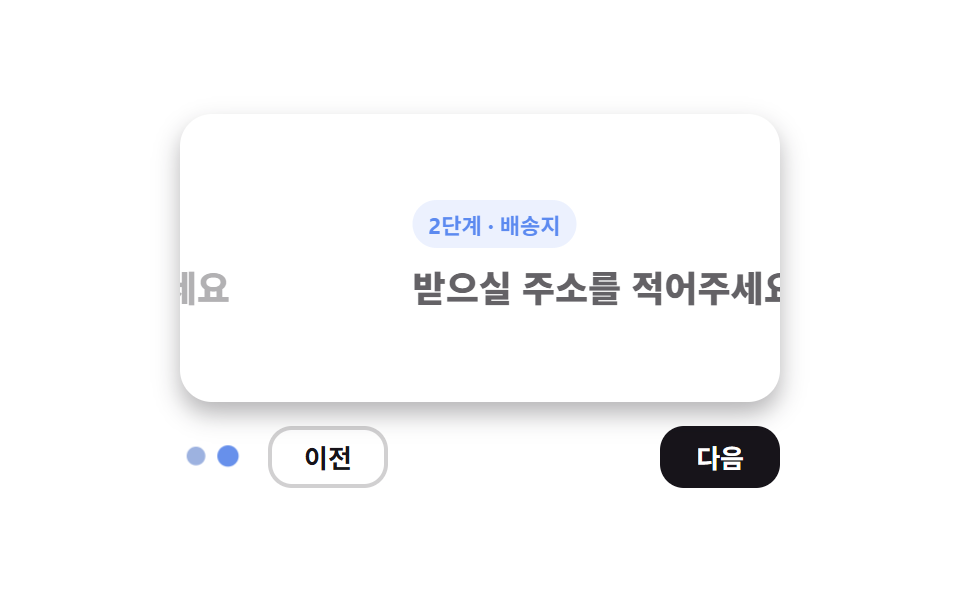
次へ進むと現在のパネルが左へ、新しいパネルが右から入り、戻るときは方向がちょうど逆になり、進行方向が目でわかる。
使いどころ会員登録・決済のマルチステップフォーム、アンケート
translateX ±100%진행 점방향별 전환
<main class="stage">
  <section class="wiz is-demo" aria-label="ステップパネルが進行方向に合わせてスライドする">
    <input class="wiz__radio" type="radio" name="wiz-218" id="wiz-1" checked>
    <input class="wiz__radio" type="radio" name="wiz-218" id="wiz-2">
    <div class="wiz__window">
      <div class="wiz__panel wiz__panel--1">
        <p class="wiz__step">ステップ1・アカウント</p>
        <p class="wiz__q">名前とメールアドレスを入力</p>
      </div>
      <div class="wiz__panel wiz__panel--2">
        <p class="wiz__step">ステップ2・配送先</p>
        <p class="wiz__q">お届け先の住所を入力</p>
      </div>
    </div>
    <div class="wiz__foot">
      <div class="wiz__dots" aria-hidden="true"><span class="wiz__dot"></span><span class="wiz__dot"></span></div>
      <label class="wiz__nav" for="wiz-1">前へ</label>
      <label class="wiz__nav wiz__nav--next" for="wiz-2">次へ</label>
    </div>
  </section>
</main>
@use "../../../../site/static/demo-tokens" as *;
$duration: $dur-base; // 패널이 한 단계 넘어가는 시간
$easing: $ease-spring;
$color: $subject-blue; // 포인트색
@include stage($stage-paper);
.wiz { width: min(300px, 90vw); }
.wiz__radio { position: absolute; opacity: 0; pointer-events: none; }
// ── 패널 창: 두 단계가 나란히 붙어 있고, 창이 이를 보여준다
.wiz__window {
position: relative;
height: clamp(96px, 48vh, 148px);
border-radius: $r-card;
background: $stage-paper;
box-shadow: $shadow-press;
overflow: hidden;
}
.wiz__panel {
position: absolute; top: 0; bottom: 0; left: 0;
display: grid;
align-content: center;
gap: $sp-2;
width: 100%;
box-sizing: border-box;
padding: $sp-4;
transition: transform $duration $easing, opacity $duration $easing;
}
.wiz__panel--1 { transform: translateX(0); }
.wiz__panel--2 { transform: translateX(100%); opacity: 0; }
.wiz__step {
margin: 0;
padding: $sp-1 $sp-2;
width: fit-content;
border-radius: $r-pill;
background: rgba($color, .14); // 칩 면(#e2eafe)은 그대로
font-weight: 700;
font-size: 11px;
font-family: inherit;
color: $subject-blue-deep; // 그 면 위 $subject-blue 글자는 3.76:1 — 짙은 파랑으로 5.29:1
}
.wiz__q {
margin: 0;
font-weight: 800;
font-size: clamp(15px, 4.4vw, 18px);
line-height: 1.35;
font-family: inherit;
color: $stage-ink;
}
// 라디오: 앞으로 갈 때 1 은 왼쪽으로, 2 는 오른쪽에서 들어온다
#wiz-1:checked ~ .wiz__window .wiz__panel--1 { transform: translateX(0); opacity: 1; }
#wiz-1:checked ~ .wiz__window .wiz__panel--2 { transform: translateX(100%); opacity: 0; }
#wiz-2:checked ~ .wiz__window .wiz__panel--1 { transform: translateX(-100%); opacity: 0; }
#wiz-2:checked ~ .wiz__window .wiz__panel--2 { transform: translateX(0); opacity: 1; }
// ── 발판: 진행 점 + 이전/다음 (라디오 라벨)
.wiz__foot {
display: flex;
align-items: center;
gap: $sp-3;
margin-top: $sp-3;
}
.wiz__dots { display: flex; gap: $sp-2; padding: 0 $sp-1; }
.wiz__dot {
width: 8px; height: 8px;
border-radius: 50%;
background: rgba(23, 20, 26, .18);
transition: transform $duration $easing, background-color $duration $easing;
}
#wiz-1:checked ~ .wiz__foot .wiz__dot:nth-child(1),
#wiz-2:checked ~ .wiz__foot .wiz__dot:nth-child(2) { background: $color; transform: scale(1.5); }
.wiz__nav {
padding: $sp-1 $sp-4;
border-radius: $r-control;
border: 2px solid rgba(23, 20, 26, .2);
font-weight: 700;
font-size: 13px;
font-family: inherit;
color: $stage-ink;
cursor: pointer;
transition: transform $dur-quick $easing, border-color $dur-quick $easing;
}
.wiz__nav--next { margin-left: auto; background: $stage-ink; border-color: $stage-ink; color: $stage-paper; }
.wiz__nav:active { transform: scale(.94); }
// 렌더·갤러리용 자동 루프: 앞으로(1→2) 갔다 뒤로(2→1) 돌아온다 — 방향이 반대로 보인다
.wiz.is-demo .wiz__panel--1 { animation: p1-loop $dur-loop $easing infinite; }
.wiz.is-demo .wiz__panel--2 { animation: p2-loop $dur-loop $easing infinite; }
.wiz.is-demo .wiz__dot:nth-child(1) { animation: d1-loop $dur-loop $easing infinite; }
.wiz.is-demo .wiz__dot:nth-child(2) { animation: d2-loop $dur-loop $easing infinite; }
@keyframes p1-loop {
0%, 10% { transform: translateX(0); opacity: 1; }
40%, 60% { transform: translateX(-100%); opacity: 0; }
90%, 100% { transform: translateX(0); opacity: 1; }
}
@keyframes p2-loop {
0%, 10% { transform: translateX(100%); opacity: 0; }
40%, 60% { transform: translateX(0); opacity: 1; }
90%, 100% { transform: translateX(100%); opacity: 0; }
}
@keyframes d1-loop {
0%, 10% { transform: scale(1.5); background: $color; }
40%, 60% { transform: scale(1); background: rgba(23, 20, 26, .18); }
90%, 100% { transform: scale(1.5); background: $color; }
}
@keyframes d2-loop {
0%, 10% { transform: scale(1); background: rgba(23, 20, 26, .18); }
40%, 60% { transform: scale(1.5); background: $color; }
90%, 100% { transform: scale(1); background: rgba(23, 20, 26, .18); }
}
@media (max-width: 360px) { // 320×200 아이프레임 대응
.wiz__window { height: 96px; }
.wiz__panel { padding: 8px; gap: 4px; }
.wiz__q { font-size: 13px; }
.wiz__foot { margin-top: 8px; gap: 8px; }
.wiz__nav { padding: 4px 12px; font-size: 11px; }
}
@media (prefers-reduced-motion: reduce) {
.wiz__panel, .wiz__dot, .wiz__nav { transition: none; }
.wiz.is-demo .wiz__panel,
.wiz.is-demo .wiz__dot { animation: none; } // 패널이 즉시 바뀐다
}html, body {
margin: 0;
overflow: hidden;
}
.stage {
box-sizing: border-box;
min-height: 100vh;
display: grid;
place-items: center;
margin: 0;
background: #ffffff;
font-family: -apple-system, "Segoe UI", "Noto Sans KR", sans-serif;
padding: clamp(8px, 4vw, 24px);
}
.wiz {
width: min(300px, 90vw);
}
.wiz__radio {
position: absolute;
opacity: 0;
pointer-events: none;
}
.wiz__window {
position: relative;
height: clamp(96px, 48vh, 148px);
border-radius: 16px;
background: #ffffff;
box-shadow: 0 6px 12px rgba(23, 20, 26, 0.32);
overflow: hidden;
}
.wiz__panel {
position: absolute;
top: 0;
bottom: 0;
left: 0;
display: grid;
align-content: center;
gap: 8px;
width: 100%;
box-sizing: border-box;
padding: 16px;
transition: transform 300ms cubic-bezier(0.2, 0.8, 0.2, 1), opacity 300ms cubic-bezier(0.2, 0.8, 0.2, 1);
}
.wiz__panel--1 {
transform: translateX(0);
}
.wiz__panel--2 {
transform: translateX(100%);
opacity: 0;
}
.wiz__step {
margin: 0;
padding: 4px 8px;
width: fit-content;
border-radius: 999px;
background: rgba(47, 109, 246, 0.14);
font-weight: 700;
font-size: 11px;
font-family: inherit;
color: #0a4fe8;
}
.wiz__q {
margin: 0;
font-weight: 800;
font-size: clamp(15px, 4.4vw, 18px);
line-height: 1.35;
font-family: inherit;
color: #17141a;
}
#wiz-1:checked ~ .wiz__window .wiz__panel--1 {
transform: translateX(0);
opacity: 1;
}
#wiz-1:checked ~ .wiz__window .wiz__panel--2 {
transform: translateX(100%);
opacity: 0;
}
#wiz-2:checked ~ .wiz__window .wiz__panel--1 {
transform: translateX(-100%);
opacity: 0;
}
#wiz-2:checked ~ .wiz__window .wiz__panel--2 {
transform: translateX(0);
opacity: 1;
}
.wiz__foot {
display: flex;
align-items: center;
gap: 12px;
margin-top: 12px;
}
.wiz__dots {
display: flex;
gap: 8px;
padding: 0 4px;
}
.wiz__dot {
width: 8px;
height: 8px;
border-radius: 50%;
background: rgba(23, 20, 26, 0.18);
transition: transform 300ms cubic-bezier(0.2, 0.8, 0.2, 1), background-color 300ms cubic-bezier(0.2, 0.8, 0.2, 1);
}
#wiz-1:checked ~ .wiz__foot .wiz__dot:nth-child(1),
#wiz-2:checked ~ .wiz__foot .wiz__dot:nth-child(2) {
background: #2f6df6;
transform: scale(1.5);
}
.wiz__nav {
padding: 4px 16px;
border-radius: 12px;
border: 2px solid rgba(23, 20, 26, 0.2);
font-weight: 700;
font-size: 13px;
font-family: inherit;
color: #17141a;
cursor: pointer;
transition: transform 220ms cubic-bezier(0.2, 0.8, 0.2, 1), border-color 220ms cubic-bezier(0.2, 0.8, 0.2, 1);
}
.wiz__nav--next {
margin-left: auto;
background: #17141a;
border-color: #17141a;
color: #ffffff;
}
.wiz__nav:active {
transform: scale(0.94);
}
.wiz.is-demo .wiz__panel--1 {
animation: p1-loop 2s cubic-bezier(0.2, 0.8, 0.2, 1) infinite;
}
.wiz.is-demo .wiz__panel--2 {
animation: p2-loop 2s cubic-bezier(0.2, 0.8, 0.2, 1) infinite;
}
.wiz.is-demo .wiz__dot:nth-child(1) {
animation: d1-loop 2s cubic-bezier(0.2, 0.8, 0.2, 1) infinite;
}
.wiz.is-demo .wiz__dot:nth-child(2) {
animation: d2-loop 2s cubic-bezier(0.2, 0.8, 0.2, 1) infinite;
}
@keyframes p1-loop {
0%, 10% {
transform: translateX(0);
opacity: 1;
}
40%, 60% {
transform: translateX(-100%);
opacity: 0;
}
90%, 100% {
transform: translateX(0);
opacity: 1;
}
}
@keyframes p2-loop {
0%, 10% {
transform: translateX(100%);
opacity: 0;
}
40%, 60% {
transform: translateX(0);
opacity: 1;
}
90%, 100% {
transform: translateX(100%);
opacity: 0;
}
}
@keyframes d1-loop {
0%, 10% {
transform: scale(1.5);
background: #2f6df6;
}
40%, 60% {
transform: scale(1);
background: rgba(23, 20, 26, 0.18);
}
90%, 100% {
transform: scale(1.5);
background: #2f6df6;
}
}
@keyframes d2-loop {
0%, 10% {
transform: scale(1);
background: rgba(23, 20, 26, 0.18);
}
40%, 60% {
transform: scale(1.5);
background: #2f6df6;
}
90%, 100% {
transform: scale(1);
background: rgba(23, 20, 26, 0.18);
}
}
@media (max-width: 360px) {
.wiz__window {
height: 96px;
}
.wiz__panel {
padding: 8px;
gap: 4px;
}
.wiz__q {
font-size: 13px;
}
.wiz__foot {
margin-top: 8px;
gap: 8px;
}
.wiz__nav {
padding: 4px 12px;
font-size: 11px;
}
}
@media (prefers-reduced-motion: reduce) {
.wiz__panel, .wiz__dot, .wiz__nav {
transition: none;
}
.wiz.is-demo .wiz__panel,
.wiz.is-demo .wiz__dot {
animation: none;
}
}import type { CSSProperties } from "react";
import { useState } from "react";
import styles from "./WizardStepSlide.module.scss";
export type WizardStepSlideProps = {
steps: { badge: string; question: string }[];
backLabel: string;
nextLabel: string;
/** 패널이 한 단계 넘어가는 시간 (기본 300ms) */
duration?: number;
easing?: string;
color?: string;
};
type Vars = CSSProperties & { "--duration"?: string; "--easing"?: string; "--color"?: string };
export default function WizardStepSlide({
steps,
backLabel,
nextLabel,
duration = 300,
easing = "cubic-bezier(.2,.8,.2,1)",
color = "#2f6df6",
}: WizardStepSlideProps) {
const [step, setStep] = useState(0);
const [dir, setDir] = useState<"fwd" | "back">("fwd");
const go = (d: number) => {
const next = Math.min(Math.max(step + d, 0), steps.length - 1);
if (next === step) return;
setDir(d > 0 ? "fwd" : "back");
setStep(next);
};
const vars: Vars = { "--duration": `${duration}ms`, "--easing": easing, "--color": color };
return (
<section className={styles.wiz} style={vars} aria-label="다단계 폼">
<div className={styles.window}>
{steps.map((s, i) => (
<div
key={s.badge}
className={`${styles.panel} ${i === step ? styles.panelOn : ""}`}
data-side={i < step ? "left" : i > step ? "right" : dir}
>
<p className={styles.step}>{s.badge}</p>
<p className={styles.q}>{s.question}</p>
</div>
))}
</div>
<div className={styles.foot}>
<div className={styles.dots} aria-hidden="true">
{steps.map((s, i) => (
<span key={s.badge} className={`${styles.dot} ${i === step ? styles.dotOn : ""}`} />
))}
</div>
<button type="button" className={styles.nav} onClick={() => go(-1)}>{backLabel}</button>
<button type="button" className={`${styles.nav} ${styles.navNext}`} onClick={() => go(1)}>{nextLabel}</button>
</div>
</section>
);
}08 ステップ方向スライド — 計測 累積面積 7.495% · 動いたフレーム 16/23GODRICH オリジナル · SCSS と React は zip に同梱 · CSS 画面切り替え アニメーション9選
このデモが属する記事
 CSS 画面切り替え アニメーション9選CSS 画面切り替え アニメーションとは、ページを読み込み直さずに、画像が別の画像に変わったり、注文が確定したり、フォームが次の段階へ進んだりするとき、その変化を滑らかに見せる短い動きのことです。画面が切り替わる瞬間ごとにそのまま貼れる9種 この記事のデモをすべて見る