07章ステップ
上部に並んだ章番号のうち、今読んでいる章の丸だけが色で塗りつぶされる。
使いどころチュートリアルシリーズ、複数ステップのガイド記事
원 채움챕터 4개scale 1.25배
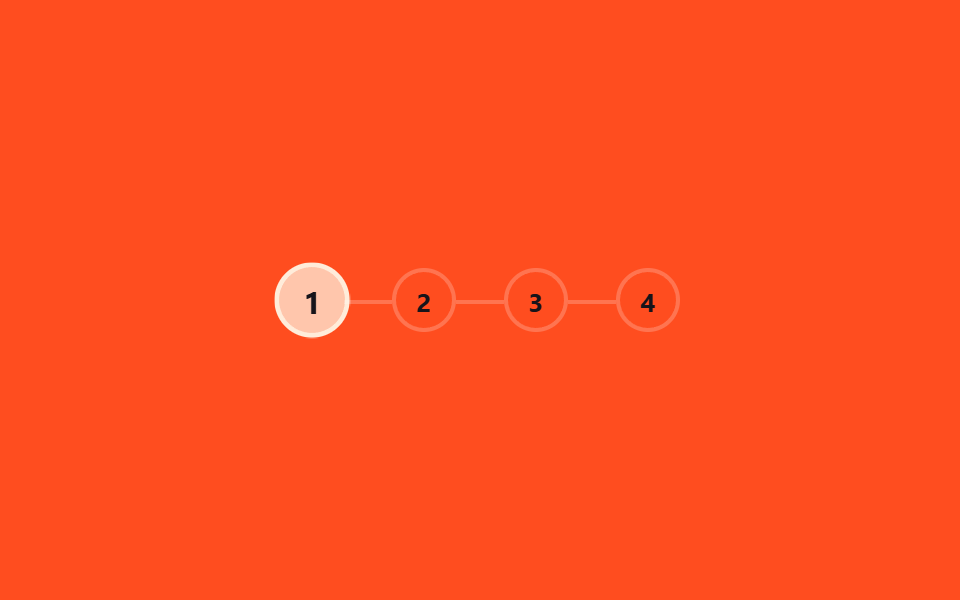
<main class="stage">
  <ol class="steps is-demo" aria-label="章の進捗">
    <li class="step"><span class="step__circle">1</span></li>
    <li class="step"><span class="step__circle">2</span></li>
    <li class="step"><span class="step__circle">3</span></li>
    <li class="step"><span class="step__circle">4</span></li>
  </ol>
</main>
@use "../../../../site/static/demo-tokens" as *;
// ── 변수 3개 ──────────────────────────────────────────
$duration: $dur-loop;
$color: $subject-cream; // 채워진 원 색
$track: rgba(255, 255, 255, .22); // 연결선 색
@include stage($stage-orange);
.steps {
position: relative;
display: flex;
gap: $sp-6;
margin: 0; padding: 0;
list-style: none;
}
.step {
position: relative;
&:not(:first-child)::before {
content: "";
position: absolute;
right: 100%; top: 50%;
width: $sp-6; height: 2px;
background: $track;
}
}
.step__circle {
display: grid;
place-items: center;
width: 28px; height: 28px;
border-radius: 50%;
border: 2px solid $track;
background: transparent;
color: $subject-ink; // AA: 채워지기 전 원 숫자 — 주황 무대 위 5.50:1
font-weight: 700;
font-size: 13px;
line-height: 1;
font-family: inherit;
}
// ── 실제 사용: 같은 스텝 키프레임을 시간 대신 스크롤 구간(animation-range)에 건다 ──
// .step:nth-child(2) .step__circle { animation: fill-2 linear both; animation-timeline: scroll(root); }
// ── 데모: 챕터 번호가 순서대로 하나씩 부풀며 채워지고, 루프가 돌면 처음으로 되돌아간다 ──
// (색만 순간 전환하면 프레임 사이 변화가 한두 장뿐이라 눈에 덜 띈다 — scale 팝으로 구간을 넓힌다)
.steps.is-demo .step:nth-child(1) .step__circle { animation: fill-1 $duration ease-out infinite; }
.steps.is-demo .step:nth-child(2) .step__circle { animation: fill-2 $duration ease-out infinite; }
.steps.is-demo .step:nth-child(3) .step__circle { animation: fill-3 $duration ease-out infinite; }
.steps.is-demo .step:nth-child(4) .step__circle { animation: fill-4 $duration ease-out infinite; }
@keyframes fill-1 {
0% { background: transparent; color: $subject-ink; border-color: $track; transform: scale(1); }
8% { background: $color; color: $subject-ink; border-color: $color; transform: scale(1.25); }
15%, 100% { background: $color; color: $subject-ink; border-color: $color; transform: scale(1); }
}
@keyframes fill-2 {
0%, 25% { background: transparent; color: $subject-ink; border-color: $track; transform: scale(1); }
33% { background: $color; color: $subject-ink; border-color: $color; transform: scale(1.25); }
40%, 100% { background: $color; color: $subject-ink; border-color: $color; transform: scale(1); }
}
@keyframes fill-3 {
0%, 50% { background: transparent; color: $subject-ink; border-color: $track; transform: scale(1); }
58% { background: $color; color: $subject-ink; border-color: $color; transform: scale(1.25); }
65%, 100% { background: $color; color: $subject-ink; border-color: $color; transform: scale(1); }
}
@keyframes fill-4 {
0%, 75% { background: transparent; color: $subject-ink; border-color: $track; transform: scale(1); }
83% { background: $color; color: $subject-ink; border-color: $color; transform: scale(1.25); }
90%, 100% { background: $color; color: $subject-ink; border-color: $color; transform: scale(1); }
}
@media (prefers-reduced-motion: reduce) {
.steps.is-demo .step__circle { animation: none !important; background: $color; border-color: $color; }
}html, body {
margin: 0;
overflow: hidden;
}
.stage {
box-sizing: border-box;
min-height: 100vh;
display: grid;
place-items: center;
margin: 0;
background: #ff4d1f;
font-family: -apple-system, "Segoe UI", "Noto Sans KR", sans-serif;
padding: clamp(8px, 4vw, 24px);
}
.steps {
position: relative;
display: flex;
gap: 24px;
margin: 0;
padding: 0;
list-style: none;
}
.step {
position: relative;
}
.step:not(:first-child)::before {
content: "";
position: absolute;
right: 100%;
top: 50%;
width: 24px;
height: 2px;
background: rgba(255, 255, 255, 0.22);
}
.step__circle {
display: grid;
place-items: center;
width: 28px;
height: 28px;
border-radius: 50%;
border: 2px solid rgba(255, 255, 255, 0.22);
background: transparent;
color: #17141a;
font-weight: 700;
font-size: 13px;
line-height: 1;
font-family: inherit;
}
.steps.is-demo .step:nth-child(1) .step__circle {
animation: fill-1 2s ease-out infinite;
}
.steps.is-demo .step:nth-child(2) .step__circle {
animation: fill-2 2s ease-out infinite;
}
.steps.is-demo .step:nth-child(3) .step__circle {
animation: fill-3 2s ease-out infinite;
}
.steps.is-demo .step:nth-child(4) .step__circle {
animation: fill-4 2s ease-out infinite;
}
@keyframes fill-1 {
0% {
background: transparent;
color: #17141a;
border-color: rgba(255, 255, 255, 0.22);
transform: scale(1);
}
8% {
background: #fff7e6;
color: #17141a;
border-color: #fff7e6;
transform: scale(1.25);
}
15%, 100% {
background: #fff7e6;
color: #17141a;
border-color: #fff7e6;
transform: scale(1);
}
}
@keyframes fill-2 {
0%, 25% {
background: transparent;
color: #17141a;
border-color: rgba(255, 255, 255, 0.22);
transform: scale(1);
}
33% {
background: #fff7e6;
color: #17141a;
border-color: #fff7e6;
transform: scale(1.25);
}
40%, 100% {
background: #fff7e6;
color: #17141a;
border-color: #fff7e6;
transform: scale(1);
}
}
@keyframes fill-3 {
0%, 50% {
background: transparent;
color: #17141a;
border-color: rgba(255, 255, 255, 0.22);
transform: scale(1);
}
58% {
background: #fff7e6;
color: #17141a;
border-color: #fff7e6;
transform: scale(1.25);
}
65%, 100% {
background: #fff7e6;
color: #17141a;
border-color: #fff7e6;
transform: scale(1);
}
}
@keyframes fill-4 {
0%, 75% {
background: transparent;
color: #17141a;
border-color: rgba(255, 255, 255, 0.22);
transform: scale(1);
}
83% {
background: #fff7e6;
color: #17141a;
border-color: #fff7e6;
transform: scale(1.25);
}
90%, 100% {
background: #fff7e6;
color: #17141a;
border-color: #fff7e6;
transform: scale(1);
}
}
@media (prefers-reduced-motion: reduce) {
.steps.is-demo .step__circle {
animation: none !important;
background: #fff7e6;
border-color: #fff7e6;
}
}import { useEffect, useState } from "react";
import styles from "./ChapterSteps.module.scss";
export type ChapterStepsProps = {
/** 챕터 수 */
total: number;
/** 채워진 원 색 */
color?: string;
};
// 실제 쓰임: 전체 스크롤 진행률을 챕터 수로 나눠 지금 챕터를 계산한다.
export default function ChapterSteps({ total, color = "#fff7e6" }: ChapterStepsProps) {
const [current, setCurrent] = useState(0);
useEffect(() => {
const onScroll = () => {
const max = document.documentElement.scrollHeight - window.innerHeight;
const p = max > 0 ? Math.min(1, window.scrollY / max) : 0;
setCurrent(Math.min(total - 1, Math.floor(p * total)));
};
onScroll();
window.addEventListener("scroll", onScroll, { passive: true });
return () => window.removeEventListener("scroll", onScroll);
}, [total]);
return (
<ol className={styles.steps} aria-label="Chapter progress">
{Array.from({ length: total }, (_, i) => (
<li key={i} className={styles.step}>
<span className={styles.circle} style={i <= current ? { background: color, borderColor: color } : undefined}>
{i + 1}
</span>
</li>
))}
</ol>
);
}07 章ステップ — 計測 累積面積 3.558% · 動いたフレーム 16/23GODRICH オリジナル · SCSS と React は zip に同梱 · 【コピペOK】プログレスバー css アニメーション 9選
このデモが属する記事
 【コピペOK】プログレスバー css アニメーション 9選プログレスバー css アニメーションは、スクロールした量だけを手がかりに「今どこまで読んだか」を見せるCSSの部品です。CSSだけ・JS不要で、上部バー・円形バッジ・点ナビ・縦バー・文字塗り・数値・章ステップ・目次・残り時間の9種類を集め この記事のデモをすべて見る