09残り読了時間
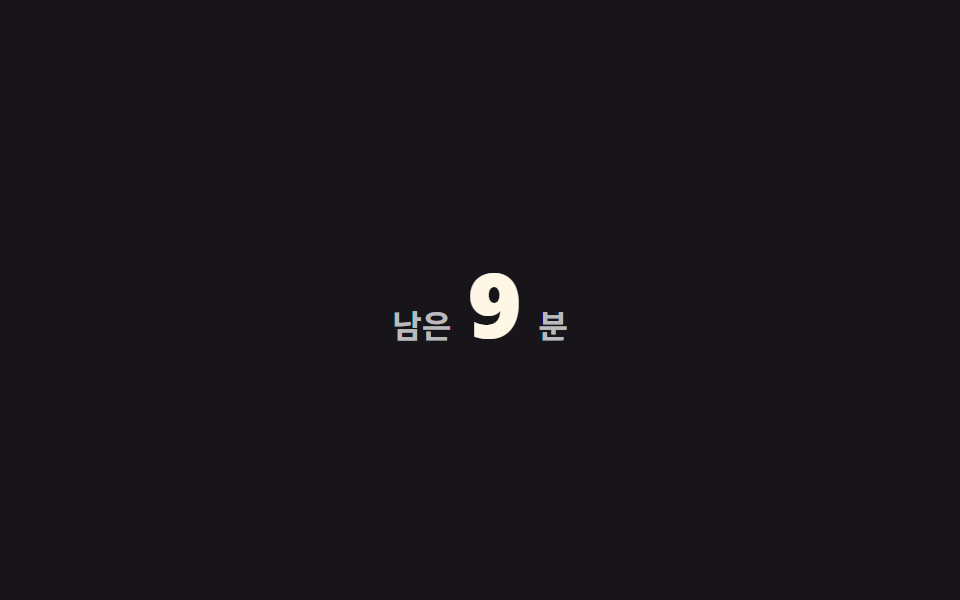
「残り3分」の数字がスクロールするほど減っていく。全体量から読んだ割合だけ差し引く。
使いどころ長い記事のヘッダー、ニュースレターのWeb版
카운트다운분 단위scroll() 연동
<main class="stage">
  <p class="time is-demo" role="status">
    <span class="time__label">残り</span>
    <span class="time__num" aria-hidden="true"></span>
    <span class="time__label">分</span>
  </p>
</main>
@use "../../../../site/static/demo-tokens" as *;
// ── 변수 3개 ──────────────────────────────────────────
$total: 12; // 전체 예상 분 (두 자릿수로 시작해야 자릿수가 바뀌는 순간도 보인다)
$color: $subject-cream; // 숫자 색
$duration: $dur-loop;
@include stage($stage-ink);
@property --min {
syntax: '<integer>';
initial-value: #{$total};
inherits: false;
}
.time {
display: flex;
align-items: baseline;
gap: $sp-2;
margin: 0;
color: rgba(255, 255, 255, .7);
font-weight: 600;
font-size: 16px;
line-height: 1;
font-family: inherit;
}
.time__num {
--min: #{$total};
counter-reset: min var(--min);
color: $color;
font-weight: 800;
font-size: clamp(34px, 11vw, 46px);
line-height: 1;
font-family: inherit;
font-variant-numeric: tabular-nums;
&::before { content: counter(min); }
// 실제 사용: 남은 분수 = 전체 분수 × (1 − 스크롤 진행률)
@supports (animation-timeline: scroll()) {
animation: count-down linear both;
animation-timeline: scroll(root);
}
}
@keyframes count-down { from { --min: #{$total}; } to { --min: 0; } }
.time.is-demo .time__num { animation: count-down-loop $duration linear infinite; }
@keyframes count-down-loop {
0% { --min: #{$total}; }
92% { --min: 0; }
100% { --min: 0; }
}
@media (prefers-reduced-motion: reduce) {
.time__num, .time.is-demo .time__num { animation: none !important; --min: 0; }
}html, body {
margin: 0;
overflow: hidden;
}
.stage {
box-sizing: border-box;
min-height: 100vh;
display: grid;
place-items: center;
margin: 0;
background: #17141a;
font-family: -apple-system, "Segoe UI", "Noto Sans KR", sans-serif;
padding: clamp(8px, 4vw, 24px);
}
@property --min {
syntax: "<integer>";
initial-value: 12;
inherits: false;
}
.time {
display: flex;
align-items: baseline;
gap: 8px;
margin: 0;
color: rgba(255, 255, 255, 0.7);
font-weight: 600;
font-size: 16px;
line-height: 1;
font-family: inherit;
}
.time__num {
--min: 12;
counter-reset: min var(--min);
color: #fff7e6;
font-weight: 800;
font-size: clamp(34px, 11vw, 46px);
line-height: 1;
font-family: inherit;
font-variant-numeric: tabular-nums;
}
.time__num::before {
content: counter(min);
}
@supports (animation-timeline: scroll()) {
.time__num {
animation: count-down linear both;
animation-timeline: scroll(root);
}
}
@keyframes count-down {
from {
--min: 12;
}
to {
--min: 0;
}
}
.time.is-demo .time__num {
animation: count-down-loop 2s linear infinite;
}
@keyframes count-down-loop {
0% {
--min: 12;
}
92% {
--min: 0;
}
100% {
--min: 0;
}
}
@media (prefers-reduced-motion: reduce) {
.time__num, .time.is-demo .time__num {
animation: none !important;
--min: 0;
}
}import { useEffect, useState } from "react";
import styles from "./ReadingTime.module.scss";
export type ReadingTimeProps = {
/** 전체 예상 분 */
totalMinutes: number;
/** 숫자 색 */
color?: string;
};
// 실제 쓰임: 남은 분 = 전체 분 × (1 − 스크롤 진행률).
export default function ReadingTime({ totalMinutes, color = "#fff7e6" }: ReadingTimeProps) {
const [left, setLeft] = useState(totalMinutes);
useEffect(() => {
const onScroll = () => {
const max = document.documentElement.scrollHeight - window.innerHeight;
const p = max > 0 ? Math.min(1, window.scrollY / max) : 0;
setLeft(Math.max(0, Math.round(totalMinutes * (1 - p))));
};
onScroll();
window.addEventListener("scroll", onScroll, { passive: true });
return () => window.removeEventListener("scroll", onScroll);
}, [totalMinutes]);
return (
<p className={styles.time} role="status">
<span>left</span>
<span className={styles.num} style={{ color }}>{left}</span>
<span>min</span>
</p>
);
}09 残り読了時間 — 計測 累積面積 1.545% · 動いたフレーム 12/23GODRICH オリジナル · SCSS と React は zip に同梱 · 【コピペOK】プログレスバー css アニメーション 9選
このデモが属する記事
 【コピペOK】プログレスバー css アニメーション 9選プログレスバー css アニメーションは、スクロールした量だけを手がかりに「今どこまで読んだか」を見せるCSSの部品です。CSSだけ・JS不要で、上部バー・円形バッジ・点ナビ・縦バー・文字塗り・数値・章ステップ・目次・残り時間の9種類を集め この記事のデモをすべて見る