07スクロールで隠れる
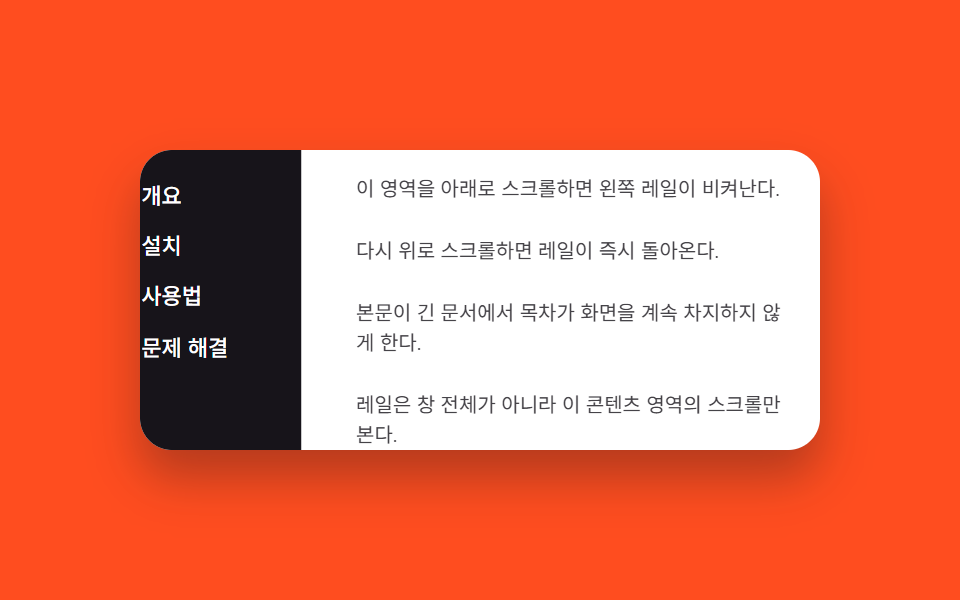
隣のコンテンツパネルを下にスクロールするとレールが translateX で退き、上にスクロールすると戻る。
使いどころ本文が長いドキュメントビューアーの目次レール
scroll 방향 감지translateX 은닉내부 콘텐츠 스크롤
<main class="stage is-demo">
  <div class="layout">
    <nav class="rail" aria-label="目次">
      <a class="rail__link" href="#">概要</a>
      <a class="rail__link" href="#">インストール</a>
      <a class="rail__link" href="#">使い方</a>
      <a class="rail__link" href="#">トラブルシューティング</a>
    </nav>
    <div class="content" id="content">
      <p>このエリアを下にスクロールすると左のレールが退く。</p>
      <p>上にスクロールし直すとレールがすぐ戻る。</p>
      <p>本文が長いドキュメントで目次が画面を占領し続けないようにする。</p>
      <p>レールはウィンドウ全体ではなくこのコンテンツエリアのスクロールだけを見る。</p>
    </div>
  </div>
</main>
@use "../../../../site/static/demo-tokens" as *;
// ── 변수 3개 ──────────────────────────────────────────
$duration: $dur-quick; // 220ms — 실제 스크롤 시 숨는 속도
$easing: $ease-out;
$color: $subject-cream; // 레일 링크 강조색
// ── 데모 무대 ───────────────────────────────────────────
@include stage($stage-orange);
.layout {
display: flex;
width: min(90vw, 340px);
height: min(50vw, 150px);
border-radius: $r-card;
overflow: hidden;
background: $stage-paper;
box-shadow: $shadow-raised;
}
.rail {
flex: none;
width: 96px;
box-sizing: border-box;
display: flex; flex-direction: column; gap: $sp-1;
padding: $sp-3 $sp-2;
background: $stage-ink;
transform: translateX(0);
transition: transform $duration $easing;
}
.rail__link {
padding: $sp-1 $sp-2;
border-radius: $r-xs;
color: $stage-paper; text-decoration: none; font-weight: 500; font-size: 11px; line-height: 1.2; font-family: inherit;
&:hover, &:focus-visible { color: $color; background: rgba($stage-paper, .12); }
}
.rail.is-hidden { transform: translateX(-100%); }
.content {
flex: 1;
overflow-y: auto;
box-sizing: border-box;
padding: $sp-3;
display: flex; flex-direction: column; gap: $sp-4;
color: $stage-ink;
p { margin: 0; font-size: clamp(10px, 3vmin, 12px); line-height: 1.5; opacity: .8; }
}
// 데모 루프: 레일이 나갔다 들어왔다를 2초에 한 바퀴(실제 스크롤 여부와 무관)
.stage.is-demo .rail { animation: rail-loop $dur-loop ease-in-out infinite; }
@keyframes rail-loop {
0%, 100% { transform: translateX(0); }
40%, 70% { transform: translateX(-100%); }
}
@media (prefers-reduced-motion: reduce) {
.stage.is-demo .rail { animation: none; }
.rail { transition-duration: 1ms; }
}html, body {
margin: 0;
overflow: hidden;
}
.stage {
box-sizing: border-box;
min-height: 100vh;
display: grid;
place-items: center;
margin: 0;
background: #ff4d1f;
font-family: -apple-system, "Segoe UI", "Noto Sans KR", sans-serif;
padding: clamp(8px, 4vw, 24px);
}
.layout {
display: flex;
width: min(90vw, 340px);
height: min(50vw, 150px);
border-radius: 16px;
overflow: hidden;
background: #ffffff;
box-shadow: 0 14px 24px rgba(23, 20, 26, 0.32);
}
.rail {
flex: none;
width: 96px;
box-sizing: border-box;
display: flex;
flex-direction: column;
gap: 4px;
padding: 12px 8px;
background: #17141a;
transform: translateX(0);
transition: transform 220ms ease-out;
}
.rail__link {
padding: 4px 8px;
border-radius: 4px;
color: #ffffff;
text-decoration: none;
font-weight: 500;
font-size: 11px;
line-height: 1.2;
font-family: inherit;
}
.rail__link:hover, .rail__link:focus-visible {
color: #fff7e6;
background: rgba(255, 255, 255, 0.12);
}
.rail.is-hidden {
transform: translateX(-100%);
}
.content {
flex: 1;
overflow-y: auto;
box-sizing: border-box;
padding: 12px;
display: flex;
flex-direction: column;
gap: 16px;
color: #17141a;
}
.content p {
margin: 0;
font-size: clamp(10px, 3vmin, 12px);
line-height: 1.5;
opacity: 0.8;
}
.stage.is-demo .rail {
animation: rail-loop 2s ease-in-out infinite;
}
@keyframes rail-loop {
0%, 100% {
transform: translateX(0);
}
40%, 70% {
transform: translateX(-100%);
}
}
@media (prefers-reduced-motion: reduce) {
.stage.is-demo .rail {
animation: none;
}
.rail {
transition-duration: 1ms;
}
}// 콘텐츠 스크롤 방향을 비교해 레일을 translateX 로 숨기고 보인다. 실제 스크롤이 오면 데모 루프를 넘긴다.
(function () {
var stage = document.querySelector('.stage');
var rail = document.querySelector('.rail');
var content = document.getElementById('content');
var last = 0;
content.addEventListener('scroll', function () {
stage.classList.remove('is-demo');
var y = content.scrollTop;
if (y > last + 4) rail.classList.add('is-hidden');
else if (y < last - 4) rail.classList.remove('is-hidden');
last = y;
});
})();import { useRef, useState } from "react";
import type { CSSProperties } from "react";
import styles from "./ScrollHideRail.module.scss";
type ScrollEv = { currentTarget: HTMLDivElement };
export type ScrollHideRailProps = {
duration?: number;
easing?: string;
color?: string;
};
const LINKS = ["개요", "설치", "사용법", "문제 해결"];
export default function ScrollHideRail({
duration = 220,
easing = "ease-out",
color = "#fff7e6",
}: ScrollHideRailProps) {
const [hidden, setHidden] = useState(false);
const lastY = useRef(0);
function onScroll(e: ScrollEv) {
const y = e.currentTarget.scrollTop;
const last = lastY.current ?? 0;
if (y > last + 4) setHidden(true);
else if (y < last - 4) setHidden(false);
lastY.current = y;
}
const vars: CSSProperties = { "--duration": `${duration}ms`, "--easing": easing, "--color": color };
return (
<div className={styles.stage} style={vars}>
<div className={styles.layout}>
<nav className={styles.rail} data-hidden={hidden} aria-label="목차">
{LINKS.map((label) => (
<a key={label} className={styles.link} href="#">{label}</a>
))}
</nav>
<div className={styles.content} onScroll={onScroll}>
<p>이 영역을 아래로 스크롤하면 왼쪽 레일이 비켜난다.</p>
<p>다시 위로 스크롤하면 레일이 즉시 돌아온다.</p>
<p>본문이 긴 문서에서 목차가 화면을 계속 차지하지 않게 한다.</p>
<p>레일은 창 전체가 아니라 이 콘텐츠 영역의 스크롤만 본다.</p>
</div>
</div>
</div>
);
}07 スクロールで隠れる — 計測 累積面積 9.937% · 動いたフレーム 17/23GODRICH オリジナル · SCSS と React は zip に同梱 · css ドロワー メニュー スライド9選 — JS最小・CSSだけ
このデモが属する記事
 css ドロワー メニュー スライド9選 — JS最小・CSSだけcss ドロワーは、画面の端に隠れたパネルがトリガー操作で滑り出したり、位置を変えずにその場で現れたりするナビゲーションUIです。この記事はtransformとopacityを軸に9種類の開き方を集め、うち01・03・08の3つは実際にin この記事のデモをすべて見る