033件スタック
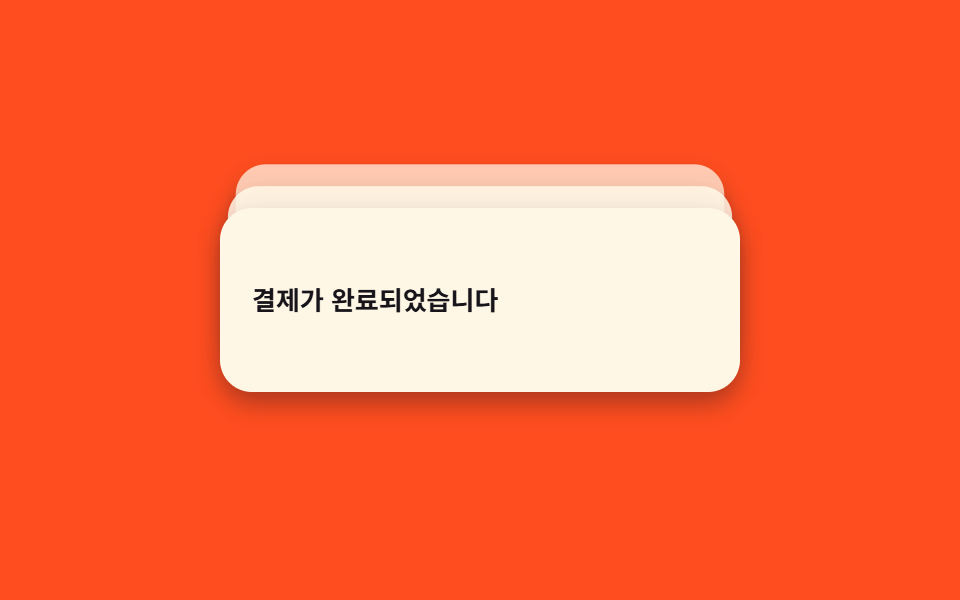
3件の通知は普段わずかに重なったデッキ状態で、hover・focus すると扇状に広がりそれぞれ読める。
使いどころ複数のイベントが短時間に重なるダッシュボードの通知トレイ
CSS 변수 --ihover·focus-within덱 펼치기
<main class="stage">
  <div class="stack is-demo" tabindex="0" role="status" aria-live="polite" aria-label="通知3件">
    <div class="stack__item" style="--i:2">ポイントが加算されました</div>
    <div class="stack__item" style="--i:1">発送が開始されました</div>
    <div class="stack__item" style="--i:0">決済が完了しました</div>
  </div>
</main>
@use "../../../../site/static/demo-tokens" as *;
// ── 변수 3개 ──────────────────────────────
$duration: $dur-base; // 300ms — 실제 hover/focus 로 펼쳐지는 속도
$easing: $ease-spring;
$color: $subject-cream; // 카드 색
// ── 데모 무대 ───────────────────────────────
@include stage($stage-orange);
.stack {
position: relative;
width: min(260px, 78vw);
height: 92px;
outline: none;
}
.stack__item {
position: absolute; inset: 0;
display: flex; align-items: center;
padding: $sp-4;
border-radius: $r-card;
background: $color;
color: $subject-ink;
font-weight: 600;
font-size: 13px;
line-height: 1.4;
font-family: inherit;
box-shadow: $shadow-press;
// 뒤 카드일수록(--i 클수록) 더 밀리고 작아지고 흐려진다 — 평소엔 살짝 겹친 "덱" 모양
transform: translateY(calc(var(--i) * -6px)) scale(calc(1 - var(--i) * .05));
opacity: calc(1 - var(--i) * .22);
}
// 실제 사용: hover·focus 로 카드 3장을 부채꼴로 펼친다 (JS 없이)
.stack:hover .stack__item,
.stack:focus-within .stack__item {
transform: translateY(calc(var(--i) * -22px)) scale(1);
opacity: 1;
transition: transform $duration $easing, opacity $duration $easing;
}
// 실측 2026-09-10: 018 편의 "토스트 쌓임"(새 토스트가 올수록 기존 걸 밀어 올리는 큐)과 다르다 —
// 여기는 항상 3장이 고정으로 있고, 접힌 덱이 펼쳐졌다 다시 접히는 "카드 뭉치" 자체가 하나의 애니메이션이다.
.stack.is-demo .stack__item { animation: spread $dur-loop $easing infinite; }
@keyframes spread {
0%, 100% {
transform: translateY(calc(var(--i) * -6px)) scale(calc(1 - var(--i) * .05));
opacity: calc(1 - var(--i) * .22);
}
35%, 65% {
transform: translateY(calc(var(--i) * -22px)) scale(1);
opacity: 1;
}
}
// ── 접근성: 움직임 줄이기 설정이면 펼쳐진 채로 고정 ────────
@media (prefers-reduced-motion: reduce) {
.stack.is-demo .stack__item { animation: none; transform: translateY(calc(var(--i) * -22px)) scale(1); opacity: 1; }
}html, body {
margin: 0;
overflow: hidden;
}
.stage {
box-sizing: border-box;
min-height: 100vh;
display: grid;
place-items: center;
margin: 0;
background: #ff4d1f;
font-family: -apple-system, "Segoe UI", "Noto Sans KR", sans-serif;
padding: clamp(8px, 4vw, 24px);
}
.stack {
position: relative;
width: min(260px, 78vw);
height: 92px;
outline: none;
}
.stack__item {
position: absolute;
inset: 0;
display: flex;
align-items: center;
padding: 16px;
border-radius: 16px;
background: #fff7e6;
color: #17141a;
font-weight: 600;
font-size: 13px;
line-height: 1.4;
font-family: inherit;
box-shadow: 0 6px 12px rgba(23, 20, 26, 0.32);
transform: translateY(calc(var(--i) * -6px)) scale(calc(1 - var(--i) * 0.05));
opacity: calc(1 - var(--i) * 0.22);
}
.stack:hover .stack__item,
.stack:focus-within .stack__item {
transform: translateY(calc(var(--i) * -22px)) scale(1);
opacity: 1;
transition: transform 300ms cubic-bezier(0.2, 0.8, 0.2, 1), opacity 300ms cubic-bezier(0.2, 0.8, 0.2, 1);
}
.stack.is-demo .stack__item {
animation: spread 2s cubic-bezier(0.2, 0.8, 0.2, 1) infinite;
}
@keyframes spread {
0%, 100% {
transform: translateY(calc(var(--i) * -6px)) scale(calc(1 - var(--i) * 0.05));
opacity: calc(1 - var(--i) * 0.22);
}
35%, 65% {
transform: translateY(calc(var(--i) * -22px)) scale(1);
opacity: 1;
}
}
@media (prefers-reduced-motion: reduce) {
.stack.is-demo .stack__item {
animation: none;
transform: translateY(calc(var(--i) * -22px)) scale(1);
opacity: 1;
}
}import type { CSSProperties } from "react";
import styles from "./ToastStack3.module.scss";
export type ToastStack3Props = {
/** 앞(맨 위)부터 순서대로 3개 */
items: [string, string, string];
color?: string;
duration?: number;
easing?: string;
};
type ItemVars = CSSProperties & { "--i"?: number };
export default function ToastStack3({
items,
color = "#fff7e6",
duration = 300,
easing = "cubic-bezier(.2,.8,.2,1)",
}: ToastStack3Props) {
const vars = { "--color": color, "--duration": `${duration}ms`, "--easing": easing } as CSSProperties;
const withIndex = items.map((text, i) => ({ text, i }));
const backToFront = [...withIndex].reverse(); // DOM은 뒤(i 큰 값)부터 써야 앞(i=0)이 맨 위에 그려진다
return (
<div
className={styles.stack}
style={vars}
tabIndex={0}
role="status"
aria-live="polite"
aria-label={`알림 ${items.length}개`}
>
{backToFront.map(({ text, i }) => {
const itemVars: ItemVars = { "--i": i };
return (
<div key={i} className={styles.item} style={itemVars}>
{text}
</div>
);
})}
</div>
);
}03 3件スタック — 計測 累積面積 9.192% · 動いたフレーム 16/23GODRICH オリジナル · SCSS と React は zip に同梱 · トースト通知 css アニメーション9選 — JS最小・CSSだけ
このデモが属する記事
 トースト通知 css アニメーション9選 — JS最小・CSSだけトースト通知 css は、画面の隅に短く現れて自分で消えていく通知カードを、JavaScriptをほぼ使わずtransformとopacityだけで動かす手法です。この記事では9種類を実装し、コードは6〜25行の断片として載せています。まず この記事のデモをすべて見る