08モバイル下部トースト
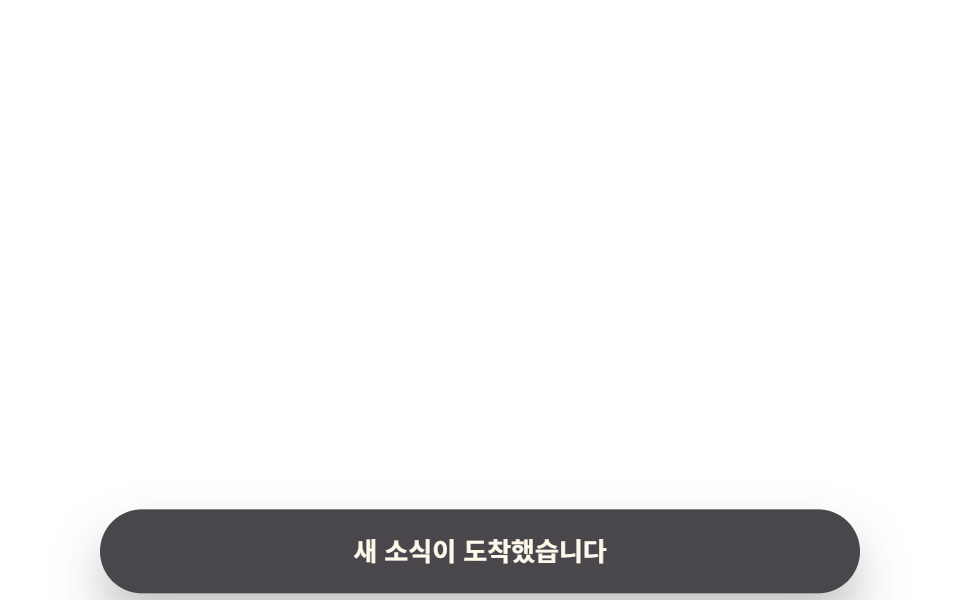
画面下部に固定された錠剤型のバーがセーフエリアを避けてわずかに上がってから戻る。ハンドル付きのボトムシートと違い一行だけ表示して自動で閉じる。
使いどころモバイルWebの新着・ネットワーク通知、PWA ホーム画面の通知
safe-area-inset-bottomtranslateY$r-pill
<main class="stage">
  <div class="toast is-demo" role="status" aria-live="polite">
    <p class="toast__text">新着情報が届きました</p>
  </div>
</main>
@use "../../../../site/static/demo-tokens" as *;
// ── 변수 3개 ──────────────────────────────
$duration: $dur-enter; // 600ms — 아래에서 올라오는 시간
$easing: $ease-spring;
$color: $subject-blue; // 글자 대비용 참고색(테두리 없음, 변형에서 강조선에 쓴다)
// ── 데모 무대 ───────────────────────────────
@include stage($stage-paper);
// 모바일 하단 고정 스트립 — 03 편의 bottom-sheet(손잡이 달린 큰 패널)와 달리
// 한 줄짜리 알약형이고 안전영역을 고려해 자동으로 사라진다 (모달이 아니라 알림이다)
.toast {
position: fixed;
left: $sp-4; right: $sp-4;
bottom: calc(env(safe-area-inset-bottom, 0px) + #{$sp-4});
margin: 0 auto;
max-width: 340px;
padding: $sp-3 $sp-5;
border-radius: $r-pill;
background: $subject-ink;
color: $subject-cream;
box-shadow: $shadow-raised;
text-align: center;
transform: translateY(140%);
opacity: 0;
}
.toast__text { margin: 0; font-weight: 600; font-size: 13px; line-height: 1.4; font-family: inherit; }
.toast.is-demo { animation: bottom-loop $dur-loop $easing infinite; }
@keyframes bottom-loop {
0% { transform: translateY(140%); opacity: 0; }
20% { transform: translateY(0); opacity: 1; }
78% { transform: translateY(0); opacity: 1; }
100% { transform: translateY(140%); opacity: 0; }
}
// ── 접근성: 움직임 줄이기 설정이면 뜬 채로 고정 ────────
@media (prefers-reduced-motion: reduce) {
.toast.is-demo { animation: none; transform: translateY(0); opacity: 1; }
}html, body {
margin: 0;
overflow: hidden;
}
.stage {
box-sizing: border-box;
min-height: 100vh;
display: grid;
place-items: center;
margin: 0;
background: #ffffff;
font-family: -apple-system, "Segoe UI", "Noto Sans KR", sans-serif;
padding: clamp(8px, 4vw, 24px);
}
.toast {
position: fixed;
left: 16px;
right: 16px;
bottom: calc(env(safe-area-inset-bottom, 0px) + 16px);
margin: 0 auto;
max-width: 340px;
padding: 12px 20px;
border-radius: 999px;
background: #17141a;
color: #fff7e6;
box-shadow: 0 14px 24px rgba(23, 20, 26, 0.32);
text-align: center;
transform: translateY(140%);
opacity: 0;
}
.toast__text {
margin: 0;
font-weight: 600;
font-size: 13px;
line-height: 1.4;
font-family: inherit;
}
.toast.is-demo {
animation: bottom-loop 2s cubic-bezier(0.2, 0.8, 0.2, 1) infinite;
}
@keyframes bottom-loop {
0% {
transform: translateY(140%);
opacity: 0;
}
20% {
transform: translateY(0);
opacity: 1;
}
78% {
transform: translateY(0);
opacity: 1;
}
100% {
transform: translateY(140%);
opacity: 0;
}
}
@media (prefers-reduced-motion: reduce) {
.toast.is-demo {
animation: none;
transform: translateY(0);
opacity: 1;
}
}import type { CSSProperties } from "react";
import styles from "./BottomMobileToast.module.scss";
export type BottomMobileToastProps = {
message: string;
visible: boolean;
duration?: number;
easing?: string;
};
type Vars = CSSProperties & { "--duration"?: string; "--easing"?: string };
export default function BottomMobileToast({
message,
visible,
duration = 600,
easing = "cubic-bezier(.2,.8,.2,1)",
}: BottomMobileToastProps) {
const vars: Vars = { "--duration": `${duration}ms`, "--easing": easing };
return (
<div className={`${styles.toast} ${visible ? styles.isVisible : ""}`} style={vars} role="status" aria-live="polite">
<p className={styles.text}>{message}</p>
</div>
);
}08 モバイル下部トースト — 計測 累積面積 15.832% · 動いたフレーム 9/23GODRICH オリジナル · SCSS と React は zip に同梱 · トースト通知 css アニメーション9選 — JS最小・CSSだけ
このデモが属する記事
 トースト通知 css アニメーション9選 — JS最小・CSSだけトースト通知 css は、画面の隅に短く現れて自分で消えていく通知カードを、JavaScriptをほぼ使わずtransformとopacityだけで動かす手法です。この記事では9種類を実装し、コードは6〜25行の断片として載せています。まず この記事のデモをすべて見る