07ターミナルプロンプト風
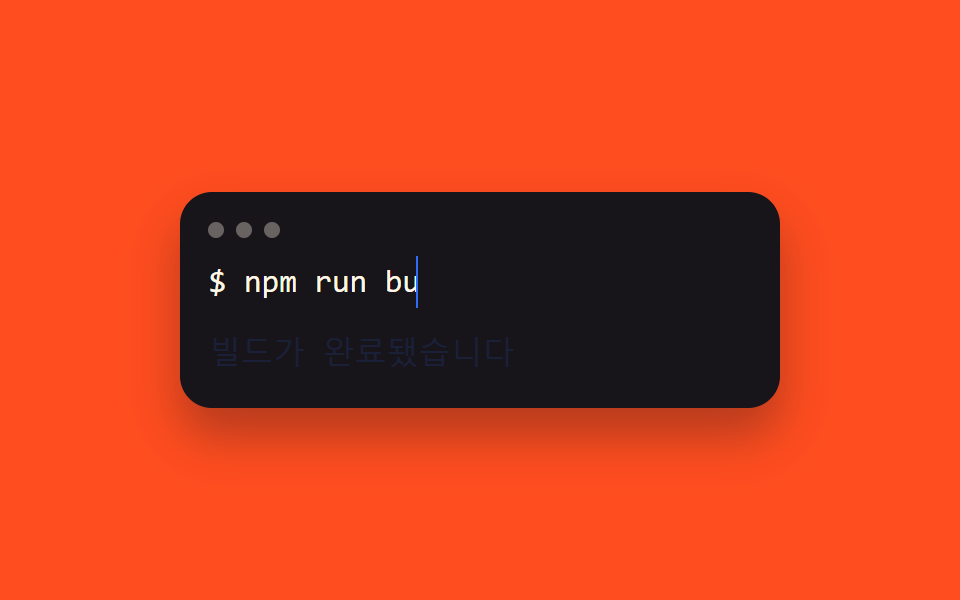
$プロンプトの後ろでコマンドがsteps()で打たれ、そのアニメーション時間分だけ後にレスポンス行がopacityでフェードインする2段階シーケンスで疑似ターミナルを演出する。
使いどころ開発ツールの紹介セクション、CLI製品のヒーローデモ
명령어→응답 순서monospace 터미널 폰트트래픽라이트 장식
<main class="stage">
  <div class="term">
    <div class="term__bar"><span class="term__dot"></span><span class="term__dot"></span><span class="term__dot"></span></div>
    <p class="term__line">$ <span class="term__cmd">npm run build</span></p>
    <p class="term__resp">ビルドが完了しました</p>
  </div>
</main>
@use "../../../../site/static/demo-tokens" as *;
$duration: $dur-loop; // 명령어 → 응답 두 단계를 담는 전체 루프
$easing: steps(13, end); // 명령어 글자 수만큼 뚝뚝 끊어 찍힌다
$color: $subject-blue; // 커서·응답 색
@include stage($stage-orange);
.term {
box-sizing: border-box; // width 와 padding 을 같이 쓰는데 border-box 가 없으면 padding 이 width 위에 더해져 320px 에서 넘친다 (실측 2026-09-10: 314px)
width: min(300px, 92vw);
border-radius: $r-card;
background: $stage-ink;
box-shadow: $shadow-raised;
padding: clamp(10px, 3vw, 16px);
font: 500 clamp(13px, 3.6vw, 16px)/1.6 "Space Mono", ui-monospace, monospace;
color: $subject-cream;
&__bar { display: flex; gap: 6px; margin: 0 0 clamp(6px, 2vw, 10px); }
&__dot { width: 8px; height: 8px; border-radius: $r-pill; background: rgba($subject-cream, .35); }
&__line { margin: 0; }
&__cmd {
display: inline-block;
overflow: hidden;
white-space: nowrap;
vertical-align: bottom;
width: 0;
border-right: .1em solid $color;
animation: cmd-type $duration linear infinite;
}
&__resp {
margin: clamp(6px, 2vw, 10px) 0 0;
color: $color;
animation: resp-fade $duration ease-out infinite;
}
}
@keyframes cmd-type {
0%, 5% { width: 0; animation-timing-function: $easing; }
45% { width: var(--full, 13ch); }
85% { width: var(--full, 13ch); }
95%, 100% { width: 0; }
}
@keyframes resp-fade {
0%, 44% { opacity: 0; }
50% { opacity: 1; }
82% { opacity: 1; }
90%, 100% { opacity: 0; }
}
@media (prefers-reduced-motion: reduce) {
.term__cmd { animation: none; width: var(--full, 13ch); border-right-color: transparent; }
.term__resp { animation: none; opacity: 1; }
}html, body {
margin: 0;
overflow: hidden;
}
.stage {
box-sizing: border-box;
min-height: 100vh;
display: grid;
place-items: center;
margin: 0;
background: #ff4d1f;
font-family: -apple-system, "Segoe UI", "Noto Sans KR", sans-serif;
padding: clamp(8px, 4vw, 24px);
}
.term {
box-sizing: border-box;
width: min(300px, 92vw);
border-radius: 16px;
background: #17141a;
box-shadow: 0 14px 24px rgba(23, 20, 26, 0.32);
padding: clamp(10px, 3vw, 16px);
font: 500 clamp(13px, 3.6vw, 16px)/1.6 "Space Mono", ui-monospace, monospace;
color: #fff7e6;
}
.term__bar {
display: flex;
gap: 6px;
margin: 0 0 clamp(6px, 2vw, 10px);
}
.term__dot {
width: 8px;
height: 8px;
border-radius: 999px;
background: rgba(255, 247, 230, 0.35);
}
.term__line {
margin: 0;
}
.term__cmd {
display: inline-block;
overflow: hidden;
white-space: nowrap;
vertical-align: bottom;
width: 0;
border-right: 0.1em solid #2f6df6;
animation: cmd-type 2s linear infinite;
}
.term__resp {
margin: clamp(6px, 2vw, 10px) 0 0;
color: #2f6df6;
animation: resp-fade 2s ease-out infinite;
}
@keyframes cmd-type {
0%, 5% {
width: 0;
animation-timing-function: steps(13, end);
}
45% {
width: var(--full, 13ch);
}
85% {
width: var(--full, 13ch);
}
95%, 100% {
width: 0;
}
}
@keyframes resp-fade {
0%, 44% {
opacity: 0;
}
50% {
opacity: 1;
}
82% {
opacity: 1;
}
90%, 100% {
opacity: 0;
}
}
@media (prefers-reduced-motion: reduce) {
.term__cmd {
animation: none;
width: var(--full, 13ch);
border-right-color: transparent;
}
.term__resp {
animation: none;
opacity: 1;
}
}(function () {
var el = document.querySelector('.term__cmd'), cv = document.createElement('canvas').getContext('2d');
cv.font = getComputedStyle(el).font;
el.style.setProperty('--full', Math.ceil(cv.measureText(el.textContent).width) + 'px');
})();import { useEffect, useRef } from "react";
import type { CSSProperties } from "react";
import styles from "./TerminalPrompt.module.scss";
export type TerminalPromptProps = {
command: string;
response: string;
/** 명령어→응답 두 단계를 담는 전체 루프 (기본 2000ms) */
duration?: number;
color?: string;
};
export default function TerminalPrompt({ command, response, duration = 2000, color = "#2f6df6" }: TerminalPromptProps) {
const ref = useRef<HTMLSpanElement | null>(null);
useEffect(() => {
const el = ref.current;
const cv = el && document.createElement("canvas").getContext("2d");
if (!el || !cv) return;
cv.font = getComputedStyle(el).font;
el.style.setProperty("--full", Math.ceil(cv.measureText(command).width) + "px");
}, [command]);
const vars = { "--duration": `${duration}ms`, "--color": color, "--easing": `steps(${command.length}, end)` } as CSSProperties;
return (
<div className={styles.term} style={vars}>
<div className={styles.bar}><span className={styles.dot} /><span className={styles.dot} /><span className={styles.dot} /></div>
<p className={styles.line}>$ <span ref={ref} className={styles.cmd}>{command}</span></p>
<p className={styles.resp}>{response}</p>
</div>
);
}07 ターミナルプロンプト風 — 計測 累積面積 1.057% · 動いたフレーム 15/23GODRICH オリジナル · SCSS と React は zip に同梱 · CSS タイピング アニメーション 9選 — 一行でコピペOK
このデモが属する記事
 CSS タイピング アニメーション 9選 — 一行でコピペOKcss タイピング アニメーションは、文字が一文字ずつ入力されていくように見せる、CSSだけで動く小さな部品です。この記事では9種類を選び、steps()とwidth、clip-pathという仕組みだけで実装しました。グリッドの9つはifr この記事のデモをすべて見る