02保存チェックアニメーション
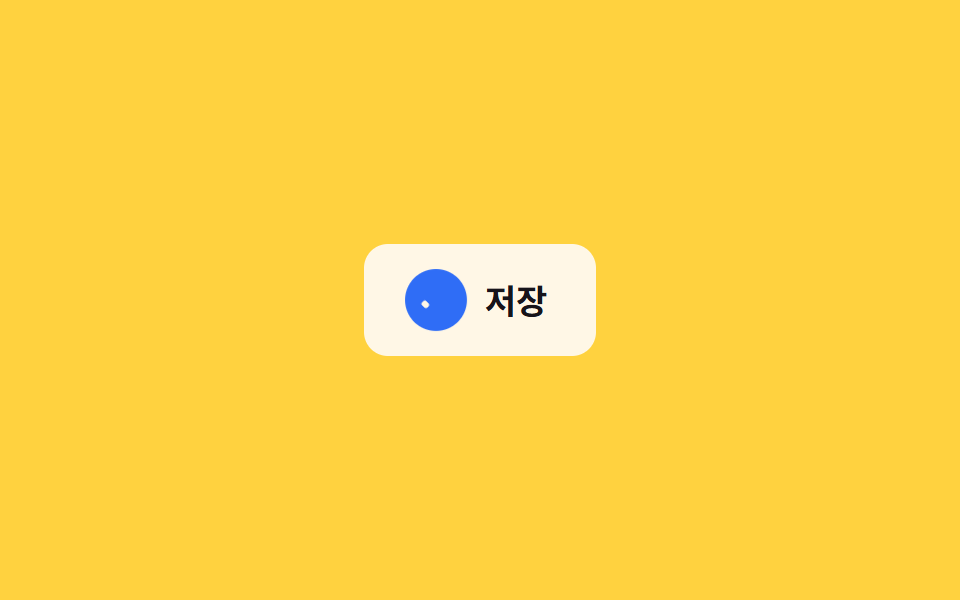
保存アイコンをクリックすると、フロッピー形状がチェックアイコンにモーフし、背景色が緑に変わって保存完了を即座に知らせる。
使いどころフォームの自動保存ボタン、メモアプリの保存状態表示
scaleX 획 긋기색상 전환0.3초
<main class="stage">
  <button class="save is-demo" type="button">
    <span class="save__icon" aria-hidden="true">
      <span class="save__ring"></span>
      <span class="save__disk"></span>
      <span class="save__check">
        <span class="save__check-bar save__check-bar--short"></span>
        <span class="save__check-bar save__check-bar--long"></span>
      </span>
    </span>
    <span class="save__label">保存</span>
  </button>
</main>
@use "../../../../site/static/demo-tokens" as *;
// ── 변수 3개 ──────────────────────────────────────────
$duration: $dur-base; // 디스켓 → 체크 전환 시간
$easing: $ease-pop; // 배지가 팝업하는 이징
$color: $subject-blue; // 완료 배지 강조색
// ── 데모 무대 ──────────────────────────────────────────
@include stage($stage-yellow);
.save {
display: inline-flex;
align-items: center;
gap: clamp(8px, 2.6vw, 12px);
border: 0;
border-radius: $r-control;
padding: clamp(12px, 4vw, 16px) clamp(18px, 5.6vw, 24px);
font-weight: 700;
font-size: clamp(14px, 4vw, 17px);
line-height: 1;
font-family: inherit;
color: $stage-ink;
background: $subject-cream;
cursor: pointer;
-webkit-tap-highlight-color: transparent;
&__icon { position: relative; width: 24px; height: 24px; flex: none; }
// 배지: 원형이 팝업하며 완료를 알린다
&__ring {
position: absolute; inset: -3px;
border-radius: 50%;
background: $color;
opacity: 0;
transform: scale(.4);
}
// 디스켓: 사각 + 오른쪽 위 노치
&__disk {
position: absolute; inset: 0;
border: 2.4px solid currentColor;
border-radius: 4px;
opacity: 1;
transform: scale(1);
&::after {
content: "";
position: absolute; top: 3px; right: 3px;
width: 7px; height: 6px;
background: currentColor;
}
}
// 체크: 두 개의 획이 각각 scaleX 로 그어진다
&__check { position: absolute; inset: 0; color: $subject-cream; }
&__check-bar {
position: absolute;
height: 3px;
border-radius: 2px;
background: currentColor;
transform: scaleX(0);
transform-origin: left center; // 규칙8: 체크 막대 같은 꼭짓점
}
&__check-bar--short { width: 6px; left: 8px; top: 14px; transform: rotate(225deg) scaleX(0); } // 두 막대가 같은 꼭짓점(8,14)에서 출발 — 어긋남 0
&__check-bar--long { width: 13px; left: 8px; top: 14px; transform: rotate(-52deg) scaleX(0); }
&.is-saved &__ring { animation: ring-pop $duration $easing forwards; }
&.is-saved &__disk { animation: disk-out $duration $easing forwards; }
&.is-saved &__check-bar--short { animation: check-short $duration $easing forwards; animation-delay: $duration * .35; }
&.is-saved &__check-bar--long { animation: check-long $duration $easing forwards; animation-delay: $duration * .5; }
&.is-demo &__ring { animation: ring-pop-loop $dur-loop $easing infinite; }
&.is-demo &__disk { animation: disk-out-loop $dur-loop $easing infinite; }
&.is-demo &__check-bar--short { animation: check-short-loop $dur-loop $easing infinite; }
&.is-demo &__check-bar--long { animation: check-long-loop $dur-loop $easing infinite; }
}
@keyframes ring-pop { from { opacity: 0; transform: scale(.4); } to { opacity: 1; transform: scale(1); } }
@keyframes disk-out { from { opacity: 1; transform: scale(1); } to { opacity: 0; transform: scale(.5); } }
@keyframes check-short { to { transform: rotate(225deg) scaleX(1); } }
@keyframes check-long { to { transform: rotate(-52deg) scaleX(1); } }
@keyframes ring-pop-loop {
0%, 20% { opacity: 0; transform: scale(.4); }
40%, 85% { opacity: 1; transform: scale(1); }
100% { opacity: 0; transform: scale(.4); }
}
@keyframes disk-out-loop {
0%, 20% { opacity: 1; transform: scale(1); }
40%, 85% { opacity: 0; transform: scale(.5); }
100% { opacity: 1; transform: scale(1); }
}
@keyframes check-short-loop {
0%, 27% { transform: rotate(225deg) scaleX(0); }
45%, 85% { transform: rotate(225deg) scaleX(1); }
100% { transform: rotate(225deg) scaleX(0); }
}
@keyframes check-long-loop {
0%, 32% { transform: rotate(-52deg) scaleX(0); }
50%, 85% { transform: rotate(-52deg) scaleX(1); }
100% { transform: rotate(-52deg) scaleX(0); }
}
// ── 접근성: 움직임 줄이기 설정이면 상태만 바뀌고 과정은 생략 ────
@media (prefers-reduced-motion: reduce) {
.save__ring, .save__disk, .save__check-bar { animation: none !important; }
.save.is-saved .save__ring { opacity: 1; transform: scale(1); }
.save.is-saved .save__disk { opacity: 0; }
.save.is-saved .save__check-bar--short { transform: rotate(225deg) scaleX(1); }
.save.is-saved .save__check-bar--long { transform: rotate(-52deg) scaleX(1); }
}html, body {
margin: 0;
overflow: hidden;
}
.stage {
box-sizing: border-box;
min-height: 100vh;
display: grid;
place-items: center;
margin: 0;
background: #ffd23f;
font-family: -apple-system, "Segoe UI", "Noto Sans KR", sans-serif;
padding: clamp(8px, 4vw, 24px);
}
.save {
display: inline-flex;
align-items: center;
gap: clamp(8px, 2.6vw, 12px);
border: 0;
border-radius: 12px;
padding: clamp(12px, 4vw, 16px) clamp(18px, 5.6vw, 24px);
font-weight: 700;
font-size: clamp(14px, 4vw, 17px);
line-height: 1;
font-family: inherit;
color: #17141a;
background: #fff7e6;
cursor: pointer;
-webkit-tap-highlight-color: transparent;
}
.save__icon {
position: relative;
width: 24px;
height: 24px;
flex: none;
}
.save__ring {
position: absolute;
inset: -3px;
border-radius: 50%;
background: #2f6df6;
opacity: 0;
transform: scale(0.4);
}
.save__disk {
position: absolute;
inset: 0;
border: 2.4px solid currentColor;
border-radius: 4px;
opacity: 1;
transform: scale(1);
}
.save__disk::after {
content: "";
position: absolute;
top: 3px;
right: 3px;
width: 7px;
height: 6px;
background: currentColor;
}
.save__check {
position: absolute;
inset: 0;
color: #fff7e6;
}
.save__check-bar {
position: absolute;
height: 3px;
border-radius: 2px;
background: currentColor;
transform: scaleX(0);
transform-origin: left center;
}
.save__check-bar--short {
width: 6px;
left: 8px;
top: 14px;
transform: rotate(225deg) scaleX(0);
}
.save__check-bar--long {
width: 13px;
left: 8px;
top: 14px;
transform: rotate(-52deg) scaleX(0);
}
.save.is-saved .save__ring {
animation: ring-pop 300ms cubic-bezier(0.2, 1.4, 0.4, 1) forwards;
}
.save.is-saved .save__disk {
animation: disk-out 300ms cubic-bezier(0.2, 1.4, 0.4, 1) forwards;
}
.save.is-saved .save__check-bar--short {
animation: check-short 300ms cubic-bezier(0.2, 1.4, 0.4, 1) forwards;
animation-delay: 105ms;
}
.save.is-saved .save__check-bar--long {
animation: check-long 300ms cubic-bezier(0.2, 1.4, 0.4, 1) forwards;
animation-delay: 150ms;
}
.save.is-demo .save__ring {
animation: ring-pop-loop 2s cubic-bezier(0.2, 1.4, 0.4, 1) infinite;
}
.save.is-demo .save__disk {
animation: disk-out-loop 2s cubic-bezier(0.2, 1.4, 0.4, 1) infinite;
}
.save.is-demo .save__check-bar--short {
animation: check-short-loop 2s cubic-bezier(0.2, 1.4, 0.4, 1) infinite;
}
.save.is-demo .save__check-bar--long {
animation: check-long-loop 2s cubic-bezier(0.2, 1.4, 0.4, 1) infinite;
}
@keyframes ring-pop {
from {
opacity: 0;
transform: scale(0.4);
}
to {
opacity: 1;
transform: scale(1);
}
}
@keyframes disk-out {
from {
opacity: 1;
transform: scale(1);
}
to {
opacity: 0;
transform: scale(0.5);
}
}
@keyframes check-short {
to {
transform: rotate(225deg) scaleX(1);
}
}
@keyframes check-long {
to {
transform: rotate(-52deg) scaleX(1);
}
}
@keyframes ring-pop-loop {
0%, 20% {
opacity: 0;
transform: scale(0.4);
}
40%, 85% {
opacity: 1;
transform: scale(1);
}
100% {
opacity: 0;
transform: scale(0.4);
}
}
@keyframes disk-out-loop {
0%, 20% {
opacity: 1;
transform: scale(1);
}
40%, 85% {
opacity: 0;
transform: scale(0.5);
}
100% {
opacity: 1;
transform: scale(1);
}
}
@keyframes check-short-loop {
0%, 27% {
transform: rotate(225deg) scaleX(0);
}
45%, 85% {
transform: rotate(225deg) scaleX(1);
}
100% {
transform: rotate(225deg) scaleX(0);
}
}
@keyframes check-long-loop {
0%, 32% {
transform: rotate(-52deg) scaleX(0);
}
50%, 85% {
transform: rotate(-52deg) scaleX(1);
}
100% {
transform: rotate(-52deg) scaleX(0);
}
}
@media (prefers-reduced-motion: reduce) {
.save__ring, .save__disk, .save__check-bar {
animation: none !important;
}
.save.is-saved .save__ring {
opacity: 1;
transform: scale(1);
}
.save.is-saved .save__disk {
opacity: 0;
}
.save.is-saved .save__check-bar--short {
transform: rotate(225deg) scaleX(1);
}
.save.is-saved .save__check-bar--long {
transform: rotate(-52deg) scaleX(1);
}
}// 실제 클릭 한 번 = 保存 완료 한 번. 데모(.is-demo) 루프는 손을 대면 멈추고 수동 상태로 바뀐다.
document.querySelector('.save').addEventListener('click', function (e) {
var b = e.currentTarget;
b.classList.remove('is-demo');
b.classList.remove('is-saved');
void b.offsetWidth;
b.classList.add('is-saved');
});import { useState } from "react";
import type { CSSProperties, MouseEvent } from "react";
import styles from "./SaveCheckButton.module.scss";
export type SaveCheckButtonProps = {
label: string;
/** 디스켓 → 체크 전환 시간 (기본 300ms) */
duration?: number;
easing?: string;
/** 완료 배지 강조색 */
color?: string;
onSave?: (e: MouseEvent<HTMLButtonElement>) => void;
};
type Vars = CSSProperties & { "--duration"?: string; "--easing"?: string; "--color"?: string };
export default function SaveCheckButton({
label,
duration = 300,
easing = "cubic-bezier(.2,1.4,.4,1)",
color = "#2f6df6",
onSave,
}: SaveCheckButtonProps) {
const [saved, setSaved] = useState(false);
const vars: Vars = { "--duration": `${duration}ms`, "--easing": easing, "--color": color };
const handle = (e: MouseEvent<HTMLButtonElement>) => {
setSaved(true);
onSave?.(e);
};
return (
<button
type="button"
className={saved ? `${styles.save} ${styles.saved}` : styles.save}
style={vars}
onClick={handle}
>
<span className={styles.icon} aria-hidden="true">
<span className={styles.ring} />
<span className={styles.disk} />
<span className={styles.check}>
<span className={`${styles.bar} ${styles.barShort}`} />
<span className={`${styles.bar} ${styles.barLong}`} />
</span>
</span>
<span>{label}</span>
</button>
);
}02 保存チェックアニメーション — 計測 累積面積 0.583% · 動いたフレーム 11/23GODRICH オリジナル · SCSS と React は zip に同梱 · マイクロインタラクション CSS 9選 — 一行でコピペOK
このデモが属する記事
 マイクロインタラクション CSS 9選 — 一行でコピペOKマイクロインタラクション css は、ボタンを押す・保存する・タブを切り替える一つの操作に、画面がひと呼吸だけ反応して見せる小さなアニメーションです。この記事では9種類を選び、transitionと@keyframesだけで実装しました。グ この記事のデモをすべて見る