06追加モーフ付き空状態イラスト
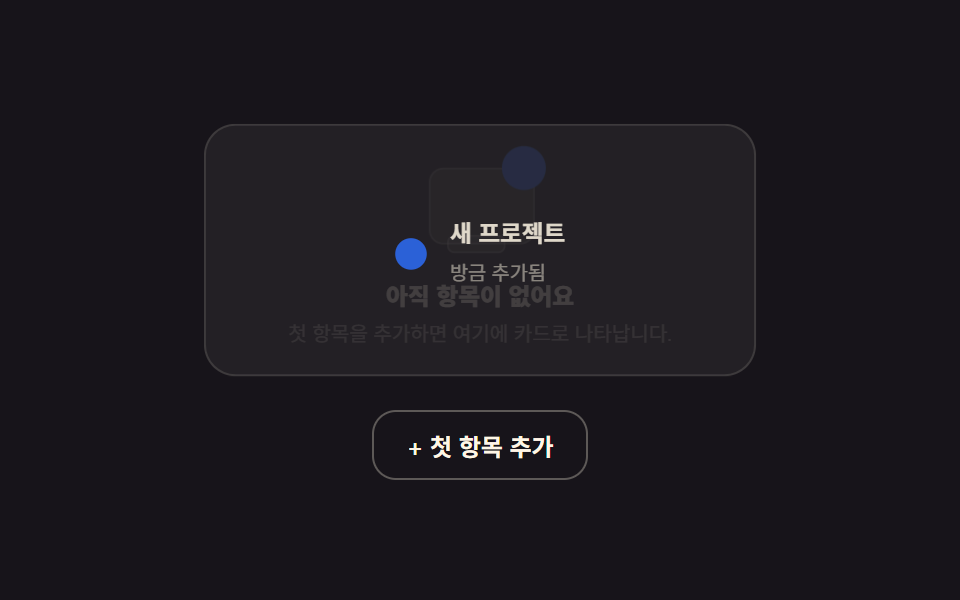
도형만으로 그린 빈 상자 일러스트가 계속 살짝 떠 있다가, '첫 항목 추가' 버튼을 누르면 그 자리가 실제로 리스트 카드 한 장으로 바뀝니다.
使いどころ
transformopacityclick
<main class="stage">
  <div class="es is-demo">
    <div class="es__stack">
      <div class="es__empty">
        <div class="es__box">
          <span class="es__shape es__shape--a" aria-hidden="true"></span>
          <span class="es__shape es__shape--b" aria-hidden="true"></span>
          <span class="es__shape es__shape--c" aria-hidden="true"></span>
        </div>
        <p class="es__title">まだ項目がありません</p>
        <p class="es__desc">最初の項目を追加すると、ここにカードとして表示されます。</p>
      </div>
      <div class="es__item" aria-hidden="true">
        <span class="es__item-dot" aria-hidden="true"></span>
        <div class="es__item-body">
          <strong>新規プロジェクト</strong>
          <span>追加されました</span>
        </div>
      </div>
    </div>
    <button class="es__add" type="button">+ 最初の項目を追加</button>
  </div>
</main>
@use "../../../../site/static/demo-tokens" as *;
$duration: $dur-enter;
$easing: $ease-spring;
$color: $subject-blue;
@include stage($stage-ink);
.es {
box-sizing: border-box;
width: min(280px, 84vw);
text-align: center;
}
.es__stack { position: relative; min-height: 128px; }
.es__empty, .es__item {
position: absolute; inset: 0;
display: flex; flex-direction: column; align-items: center; justify-content: center;
transition: opacity $duration $easing, transform $duration $easing;
}
.es__item { flex-direction: row; text-align: left; gap: $sp-3; padding: $sp-3; border-radius: $r-card;
background: rgba(255, 247, 230, .06); border: 1px solid rgba(255, 247, 230, .14);
opacity: 0; transform: scale(.9); pointer-events: none;
}
.es.is-added .es__item { opacity: 1; transform: scale(1); pointer-events: auto; }
.es.is-added .es__empty { opacity: 0; transform: scale(.9); pointer-events: none; }
.es__box { position: relative; width: 72px; height: 56px; margin: 0 auto $sp-3; }
.es__shape { position: absolute; border-radius: $r-sm; background: rgba(255, 247, 230, .14); border: 1px solid rgba(255, 247, 230, .24); }
.es__shape--a { width: 56px; height: 40px; left: 8px; top: 12px; animation: es-float 2s ease-in-out infinite; }
.es__shape--b { width: 22px; height: 22px; right: 0; top: 0; border-radius: 50%; background: $color; border-color: transparent; animation: es-float 2s ease-in-out infinite .15s; }
.es__shape--c { width: 30px; height: 8px; left: 18px; bottom: -2px; border-radius: $r-xs; animation: es-float 2s ease-in-out infinite .3s; }
@keyframes es-float {
0%, 100% { transform: translateY(0); }
50% { transform: translateY(-4px); }
}
.es__title { margin: 0 0 $sp-1; font-weight: 800; font-size: 13px; color: $subject-cream; }
.es__desc { margin: 0; font-size: 11px; line-height: 1.4; color: rgba(255, 247, 230, .58); }
.es__item-dot { flex: 0 0 auto; width: $sp-4; height: $sp-4; border-radius: 50%; background: $color; margin-top: $sp-1; }
.es__item-body { display: flex; flex-direction: column; gap: $sp-1; }
.es__item-body strong { font-size: 12px; color: $subject-cream; }
.es__item-body span { font-size: 10px; color: rgba(255, 247, 230, .55); }
.es__add {
margin-top: $sp-4;
border: 1px solid rgba(255, 247, 230, .3);
background: transparent;
color: $subject-cream;
padding: $sp-2 $sp-4;
border-radius: $r-control;
font: inherit; font-weight: 700; font-size: 12px;
cursor: pointer;
}
// ── 자동 루프: 빈 상태 ↔ 추가된 카드가 2초마다 서로 바뀐다 ──────────────
.es.is-demo .es__empty { animation: es-swap-out 2s $easing infinite; }
.es.is-demo .es__item { animation: es-swap-in 2s $easing infinite; }
@keyframes es-swap-out {
0%, 45% { opacity: 1; transform: scale(1); }
60%, 100% { opacity: 0; transform: scale(.9); }
}
@keyframes es-swap-in {
0%, 45% { opacity: 0; transform: scale(.9); pointer-events: none; }
60%, 100% { opacity: 1; transform: scale(1); pointer-events: none; }
}
@media (max-width: 340px) {
.es__stack { min-height: 108px; }
.es__box { width: 60px; height: 48px; }
}
@media (prefers-reduced-motion: reduce) {
.es__shape { animation: none !important; }
.es.is-demo .es__empty, .es.is-demo .es__item { animation: none !important; }
.es__empty, .es__item { transition: none; }
}html, body {
margin: 0;
overflow: hidden;
}
.stage {
box-sizing: border-box;
min-height: 100vh;
display: grid;
place-items: center;
margin: 0;
background: #17141a;
font-family: -apple-system, "Segoe UI", "Noto Sans KR", sans-serif;
padding: clamp(8px, 4vw, 24px);
}
.es {
box-sizing: border-box;
width: min(280px, 84vw);
text-align: center;
}
.es__stack {
position: relative;
min-height: 128px;
}
.es__empty, .es__item {
position: absolute;
inset: 0;
display: flex;
flex-direction: column;
align-items: center;
justify-content: center;
transition: opacity 600ms cubic-bezier(0.2, 0.8, 0.2, 1), transform 600ms cubic-bezier(0.2, 0.8, 0.2, 1);
}
.es__item {
flex-direction: row;
text-align: left;
gap: 12px;
padding: 12px;
border-radius: 16px;
background: rgba(255, 247, 230, 0.06);
border: 1px solid rgba(255, 247, 230, 0.14);
opacity: 0;
transform: scale(0.9);
pointer-events: none;
}
.es.is-added .es__item {
opacity: 1;
transform: scale(1);
pointer-events: auto;
}
.es.is-added .es__empty {
opacity: 0;
transform: scale(0.9);
pointer-events: none;
}
.es__box {
position: relative;
width: 72px;
height: 56px;
margin: 0 auto 12px;
}
.es__shape {
position: absolute;
border-radius: 8px;
background: rgba(255, 247, 230, 0.14);
border: 1px solid rgba(255, 247, 230, 0.24);
}
.es__shape--a {
width: 56px;
height: 40px;
left: 8px;
top: 12px;
animation: es-float 2s ease-in-out infinite;
}
.es__shape--b {
width: 22px;
height: 22px;
right: 0;
top: 0;
border-radius: 50%;
background: #2f6df6;
border-color: transparent;
animation: es-float 2s ease-in-out infinite 0.15s;
}
.es__shape--c {
width: 30px;
height: 8px;
left: 18px;
bottom: -2px;
border-radius: 4px;
animation: es-float 2s ease-in-out infinite 0.3s;
}
@keyframes es-float {
0%, 100% {
transform: translateY(0);
}
50% {
transform: translateY(-4px);
}
}
.es__title {
margin: 0 0 4px;
font-weight: 800;
font-size: 13px;
color: #fff7e6;
}
.es__desc {
margin: 0;
font-size: 11px;
line-height: 1.4;
color: rgba(255, 247, 230, 0.58);
}
.es__item-dot {
flex: 0 0 auto;
width: 16px;
height: 16px;
border-radius: 50%;
background: #2f6df6;
margin-top: 4px;
}
.es__item-body {
display: flex;
flex-direction: column;
gap: 4px;
}
.es__item-body strong {
font-size: 12px;
color: #fff7e6;
}
.es__item-body span {
font-size: 10px;
color: rgba(255, 247, 230, 0.55);
}
.es__add {
margin-top: 16px;
border: 1px solid rgba(255, 247, 230, 0.3);
background: transparent;
color: #fff7e6;
padding: 8px 16px;
border-radius: 12px;
font: inherit;
font-weight: 700;
font-size: 12px;
cursor: pointer;
}
.es.is-demo .es__empty {
animation: es-swap-out 2s cubic-bezier(0.2, 0.8, 0.2, 1) infinite;
}
.es.is-demo .es__item {
animation: es-swap-in 2s cubic-bezier(0.2, 0.8, 0.2, 1) infinite;
}
@keyframes es-swap-out {
0%, 45% {
opacity: 1;
transform: scale(1);
}
60%, 100% {
opacity: 0;
transform: scale(0.9);
}
}
@keyframes es-swap-in {
0%, 45% {
opacity: 0;
transform: scale(0.9);
pointer-events: none;
}
60%, 100% {
opacity: 1;
transform: scale(1);
pointer-events: none;
}
}
@media (max-width: 340px) {
.es__stack {
min-height: 108px;
}
.es__box {
width: 60px;
height: 48px;
}
}
@media (prefers-reduced-motion: reduce) {
.es__shape {
animation: none !important;
}
.es.is-demo .es__empty, .es.is-demo .es__item {
animation: none !important;
}
.es__empty, .es__item {
transition: none;
}
}// 실제 동작: 버튼을 누르면 빈 ステータス 일러스트가 실제로 카드 한 장으로 바뀐다(되돌리기도 가능).
var wrap = document.querySelector('.es');
var addBtn = document.querySelector('.es__add');
var item = document.querySelector('.es__item');
addBtn.addEventListener('click', function () {
wrap.classList.remove('is-demo');
var added = wrap.classList.toggle('is-added');
item.setAttribute('aria-hidden', String(!added));
addBtn.textContent = added ? '項目を元に戻す' : '+ 最初の項目を追加';
});import { useState } from "react";
import type { CSSProperties } from "react";
import styles from "./EmptyState.module.scss";
export type EmptyStateProps = {
duration?: number;
easing?: string;
color?: string;
};
type Vars = CSSProperties & { "--duration"?: string; "--easing"?: string; "--color"?: string };
export default function EmptyState({ duration = 600, easing = "cubic-bezier(.2,.8,.2,1)", color = "#2f6df6" }: EmptyStateProps) {
const [added, setAdded] = useState(false);
const vars: Vars = { "--duration": `${duration}ms`, "--easing": easing, "--color": color };
return (
<div className={styles.es} style={vars}>
<div className={styles.stack}>
<div className={`${styles.empty} ${added ? styles.hide : ""}`}>
<div className={styles.box}>
<span className={`${styles.shape} ${styles.shapeA}`} />
<span className={`${styles.shape} ${styles.shapeB}`} />
<span className={`${styles.shape} ${styles.shapeC}`} />
</div>
<p className={styles.title}>아직 항목이 없어요</p>
<p className={styles.desc}>첫 항목을 추가하면 여기에 카드로 나타납니다.</p>
</div>
<div className={`${styles.item} ${added ? styles.show : ""}`} aria-hidden={!added}>
<span className={styles.itemDot} />
<div className={styles.itemBody}>
<strong>새 프로젝트</strong>
<span>방금 추가됨</span>
</div>
</div>
</div>
<button type="button" className={styles.add} onClick={() => setAdded((v) => !v)}>
{added ? "항목 되돌리기" : "+ 첫 항목 추가"}
</button>
</div>
);
}06 追加モーフ付き空状態イラスト — 計測 累積面積 24.73% · 動いたフレーム 13/23GODRICH オリジナル · SCSS と React は zip に同梱 · ダッシュボード ウィジェット単体UI9選 —そのまま貼れる部品だけ
このデモが属する記事
 ダッシュボード ウィジェット単体UI9選 —そのまま貼れる部品だけ管理画面をまるごと使うのではなく、この部品だけを自分のプロジェクトにそのまま貼りたい人のために、単体で動くダッシュボード ウィジェットを9個集めました。ドーナツチャートは実際に数字が数え上がります。 この記事のデモをすべて見る