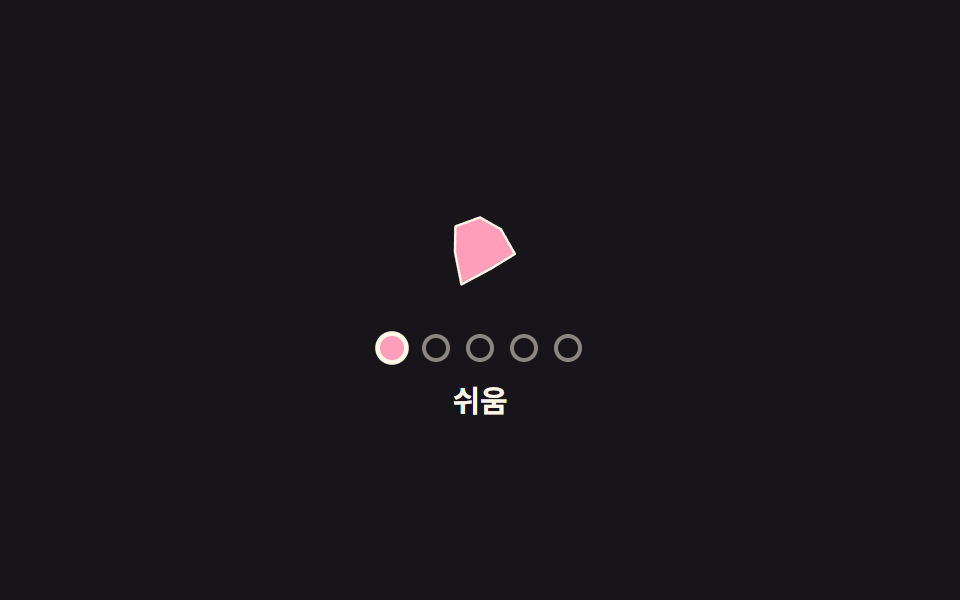
05段階ごとにアイコンの形が変形する難易度選択
段階を切り替えるたびアイコンの輪郭座標が次の段階の形へ補間され、形が飛ばずに滑らかにつながる。
使いどころゲーム設定で難易度ごとの象徴アイコンを見せる場所
polygonRadiusbuildPathradiiFor
<main class="stage">
<div class="ims is-demo" id="ims">
  <svg class="ims__icon" viewBox="0 0 80 80" width="64" height="64" aria-hidden="true">
    <path id="imsPath" class="ims__shape"></path>
  </svg>
  <div class="ims__row" id="imsRow" role="radiogroup" aria-label="難易度">
    <button type="button" class="ims__dot" role="radio" aria-checked="false" aria-label="簡単" data-i="0" tabindex="0"></button>
    <button type="button" class="ims__dot" role="radio" aria-checked="false" aria-label="普通" data-i="1" tabindex="-1"></button>
    <button type="button" class="ims__dot" role="radio" aria-checked="true" aria-label="難しい" data-i="2" tabindex="-1"></button>
    <button type="button" class="ims__dot" role="radio" aria-checked="false" aria-label="とても難しい" data-i="3" tabindex="-1"></button>
    <button type="button" class="ims__dot" role="radio" aria-checked="false" aria-label="最高" data-i="4" tabindex="-1"></button>
  </div>
  <p class="ims__label" id="imsLabel">難しい</p>
</div>
</main>
@use "../../../../site/static/demo-tokens" as *;
// 변수 3개
$duration: $dur-base;
$easing: $ease-out;
$color: $subject-pink;
// 계산 겹: polygonRadius(theta, sides) 기하 공식으로 다각형 반지름을 구하고, 단계가 바뀌면 그 반지름 배열을 보간한다(JS)
@include stage($stage-ink);
.ims { color: $subject-cream; text-align: center; }
.ims__icon { display: block; margin: 0 auto; }
.ims__shape { fill: $color; stroke: $subject-cream; stroke-width: 1.5; stroke-linejoin: round; }
.ims__row { display: flex; gap: $sp-2; justify-content: center; margin-top: $sp-3; }
.ims__dot {
appearance: none; width: 14px; height: 14px; border-radius: 50%;
border: 2px solid rgba($subject-cream, .5); background: transparent; padding: 0; cursor: pointer;
transition: background $dur-quick $ease-out, border-color $dur-quick $ease-out, transform $dur-quick $ease-pop;
}
.ims__dot:focus-visible { outline: 2px solid $subject-cream; outline-offset: 2px; }
.ims__dot[aria-checked="true"] { background: $color; border-color: $subject-cream; transform: scale(1.2); }
.ims__label { margin: $sp-2 0 0; font-weight: 700; font-size: 15px; }
@media (max-width: 340px) {
.ims__icon { width: 52px; height: 52px; }
.ims__label { font-size: 13px; }
}
@media (prefers-reduced-motion: reduce) {
// 실사용 경로 적용: morphTo() 안에서 reduce 를 확인해 보간 없이 목표 모양으로 즉시 바뀐다(JS 쪽 처리)
.ims__dot { transition: none; }
}html, body {
margin: 0;
overflow: hidden;
}
.stage {
box-sizing: border-box;
min-height: 100vh;
display: grid;
place-items: center;
margin: 0;
background: #17141a;
font-family: -apple-system, "Segoe UI", "Noto Sans KR", sans-serif;
padding: clamp(8px, 4vw, 24px);
}
.ims {
color: #fff7e6;
text-align: center;
}
.ims__icon {
display: block;
margin: 0 auto;
}
.ims__shape {
fill: #ff9ebb;
stroke: #fff7e6;
stroke-width: 1.5;
stroke-linejoin: round;
}
.ims__row {
display: flex;
gap: 8px;
justify-content: center;
margin-top: 12px;
}
.ims__dot {
appearance: none;
width: 14px;
height: 14px;
border-radius: 50%;
border: 2px solid rgba(255, 247, 230, 0.5);
background: transparent;
padding: 0;
cursor: pointer;
transition: background 220ms ease-out, border-color 220ms ease-out, transform 220ms cubic-bezier(0.2, 1.4, 0.4, 1);
}
.ims__dot:focus-visible {
outline: 2px solid #fff7e6;
outline-offset: 2px;
}
.ims__dot[aria-checked=true] {
background: #ff9ebb;
border-color: #fff7e6;
transform: scale(1.2);
}
.ims__label {
margin: 8px 0 0;
font-weight: 700;
font-size: 15px;
}
@media (max-width: 340px) {
.ims__icon {
width: 52px;
height: 52px;
}
.ims__label {
font-size: 13px;
}
}
@media (prefers-reduced-motion: reduce) {
.ims__dot {
transition: none;
}
}(function () {
var LEVELS = ['簡単', '普通', '難しい', 'とても難しい', '最高'];
var SIDES = [3, 4, 5, 6, 7];
var POINTS = 7, CX = 40, CY = 40, R = 30, MORPH_MS = 420;
var root = document.getElementById('ims');
var path = document.getElementById('imsPath');
var row = document.getElementById('imsRow');
var dots = Array.prototype.slice.call(row.querySelectorAll('.ims__dot'));
var label = document.getElementById('imsLabel');
var tier = 2;
var raf = 0, t0 = 0, fromR = [], toR = [];
var reduce = window.matchMedia('(prefers-reduced-motion: reduce)').matches;
// 계산 겹: 정다각형의 변 수(sides)와 각도(theta)로 그 방향의 반지름을 구하는 기하 공식.
// theta 가 한 변의 중심에서 멀어질수록(꼭짓점에 가까울수록) 반지름이 길어진다
function polygonRadius(theta, sides) {
var seg = (2 * Math.PI) / sides;
var a = ((theta % seg) + seg) % seg - seg / 2;
return R * Math.cos(seg / 2) / Math.cos(a);
}
function angleAt(i) { return (i / POINTS) * Math.PI * 2 - Math.PI / 2; }
function radiiFor(sides) {
var out = [];
for (var i = 0; i < POINTS; i++) out.push(polygonRadius(angleAt(i), sides));
return out;
}
function buildPath(radii) {
var d = '';
for (var i = 0; i < POINTS; i++) {
var a = angleAt(i);
var x = CX + radii[i] * Math.cos(a);
var y = CY + radii[i] * Math.sin(a);
d += (i === 0 ? 'M' : 'L') + x.toFixed(2) + ',' + y.toFixed(2) + ' ';
}
return d + 'Z';
}
var currentR = radiiFor(SIDES[tier]);
function lerp(a, b, t) { return a + (b - a) * t; }
function morphTo(sides) {
cancelAnimationFrame(raf);
var target = radiiFor(sides);
if (reduce) { currentR = target; path.setAttribute('d', buildPath(currentR)); return; }
fromR = currentR.slice(); toR = target; t0 = performance.now();
function step(now) {
var t = Math.min(1, (now - t0) / MORPH_MS);
var e = 1 - Math.pow(1 - t, 3);
currentR = fromR.map(function (r, i) { return lerp(r, toR[i], e); });
path.setAttribute('d', buildPath(currentR));
if (t < 1) raf = requestAnimationFrame(step);
}
raf = requestAnimationFrame(step);
}
function human() { root.classList.remove('is-demo'); clearInterval(timer); }
function select(i) {
tier = i;
dots.forEach(function (d, idx) {
d.setAttribute('aria-checked', idx === i ? 'true' : 'false');
d.setAttribute('tabindex', idx === i ? '0' : '-1');
});
label.textContent = LEVELS[i];
morphTo(SIDES[i]);
}
dots.forEach(function (d, i) {
d.addEventListener('click', function () { human(); select(i); });
d.addEventListener('keydown', function (e) {
if (e.key === 'ArrowRight' || e.key === 'ArrowUp') { e.preventDefault(); human(); select(Math.min(LEVELS.length - 1, tier + 1)); dots[tier].focus({ preventScroll: true }); }
else if (e.key === 'ArrowLeft' || e.key === 'ArrowDown') { e.preventDefault(); human(); select(Math.max(0, tier - 1)); dots[tier].focus({ preventScroll: true }); }
});
});
var sequence = [4, 0, 3, 1, 2];
var si = 0;
function tick() { select(sequence[si % sequence.length]); si++; }
var timer = reduce ? null : setInterval(tick, 900);
path.setAttribute('d', buildPath(currentR));
}());import { useEffect, useRef } from 'react';
import styles from './DifficultySelectorIconMorphShape.module.scss';
const LEVELS = ['쉬움', '보통', '어려움', '매우 어려움', '최고'];
const SIDES = [3, 4, 5, 6, 7];
const POINTS = 7, CX = 40, CY = 40, R = 30, MORPH_MS = 420;
const SEQUENCE = [4, 0, 3, 1, 2];
const TICK_MS = 900;
export default function DifficultySelectorIconMorphShape() {
const rootRef = useRef<HTMLDivElement>(null);
const pathRef = useRef<SVGPathElement>(null);
const rowRef = useRef<HTMLDivElement>(null);
const dotRefs = useRef<HTMLButtonElement[]>([]);
const labelRef = useRef<HTMLParagraphElement>(null);
useEffect(() => {
const root = rootRef.current;
const path = pathRef.current;
const label = labelRef.current;
if (!root || !path || !label || !dotRefs.current) return undefined;
const dots = dotRefs.current;
if (dots.length !== LEVELS.length) return undefined;
let tier = 2;
let raf = 0, t0 = 0;
const reduce = window.matchMedia('(prefers-reduced-motion: reduce)').matches;
// 계산 겹: 정다각형의 변 수(sides)와 각도(theta)로 그 방향의 반지름을 구하는 기하 공식.
// theta 가 한 변의 중심에서 멀어질수록(꼭짓점에 가까울수록) 반지름이 길어진다
function polygonRadius(theta: number, sides: number) {
const seg = (2 * Math.PI) / sides;
const a = ((theta % seg) + seg) % seg - seg / 2;
return R * Math.cos(seg / 2) / Math.cos(a);
}
function angleAt(i: number) { return (i / POINTS) * Math.PI * 2 - Math.PI / 2; }
function radiiFor(sides: number) {
const out: number[] = [];
for (let i = 0; i < POINTS; i++) out.push(polygonRadius(angleAt(i), sides));
return out;
}
function buildPath(radii: number[]) {
let d = '';
for (let i = 0; i < POINTS; i++) {
const a = angleAt(i);
const x = CX + radii[i] * Math.cos(a);
const y = CY + radii[i] * Math.sin(a);
d += (i === 0 ? 'M' : 'L') + x.toFixed(2) + ',' + y.toFixed(2) + ' ';
}
return d + 'Z';
}
let currentR = radiiFor(SIDES[tier]);
function lerp(a: number, b: number, t: number) { return a + (b - a) * t; }
function morphTo(sides: number) {
cancelAnimationFrame(raf);
const target = radiiFor(sides);
if (reduce) { currentR = target; path!.setAttribute('d', buildPath(currentR)); return; }
const fromR = currentR.slice();
t0 = performance.now();
function step(now: number) {
const t = Math.min(1, (now - t0) / MORPH_MS);
const e = 1 - Math.pow(1 - t, 3);
currentR = fromR.map((r, i) => lerp(r, target[i], e));
path!.setAttribute('d', buildPath(currentR));
if (t < 1) raf = requestAnimationFrame(step);
}
raf = requestAnimationFrame(step);
}
let timer = 0;
function human() { root!.classList.remove(styles['is-demo']); window.clearInterval(timer); }
function select(i: number) {
tier = i;
dots.forEach((d, idx) => {
d.setAttribute('aria-checked', idx === i ? 'true' : 'false');
d.setAttribute('tabindex', idx === i ? '0' : '-1');
});
label!.textContent = LEVELS[i];
morphTo(SIDES[i]);
}
const offs = dots.map((d, i) => {
function onClick() { human(); select(i); }
function onKey(e: KeyboardEvent) {
if (e.key === 'ArrowRight' || e.key === 'ArrowUp') { e.preventDefault(); human(); select(Math.min(LEVELS.length - 1, tier + 1)); dots[tier].focus({ preventScroll: true }); }
else if (e.key === 'ArrowLeft' || e.key === 'ArrowDown') { e.preventDefault(); human(); select(Math.max(0, tier - 1)); dots[tier].focus({ preventScroll: true }); }
}
d.addEventListener('click', onClick);
d.addEventListener('keydown', onKey);
return () => { d.removeEventListener('click', onClick); d.removeEventListener('keydown', onKey); };
});
let si = 0;
function tick() { select(SEQUENCE[si % SEQUENCE.length]); si++; }
if (!reduce) timer = window.setInterval(tick, TICK_MS);
path.setAttribute('d', buildPath(currentR));
return () => { offs.forEach((off) => off()); cancelAnimationFrame(raf); window.clearInterval(timer); };
}, []);
return (
<main className={styles.stage}>
<div className={styles.ims + ' ' + styles['is-demo']} ref={rootRef}>
<svg className={styles.imsIcon} viewBox="0 0 80 80" width={64} height={64} aria-hidden="true">
<path ref={pathRef} className={styles.imsShape} />
</svg>
<div className={styles.imsRow} ref={rowRef} role="radiogroup" aria-label="난이도">
{LEVELS.map((label, i) => (
<button
key={label}
type="button"
className={styles.imsDot}
ref={(el: HTMLButtonElement | null) => { if (el && dotRefs.current) dotRefs.current[i] = el; }}
role="radio"
aria-checked={i === 2 ? 'true' : 'false'}
aria-label={label}
data-i={i}
tabIndex={i === 0 ? 0 : -1}
/>
))}
</div>
<p className={styles.imsLabel} ref={labelRef}>어려움</p>
</div>
</main>
);
}05 段階ごとにアイコンの形が変形する難易度選択 — 計測 累積面積 2.066% · 動いたフレーム 11/23GODRICH オリジナル · SCSS と React は zip に同梱 · 難易度選択 ui 9種 — 角度と数式で決まる選択まで
このデモが属する記事
 難易度選択 ui 9種 — 角度と数式で決まる選択まで難易度選択 ui 9種のうち、1つは手を離すとスライダーのつまみが段階を少し行き過ぎてからばね計算で戻って止まり、1つは5つのバッジの色を固定値ではなく段階番号を入れた色相角の数式で計算し、1つは半円ゲージの針を引く指の角度を値に変換します この記事のデモをすべて見る