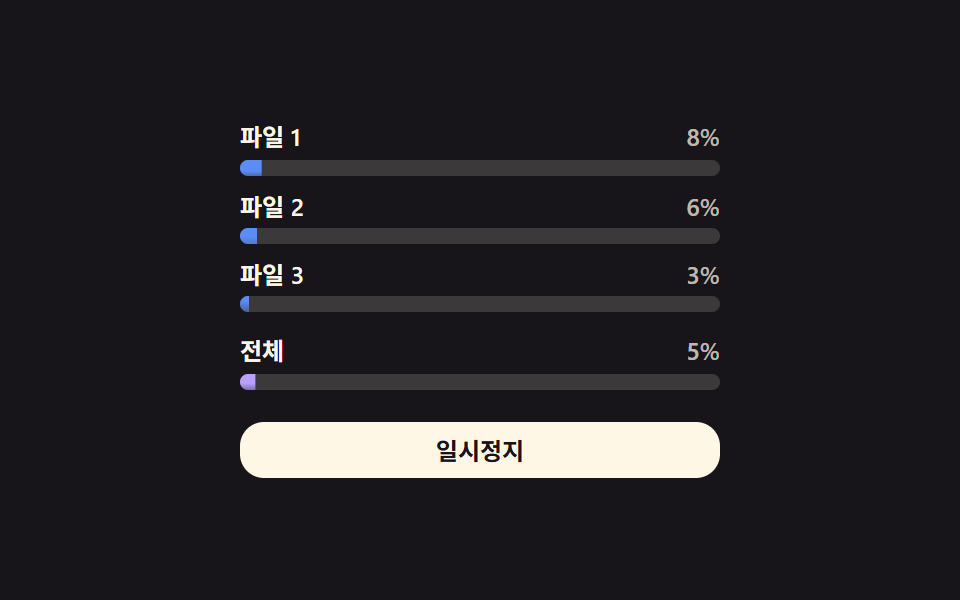
01複数ファイル進捗値の並列更新 — 複数のファイルが同時に受信される間、各ファイルの進捗値が一覧の中でそれぞれ更新される方式
複数のファイルが同時に受信されている間、各ファイルの進捗値が一覧の中でそれぞれ異なる速さで一緒に上がっていきます。
使いどころ複数の添付ファイルを一度に受信するダウンロード一覧、大量資料配布画面
.dmf__row--totalSIZES.dmf__fill

<main class="stage">
<div class="dmf is-demo" id="dmf">
  <div class="dmf__row" data-i="0">
    <div class="dmf__head"><span class="dmf__name">ファイル 1</span><span class="dmf__pct" id="dmfPct0">0%</span></div>
    <div class="dmf__track"><div class="dmf__fill" id="dmfFill0"></div></div>
  </div>
  <div class="dmf__row" data-i="1">
    <div class="dmf__head"><span class="dmf__name">ファイル 2</span><span class="dmf__pct" id="dmfPct1">0%</span></div>
    <div class="dmf__track"><div class="dmf__fill" id="dmfFill1"></div></div>
  </div>
  <div class="dmf__row" data-i="2">
    <div class="dmf__head"><span class="dmf__name">ファイル 3</span><span class="dmf__pct" id="dmfPct2">0%</span></div>
    <div class="dmf__track"><div class="dmf__fill" id="dmfFill2"></div></div>
  </div>
  <div class="dmf__row dmf__row--total">
    <div class="dmf__head"><span class="dmf__name">合計</span><span class="dmf__pct" id="dmfPctT">0%</span></div>
    <div class="dmf__track"><div class="dmf__fill dmf__fill--total" id="dmfFillT"></div></div>
  </div>
  <button class="dmf__btn" id="dmfBtn" type="button">一時停止</button>
</div>
</main>
@use "../../../../site/static/demo-tokens" as *;
// 계산 겹: 전체 바 = 파일별 바이트 합 ÷ 크기 합(용량 가중 평균) — index.html 참조
@include stage($stage-ink);
.dmf {
width: 100%;
max-width: 240px;
display: grid;
gap: $sp-2;
}
.dmf__head {
display: flex;
align-items: baseline;
justify-content: space-between;
font: 600 12px/1.2 -apple-system, "Segoe UI", "Noto Sans KR", sans-serif;
color: $subject-cream;
margin-bottom: $sp-1;
}
.dmf__pct { font-variant-numeric: tabular-nums; color: rgba($subject-cream, .72); }
.dmf__track {
width: 100%;
height: $sp-2;
border-radius: $r-pill;
background: rgba($subject-cream, .16);
overflow: hidden;
}
.dmf__fill {
height: 100%;
width: 100%;
transform-origin: left center;
transform: scaleX(0);
border-radius: $r-pill;
background: $subject-blue-light;
transition: transform $dur-instant linear;
}
.dmf__row--total { margin-top: $sp-1; }
.dmf__row--total .dmf__fill--total { background: $subject-lilac; }
.dmf--done .dmf__row--total .dmf__fill--total { background: $subject-mint; }
.dmf__btn {
margin-top: $sp-2;
width: 100%;
border: 0;
border-radius: $r-control;
padding: $sp-2 $sp-4;
background: $subject-cream;
color: $stage-ink;
font: 700 12px/1 -apple-system, "Segoe UI", "Noto Sans KR", sans-serif;
cursor: pointer;
transition: transform $dur-instant $ease-out;
&:active { transform: scale(.96); }
}
@media (max-width: 340px) {
.dmf { max-width: 200px; gap: $sp-1; }
.dmf__row--total { margin-top: 0; }
.dmf__btn { margin-top: $sp-1; padding: $sp-1 $sp-3; }
}
@media (prefers-reduced-motion: reduce) {
.dmf__fill { transition: none; }
.dmf__btn { transition: none; }
}html, body {
margin: 0;
overflow: hidden;
}
.stage {
box-sizing: border-box;
min-height: 100vh;
display: grid;
place-items: center;
margin: 0;
background: #17141a;
font-family: -apple-system, "Segoe UI", "Noto Sans KR", sans-serif;
padding: clamp(8px, 4vw, 24px);
}
.dmf {
width: 100%;
max-width: 240px;
display: grid;
gap: 8px;
}
.dmf__head {
display: flex;
align-items: baseline;
justify-content: space-between;
font: 600 12px/1.2 -apple-system, "Segoe UI", "Noto Sans KR", sans-serif;
color: #fff7e6;
margin-bottom: 4px;
}
.dmf__pct {
font-variant-numeric: tabular-nums;
color: rgba(255, 247, 230, 0.72);
}
.dmf__track {
width: 100%;
height: 8px;
border-radius: 999px;
background: rgba(255, 247, 230, 0.16);
overflow: hidden;
}
.dmf__fill {
height: 100%;
width: 100%;
transform-origin: left center;
transform: scaleX(0);
border-radius: 999px;
background: #5b8cf8;
transition: transform 140ms linear;
}
.dmf__row--total {
margin-top: 4px;
}
.dmf__row--total .dmf__fill--total {
background: #b9a0ff;
}
.dmf--done .dmf__row--total .dmf__fill--total {
background: #4cd4a6;
}
.dmf__btn {
margin-top: 8px;
width: 100%;
border: 0;
border-radius: 12px;
padding: 8px 16px;
background: #fff7e6;
color: #17141a;
font: 700 12px/1 -apple-system, "Segoe UI", "Noto Sans KR", sans-serif;
cursor: pointer;
transition: transform 140ms ease-out;
}
.dmf__btn:active {
transform: scale(0.96);
}
@media (max-width: 340px) {
.dmf {
max-width: 200px;
gap: 4px;
}
.dmf__row--total {
margin-top: 0;
}
.dmf__btn {
margin-top: 4px;
padding: 4px 12px;
}
}
@media (prefers-reduced-motion: reduce) {
.dmf__fill {
transition: none;
}
.dmf__btn {
transition: none;
}
}(function () {
var root = document.getElementById('dmf');
var btn = document.getElementById('dmfBtn');
var fills = [document.getElementById('dmfFill0'), document.getElementById('dmfFill1'), document.getElementById('dmfFill2')];
var pcts = [document.getElementById('dmfPct0'), document.getElementById('dmfPct1'), document.getElementById('dmfPct2')];
var fillT = document.getElementById('dmfFillT');
var pctT = document.getElementById('dmfPctT');
// 시드 고정: 파일별 크기(KB, 가상)와 틱마다 더할 속도 배열(KB/틱). 실 fetch·File API 0
var SIZES = [420, 980, 640];
var SPEEDS = [
[32, 40, 48, 52, 46, 38, 30, 44, 56, 60, 50, 36],
[58, 64, 60, 52, 44, 38, 46, 54, 62, 58, 48, 40],
[20, 26, 32, 38, 44, 40, 34, 28, 24, 30, 36, 42]
];
var TICK_MS = 140;
var HOLD_MS = 700;
var done = [0, 0, 0];
var tick = 0;
var paused = false;
var timer = null;
// 계산 겹: 合計 進行中 값 = 파일별 다운로드 바이트 합 ÷ 合計 크기 합(용량 가중 평균, 단순 3칸 평균 아님)
function overall() {
var d = done[0] + done[1] + done[2];
var s = SIZES[0] + SIZES[1] + SIZES[2];
return d / s;
}
function paint() {
for (var i = 0; i < 3; i++) {
var p = done[i] / SIZES[i];
fills[i].style.transform = 'scaleX(' + p.toFixed(3) + ')';
pcts[i].textContent = Math.round(p * 100) + '%';
}
var o = overall();
fillT.style.transform = 'scaleX(' + o.toFixed(3) + ')';
pctT.textContent = Math.round(o * 100) + '%';
root.classList.toggle('dmf--done', o >= 1);
}
function step() {
var allDone = true;
for (var i = 0; i < 3; i++) {
if (done[i] < SIZES[i]) {
done[i] = Math.min(SIZES[i], done[i] + SPEEDS[i][tick % SPEEDS[i].length]);
allDone = false;
}
}
tick++;
paint();
if (allDone) {
timer = setTimeout(function () { done = [0, 0, 0]; tick = 0; paint(); loop(); }, HOLD_MS);
} else {
loop();
}
}
function loop() {
if (paused) return;
timer = setTimeout(step, TICK_MS);
}
paint();
loop();
btn.addEventListener('click', function () {
root.classList.remove('is-demo');
paused = !paused;
btn.textContent = paused ? '再開' : '一時停止';
if (!paused) loop();
else if (timer) clearTimeout(timer);
});
})();import { useEffect, useRef } from "react";
import styles from "./DownloadManagerMultiFileList.module.scss";
type Box<T> = { current: T };
export default function DownloadManagerMultiFileList() {
const rootRef = useRef(null) as unknown as Box<HTMLDivElement | null>;
useEffect(() => {
const root = rootRef.current;
if (!root) return;
const fills = [0, 1, 2].map((i) => root.querySelector(`.${styles["fill" + i]}`) as HTMLElement | null);
const pcts = [0, 1, 2].map((i) => root.querySelector(`.${styles["pct" + i]}`) as HTMLElement | null);
const fillT = root.querySelector(`.${styles.fillT}`) as HTMLElement | null;
const pctT = root.querySelector(`.${styles.pctT}`) as HTMLElement | null;
const btn = root.querySelector(`.${styles.btn}`) as HTMLElement | null;
if (!fillT || !pctT || !btn) return;
// 시드 고정: 파일별 크기(KB, 가상)와 틱마다 더할 속도 배열(KB/틱). 실 fetch·File API 0
const SIZES = [420, 980, 640];
const SPEEDS = [
[32, 40, 48, 52, 46, 38, 30, 44, 56, 60, 50, 36],
[58, 64, 60, 52, 44, 38, 46, 54, 62, 58, 48, 40],
[20, 26, 32, 38, 44, 40, 34, 28, 24, 30, 36, 42],
];
const TICK_MS = 140;
const HOLD_MS = 700;
let done = [0, 0, 0];
let tick = 0;
let paused = false;
let timer = 0;
let stopped = false;
// 계산 겹: 전체 진행 값 = 파일별 다운로드 바이트 합 ÷ 전체 크기 합(용량 가중 평균, 단순 3칸 평균 아님)
function overall() {
const d = done[0] + done[1] + done[2];
const s = SIZES[0] + SIZES[1] + SIZES[2];
return d / s;
}
function paint() {
for (let i = 0; i < 3; i++) {
const p = done[i] / SIZES[i];
const fillEl = fills[i];
const pctEl = pcts[i];
if (fillEl) fillEl.style.transform = "scaleX(" + p.toFixed(3) + ")";
if (pctEl) pctEl.textContent = Math.round(p * 100) + "%";
}
const o = overall();
fillT!.style.transform = "scaleX(" + o.toFixed(3) + ")";
pctT!.textContent = Math.round(o * 100) + "%";
root!.classList.toggle(styles["dmf--done"], o >= 1);
}
function step() {
if (stopped) return;
let allDone = true;
for (let i = 0; i < 3; i++) {
if (done[i] < SIZES[i]) {
done[i] = Math.min(SIZES[i], done[i] + SPEEDS[i][tick % SPEEDS[i].length]);
allDone = false;
}
}
tick++;
paint();
if (allDone) {
timer = window.setTimeout(() => { done = [0, 0, 0]; tick = 0; paint(); loop(); }, HOLD_MS);
} else {
loop();
}
}
function loop() {
if (paused || stopped) return;
timer = window.setTimeout(step, TICK_MS);
}
paint();
loop();
function onClick() {
root!.classList.remove(styles["is-demo"]);
paused = !paused;
btn!.textContent = paused ? "재개" : "일시정지";
if (!paused) loop();
else window.clearTimeout(timer);
}
btn.addEventListener("click", onClick);
return () => {
stopped = true;
window.clearTimeout(timer);
btn.removeEventListener("click", onClick);
};
}, []);
return (
<div ref={rootRef} className={`${styles.stage} ${styles.dmf} ${styles["is-demo"]}`}>
<div className={styles.row}>
<div className={styles.head}><span className={styles.name}>파일 1</span><span className={`${styles.pct} ${styles.pct0}`}>0%</span></div>
<div className={styles.track}><div className={`${styles.fill} ${styles.fill0}`} /></div>
</div>
<div className={styles.row}>
<div className={styles.head}><span className={styles.name}>파일 2</span><span className={`${styles.pct} ${styles.pct1}`}>0%</span></div>
<div className={styles.track}><div className={`${styles.fill} ${styles.fill1}`} /></div>
</div>
<div className={styles.row}>
<div className={styles.head}><span className={styles.name}>파일 3</span><span className={`${styles.pct} ${styles.pct2}`}>0%</span></div>
<div className={styles.track}><div className={`${styles.fill} ${styles.fill2}`} /></div>
</div>
<div className={`${styles.row} ${styles["row--total"]}`}>
<div className={styles.head}><span className={styles.name}>전체</span><span className={`${styles.pct} ${styles.pctT}`}>0%</span></div>
<div className={styles.track}><div className={`${styles.fill} ${styles["fill--total"]} ${styles.fillT}`} /></div>
</div>
<button className={styles.btn} type="button">일시정지</button>
</div>
);
}01 複数ファイル進捗値の並列更新 — 複数のファイルが同時に受信される間、各ファイルの進捗値が一覧の中でそれぞれ更新される方式 — 計測 累積面積 3.927% · 動いたフレーム 16/23GODRICH オリジナル · SCSS と React は zip に同梱 · ダウンロード 進捗バー 9選 — 値がパーセントで更新される9つの方式
このデモが属する記事
 ダウンロード 進捗バー 9選 — 値がパーセントで更新される9つの方式このダウンロード 進捗バー特集では、9つのうち1つは複数のファイルが同時に受信される間、各ファイルの進捗値が一覧の中で並んで上がり、1つは検証が失敗するたびに再試行回数の値が増えて進捗値が最初に戻り、もう1つは完了した項目の位置値が一覧の決 この記事のデモをすべて見る