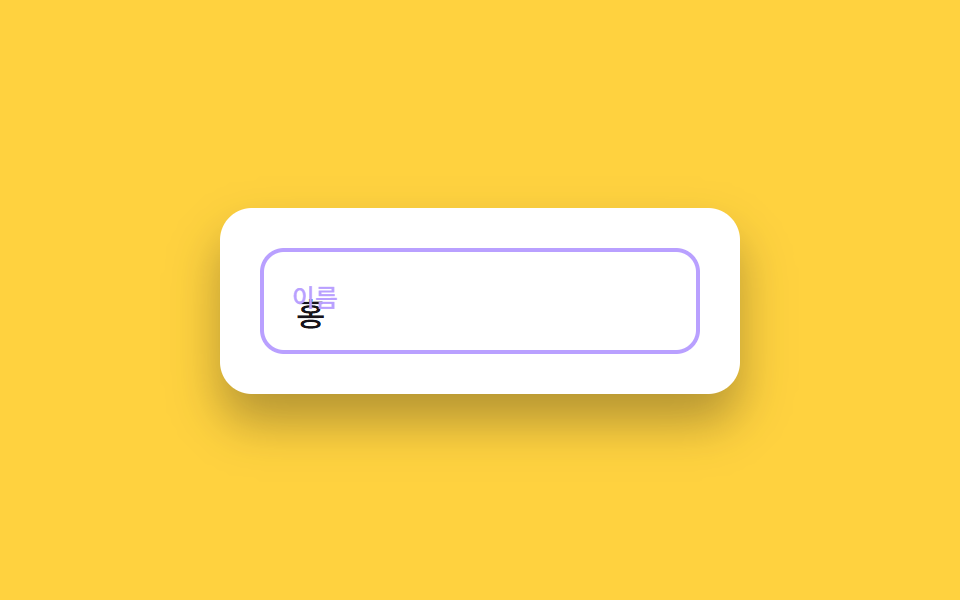
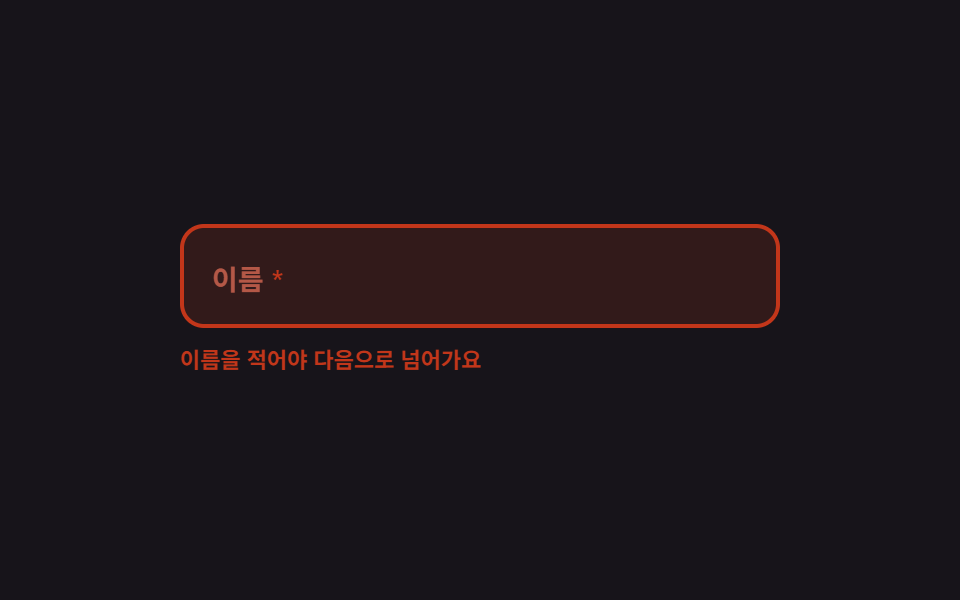
01必須マーク付きフローティングラベル
ラベルは入力欄の中にあり、打ち始めると上に浮かびます。必須の欄を空のままフォーカスが外れると、ラベルとアスタリスク、枠線がそろってエラー色に変わり、何が足りないかを欄自身が知らせます。
使いどころ名前や電話番号など空にできない欄が多い会員登録フォーム
translateYaria-requiredsteps(1, end)

<main class="stage">
  <form class="fl is-demo" id="fl" novalidate>
    <div class="fl__box" id="fl-box">
      <input class="fl__input" id="fl-input" type="text" autocomplete="off" aria-required="true" aria-describedby="fl-msg">
      <span class="fl__ghost" aria-hidden="true">キム・ビンナ</span>
      <label class="fl__label" for="fl-input"><span class="fl__text">氏名</span><span class="fl__star" aria-hidden="true">*</span></label>
    </div>
    <p class="fl__msg" id="fl-msg" role="status">
      <span class="fl__m1">お名前を入力すると次に進めます</span>
      <span class="fl__m2">お名前が入力されました</span>
    </p>
  </form>
</main>
@use "../../../../site/static/demo-tokens" as *;
$duration: $dur-quick;
$easing: $ease-spring;
$color: $subject-blue;
@include stage($stage-ink);
$ok: $subject-mint;
.fl {
position: relative;
box-sizing: border-box;
width: min(300px, 86vw);
display: flex;
flex-direction: column;
gap: $sp-2;
font-family: -apple-system, "Segoe UI", "Noto Sans KR", sans-serif;
}
// ── 입력 상자 ─────────────────────────────────────────
.fl__box {
position: relative;
box-sizing: border-box;
height: 52px;
border: 2px solid rgba(255, 255, 255, .18);
border-radius: $r-control;
background: rgba(255, 255, 255, .06);
transition: border-color $duration $easing, background $duration $easing;
}
.fl.is-up .fl__box { border-color: $color; }
.fl.is-ok .fl__box { border-color: $ok; }
.fl.is-bad .fl__box { border-color: $error; background: rgba($error, .16); }
.fl__input {
box-sizing: border-box;
width: 100%; height: 100%;
padding: $sp-5 $sp-3 0;
border: 0;
border-radius: $r-control;
background: transparent;
color: $subject-cream;
font-family: inherit;
font-size: 14px; line-height: 20px; font-weight: 600;
}
.fl__input:focus-visible { outline: 2px solid $color; outline-offset: 2px; }
// 자동 루프에서만 보이는 "쳐 넣는 글자"
.fl__ghost {
position: absolute;
left: 14px; top: 26px;
color: $subject-cream;
font-size: 14px; line-height: 20px; font-weight: 600;
white-space: nowrap;
pointer-events: none;
opacity: 0;
}
// ── 라벨 — 안에 앉아 있다가 위로 떠오른다 ───────────────
.fl__label {
position: absolute;
left: 14px; top: 16px;
display: inline-flex;
align-items: center;
gap: $sp-1;
color: rgba(255, 255, 255, .52);
font-size: 14px; line-height: 20px; font-weight: 600;
pointer-events: none;
transform-origin: left top; // 규칙8: 플로트 라벨 좌상단 고정
transform: translateY(0) scale(1);
transition: transform $duration $easing, color $duration $easing;
}
.fl.is-up .fl__label { transform: translateY(-8px) scale(.78); color: $color; }
.fl.is-ok .fl__label { transform: translateY(-8px) scale(.78); color: $ok; }
.fl.is-bad .fl__label { transform: translateY(0) scale(1); color: $error; }
.fl__star { color: $error; }
.fl.is-bad .fl__star { color: $error; }
// ── 아래 한 줄 — 자리를 미리 잡아 둔다 ──────────────────
.fl__msg {
position: relative;
height: 16px;
margin: 0;
font-size: 11px; line-height: 16px; font-weight: 600;
}
.fl__m1, .fl__m2 {
position: absolute;
left: 0; top: 0;
opacity: 0;
}
.fl__m1 { color: $error; }
.fl__m2 { color: $ok; }
.fl.is-bad .fl__m1 { opacity: 1; }
.fl.is-ok .fl__m2 { opacity: 1; }
// ── 자동 루프 (2s) ────────────────────────────────────
// 0~8% 빈 칸 → 12~40% 한 자씩 타이핑(라벨은 8% 에 이미 떠 있다) → 44~56% 통과 표시
// → 60% 비움(컷) + 오류 상태 → 76% 문구 · 82% 테두리 · 87% 라벨 순으로 흩어서 복귀한다.
// 복귀를 한 프레임에 몰면 그 프레임이 poster 로 뽑혀 정작 오류 장면이 대표 그림에서 밀린다 (실측).
.fl.is-demo .fl__ghost {
opacity: 1;
animation-name: fl-type;
animation-duration: $dur-loop;
animation-timing-function: steps(3, end);
animation-iteration-count: infinite;
}
.fl.is-demo .fl__label {
transition: none;
animation-name: fl-label;
animation-duration: $dur-loop;
animation-timing-function: $easing;
animation-iteration-count: infinite;
}
.fl.is-demo .fl__box {
transition: none;
animation-name: fl-box;
animation-duration: $dur-loop;
animation-timing-function: steps(1, end);
animation-iteration-count: infinite;
}
.fl.is-demo .fl__m1 {
animation-name: fl-m1;
animation-duration: $dur-loop;
animation-timing-function: steps(1, end);
animation-iteration-count: infinite;
}
.fl.is-demo .fl__m2 {
animation-name: fl-m2;
animation-duration: $dur-loop;
animation-timing-function: steps(1, end);
animation-iteration-count: infinite;
}
.fl.is-demo .fl__star {
animation-name: fl-star;
animation-duration: $dur-loop;
animation-timing-function: steps(1, end);
animation-iteration-count: infinite;
}
@keyframes fl-type {
0% { clip-path: inset(0 100% 0 0); }
12% { clip-path: inset(0 100% 0 0); }
40% { clip-path: inset(0 0 0 0); }
56% { clip-path: inset(0 0 0 0); }
60% { clip-path: inset(0 100% 0 0); }
100% { clip-path: inset(0 100% 0 0); }
}
@keyframes fl-label {
0% { transform: translateY(0) scale(1); color: rgba(255, 255, 255, .52); }
8% { transform: translateY(-8px) scale(.78); color: $color; }
44% { transform: translateY(-8px) scale(.78); color: $ok; }
60% { transform: translateY(0) scale(1); color: $error; }
87% { transform: translateY(0) scale(1); color: rgba(255, 255, 255, .52); }
100% { transform: translateY(0) scale(1); color: rgba(255, 255, 255, .52); }
}
@keyframes fl-box {
0% { border-color: rgba(255, 255, 255, .18); background: rgba(255, 255, 255, .06); }
8% { border-color: $color; background: rgba(255, 255, 255, .06); }
44% { border-color: $ok; background: rgba(255, 255, 255, .06); }
60% { border-color: $error; background: rgba($error, .16); }
82% { border-color: rgba(255, 255, 255, .18); background: rgba(255, 255, 255, .06); }
100% { border-color: rgba(255, 255, 255, .18); background: rgba(255, 255, 255, .06); }
}
@keyframes fl-m1 {
0% { opacity: 0; }
60% { opacity: 1; }
76% { opacity: 0; }
100% { opacity: 0; }
}
@keyframes fl-m2 {
0% { opacity: 0; }
44% { opacity: 1; }
60% { opacity: 0; }
100% { opacity: 0; }
}
@keyframes fl-star {
0% { color: $error; }
44% { color: $ok; }
60% { color: $error; }
100% { color: $error; }
}
// 320×200 — 무대 여백을 뺀 174px 안에 들어가도록 간격을 내린다(올리지 않는다)
@media (max-width: 360px) {
.fl { gap: $sp-1; }
.fl__box { height: 48px; }
.fl__ghost { top: 24px; }
}
@media (prefers-reduced-motion: reduce) {
.fl.is-demo .fl__ghost,
.fl.is-demo .fl__label,
.fl.is-demo .fl__box,
.fl.is-demo .fl__m1,
.fl.is-demo .fl__m2,
.fl.is-demo .fl__star { animation: none !important; }
.fl.is-demo .fl__ghost { opacity: 1; clip-path: inset(0 0 0 0); }
.fl.is-demo .fl__label { transform: translateY(-8px) scale(.78); color: $ok; }
.fl.is-demo .fl__box { border-color: $ok; }
.fl.is-demo .fl__m2 { opacity: 1; }
.fl__label, .fl__box { transition: none; }
}html, body {
margin: 0;
overflow: hidden;
}
.stage {
box-sizing: border-box;
min-height: 100vh;
display: grid;
place-items: center;
margin: 0;
background: #17141a;
font-family: -apple-system, "Segoe UI", "Noto Sans KR", sans-serif;
padding: clamp(8px, 4vw, 24px);
}
.fl {
position: relative;
box-sizing: border-box;
width: min(300px, 86vw);
display: flex;
flex-direction: column;
gap: 8px;
font-family: -apple-system, "Segoe UI", "Noto Sans KR", sans-serif;
}
.fl__box {
position: relative;
box-sizing: border-box;
height: 52px;
border: 2px solid rgba(255, 255, 255, 0.18);
border-radius: 12px;
background: rgba(255, 255, 255, 0.06);
transition: border-color 220ms cubic-bezier(0.2, 0.8, 0.2, 1), background 220ms cubic-bezier(0.2, 0.8, 0.2, 1);
}
.fl.is-up .fl__box {
border-color: #2f6df6;
}
.fl.is-ok .fl__box {
border-color: #4cd4a6;
}
.fl.is-bad .fl__box {
border-color: #c2361a;
background: rgba(194, 54, 26, 0.16);
}
.fl__input {
box-sizing: border-box;
width: 100%;
height: 100%;
padding: 20px 12px 0;
border: 0;
border-radius: 12px;
background: transparent;
color: #fff7e6;
font-family: inherit;
font-size: 14px;
line-height: 20px;
font-weight: 600;
}
.fl__input:focus-visible {
outline: 2px solid #2f6df6;
outline-offset: 2px;
}
.fl__ghost {
position: absolute;
left: 14px;
top: 26px;
color: #fff7e6;
font-size: 14px;
line-height: 20px;
font-weight: 600;
white-space: nowrap;
pointer-events: none;
opacity: 0;
}
.fl__label {
position: absolute;
left: 14px;
top: 16px;
display: inline-flex;
align-items: center;
gap: 4px;
color: rgba(255, 255, 255, 0.52);
font-size: 14px;
line-height: 20px;
font-weight: 600;
pointer-events: none;
transform-origin: left top;
transform: translateY(0) scale(1);
transition: transform 220ms cubic-bezier(0.2, 0.8, 0.2, 1), color 220ms cubic-bezier(0.2, 0.8, 0.2, 1);
}
.fl.is-up .fl__label {
transform: translateY(-8px) scale(0.78);
color: #2f6df6;
}
.fl.is-ok .fl__label {
transform: translateY(-8px) scale(0.78);
color: #4cd4a6;
}
.fl.is-bad .fl__label {
transform: translateY(0) scale(1);
color: #c2361a;
}
.fl__star {
color: #c2361a;
}
.fl.is-bad .fl__star {
color: #c2361a;
}
.fl__msg {
position: relative;
height: 16px;
margin: 0;
font-size: 11px;
line-height: 16px;
font-weight: 600;
}
.fl__m1, .fl__m2 {
position: absolute;
left: 0;
top: 0;
opacity: 0;
}
.fl__m1 {
color: #c2361a;
}
.fl__m2 {
color: #4cd4a6;
}
.fl.is-bad .fl__m1 {
opacity: 1;
}
.fl.is-ok .fl__m2 {
opacity: 1;
}
.fl.is-demo .fl__ghost {
opacity: 1;
animation-name: fl-type;
animation-duration: 2s;
animation-timing-function: steps(3, end);
animation-iteration-count: infinite;
}
.fl.is-demo .fl__label {
transition: none;
animation-name: fl-label;
animation-duration: 2s;
animation-timing-function: cubic-bezier(0.2, 0.8, 0.2, 1);
animation-iteration-count: infinite;
}
.fl.is-demo .fl__box {
transition: none;
animation-name: fl-box;
animation-duration: 2s;
animation-timing-function: steps(1, end);
animation-iteration-count: infinite;
}
.fl.is-demo .fl__m1 {
animation-name: fl-m1;
animation-duration: 2s;
animation-timing-function: steps(1, end);
animation-iteration-count: infinite;
}
.fl.is-demo .fl__m2 {
animation-name: fl-m2;
animation-duration: 2s;
animation-timing-function: steps(1, end);
animation-iteration-count: infinite;
}
.fl.is-demo .fl__star {
animation-name: fl-star;
animation-duration: 2s;
animation-timing-function: steps(1, end);
animation-iteration-count: infinite;
}
@keyframes fl-type {
0% {
clip-path: inset(0 100% 0 0);
}
12% {
clip-path: inset(0 100% 0 0);
}
40% {
clip-path: inset(0 0 0 0);
}
56% {
clip-path: inset(0 0 0 0);
}
60% {
clip-path: inset(0 100% 0 0);
}
100% {
clip-path: inset(0 100% 0 0);
}
}
@keyframes fl-label {
0% {
transform: translateY(0) scale(1);
color: rgba(255, 255, 255, 0.52);
}
8% {
transform: translateY(-8px) scale(0.78);
color: #2f6df6;
}
44% {
transform: translateY(-8px) scale(0.78);
color: #4cd4a6;
}
60% {
transform: translateY(0) scale(1);
color: #c2361a;
}
87% {
transform: translateY(0) scale(1);
color: rgba(255, 255, 255, 0.52);
}
100% {
transform: translateY(0) scale(1);
color: rgba(255, 255, 255, 0.52);
}
}
@keyframes fl-box {
0% {
border-color: rgba(255, 255, 255, 0.18);
background: rgba(255, 255, 255, 0.06);
}
8% {
border-color: #2f6df6;
background: rgba(255, 255, 255, 0.06);
}
44% {
border-color: #4cd4a6;
background: rgba(255, 255, 255, 0.06);
}
60% {
border-color: #c2361a;
background: rgba(194, 54, 26, 0.16);
}
82% {
border-color: rgba(255, 255, 255, 0.18);
background: rgba(255, 255, 255, 0.06);
}
100% {
border-color: rgba(255, 255, 255, 0.18);
background: rgba(255, 255, 255, 0.06);
}
}
@keyframes fl-m1 {
0% {
opacity: 0;
}
60% {
opacity: 1;
}
76% {
opacity: 0;
}
100% {
opacity: 0;
}
}
@keyframes fl-m2 {
0% {
opacity: 0;
}
44% {
opacity: 1;
}
60% {
opacity: 0;
}
100% {
opacity: 0;
}
}
@keyframes fl-star {
0% {
color: #c2361a;
}
44% {
color: #4cd4a6;
}
60% {
color: #c2361a;
}
100% {
color: #c2361a;
}
}
@media (max-width: 360px) {
.fl {
gap: 4px;
}
.fl__box {
height: 48px;
}
.fl__ghost {
top: 24px;
}
}
@media (prefers-reduced-motion: reduce) {
.fl.is-demo .fl__ghost,
.fl.is-demo .fl__label,
.fl.is-demo .fl__box,
.fl.is-demo .fl__m1,
.fl.is-demo .fl__m2,
.fl.is-demo .fl__star {
animation: none !important;
}
.fl.is-demo .fl__ghost {
opacity: 1;
clip-path: inset(0 0 0 0);
}
.fl.is-demo .fl__label {
transform: translateY(-8px) scale(0.78);
color: #4cd4a6;
}
.fl.is-demo .fl__box {
border-color: #4cd4a6;
}
.fl.is-demo .fl__m2 {
opacity: 1;
}
.fl__label, .fl__box {
transition: none;
}
}// 실제 동작: 치면 라벨이 위에 떠 있고, 비운 채 벗어나면 라벨·별표·테두리가 오류색으로 바뀐다.
var fl = document.getElementById('fl');
var flInput = document.getElementById('fl-input');
var flTouched = false;
function flState() {
fl.classList.remove('is-demo'); // 사람이 손대면 자동 루프를 멈춘다
var focused = document.activeElement === flInput;
var filled = flInput.value.length > 0;
var bad = flTouched && !filled;
fl.classList.toggle('is-up', focused || filled);
fl.classList.toggle('is-bad', bad);
fl.classList.toggle('is-ok', filled && !bad);
flInput.setAttribute('aria-invalid', bad ? 'true' : 'false');
}
flInput.addEventListener('focus', flState);
flInput.addEventListener('input', flState);
flInput.addEventListener('blur', function () { flTouched = true; flState(); });
fl.addEventListener('submit', function (e) {
e.preventDefault(); flTouched = true; flState();
flInput.focus({ preventScroll: true });
});import { useState } from "react";
import type { CSSProperties } from "react";
import styles from "./RequiredFloatLabel.module.scss";
export type RequiredFloatLabelProps = {
label?: string;
emptyMessage?: string;
filledMessage?: string;
/** 자동 재생 루프 (갤러리용). 사람이 손대면 꺼진다 */
demo?: boolean;
duration?: number;
easing?: string;
color?: string;
};
type Vars = CSSProperties & { "--duration"?: string; "--easing"?: string; "--color"?: string };
type ChangeEvt = { target: { value: string } };
export default function RequiredFloatLabel({
label = "Name",
emptyMessage = "Enter your name to continue",
filledMessage = "Name looks good",
demo = true,
duration = 220,
easing = "cubic-bezier(.2,.8,.2,1)",
color = "#2f6df6",
}: RequiredFloatLabelProps) {
const [value, setValue] = useState("");
const [focused, setFocused] = useState(false);
const [touched, setTouched] = useState(false);
const [live, setLive] = useState(demo);
const filled = value.length > 0;
const bad = touched && !filled;
const vars: Vars = { "--duration": `${duration}ms`, "--easing": easing, "--color": color };
const cls = [
styles.root,
live ? styles.isDemo : "",
focused || filled ? styles.isUp : "",
bad ? styles.isBad : "",
filled && !bad ? styles.isOk : "",
].join(" ");
return (
<form
className={cls}
style={vars}
noValidate
onSubmit={(e: { preventDefault: () => void }) => { e.preventDefault(); setTouched(true); setLive(false); }}
>
<div className={styles.box}>
<input
className={styles.input}
id="fl-input"
type="text"
autoComplete="off"
aria-required="true"
aria-invalid={bad}
aria-describedby="fl-msg"
value={value}
onChange={(e: ChangeEvt) => { setValue(e.target.value); setLive(false); }}
onFocus={() => { setFocused(true); setLive(false); }}
onBlur={() => { setFocused(false); setTouched(true); }}
/>
<span className={styles.ghost} aria-hidden="true">Bitna Kim</span>
<label className={styles.label} htmlFor="fl-input">
<span className={styles.text}>{label}</span>
<span className={styles.star} aria-hidden="true">*</span>
</label>
</div>
<p className={styles.msg} id="fl-msg" role="status">
<span className={styles.m1}>{emptyMessage}</span>
<span className={styles.m2}>{filledMessage}</span>
</p>
</form>
);
}01 必須マーク付きフローティングラベル — 計測 累積面積 11.549% · 動いたフレーム 17/23GODRICH オリジナル · SCSS と React は zip に同梱 · フォーム バリデーション UI 9選 — 打ち込んだ瞬間に判定するエラー表示
このデモが属する記事
 フォーム バリデーション UI 9選 — 打ち込んだ瞬間に判定するエラー表示フォーム バリデーションは、打ち込まれた値が規則に合うかをその場で測り、結果を画面で知らせる仕組みです。9つとも実際の正規表現が動いていて、打ち込んだ瞬間に判定する側と、送信ボタンを押すまで黙っている側が混ざっています。 この記事のデモをすべて見る