08セッションタイムアウト警告バナー
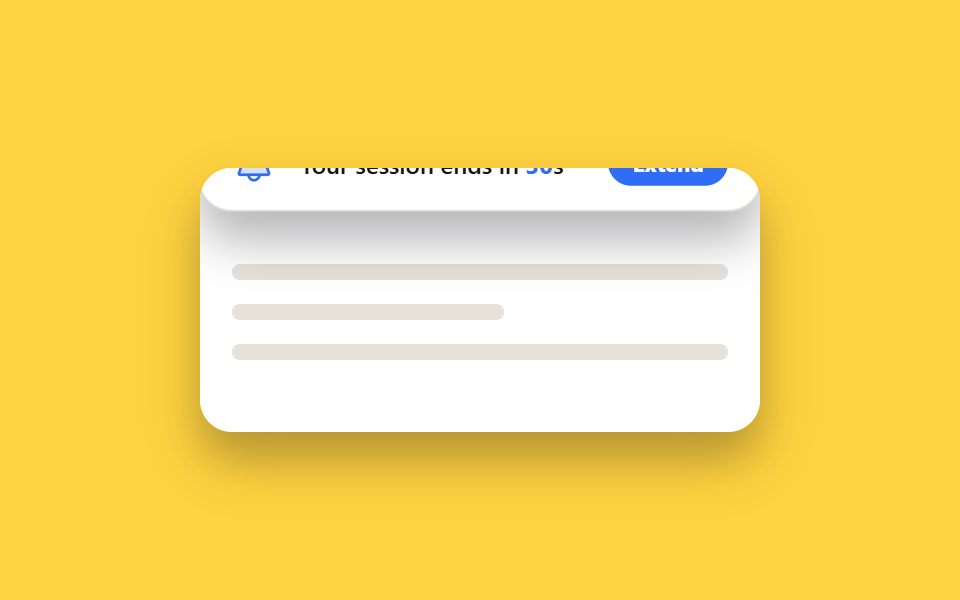
画面上部からバナーが滑り降りてきて残り時間が秒単位で減っていき、延長ボタンを押すとバナーが再び上へ畳まれて消えます。
使いどころ銀行・決済アプリの自動ログアウト前警告、管理コンソールのアイドルセッション通知
transform: translateY 슬라이드setInterval 카운트다운role=alert
<main class="stage">
  <div class="timeout-wrap">
    <div class="timeout-wrap__page">
      <span class="timeout-wrap__line"></span>
      <span class="timeout-wrap__line timeout-wrap__line--short"></span>
      <span class="timeout-wrap__line"></span>
    </div>
    <div class="timeout-banner is-demo" role="alert">
      <span class="timeout-banner__icon" aria-hidden="true">
        <svg viewBox="0 0 256 256"><g fill="currentColor"><path d="M208 192H48a8 8 0 0 1-6.88-12C47.71 168.6 56 139.81 56 104a72 72 0 0 1 144 0c0 35.82 8.3 64.6 14.9 76a8 8 0 0 1-6.9 12" opacity=".2"/><path d="M221.8 175.94c-5.55-9.56-13.8-36.61-13.8-71.94a80 80 0 1 0-160 0c0 35.34-8.26 62.38-13.81 71.94A16 16 0 0 0 48 200h40.81a40 40 0 0 0 78.38 0H208a16 16 0 0 0 13.8-24.06M128 216a24 24 0 0 1-22.62-16h45.24A24 24 0 0 1 128 216m-80-32c7.7-13.24 16-43.92 16-80a64 64 0 1 1 128 0c0 36.05 8.28 66.73 16 80Z"/></g></svg>
      </span>
      <p class="timeout-banner__text">Your session ends in <span class="timeout-banner__count">30</span>s</p>
      <button class="timeout-banner__extend" type="button">Extend</button>
    </div>
  </div>
</main>
@use "../../../../site/static/demo-tokens" as *;
$duration: $dur-loop; // 배너가 내려왔다 올라가는 한 바퀴
$easing: $ease-spring;
$color: $subject-blue; // 신뢰감 있는 차분한 강조 색
@include stage($stage-yellow);
.timeout-wrap {
position: relative;
width: min(280px, 90vw);
height: 132px;
border-radius: $r-card;
overflow: hidden;
box-shadow: $shadow-raised;
}
.timeout-wrap__page {
position: absolute;
inset: 0;
padding: $sp-4;
padding-top: $sp-12;
background: $stage-paper;
display: flex;
flex-direction: column;
gap: $sp-3;
}
.timeout-wrap__line { display: block; height: 8px; border-radius: $r-xs; background: #e6e2d8; }
.timeout-wrap__line--short { width: 55%; }
.timeout-banner {
position: absolute;
top: 0; left: 0; right: 0;
display: flex;
align-items: center;
gap: $sp-3;
padding: $sp-3 $sp-4;
background: $stage-paper;
border-bottom: 1.5px solid #e6e2d8;
border-radius: 0 0 $r-card $r-card;
box-shadow: $shadow-raised;
transform: translateY(-100%);
}
.timeout-banner__icon { width: 22px; height: 22px; flex: 0 0 auto; color: $color; }
.timeout-banner__text { flex: 1 1 auto; margin: 0; font-size: 12px; font-weight: 600; color: $stage-ink; font-family: inherit; }
.timeout-banner__count { color: $color; font-weight: 700; }
.timeout-banner__extend {
flex: 0 0 auto;
padding: $sp-1 $sp-3;
border: none;
border-radius: $r-pill;
background: $color;
color: $stage-paper;
font-size: 11px;
font-weight: 700;
font-family: inherit;
cursor: pointer;
}
.timeout-banner__extend:hover, .timeout-banner__extend:focus-visible { background: darken($color, 10%); }
// 자동 재생 — 배너가 내려와 머물다 다시 올라간다 (텍스트 숫자는 실제 JS 타이머, 이 애니메이션과 무관)
.timeout-banner.is-demo { animation: banner-cycle $duration $easing infinite; }
@keyframes banner-cycle {
0%, 8% { transform: translateY(-100%); }
23%, 77% { transform: translateY(0); }
92%, 100% { transform: translateY(-100%); }
}
@media (prefers-reduced-motion: reduce) {
.timeout-banner.is-demo { animation: none; transform: translateY(0); }
}html, body {
margin: 0;
overflow: hidden;
}
.stage {
box-sizing: border-box;
min-height: 100vh;
display: grid;
place-items: center;
margin: 0;
background: #ffd23f;
font-family: -apple-system, "Segoe UI", "Noto Sans KR", sans-serif;
padding: clamp(8px, 4vw, 24px);
}
.timeout-wrap {
position: relative;
width: min(280px, 90vw);
height: 132px;
border-radius: 16px;
overflow: hidden;
box-shadow: 0 14px 24px rgba(23, 20, 26, 0.32);
}
.timeout-wrap__page {
position: absolute;
inset: 0;
padding: 16px;
padding-top: 48px;
background: #ffffff;
display: flex;
flex-direction: column;
gap: 12px;
}
.timeout-wrap__line {
display: block;
height: 8px;
border-radius: 4px;
background: #e6e2d8;
}
.timeout-wrap__line--short {
width: 55%;
}
.timeout-banner {
position: absolute;
top: 0;
left: 0;
right: 0;
display: flex;
align-items: center;
gap: 12px;
padding: 12px 16px;
background: #ffffff;
border-bottom: 1.5px solid #e6e2d8;
border-radius: 0 0 16px 16px;
box-shadow: 0 14px 24px rgba(23, 20, 26, 0.32);
transform: translateY(-100%);
}
.timeout-banner__icon {
width: 22px;
height: 22px;
flex: 0 0 auto;
color: #2f6df6;
}
.timeout-banner__text {
flex: 1 1 auto;
margin: 0;
font-size: 12px;
font-weight: 600;
color: #17141a;
font-family: inherit;
}
.timeout-banner__count {
color: #2f6df6;
font-weight: 700;
}
.timeout-banner__extend {
flex: 0 0 auto;
padding: 4px 12px;
border: none;
border-radius: 999px;
background: #2f6df6;
color: #ffffff;
font-size: 11px;
font-weight: 700;
font-family: inherit;
cursor: pointer;
}
.timeout-banner__extend:hover, .timeout-banner__extend:focus-visible {
background: rgb(3.9360260233%, 31.0508719617%, 90.965934761%);
}
.timeout-banner.is-demo {
animation: banner-cycle 2s cubic-bezier(0.2, 0.8, 0.2, 1) infinite;
}
@keyframes banner-cycle {
0%, 8% {
transform: translateY(-100%);
}
23%, 77% {
transform: translateY(0);
}
92%, 100% {
transform: translateY(-100%);
}
}
@media (prefers-reduced-motion: reduce) {
.timeout-banner.is-demo {
animation: none;
transform: translateY(0);
}
}(function(){
var cnt = document.querySelector('.timeout-banner__count'),
btn = document.querySelector('.timeout-banner__extend'),
n = 30,
timer = setInterval(function(){
n--; if (n < 0) n = 0; cnt.textContent = n;
}, 1000);
btn.addEventListener('click', function(){
n = 30; cnt.textContent = n;
});
}());import { useEffect, useState } from "react";
import styles from "./SessionTimeoutBanner.module.scss";
export type SessionTimeoutBannerProps = {
/** 세션 만료까지 남은 초 (기본 30) */
seconds?: number;
onExtend?: () => void;
};
/** 마운트·연장마다 seconds 초를 세고, 0 이 되기 전에 Extend 를 누르면 다시 처음부터 센다 */
export default function SessionTimeoutBanner({ seconds = 30, onExtend }: SessionTimeoutBannerProps) {
const [left, setLeft] = useState(seconds);
useEffect(() => {
if (left <= 0) return;
const id = setInterval(() => setLeft((n) => Math.max(0, n - 1)), 1000);
return () => clearInterval(id);
}, [left]);
const extend = () => {
setLeft(seconds);
onExtend?.();
};
return (
<div className={styles.banner} role="alert">
<span className={styles.icon} aria-hidden="true">
<svg viewBox="0 0 256 256">
<g fill="currentColor"><path d="M208 192H48a8 8 0 0 1-6.88-12C47.71 168.6 56 139.81 56 104a72 72 0 0 1 144 0c0 35.82 8.3 64.6 14.9 76a8 8 0 0 1-6.9 12" opacity=".2" /><path d="M221.8 175.94c-5.55-9.56-13.8-36.61-13.8-71.94a80 80 0 1 0-160 0c0 35.34-8.26 62.38-13.81 71.94A16 16 0 0 0 48 200h40.81a40 40 0 0 0 78.38 0H208a16 16 0 0 0 13.8-24.06M128 216a24 24 0 0 1-22.62-16h45.24A24 24 0 0 1 128 216m-80-32c7.7-13.24 16-43.92 16-80a64 64 0 1 1 128 0c0 36.05 8.28 66.73 16 80Z" /></g>
</svg>
</span>
<p className={styles.text}>Your session ends in <span className={styles.count}>{left}</span>s</p>
<button className={styles.extend} type="button" onClick={extend}>Extend</button>
</div>
);
}08 セッションタイムアウト警告バナー — 計測 累積面積 14.106% · 動いたフレーム 9/23GODRICH オリジナル · SCSS と React は zip に同梱 · 本人確認 画面UI 9選 — そのまま使える認証カード
このデモが属する記事
 本人確認 画面UI 9選 — そのまま使える認証カード本人確認 画面とは、カメラへのアクセス許可や認証コードの入力、本人確認直後のプロフィール設定まで、ユーザーが本人であることを証明する一連の流れで使われる一時的な画面のことです。ここでは権限リクエストから認証コード入力、ログアウト確認まで、そ この記事のデモをすべて見る