07部屋のジオラマ — 01〜04を組み立てた完成シーン
格子座標系に机・椅子・窓・照明ブロックを配置し、各ブロックに面シェーディングと深度順をそのまま適用して部屋を1つ完成させます。照明ブロックだけ色が変わるアニメーションを載せ、シーンに生気を与えます。
使いどころポートフォリオヒーロー、紹介セクション
matrix3dCSS custom propertiestransition
<main class="stage">
<div class="rb" id="rb">
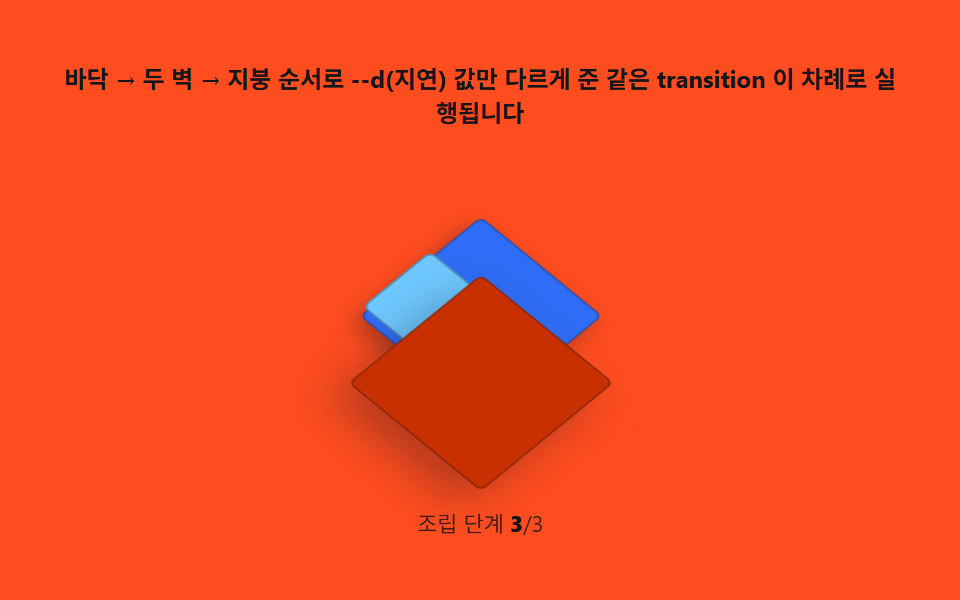
  <p class="rb__hint">床 → 2つの壁 → 屋根の順に、--d(遅延)の値だけ変えた同じtransitionが順番に実行されます</p>
  <div class="rb__field" role="group" tabindex="0" aria-label="床の上に2つの壁が立ち、屋根が閉じて部屋が組み立てられる場面" id="field">
    <div class="rb__world" id="world">
      <div class="rb__floor"></div>
      <div class="rb__wall rb__wall--left" style="--d:0ms"></div>
      <div class="rb__wall rb__wall--right" style="--d:140ms"></div>
      <div class="rb__roof" style="--d:320ms"></div>
    </div>
  </div>
  <p class="rb__meta">組み立て段階  <b id="step">0</b>/3</p>
</div>
</main>
@use "../../../../site/static/demo-tokens" as *;
// 방 조립(07) — 무대는 주황. 세계 좌표계(matrix3d) 는 고정, 바닥은 그대로 두고 두 벽은
// scaleY(바닥 기준 transform-origin: bottom) 로 눕힌 상태에서 서는 상태로, 지붕은
// translateZ 로 위에서 내려앉는다. 셋 다 같은 transition 이고 --d(지연) 만 다르다.
$duration: $dur-enter;
$easing: $ease-spring;
$color: $subject-cream;
@include stage($stage-orange);
.rb {
display: flex; flex-direction: column; align-items: center; gap: $sp-2;
width: 100%; max-width: 420px;
}
.rb__hint {
margin: 0; font-weight: 700; font-size: clamp(10px, 2.6vw, 12px); line-height: 1.35;
color: $subject-ink; text-align: center;
}
.rb__field {
position: relative;
width: clamp(180px, 42vw, 220px); height: clamp(150px, 36vw, 178px);
display: grid; place-items: center;
border-radius: $r-sm;
outline: none;
}
.rb__field:focus-visible { box-shadow: 0 0 0 2px rgba($subject-ink, .5); }
.rb__world { position: relative; transform-style: preserve-3d; width: 1px; height: 1px; }
.rb__floor {
position: absolute; left: 0; top: 0;
width: 84px; height: 84px;
transform: translate3d(-50%, -50%, 0);
background: $subject-blue;
border: 1px solid rgba($subject-ink, .3);
border-radius: $r-xs;
box-shadow: $shadow-press;
}
.rb__wall {
position: absolute; left: 0; top: 0;
width: 56px; height: 46px;
transform-origin: bottom center;
transition: transform $duration $easing;
transition-delay: var(--d, 0ms);
border: 1px solid rgba($subject-ink, .3);
border-radius: $r-xs;
}
.rb__wall--left {
background: $subject-sky;
transform: translate3d(-46px, -10px, 0) scaleY(.06);
}
.rb__wall--right {
background: $subject-mint;
transform: translate3d(2px, -10px, 0) scaleY(.06);
}
.rb__field.is-open .rb__wall--left { transform: translate3d(-46px, -10px, 0) scaleY(1); }
.rb__field.is-open .rb__wall--right { transform: translate3d(2px, -10px, 0) scaleY(1); }
.rb__roof {
position: absolute; left: 0; top: 0;
width: 92px; height: 92px;
transform: translate3d(-50%, -50%, 120px);
transition: transform $duration $easing;
transition-delay: var(--d, 0ms);
background: $subject-orange-deep;
border: 1px solid rgba($subject-ink, .3);
border-radius: $r-xs;
box-shadow: $shadow-raised;
}
.rb__field.is-open .rb__roof { transform: translate3d(-50%, -50%, 58px); }
.rb__meta { margin: 0; font-size: clamp(9px, 2.4vw, 11px); color: rgba($subject-ink, .82); }
.rb__meta b { font-weight: 800; color: $subject-ink; font-variant-numeric: tabular-nums; }
@media (max-width: 340px) {
.rb { gap: $sp-1; }
.rb__field { width: 156px; height: 124px; }
.rb__hint { font-size: 8px; }
.rb__meta { font-size: 7px; }
}
// reduce — 조립 transition 이 멎는다. 접힌(해체) 정지 상태만 남긴다.
@media (prefers-reduced-motion: reduce) {
.rb.is-still .rb__wall,
.rb.is-still .rb__roof { transition: none; }
}html, body {
margin: 0;
overflow: hidden;
}
.stage {
box-sizing: border-box;
min-height: 100vh;
display: grid;
place-items: center;
margin: 0;
background: #ff4d1f;
font-family: -apple-system, "Segoe UI", "Noto Sans KR", sans-serif;
padding: clamp(8px, 4vw, 24px);
}
.rb {
display: flex;
flex-direction: column;
align-items: center;
gap: 8px;
width: 100%;
max-width: 420px;
}
.rb__hint {
margin: 0;
font-weight: 700;
font-size: clamp(10px, 2.6vw, 12px);
line-height: 1.35;
color: #17141a;
text-align: center;
}
.rb__field {
position: relative;
width: clamp(180px, 42vw, 220px);
height: clamp(150px, 36vw, 178px);
display: grid;
place-items: center;
border-radius: 8px;
outline: none;
}
.rb__field:focus-visible {
box-shadow: 0 0 0 2px rgba(23, 20, 26, 0.5);
}
.rb__world {
position: relative;
transform-style: preserve-3d;
width: 1px;
height: 1px;
}
.rb__floor {
position: absolute;
left: 0;
top: 0;
width: 84px;
height: 84px;
transform: translate3d(-50%, -50%, 0);
background: #2f6df6;
border: 1px solid rgba(23, 20, 26, 0.3);
border-radius: 4px;
box-shadow: 0 6px 12px rgba(23, 20, 26, 0.32);
}
.rb__wall {
position: absolute;
left: 0;
top: 0;
width: 56px;
height: 46px;
transform-origin: bottom center;
transition: transform 600ms cubic-bezier(0.2, 0.8, 0.2, 1);
transition-delay: var(--d, 0ms);
border: 1px solid rgba(23, 20, 26, 0.3);
border-radius: 4px;
}
.rb__wall--left {
background: #6ec8ff;
transform: translate3d(-46px, -10px, 0) scaleY(0.06);
}
.rb__wall--right {
background: #4cd4a6;
transform: translate3d(2px, -10px, 0) scaleY(0.06);
}
.rb__field.is-open .rb__wall--left {
transform: translate3d(-46px, -10px, 0) scaleY(1);
}
.rb__field.is-open .rb__wall--right {
transform: translate3d(2px, -10px, 0) scaleY(1);
}
.rb__roof {
position: absolute;
left: 0;
top: 0;
width: 92px;
height: 92px;
transform: translate3d(-50%, -50%, 120px);
transition: transform 600ms cubic-bezier(0.2, 0.8, 0.2, 1);
transition-delay: var(--d, 0ms);
background: #c93000;
border: 1px solid rgba(23, 20, 26, 0.3);
border-radius: 4px;
box-shadow: 0 14px 24px rgba(23, 20, 26, 0.32);
}
.rb__field.is-open .rb__roof {
transform: translate3d(-50%, -50%, 58px);
}
.rb__meta {
margin: 0;
font-size: clamp(9px, 2.4vw, 11px);
color: rgba(23, 20, 26, 0.82);
}
.rb__meta b {
font-weight: 800;
color: #17141a;
font-variant-numeric: tabular-nums;
}
@media (max-width: 340px) {
.rb {
gap: 4px;
}
.rb__field {
width: 156px;
height: 124px;
}
.rb__hint {
font-size: 8px;
}
.rb__meta {
font-size: 7px;
}
}
@media (prefers-reduced-motion: reduce) {
.rb.is-still .rb__wall,
.rb.is-still .rb__roof {
transition: none;
}
}// 방 조립(07) — 세계 좌표계 자체는 matrix3d(고정 등각 행렬, JS 로 한 번 계산)로 눕혀 두고,
// 그 안의 바닥·벽·지붕은 각자 --d(지연) 만 다르게 받은 같은 transition 으로 차례로 선다.
// 계산은 지연값 배정 한 번뿐 — 실행은 CSS 가 한다. 캡처는 06 과 같은 방식으로 1초마다
// is-open 을 토글해 2초 창에 조립 1회를 재생한다.
(function () {
var root = document.getElementById('rb');
var field = document.getElementById('field');
var world = document.getElementById('world');
var stepEl = document.getElementById('step');
if (!root || !field || !world || !stepEl) return;
function mat4RotateX(deg) {
var r = deg * Math.PI / 180, c = Math.cos(r), s = Math.sin(r);
return [1, 0, 0, 0, 0, c, s, 0, 0, -s, c, 0, 0, 0, 0, 1];
}
function mat4RotateZ(deg) {
var r = deg * Math.PI / 180, c = Math.cos(r), s = Math.sin(r);
return [c, s, 0, 0, -s, c, 0, 0, 0, 0, 1, 0, 0, 0, 0, 1];
}
function mat4Mul(a, b) {
var out = new Array(16);
for (var col = 0; col < 4; col++) {
for (var row = 0; row < 4; row++) {
var sum = 0;
for (var k = 0; k < 4; k++) sum += a[k * 4 + row] * b[col * 4 + k];
out[col * 4 + row] = sum;
}
}
return out;
}
function mat4ToCss(m) {
var s = '';
for (var i = 0; i < m.length; i++) s += (i ? ',' : '') + m[i].toFixed(6);
return 'matrix3d(' + s + ')';
}
// 세계 좌표계는 한 번만 계산해 고정한다 — 조립 애니메이션과는 무관한 값
world.style.transform = mat4ToCss(mat4Mul(mat4RotateX(-35.264), mat4RotateZ(45)));
var reduce = window.matchMedia('(prefers-reduced-motion: reduce)').matches;
if (reduce) {
root.classList.add('is-still');
stepEl.textContent = '3';
return;
}
var open = false;
function toggle() {
open = !open;
field.classList.toggle('is-open', open);
stepEl.textContent = open ? '3' : '0';
}
setInterval(toggle, 1000); // 1초마다 조립/해체 — 2초 캡처 창에 한 번의 조립을 담는다
})();// IsometricRoomSceneBuild — vanilla 판(run/333/demo/07-isometric-room-scene-build/index.html)
// 의 React 포트. 등각 세계 행렬은 한 번만 계산해 고정하고, 바닥 → 두 벽 → 지붕 순서로
// --d(지연)만 다르게 준 같은 transition 을 setInterval 토글로 반복 재생한다.
import { useEffect, useRef } from "react";
import type { CSSProperties } from "react";
import styles from "./IsometricRoomSceneBuild.module.scss";
export type IsometricRoomSceneBuildProps = {
duration?: string;
easing?: string;
color?: string;
};
type Vars = CSSProperties & { "--d"?: string };
type Box<T> = { current: T };
const HINT = "바닥 → 두 벽 → 지붕 순서로 --d(지연) 값만 다르게 준 같은 transition 이 차례로 실행됩니다";
const ARIA_FIELD = "바닥 위에 두 벽이 서고 지붕이 닫히며 방이 조립되는 장면";
const LABEL_STEP = "조립 단계 ";
const DELAYS = { left: 0, right: 140, roof: 320 };
export default function IsometricRoomSceneBuild({
duration = "600ms",
easing = "cubic-bezier(.2,.8,.2,1)",
color = "#2f6df6"
}: IsometricRoomSceneBuildProps) {
const rootRef = useRef<HTMLDivElement | null>(null);
const fieldRef = useRef<HTMLDivElement | null>(null);
const stepRef = useRef<HTMLElement | null>(null);
const timerRef = useRef(0) as Box<number>;
useEffect(() => {
const field = fieldRef.current;
const root = rootRef.current;
if (!field || !root) return;
const reduce = window.matchMedia("(prefers-reduced-motion: reduce)").matches;
if (reduce) {
field.classList.add(styles.isOpen);
if (stepRef.current) stepRef.current.textContent = "3";
root.classList.add(styles.isStill);
return;
}
function toggle(): void {
if (!field) return;
const open = field.classList.toggle(styles.isOpen);
if (stepRef.current) stepRef.current.textContent = open ? "3" : "0";
}
timerRef.current = window.setInterval(toggle, 1400);
return () => window.clearInterval(timerRef.current);
// eslint-disable-next-line react-hooks/exhaustive-deps
}, []);
return (
<main className={styles.stage}>
<div className={styles.rb} ref={rootRef} data-duration={duration} data-easing={easing} data-color={color}>
<p className={styles.hint}>{HINT}</p>
<div className={styles.field} ref={fieldRef} role="img" aria-label={ARIA_FIELD} tabIndex={0}>
<div className={styles.floor}></div>
<div className={styles.wallLeft} style={{ "--d": DELAYS.left + "ms" } as Vars}></div>
<div className={styles.wallRight} style={{ "--d": DELAYS.right + "ms" } as Vars}></div>
<div className={styles.roof} style={{ "--d": DELAYS.roof + "ms" } as Vars}></div>
</div>
<p className={styles.meta}>
<span className={styles.metaLabel}>{LABEL_STEP}</span>
<b className={styles.stepVal} ref={stepRef}>0</b>
<span className={styles.metaUnit}>/3</span>
</p>
</div>
</main>
);
}07 部屋のジオラマ — 01〜04を組み立てた完成シーン — 計測 累積面積 9.435% · 動いたフレーム 16/23GODRICH オリジナル · SCSS と React は zip に同梱 · アイソメトリック デザイン — 陰影計算で組む3Dジオラマシーン9種
このデモが属する記事
 アイソメトリック デザイン — 陰影計算で組む3Dジオラマシーン9種光源角度からキューブ各面の明度を計算し、格子座標を2:1公式で画面座標に変換して等角投影を組みます。深度でスタック順を並べるペインターズアルゴリズムまで — 部屋と街のジオラマ9種、コードはパスワードzipで。アイソメトリック デザインとし この記事のデモをすべて見る