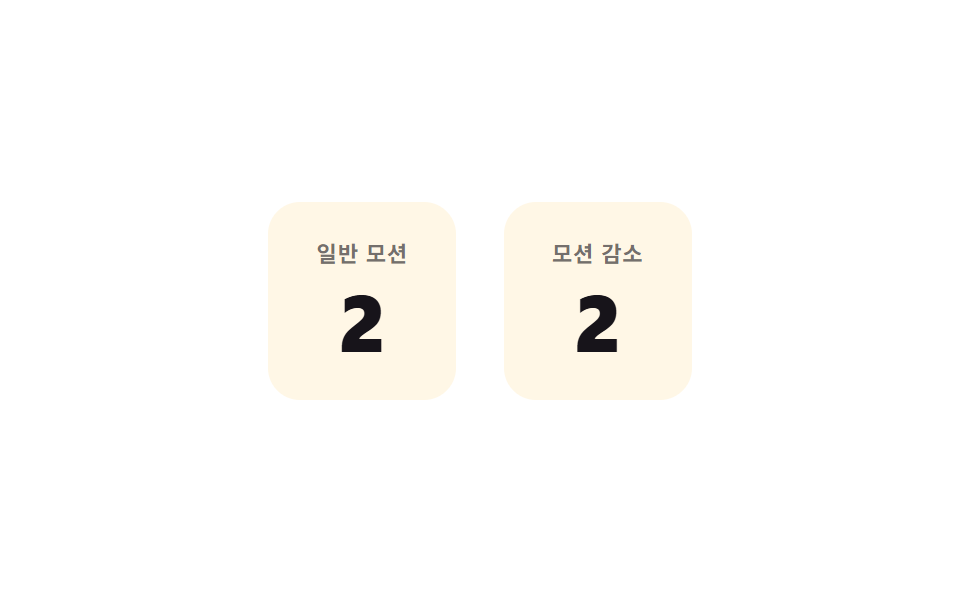
09モーション削減の即時更新 — モーション削減設定時に値が動きなしで次の状態へ直接変わる方式
モーション削減設定がオンだと、値は徐々に変わらず次の状態へ直接切り替わります。
使いどころアクセシビリティに配慮した認証画面、低スペック端末対応のログイン画面
MAX_TRIESAMPSHAKE_MS
<main class="stage">
<div class="arm is-demo" id="arm">
  <div class="arm__panel">
    <span class="arm__tag">通常モーション</span>
    <span class="arm__count" id="armCountA">5</span>
  </div>
  <div class="arm__panel">
    <span class="arm__tag">モーション削減</span>
    <span class="arm__count arm__count--static" id="armCountB">5</span>
  </div>
</div>
</main>
@use "../../../../site/static/demo-tokens" as *;
// 계산 겹: 일반 판은 감쇠 사인 흔들림, 모션 감소 판은 같은 값을 트윈 없이 즉시 반영 — index.html 참조
@include stage($stage-paper);
.arm {
display: flex;
gap: $sp-6;
cursor: pointer;
}
.arm__panel {
display: grid;
justify-items: center;
gap: $sp-2;
padding: $sp-5 $sp-6;
border-radius: $r-card;
background: $subject-cream;
}
.arm__tag {
font: 600 11px/1 -apple-system, "Segoe UI", "Noto Sans KR", sans-serif;
color: rgba($stage-ink, .6);
text-transform: uppercase;
letter-spacing: .04em;
}
.arm__count {
font: 800 40px/1 -apple-system, "Segoe UI", "Noto Sans KR", sans-serif;
color: $stage-ink;
font-variant-numeric: tabular-nums;
}
@media (max-width: 340px) {
.arm { gap: $sp-3; }
.arm__panel { padding: $sp-3 $sp-4; }
.arm__count { font-size: 28px; }
}
@media (prefers-reduced-motion: reduce) {
// 모션 감소 판의 값 갱신은 원래 트윈이 없다 — OS 설정이 켜지면 일반 판도 흔들림 계산을 건너뛴다(index.html)
.arm__count { transition: none; }
}html, body {
margin: 0;
overflow: hidden;
}
.stage {
box-sizing: border-box;
min-height: 100vh;
display: grid;
place-items: center;
margin: 0;
background: #ffffff;
font-family: -apple-system, "Segoe UI", "Noto Sans KR", sans-serif;
padding: clamp(8px, 4vw, 24px);
}
.arm {
display: flex;
gap: 24px;
cursor: pointer;
}
.arm__panel {
display: grid;
justify-items: center;
gap: 8px;
padding: 20px 24px;
border-radius: 16px;
background: #fff7e6;
}
.arm__tag {
font: 600 11px/1 -apple-system, "Segoe UI", "Noto Sans KR", sans-serif;
color: rgba(23, 20, 26, 0.6);
text-transform: uppercase;
letter-spacing: 0.04em;
}
.arm__count {
font: 800 40px/1 -apple-system, "Segoe UI", "Noto Sans KR", sans-serif;
color: #17141a;
font-variant-numeric: tabular-nums;
}
@media (max-width: 340px) {
.arm {
gap: 12px;
}
.arm__panel {
padding: 12px 16px;
}
.arm__count {
font-size: 28px;
}
}
@media (prefers-reduced-motion: reduce) {
.arm__count {
transition: none;
}
}(function () {
var root = document.getElementById('arm');
var a = document.getElementById('armCountA');
var b = document.getElementById('armCountB');
// 상수: 최대 시도 횟수 · 通常モーション 흔들림 진폭·지속시간
var MAX_TRIES = 5;
var AMP = 6;
var SHAKE_MS = 300;
var remaining = MAX_TRIES;
// 계산 겹: 일반 판은 감쇠 사인으로 흔들며 값을 바꾸고, モーション削減 판은 같은 값을 애니메이션 없이 즉시 반영한다
function shakeA() {
var start = null;
function frame(ts) {
if (start === null) start = ts;
var t = Math.min(1, (ts - start) / SHAKE_MS);
var x = AMP * Math.sin(t * Math.PI * 2 * 3) * (1 - t);
a.style.transform = 'translateX(' + x.toFixed(2) + 'px)';
if (t < 1) requestAnimationFrame(frame);
else a.style.transform = 'translateX(0)';
}
requestAnimationFrame(frame);
}
function step() {
remaining = remaining > 0 ? remaining - 1 : MAX_TRIES;
a.textContent = String(remaining);
shakeA();
// モーション削減 판: 같은 값이 트윈 없이 그 자리에서 바로 바뀐다
b.textContent = String(remaining);
}
root.addEventListener('click', function () {
root.classList.remove('is-demo');
stopAutoplay();
step();
});
var autoTimer = null;
function stopAutoplay() { if (autoTimer) { clearInterval(autoTimer); autoTimer = null; } }
var reduce = window.matchMedia('(prefers-reduced-motion: reduce)').matches;
if (!reduce) { autoTimer = setInterval(step, 420); }
else { autoTimer = setInterval(function () { remaining = remaining > 0 ? remaining - 1 : MAX_TRIES; a.textContent = b.textContent = String(remaining); }, 420); }
})();import { useEffect, useRef } from "react";
import styles from "./AuthAttemptReducedMotionStatic.module.scss";
type Box<T> = { current: T };
export default function AuthAttemptReducedMotionStatic() {
const rootRef = useRef(null) as unknown as Box<HTMLDivElement | null>;
useEffect(() => {
const root = rootRef.current;
if (!root) return;
const a = root.querySelector(`.${styles.a}`) as HTMLElement | null;
const b = root.querySelector(`.${styles.b}`) as HTMLElement | null;
if (!a || !b) return;
// 상수: 최대 시도 횟수 · 일반 모션 흔들림 진폭·지속시간
const MAX_TRIES = 5;
const AMP = 6;
const SHAKE_MS = 300;
let remaining = MAX_TRIES;
// 계산 겹: 일반 판은 감쇠 사인으로 흔들며 값을 바꾸고, 모션 감소 판은 같은 값을 애니메이션 없이 즉시 반영한다
function shakeA() {
let start: number | null = null;
function frame(ts: number) {
if (start === null) start = ts;
const t = Math.min(1, (ts - start) / SHAKE_MS);
const x = AMP * Math.sin(t * Math.PI * 2 * 3) * (1 - t);
a!.style.transform = "translateX(" + x.toFixed(2) + "px)";
if (t < 1) requestAnimationFrame(frame);
else a!.style.transform = "translateX(0)";
}
requestAnimationFrame(frame);
}
function step() {
remaining = remaining > 0 ? remaining - 1 : MAX_TRIES;
a!.textContent = String(remaining);
shakeA();
// 모션 감소 판: 같은 값이 트윈 없이 그 자리에서 바로 바뀐다
b!.textContent = String(remaining);
}
function onClick() {
root!.classList.remove(styles["is-demo"]);
stopAutoplay();
step();
}
root.addEventListener("click", onClick);
let autoTimer: number | null = null;
function stopAutoplay() { if (autoTimer !== null) { window.clearInterval(autoTimer); autoTimer = null; } }
const reduce = window.matchMedia("(prefers-reduced-motion: reduce)").matches;
if (!reduce) {
autoTimer = window.setInterval(step, 420);
} else {
autoTimer = window.setInterval(() => {
remaining = remaining > 0 ? remaining - 1 : MAX_TRIES;
a!.textContent = b!.textContent = String(remaining);
}, 420);
}
return () => {
stopAutoplay();
root!.removeEventListener("click", onClick);
};
}, []);
return (
<div ref={rootRef} className={`${styles.stage} ${styles.arm} ${styles["is-demo"]}`}>
<div className={styles.panel}>
<span className={styles.tag}>일반 모션</span>
<span className={`${styles.count} ${styles.a}`}>5</span>
</div>
<div className={styles.panel}>
<span className={styles.tag}>모션 감소</span>
<span className={`${styles.count} ${styles["count--static"]} ${styles.b}`}>5</span>
</div>
</div>
);
}09 モーション削減の即時更新 — モーション削減設定時に値が動きなしで次の状態へ直接変わる方式 — 計測 累積面積 0.868% · 動いたフレーム 20/23GODRICH オリジナル · SCSS と React は zip に同梱 · ログイン 失敗 ロック 9選 — 値が計算で絞られていく9つの方式
このデモが属する記事
 ログイン 失敗 ロック 9選 — 値が計算で絞られていく9つの方式9つのうち1つはログインに失敗するたびに残り試行回数の値が1つずつ減り、1つは失敗が重なるほど次の試行までの待ち時間の値が倍々に増え、もう1つはロックが解けるまでの残り秒数の値が0に向かって減っていきます。「ログイン 失敗 ロック」で探して この記事のデモをすべて見る