023D回転投影像 — 軌道を斜め投影でくるくる回す
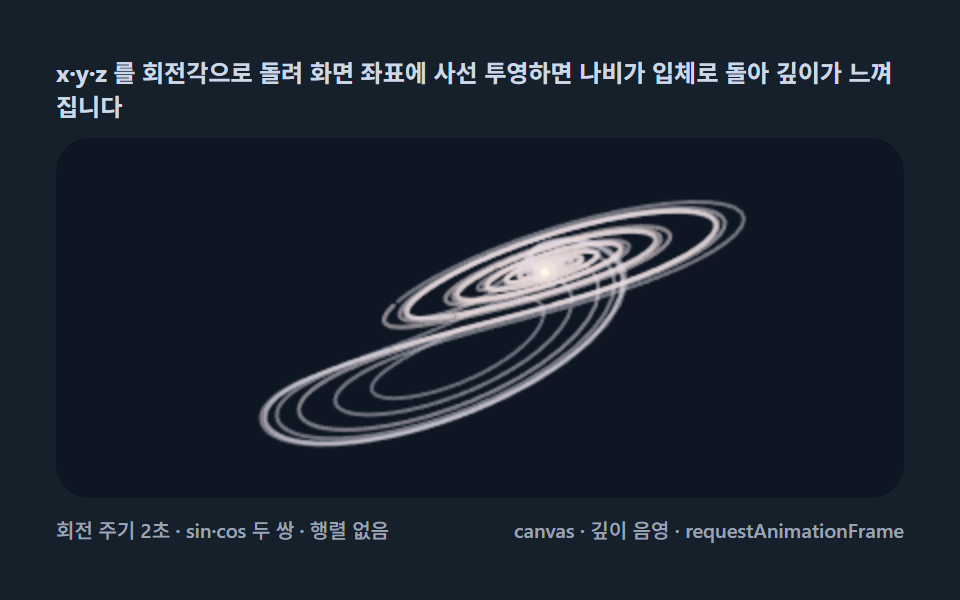
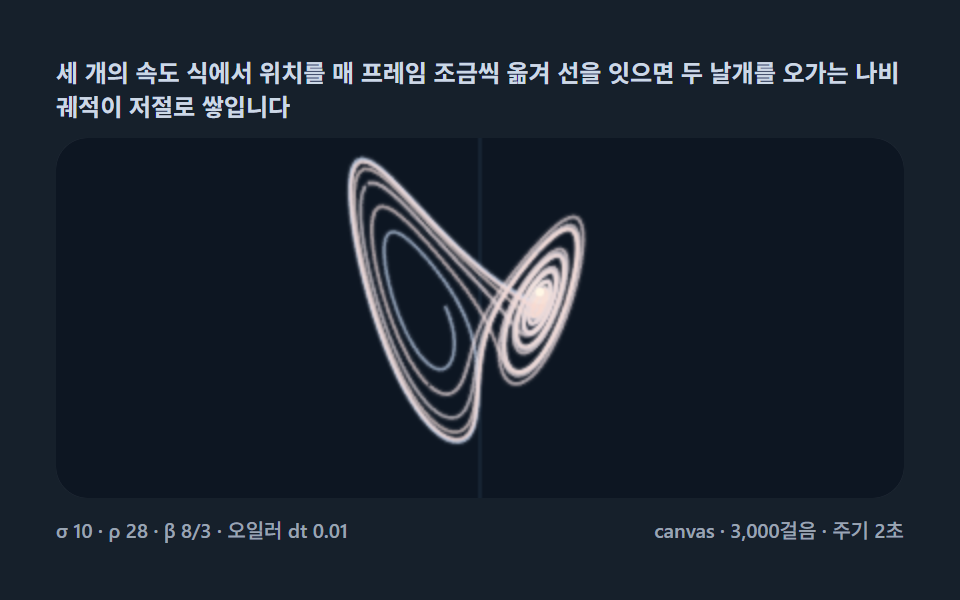
xyzを角度で回転して画面座標に落とすと、蝶が立体で回って奥行きを感じます。行列なしでsin・cos2組だけの軽い3D投影の代表格です。
使いどころヒーロー背景、サイエンスコンテンツ
requestAnimationFrameMath.sinMath.cos
<main class="stage">
<div class="lz is-demo" id="lzRoot">
  <p class="lz__hint">
    <span>xyzを回転角で回して画面座標に斜め投影すると、蝶が立体で回って奥行きを感じます</span>
  </p>
  <div class="lz__field" role="application" aria-label="3D回転投影の実験盤" tabindex="0">
    <canvas class="lz__cv" id="lzCv"></canvas>
  </div>
  <div class="lz__bar">
    <span class="lz__meta">回転周期2秒 · sin・cos2組 · 行列なし</span>
    <span class="lz__meta lz__meta--dim">canvas · 奥行きシェーディング · requestAnimationFrame</span>
  </div>
</div>
</main>
@use "../../../../site/static/demo-tokens" as *;
// 3D 회전 투영(02) — @keyframes 를 두지 않는다.
// 움직임은 전부 캔버스 rAF 루프(사선 투영 좌표를 회전각마다 다시 계산)가 만든다.
// 무대는 편 공통 심해 남색 관측창. 파스텔 팔레트는 01 과 같은 규격.
$lz-stage: #16202b;
@include stage($lz-stage);
$lz-panel: #0d1622;
$lz-text: #ccd8e6;
$lz-c0: #cfe3ff;
$lz-c1: #ffd9c9;
$duration: $dur-loop;
$easing: $ease-out;
$color: $lz-c0;
.lz {
--lz-panel: #{$lz-panel};
--lz-c0: #{$lz-c0};
--lz-c1: #{$lz-c1};
--lz-head: #{$subject-cream};
display: flex; flex-direction: column; gap: $sp-2;
width: 100%; max-width: 424px;
}
.lz__hint {
display: flex; align-items: center; gap: $sp-1; margin: 0;
font-weight: 700; font-size: clamp(10px, 2.8vw, 12px); line-height: 1.35;
color: $lz-text;
}
.lz__field {
position: relative; height: 180px;
border-radius: $r-card; overflow: hidden;
background: $lz-panel;
box-shadow: inset 0 0 0 1px rgba($lz-text, .18);
}
.lz__field:focus-visible { outline: 2px solid $lz-c0; outline-offset: 2px; }
.lz__cv { display: block; width: 100%; height: 100%; }
.lz__bar { display: flex; align-items: baseline; justify-content: space-between; gap: $sp-2; }
.lz__meta { font-size: 10px; font-weight: 500; color: rgba($lz-text, .72); }
.lz__meta--dim { font-size: 10px; }
@media (max-width: 340px) {
.lz { gap: $sp-1; }
.lz__field { height: 100px; }
.lz__meta--dim { display: none; }
}
@media (prefers-reduced-motion: reduce) {
.lz.is-still .lz__field { cursor: default !important; }
}html, body {
margin: 0;
overflow: hidden;
}
.stage {
box-sizing: border-box;
min-height: 100vh;
display: grid;
place-items: center;
margin: 0;
background: #16202b;
font-family: -apple-system, "Segoe UI", "Noto Sans KR", sans-serif;
padding: clamp(8px, 4vw, 24px);
}
.lz {
--lz-panel: #0d1622;
--lz-c0: #cfe3ff;
--lz-c1: #ffd9c9;
--lz-head: #fff7e6;
display: flex;
flex-direction: column;
gap: 8px;
width: 100%;
max-width: 424px;
}
.lz__hint {
display: flex;
align-items: center;
gap: 4px;
margin: 0;
font-weight: 700;
font-size: clamp(10px, 2.8vw, 12px);
line-height: 1.35;
color: #ccd8e6;
}
.lz__field {
position: relative;
height: 180px;
border-radius: 16px;
overflow: hidden;
background: #0d1622;
box-shadow: inset 0 0 0 1px rgba(204, 216, 230, 0.18);
}
.lz__field:focus-visible {
outline: 2px solid #cfe3ff;
outline-offset: 2px;
}
.lz__cv {
display: block;
width: 100%;
height: 100%;
}
.lz__bar {
display: flex;
align-items: baseline;
justify-content: space-between;
gap: 8px;
}
.lz__meta {
font-size: 10px;
font-weight: 500;
color: rgba(204, 216, 230, 0.72);
}
.lz__meta--dim {
font-size: 10px;
}
@media (max-width: 340px) {
.lz {
gap: 4px;
}
.lz__field {
height: 100px;
}
.lz__meta--dim {
display: none;
}
}
@media (prefers-reduced-motion: reduce) {
.lz.is-still .lz__field {
cursor: default !important;
}
}// 3D 회전 투영(02) — 로렌츠 어트랙터를 입체로 돌아 보게 만든다.
// 사전 적분한 2,600걸음을 회전각 t 에 맞춰 사선 투영(xy 회전 + z 를 세로·y 를 깊이로)하고
// 깊이(y)로 색·두께·밝기를 음영한다. 행렬 곱 없이 sin·cos 두 쌍의 회전식만으로 3D 를 만든다.
(function () {
// ── 변형 상수 블록 — 아래 값 하나만 바꿔 변형을 만든다 ──
var DT = 0.01; // 오일러 걸음
var STEPS = 2600; // 사전 적분 걸음 수
var SPIN_S = 2.0; // 화면 가로축 회전 주기(초) — 설정 초(2s)와 같다
var SPIN_L = 14.0; // 관찰축(깊이) 회전 주기(초) — 느리게 도는 두 번째 축
// ────────────────────────────────────────────────────
var SIG = 10, RHO = 28, BETA = 8 / 3;
var root = document.getElementById('lzRoot');
var cvEl = document.getElementById('lzCv');
if (!root || !cvEl) return;
var fieldEl = cvEl.parentElement;
var css = getComputedStyle(root);
function tokRGB(name) {
var s = css.getPropertyValue(name).trim();
var hx = s.length === 4
? s.charAt(1) + s.charAt(1) + s.charAt(2) + s.charAt(2) + s.charAt(3) + s.charAt(3)
: s.slice(1);
return [parseInt(hx.slice(0, 2), 16), parseInt(hx.slice(2, 4), 16), parseInt(hx.slice(4, 6), 16)];
}
var C0 = tokRGB('--lz-c0'); // 먼 궤적 — 얼음 파스텔
var C1 = tokRGB('--lz-c1'); // 가까운 궤적 — 복숭아 파스텔
var HEAD = tokRGB('--lz-head'); // 머리 점 — 크림(토큰)
var PANEL = tokRGB('--lz-panel'); // 관측창 바닥
function rgba(c, a) { return 'rgba(' + (c[0] | 0) + ',' + (c[1] | 0) + ',' + (c[2] | 0) + ',' + a + ')'; }
function mix(a, b, t) { return [a[0] + (b[0] - a[0]) * t, a[1] + (b[1] - a[1]) * t, a[2] + (b[2] - a[2]) * t]; }
function deriv(x, y, z) {
return [SIG * (y - x), x * (RHO - z) - y, x * y - BETA * z];
}
// 사전 적분 — 과도기 200걸음 건너뛰기
var xs = new Float32Array(STEPS), ys = new Float32Array(STEPS), zs = new Float32Array(STEPS);
var x = 0.6, y = 0.7, z = 21, i;
for (i = 0; i < 200; i++) {
var d0 = deriv(x, y, z);
x += d0[0] * DT; y += d0[1] * DT; z += d0[2] * DT;
}
for (i = 0; i < STEPS; i++) {
xs[i] = x; ys[i] = y; zs[i] = z;
var d1 = deriv(x, y, z);
x += d1[0] * DT; y += d1[1] * DT; z += d1[2] * DT;
}
var ctx = cvEl.getContext('2d');
var W = 0, H = 0;
function fit() {
var r = fieldEl.getBoundingClientRect();
W = Math.round(r.width); H = Math.round(r.height);
cvEl.width = W; cvEl.height = H;
ctx.lineCap = 'round'; ctx.lineJoin = 'round';
}
var CH = 26;
function draw(tSec) {
ctx.fillStyle = rgba(PANEL, 1);
ctx.fillRect(0, 0, W, H);
var a1 = tSec / SPIN_S * 6.2832; // z축 회전각(라디안) — 나비가 도는 빠른 축(2초)
var a2 = Math.sin(tSec / SPIN_L * 6.2832) * 0.45 + 0.55; // 시야 기울기(0.10~1.00rad 왕복, 14초) — 0 을 지나지 않는다
var ca1 = Math.cos(a1), sa1 = Math.sin(a1);
var ca2 = Math.cos(a2), sa2 = Math.sin(a2);
// 이방 스케일 — 캔버스는 2.4:1 넓은 창, 어트랙터는 1:1 에 가까워 한 변으로 묶으면
// 가로가 절반 이상 비는 것을 막는다. 가로 W/57 · 세로 H/37.5 로 각 변을 채운다.
var sx = W / 57, sy = H / 37.5;
var ox = W / 2, oy = H / 2;
// 사선 투영 — z축 회전(u, w) 뒤 기울기 a2 로 z 를 가로에도 섞는다.
// 가로 성분이 두 축에 걸려 있어 어떤 회전각에서도 궤적이 실 한 줄로 무너지지 않는다.
function pr(i) {
var u = xs[i] * ca1 - ys[i] * sa1;
var w = xs[i] * sa1 + ys[i] * ca1;
var zv = zs[i] - 25;
return [ox + (u * ca2 + zv * sa2) * sx, oy - (zv * ca2 * 0.66 + w * 0.40) * sy];
}
var k, a, b, ci, ny, col, t, P;
for (k = 0; k < CH; k++) {
a = Math.floor(k * STEPS / CH);
b = Math.floor((k + 1) * STEPS / CH);
if (b - a < 2) continue;
t = (k + 0.5) / CH;
ctx.beginPath();
var sum = 0;
P = pr(a);
ctx.moveTo(P[0], P[1]);
for (ci = a + 1; ci < b; ci++) {
P = pr(ci);
ctx.lineTo(P[0], P[1]);
sum += ys[ci];
}
ny = (sum / (b - a - 1) + 27) / 57;
ny = Math.max(0, Math.min(1, ny));
col = mix(C0, C1, ny);
ctx.strokeStyle = rgba(col, 0.20 + 0.62 * ny);
ctx.lineWidth = 1.2 + 1.8 * ny;
ctx.stroke();
}
// 머리 — 현재 프레임의 회전각에 맞춘 위치
var m = STEPS - 1;
P = pr(m);
var hx = P[0], hy = P[1];
ctx.fillStyle = rgba(HEAD, 0.25);
ctx.beginPath(); ctx.arc(hx, hy, 6, 0, 6.2832); ctx.fill();
ctx.fillStyle = rgba(HEAD, 1);
ctx.beginPath(); ctx.arc(hx, hy, 2.2, 0, 6.2832); ctx.fill();
}
var reduce = window.matchMedia('(prefers-reduced-motion: reduce)').matches;
var t0 = -1;
function frame(now) {
if (t0 < 0) t0 = now;
draw((now - t0) / 1000 % SPIN_S + 0.4);
requestAnimationFrame(frame);
}
window.addEventListener('resize', function () {
fit();
if (reduce) draw(0.4);
});
fit();
if (reduce) {
draw(0.4); // reduce — 한 회전각만 고정
root.classList.add('is-still');
} else {
requestAnimationFrame(frame);
}
})();// Lorenz3dRotateProject — vanilla 판(run/324/demo/02-lorenz-3d-rotate-project/index.html) 의 React 포트.
// 사전 적분한 2,600걸음을 회전각 t 에 맞춰 사선 투영(xy 회전 + z 를 세로·y 를 깊이로)하고
// 깊이(y)로 색·두께·밝기를 음영한다. 행렬 곱 없이 sin·cos 두 쌍의 회전식만으로 3D 를 만든다.
import { useEffect, useRef, useState } from "react";
import type { CSSProperties } from "react";
import styles from "./Lorenz3dRotateProject.module.scss";
export type Lorenz3dRotateProjectProps = {
duration?: string;
easing?: string;
color?: string;
steps?: number; // 사전 적분 걸음 수
spinS?: number; // 화면 가로축 회전 주기(초) — 설정 초(2s)와 같다
};
// ── 변형 상수(기본값) — vanilla 판과 동일 ──
const DT = 0.01; // 오일러 걸음
const STEPS = 2600; // 사전 적분 걸음 수
const SPIN_S = 2.0; // 화면 가로축 회전 주기(초) — 설정 초(2s)와 같다
const SPIN_L = 14.0; // 관찰축(깊이) 회전 주기(초) — 느리게 도는 두 번째 축
type Vars = CSSProperties & { "--duration"?: string; "--easing"?: string; "--color"?: string };
type Box<T> = { current: T };
type RGB = [number, number, number];
const FIELD_LABEL = "3D 회전 투영 실험판";
const META_LEFT = "회전 주기 2초 · sin·cos 두 쌍 · 행렬 없음";
const META_RIGHT = "canvas · 깊이 음영 · requestAnimationFrame";
const HINT = "x·y·z 를 회전각으로 돌려 화면 좌표에 사선 투영하면 나비가 입체로 돌아 깊이가 느껴집니다";
const SIG = 10, RHO = 28, BETA = 8 / 3;
function deriv(x: number, y: number, z: number): [number, number, number] {
return [SIG * (y - x), x * (RHO - z) - y, x * y - BETA * z];
}
function rgba(c: RGB, a: number): string {
return "rgba(" + (c[0] | 0) + "," + (c[1] | 0) + "," + (c[2] | 0) + "," + a + ")";
}
function mix(a: RGB, b: RGB, t: number): RGB {
return [a[0] + (b[0] - a[0]) * t, a[1] + (b[1] - a[1]) * t, a[2] + (b[2] - a[2]) * t];
}
export default function Lorenz3dRotateProject({
duration = "2s",
easing = "ease-out",
color = "#cfe3ff",
steps = STEPS,
spinS = SPIN_S
}: Lorenz3dRotateProjectProps) {
const rootRef = useRef<HTMLDivElement | null>(null);
const fieldRef = useRef<HTMLDivElement | null>(null);
const cvRef = useRef<HTMLCanvasElement | null>(null);
const ctxRef = useRef<CanvasRenderingContext2D | null>(null);
const c0Ref = useRef<RGB | null>(null);
const c1Ref = useRef<RGB | null>(null);
const headRef = useRef<RGB | null>(null);
const panelRef = useRef<RGB | null>(null);
const trajRef = useRef<{ xs: Float32Array; ys: Float32Array; zs: Float32Array } | null>(null);
const wRef = useRef(0) as Box<number>;
const hRef = useRef(0) as Box<number>;
const rafRef = useRef(0) as Box<number>;
const [still, setStill] = useState(false);
const vars: Vars = { "--duration": duration, "--easing": easing, "--color": color };
function reduced(): boolean {
return window.matchMedia("(prefers-reduced-motion: reduce)").matches;
}
function tokRGB(root: HTMLDivElement, name: string): RGB {
const s = getComputedStyle(root).getPropertyValue(name).trim();
const hx = s.length === 4
? s.charAt(1) + s.charAt(1) + s.charAt(2) + s.charAt(2) + s.charAt(3) + s.charAt(3)
: s.slice(1);
return [parseInt(hx.slice(0, 2), 16), parseInt(hx.slice(2, 4), 16), parseInt(hx.slice(4, 6), 16)];
}
function fit(): void {
const field = fieldRef.current;
const cv = cvRef.current;
const ctx = ctxRef.current;
if (!field || !cv || !ctx) return;
const r = field.getBoundingClientRect();
wRef.current = Math.round(r.width);
hRef.current = Math.round(r.height);
cv.width = wRef.current;
cv.height = hRef.current;
ctx.lineCap = "round";
ctx.lineJoin = "round";
}
// 사전 적분 — 과도기 200걸음 건너뛰기
function precompute(n: number): void {
const xs = new Float32Array(n), ys = new Float32Array(n), zs = new Float32Array(n);
let x = 0.6, y = 0.7, z = 21;
for (let i = 0; i < 200; i++) {
const d0 = deriv(x, y, z);
x += d0[0] * DT; y += d0[1] * DT; z += d0[2] * DT;
}
for (let i = 0; i < n; i++) {
xs[i] = x; ys[i] = y; zs[i] = z;
const d1 = deriv(x, y, z);
x += d1[0] * DT; y += d1[1] * DT; z += d1[2] * DT;
}
trajRef.current = { xs, ys, zs };
}
const CH = 26;
function draw(tSec: number): void {
const ctx = ctxRef.current;
const traj = trajRef.current;
const PANEL = panelRef.current;
const C0 = c0Ref.current;
const C1 = c1Ref.current;
const HEAD = headRef.current;
const W = wRef.current, H = hRef.current;
if (!ctx || !traj || !PANEL || !C0 || !C1 || !HEAD) return;
const { xs, ys, zs } = traj;
const STEPSN = xs.length;
ctx.fillStyle = rgba(PANEL, 1);
ctx.fillRect(0, 0, W, H);
const a1 = tSec / SPIN_S * 6.2832; // z축 회전각(라디안) — 나비가 도는 빠른 축(2초)
const a2 = Math.sin(tSec / SPIN_L * 6.2832) * 0.45 + 0.55; // 시야 기울기(0.10~1.00rad 왕복, 14초) — 0 을 지나지 않는다
const ca1 = Math.cos(a1), sa1 = Math.sin(a1);
const ca2 = Math.cos(a2), sa2 = Math.sin(a2);
// 이방 스케일 — 캔버스는 2.4:1 넓은 창, 어트랙터는 1:1 에 가까워 한 변으로 묶으면
// 가로가 절반 이상 비는 것을 막는다. 가로 W/57 · 세로 H/37.5 로 각 변을 채운다.
const sx = W / 57, sy = H / 37.5;
const ox = W / 2, oy = H / 2;
// 사선 투영 — z축 회전(u, w) 뒤 기울기 a2 로 z 를 가로에도 섞는다.
// 가로 성분이 두 축에 걸려 있어 어떤 회전각에서도 궤적이 실 한 줄로 무너지지 않는다.
function pr(i: number): [number, number] {
const u = xs[i] * ca1 - ys[i] * sa1;
const w = xs[i] * sa1 + ys[i] * ca1;
const zv = zs[i] - 25;
return [ox + (u * ca2 + zv * sa2) * sx, oy - (zv * ca2 * 0.66 + w * 0.40) * sy];
}
for (let k = 0; k < CH; k++) {
const a = Math.floor(k * STEPSN / CH);
const b = Math.floor((k + 1) * STEPSN / CH);
if (b - a < 2) continue;
const t = (k + 0.5) / CH;
ctx.beginPath();
let sum = 0;
let P = pr(a);
ctx.moveTo(P[0], P[1]);
for (let ci = a + 1; ci < b; ci++) {
P = pr(ci);
ctx.lineTo(P[0], P[1]);
sum += ys[ci];
}
let ny = (sum / (b - a - 1) + 27) / 57;
ny = Math.max(0, Math.min(1, ny));
const col = mix(C0, C1, ny);
ctx.strokeStyle = rgba(col, 0.20 + 0.62 * ny);
ctx.lineWidth = 1.2 + 1.8 * ny;
ctx.stroke();
}
// 머리 — 현재 프레임의 회전각에 맞춘 위치
const m = STEPSN - 1;
const P = pr(m);
const hx = P[0], hy = P[1];
ctx.fillStyle = rgba(HEAD, 0.25);
ctx.beginPath(); ctx.arc(hx, hy, 6, 0, 6.2832); ctx.fill();
ctx.fillStyle = rgba(HEAD, 1);
ctx.beginPath(); ctx.arc(hx, hy, 2.2, 0, 6.2832); ctx.fill();
}
let t0 = -1;
function frame(now: number): void {
if (t0 < 0) t0 = now;
draw((now - t0) / 1000 % spinS + 0.4);
rafRef.current = requestAnimationFrame(frame);
}
useEffect(() => {
const root = rootRef.current;
const cv = cvRef.current;
if (!root || !cv) return;
c0Ref.current = tokRGB(root, "--lz-c0"); // 먼 궤적 — 얼음 파스텔
c1Ref.current = tokRGB(root, "--lz-c1"); // 가까운 궤적 — 복숭아 파스텔
headRef.current = tokRGB(root, "--lz-head"); // 머리 점 — 크림(토큰)
panelRef.current = tokRGB(root, "--lz-panel");// 관측창 바닥
ctxRef.current = cv.getContext("2d");
precompute(steps);
fit();
function onResize(): void {
fit();
if (reduced()) draw(0.4);
}
window.addEventListener("resize", onResize);
if (reduced()) {
draw(0.4); // reduce — 한 회전각만 고정
setStill(true);
} else {
t0 = -1;
rafRef.current = requestAnimationFrame(frame);
}
return () => {
window.removeEventListener("resize", onResize);
cancelAnimationFrame(rafRef.current);
};
// eslint-disable-next-line react-hooks/exhaustive-deps
}, [steps, spinS]);
const rootCls = still ? `${styles.root} ${styles.isStill}` : styles.root;
return (
<main className={styles.stage}>
<div className={rootCls} ref={rootRef} style={vars}>
<p className={styles.hint}>
<span>{HINT}</span>
</p>
<div
className={styles.field}
ref={fieldRef}
role="application"
aria-label={FIELD_LABEL}
tabIndex={0}
>
<canvas className={styles.cv} ref={cvRef}></canvas>
</div>
<div className={styles.bar}>
<span className={styles.meta}>{META_LEFT}</span>
<span className={styles.metaDim}>{META_RIGHT}</span>
</div>
</div>
</main>
);
}02 3D回転投影像 — 軌道を斜め投影でくるくる回す — 計測 累積面積 28.715% · 動いたフレーム 23/23GODRICH オリジナル · SCSS と React は zip に同梱 · ローレンツアトラクター 9種 — 蝶の形のカオス軌道を1歩ずつ数値積分して積む
このデモが属する記事
 ローレンツアトラクター 9種 — 蝶の形のカオス軌道を1歩ずつ数値積分して積む3つの微分方程式を1歩ずつ積分すると、蝶の形をした軌道がひとりでに積み上がります。ライブラリなしのコピペで持ち帰れるカオス可視化です。ローレンツアトラクターとは、蝶の絵を持ってきた画像ではなく、速度式3行に点の位置を従わせた計算の結果です。 この記事のデモをすべて見る