01クリックで落ちるピンドロップ
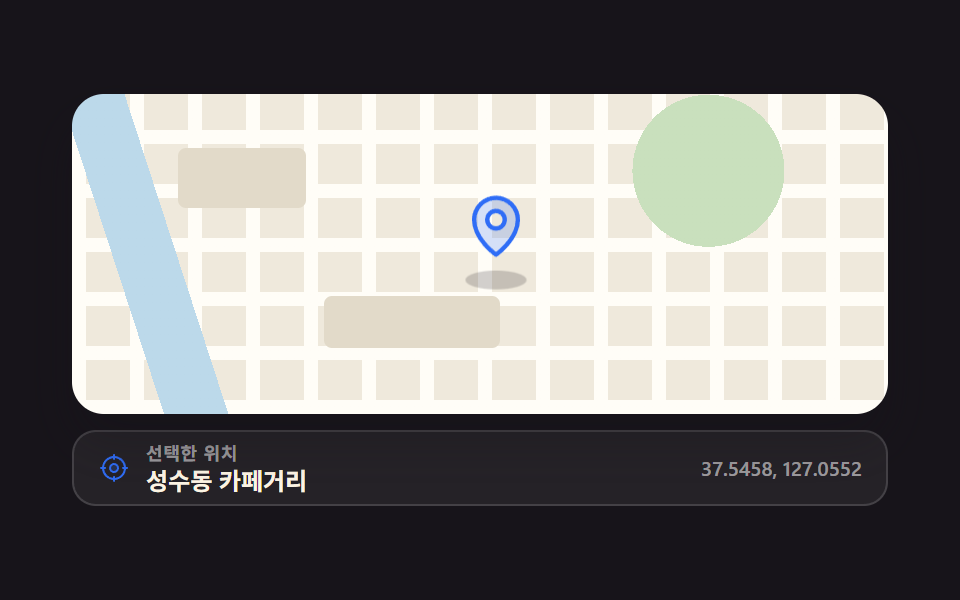
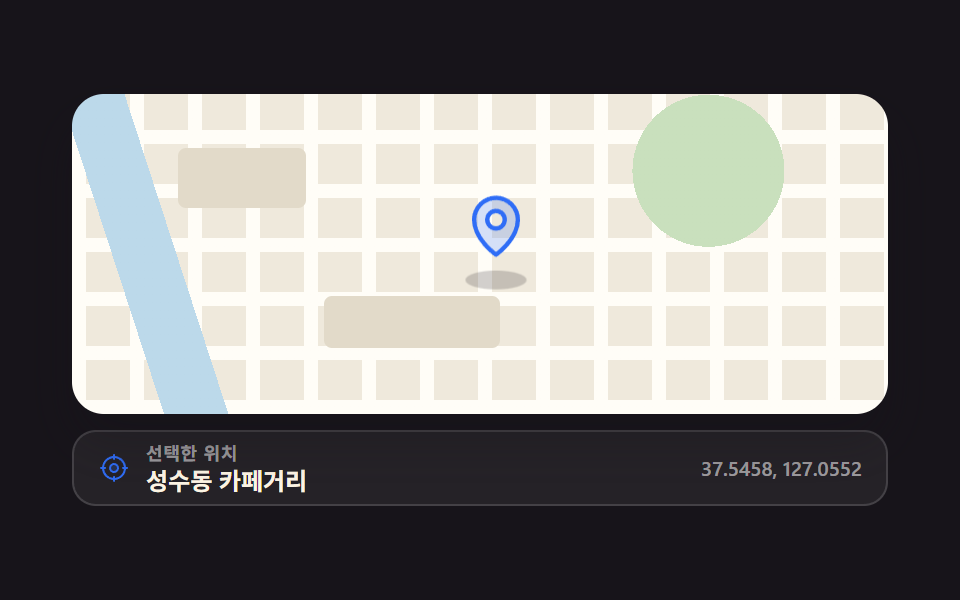
地図を押した場所にピンが上から落ちて一度弾んで着き、影が狭まってから広がるので、置かれたのではなく着地したように見えます。
使いどころ配達の出発地や予約位置を地図を直接押して選ばせるとき
translateYcubic-bezierclick 좌표
<main class="stage">
  <div class="pd is-demo">
    <button class="pd__map" type="button" id="pd-map" aria-label="地図を押して位置を選んでください" aria-describedby="pd-val">
      <span class="pd__shadow" id="pd-shadow" style="left:52%;top:58%" aria-hidden="true"></span>
      <span class="pd__pin" id="pd-pin" style="left:52%;top:58%" aria-hidden="true">
        <span class="pd__pin-i">
          <svg viewBox="0 0 256 256" width="34" height="34"><g fill="currentColor"><path d="M128 24a80 80 0 0 0-80 80c0 72 80 128 80 128s80-56 80-128a80 80 0 0 0-80-80m0 112a32 32 0 1 1 32-32a32 32 0 0 1-32 32" opacity=".2"/><path d="M128 64a40 40 0 1 0 40 40a40 40 0 0 0-40-40m0 64a24 24 0 1 1 24-24a24 24 0 0 1-24 24m0-112a88.1 88.1 0 0 0-88 88c0 31.4 14.51 64.68 42 96.25a254.2 254.2 0 0 0 41.45 38.3a8 8 0 0 0 9.18 0a254.2 254.2 0 0 0 41.37-38.3c27.45-31.57 42-64.85 42-96.25a88.1 88.1 0 0 0-88-88m0 206c-16.53-13-72-60.75-72-118a72 72 0 0 1 144 0c0 57.23-55.47 105-72 118"/></g></svg>
        </span>
      </span>
    </button>
    <div class="pd__bar">
      <span class="pd__icon" aria-hidden="true"><svg viewBox="0 0 256 256" width="16" height="16"><g fill="currentColor"><path d="M160 128a32 32 0 1 1-32-32a32 32 0 0 1 32 32" opacity=".2"/><path d="M232 120h-8.34A96.14 96.14 0 0 0 136 32.34V24a8 8 0 0 0-16 0v8.34A96.14 96.14 0 0 0 32.34 120H24a8 8 0 0 0 0 16h8.34A96.14 96.14 0 0 0 120 223.66V232a8 8 0 0 0 16 0v-8.34A96.14 96.14 0 0 0 223.66 136H232a8 8 0 0 0 0-16m-96 87.6V200a8 8 0 0 0-16 0v7.6A80.15 80.15 0 0 1 48.4 136H56a8 8 0 0 0 0-16h-7.6A80.15 80.15 0 0 1 120 48.4V56a8 8 0 0 0 16 0v-7.6a80.15 80.15 0 0 1 71.6 71.6H200a8 8 0 0 0 0 16h7.6a80.15 80.15 0 0 1-71.6 71.6M128 88a40 40 0 1 0 40 40a40 40 0 0 0-40-40m0 64a24 24 0 1 1 24-24a24 24 0 0 1-24 24"/></g></svg></span>
      <span class="pd__txt">
        <span class="pd__cap">選択した位置</span>
        <span class="pd__val" id="pd-val" role="status" aria-live="polite">ソンス洞カフェ通り</span>
      </span>
      <span class="pd__coord" id="pd-coord">37.5458, 127.0552</span>
    </div>
  </div>
</main>
@use "../../../../site/static/demo-tokens" as *;
$duration: $dur-enter;
$easing: $ease-pop;
$color: $subject-blue;
@include stage($stage-ink);
// 가짜 지도 — 외부 타일·이미지·폰트 0. 그라디언트만 겹친다. 이 색들은 토큰에 없는 지도 전용색이다
$map-land: #efe9dc;
$map-road: #fffdf7;
$map-block: #e2dac9;
$map-park: #c9e0bd;
$map-water: #bcd9ea;
.pd {
box-sizing: border-box;
width: min(408px, 88vw);
display: flex; flex-direction: column; gap: $sp-2;
font-family: -apple-system, "Segoe UI", "Noto Sans KR", sans-serif;
color: $subject-cream;
}
// ── 지도판: 공원 원 → 강 띠 → 세로 도로 → 가로 도로 → 땅 순으로 겹친다. 배경 자체는 절대 움직이지 않는다 ──
.pd__map {
position: relative;
overflow: hidden;
box-sizing: border-box;
width: 100%;
height: clamp(104px, 34vw, 160px);
margin: 0; padding: 0;
border: 0;
border-radius: $r-card;
cursor: crosshair;
box-shadow: $shadow-raised;
background:
radial-gradient(circle at 78% 24%, $map-park 0 38px, transparent 38px),
linear-gradient(72deg, transparent 0 10%, $map-water 10% 17%, transparent 17%),
repeating-linear-gradient(90deg, $map-road 0 7px, transparent 7px 29px),
repeating-linear-gradient(0deg, $map-road 0 7px, transparent 7px 27px),
$map-land;
}
// 블록 두 장 — 도로 격자만 있으면 벽지처럼 보인다
.pd__map::before, .pd__map::after {
content: "";
position: absolute;
border-radius: $r-xs;
background: $map-block;
pointer-events: none;
}
.pd__map::before { left: 13%; top: 17%; width: 64px; height: 30px; }
.pd__map::after { left: 31%; top: 63%; width: 88px; height: 26px; }
.pd__map:focus-visible { outline: 2px solid $color; outline-offset: 2px; }
.pd__pin {
position: absolute;
width: 34px; height: 34px;
margin: 0;
transform: translate(-50%, -100%);
color: $color;
pointer-events: none;
}
.pd__pin-i { display: block; }
.pd__pin svg { display: block; }
.pd__shadow {
position: absolute;
width: 26px; height: 8px;
margin: 0;
border-radius: 50%;
background: rgba($subject-ink, .5);
transform: translate(-50%, -50%) scale(1);
opacity: .3;
pointer-events: none;
}
.pd__bar {
box-sizing: border-box;
display: flex; align-items: center; gap: $sp-2;
padding: $sp-1 $sp-3;
border: 1px solid rgba(255, 255, 255, .14);
border-radius: $r-control;
background: rgba(255, 255, 255, .06);
}
.pd__icon { display: inline-flex; color: $color; }
.pd__txt { display: flex; flex-direction: column; min-width: 0; flex: 1 1 auto; }
.pd__cap {
font-size: 9px; line-height: 12px; font-weight: 700;
letter-spacing: .04em;
color: rgba(255, 255, 255, .55);
}
.pd__val {
font-size: 12px; line-height: 16px; font-weight: 700;
white-space: nowrap; overflow: hidden; text-overflow: ellipsis;
}
.pd__coord {
font-size: 10px; line-height: 14px; font-weight: 600;
color: rgba(255, 255, 255, .55);
white-space: nowrap;
}
// ── 사람이 누른 뒤: 한 번 떨어져 통통 튀고 앉는다 (.is-demo 는 JS 가 이미 뗐다) ──
.pd:not(.is-demo) .pd__pin.is-drop .pd__pin-i {
animation-name: pd-drop;
animation-duration: $duration;
animation-timing-function: $easing;
animation-iteration-count: 1;
}
.pd:not(.is-demo) .pd__shadow.is-drop {
animation-name: pd-shadow;
animation-duration: $duration;
animation-timing-function: $easing;
animation-iteration-count: 1;
}
@keyframes pd-drop {
0% { opacity: 0; transform: translateY(-62px) scale(.92); animation-timing-function: cubic-bezier(.5, 0, .9, .4); }
14% { opacity: 1; transform: translateY(-52px) scale(.94); animation-timing-function: cubic-bezier(.5, 0, .9, .4); }
46% { opacity: 1; transform: translateY(0) scale(1.04); }
64% { opacity: 1; transform: translateY(-13px) scale(.98); }
82% { opacity: 1; transform: translateY(0) scale(1.02); }
100% { opacity: 1; transform: translateY(0) scale(1); }
}
@keyframes pd-shadow {
0% { opacity: 0; transform: translate(-50%, -50%) scale(.42); }
14% { opacity: .16; transform: translate(-50%, -50%) scale(.46); }
46% { opacity: .4; transform: translate(-50%, -50%) scale(1.18); }
64% { opacity: .22; transform: translate(-50%, -50%) scale(.72); }
82% { opacity: .36; transform: translate(-50%, -50%) scale(1.06); }
100% { opacity: .3; transform: translate(-50%, -50%) scale(1); }
}
// ── 자동 루프: 떨어짐 → 튐 → 유지 → 90% 안에서 fade-out+상승. 0% 와 100% 가 같은 상태라 이어 붙어도 안 튄다 ──
.pd.is-demo .pd__pin-i {
animation-name: pd-loop;
animation-duration: $dur-loop;
animation-timing-function: linear;
animation-iteration-count: infinite;
}
.pd.is-demo .pd__shadow {
animation-name: pd-shadow-loop;
animation-duration: $dur-loop;
animation-timing-function: linear;
animation-iteration-count: infinite;
}
@keyframes pd-loop {
0% { opacity: 0; transform: translateY(-62px) scale(.92); }
6% { opacity: 1; transform: translateY(-62px) scale(.92); animation-timing-function: cubic-bezier(.5, 0, .9, .4); }
30% { opacity: 1; transform: translateY(0) scale(1.05); animation-timing-function: $easing; }
42% { opacity: 1; transform: translateY(-14px) scale(.97); }
54% { opacity: 1; transform: translateY(0) scale(1.03); }
62% { opacity: 1; transform: translateY(0) scale(1); }
80% { opacity: 1; transform: translateY(0) scale(1); }
90%, 100% { opacity: 0; transform: translateY(-62px) scale(.92); }
}
@keyframes pd-shadow-loop {
0% { opacity: 0; transform: translate(-50%, -50%) scale(.42); }
6% { opacity: .16; transform: translate(-50%, -50%) scale(.44); }
30% { opacity: .4; transform: translate(-50%, -50%) scale(1.2); }
42% { opacity: .2; transform: translate(-50%, -50%) scale(.7); }
54% { opacity: .36; transform: translate(-50%, -50%) scale(1.08); }
62% { opacity: .3; transform: translate(-50%, -50%) scale(1); }
80% { opacity: .3; transform: translate(-50%, -50%) scale(1); }
90%, 100% { opacity: 0; transform: translate(-50%, -50%) scale(.42); }
}
@media (prefers-reduced-motion: reduce) {
.pd.is-demo .pd__pin-i,
.pd.is-demo .pd__shadow,
.pd:not(.is-demo) .pd__pin.is-drop .pd__pin-i,
.pd:not(.is-demo) .pd__shadow.is-drop { animation: none !important; }
.pd__map, .pd__bar { transition: none; }
}html, body {
margin: 0;
overflow: hidden;
}
.stage {
box-sizing: border-box;
min-height: 100vh;
display: grid;
place-items: center;
margin: 0;
background: #17141a;
font-family: -apple-system, "Segoe UI", "Noto Sans KR", sans-serif;
padding: clamp(8px, 4vw, 24px);
}
.pd {
box-sizing: border-box;
width: min(408px, 88vw);
display: flex;
flex-direction: column;
gap: 8px;
font-family: -apple-system, "Segoe UI", "Noto Sans KR", sans-serif;
color: #fff7e6;
}
.pd__map {
position: relative;
overflow: hidden;
box-sizing: border-box;
width: 100%;
height: clamp(104px, 34vw, 160px);
margin: 0;
padding: 0;
border: 0;
border-radius: 16px;
cursor: crosshair;
box-shadow: 0 14px 24px rgba(23, 20, 26, 0.32);
background: radial-gradient(circle at 78% 24%, #c9e0bd 0 38px, transparent 38px), linear-gradient(72deg, transparent 0 10%, #bcd9ea 10% 17%, transparent 17%), repeating-linear-gradient(90deg, #fffdf7 0 7px, transparent 7px 29px), repeating-linear-gradient(0deg, #fffdf7 0 7px, transparent 7px 27px), #efe9dc;
}
.pd__map::before, .pd__map::after {
content: "";
position: absolute;
border-radius: 4px;
background: #e2dac9;
pointer-events: none;
}
.pd__map::before {
left: 13%;
top: 17%;
width: 64px;
height: 30px;
}
.pd__map::after {
left: 31%;
top: 63%;
width: 88px;
height: 26px;
}
.pd__map:focus-visible {
outline: 2px solid #2f6df6;
outline-offset: 2px;
}
.pd__pin {
position: absolute;
width: 34px;
height: 34px;
margin: 0;
transform: translate(-50%, -100%);
color: #2f6df6;
pointer-events: none;
}
.pd__pin-i {
display: block;
}
.pd__pin svg {
display: block;
}
.pd__shadow {
position: absolute;
width: 26px;
height: 8px;
margin: 0;
border-radius: 50%;
background: rgba(23, 20, 26, 0.5);
transform: translate(-50%, -50%) scale(1);
opacity: 0.3;
pointer-events: none;
}
.pd__bar {
box-sizing: border-box;
display: flex;
align-items: center;
gap: 8px;
padding: 4px 12px;
border: 1px solid rgba(255, 255, 255, 0.14);
border-radius: 12px;
background: rgba(255, 255, 255, 0.06);
}
.pd__icon {
display: inline-flex;
color: #2f6df6;
}
.pd__txt {
display: flex;
flex-direction: column;
min-width: 0;
flex: 1 1 auto;
}
.pd__cap {
font-size: 9px;
line-height: 12px;
font-weight: 700;
letter-spacing: 0.04em;
color: rgba(255, 255, 255, 0.55);
}
.pd__val {
font-size: 12px;
line-height: 16px;
font-weight: 700;
white-space: nowrap;
overflow: hidden;
text-overflow: ellipsis;
}
.pd__coord {
font-size: 10px;
line-height: 14px;
font-weight: 600;
color: rgba(255, 255, 255, 0.55);
white-space: nowrap;
}
.pd:not(.is-demo) .pd__pin.is-drop .pd__pin-i {
animation-name: pd-drop;
animation-duration: 600ms;
animation-timing-function: cubic-bezier(0.2, 1.4, 0.4, 1);
animation-iteration-count: 1;
}
.pd:not(.is-demo) .pd__shadow.is-drop {
animation-name: pd-shadow;
animation-duration: 600ms;
animation-timing-function: cubic-bezier(0.2, 1.4, 0.4, 1);
animation-iteration-count: 1;
}
@keyframes pd-drop {
0% {
opacity: 0;
transform: translateY(-62px) scale(0.92);
animation-timing-function: cubic-bezier(0.5, 0, 0.9, 0.4);
}
14% {
opacity: 1;
transform: translateY(-52px) scale(0.94);
animation-timing-function: cubic-bezier(0.5, 0, 0.9, 0.4);
}
46% {
opacity: 1;
transform: translateY(0) scale(1.04);
}
64% {
opacity: 1;
transform: translateY(-13px) scale(0.98);
}
82% {
opacity: 1;
transform: translateY(0) scale(1.02);
}
100% {
opacity: 1;
transform: translateY(0) scale(1);
}
}
@keyframes pd-shadow {
0% {
opacity: 0;
transform: translate(-50%, -50%) scale(0.42);
}
14% {
opacity: 0.16;
transform: translate(-50%, -50%) scale(0.46);
}
46% {
opacity: 0.4;
transform: translate(-50%, -50%) scale(1.18);
}
64% {
opacity: 0.22;
transform: translate(-50%, -50%) scale(0.72);
}
82% {
opacity: 0.36;
transform: translate(-50%, -50%) scale(1.06);
}
100% {
opacity: 0.3;
transform: translate(-50%, -50%) scale(1);
}
}
.pd.is-demo .pd__pin-i {
animation-name: pd-loop;
animation-duration: 2s;
animation-timing-function: linear;
animation-iteration-count: infinite;
}
.pd.is-demo .pd__shadow {
animation-name: pd-shadow-loop;
animation-duration: 2s;
animation-timing-function: linear;
animation-iteration-count: infinite;
}
@keyframes pd-loop {
0% {
opacity: 0;
transform: translateY(-62px) scale(0.92);
}
6% {
opacity: 1;
transform: translateY(-62px) scale(0.92);
animation-timing-function: cubic-bezier(0.5, 0, 0.9, 0.4);
}
30% {
opacity: 1;
transform: translateY(0) scale(1.05);
animation-timing-function: cubic-bezier(0.2, 1.4, 0.4, 1);
}
42% {
opacity: 1;
transform: translateY(-14px) scale(0.97);
}
54% {
opacity: 1;
transform: translateY(0) scale(1.03);
}
62% {
opacity: 1;
transform: translateY(0) scale(1);
}
80% {
opacity: 1;
transform: translateY(0) scale(1);
}
90%, 100% {
opacity: 0;
transform: translateY(-62px) scale(0.92);
}
}
@keyframes pd-shadow-loop {
0% {
opacity: 0;
transform: translate(-50%, -50%) scale(0.42);
}
6% {
opacity: 0.16;
transform: translate(-50%, -50%) scale(0.44);
}
30% {
opacity: 0.4;
transform: translate(-50%, -50%) scale(1.2);
}
42% {
opacity: 0.2;
transform: translate(-50%, -50%) scale(0.7);
}
54% {
opacity: 0.36;
transform: translate(-50%, -50%) scale(1.08);
}
62% {
opacity: 0.3;
transform: translate(-50%, -50%) scale(1);
}
80% {
opacity: 0.3;
transform: translate(-50%, -50%) scale(1);
}
90%, 100% {
opacity: 0;
transform: translate(-50%, -50%) scale(0.42);
}
}
@media (prefers-reduced-motion: reduce) {
.pd.is-demo .pd__pin-i,
.pd.is-demo .pd__shadow,
.pd:not(.is-demo) .pd__pin.is-drop .pd__pin-i,
.pd:not(.is-demo) .pd__shadow.is-drop {
animation: none !important;
}
.pd__map, .pd__bar {
transition: none;
}
}// 실제 동작: 지도를 누른 좌표에 핀을 떨어뜨린다. 키보드는 화살표로 옮기고 Enter·Space 로 다시 떨어뜨린다.
var root = document.querySelector('.pd');
var map = document.getElementById('pd-map');
var parts = [document.getElementById('pd-pin'), document.getElementById('pd-shadow')];
var val = document.getElementById('pd-val');
var coord = document.getElementById('pd-coord');
var names = ['ソンス洞カフェ通り', 'ソウルの森正門', 'ワンシムニ駅2番出口', 'トゥクソム遊園地', 'ハンガン公園入口'];
var x = 52, y = 58;
function drop(nx, ny) {
root.classList.remove('is-demo');
x = Math.max(8, Math.min(92, nx));
y = Math.max(14, Math.min(90, ny));
parts.forEach(function (el) {
el.style.left = x.toFixed(1) + '%';
el.style.top = y.toFixed(1) + '%';
el.classList.remove('is-drop');
void el.offsetWidth; // 리플로를 강제해야 같은 애니메이션이 다시 돈다
el.classList.add('is-drop');
});
val.textContent = names[Math.floor((x + y) / 38) % names.length];
coord.textContent = (37.52 + y / 400).toFixed(4) + ', ' + (127.03 + x / 400).toFixed(4);
}
map.addEventListener('click', function (e) {
if (!e.detail) { drop(x, y); return; } // Enter·Space 는 좌표가 0 이라 제자리에 다시 떨어뜨린다
var r = map.getBoundingClientRect();
drop(((e.clientX - r.left) / r.width) * 100, ((e.clientY - r.top) / r.height) * 100);
});
map.addEventListener('keydown', function (e) {
if (e.key === 'ArrowLeft') drop(x - 6, y);
else if (e.key === 'ArrowRight') drop(x + 6, y);
else if (e.key === 'ArrowUp') drop(x, y - 6);
else if (e.key === 'ArrowDown') drop(x, y + 6);
else return;
e.preventDefault();
});import { useState } from "react";
import type { CSSProperties } from "react";
import styles from "./PinDrop.module.scss";
export type PinDropProps = {
label?: string;
hint?: string;
places?: string[];
duration?: number;
easing?: string;
color?: string;
};
type Vars = CSSProperties & { "--duration"?: string; "--easing"?: string; "--color"?: string };
// React 이벤트 타입은 'react' 에서 import 하지 않는다 — 포트 안에서 필요한 모양만 선언한다
type Box = { left: number; top: number; width: number; height: number };
type ClickEvt = { detail: number; clientX: number; clientY: number; currentTarget: { getBoundingClientRect: () => Box } };
type KeyEvt = { key: string; preventDefault: () => void };
export default function PinDrop({
label = "Selected location",
hint = "Click the map to pick a location",
places = ["Seongsu Cafe Street", "Seoul Forest Main Gate", "Wangsimni Stn. Exit 2", "Ttukseom Resort", "Hangang Park Entrance"],
duration = 600,
easing = "cubic-bezier(.2,1.4,.4,1)",
color = "#2f6df6",
}: PinDropProps) {
const [pos, setPos] = useState({ x: 52, y: 58 });
const [drops, setDrops] = useState(0); // key 를 바꿔 같은 애니메이션을 다시 돌린다 (vanilla 의 리플로 강제와 같은 역할)
const [demo, setDemo] = useState(true);
const vars: Vars = { "--duration": `${duration}ms`, "--easing": easing, "--color": color };
function drop(nx: number, ny: number) {
setDemo(false);
setPos({ x: Math.max(8, Math.min(92, nx)), y: Math.max(14, Math.min(90, ny)) });
setDrops((v) => v + 1);
}
const name = places[Math.floor((pos.x + pos.y) / 38) % places.length];
const coord = `${(37.52 + pos.y / 400).toFixed(4)}, ${(127.03 + pos.x / 400).toFixed(4)}`;
const at: CSSProperties = { left: `${pos.x}%`, top: `${pos.y}%` };
return (
<div className={`${styles.pd} ${demo ? styles.isDemo : ""}`} style={vars}>
<button
type="button"
className={styles.map}
aria-label={hint}
onClick={(e: ClickEvt) => {
if (!e.detail) { drop(pos.x, pos.y); return; } // Enter·Space 는 좌표가 0 이다
const r = e.currentTarget.getBoundingClientRect();
drop(((e.clientX - r.left) / r.width) * 100, ((e.clientY - r.top) / r.height) * 100);
}}
onKeyDown={(e: KeyEvt) => {
if (e.key === "ArrowLeft") drop(pos.x - 6, pos.y);
else if (e.key === "ArrowRight") drop(pos.x + 6, pos.y);
else if (e.key === "ArrowUp") drop(pos.x, pos.y - 6);
else if (e.key === "ArrowDown") drop(pos.x, pos.y + 6);
else return;
e.preventDefault();
}}
>
<span key={`s${drops}`} className={`${styles.shadow} ${drops ? styles.isDrop : ""}`} style={at} aria-hidden="true" />
<span key={`p${drops}`} className={`${styles.pin} ${drops ? styles.isDrop : ""}`} style={at} aria-hidden="true">
<span className={styles.pinI}>
<svg viewBox="0 0 256 256" width="34" height="34"><g fill="currentColor"><path d="M128 24a80 80 0 0 0-80 80c0 72 80 128 80 128s80-56 80-128a80 80 0 0 0-80-80m0 112a32 32 0 1 1 32-32a32 32 0 0 1-32 32" opacity=".2" /><path d="M128 64a40 40 0 1 0 40 40a40 40 0 0 0-40-40m0 64a24 24 0 1 1 24-24a24 24 0 0 1-24 24m0-112a88.1 88.1 0 0 0-88 88c0 31.4 14.51 64.68 42 96.25a254.2 254.2 0 0 0 41.45 38.3a8 8 0 0 0 9.18 0a254.2 254.2 0 0 0 41.37-38.3c27.45-31.57 42-64.85 42-96.25a88.1 88.1 0 0 0-88-88m0 206c-16.53-13-72-60.75-72-118a72 72 0 0 1 144 0c0 57.23-55.47 105-72 118" /></g></svg>
</span>
</span>
</button>
<div className={styles.bar}>
<span className={styles.icon} aria-hidden="true">
<svg viewBox="0 0 256 256" width="16" height="16"><g fill="currentColor"><path d="M160 128a32 32 0 1 1-32-32a32 32 0 0 1 32 32" opacity=".2" /><path d="M232 120h-8.34A96.14 96.14 0 0 0 136 32.34V24a8 8 0 0 0-16 0v8.34A96.14 96.14 0 0 0 32.34 120H24a8 8 0 0 0 0 16h8.34A96.14 96.14 0 0 0 120 223.66V232a8 8 0 0 0 16 0v-8.34A96.14 96.14 0 0 0 223.66 136H232a8 8 0 0 0 0-16m-96 87.6V200a8 8 0 0 0-16 0v7.6A80.15 80.15 0 0 1 48.4 136H56a8 8 0 0 0 0-16h-7.6A80.15 80.15 0 0 1 120 48.4V56a8 8 0 0 0 16 0v-7.6a80.15 80.15 0 0 1 71.6 71.6H200a8 8 0 0 0 0 16h7.6a80.15 80.15 0 0 1-71.6 71.6M128 88a40 40 0 1 0 40 40a40 40 0 0 0-40-40m0 64a24 24 0 1 1 24-24a24 24 0 0 1-24 24" /></g></svg>
</span>
<span className={styles.txt}>
<span className={styles.cap}>{label}</span>
<span className={styles.val} role="status" aria-live="polite">{name}</span>
</span>
<span className={styles.coord}>{coord}</span>
</div>
</div>
);
}01 クリックで落ちるピンドロップ — 計測 累積面積 1.535% · 動いたフレーム 18/23GODRICH オリジナル · SCSS と React は zip に同梱 · 地図 ui デザイン 9選 — クリックでピンが落ちる位置選択
このデモが属する記事
 地図 ui デザイン 9選 — クリックでピンが落ちる位置選択地図 ui デザインとは、配達先や待ち合わせ場所を「住所を書かせる」のではなく地図の上で指して決めてもらう画面の作りです。9つとも地図 API を使わず、CSS で描いた盤の上だけで動きます。 この記事のデモをすべて見る