01スプリング追従
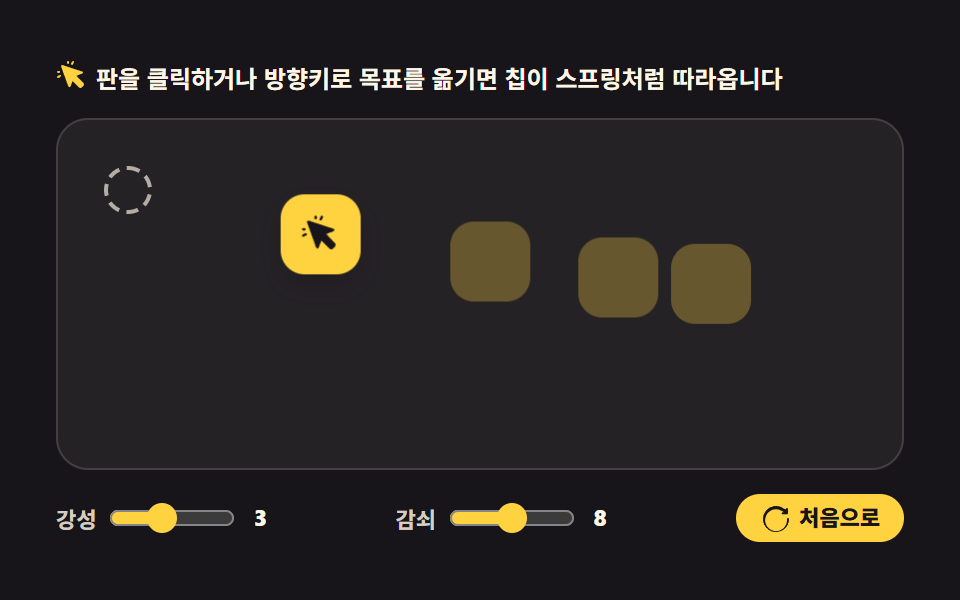
クリックした場所が目標になると、チップがばね定数と減衰の値の通り目標を通り過ぎて戻って留まります。毎フレームは requestAnimationFrame が回し、位置は translate だけで動かします。
使いどころポインターを追うカーソルチップ、ドラッグ後に元の場所へ戻るツール
requestAnimationFrametranslatepointerdownkeydown

<svg width="0" height="0" style="position:absolute" aria-hidden="true">
  <defs>
    <symbol id="ico-target" viewBox="0 0 256 256" fill="currentColor"><g><path d="M213.66 201L201 213.66a8 8 0 0 1-11.31 0l-51.31-51.31a8 8 0 0 0-13 2.46l-17.82 46.41a8 8 0 0 1-14.85-.71L40.41 50.44a8 8 0 0 1 10-10l160.1 52.24a8 8 0 0 1 .71 14.85l-46.41 17.82a8 8 0 0 0-2.46 13l51.31 51.31a8 8 0 0 1 0 11.34" opacity=".2"/><path d="M88 24v-8a8 8 0 0 1 16 0v8a8 8 0 0 1-16 0m-72 80h8a8 8 0 0 0 0-16h-8a8 8 0 0 0 0 16m108.42-64.84a8 8 0 0 0 10.74-3.58l8-16a8 8 0 0 0-14.31-7.16l-8 16a8 8 0 0 0 3.57 10.74m-96 81.69l-16 8a8 8 0 0 0 7.16 14.31l16-8a8 8 0 1 0-7.16-14.31M219.31 184a16 16 0 0 1 0 22.63l-12.68 12.68a16 16 0 0 1-22.63 0L132.7 168L115 214.09c0 .1-.08.21-.14.32a8 8 0 0 1-14.68-1.6L40.41 50.44a8 8 0 0 1 10-10l160.1 52.24c.1 0 .21.08.32.14a8 8 0 0 1-1.21 15.27l-46.41 17.82Z"/></g></symbol>
    <symbol id="ico-reset" viewBox="0 0 256 256" fill="currentColor"><g><path d="M232 136a104 104 0 1 1-38.17-80.55L208 60v-4a8 8 0 0 1 16 0v34a8 8 0 0 1-8 8h-34a8 8 0 0 1 0-16h7.6l-8.89-7.4A88 88 0 1 0 216 136a8 8 0 0 1 16 0Z" opacity=".2"/><path d="M232 136a104 104 0 1 1-38.17-80.55L208 60v-4a8 8 0 0 1 16 0v34a8 8 0 0 1-8 8h-34a8 8 0 0 1 0-16h7.6l-8.89-7.4A88 88 0 1 0 216 136a8 8 0 0 1 16 0Z"/></g></symbol>
  </defs>
</svg>
<main class="stage">
<div class="sf is-demo" id="sf">
  <p class="sf__hint"><svg class="sf__ico" aria-hidden="true"><use href="#ico-target"/></svg><span>板をクリックするか方向キーで目標を動かすと、チップがばねのように追いかけます</span></p>
  <div class="sf__field" id="field" role="application" aria-label="ばねの実験台" tabindex="0">
    <span class="sf__ring sf__ring--home" aria-hidden="true"></span>
    <span class="sf__ring sf__ring--away" aria-hidden="true"></span>
    <span class="sf__ghost" style="--g:0" aria-hidden="true"></span>
    <span class="sf__ghost" style="--g:1" aria-hidden="true"></span>
    <span class="sf__ghost" style="--g:2" aria-hidden="true"></span>
    <span class="sf__chip" id="chip" aria-hidden="true"><svg class="sf__chipIco" aria-hidden="true"><use href="#ico-target"/></svg></span>
  </div>
  <div class="sf__bar">
    <label class="sf__dial">ばね定数
      <input type="range" id="stiff" min="1" max="6" step="1" value="3" aria-label="ばね定数">
      <b class="sf__val" id="stiffVal">3</b>
    </label>
    <label class="sf__dial">減衰
      <input type="range" id="damp" min="4" max="12" step="1" value="8" aria-label="減衰">
      <b class="sf__val" id="dampVal">8</b>
    </label>
    <button class="sf__reset" id="reset" type="button">
      <svg class="sf__ico" aria-hidden="true"><use href="#ico-reset"/></svg><span>最初へ</span>
    </button>
  </div>
</div>
</main>@use "../../../../site/static/demo-tokens" as *;
// 스프링 따라오기 — 클릭한 목표를 강성(k)·감쇠(c) 값대로 지나쳤다 돌아와 붙는 준암시적 오일러 적분.
// 위치는 칩·잔상 전부 translate 하나로만 옮긴다 (레이아웃 재계산 금지, blog-demo 규칙 1).
// 격자 미리보기(.is-demo)는 실제 시뮬레이션 궤적을 표본 추출한 키프레임을 재생한다 —
// rAF 시뮬은 렌더러의 WAAPI 애니메이션 시계로 움직이지 않으므로(291 실측) 미리보기는 CSS 가 맡는다.
// 사람이 판을 클릭하면 JS 가 .is-demo 를 떼고 진짜 적분 경로로 넘어간다.
$duration: $dur-loop;
$easing: linear; // 감쇠 진동의 속도 변화는 키프레임 표본 자체에 들어 있으므로 구간은 균등 분할
$color: $stage-yellow;
@include stage($stage-ink);
.sf { --k: 1; display: flex; flex-direction: column; gap: $sp-3; width: 100%; max-width: 424px; }
.sf__hint {
display: flex; align-items: center; gap: $sp-1; margin: 0;
font-weight: 700; font-size: clamp(10px, 2.8vw, 12px); color: $subject-cream;
}
.sf__ico { width: 16px; height: 16px; flex: 0 0 auto; color: $color; }
.sf__field {
position: relative; height: 176px; border-radius: $r-card;
background: rgba($subject-cream, .06);
box-shadow: inset 0 0 0 1px rgba($subject-cream, .14);
cursor: pointer; overflow: hidden; touch-action: none;
}
.sf__field:focus-visible { outline: 2px solid $color; outline-offset: 2px; }
// 목표 링 — 목표가 홈인지 다른 곳인지에 따라 하나만 켜진다 (JS 가 .is-on 토글)
.sf__ring {
position: absolute; left: 0; top: 0; width: 20px; height: 20px; border-radius: 50%;
border: 2px dashed rgba($subject-cream, .65); opacity: 0;
}
.sf__ring.is-on { opacity: 1; }
// 칩과 잔상 — 같은 40px 칸, 잔상은 뒤에 깔리고 투명도만 다르다
.sf__ghost, .sf__chip { position: absolute; left: 0; top: 0; width: 40px; height: 40px; border-radius: $r-control; }
.sf__ghost { background: rgba($color, .30); }
.sf__ghost[style*="--g:1"] { background: rgba($color, .18); }
.sf__ghost[style*="--g:2"] { background: rgba($color, .10); }
.sf__chip {
display: grid; place-items: center;
background: $color; color: $subject-ink; box-shadow: $shadow-press;
}
.sf__chipIco { width: 20px; height: 20px; }
.sf__bar { display: flex; align-items: center; justify-content: space-between; gap: $sp-2; flex-wrap: wrap; }
.sf__dial {
display: inline-flex; align-items: center; gap: $sp-1;
font-weight: 700; font-size: clamp(10px, 2.6vw, 11px); color: rgba($subject-cream, .82);
}
.sf__dial input { width: 64px; accent-color: $color; }
.sf__val {
min-width: 12px; text-align: center; border-radius: $r-xs;
font-weight: 800; font-size: clamp(10px, 2.6vw, 11px); color: $subject-cream;
}
.sf__reset {
display: inline-flex; align-items: center; gap: $sp-1; border: 0; border-radius: $r-pill;
padding: $sp-1 $sp-3; background: $color; color: $subject-ink; cursor: pointer;
font-family: inherit; font-weight: 800; font-size: clamp(10px, 2.6vw, 11px); line-height: 1;
}
.sf__reset .sf__ico { color: $subject-ink; }
// ── 격자 미리보기 루프 ─────────────────────────────────────────────
// 오른쪽 목표로 스프링 → 과충격 두 번 → 정착(0~48%) → 목표가 홈으로 바뀌고(링 컷) 되돌아가 정착(52~90%).
// 100% 좌표를 0% 와 같게 두어 루프 경계에서 순간이동이 없다.
.sf.is-demo .sf__chip {
animation-name: sfChase; animation-duration: $duration; animation-timing-function: $easing;
animation-iteration-count: infinite; animation-fill-mode: backwards;
}
.sf.is-demo .sf__ghost {
animation-name: sfChase; animation-duration: $duration; animation-timing-function: $easing;
animation-iteration-count: infinite; animation-fill-mode: backwards;
// 음수 지연 = 잔상이 칩보다 그만큼 과거 위치에 있다. 음수라 루프 끝이 열려 있지 않다(양수 지연 순간이동 함정)
animation-delay: calc(var(--g) * -80ms - 80ms);
}
@keyframes sfChase {
0% { transform: translate(24px, 24px); }
10% { transform: translate(calc(var(--k) * 236px), calc(var(--k) * 58px)); }
20% { transform: translate(calc(var(--k) * 352px), calc(var(--k) * 66px)); }
30% { transform: translate(calc(var(--k) * 296px), calc(var(--k) * 96px)); }
38% { transform: translate(calc(var(--k) * 330px), calc(var(--k) * 74px)); }
46% { transform: translate(calc(var(--k) * 316px), calc(var(--k) * 84px)); }
50% { transform: translate(calc(var(--k) * 316px), calc(var(--k) * 84px)); }
58% { transform: translate(calc(var(--k) * 128px), calc(var(--k) * 4px)); }
64% { transform: translate(4px, 40px); }
72% { transform: translate(36px, 12px); }
80% { transform: translate(20px, 30px); }
88% { transform: translate(25px, 21px); }
90% { transform: translate(24px, 24px); }
100% { transform: translate(24px, 24px); }
}
// 목표 링 교체는 한 프레임 컷 — 반투명 겹침이 생기지 않는다
.sf.is-demo .sf__ring { opacity: 0; }
.sf.is-demo .sf__ring--away {
animation-name: sfRingAway; animation-duration: $duration; animation-timing-function: steps(1, end);
animation-iteration-count: infinite;
transform: translate(calc(var(--k) * 316px), calc(var(--k) * 84px));
}
.sf.is-demo .sf__ring--home {
animation-name: sfRingHome; animation-duration: $duration; animation-timing-function: steps(1, end);
animation-iteration-count: infinite;
}
@keyframes sfRingAway { 0%, 50% { opacity: 1; } 51%, 100% { opacity: 0; } }
@keyframes sfRingHome { 0%, 50% { opacity: 0; } 51%, 100% { opacity: 1; } }
@media (max-width: 340px) {
.sf { --k: .55; gap: $sp-2; }
.sf__field { height: 104px; }
.sf__ghost, .sf__chip { width: 32px; height: 32px; }
.sf__chipIco { width: 16px; height: 16px; }
.sf__dial input { width: 44px; }
}
// reduce 에서는 루프를 끄고 정지 상태(홈에 붙은 칩) 한 장을 둔다
@media (prefers-reduced-motion: reduce) {
.sf.is-demo .sf__chip,
.sf.is-demo .sf__ghost,
.sf.is-demo .sf__ring--away,
.sf.is-demo .sf__ring--home { animation: none !important; }
.sf.is-demo .sf__chip { transform: translate(24px, 24px) !important; }
.sf.is-demo .sf__ghost { opacity: 0 !important; }
.sf.is-demo .sf__ring--away { opacity: 0 !important; }
.sf.is-demo .sf__ring--home { opacity: 1 !important; transform: translate(24px, 24px) !important; }
}html, body {
margin: 0;
overflow: hidden;
}
.stage {
box-sizing: border-box;
min-height: 100vh;
display: grid;
place-items: center;
margin: 0;
background: #17141a;
font-family: -apple-system, "Segoe UI", "Noto Sans KR", sans-serif;
padding: clamp(8px, 4vw, 24px);
}
.sf {
--k: 1;
display: flex;
flex-direction: column;
gap: 12px;
width: 100%;
max-width: 424px;
}
.sf__hint {
display: flex;
align-items: center;
gap: 4px;
margin: 0;
font-weight: 700;
font-size: clamp(10px, 2.8vw, 12px);
color: #fff7e6;
}
.sf__ico {
width: 16px;
height: 16px;
flex: 0 0 auto;
color: #ffd23f;
}
.sf__field {
position: relative;
height: 176px;
border-radius: 16px;
background: rgba(255, 247, 230, 0.06);
box-shadow: inset 0 0 0 1px rgba(255, 247, 230, 0.14);
cursor: pointer;
overflow: hidden;
touch-action: none;
}
.sf__field:focus-visible {
outline: 2px solid #ffd23f;
outline-offset: 2px;
}
.sf__ring {
position: absolute;
left: 0;
top: 0;
width: 20px;
height: 20px;
border-radius: 50%;
border: 2px dashed rgba(255, 247, 230, 0.65);
opacity: 0;
}
.sf__ring.is-on {
opacity: 1;
}
.sf__ghost, .sf__chip {
position: absolute;
left: 0;
top: 0;
width: 40px;
height: 40px;
border-radius: 12px;
}
.sf__ghost {
background: rgba(255, 210, 63, 0.3);
}
.sf__ghost[style*="--g:1"] {
background: rgba(255, 210, 63, 0.18);
}
.sf__ghost[style*="--g:2"] {
background: rgba(255, 210, 63, 0.1);
}
.sf__chip {
display: grid;
place-items: center;
background: #ffd23f;
color: #17141a;
box-shadow: 0 6px 12px rgba(23, 20, 26, 0.32);
}
.sf__chipIco {
width: 20px;
height: 20px;
}
.sf__bar {
display: flex;
align-items: center;
justify-content: space-between;
gap: 8px;
flex-wrap: wrap;
}
.sf__dial {
display: inline-flex;
align-items: center;
gap: 4px;
font-weight: 700;
font-size: clamp(10px, 2.6vw, 11px);
color: rgba(255, 247, 230, 0.82);
}
.sf__dial input {
width: 64px;
accent-color: #ffd23f;
}
.sf__val {
min-width: 12px;
text-align: center;
border-radius: 4px;
font-weight: 800;
font-size: clamp(10px, 2.6vw, 11px);
color: #fff7e6;
}
.sf__reset {
display: inline-flex;
align-items: center;
gap: 4px;
border: 0;
border-radius: 999px;
padding: 4px 12px;
background: #ffd23f;
color: #17141a;
cursor: pointer;
font-family: inherit;
font-weight: 800;
font-size: clamp(10px, 2.6vw, 11px);
line-height: 1;
}
.sf__reset .sf__ico {
color: #17141a;
}
.sf.is-demo .sf__chip {
animation-name: sfChase;
animation-duration: 2s;
animation-timing-function: linear;
animation-iteration-count: infinite;
animation-fill-mode: backwards;
}
.sf.is-demo .sf__ghost {
animation-name: sfChase;
animation-duration: 2s;
animation-timing-function: linear;
animation-iteration-count: infinite;
animation-fill-mode: backwards;
animation-delay: calc(var(--g) * -80ms - 80ms);
}
@keyframes sfChase {
0% {
transform: translate(24px, 24px);
}
10% {
transform: translate(calc(var(--k) * 236px), calc(var(--k) * 58px));
}
20% {
transform: translate(calc(var(--k) * 352px), calc(var(--k) * 66px));
}
30% {
transform: translate(calc(var(--k) * 296px), calc(var(--k) * 96px));
}
38% {
transform: translate(calc(var(--k) * 330px), calc(var(--k) * 74px));
}
46% {
transform: translate(calc(var(--k) * 316px), calc(var(--k) * 84px));
}
50% {
transform: translate(calc(var(--k) * 316px), calc(var(--k) * 84px));
}
58% {
transform: translate(calc(var(--k) * 128px), calc(var(--k) * 4px));
}
64% {
transform: translate(4px, 40px);
}
72% {
transform: translate(36px, 12px);
}
80% {
transform: translate(20px, 30px);
}
88% {
transform: translate(25px, 21px);
}
90% {
transform: translate(24px, 24px);
}
100% {
transform: translate(24px, 24px);
}
}
.sf.is-demo .sf__ring {
opacity: 0;
}
.sf.is-demo .sf__ring--away {
animation-name: sfRingAway;
animation-duration: 2s;
animation-timing-function: steps(1, end);
animation-iteration-count: infinite;
transform: translate(calc(var(--k) * 316px), calc(var(--k) * 84px));
}
.sf.is-demo .sf__ring--home {
animation-name: sfRingHome;
animation-duration: 2s;
animation-timing-function: steps(1, end);
animation-iteration-count: infinite;
}
@keyframes sfRingAway {
0%, 50% {
opacity: 1;
}
51%, 100% {
opacity: 0;
}
}
@keyframes sfRingHome {
0%, 50% {
opacity: 0;
}
51%, 100% {
opacity: 1;
}
}
@media (max-width: 340px) {
.sf {
--k: .55;
gap: 8px;
}
.sf__field {
height: 104px;
}
.sf__ghost, .sf__chip {
width: 32px;
height: 32px;
}
.sf__chipIco {
width: 16px;
height: 16px;
}
.sf__dial input {
width: 44px;
}
}
@media (prefers-reduced-motion: reduce) {
.sf.is-demo .sf__chip,
.sf.is-demo .sf__ghost,
.sf.is-demo .sf__ring--away,
.sf.is-demo .sf__ring--home {
animation: none !important;
}
.sf.is-demo .sf__chip {
transform: translate(24px, 24px) !important;
}
.sf.is-demo .sf__ghost {
opacity: 0 !important;
}
.sf.is-demo .sf__ring--away {
opacity: 0 !important;
}
.sf.is-demo .sf__ring--home {
opacity: 1 !important;
transform: translate(24px, 24px) !important;
}
}var root = document.getElementById('sf');
var field = document.getElementById('field');
var chip = document.getElementById('chip');
var ghosts = Array.prototype.slice.call(root.querySelectorAll('.sf__ghost'));
var rings = { home: root.querySelector('.sf__ring--home'), away: root.querySelector('.sf__ring--away') };
var stiffIn = document.getElementById('stiff');
var dampIn = document.getElementById('damp');
var stiffVal = document.getElementById('stiffVal');
var dampVal = document.getElementById('dampVal');
var reduce = window.matchMedia('(prefers-reduced-motion: reduce)');
var SIZE = 40, HOME = { x: 24, y: 24 };
var pos = { x: HOME.x, y: HOME.y };
var vel = { x: 0, y: 0 };
var target = { x: HOME.x, y: HOME.y };
var last = 0, frame = 0, running = false;
var trail = [ { x: HOME.x, y: HOME.y }, { x: HOME.x, y: HOME.y }, { x: HOME.x, y: HOME.y } ];
function clampTarget(t) {
var w = field.clientWidth - SIZE, h = field.clientHeight - SIZE;
t.x = Math.max(0, Math.min(w, t.x));
t.y = Math.max(0, Math.min(h, t.y));
}
function paint() {
chip.style.transform = 'translate(' + pos.x + 'px, ' + pos.y + 'px)';
for (var i = 0; i < ghosts.length; i++) {
ghosts[i].style.transform = 'translate(' + trail[i].x + 'px, ' + trail[i].y + 'px)';
}
rings.home.style.transform = 'translate(' + HOME.x + 'px, ' + HOME.y + 'px)';
rings.away.style.transform = 'translate(' + target.x + 'px, ' + target.y + 'px)';
rings.home.classList.toggle('is-on', target.x === HOME.x && target.y === HOME.y);
rings.away.classList.toggle('is-on', target.x !== HOME.x || target.y !== HOME.y);
}
function step(now) {
// 준암시적 오일러: 가속을 먼저 반영하고 위치를 옮긴다. dt 는 프레임 간격(초)이다.
var dt = Math.min((now - last) / 1000, 0.033);
last = now;
var k = Number(stiffIn.value) * 60;
var c = Number(dampIn.value) * 1.5;
vel.x += (k * (target.x - pos.x) - c * vel.x) * dt;
vel.y += (k * (target.y - pos.y) - c * vel.y) * dt;
pos.x += vel.x * dt;
pos.y += vel.y * dt;
frame++;
if (frame % 2 === 0) {
trail[2] = trail[1]; trail[1] = trail[0]; trail[0] = { x: pos.x, y: pos.y };
}
paint();
var settled = Math.abs(target.x - pos.x) < 0.5 && Math.abs(target.y - pos.y) < 0.5
&& Math.abs(vel.x) < 4 && Math.abs(vel.y) < 4;
if (settled) {
pos.x = target.x; pos.y = target.y; vel.x = 0; vel.y = 0;
trail = [ { x: pos.x, y: pos.y }, { x: pos.x, y: pos.y }, { x: pos.x, y: pos.y } ];
paint(); running = false; return;
}
requestAnimationFrame(step);
}
function go(t) {
clampTarget(t);
target.x = t.x; target.y = t.y;
root.classList.remove('is-demo');
if (reduce.matches) {
// 사용자가 움직임을 줄였을 때는 진동 없이 목표에 바로 붙인다
pos.x = target.x; pos.y = target.y; vel.x = 0; vel.y = 0;
trail = [ { x: pos.x, y: pos.y }, { x: pos.x, y: pos.y }, { x: pos.x, y: pos.y } ];
paint(); return;
}
if (!running) { running = true; last = performance.now(); requestAnimationFrame(step); }
}
field.addEventListener('pointerdown', function (e) {
var r = field.getBoundingClientRect();
go({ x: e.clientX - r.left - SIZE / 2, y: e.clientY - r.top - SIZE / 2 });
});
field.addEventListener('keydown', function (e) {
var JUMP = 24;
var next = { x: target.x, y: target.y };
if (e.key === 'ArrowLeft') { next.x -= JUMP; }
else if (e.key === 'ArrowRight') { next.x += JUMP; }
else if (e.key === 'ArrowUp') { next.y -= JUMP; }
else if (e.key === 'ArrowDown') { next.y += JUMP; }
else { return; }
e.preventDefault();
go(next);
});
document.getElementById('reset').addEventListener('click', function () { go({ x: HOME.x, y: HOME.y }); });
stiffIn.addEventListener('input', function () { stiffVal.textContent = stiffIn.value; });
dampIn.addEventListener('input', function () { dampVal.textContent = dampIn.value; });
window.addEventListener('resize', function () { clampTarget(target); paint(); });
paint();// SpringFollow — vanilla 판(run/292/demo/01-physics-spring-follow/index.html) 의 React 포트.
// 준암시적 오일러: 가속(강성 k = 강성값×60 으로 목표를 당기고 마찰 c = 감쇠값×1.5 로 깎는다)을 먼저 반영하고 위치를 옮긴다.
// 값·수치는 vanilla 와 같다. 사람이 판을 클릭하거나 방향키를 누르면 미리보기 루프를 떼고 진짜 적분 경로로 넘어간다.
import { useEffect, useRef, useState } from "react";
import type { CSSProperties, PointerEvent as ReactPointerEvent } from "react";
import styles from "./SpringFollow.module.scss";
export type SpringFollowProps = {
duration?: number;
easing?: string;
color?: string;
};
type Vars = CSSProperties & { "--duration"?: string; "--easing"?: string; "--color"?: string };
type GhostVars = CSSProperties & { "--g"?: string };
// useRef 는 T | null 을 돌려준다. 처음부터 값이 있고 절대 비지 않는 상자는 이렇게 좁혀 쓴다
type Box<T> = { current: T };
// React 의 KeyboardEvent 제네릭이 없는 환경이라 필요한 것만 로컬로 선언한다
type KeyEvt = { key: string; preventDefault(): void };
type InputEvt = { target: { value: string } };
type Point = { x: number; y: number };
const SIZE = 40;
const HOME: Point = { x: 24, y: 24 };
const JUMP = 24; // 방향키 한 번에 옮기는 목표 거리
const FIELD_LABEL = "스프링 실험판";
export default function SpringFollow({
duration = 2000,
easing = "linear",
color = "#ffd23f",
}: SpringFollowProps) {
const fieldRef = useRef<HTMLDivElement | null>(null);
const chipRef = useRef<HTMLSpanElement | null>(null);
const ghostARef = useRef<HTMLSpanElement | null>(null);
const ghostBRef = useRef<HTMLSpanElement | null>(null);
const ghostCRef = useRef<HTMLSpanElement | null>(null);
const ringHomeRef = useRef<HTMLSpanElement | null>(null);
const ringAwayRef = useRef<HTMLSpanElement | null>(null);
const posRef = useRef<Point>({ x: HOME.x, y: HOME.y }) as Box<Point>;
const velRef = useRef<Point>({ x: 0, y: 0 }) as Box<Point>;
const targetRef = useRef<Point>({ x: HOME.x, y: HOME.y }) as Box<Point>;
const trailRef = useRef<Point[]>([
{ x: HOME.x, y: HOME.y },
{ x: HOME.x, y: HOME.y },
{ x: HOME.x, y: HOME.y },
]) as Box<Point[]>;
const lastRef = useRef<number>(0) as Box<number>;
const tickRef = useRef<number>(0) as Box<number>; // 잔상을 두 프레임마다 밀기 위한 프레임 수
const rafRef = useRef<number>(0) as Box<number>;
const runningRef = useRef<boolean>(false) as Box<boolean>;
const stiffRef = useRef<number>(3) as Box<number>;
const dampRef = useRef<number>(8) as Box<number>;
const [stiff, setStiff] = useState(3);
const [damp, setDamp] = useState(8);
const [demo, setDemo] = useState(true);
const vars: Vars = { "--duration": `${duration}ms`, "--easing": easing, "--color": color };
function ghostEls(): (HTMLSpanElement | null)[] {
return [ghostARef.current, ghostBRef.current, ghostCRef.current];
}
function reduced(): boolean {
return window.matchMedia("(prefers-reduced-motion: reduce)").matches;
}
function clampTarget(t: Point): void {
const field = fieldRef.current;
if (!field) return;
const w = field.clientWidth - SIZE;
const h = field.clientHeight - SIZE;
t.x = Math.max(0, Math.min(w, t.x));
t.y = Math.max(0, Math.min(h, t.y));
}
function paint(): void {
const pos = posRef.current;
const target = targetRef.current;
const chip = chipRef.current;
if (chip) chip.style.transform = "translate(" + pos.x + "px, " + pos.y + "px)";
const ghosts = ghostEls();
for (let i = 0; i < ghosts.length; i++) {
const g = ghosts[i];
if (g) g.style.transform = "translate(" + trailRef.current[i].x + "px, " + trailRef.current[i].y + "px)";
}
const home = ringHomeRef.current;
const away = ringAwayRef.current;
if (home) {
home.style.transform = "translate(" + HOME.x + "px, " + HOME.y + "px)";
home.classList.toggle(styles.isOn, target.x === HOME.x && target.y === HOME.y);
}
if (away) {
away.style.transform = "translate(" + target.x + "px, " + target.y + "px)";
away.classList.toggle(styles.isOn, target.x !== HOME.x || target.y !== HOME.y);
}
}
function step(now: number): void {
// 준암시적 오일러: 가속을 먼저 반영하고 위치를 옮긴다. dt 는 프레임 간격(초)이다.
const dt = Math.min((now - lastRef.current) / 1000, 0.033);
lastRef.current = now;
const pos = posRef.current;
const vel = velRef.current;
const target = targetRef.current;
const k = stiffRef.current * 60;
const c = dampRef.current * 1.5;
vel.x += (k * (target.x - pos.x) - c * vel.x) * dt;
vel.y += (k * (target.y - pos.y) - c * vel.y) * dt;
pos.x += vel.x * dt;
pos.y += vel.y * dt;
tickRef.current++;
if (tickRef.current % 2 === 0) {
const trail = trailRef.current;
trail[2] = trail[1];
trail[1] = trail[0];
trail[0] = { x: pos.x, y: pos.y };
}
paint();
const settled =
Math.abs(target.x - pos.x) < 0.5 && Math.abs(target.y - pos.y) < 0.5 &&
Math.abs(vel.x) < 4 && Math.abs(vel.y) < 4;
if (settled) {
pos.x = target.x; pos.y = target.y; vel.x = 0; vel.y = 0;
trailRef.current = [{ x: pos.x, y: pos.y }, { x: pos.x, y: pos.y }, { x: pos.x, y: pos.y }];
paint();
runningRef.current = false;
return;
}
rafRef.current = requestAnimationFrame(step);
}
function go(t: Point): void {
clampTarget(t);
const target = targetRef.current;
target.x = t.x;
target.y = t.y;
setDemo(false);
if (reduced()) {
// 사용자가 움직임을 줄였을 때는 진동 없이 목표에 바로 붙인다
const pos = posRef.current;
const vel = velRef.current;
pos.x = target.x; pos.y = target.y; vel.x = 0; vel.y = 0;
trailRef.current = [{ x: pos.x, y: pos.y }, { x: pos.x, y: pos.y }, { x: pos.x, y: pos.y }];
paint();
return;
}
if (!runningRef.current) {
runningRef.current = true;
lastRef.current = performance.now();
rafRef.current = requestAnimationFrame(step);
}
}
useEffect(() => {
paint();
function onResize(): void {
clampTarget(targetRef.current);
paint();
}
window.addEventListener("resize", onResize);
return () => {
window.removeEventListener("resize", onResize);
cancelAnimationFrame(rafRef.current);
};
}, []);
function onPointerDown(event: ReactPointerEvent<HTMLDivElement>): void {
const field = fieldRef.current;
if (!field) return;
const r = field.getBoundingClientRect();
go({ x: event.clientX - r.left - SIZE / 2, y: event.clientY - r.top - SIZE / 2 });
}
function onKeyDown(event: KeyEvt): void {
const target = targetRef.current;
const next: Point = { x: target.x, y: target.y };
if (event.key === "ArrowLeft") next.x -= JUMP;
else if (event.key === "ArrowRight") next.x += JUMP;
else if (event.key === "ArrowUp") next.y -= JUMP;
else if (event.key === "ArrowDown") next.y += JUMP;
else return;
event.preventDefault();
go(next);
}
const cls = [styles.root, demo ? styles.isDemo : ""].filter(Boolean).join(" ");
const ghostVars = (g: number): GhostVars => ({ "--g": String(g) });
return (
<main className={styles.stage}>
<svg width="0" height="0" style={{ position: "absolute" }} aria-hidden="true">
<defs>
<symbol id="ico-target" viewBox="0 0 256 256" fill="currentColor"><g><path d="M213.66 201L201 213.66a8 8 0 0 1-11.31 0l-51.31-51.31a8 8 0 0 0-13 2.46l-17.82 46.41a8 8 0 0 1-14.85-.71L40.41 50.44a8 8 0 0 1 10-10l160.1 52.24a8 8 0 0 1 .71 14.85l-46.41 17.82a8 8 0 0 0-2.46 13l51.31 51.31a8 8 0 0 1 0 11.34" opacity=".2"/><path d="M88 24v-8a8 8 0 0 1 16 0v8a8 8 0 0 1-16 0m-72 80h8a8 8 0 0 0 0-16h-8a8 8 0 0 0 0 16m108.42-64.84a8 8 0 0 0 10.74-3.58l8-16a8 8 0 0 0-14.31-7.16l-8 16a8 8 0 0 0 3.57 10.74m-96 81.69l-16 8a8 8 0 0 0 7.16 14.31l16-8a8 8 0 1 0-7.16-14.31M219.31 184a16 16 0 0 1 0 22.63l-12.68 12.68a16 16 0 0 1-22.63 0L132.7 168L115 214.09c0 .1-.08.21-.14.32a8 8 0 0 1-14.68-1.6L40.41 50.44a8 8 0 0 1 10-10l160.1 52.24c.1 0 .21.08.32.14a8 8 0 0 1-1.21 15.27l-46.41 17.82Z"/></g></symbol>
<symbol id="ico-reset" viewBox="0 0 256 256" fill="currentColor"><g><path d="M232 136a104 104 0 1 1-38.17-80.55L208 60v-4a8 8 0 0 1 16 0v34a8 8 0 0 1-8 8h-34a8 8 0 0 1 0-16h7.6l-8.89-7.4A88 88 0 1 0 216 136a8 8 0 0 1 16 0Z" opacity=".2"/><path d="M232 136a104 104 0 1 1-38.17-80.55L208 60v-4a8 8 0 0 1 16 0v34a8 8 0 0 1-8 8h-34a8 8 0 0 1 0-16h7.6l-8.89-7.4A88 88 0 1 0 216 136a8 8 0 0 1 16 0Z"/></g></symbol>
</defs>
</svg>
<div className={cls} style={vars}>
<p className={styles.hint}>
<svg className={styles.ico} aria-hidden="true"><use href="#ico-target" /></svg>
<span>판을 클릭하거나 방향키로 목표를 옮기면 칩이 스프링처럼 따라옵니다</span>
</p>
<div
className={styles.field}
ref={fieldRef}
role="application"
aria-label={FIELD_LABEL}
tabIndex={0}
onPointerDown={onPointerDown}
onKeyDown={onKeyDown}
>
<span className={`${styles.ring} ${styles.ringHome}`} ref={ringHomeRef} aria-hidden="true"></span>
<span className={`${styles.ring} ${styles.ringAway}`} ref={ringAwayRef} aria-hidden="true"></span>
<span className={`${styles.ghost} ${styles.ghostA}`} ref={ghostARef} style={ghostVars(0)} aria-hidden="true"></span>
<span className={`${styles.ghost} ${styles.ghostB}`} ref={ghostBRef} style={ghostVars(1)} aria-hidden="true"></span>
<span className={`${styles.ghost} ${styles.ghostC}`} ref={ghostCRef} style={ghostVars(2)} aria-hidden="true"></span>
<span className={styles.chip} ref={chipRef} aria-hidden="true">
<svg className={styles.chipIco} aria-hidden="true"><use href="#ico-target" /></svg>
</span>
</div>
<div className={styles.bar}>
<label className={styles.dial}>강성
<input
type="range" min={1} max={6} step={1} value={stiff} aria-label="강성"
onChange={(event: InputEvt) => { const v = Number(event.target.value); stiffRef.current = v; setStiff(v); }}
/>
<b className={styles.val}>{stiff}</b>
</label>
<label className={styles.dial}>감쇠
<input
type="range" min={4} max={12} step={1} value={damp} aria-label="감쇠"
onChange={(event: InputEvt) => { const v = Number(event.target.value); dampRef.current = v; setDamp(v); }}
/>
<b className={styles.val}>{damp}</b>
</label>
<button className={styles.reset} type="button" onClick={() => go({ x: HOME.x, y: HOME.y })}>
<svg className={styles.ico} aria-hidden="true"><use href="#ico-reset" /></svg><span>처음으로</span>
</button>
</div>
</div>
</main>
);
}01 スプリング追従 — 計測 累積面積 11.931% · 動いたフレーム 23/23GODRICH オリジナル · SCSS と React は zip に同梱 · 物理シミュレーション 作り方 9選 — バネから慣性スクラブまで
このデモが属する記事
 物理シミュレーション 作り方 9選 — バネから慣性スクラブまで「物理シミュレーション 作り方」の基本は、requestAnimationFrame が毎フレーム速度と位置を計算し、その結果を transform だけで画面に反映することです。ライブラリを使わない9つのデモは、ばね追従・重力・振り子から この記事のデモをすべて見る