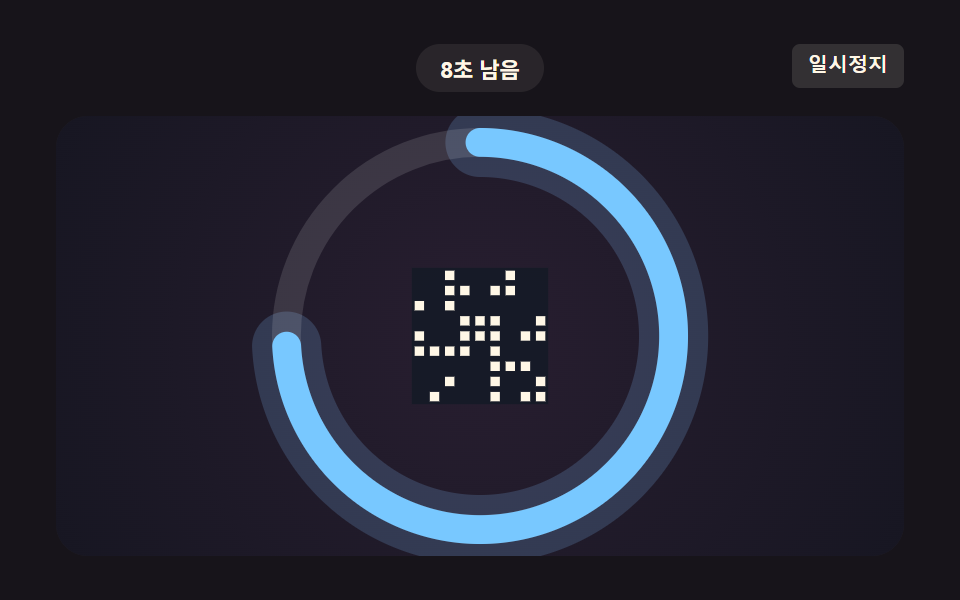
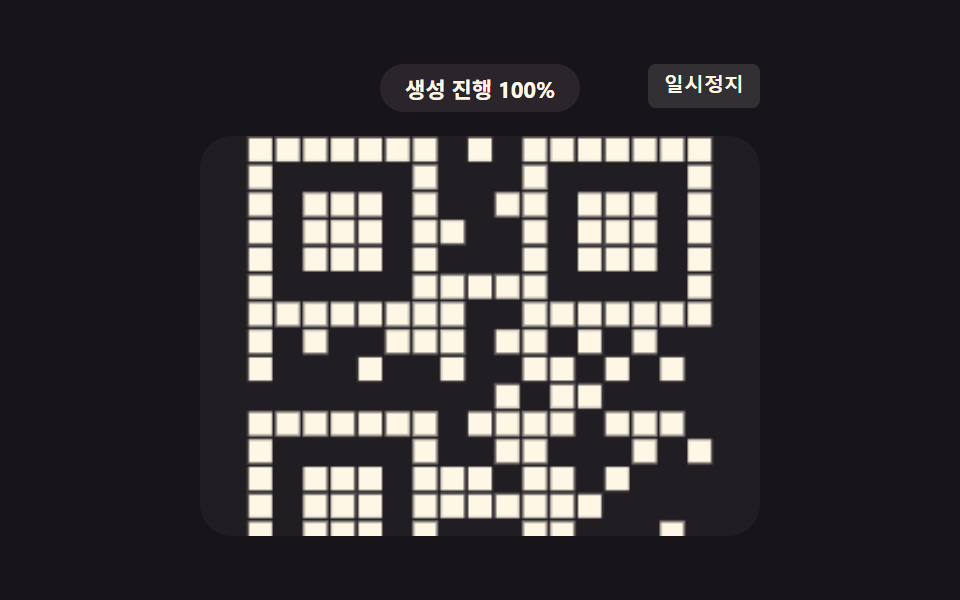
04残り時間値が角度値として削られるカウントダウンリング
同じ残り時間の比率値を角度値に変え、円形リングを時計回りに削り、値が0に触れるとリングは完全に消える。
使いどころ決済QRコードの有効時間カウントダウン
QR_EXPIRE_DURATION_MSDEMO_ACCEL_FACTORurgency
<main class="stage">
<div class="ecr is-demo" id="ecrRoot">
  <div class="ecr__badge" id="ecrBadge">30秒残り</div>
  <button class="ecr__ctrl" id="ecrCtrl" type="button">一時停止</button>
  <div class="ecr__canvas-wrap">
    <canvas class="ecr__canvas" id="ecrCanvas" width="240" height="200"></canvas>
  </div>
</div>
</main>
@use "../../../../site/static/demo-tokens" as *;
// 핵심: 경과 비율을 0~360도 각도로 바꿔 링을 깎아 나가고, 남은 비율이 20% 아래로
// 내려가면 그 비율만큼 링 색을 파랑에서 빨강으로 보간한다. .is-demo 는 실 30000ms
// 상수는 그대로 둔 채 시연 배속(DEMO_ACCEL_FACTOR)만 곱해 2초 측정창에 맞춘다.
@include stage($stage-ink);
.ecr {
position: relative;
width: 100%;
max-width: 424px;
display: flex;
flex-direction: column;
align-items: center;
gap: $sp-3;
}
.ecr__badge {
padding: $sp-1 $sp-3;
border-radius: $r-pill;
background: rgba(255, 247, 230, .08);
color: $subject-cream;
font-weight: 700;
font-size: 11px;
font-variant-numeric: tabular-nums;
}
.ecr__ctrl {
position: absolute;
top: 0;
right: 0;
border: 0;
border-radius: $r-xs;
padding: $sp-1 $sp-2;
background: rgba(255, 247, 230, .12);
color: $subject-cream;
font-weight: 600;
font-size: 10px;
line-height: 1.4;
cursor: pointer;
}
.ecr__ctrl:focus-visible { outline: 2px solid $subject-blue-light; outline-offset: 2px; }
.ecr__canvas-wrap {
width: 100%;
height: 220px;
border-radius: $r-card;
background: rgba(255, 255, 255, .04);
display: grid;
place-items: center;
overflow: hidden;
}
.ecr__canvas {
width: 100%;
height: 100%;
display: block;
}
@media (max-width: 340px) {
.ecr { gap: $sp-1; }
.ecr__badge { padding: $sp-1 $sp-2; font-size: 10px; }
.ecr__canvas-wrap { height: 124px; }
}
@media (prefers-reduced-motion: reduce) {
.ecr__canvas-wrap { background: rgba(255, 255, 255, .04); }
}html, body {
margin: 0;
overflow: hidden;
}
.stage {
box-sizing: border-box;
min-height: 100vh;
display: grid;
place-items: center;
margin: 0;
background: #17141a;
font-family: -apple-system, "Segoe UI", "Noto Sans KR", sans-serif;
padding: clamp(8px, 4vw, 24px);
}
.ecr {
position: relative;
width: 100%;
max-width: 424px;
display: flex;
flex-direction: column;
align-items: center;
gap: 12px;
}
.ecr__badge {
padding: 4px 12px;
border-radius: 999px;
background: rgba(255, 247, 230, 0.08);
color: #fff7e6;
font-weight: 700;
font-size: 11px;
font-variant-numeric: tabular-nums;
}
.ecr__ctrl {
position: absolute;
top: 0;
right: 0;
border: 0;
border-radius: 4px;
padding: 4px 8px;
background: rgba(255, 247, 230, 0.12);
color: #fff7e6;
font-weight: 600;
font-size: 10px;
line-height: 1.4;
cursor: pointer;
}
.ecr__ctrl:focus-visible {
outline: 2px solid #5b8cf8;
outline-offset: 2px;
}
.ecr__canvas-wrap {
width: 100%;
height: 220px;
border-radius: 16px;
background: rgba(255, 255, 255, 0.04);
display: grid;
place-items: center;
overflow: hidden;
}
.ecr__canvas {
width: 100%;
height: 100%;
display: block;
}
@media (max-width: 340px) {
.ecr {
gap: 4px;
}
.ecr__badge {
padding: 4px 8px;
font-size: 10px;
}
.ecr__canvas-wrap {
height: 124px;
}
}
@media (prefers-reduced-motion: reduce) {
.ecr__canvas-wrap {
background: rgba(255, 255, 255, 0.04);
}
}(function () {
// QR_EXPIRE_DURATION_MS — 변형 1: 30000 → 15000 으로 늘리면 만료까지 더 여유 있게 카운트다운한다.
var QR_EXPIRE_DURATION_MS = 30000;
// 시연 전용 가상 시계 배속: 30000ms 만료를 2초 측정 창 안에서 보여주기 위한 시연 장치일 뿐,
// 상수 QR_EXPIRE_DURATION_MS 자체는 그대로 유지한다.
var DEMO_ACCEL_FACTOR = 15;
var canvas = document.getElementById('ecrCanvas');
var ctx = canvas.getContext('2d');
var wrap = canvas.parentElement;
var badge = document.getElementById('ecrBadge');
var ctrl = document.getElementById('ecrCtrl');
var root = document.getElementById('ecrRoot');
var isDemo = root.classList.contains('is-demo');
function seedRand(seed) {
var s = seed >>> 0;
return function () { s = (s * 1664525 + 1013904223) >>> 0; return s / 4294967296; };
}
var rand = seedRand(407041);
var dots = [];
for (var y = 0; y < 9; y += 1) {
for (var x = 0; x < 9; x += 1) {
if (rand() < 0.42) dots.push({ x: x, y: y });
}
}
function lerp(a, b, t) { return a + (b - a) * t; }
// 계산된 시각 레이어: 캔버스 크기가 바뀌면 중심·링 반지름을 다시 잰다 —
// 링이 항상 스테이지 폭까지 채우게(278px 캡 없이 반응형).
var dpr = 1, cw = 240, ch = 200, cx = 120, cy = 100, radius = 70;
function fit() {
var r = wrap.getBoundingClientRect();
dpr = window.devicePixelRatio || 1;
cw = r.width; ch = r.height;
canvas.width = Math.round(cw * dpr);
canvas.height = Math.round(ch * dpr);
ctx.setTransform(dpr, 0, 0, dpr, 0, 0);
cx = cw / 2; cy = ch / 2;
radius = Math.min(cw, ch) * 0.44;
draw(lastElapsed);
}
var lastElapsed = 0;
function draw(virtualElapsed) {
lastElapsed = virtualElapsed;
ctx.clearRect(0, 0, cw, ch);
// 계산 한 겹: 경과 비율 → 각도(0~360) 로 링을 깎고, 만료 근접(20% 이하)일수록
// 파랑→빨강으로 색을 보간한다. 같은 urgency 값이 배경 톤·링 외곽 글로우에도 반영돼
// 화면 넓은 면이 함께 바뀐다.
var ratio = Math.min(1, virtualElapsed / QR_EXPIRE_DURATION_MS);
var remainRatio = 1 - ratio;
var angle = ratio * 360;
var urgency = remainRatio < 0.2 ? (0.2 - remainRatio) / 0.2 : 0;
var r1 = lerp(120, 255, urgency), g1 = lerp(200, 90, urgency), b1 = lerp(255, 90, urgency);
var ringColor = 'rgb(' + Math.round(r1) + ',' + Math.round(g1) + ',' + Math.round(b1) + ')';
// 카드 배경 밝기 — urgency 가 오를수록 전체 캔버스가 옅은 붉은 톤으로 밝아진다.
var bg = ctx.createRadialGradient(cx, cy, 0, cx, cy, Math.max(cw, ch) * 0.72);
bg.addColorStop(0, 'rgba(' + Math.round(lerp(40, 120, urgency)) + ',' + Math.round(lerp(30, 26, urgency)) + ',' + Math.round(lerp(48, 30, urgency)) + ',1)');
bg.addColorStop(1, 'rgba(18,20,30,1)');
ctx.fillStyle = bg;
ctx.fillRect(0, 0, cw, ch);
var ringWidth = Math.max(6, cw * 0.034);
// 링 외곽 글로우 — urgency 가 오를수록 더 크고 옅게 번진다.
ctx.globalCompositeOperation = 'lighter';
ctx.strokeStyle = 'rgba(' + Math.round(r1) + ',' + Math.round(g1) + ',' + Math.round(b1) + ',' + (0.16 + urgency * 0.22).toFixed(3) + ')';
ctx.lineWidth = ringWidth * (2.4 + urgency * 1.6);
ctx.beginPath();
ctx.arc(cx, cy, radius, -Math.PI / 2, -Math.PI / 2 + (angle * Math.PI / 180));
ctx.stroke();
ctx.globalCompositeOperation = 'source-over';
ctx.strokeStyle = 'rgba(255,255,255,.12)';
ctx.lineWidth = ringWidth;
ctx.beginPath();
ctx.arc(cx, cy, radius, 0, Math.PI * 2);
ctx.stroke();
ctx.strokeStyle = ringColor;
ctx.lineWidth = ringWidth;
ctx.lineCap = 'round';
ctx.beginPath();
ctx.arc(cx, cy, radius, -Math.PI / 2, -Math.PI / 2 + (angle * Math.PI / 180));
ctx.stroke();
var box = Math.min(cw, ch) * 0.31;
ctx.fillStyle = 'rgba(20,26,38,.9)';
ctx.fillRect(cx - box / 2, cy - box / 2, box, box);
var cell = box / 9;
ctx.fillStyle = 'rgb(255,247,230)';
dots.forEach(function (d) {
var s = cell * 0.62;
ctx.fillRect(cx - box / 2 + d.x * cell + (cell - s) / 2, cy - box / 2 + d.y * cell + (cell - s) / 2, s, s);
});
var remainSec = Math.max(0, Math.ceil((QR_EXPIRE_DURATION_MS - virtualElapsed) / 1000));
badge.textContent = remainSec + '秒残り';
}
var reduce = window.matchMedia('(prefers-reduced-motion: reduce)').matches;
var playing = true;
var virtualElapsed = reduce ? QR_EXPIRE_DURATION_MS : 0;
if (reduce) {
playing = false;
root.classList.remove('is-demo');
}
var lastTs = null;
function tick(ts) {
if (lastTs === null) lastTs = ts;
var dt = ts - lastTs;
lastTs = ts;
if (playing) {
var accel = isDemo ? DEMO_ACCEL_FACTOR : 1;
virtualElapsed += dt * accel;
if (virtualElapsed >= QR_EXPIRE_DURATION_MS) virtualElapsed -= QR_EXPIRE_DURATION_MS;
}
draw(virtualElapsed);
requestAnimationFrame(tick);
}
fit();
window.addEventListener('resize', fit);
draw(virtualElapsed);
requestAnimationFrame(tick);
ctrl.addEventListener('click', function () {
playing = !playing;
ctrl.textContent = playing ? '一時停止' : '再生';
});
ctrl.addEventListener('keydown', function (e) {
if ((e.key === 'r' || e.key === 'R') && !reduce) {
virtualElapsed = 0;
playing = true;
ctrl.textContent = '一時停止';
}
});
})();import { useEffect, useRef, useState } from "react";
import styles from "./ExpiryCountdownRing.module.scss";
export default function ExpiryCountdownRing() {
const rootRef = useRef<HTMLDivElement>(null);
const canvasRef = useRef<HTMLCanvasElement>(null);
const ctrlRef = useRef<HTMLButtonElement>(null);
const [badge, setBadge] = useState("30초 남음");
const [ctrlLabel, setCtrlLabel] = useState("일시정지");
useEffect(() => {
const root = rootRef.current;
const canvas = canvasRef.current;
const ctrl = ctrlRef.current;
if (!root || !canvas || !ctrl) return;
const ctx = canvas.getContext("2d");
if (!ctx) return;
// QR_EXPIRE_DURATION_MS — 변형 1: 30000 → 15000 으로 늘리면 만료까지 더 여유 있게 카운트다운한다.
const QR_EXPIRE_DURATION_MS = 30000;
// 시연 전용 가상 시계 배속: 30000ms 만료를 2초 측정 창 안에서 보여주기 위한 시연 장치일 뿐,
// 상수 QR_EXPIRE_DURATION_MS 자체는 그대로 유지한다.
const DEMO_ACCEL_FACTOR = 15;
const isDemo = root.classList.contains("is-demo");
const wrap = canvas.parentElement as HTMLElement;
function seedRand(seed: number) {
let s = seed >>> 0;
return function () {
s = (s * 1664525 + 1013904223) >>> 0;
return s / 4294967296;
};
}
const rand = seedRand(407041);
const dots: { x: number; y: number }[] = [];
for (let y = 0; y < 9; y += 1) {
for (let x = 0; x < 9; x += 1) {
if (rand() < 0.42) dots.push({ x, y });
}
}
function lerp(a: number, b: number, t: number) { return a + (b - a) * t; }
// 계산된 시각 레이어: 캔버스 크기가 바뀌면 중심·링 반지름을 다시 잰다 —
// 링이 항상 스테이지 폭까지 채우게(278px 캡 없이 반응형).
let dpr = 1, cw = 240, ch = 200, cx = 120, cy = 100, radius = 70;
function fit() {
const r = wrap.getBoundingClientRect();
dpr = window.devicePixelRatio || 1;
cw = r.width; ch = r.height;
canvas!.width = Math.round(cw * dpr);
canvas!.height = Math.round(ch * dpr);
ctx!.setTransform(dpr, 0, 0, dpr, 0, 0);
cx = cw / 2; cy = ch / 2;
radius = Math.min(cw, ch) * 0.44;
draw(lastElapsed);
}
let lastElapsed = 0;
function draw(virtualElapsed: number) {
lastElapsed = virtualElapsed;
ctx!.clearRect(0, 0, cw, ch);
// 계산 한 겹: 경과 비율 → 각도(0~360) 로 링을 깎고, 만료 근접(20% 이하)일수록
// 파랑→빨강으로 색을 보간한다. 같은 urgency 값이 배경 톤·링 외곽 글로우에도 반영돼
// 화면 넓은 면이 함께 바뀐다.
const ratio = Math.min(1, virtualElapsed / QR_EXPIRE_DURATION_MS);
const remainRatio = 1 - ratio;
const angle = ratio * 360;
const urgency = remainRatio < 0.2 ? (0.2 - remainRatio) / 0.2 : 0;
const r1 = lerp(120, 255, urgency), g1 = lerp(200, 90, urgency), b1 = lerp(255, 90, urgency);
const ringColor = "rgb(" + Math.round(r1) + "," + Math.round(g1) + "," + Math.round(b1) + ")";
// 카드 배경 밝기 — urgency 가 오를수록 전체 캔버스가 옅은 붉은 톤으로 밝아진다.
const bg = ctx!.createRadialGradient(cx, cy, 0, cx, cy, Math.max(cw, ch) * 0.72);
bg.addColorStop(0, "rgba(" + Math.round(lerp(40, 120, urgency)) + "," + Math.round(lerp(30, 26, urgency)) + "," + Math.round(lerp(48, 30, urgency)) + ",1)");
bg.addColorStop(1, "rgba(18,20,30,1)");
ctx!.fillStyle = bg;
ctx!.fillRect(0, 0, cw, ch);
const ringWidth = Math.max(6, cw * 0.034);
// 링 외곽 글로우 — urgency 가 오를수록 더 크고 옅게 번진다.
ctx!.globalCompositeOperation = "lighter";
ctx!.strokeStyle = "rgba(" + Math.round(r1) + "," + Math.round(g1) + "," + Math.round(b1) + "," + (0.16 + urgency * 0.22).toFixed(3) + ")";
ctx!.lineWidth = ringWidth * (2.4 + urgency * 1.6);
ctx!.beginPath();
ctx!.arc(cx, cy, radius, -Math.PI / 2, -Math.PI / 2 + (angle * Math.PI) / 180);
ctx!.stroke();
ctx!.globalCompositeOperation = "source-over";
ctx!.strokeStyle = "rgba(255,255,255,.12)";
ctx!.lineWidth = ringWidth;
ctx!.beginPath();
ctx!.arc(cx, cy, radius, 0, Math.PI * 2);
ctx!.stroke();
ctx!.strokeStyle = ringColor;
ctx!.lineWidth = ringWidth;
ctx!.lineCap = "round";
ctx!.beginPath();
ctx!.arc(cx, cy, radius, -Math.PI / 2, -Math.PI / 2 + (angle * Math.PI) / 180);
ctx!.stroke();
const box = Math.min(cw, ch) * 0.31;
ctx!.fillStyle = "rgba(20,26,38,.9)";
ctx!.fillRect(cx - box / 2, cy - box / 2, box, box);
const cell = box / 9;
ctx!.fillStyle = "rgb(255,247,230)";
dots.forEach((d) => {
const s = cell * 0.62;
ctx!.fillRect(cx - box / 2 + d.x * cell + (cell - s) / 2, cy - box / 2 + d.y * cell + (cell - s) / 2, s, s);
});
const remainSec = Math.max(0, Math.ceil((QR_EXPIRE_DURATION_MS - virtualElapsed) / 1000));
setBadge(remainSec + "초 남음");
}
const reduce = window.matchMedia("(prefers-reduced-motion: reduce)").matches;
let playing = true;
let virtualElapsed = reduce ? QR_EXPIRE_DURATION_MS : 0;
if (reduce) {
playing = false;
root.classList.remove("is-demo");
}
let lastTs: number | null = null;
let raf = 0;
function tick(ts: number) {
if (lastTs === null) lastTs = ts;
const dt = ts - lastTs;
lastTs = ts;
if (playing) {
const accel = isDemo ? DEMO_ACCEL_FACTOR : 1;
virtualElapsed += dt * accel;
if (virtualElapsed >= QR_EXPIRE_DURATION_MS) virtualElapsed -= QR_EXPIRE_DURATION_MS;
}
draw(virtualElapsed);
raf = requestAnimationFrame(tick);
}
fit();
window.addEventListener("resize", fit);
draw(virtualElapsed);
raf = requestAnimationFrame(tick);
function onClick() {
playing = !playing;
setCtrlLabel(playing ? "일시정지" : "재생");
}
function onKeydown(e: KeyboardEvent) {
if ((e.key === "r" || e.key === "R") && !reduce) {
virtualElapsed = 0;
playing = true;
setCtrlLabel("일시정지");
}
}
ctrl.addEventListener("click", onClick);
ctrl.addEventListener("keydown", onKeydown);
return () => {
cancelAnimationFrame(raf);
window.removeEventListener("resize", fit);
ctrl.removeEventListener("click", onClick);
ctrl.removeEventListener("keydown", onKeydown);
};
}, []);
return (
<main className={styles.stage}>
<div className={`${styles.ecr} is-demo`} ref={rootRef}>
<div className={styles.ecr__badge}>{badge}</div>
<button className={styles.ecr__ctrl} type="button" ref={ctrlRef}>{ctrlLabel}</button>
<div className={styles["ecr__canvas-wrap"]}>
<canvas className={styles.ecr__canvas} ref={canvasRef} width={240} height={200} />
</div>
</div>
</main>
);
}04 残り時間値が角度値として削られるカウントダウンリング — 計測 累積面積 61.73% · 動いたフレーム 23/23GODRICH オリジナル · SCSS と React は zip に同梱 · qr コード アニメーション css 9選 — 残り時間
このデモが属する記事
 qr コード アニメーション css 9選 — 残り時間スキャン失敗のせいでもなく、ただ長く浮いているせいでもない — qrコードローディングアニメーションの残り時間の比率の値ひとつが尽きることでリングが狭まり、角度が削られ、終わりに触れると揺れる。3番はその値でパルスリングの半径を狭め、4番は この記事のデモをすべて見る