01層ごとに太さと速度が違う雨筋パララックス背景
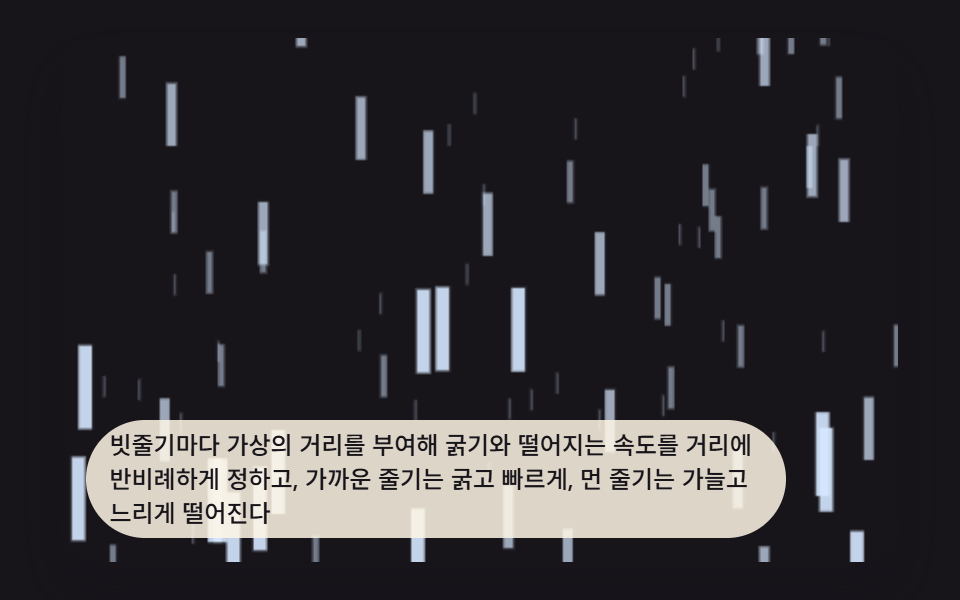
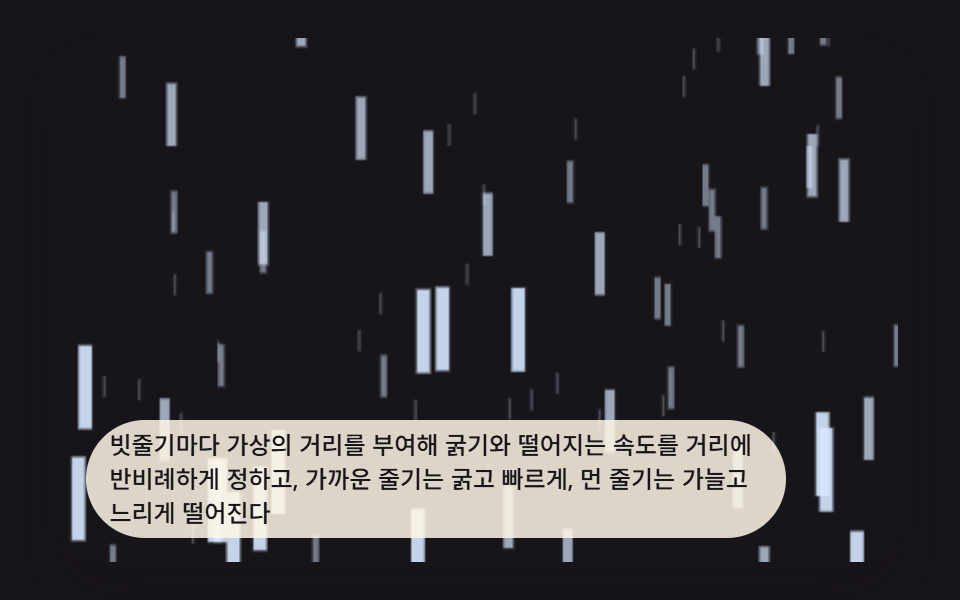
雨筋ごとに仮の距離を与え、太さと落下速度をその距離に反比例させることで、近い筋は太く速く、遠い筋は細くゆっくり落ちる。
使いどころランディングヒーローの裏に敷く窓の外背景
streakDepthZRAIN_NEAR_SPEED_PX_SRAIN_LAYER_COUNT
<main class="stage">
<div class="rn is-demo" id="rnRoot">
  <canvas class="rn__canvas" id="rnCanvas" width="480" height="300"></canvas>
  <p class="rn__caption">雨筋ごとに仮想の距離を与えて太さと落下速度を距離に反比例させ、近い筋は太く速く、遠い筋は細くゆっくり落ちる。</p>
</div>
</main>
@use "../../../../site/static/demo-tokens" as *;
@include stage($stage-ink);
.rn {
position: relative;
width: min(92vw, calc(160vh - 12.8vw));
aspect-ratio: 480 / 300;
margin: 0 auto;
border-radius: $r-card;
overflow: hidden;
box-shadow: $shadow-raised;
background: $stage-ink;
}
.rn__canvas {
display: block;
width: 100%;
height: 100%;
}
.rn__caption {
position: absolute;
left: $sp-3;
bottom: $sp-3;
max-width: 78%;
margin: 0;
padding: $sp-1 $sp-3;
border-radius: $r-pill;
background: rgba(255, 247, 230, .85);
color: $subject-ink;
font-weight: 500;
font-size: 12px;
line-height: 1.4;
pointer-events: none;
}
@media (max-width: 340px) {
.rn__caption { font-size: 10px; padding: $sp-1 $sp-2; }
}
@media (prefers-reduced-motion: reduce) {
.rn { cursor: default; }
}html, body {
margin: 0;
overflow: hidden;
}
.stage {
box-sizing: border-box;
min-height: 100vh;
display: grid;
place-items: center;
margin: 0;
background: #17141a;
font-family: -apple-system, "Segoe UI", "Noto Sans KR", sans-serif;
padding: clamp(8px, 4vw, 24px);
}
.rn {
position: relative;
width: min(92vw, 160vh - 12.8vw);
aspect-ratio: 480/300;
margin: 0 auto;
border-radius: 16px;
overflow: hidden;
box-shadow: 0 14px 24px rgba(23, 20, 26, 0.32);
background: #17141a;
}
.rn__canvas {
display: block;
width: 100%;
height: 100%;
}
.rn__caption {
position: absolute;
left: 12px;
bottom: 12px;
max-width: 78%;
margin: 0;
padding: 4px 12px;
border-radius: 999px;
background: rgba(255, 247, 230, 0.85);
color: #17141a;
font-weight: 500;
font-size: 12px;
line-height: 1.4;
pointer-events: none;
}
@media (max-width: 340px) {
.rn__caption {
font-size: 10px;
padding: 4px 8px;
}
}
@media (prefers-reduced-motion: reduce) {
.rn {
cursor: default;
}
}(function () {
// 기법: 빗줄기마다 층(RAIN_LAYER_COUNT)을 매겨 가상의 거리(depth z, 0=멀다 1=가깝다)를 부여한다.
// 굵기·속도·불투명도를 모두 z 에 비례해 정하므로 가까운 줄기는 굵고 빠르고 진하게, 먼 줄기는
// 가늘고 느리고 옅게 떨어진다 — 거리 하나가 세 가지 값을 동시에 결정하는 시차(parallax) 계산.
var root = document.getElementById('rnRoot');
var canvas = document.getElementById('rnCanvas');
var ctx = canvas.getContext('2d');
var wrap = canvas.parentElement;
var CALC_W = 160, CALC_H = 100;
var RAIN_LAYER_COUNT = 4;
var RAIN_NEAR_SPEED_PX_S = 150;
var RAIN_FAR_SPEED_PX_S = 40;
function seedRand(seed) {
var s = seed >>> 0;
return function () { s = (s * 1664525 + 1013904223) >>> 0; return s / 4294967296; };
}
var rRand = seedRand(431011);
function streakDepthZ(layerIndex) {
return RAIN_LAYER_COUNT <= 1 ? 1 : layerIndex / (RAIN_LAYER_COUNT - 1);
}
var streaks = [];
for (var li = 0; li < RAIN_LAYER_COUNT; li += 1) {
var z = streakDepthZ(li);
var count = Math.round(32 - z * 18);
var speed = RAIN_FAR_SPEED_PX_S + (RAIN_NEAR_SPEED_PX_S - RAIN_FAR_SPEED_PX_S) * z;
var thick = 0.5 + z * 2.1;
var alpha = 0.28 + z * 0.62;
for (var i = 0; i < count; i += 1) {
streaks.push({
x: rRand() * CALC_W,
y: rRand() * CALC_H,
z: z, speed: speed, thick: thick, alpha: alpha,
len: 4 + z * 12
});
}
}
streaks.sort(function (a, b) { return a.z - b.z; });
function stepSim(dtS) {
for (var i = 0; i < streaks.length; i += 1) {
var s = streaks[i];
s.y += s.speed * dtS;
if (s.y - s.len > CALC_H + 4) {
s.y = -4 - rRand() * 10;
s.x = rRand() * CALC_W;
}
}
}
function draw() {
var sx = cw / CALC_W, sy = ch / CALC_H;
ctx.clearRect(0, 0, cw, ch);
for (var i = 0; i < streaks.length; i += 1) {
var s = streaks[i];
var x = s.x * sx;
var y0 = s.y * sy, y1 = (s.y - s.len) * sy;
ctx.strokeStyle = 'rgba(214,232,255,' + s.alpha + ')';
ctx.lineWidth = Math.max(0.6, s.thick * ((sx + sy) / 2));
ctx.beginPath();
ctx.moveTo(x, y0);
ctx.lineTo(x, y1);
ctx.stroke();
}
}
var cw = 480, ch = 300;
function fit() {
var r = wrap.getBoundingClientRect();
cw = Math.max(1, Math.round(r.width));
ch = Math.max(1, Math.round(r.height));
canvas.width = cw; canvas.height = ch;
draw();
}
var reduce = window.matchMedia('(prefers-reduced-motion: reduce)').matches;
if (reduce) root.classList.remove('is-demo');
var warmSteps = reduce ? 90 : 40;
for (var w = 0; w < warmSteps; w += 1) stepSim(0.02);
var lastTs = null;
function tick(ts) {
if (lastTs === null) lastTs = ts;
var dt = Math.min(ts - lastTs, 48);
lastTs = ts;
if (!reduce) {
stepSim(dt / 1000);
draw();
}
requestAnimationFrame(tick);
}
fit();
window.addEventListener('resize', fit);
draw();
requestAnimationFrame(tick);
})();import { useEffect, useRef } from "react";
import styles from "./RainEffectCanvasStreakDepthParallax.module.scss";
type Streak = { x: number; y: number; z: number; speed: number; thick: number; alpha: number; len: number };
export default function RainEffectCanvasStreakDepthParallax() {
const rootRef = useRef<HTMLDivElement>(null);
const canvasRef = useRef<HTMLCanvasElement>(null);
useEffect(() => {
const root = rootRef.current;
const canvas = canvasRef.current;
if (!root || !canvas) return;
const ctx = canvas.getContext("2d");
if (!ctx) return;
const wrap = canvas.parentElement as HTMLElement;
const CALC_W = 160, CALC_H = 100;
const RAIN_LAYER_COUNT = 4;
const RAIN_NEAR_SPEED_PX_S = 150;
const RAIN_FAR_SPEED_PX_S = 40;
function seedRand(seed: number) {
let s = seed >>> 0;
return function () { s = (s * 1664525 + 1013904223) >>> 0; return s / 4294967296; };
}
const rRand = seedRand(431012);
function streakDepthZ(layerIndex: number) {
return RAIN_LAYER_COUNT <= 1 ? 1 : layerIndex / (RAIN_LAYER_COUNT - 1);
}
const streaks: Streak[] = [];
for (let li = 0; li < RAIN_LAYER_COUNT; li += 1) {
const z = streakDepthZ(li);
const count = Math.round(32 - z * 18);
const speed = RAIN_FAR_SPEED_PX_S + (RAIN_NEAR_SPEED_PX_S - RAIN_FAR_SPEED_PX_S) * z;
const thick = 0.5 + z * 2.1;
const alpha = 0.28 + z * 0.62;
for (let i = 0; i < count; i += 1) {
streaks.push({
x: rRand() * CALC_W,
y: rRand() * CALC_H,
z, speed, thick, alpha,
len: 4 + z * 12
});
}
}
streaks.sort((a, b) => a.z - b.z);
function stepSim(dtS: number) {
for (let i = 0; i < streaks.length; i += 1) {
const s = streaks[i];
s.y += s.speed * dtS;
if (s.y - s.len > CALC_H + 4) {
s.y = -4 - rRand() * 10;
s.x = rRand() * CALC_W;
}
}
}
let cw = 480, ch = 300;
function draw() {
const sx = cw / CALC_W, sy = ch / CALC_H;
ctx!.clearRect(0, 0, cw, ch);
for (let i = 0; i < streaks.length; i += 1) {
const s = streaks[i];
const x = s.x * sx;
const y0 = s.y * sy, y1 = (s.y - s.len) * sy;
ctx!.strokeStyle = "rgba(214,232,255," + s.alpha + ")";
ctx!.lineWidth = Math.max(0.6, s.thick * ((sx + sy) / 2));
ctx!.beginPath();
ctx!.moveTo(x, y0);
ctx!.lineTo(x, y1);
ctx!.stroke();
}
}
function fit() {
const r = wrap.getBoundingClientRect();
cw = Math.max(1, Math.round(r.width));
ch = Math.max(1, Math.round(r.height));
canvas!.width = cw; canvas!.height = ch;
draw();
}
const reduce = window.matchMedia("(prefers-reduced-motion: reduce)").matches;
if (reduce) root.classList.remove("is-demo");
const warmSteps = reduce ? 90 : 40;
for (let w = 0; w < warmSteps; w += 1) stepSim(0.02);
let lastTs: number | null = null;
let raf = 0;
function tick(ts: number) {
if (lastTs === null) lastTs = ts;
const dt = Math.min(ts - lastTs, 48);
lastTs = ts;
if (!reduce) {
stepSim(dt / 1000);
draw();
}
raf = requestAnimationFrame(tick);
}
fit();
window.addEventListener("resize", fit);
draw();
raf = requestAnimationFrame(tick);
return () => {
cancelAnimationFrame(raf);
window.removeEventListener("resize", fit);
};
}, []);
return (
<main className={styles.stage}>
<div className={`${styles.rn} is-demo`} ref={rootRef}>
<canvas className={styles.rn__canvas} ref={canvasRef} width={480} height={300} />
<p className={styles.rn__caption}>빗줄기마다 가상의 거리를 부여해 굵기와 떨어지는 속도를 거리에 반비례하게 정하고, 가까운 줄기는 굵고 빠르게, 먼 줄기는 가늘고 느리게 떨어진다</p>
</div>
</main>
);
}01 層ごとに太さと速度が違う雨筋パララックス背景 — 計測 累積面積 63.301% · 動いたフレーム 23/23GODRICH オリジナル · SCSS と React は zip に同梱 · css 雨を降らせる 9パターン — 窓辺のストーム背景
このデモが属する記事
 css 雨を降らせる 9パターン — 窓辺のストーム背景このcss 雨を降らせるコレクションは、窓辺の嵐の場面を9つの独立したキャンバス層に分け、一本のループ動画ではなく層ごとに別々の計算で動かしています。この背景シーンでは、ひとつの風ベクトル値が九つの雨層の傾きと速度を同時に決めている。以下の この記事のデモをすべて見る