07ルートマップの描画
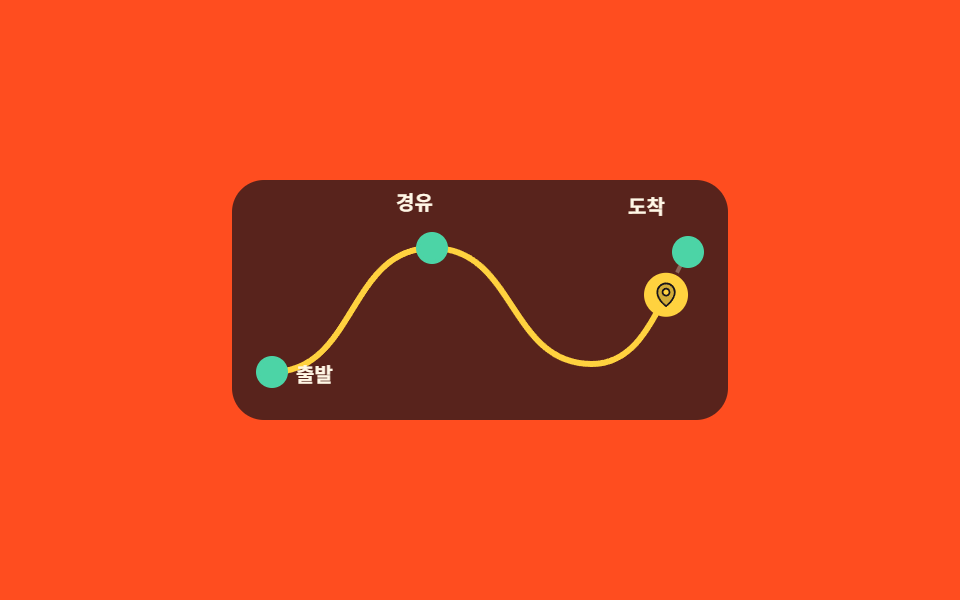
地図に薄く敷かれた破線の上を濃い線が出発地から引かれ、同じ曲線をマーカーが走り、通り過ぎた地点だけが点灯します。
使いどころ旅程・配送追跡・会社の沿革など「どこを経てきたか」を順番に見せる区間
stroke-dashoffsetoffset-pathoffset-distance
<main class="stage">
  <div class="rm is-demo">
    <div class="rm__scroller">
      <div class="rm__pad">
        <div class="rm__pin">
          <div class="rm__map">
            <svg class="rm__svg" viewBox="0 0 248 120" width="248" height="120" aria-hidden="true">
              <path class="rm__guide" d="M20 96C62 96 58 34 100 34C142 34 138 92 180 92C206 92 214 60 228 36" pathLength="100"/>
              <path class="rm__line" d="M20 96C62 96 58 34 100 34C142 34 138 92 180 92C206 92 214 60 228 36" pathLength="100"/>
            </svg>
            <span class="rm__stop rm__stop--1"></span>
            <span class="rm__stop rm__stop--2"></span>
            <span class="rm__stop rm__stop--3"></span>
            <span class="rm__mark">
              <svg viewBox="0 0 256 256" width="14" height="14" aria-hidden="true"><g fill="currentColor"><path d="M128 24a80 80 0 0 0-80 80c0 72 80 128 80 128s80-56 80-128a80 80 0 0 0-80-80m0 112a32 32 0 1 1 32-32a32 32 0 0 1-32 32" opacity=".2"/><path d="M128 64a40 40 0 1 0 40 40a40 40 0 0 0-40-40m0 64a24 24 0 1 1 24-24a24 24 0 0 1-24 24m0-112a88.1 88.1 0 0 0-88 88c0 31.4 14.51 64.68 42 96.25a254.2 254.2 0 0 0 41.45 38.3a8 8 0 0 0 9.18 0a254.2 254.2 0 0 0 41.37-38.3c27.45-31.57 42-64.85 42-96.25a88.1 88.1 0 0 0-88-88m0 206c-16.53-13-72-60.75-72-118a72 72 0 0 1 144 0c0 57.23-55.47 105-72 118"/></g></svg>
            </span>
            <span class="rm__name rm__name--1">出発</span>
            <span class="rm__name rm__name--2">経由</span>
            <span class="rm__name rm__name--3">到着</span>
          </div>
        </div>
      </div>
    </div>
  </div>
</main>@use "../../../../site/static/demo-tokens" as *;
// ── 변수 3개 ──────────────────────────────────────────
$duration: 1s; // alternate 라 한 바퀴는 2s
$easing: linear;
$color: $subject-cream;
$route: "M20 96C62 96 58 34 100 34C142 34 138 92 180 92C206 92 214 60 228 36";
@include stage($stage-orange);
.rm {
--h: clamp(148px, 58vh, 176px);
width: min(340px, 92vw);
}
.rm__scroller {
height: var(--h);
overflow-y: auto;
scrollbar-width: none;
&::-webkit-scrollbar { display: none; }
}
// ⚠ 여기는 padding-bottom 이 아니라 height 다. sticky 가 붙어 있을 수 있는 범위는 부모의
// **콘텐츠 박스**라, padding 으로만 늘린 자리는 안 쳐준다 — 창이 곧바로 위로 흘러나간다 (실측)
.rm__pad { height: calc(var(--h) * 2.2); }
.rm__pin {
position: sticky;
top: 0;
display: grid;
place-items: center;
height: var(--h);
}
.rm__map {
position: relative;
width: 248px;
height: 120px;
border-radius: $r-card;
background: rgba(23, 20, 26, .72);
}
.rm__svg { position: absolute; top: 0; left: 0; }
.rm__guide {
fill: none;
stroke: rgba(255, 247, 230, .3);
stroke-width: 2;
stroke-dasharray: 3 3;
}
// ── 실제 동작 ① 경로가 그어진다.
// pathLength="100" 을 박아 두면 길이를 몰라도 dashoffset 을 100 → 0 으로 쓸 수 있다 ──
.rm__line {
fill: none;
stroke: $stage-yellow;
stroke-width: 3;
stroke-linecap: round;
stroke-dasharray: 100;
stroke-dashoffset: 100;
animation-name: rm-draw;
animation-duration: 1s;
animation-timing-function: $easing;
animation-fill-mode: both;
animation-timeline: scroll(nearest block);
}
@keyframes rm-draw {
from { stroke-dashoffset: 100; }
to { stroke-dashoffset: 0; }
}
// ── 실제 동작 ② 표식은 같은 곡선 위를 달린다.
// offset-path 가 경로를 받고 offset-distance 가 그 위의 위치다 ──
.rm__mark {
position: absolute;
top: 0;
left: 0;
display: grid;
place-items: center;
width: 22px;
height: 22px;
border-radius: 50%;
background: $stage-yellow;
color: $subject-ink;
offset-path: path($route);
offset-distance: 0%;
offset-rotate: 0deg;
animation-name: rm-run;
animation-duration: 1s;
animation-timing-function: $easing;
animation-fill-mode: both;
animation-timeline: scroll(nearest block);
}
@keyframes rm-run {
from { offset-distance: 0%; }
to { offset-distance: 100%; }
}
// 지나친 지점만 불이 켜진다 — 구간을 어긋나게 줘서 순서대로 들어온다
.rm__stop {
position: absolute;
width: 12px;
height: 12px;
border: 2px solid rgba(255, 247, 230, .5);
border-radius: 50%;
background: rgba(23, 20, 26, .9);
animation-name: rm-lit;
animation-duration: 1s;
animation-timing-function: $easing;
animation-fill-mode: both;
animation-timeline: scroll(nearest block);
}
.rm__stop--1 { left: 12px; top: 88px; animation-range: 0% 12%; }
.rm__stop--2 { left: 92px; top: 26px; animation-range: 34% 46%; }
.rm__stop--3 { left: 220px; top: 28px; animation-range: 84% 96%; }
@keyframes rm-lit {
from { border-color: rgba(255, 247, 230, .5); background: rgba(23, 20, 26, .9); }
to { border-color: $subject-mint; background: $subject-mint; }
}
.rm__name {
position: absolute;
color: $color;
font-size: 10px;
line-height: 14px;
font-weight: 700;
}
.rm__name--1 { left: 32px; top: 90px; }
.rm__name--2 { left: 82px; top: 4px; }
.rm__name--3 { left: 198px; top: 6px; }
// ── 격자 미리보기 루프 — 같은 진행을 시간으로 돌렸다 되감는다 ──
.rm.is-demo .rm__line,
.rm.is-demo .rm__mark,
.rm.is-demo .rm__stop {
animation-duration: $duration;
animation-direction: alternate;
animation-iteration-count: infinite;
animation-timeline: auto;
}
// 미리보기에서는 구간 대신 키프레임 자리로 순서를 준다 — 시차를 delay 로 주면
// 2초 캡처 구간과 주기가 어긋나 gif 가 이어지지 않는다
.rm.is-demo .rm__stop--1 { animation-name: rm-lit-a; }
.rm.is-demo .rm__stop--2 { animation-name: rm-lit-b; }
.rm.is-demo .rm__stop--3 { animation-name: rm-lit-c; }
@keyframes rm-lit-a {
0%, 8% { border-color: rgba(255, 247, 230, .5); background: rgba(23, 20, 26, .9); }
12%, 100% { border-color: $subject-mint; background: $subject-mint; }
}
@keyframes rm-lit-b {
0%, 36% { border-color: rgba(255, 247, 230, .5); background: rgba(23, 20, 26, .9); }
42%, 100% { border-color: $subject-mint; background: $subject-mint; }
}
@keyframes rm-lit-c {
0%, 84% { border-color: rgba(255, 247, 230, .5); background: rgba(23, 20, 26, .9); }
90%, 100% { border-color: $subject-mint; background: $subject-mint; }
}
@media (prefers-reduced-motion: reduce) {
.rm__line { animation: none !important; stroke-dashoffset: 0; }
.rm__mark { animation: none !important; offset-distance: 100%; }
.rm__stop { animation: none !important; border-color: $subject-mint; background: $subject-mint; }
}html, body {
margin: 0;
overflow: hidden;
}
.stage {
box-sizing: border-box;
min-height: 100vh;
display: grid;
place-items: center;
margin: 0;
background: #ff4d1f;
font-family: -apple-system, "Segoe UI", "Noto Sans KR", sans-serif;
padding: clamp(8px, 4vw, 24px);
}
.rm {
--h: clamp(148px, 58vh, 176px);
width: min(340px, 92vw);
}
.rm__scroller {
height: var(--h);
overflow-y: auto;
scrollbar-width: none;
}
.rm__scroller::-webkit-scrollbar {
display: none;
}
.rm__pad {
height: calc(var(--h) * 2.2);
}
.rm__pin {
position: sticky;
top: 0;
display: grid;
place-items: center;
height: var(--h);
}
.rm__map {
position: relative;
width: 248px;
height: 120px;
border-radius: 16px;
background: rgba(23, 20, 26, 0.72);
}
.rm__svg {
position: absolute;
top: 0;
left: 0;
}
.rm__guide {
fill: none;
stroke: rgba(255, 247, 230, 0.3);
stroke-width: 2;
stroke-dasharray: 3 3;
}
.rm__line {
fill: none;
stroke: #ffd23f;
stroke-width: 3;
stroke-linecap: round;
stroke-dasharray: 100;
stroke-dashoffset: 100;
animation-name: rm-draw;
animation-duration: 1s;
animation-timing-function: linear;
animation-fill-mode: both;
animation-timeline: scroll(nearest block);
}
@keyframes rm-draw {
from {
stroke-dashoffset: 100;
}
to {
stroke-dashoffset: 0;
}
}
.rm__mark {
position: absolute;
top: 0;
left: 0;
display: grid;
place-items: center;
width: 22px;
height: 22px;
border-radius: 50%;
background: #ffd23f;
color: #17141a;
offset-path: path("M20 96C62 96 58 34 100 34C142 34 138 92 180 92C206 92 214 60 228 36");
offset-distance: 0%;
offset-rotate: 0deg;
animation-name: rm-run;
animation-duration: 1s;
animation-timing-function: linear;
animation-fill-mode: both;
animation-timeline: scroll(nearest block);
}
@keyframes rm-run {
from {
offset-distance: 0%;
}
to {
offset-distance: 100%;
}
}
.rm__stop {
position: absolute;
width: 12px;
height: 12px;
border: 2px solid rgba(255, 247, 230, 0.5);
border-radius: 50%;
background: rgba(23, 20, 26, 0.9);
animation-name: rm-lit;
animation-duration: 1s;
animation-timing-function: linear;
animation-fill-mode: both;
animation-timeline: scroll(nearest block);
}
.rm__stop--1 {
left: 12px;
top: 88px;
animation-range: 0% 12%;
}
.rm__stop--2 {
left: 92px;
top: 26px;
animation-range: 34% 46%;
}
.rm__stop--3 {
left: 220px;
top: 28px;
animation-range: 84% 96%;
}
@keyframes rm-lit {
from {
border-color: rgba(255, 247, 230, 0.5);
background: rgba(23, 20, 26, 0.9);
}
to {
border-color: #4cd4a6;
background: #4cd4a6;
}
}
.rm__name {
position: absolute;
color: #fff7e6;
font-size: 10px;
line-height: 14px;
font-weight: 700;
}
.rm__name--1 {
left: 32px;
top: 90px;
}
.rm__name--2 {
left: 82px;
top: 4px;
}
.rm__name--3 {
left: 198px;
top: 6px;
}
.rm.is-demo .rm__line,
.rm.is-demo .rm__mark,
.rm.is-demo .rm__stop {
animation-duration: 1s;
animation-direction: alternate;
animation-iteration-count: infinite;
animation-timeline: auto;
}
.rm.is-demo .rm__stop--1 {
animation-name: rm-lit-a;
}
.rm.is-demo .rm__stop--2 {
animation-name: rm-lit-b;
}
.rm.is-demo .rm__stop--3 {
animation-name: rm-lit-c;
}
@keyframes rm-lit-a {
0%, 8% {
border-color: rgba(255, 247, 230, 0.5);
background: rgba(23, 20, 26, 0.9);
}
12%, 100% {
border-color: #4cd4a6;
background: #4cd4a6;
}
}
@keyframes rm-lit-b {
0%, 36% {
border-color: rgba(255, 247, 230, 0.5);
background: rgba(23, 20, 26, 0.9);
}
42%, 100% {
border-color: #4cd4a6;
background: #4cd4a6;
}
}
@keyframes rm-lit-c {
0%, 84% {
border-color: rgba(255, 247, 230, 0.5);
background: rgba(23, 20, 26, 0.9);
}
90%, 100% {
border-color: #4cd4a6;
background: #4cd4a6;
}
}
@media (prefers-reduced-motion: reduce) {
.rm__line {
animation: none !important;
stroke-dashoffset: 0;
}
.rm__mark {
animation: none !important;
offset-distance: 100%;
}
.rm__stop {
animation: none !important;
border-color: #4cd4a6;
background: #4cd4a6;
}
}// 실제 동작은 CSS 만: 선은 stroke-dashoffset, 표식은 offset-path 위의 offset-distance,
// 둘 다 animation-timeline: scroll() 이 끌고 간다.
var r = document.querySelector('.rm');
var s = r.querySelector('.rm__scroller');
function stopDemo(){ r.classList.remove('is-demo'); }
r.addEventListener('pointerdown', stopDemo);
s.addEventListener('scroll', stopDemo, { passive: true });import type { CSSProperties, ReactNode } from "react";
import styles from "./RouteMapProgress.module.scss";
export type RouteMapProgressProps = {
stops?: string[];
preview?: boolean;
duration?: number;
easing?: string;
color?: string;
};
type Vars = CSSProperties & { "--duration"?: string; "--easing"?: string; "--color"?: string };
const ROUTE = "M20 96C62 96 58 34 100 34C142 34 138 92 180 92C206 92 214 60 228 36";
const IconPin = (): ReactNode => (
<svg viewBox="0 0 256 256" width="14" height="14" aria-hidden="true"><g fill="currentColor"><path d="M128 24a80 80 0 0 0-80 80c0 72 80 128 80 128s80-56 80-128a80 80 0 0 0-80-80m0 112a32 32 0 1 1 32-32a32 32 0 0 1-32 32" opacity=".2"/><path d="M128 64a40 40 0 1 0 40 40a40 40 0 0 0-40-40m0 64a24 24 0 1 1 24-24a24 24 0 0 1-24 24m0-112a88.1 88.1 0 0 0-88 88c0 31.4 14.51 64.68 42 96.25a254.2 254.2 0 0 0 41.45 38.3a8 8 0 0 0 9.18 0a254.2 254.2 0 0 0 41.37-38.3c27.45-31.57 42-64.85 42-96.25a88.1 88.1 0 0 0-88-88m0 206c-16.53-13-72-60.75-72-118a72 72 0 0 1 144 0c0 57.23-55.47 105-72 118"/></g></svg>
);
export default function RouteMapProgress({
stops = ["Start", "Stop", "Arrive"],
preview = true,
duration = 1000,
easing = "linear",
color = "#fff7e6",
}: RouteMapProgressProps): ReactNode {
const vars: Vars = { "--duration": `${duration}ms`, "--easing": easing, "--color": color };
const cls = preview ? `${styles.rm} ${styles.isDemo}` : styles.rm;
return (
<div className={cls} style={vars}>
<div className={styles.scroller}>
<div className={styles.pad}>
<div className={styles.pin}>
<div className={styles.map}>
<svg className={styles.svg} viewBox="0 0 248 120" width="248" height="120" aria-hidden="true">
<path className={styles.guide} d={ROUTE} pathLength="100" />
<path className={styles.line} d={ROUTE} pathLength="100" />
</svg>
{stops.map((s: string, i: number): ReactNode => (
<span className={`${styles.stop} ${styles[`stop${i + 1}`]}`} key={s} />
))}
<span className={styles.mark}><IconPin /></span>
{stops.map((s: string, i: number): ReactNode => (
<span className={`${styles.name} ${styles[`name${i + 1}`]}`} key={s}>{s}</span>
))}
</div>
</div>
</div>
</div>
</div>
);
}07 ルートマップの描画 — 計測 累積面積 3.755% · 動いたフレーム 23/23GODRICH オリジナル · SCSS と React は zip に同梱 · スクロールテリング 作り方 9選 — コピペOKのCSS
このデモが属する記事
 スクロールテリング 作り方 9選 — コピペOKのCSSスクロールテリングとは、スクロール位置を時計の代わりに使い、ひとつの区間の中で場面を順番に切り替える組み立て方です。ここにある9つは効果の違いではなく、場面の組み立て方そのものが違います。 この記事のデモをすべて見る