08チャプターのページめくり
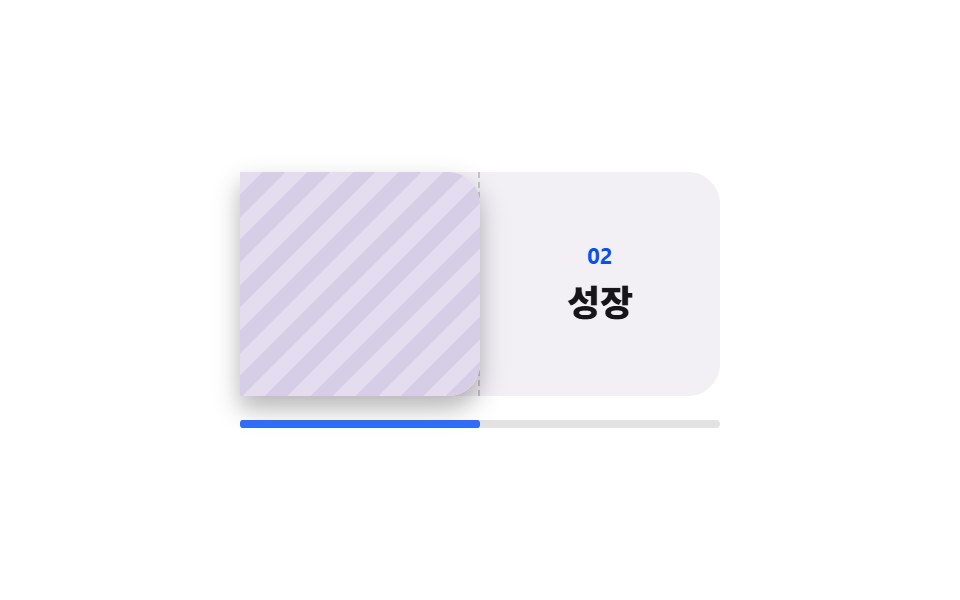
左端を軸に紙が1枚めくれて次の面が現れ、紙の裏側は隠してあるので表の文字が透けて重なりません。
使いどころ章がはっきりしたブランドストーリーや年次報告書のように、1画面に1章だけ置きたい区間
rotateYbackface-visibilitysteps(1, end)
<main class="stage">
  <div class="pt is-demo">
    <div class="pt__scroller">
      <div class="pt__pad">
        <div class="pt__pin">
          <div class="pt__book">
            <div class="pt__half pt__half--left">
              <svg viewBox="0 0 256 256" width="28" height="28" aria-hidden="true"><g fill="currentColor"><path d="M232 56v144h-72a32 32 0 0 0-32 32a32 32 0 0 0-32-32H24V56h72a32 32 0 0 1 32 32a32 32 0 0 1 32-32Z" opacity=".2"/><path d="M232 48h-72a40 40 0 0 0-32 16a40 40 0 0 0-32-16H24a8 8 0 0 0-8 8v144a8 8 0 0 0 8 8h72a24 24 0 0 1 24 24a8 8 0 0 0 16 0a24 24 0 0 1 24-24h72a8 8 0 0 0 8-8V56a8 8 0 0 0-8-8M96 192H32V64h64a24 24 0 0 1 24 24v112a39.8 39.8 0 0 0-24-8m128 0h-64a39.8 39.8 0 0 0-24 8V88a24 24 0 0 1 24-24h64Z"/></g></svg>
              <span class="pt__small">目次</span>
            </div>
            <div class="pt__half pt__half--right">
              <span class="pt__no">02</span>
              <span class="pt__title">成長</span>
            </div>
            <div class="pt__page">
              <div class="pt__face pt__face--front">
                <span class="pt__no">01</span>
                <span class="pt__title">はじまり</span>
              </div>
              <div class="pt__face pt__face--back" aria-hidden="true"></div>
            </div>
          </div>
          <div class="pt__rail" aria-hidden="true"><span class="pt__fill"></span></div>
        </div>
      </div>
    </div>
  </div>
</main>@use "../../../../site/static/demo-tokens" as *;
// ── 변수 3개 ──────────────────────────────────────────
$duration: 1s; // alternate 라 한 바퀴(넘김 → 되넘김)는 2s
$easing: linear; // 스크롤 스크럽은 등속이라야 스크롤 양과 회전각이 1:1 로 맞는다
$color: $subject-blue;
@include stage($stage-paper);
.pt {
--h: clamp(148px, 58vh, 176px);
width: min(340px, 92vw);
}
.pt__scroller {
height: var(--h);
overflow-y: auto;
scrollbar-width: none;
&::-webkit-scrollbar { display: none; }
}
// ⚠ 여기는 padding-bottom 이 아니라 height 다. sticky 가 붙어 있을 수 있는 범위는 부모의
// **콘텐츠 박스**라, padding 으로만 늘린 자리는 안 쳐준다 — 창이 곧바로 위로 흘러나간다 (실측)
.pt__pad { height: calc(var(--h) * 2.2); }
.pt__pin {
position: sticky;
top: 0;
display: grid;
justify-items: center;
align-content: center;
gap: $sp-3;
height: var(--h);
}
.pt__book {
position: relative;
display: grid;
grid-template-columns: 1fr 1fr;
width: 240px;
height: 112px;
border-radius: $r-card;
background: #f2eff5;
perspective: 900px;
}
.pt__half {
display: grid;
place-content: center;
justify-items: center;
gap: $sp-1;
color: rgba(23, 20, 26, .72);
}
.pt__half--left { border-right: 1px dashed rgba(23, 20, 26, .2); }
.pt__no {
color: $subject-blue-deep; // 크림 면 위 파란 글자 4.25:1 → deep 5.98:1
font-size: 11px;
line-height: 14px;
font-weight: 700;
}
.pt__title {
color: $subject-ink;
font-size: 18px;
line-height: 24px;
font-weight: 800;
}
.pt__small {
font-size: 11px;
line-height: 14px;
font-weight: 700;
}
// ── 실제 동작: 오른쪽 장이 왼쪽 모서리를 축으로 넘어간다.
// 스크롤 진행이 곧 회전각이고, 뒷면은 가려 둬서 앞면 글자가 비치지 않는다 ──
.pt__page {
position: absolute;
top: 0;
right: 0;
width: 120px;
height: 112px;
transform-origin: left center; // 규칙8: 책장 왼쪽 경첩 회전
transform-style: preserve-3d;
animation-name: pt-turn;
animation-duration: 1s;
animation-timing-function: $easing;
animation-fill-mode: both;
animation-timeline: scroll(nearest block);
}
@keyframes pt-turn {
from { transform: rotateY(0deg); }
to { transform: rotateY(-180deg); }
}
.pt__face {
position: absolute;
inset: 0;
display: grid;
place-content: center;
justify-items: center;
gap: $sp-1;
border-radius: 0 $r-card $r-card 0;
backface-visibility: hidden;
box-shadow: $shadow-press;
}
.pt__face--front { background: $subject-cream; }
.pt__face--back {
background: repeating-linear-gradient(135deg, #e3ddef 0 8px, #d6cee6 8px 16px);
transform: rotateY(180deg);
}
.pt__rail {
width: 240px;
height: 4px;
border-radius: $r-pill;
background: rgba(23, 20, 26, .12);
}
.pt__fill {
display: block;
height: 4px;
border-radius: $r-pill;
background: $color;
transform: scaleX(0);
transform-origin: left center; // 규칙8: 읽기막대 left 채움
animation-name: pt-read;
animation-duration: 1s;
animation-timing-function: linear;
animation-fill-mode: both;
animation-timeline: scroll(nearest block);
}
@keyframes pt-read {
from { transform: scaleX(0); }
to { transform: scaleX(1); }
}
// ── 격자 미리보기 루프 ────────────────────────────────
// 넘김만 steps(1, end) 로 끊는다. 회전한 면의 폭은 |cos θ| 라 프레임당 변화율이 90° 에서
// 언제나 최대라, 부드럽게 두면 대표 이미지가 늘 모서리뷰로 뽑힌다(252 실측).
// 진행 막대는 그대로 이어져 프레임을 채운다 — transform 이라 반투명 유령이 안 생긴다.
.pt.is-demo .pt__page {
animation-name: pt-cut;
animation-duration: $duration;
animation-timing-function: steps(1, end);
animation-direction: alternate;
animation-iteration-count: infinite;
animation-timeline: auto;
}
.pt.is-demo .pt__fill {
animation-duration: $duration;
animation-direction: alternate;
animation-iteration-count: infinite;
animation-timeline: auto;
}
@keyframes pt-cut {
0%, 49% { transform: rotateY(0deg); }
50%, 100% { transform: rotateY(-180deg); }
}
@media (prefers-reduced-motion: reduce) {
.pt__page { animation: none !important; transform: rotateY(0deg); }
.pt__fill { animation: none !important; transform: scaleX(.5); }
}html, body {
margin: 0;
overflow: hidden;
}
.stage {
box-sizing: border-box;
min-height: 100vh;
display: grid;
place-items: center;
margin: 0;
background: #ffffff;
font-family: -apple-system, "Segoe UI", "Noto Sans KR", sans-serif;
padding: clamp(8px, 4vw, 24px);
}
.pt {
--h: clamp(148px, 58vh, 176px);
width: min(340px, 92vw);
}
.pt__scroller {
height: var(--h);
overflow-y: auto;
scrollbar-width: none;
}
.pt__scroller::-webkit-scrollbar {
display: none;
}
.pt__pad {
height: calc(var(--h) * 2.2);
}
.pt__pin {
position: sticky;
top: 0;
display: grid;
justify-items: center;
align-content: center;
gap: 12px;
height: var(--h);
}
.pt__book {
position: relative;
display: grid;
grid-template-columns: 1fr 1fr;
width: 240px;
height: 112px;
border-radius: 16px;
background: #f2eff5;
perspective: 900px;
}
.pt__half {
display: grid;
place-content: center;
justify-items: center;
gap: 4px;
color: rgba(23, 20, 26, 0.72);
}
.pt__half--left {
border-right: 1px dashed rgba(23, 20, 26, 0.2);
}
.pt__no {
color: #0a4fe8;
font-size: 11px;
line-height: 14px;
font-weight: 700;
}
.pt__title {
color: #17141a;
font-size: 18px;
line-height: 24px;
font-weight: 800;
}
.pt__small {
font-size: 11px;
line-height: 14px;
font-weight: 700;
}
.pt__page {
position: absolute;
top: 0;
right: 0;
width: 120px;
height: 112px;
transform-origin: left center;
transform-style: preserve-3d;
animation-name: pt-turn;
animation-duration: 1s;
animation-timing-function: linear;
animation-fill-mode: both;
animation-timeline: scroll(nearest block);
}
@keyframes pt-turn {
from {
transform: rotateY(0deg);
}
to {
transform: rotateY(-180deg);
}
}
.pt__face {
position: absolute;
inset: 0;
display: grid;
place-content: center;
justify-items: center;
gap: 4px;
border-radius: 0 16px 16px 0;
backface-visibility: hidden;
box-shadow: 0 6px 12px rgba(23, 20, 26, 0.32);
}
.pt__face--front {
background: #fff7e6;
}
.pt__face--back {
background: repeating-linear-gradient(135deg, #e3ddef 0 8px, #d6cee6 8px 16px);
transform: rotateY(180deg);
}
.pt__rail {
width: 240px;
height: 4px;
border-radius: 999px;
background: rgba(23, 20, 26, 0.12);
}
.pt__fill {
display: block;
height: 4px;
border-radius: 999px;
background: #2f6df6;
transform: scaleX(0);
transform-origin: left center;
animation-name: pt-read;
animation-duration: 1s;
animation-timing-function: linear;
animation-fill-mode: both;
animation-timeline: scroll(nearest block);
}
@keyframes pt-read {
from {
transform: scaleX(0);
}
to {
transform: scaleX(1);
}
}
.pt.is-demo .pt__page {
animation-name: pt-cut;
animation-duration: 1s;
animation-timing-function: steps(1, end);
animation-direction: alternate;
animation-iteration-count: infinite;
animation-timeline: auto;
}
.pt.is-demo .pt__fill {
animation-duration: 1s;
animation-direction: alternate;
animation-iteration-count: infinite;
animation-timeline: auto;
}
@keyframes pt-cut {
0%, 49% {
transform: rotateY(0deg);
}
50%, 100% {
transform: rotateY(-180deg);
}
}
@media (prefers-reduced-motion: reduce) {
.pt__page {
animation: none !important;
transform: rotateY(0deg);
}
.pt__fill {
animation: none !important;
transform: scaleX(0.5);
}
}// 실제 동작: 스크롤이 rotateY 를 0 → -180deg 로 끌고 간다(animation-timeline: scroll()).
// 격자 미리보기 루프만 steps(1, end) 로 끊는다 — 3D 플립은 90° 부근이 항상 최대 변화라
// 그대로 두면 대표 이미지가 늘 모서리뷰(선 한 줄)가 된다.
var r = document.querySelector('.pt');
var s = r.querySelector('.pt__scroller');
function stopDemo(){ r.classList.remove('is-demo'); }
r.addEventListener('pointerdown', stopDemo);
s.addEventListener('scroll', stopDemo, { passive: true });import type { CSSProperties, ReactNode } from "react";
import styles from "./PageTurnChapters.module.scss";
export type PageTurnChaptersProps = {
tocLabel?: string;
frontTitle?: string;
backTitle?: string;
preview?: boolean;
duration?: number;
easing?: string;
color?: string;
};
type Vars = CSSProperties & { "--duration"?: string; "--easing"?: string; "--color"?: string };
const IconBook = (): ReactNode => (
<svg viewBox="0 0 256 256" width="28" height="28" aria-hidden="true"><g fill="currentColor"><path d="M232 56v144h-72a32 32 0 0 0-32 32a32 32 0 0 0-32-32H24V56h72a32 32 0 0 1 32 32a32 32 0 0 1 32-32Z" opacity=".2"/><path d="M232 48h-72a40 40 0 0 0-32 16a40 40 0 0 0-32-16H24a8 8 0 0 0-8 8v144a8 8 0 0 0 8 8h72a24 24 0 0 1 24 24a8 8 0 0 0 16 0a24 24 0 0 1 24-24h72a8 8 0 0 0 8-8V56a8 8 0 0 0-8-8M96 192H32V64h64a24 24 0 0 1 24 24v112a39.8 39.8 0 0 0-24-8m128 0h-64a39.8 39.8 0 0 0-24 8V88a24 24 0 0 1 24-24h64Z"/></g></svg>
);
export default function PageTurnChapters({
tocLabel = "Contents",
frontTitle = "Beginning",
backTitle = "Growth",
preview = true,
duration = 1000,
easing = "linear",
color = "#2f6df6",
}: PageTurnChaptersProps): ReactNode {
const vars: Vars = { "--duration": `${duration}ms`, "--easing": easing, "--color": color };
const cls = preview ? `${styles.pt} ${styles.isDemo}` : styles.pt;
return (
<div className={cls} style={vars}>
<div className={styles.scroller}>
<div className={styles.pad}>
<div className={styles.pin}>
<div className={styles.book}>
<div className={`${styles.half} ${styles.halfLeft}`}>
<IconBook />
<span className={styles.small}>{tocLabel}</span>
</div>
<div className={`${styles.half} ${styles.halfRight}`}>
<span className={styles.no}>02</span>
<span className={styles.title}>{backTitle}</span>
</div>
<div className={styles.page}>
<div className={`${styles.face} ${styles.faceFront}`}>
<span className={styles.no}>01</span>
<span className={styles.title}>{frontTitle}</span>
</div>
<div className={`${styles.face} ${styles.faceBack}`} aria-hidden="true" />
</div>
</div>
<div className={styles.rail} aria-hidden="true"><span className={styles.fill} /></div>
</div>
</div>
</div>
</div>
);
}08 チャプターのページめくり — 計測 累積面積 21.651% · 動いたフレーム 23/23GODRICH オリジナル · SCSS と React は zip に同梱 · スクロールテリング 作り方 9選 — コピペOKのCSS
このデモが属する記事
 スクロールテリング 作り方 9選 — コピペOKのCSSスクロールテリングとは、スクロール位置を時計の代わりに使い、ひとつの区間の中で場面を順番に切り替える組み立て方です。ここにある9つは効果の違いではなく、場面の組み立て方そのものが違います。 この記事のデモをすべて見る