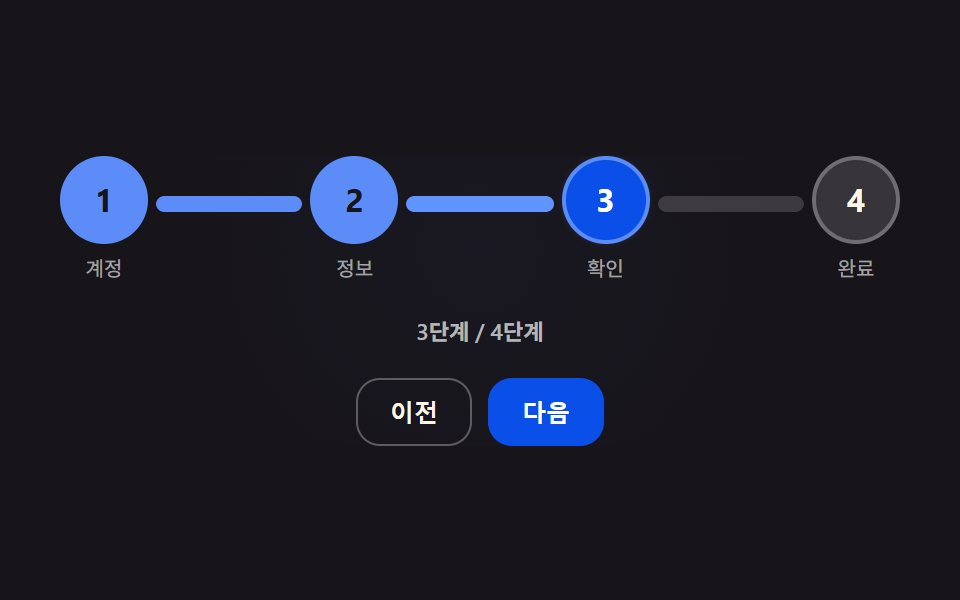
01スプリングで満ちる接続線のステップ表示
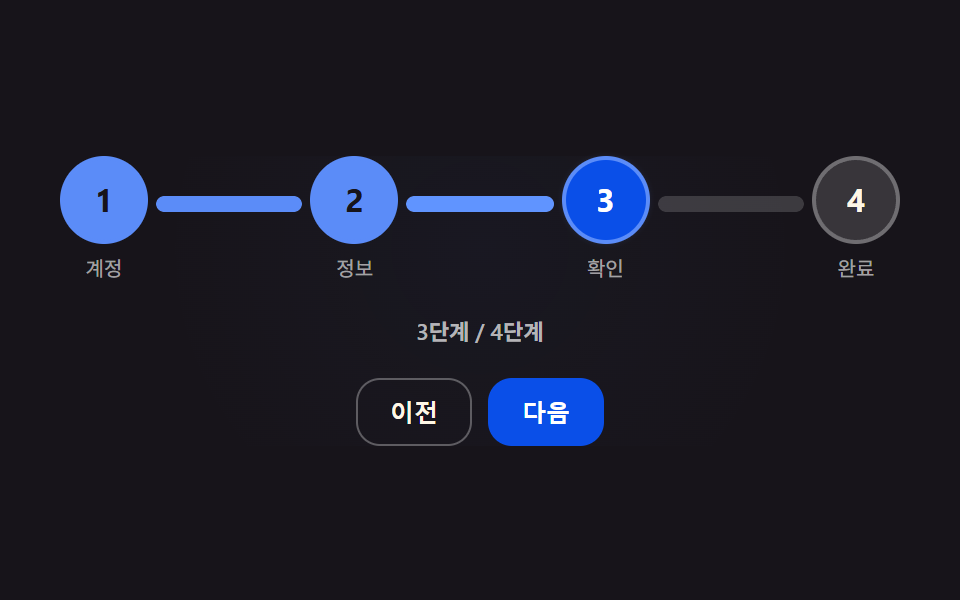
次の段階に進むと、二つの丸をつなぐ線が目標の長さより少し伸びてから戻りながら満ちていく。
使いどころ会員登録のステップ表示
STEP_CONNECTOR_OVERSHOOT_PERCENTSPRING_STIFFNESSSPRING_DAMPING
<main class="stage">
<div class="cs is-demo" id="cs">
  <ol class="cs__row" id="csRow" role="list" aria-label="会員登録の進行ステップ">
    <li class="cs__node" data-i="0"><span class="cs__circle" id="c0">1</span><span class="cs__label">アカウント</span></li>
    <li class="cs__connector" id="k0"><span class="cs__connectorTrack"></span><span class="cs__connectorFill" id="f0"></span></li>
    <li class="cs__node" data-i="1"><span class="cs__circle" id="c1">2</span><span class="cs__label">情報</span></li>
    <li class="cs__connector" id="k1"><span class="cs__connectorTrack"></span><span class="cs__connectorFill" id="f1"></span></li>
    <li class="cs__node" data-i="2"><span class="cs__circle" id="c2">3</span><span class="cs__label">確認</span></li>
    <li class="cs__connector" id="k2"><span class="cs__connectorTrack"></span><span class="cs__connectorFill" id="f2"></span></li>
    <li class="cs__node" data-i="3"><span class="cs__circle" id="c3">4</span><span class="cs__label">完了</span></li>
  </ol>
  <p class="cs__status" id="csStatus" aria-live="polite">1/4 ステップ</p>
  <div class="cs__controls">
    <button type="button" class="cs__btn" id="csPrev">戻る</button>
    <button type="button" class="cs__btn cs__btn--primary" id="csNext">次へ</button>
  </div>
</div>
</main>
@use "../../../../site/static/demo-tokens" as *;
// 핵심: 연결선 채움 비율(pos)이 스프링 방정식(강성 SPRING_STIFFNESS·감쇠 SPRING_DAMPING)을
// 매 프레임 적분한 값이다. 목표(0 또는 1)를 넘어서면 STEP_CONNECTOR_OVERSHOOT_PERCENT 로 정한
// MAX_FILL 에서 강제로 튕겨(vel *= -0.35) 되돌아온다 — 트윈이 아니라 계산.
$duration: $dur-base;
$easing: $ease-spring;
$color: $subject-cream;
@include stage($stage-ink);
.cs {
--stageGlow: 0;
display: grid;
gap: $sp-4;
justify-items: center;
width: min(92vw, 420px);
background-image: radial-gradient(circle at 50% 32%, rgba(91, 140, 248, calc(var(--stageGlow, 0) * .22)), transparent 70%);
border-radius: $r-card;
}
.cs__row {
display: flex;
align-items: flex-start;
list-style: none;
padding: 0;
margin: 0;
width: 100%;
}
.cs__node {
display: flex;
flex-direction: column;
align-items: center;
gap: $sp-1;
flex: 0 0 auto;
}
.cs__circle {
--glow: 0;
width: 40px;
height: 40px;
border-radius: 50%;
display: grid;
place-items: center;
font-size: 16px;
font-weight: 700;
color: $subject-cream;
background: rgba(255, 255, 255, .14);
border: 2px solid rgba(255, 255, 255, .28);
box-shadow: 0 0 calc(var(--glow, 0) * 16px) rgba(91, 140, 248, calc(var(--glow, 0) * .85));
transition: background $dur-quick $ease-out, border-color $dur-quick $ease-out, color $dur-quick $ease-out;
cursor: pointer;
}
.cs__circle.is-active {
background: $subject-blue-deep;
border-color: $subject-blue-light;
color: $stage-paper;
}
.cs__circle.is-done {
background: $subject-blue-light;
border-color: $subject-blue-light;
color: $stage-ink;
}
.cs__label {
font-size: 10px;
color: rgba(255, 255, 255, .6);
}
.cs__connector {
flex: 1 1 auto;
height: 8px;
min-width: 20px;
position: relative;
margin: 20px 4px 0;
border-radius: $r-pill;
overflow: hidden;
}
.cs__connectorTrack,
.cs__connectorFill {
position: absolute;
inset: 0;
border-radius: $r-pill;
}
.cs__connectorTrack {
background: rgba(255, 255, 255, .16);
}
.cs__connectorFill {
--glow: 0;
background: $subject-blue-light;
transform-origin: left center;
transform: scaleX(0);
box-shadow: 0 0 calc(var(--glow, 0) * 14px) rgba(91, 140, 248, calc(var(--glow, 0) * .9));
filter: brightness(calc(1 + var(--glow, 0) * .35));
}
.cs__status {
margin: 0;
font-size: 11px;
color: rgba(255, 255, 255, .68);
font-weight: 600;
}
.cs__controls {
display: flex;
gap: $sp-2;
}
.cs__btn {
border: 1px solid rgba(255, 255, 255, .3);
background: transparent;
color: $subject-cream;
border-radius: $r-control;
padding: $sp-2 $sp-4;
font-size: 12px;
font-weight: 600;
cursor: pointer;
}
.cs__btn--primary {
background: $subject-blue-deep;
border-color: $subject-blue-deep;
color: $stage-paper;
}
.cs__btn:disabled {
opacity: .4;
cursor: default;
}
.cs__btn:focus-visible,
.cs__circle:focus-visible {
outline: 2px solid $subject-blue-light;
outline-offset: 2px;
}
@media (max-width: 340px) {
.cs__circle { width: 32px; height: 32px; font-size: 13px; }
.cs__label { font-size: 9px; }
.cs__connector { height: 6px; margin: 16px 4px 0; }
}
@media (prefers-reduced-motion: reduce) {
.cs__circle,
.cs__connectorFill {
transition: none;
}
}html, body {
margin: 0;
overflow: hidden;
}
.stage {
box-sizing: border-box;
min-height: 100vh;
display: grid;
place-items: center;
margin: 0;
background: #17141a;
font-family: -apple-system, "Segoe UI", "Noto Sans KR", sans-serif;
padding: clamp(8px, 4vw, 24px);
}
.cs {
--stageGlow: 0;
display: grid;
gap: 16px;
justify-items: center;
width: min(92vw, 420px);
background-image: radial-gradient(circle at 50% 32%, rgba(91, 140, 248, calc(var(--stageGlow, 0) * 0.22)), transparent 70%);
border-radius: 16px;
}
.cs__row {
display: flex;
align-items: flex-start;
list-style: none;
padding: 0;
margin: 0;
width: 100%;
}
.cs__node {
display: flex;
flex-direction: column;
align-items: center;
gap: 4px;
flex: 0 0 auto;
}
.cs__circle {
--glow: 0;
width: 40px;
height: 40px;
border-radius: 50%;
display: grid;
place-items: center;
font-size: 16px;
font-weight: 700;
color: #fff7e6;
background: rgba(255, 255, 255, 0.14);
border: 2px solid rgba(255, 255, 255, 0.28);
box-shadow: 0 0 calc(var(--glow, 0) * 16px) rgba(91, 140, 248, calc(var(--glow, 0) * 0.85));
transition: background 220ms ease-out, border-color 220ms ease-out, color 220ms ease-out;
cursor: pointer;
}
.cs__circle.is-active {
background: #0a4fe8;
border-color: #5b8cf8;
color: #ffffff;
}
.cs__circle.is-done {
background: #5b8cf8;
border-color: #5b8cf8;
color: #17141a;
}
.cs__label {
font-size: 10px;
color: rgba(255, 255, 255, 0.6);
}
.cs__connector {
flex: 1 1 auto;
height: 8px;
min-width: 20px;
position: relative;
margin: 20px 4px 0;
border-radius: 999px;
overflow: hidden;
}
.cs__connectorTrack,
.cs__connectorFill {
position: absolute;
inset: 0;
border-radius: 999px;
}
.cs__connectorTrack {
background: rgba(255, 255, 255, 0.16);
}
.cs__connectorFill {
--glow: 0;
background: #5b8cf8;
transform-origin: left center;
transform: scaleX(0);
box-shadow: 0 0 calc(var(--glow, 0) * 14px) rgba(91, 140, 248, calc(var(--glow, 0) * 0.9));
filter: brightness(calc(1 + var(--glow, 0) * 0.35));
}
.cs__status {
margin: 0;
font-size: 11px;
color: rgba(255, 255, 255, 0.68);
font-weight: 600;
}
.cs__controls {
display: flex;
gap: 8px;
}
.cs__btn {
border: 1px solid rgba(255, 255, 255, 0.3);
background: transparent;
color: #fff7e6;
border-radius: 12px;
padding: 8px 16px;
font-size: 12px;
font-weight: 600;
cursor: pointer;
}
.cs__btn--primary {
background: #0a4fe8;
border-color: #0a4fe8;
color: #ffffff;
}
.cs__btn:disabled {
opacity: 0.4;
cursor: default;
}
.cs__btn:focus-visible,
.cs__circle:focus-visible {
outline: 2px solid #5b8cf8;
outline-offset: 2px;
}
@media (max-width: 340px) {
.cs__circle {
width: 32px;
height: 32px;
font-size: 13px;
}
.cs__label {
font-size: 9px;
}
.cs__connector {
height: 6px;
margin: 16px 4px 0;
}
}
@media (prefers-reduced-motion: reduce) {
.cs__circle,
.cs__connectorFill {
transition: none;
}
}(function () {
var STEP_CONNECTOR_OVERSHOOT_PERCENT = 10;
var SPRING_STIFFNESS = 180;
var SPRING_DAMPING = 16;
var SPRING_KICK_VELOCITY = 3.2;
var STEP_COUNT = 4;
var MAX_FILL = 1 + STEP_CONNECTOR_OVERSHOOT_PERCENT / 100;
var root = document.getElementById('cs');
var status = document.getElementById('csStatus');
var prevBtn = document.getElementById('csPrev');
var nextBtn = document.getElementById('csNext');
var reduce = window.matchMedia('(prefers-reduced-motion: reduce)').matches;
var circles = [0, 1, 2, 3].map(function (i) { return document.getElementById('c' + i); });
var fills = [0, 1, 2].map(function (i) { return document.getElementById('f' + i); });
function clamp(v, lo, hi) { return Math.max(lo, Math.min(hi, v)); }
// 연결선마다 독립된 스프링 상태(위치·속도) — 목표는 0(안 채움) 또는 1(채움)
var springs = fills.map(function () { return { pos: 0, vel: 0, target: 0 }; });
var current = 0;
function integrate(s, dt) {
var accel = SPRING_STIFFNESS * (s.target - s.pos) - SPRING_DAMPING * s.vel;
s.vel += accel * dt;
s.pos += s.vel * dt;
var max = s.target > 0 ? MAX_FILL : 1;
if (s.target > 0 && s.pos > MAX_FILL) { s.pos = MAX_FILL; s.vel *= -0.35; }
if (s.target === 0 && s.pos < 0) { s.pos = 0; s.vel = 0; }
if (Math.abs(s.pos - s.target) < 0.001 && Math.abs(s.vel) < 0.01) { s.pos = s.target; s.vel = 0; }
}
function kick(s) { s.vel += (s.target > s.pos ? 1 : -1) * SPRING_KICK_VELOCITY; }
function render() {
var maxGlow = 0;
fills.forEach(function (el, i) {
var p = reduce ? springs[i].target : clamp(springs[i].pos, 0, MAX_FILL);
el.style.transform = 'scaleX(' + p.toFixed(4) + ')';
// 오버슛(1 을 넘긴 만큼)을 0~1 로 정규화해 연결선 글로우·次へ 노드 그림자·배경 톤에 같은 값을 퍼뜨린다
var over = clamp((p - 1) / (STEP_CONNECTOR_OVERSHOOT_PERCENT / 100), 0, 1);
el.style.setProperty('--glow', over.toFixed(3));
if (circles[i + 1]) circles[i + 1].style.setProperty('--glow', over.toFixed(3));
if (over > maxGlow) maxGlow = over;
});
root.style.setProperty('--stageGlow', maxGlow.toFixed(3));
circles.forEach(function (el, i) {
el.classList.toggle('is-done', i < current);
el.classList.toggle('is-active', i === current);
});
status.textContent = (current + 1) + '/ ' + STEP_COUNT + ' ステップ';
prevBtn.disabled = current === 0;
nextBtn.disabled = current === STEP_COUNT - 1;
}
function goTo(next) {
next = clamp(next, 0, STEP_COUNT - 1);
if (next === current) return;
if (next > current) {
for (var i = current; i < next; i++) { springs[i].target = 1; kick(springs[i]); }
} else {
for (var j = next; j < current; j++) { springs[j].target = 0; kick(springs[j]); }
}
current = next;
render();
}
prevBtn.addEventListener('click', function () { root.classList.remove('is-demo'); goTo(current - 1); });
nextBtn.addEventListener('click', function () { root.classList.remove('is-demo'); goTo(current + 1); });
root.addEventListener('keydown', function (e) {
if (e.key === 'ArrowRight') { root.classList.remove('is-demo'); goTo(current + 1); e.preventDefault(); }
else if (e.key === 'ArrowLeft') { root.classList.remove('is-demo'); goTo(current - 1); e.preventDefault(); }
});
circles.forEach(function (el, i) {
el.addEventListener('click', function () { root.classList.remove('is-demo'); goTo(i); });
});
var startTime = null;
var lastNow = 0;
var phase = 0;
function tick(now) {
if (startTime === null) { startTime = now; lastNow = now; }
var dt = Math.min((now - lastNow) / 1000, 0.05);
lastNow = now;
var t = (now - startTime) / 1000 % 2;
if (root.classList.contains('is-demo')) {
if (t < 0.05 && phase !== 0) { phase = 0; }
if (phase === 0 && t > 0.2) { goTo(clamp(current + 1, 0, STEP_COUNT - 1)); phase = 1; }
if (phase === 1 && t > 0.75) { goTo(clamp(current + 1, 0, STEP_COUNT - 1)); phase = 2; }
if (phase === 2 && t > 1.3) { goTo(clamp(current + 1, 0, STEP_COUNT - 1)); phase = 3; }
if (phase === 3 && t > 1.85) { goTo(0); phase = 4; }
}
springs.forEach(function (s) { if (!reduce) integrate(s, dt); });
render();
requestAnimationFrame(tick);
}
render();
requestAnimationFrame(tick);
})();// StepSpringFillConnector — vanilla 판(run/420/demo/01-step-precision-connector-spring-fill/index.html) 의 React 포트.
// 값 하나: 연결선 채움 비율(pos)이 스프링 방정식(SPRING_STIFFNESS·SPRING_DAMPING)을 매 프레임 적분한 값이다.
// 목표를 넘어서면 STEP_CONNECTOR_OVERSHOOT_PERCENT 로 정한 MAX_FILL 에서 튕겨(vel *= -0.35) 되돌아온다.
import { useEffect, useRef, useState } from "react";
import styles from "./StepSpringFillConnector.module.scss";
type Box<T> = { current: T };
type Spring = { pos: number; vel: number; target: number };
const STEP_CONNECTOR_OVERSHOOT_PERCENT = 10;
const SPRING_STIFFNESS = 180;
const SPRING_DAMPING = 16;
const SPRING_KICK_VELOCITY = 3.2;
const STEP_COUNT = 4;
const MAX_FILL = 1 + STEP_CONNECTOR_OVERSHOOT_PERCENT / 100;
const LABELS = ["계정", "정보", "확인", "완료"];
function clamp(v: number, lo: number, hi: number): number {
return Math.max(lo, Math.min(hi, v));
}
export default function StepSpringFillConnector() {
const [current, setCurrent] = useState(0);
const [reduce, setReduce] = useState(false);
const currentRef = useRef<number>(0) as Box<number>;
const demoRef = useRef<boolean>(true) as Box<boolean>;
const fillRefs = useRef<Array<HTMLSpanElement | null>>([null, null, null]) as Box<Array<HTMLSpanElement | null>>;
const circleRefs = useRef<Array<HTMLButtonElement | null>>([null, null, null, null]) as Box<Array<HTMLButtonElement | null>>;
const rootRef = useRef<HTMLDivElement | null>(null) as Box<HTMLDivElement | null>;
const springsRef = useRef<Spring[]>([0, 1, 2].map(() => ({ pos: 0, vel: 0, target: 0 }))) as Box<Spring[]>;
const frameRef = useRef<number>(0) as Box<number>;
useEffect(() => {
setReduce(window.matchMedia("(prefers-reduced-motion: reduce)").matches);
}, []);
function integrate(s: Spring, dt: number): void {
const accel = SPRING_STIFFNESS * (s.target - s.pos) - SPRING_DAMPING * s.vel;
s.vel += accel * dt;
s.pos += s.vel * dt;
if (s.target > 0 && s.pos > MAX_FILL) { s.pos = MAX_FILL; s.vel *= -0.35; }
if (s.target === 0 && s.pos < 0) { s.pos = 0; s.vel = 0; }
if (Math.abs(s.pos - s.target) < 0.001 && Math.abs(s.vel) < 0.01) { s.pos = s.target; s.vel = 0; }
}
function kick(s: Spring): void {
s.vel += (s.target > s.pos ? 1 : -1) * SPRING_KICK_VELOCITY;
}
function paintFills(): void {
let maxGlow = 0;
springsRef.current.forEach((s, i) => {
const el = fillRefs.current[i];
const p = reduce ? s.target : clamp(s.pos, 0, MAX_FILL);
const over = clamp((p - 1) / (STEP_CONNECTOR_OVERSHOOT_PERCENT / 100), 0, 1);
if (el) {
el.style.transform = "scaleX(" + p.toFixed(4) + ")";
el.style.setProperty("--glow", over.toFixed(3));
}
const node = circleRefs.current[i + 1];
if (node) node.style.setProperty("--glow", over.toFixed(3));
if (over > maxGlow) maxGlow = over;
});
if (rootRef.current) rootRef.current.style.setProperty("--stageGlow", maxGlow.toFixed(3));
}
function goTo(next: number): void {
const clamped = clamp(next, 0, STEP_COUNT - 1);
if (clamped === currentRef.current) return;
const from = currentRef.current;
if (clamped > from) {
for (let i = from; i < clamped; i += 1) { springsRef.current[i].target = 1; kick(springsRef.current[i]); }
} else {
for (let j = clamped; j < from; j += 1) { springsRef.current[j].target = 0; kick(springsRef.current[j]); }
}
currentRef.current = clamped;
setCurrent(clamped);
}
useEffect(() => {
let startTime = 0;
let lastNow = 0;
let phase = 0;
function tick(now: number): void {
if (startTime === 0) { startTime = now; lastNow = now; }
const dt = Math.min((now - lastNow) / 1000, 0.05);
lastNow = now;
const t = ((now - startTime) / 1000) % 2;
if (demoRef.current) {
if (t < 0.05 && phase !== 0) phase = 0;
if (phase === 0 && t > 0.2) { goTo(clamp(currentRef.current + 1, 0, STEP_COUNT - 1)); phase = 1; }
if (phase === 1 && t > 0.75) { goTo(clamp(currentRef.current + 1, 0, STEP_COUNT - 1)); phase = 2; }
if (phase === 2 && t > 1.3) { goTo(clamp(currentRef.current + 1, 0, STEP_COUNT - 1)); phase = 3; }
if (phase === 3 && t > 1.85) { goTo(0); phase = 4; }
}
if (!reduce) springsRef.current.forEach((s) => integrate(s, dt));
paintFills();
frameRef.current = requestAnimationFrame(tick);
}
frameRef.current = requestAnimationFrame(tick);
return () => cancelAnimationFrame(frameRef.current);
}, [reduce]);
function stopDemo(): void { demoRef.current = false; }
function onKeyDown(e: { key: string; preventDefault: () => void }): void {
if (e.key === "ArrowRight") { stopDemo(); goTo(currentRef.current + 1); e.preventDefault(); }
else if (e.key === "ArrowLeft") { stopDemo(); goTo(currentRef.current - 1); e.preventDefault(); }
}
return (
<main className={styles.stage}>
<div className={styles.cs} onKeyDown={onKeyDown} ref={(el: HTMLDivElement | null) => { rootRef.current = el; }}>
<ol className={styles.row} role="list" aria-label="가입 진행 단계">
{LABELS.map((label, i) => (
<li key={label} style={{ display: "contents" }}>
<div className={styles.node}>
<button
type="button"
className={[styles.circle, i === current ? styles.circleActive : "", i < current ? styles.circleDone : ""].join(" ")}
ref={(el: HTMLButtonElement | null) => { circleRefs.current[i] = el; }}
onClick={() => { stopDemo(); goTo(i); }}
>
{i + 1}
</button>
<span className={styles.label}>{label}</span>
</div>
{i < STEP_COUNT - 1 && (
<div className={styles.connector}>
<span className={styles.connectorTrack} />
<span className={styles.connectorFill} ref={(el: HTMLSpanElement | null) => { fillRefs.current[i] = el; }} />
</div>
)}
</li>
))}
</ol>
<p className={styles.status} aria-live="polite">{(current + 1) + "단계 / " + STEP_COUNT + "단계"}</p>
<div className={styles.controls}>
<button type="button" className={styles.btn} disabled={current === 0} onClick={() => { stopDemo(); goTo(current - 1); }}>이전</button>
<button type="button" className={[styles.btn, styles.btnPrimary].join(" ")} disabled={current === STEP_COUNT - 1} onClick={() => { stopDemo(); goTo(current + 1); }}>다음</button>
</div>
</div>
</main>
);
}01 スプリングで満ちる接続線のステップ表示 — 計測 累積面積 22.607% · 動いたフレーム 23/23GODRICH オリジナル · SCSS と React は zip に同梱 · ステップインジケーター デザイン 9パターン — 物理計算で仕上げる進行段階
このデモが属する記事
 ステップインジケーター デザイン 9パターン — 物理計算で仕上げる進行段階このステップインジケーター デザインは9通りある。デザイナーは03番のチェックマークが描かれる瞬間を気に入り、開発者は05番の摩擦値ひとつのせいでスクラバーが毎回違う位置で止まることに手を焼いた。09番では二人とも頷いた — リングの広がり この記事のデモをすべて見る