04最後のローソクが伸びるキャンドルチャート
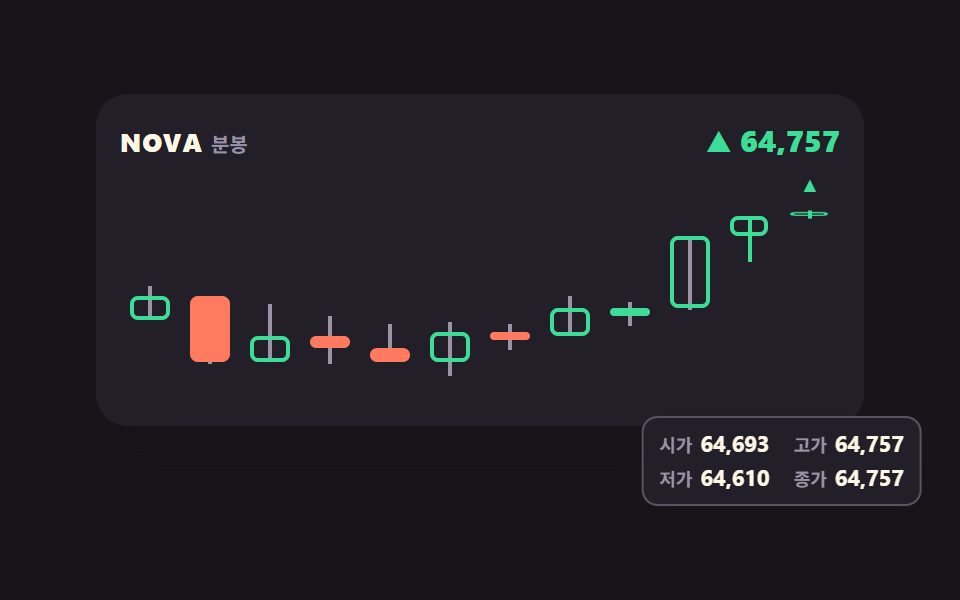
確定したローソクはそのままに、未確定のローソクだけ scaleY と transform-origin で高値・安値に合わせて伸ばします
使いどころチャート画面の分足エリア、取引アプリの期間切り替えタブの下
scaleYtransform-originsteps(1, end)
<main class="stage">
<div class="cl is-demo" id="cl">
  <div class="cl__board">
    <div class="cl__head">
      <p class="cl__name"><span class="cl__sym">NOVA</span><span class="cl__unit">分足</span></p>
      <span class="cl__now" data-now>0</span>
    </div>
    <div class="cl__plot" id="clPlot">
      <!-- 칸 13개 = 화면에 12개 + 오른쪽에 대기 1개. 대기 칸은 확정 컷 뒤에 밀려 들어온다 -->
      <div class="cl__track" id="clTrack" data-label="{n}本目のローソク">
        <button type="button" class="cl__slot" data-i="0"><span class="cl__wick cl__wick--up" data-wu></span><span class="cl__wick cl__wick--dn" data-wd></span><span class="cl__body" data-bd></span></button>
        <button type="button" class="cl__slot" data-i="1"><span class="cl__wick cl__wick--up" data-wu></span><span class="cl__wick cl__wick--dn" data-wd></span><span class="cl__body" data-bd></span></button>
        <button type="button" class="cl__slot" data-i="2"><span class="cl__wick cl__wick--up" data-wu></span><span class="cl__wick cl__wick--dn" data-wd></span><span class="cl__body" data-bd></span></button>
        <button type="button" class="cl__slot" data-i="3"><span class="cl__wick cl__wick--up" data-wu></span><span class="cl__wick cl__wick--dn" data-wd></span><span class="cl__body" data-bd></span></button>
        <button type="button" class="cl__slot" data-i="4"><span class="cl__wick cl__wick--up" data-wu></span><span class="cl__wick cl__wick--dn" data-wd></span><span class="cl__body" data-bd></span></button>
        <button type="button" class="cl__slot" data-i="5"><span class="cl__wick cl__wick--up" data-wu></span><span class="cl__wick cl__wick--dn" data-wd></span><span class="cl__body" data-bd></span></button>
        <button type="button" class="cl__slot" data-i="6"><span class="cl__wick cl__wick--up" data-wu></span><span class="cl__wick cl__wick--dn" data-wd></span><span class="cl__body" data-bd></span></button>
        <button type="button" class="cl__slot" data-i="7"><span class="cl__wick cl__wick--up" data-wu></span><span class="cl__wick cl__wick--dn" data-wd></span><span class="cl__body" data-bd></span></button>
        <button type="button" class="cl__slot" data-i="8"><span class="cl__wick cl__wick--up" data-wu></span><span class="cl__wick cl__wick--dn" data-wd></span><span class="cl__body" data-bd></span></button>
        <button type="button" class="cl__slot" data-i="9"><span class="cl__wick cl__wick--up" data-wu></span><span class="cl__wick cl__wick--dn" data-wd></span><span class="cl__body" data-bd></span></button>
        <button type="button" class="cl__slot" data-i="10"><span class="cl__wick cl__wick--up" data-wu></span><span class="cl__wick cl__wick--dn" data-wd></span><span class="cl__body" data-bd></span></button>
        <!-- 11 = 아직 안 끝난 봉. 이 하나만 자란다 -->
        <button type="button" class="cl__slot cl__slot--live" data-i="11"><span class="cl__tag" aria-hidden="true">▲</span><span class="cl__wick cl__wick--up" data-wu></span><span class="cl__wick cl__wick--dn" data-wd></span><span class="cl__body" data-bd></span></button>
        <!-- 12 = 확정 컷 뒤 오른쪽에 서는 새 봉. 실사용에서는 자리만 지킨다(opacity 0) -->
        <button type="button" class="cl__slot cl__slot--next" data-i="12"><span class="cl__tag" aria-hidden="true">▲</span><span class="cl__wick cl__wick--up" data-wu></span><span class="cl__wick cl__wick--dn" data-wd></span><span class="cl__body" data-bd></span></button>
      </div>
    </div>
  </div>
  <div class="cl__tip" data-tip>
    <span class="cl__tipRow"><span class="cl__tipK">始値</span><span class="cl__tipV" data-v0>0</span></span>
    <span class="cl__tipRow"><span class="cl__tipK">高値</span><span class="cl__tipV" data-v1>0</span></span>
    <span class="cl__tipRow"><span class="cl__tipK">安値</span><span class="cl__tipV" data-v2>0</span></span>
    <span class="cl__tipRow"><span class="cl__tipK">終値</span><span class="cl__tipV" data-v3>0</span></span>
  </div>
</div>
</main>@use "../../../../site/static/demo-tokens" as *;
// 마지막 봉이 자라는 캔들 차트 — 확정된 봉 11개는 값이 굳어 그대로 서 있고, 맨 오른쪽 한 봉만
// 새 값이 들어올 때마다 늘어난다. 주기가 끝나면 그 봉이 확정되고 차트가 한 칸 왼쪽으로 밀린다.
//
// 289(SVG 그래프 그리기)와 갈리는 지점: 289 는 이미 다 들어와 있는 정적 데이터를 한 번에 그리고,
// 여기는 데이터가 계속 들어와 마지막 한 봉이 그 자리에서 실시간으로 늘어난다.
//
// 실사용에서는 시드 PRNG 가 260ms 마다 마지막 봉을 갱신하고 JS 가 몸통·심지의 top/height 를 다시 적는다.
// 미리보기(.is-demo)는 같은 서사를 2초 CSS 루프에 눕힌다 — JS 는 그동안 값을 안 건드린다.
$duration: $dur-loop;
$easing: $ease-out;
$color: $tick-up;
@include stage($stage-ink);
// 툴팁이 절대 배치라 부모 높이 계산에서 빠진다 — 그 높이만큼 아래에 자리를 비워 둔다 (BD8·BD9)
.cl { position: relative; display: flex; justify-content: center; width: 100%; padding-bottom: $sp-10; }
.cl__board {
width: min(100%, 360px); background: $tick-panel; border-radius: $r-card;
box-shadow: $shadow-raised; padding: $sp-3 $sp-3 $sp-2;
}
.cl__head { display: flex; align-items: baseline; justify-content: space-between; gap: $sp-2; padding-bottom: $sp-2; }
.cl__name { margin: 0; }
.cl__sym { font-weight: 800; font-size: clamp(11px, 3vw, 13px); color: $subject-cream; letter-spacing: .04em; }
.cl__unit { font-weight: 700; font-size: clamp(9px, 2.4vw, 10px); color: $tick-mute; margin-left: $sp-1; }
.cl__now {
font-weight: 800; font-size: clamp(12px, 3.4vw, 15px); line-height: 1.4;
font-variant-numeric: tabular-nums; color: $subject-cream;
}
.cl__now.is-up { color: $color; }
.cl__now.is-down { color: $tick-down; }
.cl__plot { position: relative; height: clamp(76px, 25vw, 116px); overflow: hidden; }
// 칸을 13개로 짜고 트랙을 13/12 만큼 넓혀 12칸만 보이게 한다 — 한 칸 밀기가 translateX(-100%/13) 로 딱 떨어진다
.cl__track { display: grid; grid-template-columns: repeat(13, 1fr); width: calc(100% * 13 / 12); height: 100%; }
// 버튼은 폭이 fit-content 라 격자 칸이 0 으로 접힌다 — width: 100% 를 반드시 적는다 (281-04 실측)
.cl__slot {
position: relative; width: 100%; height: 100%;
padding: 0; margin: 0; border: 0; background: transparent; cursor: pointer;
}
.cl__slot:focus-visible { outline: 2px solid $tick-mute; outline-offset: -2px; }
.cl__wick { position: absolute; left: calc(50% - 1px); width: 2px; background: $tick-mute; }
// 심지도 몸통도 **여는 값 쪽 변**이 기준점이다. 가운데를 기준으로 늘리면 이미 확정된 여는 값 자리까지
// 같이 움직여 차트가 거짓말을 한다 — 위로 자라는 것은 아래 변, 아래로 자라는 것은 위 변이 origin
.cl__wick--up { transform-origin: 50% 100%; }
.cl__wick--dn { transform-origin: 50% 0; }
.cl__slot--live .cl__wick, .cl__slot--next .cl__wick { background: $color; }
.cl__body { box-sizing: border-box; position: absolute; left: 18%; right: 18%; border-radius: $r-xs; }
// 방향을 색만으로 전하지 않는다 — 오르는 봉은 속 빈 몸통, 내리는 봉은 채운 몸통으로 형태가 갈린다
.cl__body.is-up { border: 2px solid $color; background: transparent; transform-origin: 50% 100%; }
.cl__body.is-down { border: 2px solid $tick-down; background: $tick-down; transform-origin: 50% 0; }
// 아직 안 끝난 봉 위에 붙는 방향 표시 — 색을 못 읽어도 ▲ 로 어느 쪽으로 자라는지 안다
.cl__tag {
position: absolute; top: 0; left: 50%; transform: translateX(-50%);
font-weight: 700; font-size: clamp(7px, 2vw, 9px); line-height: 1; color: $color;
}
// 툴팁 — 실사용에서는 봉 위에 포인터를 올리면 JS 가 left 를 옮기고 네 값을 갈아 끼운다
.cl__tip {
position: absolute; bottom: 0; left: 50%; transform: translateX(-50%);
display: grid; grid-template-columns: repeat(2, auto); gap: 0 $sp-3;
background: $tick-panel; border: 1px solid rgba(154, 147, 166, .45); border-radius: $r-sm;
box-shadow: $shadow-press; padding: $sp-1 $sp-2; white-space: nowrap; max-width: 100%;
}
.cl__tipRow { display: flex; align-items: baseline; gap: $sp-1; }
.cl__tipK { font-weight: 700; font-size: clamp(8px, 2.1vw, 9px); line-height: 1.6; color: $tick-mute; }
.cl__tipV {
font-weight: 700; font-size: clamp(9px, 2.4vw, 11px); line-height: 1.6;
color: $subject-cream; font-variant-numeric: tabular-nums;
}
// 실사용(정적 경로)에서는 대기 칸이 보이면 안 된다. display: none 이 아니라 opacity 0 이라야
// 격자 칸 폭이 그대로 남아 나머지 12개의 자리가 안 흔들린다
.cl:not(.is-demo) .cl__slot--next { opacity: 0; }
.cl__slot--next .cl__tag { opacity: 0; }
// ── 미리보기 루프(2초)
// 0 → 70% 마지막 봉이 여는 값 선에서 위로 자란다 (몸통·심지 모두 scaleY)
// 72% 확정 컷 — 트랙이 한 칸 왼쪽으로 밀리고 오른쪽에서 새 봉이 선다 (steps(1, end))
// 72 → 92% 새 봉이 조금 자란다
// 94% 루프 복귀 컷 — 24프레임의 마지막 장이 2초의 95.8% 지점이라 96% 안에서 끝낸다
// 루프 안에서 컷은 두 번(확정·복귀) = 초당 1회로 WCAG 2.3.1 의 초당 3회 미만 아래다
.cl.is-demo .cl__track {
animation-name: clShift;
animation-duration: $duration;
animation-timing-function: steps(1, end);
animation-iteration-count: infinite;
}
@keyframes clShift {
0%, 70% { transform: translateX(0); }
72%, 92% { transform: translateX(calc(-100% / 13)); }
94%, 100% { transform: translateX(0); }
}
.cl.is-demo .cl__slot--live .cl__body,
.cl.is-demo .cl__slot--live .cl__wick,
.cl.is-demo .cl__slot--next .cl__body,
.cl.is-demo .cl__slot--next .cl__wick {
animation-duration: $duration;
animation-timing-function: $easing;
animation-iteration-count: infinite;
}
.cl.is-demo .cl__slot--live .cl__body { animation-name: clGrowBody; }
.cl.is-demo .cl__slot--live .cl__wick--up { animation-name: clGrowUp; }
.cl.is-demo .cl__slot--live .cl__wick--dn { animation-name: clGrowDn; }
.cl.is-demo .cl__slot--next .cl__body,
.cl.is-demo .cl__slot--next .cl__wick { animation-name: clGrowNext; }
@keyframes clGrowBody {
0% { transform: scaleY(.18); }
12% { transform: scaleY(.42); }
24% { transform: scaleY(.31); }
38% { transform: scaleY(.68); }
52% { transform: scaleY(.57); }
70% { transform: scaleY(1); }
92% { transform: scaleY(1); animation-timing-function: steps(1, end); }
94%, 100% { transform: scaleY(.18); }
}
@keyframes clGrowUp {
0% { transform: scaleY(.24); }
12% { transform: scaleY(.5); }
24% { transform: scaleY(.46); }
38% { transform: scaleY(.76); }
52% { transform: scaleY(.72); }
70% { transform: scaleY(1); }
92% { transform: scaleY(1); animation-timing-function: steps(1, end); }
94%, 100% { transform: scaleY(.24); }
}
@keyframes clGrowDn {
0% { transform: scaleY(.3); }
24% { transform: scaleY(1); }
92% { transform: scaleY(1); animation-timing-function: steps(1, end); }
94%, 100% { transform: scaleY(.3); }
}
@keyframes clGrowNext {
0% { transform: scaleY(0); }
70% { transform: scaleY(0); animation-timing-function: steps(1, end); }
72% { transform: scaleY(.26); animation-timing-function: $easing; }
84% { transform: scaleY(.48); }
92% { transform: scaleY(.62); animation-timing-function: steps(1, end); }
94%, 100% { transform: scaleY(0); }
}
// 방향 표시는 확정 컷에 맞춰 자리를 넘긴다 — 아직 안 끝난 봉 위에만 떠 있어야 뜻이 맞는다
.cl.is-demo .cl__slot--live .cl__tag,
.cl.is-demo .cl__slot--next .cl__tag {
animation-duration: $duration;
animation-timing-function: steps(1, end);
animation-iteration-count: infinite;
}
.cl.is-demo .cl__slot--live .cl__tag { animation-name: clTagLive; }
.cl.is-demo .cl__slot--next .cl__tag { animation-name: clTagNext; }
@keyframes clTagLive { 0%, 70% { opacity: 1; } 72%, 92% { opacity: 0; } 94%, 100% { opacity: 1; } }
@keyframes clTagNext { 0%, 70% { opacity: 0; } 72%, 92% { opacity: 1; } 94%, 100% { opacity: 0; } }
@media (max-width: 340px) {
.cl { padding-bottom: $sp-8; }
.cl__board { padding: $sp-2; }
.cl__head { padding-bottom: $sp-1; }
.cl__tip { gap: 0 $sp-2; padding: $sp-1; }
}
@media (prefers-reduced-motion: reduce) {
// 자라는 연출과 확정 컷을 멈추고 마지막 봉을 다 자란 크기로 세워 둔다 — 값은 그대로 갱신된다
.cl.is-demo .cl__track { animation: none !important; transform: none !important; }
.cl.is-demo .cl__slot--live .cl__body,
.cl.is-demo .cl__slot--live .cl__wick { animation: none !important; transform: none !important; }
.cl.is-demo .cl__slot--next .cl__body,
.cl.is-demo .cl__slot--next .cl__wick { animation: none !important; transform: scaleY(0) !important; }
.cl.is-demo .cl__slot--live .cl__tag { animation: none !important; opacity: 1 !important; }
.cl.is-demo .cl__slot--next .cl__tag { animation: none !important; opacity: 0 !important; }
}html, body {
margin: 0;
overflow: hidden;
}
.stage {
box-sizing: border-box;
min-height: 100vh;
display: grid;
place-items: center;
margin: 0;
background: #17141a;
font-family: -apple-system, "Segoe UI", "Noto Sans KR", sans-serif;
padding: clamp(8px, 4vw, 24px);
}
.cl {
position: relative;
display: flex;
justify-content: center;
width: 100%;
padding-bottom: 40px;
}
.cl__board {
width: min(100%, 360px);
background: #231f28;
border-radius: 16px;
box-shadow: 0 14px 24px rgba(23, 20, 26, 0.32);
padding: 12px 12px 8px;
}
.cl__head {
display: flex;
align-items: baseline;
justify-content: space-between;
gap: 8px;
padding-bottom: 8px;
}
.cl__name {
margin: 0;
}
.cl__sym {
font-weight: 800;
font-size: clamp(11px, 3vw, 13px);
color: #fff7e6;
letter-spacing: 0.04em;
}
.cl__unit {
font-weight: 700;
font-size: clamp(9px, 2.4vw, 10px);
color: #9a93a6;
margin-left: 4px;
}
.cl__now {
font-weight: 800;
font-size: clamp(12px, 3.4vw, 15px);
line-height: 1.4;
font-variant-numeric: tabular-nums;
color: #fff7e6;
}
.cl__now.is-up {
color: #3ddc97;
}
.cl__now.is-down {
color: #ff7a5e;
}
.cl__plot {
position: relative;
height: clamp(76px, 25vw, 116px);
overflow: hidden;
}
.cl__track {
display: grid;
grid-template-columns: repeat(13, 1fr);
width: 108.3333333333%;
height: 100%;
}
.cl__slot {
position: relative;
width: 100%;
height: 100%;
padding: 0;
margin: 0;
border: 0;
background: transparent;
cursor: pointer;
}
.cl__slot:focus-visible {
outline: 2px solid #9a93a6;
outline-offset: -2px;
}
.cl__wick {
position: absolute;
left: calc(50% - 1px);
width: 2px;
background: #9a93a6;
}
.cl__wick--up {
transform-origin: 50% 100%;
}
.cl__wick--dn {
transform-origin: 50% 0;
}
.cl__slot--live .cl__wick, .cl__slot--next .cl__wick {
background: #3ddc97;
}
.cl__body {
box-sizing: border-box;
position: absolute;
left: 18%;
right: 18%;
border-radius: 4px;
}
.cl__body.is-up {
border: 2px solid #3ddc97;
background: transparent;
transform-origin: 50% 100%;
}
.cl__body.is-down {
border: 2px solid #ff7a5e;
background: #ff7a5e;
transform-origin: 50% 0;
}
.cl__tag {
position: absolute;
top: 0;
left: 50%;
transform: translateX(-50%);
font-weight: 700;
font-size: clamp(7px, 2vw, 9px);
line-height: 1;
color: #3ddc97;
}
.cl__tip {
position: absolute;
bottom: 0;
left: 50%;
transform: translateX(-50%);
display: grid;
grid-template-columns: repeat(2, auto);
gap: 0 12px;
background: #231f28;
border: 1px solid rgba(154, 147, 166, 0.45);
border-radius: 8px;
box-shadow: 0 6px 12px rgba(23, 20, 26, 0.32);
padding: 4px 8px;
white-space: nowrap;
max-width: 100%;
}
.cl__tipRow {
display: flex;
align-items: baseline;
gap: 4px;
}
.cl__tipK {
font-weight: 700;
font-size: clamp(8px, 2.1vw, 9px);
line-height: 1.6;
color: #9a93a6;
}
.cl__tipV {
font-weight: 700;
font-size: clamp(9px, 2.4vw, 11px);
line-height: 1.6;
color: #fff7e6;
font-variant-numeric: tabular-nums;
}
.cl:not(.is-demo) .cl__slot--next {
opacity: 0;
}
.cl__slot--next .cl__tag {
opacity: 0;
}
.cl.is-demo .cl__track {
animation-name: clShift;
animation-duration: 2s;
animation-timing-function: steps(1, end);
animation-iteration-count: infinite;
}
@keyframes clShift {
0%, 70% {
transform: translateX(0);
}
72%, 92% {
transform: translateX(-7.6923076923%);
}
94%, 100% {
transform: translateX(0);
}
}
.cl.is-demo .cl__slot--live .cl__body,
.cl.is-demo .cl__slot--live .cl__wick,
.cl.is-demo .cl__slot--next .cl__body,
.cl.is-demo .cl__slot--next .cl__wick {
animation-duration: 2s;
animation-timing-function: ease-out;
animation-iteration-count: infinite;
}
.cl.is-demo .cl__slot--live .cl__body {
animation-name: clGrowBody;
}
.cl.is-demo .cl__slot--live .cl__wick--up {
animation-name: clGrowUp;
}
.cl.is-demo .cl__slot--live .cl__wick--dn {
animation-name: clGrowDn;
}
.cl.is-demo .cl__slot--next .cl__body,
.cl.is-demo .cl__slot--next .cl__wick {
animation-name: clGrowNext;
}
@keyframes clGrowBody {
0% {
transform: scaleY(0.18);
}
12% {
transform: scaleY(0.42);
}
24% {
transform: scaleY(0.31);
}
38% {
transform: scaleY(0.68);
}
52% {
transform: scaleY(0.57);
}
70% {
transform: scaleY(1);
}
92% {
transform: scaleY(1);
animation-timing-function: steps(1, end);
}
94%, 100% {
transform: scaleY(0.18);
}
}
@keyframes clGrowUp {
0% {
transform: scaleY(0.24);
}
12% {
transform: scaleY(0.5);
}
24% {
transform: scaleY(0.46);
}
38% {
transform: scaleY(0.76);
}
52% {
transform: scaleY(0.72);
}
70% {
transform: scaleY(1);
}
92% {
transform: scaleY(1);
animation-timing-function: steps(1, end);
}
94%, 100% {
transform: scaleY(0.24);
}
}
@keyframes clGrowDn {
0% {
transform: scaleY(0.3);
}
24% {
transform: scaleY(1);
}
92% {
transform: scaleY(1);
animation-timing-function: steps(1, end);
}
94%, 100% {
transform: scaleY(0.3);
}
}
@keyframes clGrowNext {
0% {
transform: scaleY(0);
}
70% {
transform: scaleY(0);
animation-timing-function: steps(1, end);
}
72% {
transform: scaleY(0.26);
animation-timing-function: ease-out;
}
84% {
transform: scaleY(0.48);
}
92% {
transform: scaleY(0.62);
animation-timing-function: steps(1, end);
}
94%, 100% {
transform: scaleY(0);
}
}
.cl.is-demo .cl__slot--live .cl__tag,
.cl.is-demo .cl__slot--next .cl__tag {
animation-duration: 2s;
animation-timing-function: steps(1, end);
animation-iteration-count: infinite;
}
.cl.is-demo .cl__slot--live .cl__tag {
animation-name: clTagLive;
}
.cl.is-demo .cl__slot--next .cl__tag {
animation-name: clTagNext;
}
@keyframes clTagLive {
0%, 70% {
opacity: 1;
}
72%, 92% {
opacity: 0;
}
94%, 100% {
opacity: 1;
}
}
@keyframes clTagNext {
0%, 70% {
opacity: 0;
}
72%, 92% {
opacity: 1;
}
94%, 100% {
opacity: 0;
}
}
@media (max-width: 340px) {
.cl {
padding-bottom: 32px;
}
.cl__board {
padding: 8px;
}
.cl__head {
padding-bottom: 4px;
}
.cl__tip {
gap: 0 8px;
padding: 4px;
}
}
@media (prefers-reduced-motion: reduce) {
.cl.is-demo .cl__track {
animation: none !important;
transform: none !important;
}
.cl.is-demo .cl__slot--live .cl__body,
.cl.is-demo .cl__slot--live .cl__wick {
animation: none !important;
transform: none !important;
}
.cl.is-demo .cl__slot--next .cl__body,
.cl.is-demo .cl__slot--next .cl__wick {
animation: none !important;
transform: scaleY(0) !important;
}
.cl.is-demo .cl__slot--live .cl__tag {
animation: none !important;
opacity: 1 !important;
}
.cl.is-demo .cl__slot--next .cl__tag {
animation: none !important;
opacity: 0 !important;
}
}// 가짜 시세는 시드 PRNG 로 만든다 — 같은 시드면 누가 열어도 같은 흐름이 재현되고 외부 API·키가 필요 없다.
// 심볼도 실존 종목이 아니다.
var SEED = 296;
function mulberry32(a) {
return function () {
a |= 0; a = a + 0x6D2B79F5 | 0;
var t = Math.imul(a ^ a >>> 15, 1 | a);
t = t + Math.imul(t ^ t >>> 7, 61 | t) ^ t;
return ((t ^ t >>> 14) >>> 0) / 4294967296;
};
}
var rand = mulberry32(SEED);
var VISIBLE = 12; // 화면에 서 있는 봉 수 (마지막 하나가 아직 안 끝난 봉)
var TICKS = 10; // 한 봉이 끝날 때까지의 갱신 횟수
var STEP_MS = 260; // 갱신 간격 — 2초에 7.7회, 값만 바뀌고 깜빡이지 않는다
var LIVE = VISIBLE - 1;
var root = document.getElementById('cl');
var plot = document.getElementById('clPlot');
var slots = [].slice.call(root.querySelectorAll('.cl__slot'));
var tip = root.querySelector('[data-tip]');
var tipV = [
root.querySelector('[data-v0]'), root.querySelector('[data-v1]'),
root.querySelector('[data-v2]'), root.querySelector('[data-v3]')
];
var nowEl = root.querySelector('[data-now]');
var labelTpl = document.getElementById('clTrack').getAttribute('data-label');
// 한 봉은 네 값을 쥔다: 여는 값 o, 그 주기의 최고 h, 최저 l, 닫는 값 c
function newBar(open) { return { o: open, h: open, l: open, c: open }; }
function grow(b) {
var step = Math.round((rand() - 0.47) * b.o * 0.0018);
if (step === 0) { step = rand() < 0.5 ? -1 : 1; }
b.c += step;
if (b.c > b.h) { b.h = b.c; }
if (b.c < b.l) { b.l = b.c; }
}
var bars = [];
var seedPrice = 64200;
for (var i = 0; i < VISIBLE; i++) {
var b = newBar(seedPrice);
for (var s = 0; s < TICKS; s++) { grow(b); }
bars.push(b);
seedPrice = b.c;
}
// 미리보기 첫 장면은 오르는 봉이어야 "어느 쪽으로 자라는가" 가 한눈에 읽힌다 — 마지막 봉만 위로 맞춰 둔다
var last = bars[LIVE];
if (last.c <= last.o) { last.c = last.o + Math.max(2, Math.round(last.o * 0.0018)); }
if (last.h < last.c) { last.h = last.c + Math.round(last.o * 0.0006); }
if (last.l > last.o) { last.l = last.o - Math.round(last.o * 0.0005); }
// 13번째 칸 — 확정 컷 뒤에 오른쪽에서 서는 새 봉
function makePending() {
var p = bars[LIVE].c;
return { o: p, h: p + Math.round(p * 0.0008), l: p - Math.round(p * 0.0004), c: p + Math.round(p * 0.0006) };
}
var pending = makePending();
function money(n) { return n.toLocaleString('en-US'); }
function arrow(v) { return v >= 0 ? '▲' : '▼'; }
// 값 → 판 위에서 위에서부터의 % (판은 위가 비쌀수록 위). 0~100 안에 들도록 위아래로 여유를 둔다
var hi = 0, lo = 0;
function scale() {
var all = bars.concat([pending]);
hi = -Infinity; lo = Infinity;
all.forEach(function (b) { if (b.h > hi) { hi = b.h; } if (b.l < lo) { lo = b.l; } });
var pad = (hi - lo) * 0.12 || 1;
hi += pad; lo -= pad;
}
function y(p) { return (hi - p) / (hi - lo) * 100; }
// 몸통도 심지도 **여는 값 쪽 변**을 기준점으로 늘린다. 가운데가 아니라 변을 origin 으로 잡는 이유는
// 봉이 커질 때 여는 값 자리가 그대로 있어야 하기 때문이다 — 가운데를 기준으로 늘리면 이미 확정된
// 여는 값까지 같이 움직여 차트가 거짓말을 한다.
function drawBar(el, b) {
var up = b.c >= b.o;
var wu = el.querySelector('[data-wu]'), wd = el.querySelector('[data-wd]'), bd = el.querySelector('[data-bd]');
wu.style.top = y(b.h) + '%';
wu.style.height = Math.max(0, y(b.o) - y(b.h)) + '%';
wd.style.top = y(b.o) + '%';
wd.style.height = Math.max(0, y(b.l) - y(b.o)) + '%';
bd.style.top = (up ? y(b.c) : y(b.o)) + '%';
bd.style.height = Math.max(1.4, up ? y(b.o) - y(b.c) : y(b.c) - y(b.o)) + '%';
bd.className = 'cl__body ' + (up ? 'is-up' : 'is-down');
}
function draw() {
scale();
for (var i = 0; i < VISIBLE; i++) { drawBar(slots[i], bars[i]); }
drawBar(slots[VISIBLE], pending);
var live = bars[LIVE];
nowEl.textContent = arrow(live.c - live.o) + ' ' + money(live.c);
nowEl.className = 'cl__now ' + (live.c >= live.o ? 'is-up' : 'is-down');
}
// 툴팁은 절대 배치라 판의 높이 계산에서 빠진다 — 뿌리(.cl)에 padding-bottom 으로 자리를 미리 비워 둬야
// 320px 에서 세로가 넘치지 않는다(BD8·BD9).
var tipIdx = LIVE;
function showTip(i) {
tipIdx = i;
var b = i >= VISIBLE ? pending : bars[i];
tipV[0].textContent = money(b.o);
tipV[1].textContent = money(b.h);
tipV[2].textContent = money(b.l);
tipV[3].textContent = money(b.c);
var r = slots[i].getBoundingClientRect(), rr = root.getBoundingClientRect();
var half = tip.offsetWidth / 2;
var x = r.left - rr.left + r.width / 2;
tip.style.left = Math.min(Math.max(x, half), rr.width - half) + 'px';
}
slots.forEach(function (el, i) {
el.setAttribute('aria-label', labelTpl.replace('{n}', i + 1));
el.addEventListener('pointerenter', function () { showTip(i); });
el.addEventListener('focus', function () { showTip(i); });
});
plot.addEventListener('pointerleave', function () { showTip(LIVE); });
// 툴팁 left 는 px 로 박히므로 폭이 바뀌면 다시 재야 한다 — 안 하면 폰 폭에서 판 밖으로 삐져나간다
window.addEventListener('resize', function () { showTip(tipIdx); });
draw();
showTip(LIVE);
// 격자 미리보기(.is-demo) 동안에는 CSS 키프레임만 돌고 JS 는 값을 안 건드린다 — 렌더 24프레임이 같은
// 순간을 재현해야 측정이 안 흔들린다. 포인터를 올리거나 키보드로 들어오면 그때부터 시드 시세가 갱신된다.
function live() { if (root.classList.contains('is-demo')) { root.classList.remove('is-demo'); } }
['pointerdown', 'pointermove', 'focusin'].forEach(function (ev) { root.addEventListener(ev, live); });
var left = TICKS;
var timer = setInterval(function () {
if (root.classList.contains('is-demo')) { return; }
if (document.visibilityState === 'hidden') { return; }
grow(bars[LIVE]);
left -= 1;
if (left <= 0) {
// 주기가 끝났다 — 맨 왼쪽 봉을 버리고 한 칸 밀린 자리에 새 봉을 세운다. 실사용에서도 이 교체는
// 중간 장면 없이 한 번에 바뀐다(미리보기의 steps(1, end) 컷과 같은 순간)
bars.shift();
bars.push(pending);
pending = makePending();
left = TICKS;
}
draw();
}, STEP_MS);
document.addEventListener('visibilitychange', function () {
if (document.visibilityState === 'visible') { draw(); }
});
window.addEventListener('pagehide', function () { clearInterval(timer); });// CandleLive — vanilla 판(run/296/demo/04-ticker-candle-live/index.html) 의 React 포트.
// 확정된 봉 11개는 값이 굳어 서 있고, 맨 오른쪽 아직 안 끝난 봉 하나만 새 값이 들어올 때마다 늘어난다.
// 주기가 끝나면 그 봉이 확정되고 차트가 한 칸 왼쪽으로 밀린다.
// 289(SVG 그래프 그리기)와 갈리는 지점: 289 는 정적 데이터를 한 번에 그리고, 여기는 마지막 한 봉이
// 그 자리에서 실시간으로 늘어난다.
import { useEffect, useRef, useState } from "react";
import styles from "./CandleLive.module.scss";
export type CandleLiveProps = {
/** 격자 미리보기용 2초 자동 루프. 포인터를 올리거나 키보드로 들어오면 꺼지고 실제 갱신이 시작된다 */
demo?: boolean;
/** 시드 — 같은 값이면 누가 열어도 같은 시세 흐름이 재현된다 */
seed?: number;
/** 갱신 간격(ms). 값만 바뀌고 깜빡이지 않으므로 WCAG 2.3.1 의 초당 3회 제한과 무관하다 */
stepMs?: number;
};
type Box<T> = { current: T };
/** 한 봉은 네 값을 쥔다: 여는 값 o, 그 주기의 최고 h, 최저 l, 닫는 값 c */
type Bar = { o: number; h: number; l: number; c: number };
const VISIBLE = 12; // 화면에 서 있는 봉 수 (마지막 하나가 아직 안 끝난 봉)
const TICKS = 10; // 한 봉이 끝날 때까지의 갱신 횟수
const LIVE = VISIBLE - 1;
const LABEL = "{n}번째 봉";
const START = 64200;
/** 시드 PRNG — 외부 API·키가 필요 없고 심볼도 실존 종목이 아니다 */
function mulberry32(a: number) {
return function () {
a |= 0; a = a + 0x6D2B79F5 | 0;
let t = Math.imul(a ^ a >>> 15, 1 | a);
t = t + Math.imul(t ^ t >>> 7, 61 | t) ^ t;
return ((t ^ t >>> 14) >>> 0) / 4294967296;
};
}
/** 새 값 하나를 붙인 봉을 돌려준다 — React 는 상태를 갈아 끼우므로 원본을 고치지 않는다 */
function grow(b: Bar, rand: () => number): Bar {
let step = Math.round((rand() - 0.47) * b.o * 0.0018);
if (step === 0) { step = rand() < 0.5 ? -1 : 1; }
const c = b.c + step;
return { o: b.o, h: Math.max(b.h, c), l: Math.min(b.l, c), c };
}
function nextBar(open: number): Bar {
return {
o: open,
h: open + Math.round(open * 0.0008),
l: open - Math.round(open * 0.0004),
c: open + Math.round(open * 0.0006),
};
}
function initial(rand: () => number): { bars: Bar[]; pending: Bar } {
const bars: Bar[] = [];
let seedPrice = START;
for (let i = 0; i < VISIBLE; i += 1) {
let b: Bar = { o: seedPrice, h: seedPrice, l: seedPrice, c: seedPrice };
for (let s = 0; s < TICKS; s += 1) { b = grow(b, rand); }
bars.push(b);
seedPrice = b.c;
}
// 미리보기 첫 장면은 오르는 봉이어야 "어느 쪽으로 자라는가" 가 한눈에 읽힌다 — 마지막 봉만 위로 맞춘다
const last = bars[LIVE];
const c = last.c <= last.o ? last.o + Math.max(2, Math.round(last.o * 0.0018)) : last.c;
bars[LIVE] = {
o: last.o,
h: Math.max(last.h, c + Math.round(last.o * 0.0006)),
l: Math.min(last.l, last.o - Math.round(last.o * 0.0005)),
c,
};
return { bars, pending: nextBar(bars[LIVE].c) };
}
const money = (n: number) => n.toLocaleString("en-US");
const arrow = (v: number) => (v >= 0 ? "▲" : "▼");
export default function CandleLive({ demo = true, seed = 296, stepMs = 260 }: CandleLiveProps) {
const randRef: Box<(() => number) | null> = useRef(null);
if (randRef.current === null) { randRef.current = mulberry32(seed); }
const rand = randRef.current as () => number;
const [chart, setChart] = useState(() => initial(rand));
const [live, setLive] = useState(!demo);
const [tipIdx, setTipIdx] = useState(LIVE);
const [tipX, setTipX] = useState(-1);
const leftTicks = useRef(TICKS) as Box<number>;
const rootRef = useRef<HTMLDivElement>(null);
const plotRef = useRef<HTMLDivElement>(null);
const tipRef = useRef<HTMLDivElement>(null);
useEffect(() => {
if (!live) { return; }
const id = window.setInterval(() => {
// 탭이 안 보이는 동안은 세지 않는다 — 돌아왔을 때 밀린 갱신이 한꺼번에 터지지 않게
if (document.visibilityState === "hidden") { return; }
setChart((old) => {
const bars = old.bars.slice();
bars[LIVE] = grow(bars[LIVE], rand);
leftTicks.current -= 1;
if (leftTicks.current > 0) { return { bars, pending: old.pending }; }
// 주기가 끝났다 — 맨 왼쪽 봉을 버리고 한 칸 밀린 자리에 새 봉을 세운다. 실사용에서도 이 교체는
// 중간 장면 없이 한 번에 바뀐다(미리보기의 steps(1, end) 컷과 같은 순간)
bars.shift();
bars.push(old.pending);
leftTicks.current = TICKS;
return { bars, pending: nextBar(bars[LIVE].c) };
});
}, stepMs);
return () => window.clearInterval(id);
}, [live, stepMs, rand]);
// 툴팁은 절대 배치라 부모 높이 계산에서 빠진다 — 뿌리에 padding-bottom 으로 자리를 비워 두고(BD8·BD9),
// 가로로는 뿌리 안에 들어오도록 반 폭만큼 잘라 준다
useEffect(() => {
const place = () => {
const root = rootRef.current, plot = plotRef.current, tip = tipRef.current;
if (!root || !plot || !tip) { return; }
const rr = root.getBoundingClientRect(), pr = plot.getBoundingClientRect();
const half = tip.offsetWidth / 2;
const x = pr.left - rr.left + (tipIdx + 0.5) / VISIBLE * pr.width;
setTipX(Math.min(Math.max(x, half), rr.width - half));
};
place();
// left 는 px 로 박히므로 폭이 바뀌면 다시 재야 한다 — 안 하면 폰 폭에서 판 밖으로 삐져나간다
window.addEventListener("resize", place);
return () => window.removeEventListener("resize", place);
}, [tipIdx]);
const all = chart.bars.concat([chart.pending]);
let hi = -Infinity, lo = Infinity;
all.forEach((b) => { if (b.h > hi) { hi = b.h; } if (b.l < lo) { lo = b.l; } });
const pad = (hi - lo) * 0.12 || 1;
hi += pad; lo -= pad;
// 값 → 판 위에서 위에서부터의 % (판은 비쌀수록 위)
const y = (p: number) => (hi - p) / (hi - lo) * 100;
const shown = chart.bars[LIVE];
const tipBar = tipIdx >= VISIBLE ? chart.pending : chart.bars[tipIdx];
const rootCls = [styles.root, live ? "" : styles.isDemo].filter(Boolean).join(" ");
return (
<div
className={rootCls}
ref={rootRef}
onPointerMove={() => setLive(true)}
onPointerDown={() => setLive(true)}
onFocus={() => setLive(true)}
>
<div className={styles.board}>
<div className={styles.head}>
<p className={styles.name}>
<span className={styles.sym}>NOVA</span><span className={styles.unit}>분봉</span>
</p>
<span className={`${styles.now} ${shown.c >= shown.o ? styles.nowUp : styles.nowDown}`}>
{arrow(shown.c - shown.o)} {money(shown.c)}
</span>
</div>
<div className={styles.plot} ref={plotRef}>
{/* 칸 13개 = 화면에 12개 + 오른쪽에 대기 1개. 대기 칸은 확정 컷 뒤에 밀려 들어온다 */}
<div className={styles.track}>
{all.map((b, i) => {
const up = b.c >= b.o;
const cls = [
styles.slot,
i === LIVE ? styles.slotLive : "",
i === VISIBLE ? styles.slotNext : "",
].filter(Boolean).join(" ");
return (
<button
key={i}
type="button"
className={cls}
aria-label={LABEL.replace("{n}", String(i + 1))}
onPointerEnter={() => setTipIdx(i)}
onFocus={() => setTipIdx(i)}
>
{i >= LIVE ? <span className={styles.tag} aria-hidden="true">▲</span> : null}
<span
className={`${styles.wick} ${styles.wickUp}`}
style={{ top: y(b.h) + "%", height: Math.max(0, y(b.o) - y(b.h)) + "%" }}
/>
<span
className={`${styles.wick} ${styles.wickDn}`}
style={{ top: y(b.o) + "%", height: Math.max(0, y(b.l) - y(b.o)) + "%" }}
/>
<span
className={`${styles.body} ${up ? styles.bodyUp : styles.bodyDown}`}
style={{
top: (up ? y(b.c) : y(b.o)) + "%",
height: Math.max(1.4, up ? y(b.o) - y(b.c) : y(b.c) - y(b.o)) + "%",
}}
/>
</button>
);
})}
</div>
</div>
</div>
<div className={styles.tip} ref={tipRef} style={tipX < 0 ? undefined : { left: tipX + "px" }}>
<span className={styles.tipRow}><span className={styles.tipK}>시가</span><span className={styles.tipV}>{money(tipBar.o)}</span></span>
<span className={styles.tipRow}><span className={styles.tipK}>고가</span><span className={styles.tipV}>{money(tipBar.h)}</span></span>
<span className={styles.tipRow}><span className={styles.tipK}>저가</span><span className={styles.tipV}>{money(tipBar.l)}</span></span>
<span className={styles.tipRow}><span className={styles.tipK}>종가</span><span className={styles.tipV}>{money(tipBar.c)}</span></span>
</div>
</div>
);
}04 最後のローソクが伸びるキャンドルチャート — 計測 累積面積 2.771% · 動いたフレーム 23/23GODRICH オリジナル · SCSS と React は zip に同梱 · ティッカー ui で作るリアルタイム株価表示9種 — APIキー不要
このデモが属する記事
 ティッカー ui で作るリアルタイム株価表示9種 — APIキー不要ティッカー ui とは、株価のように絶えず変わる数字を、いまどこが変わったのかが目で分かる形にして見せる画面部品のことです。ここに並べた九つは、証券会社のキーも有料のデータ購読もいらず、ファイルを貼るだけでそのまま動きます。 この記事のデモをすべて見る