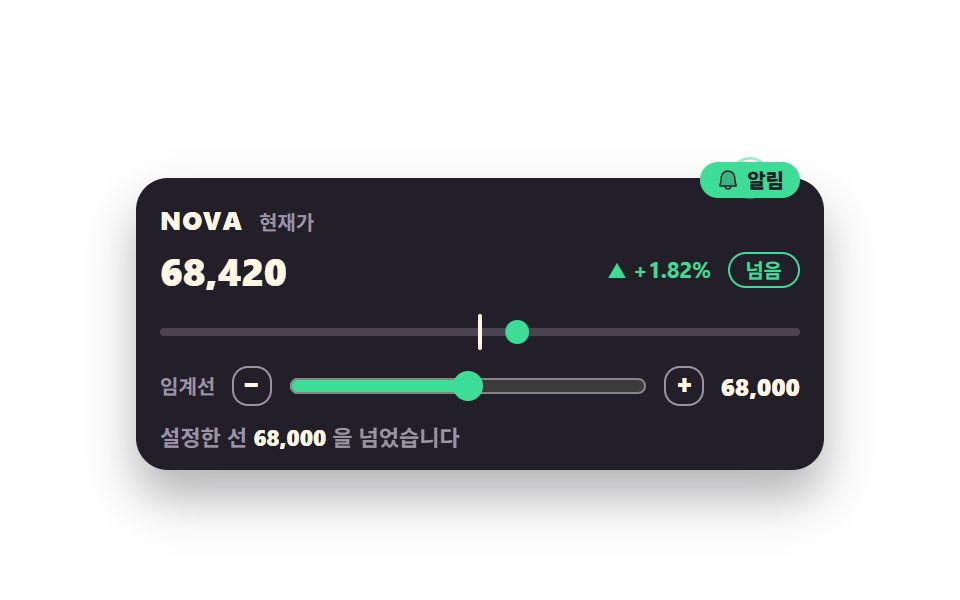
08設定した線を超えたら知らせるしきい値バッジ
利用者が決めた線を値が超えた瞬間だけバッジが出て、aria-live が一文を読み上げます
使いどころ価格アラートの設定画面、在庫や温度などのしきい値監視ダッシュボード
aria-livebox-shadowsteps(1, end)
<main class="stage">
<div class="at is-demo" id="at">
  <div class="at__card">
    <div class="at__head">
      <span class="at__sym">NOVA</span>
      <span class="at__cap">現在値</span>
    </div>

    <p class="at__priceRow">
      <!-- 이전값·현재값을 같은 칸에 겹친다 — steps(1, end) 컷이라 반투명 유령이 안 생긴다 -->
      <span class="at__priceWrap">
        <span class="at__price at__price--prev">66,940</span>
        <span class="at__price at__price--next" data-price>68,420</span>
      </span>
      <span class="at__dirWrap">
        <span class="at__dir at__dir--prev is-down">▼ −0.39%</span>
        <span class="at__dir at__dir--next is-up" data-dir>▲ +1.82%</span>
      </span>
      <!-- 방향을 색만으로 전하지 않는다 — ▲▼ 와 부호에 더해 "超過 / 未満" 를 글자로도 적는다 -->
      <span class="at__chipWrap">
        <span class="at__chip at__chip--under">未満</span>
        <span class="at__chip at__chip--over">超過</span>
      </span>
    </p>

    <div class="at__track">
      <span class="at__rail" aria-hidden="true"></span>
      <span class="at__lineHolder" data-line aria-hidden="true"><span class="at__line"></span></span>
      <span class="at__dotHolder" data-dot aria-hidden="true"><span class="at__dot"></span></span>
    </div>

    <div class="at__ctrl">
      <span class="at__ctrlLabel">しきい値</span>
      <button class="at__btn" type="button" data-step="-1" aria-label="しきい値を下げる">−</button>
      <input class="at__range" type="range" min="64000" max="72000" step="200" value="68000"
             aria-label="しきい値の設定" data-range>
      <button class="at__btn" type="button" data-step="1" aria-label="しきい値を上げる">+</button>
      <span class="at__ctrlVal" data-threshold>68,000</span>
    </div>

    <!-- aria-live 는 이 アラート 한 줄에만 붙인다 — 갱신되는 가격 칸에 붙이면 시세 전체가 계속 읽혀 스크린리더로 못 쓴다 -->
    <p class="at__alert" aria-live="polite">設定した線 <b class="at__alertVal" data-alertval>68,000</b> <span class="at__msgWrap"><span class="at__msg at__msg--under">に届いていません</span><span class="at__msg at__msg--over">を超えました</span></span></p>

    <span class="at__alertBox">
      <span class="at__pulse" aria-hidden="true"></span>
      <span class="at__badge"><svg class="at__bell" xmlns="http://www.w3.org/2000/svg" width="1em" height="1em" viewBox="0 0 256 256" aria-hidden="true"><g fill="currentColor"><path d="M208 192H48a8 8 0 0 1-6.88-12C47.71 168.6 56 139.81 56 104a72 72 0 0 1 144 0c0 35.82 8.3 64.6 14.9 76a8 8 0 0 1-6.9 12" opacity=".2"/><path d="M221.8 175.94c-5.55-9.56-13.8-36.61-13.8-71.94a80 80 0 1 0-160 0c0 35.34-8.26 62.38-13.81 71.94A16 16 0 0 0 48 200h40.81a40 40 0 0 0 78.38 0H208a16 16 0 0 0 13.8-24.06M128 216a24 24 0 0 1-22.62-16h45.24A24 24 0 0 1 128 216m-80-32c7.7-13.24 16-43.92 16-80a64 64 0 1 1 128 0c0 36.05 8.28 66.73 16 80Z"/></g></svg>アラート</span>
    </span>
  </div>
</div>
</main>@use "../../../../site/static/demo-tokens" as *;
// 임계 배지 — 현재가와 "사용자가 정한 임계선" 이 한 카드 안에 같이 선다. 값이 그 선을 넘는 순간에만
// 배지가 뜨고 소리 없는 펄스가 퍼진다. 실사용에서는 시드 PRNG 가 setInterval 로 값을 움직이고,
// 임계 통과는 이전 상태와 지금 상태가 선을 사이에 두고 갈릴 때만 한 번 발동한다 — 같은 쪽에 머무는
// 동안에는 다시 울리지 않는다. 임계선은 슬라이더·버튼·키보드로 실제로 움직인다.
// 방향은 색만으로 전하지 않는다: ▲▼ 와 +/− 부호에 더해 "넘음 / 아래" 를 글자로도 적는다.
//
// 미리보기(.is-demo)는 같은 장면을 CSS 키프레임 2초 루프로 눕힌다 — JS 는 그동안 화면을 안 건드려
// 24프레임이 같은 순간을 재현한다. 루프 안 깜빡임은 펄스 2회 = 초당 1회로 WCAG 2.3.1(초당 3회 미만) 아래.
// 배지가 사라지는 장면은 루프에서 재현하지 않는다(퇴장이 poster 를 이긴다 — 255-03): 되돌림을 96% 컷으로
// 두면 24프레임의 마지막 장(2초의 95.8%)에는 안 잡힌다.
$duration: $dur-loop;
$easing: $ease-out;
$pulse: rgba(61, 220, 151, .8); // $tick-up 의 반투명 판 — 펄스 고리
@include stage($stage-paper);
// 배지가 카드 윗변에 걸쳐 올라앉고 그 둘레로 펄스가 퍼진다 — 그만큼을 뿌리에서 미리 비워 둔다 (BD8·BD9)
.at { position: relative; display: flex; justify-content: center; width: 100%; padding-top: $sp-6; }
.at__card {
position: relative; width: min(100%, 320px); background: $tick-panel; border-radius: $r-card;
box-shadow: $shadow-raised; padding: $sp-3 $sp-3 $sp-2;
}
.at__head { display: flex; align-items: baseline; gap: $sp-2; padding: 0 0 $sp-1; }
.at__sym { font-weight: 800; font-size: clamp(11px, 3vw, 13px); color: $subject-cream; letter-spacing: .04em; }
.at__cap { font-weight: 700; font-size: clamp(9px, 2.4vw, 10px); color: $tick-mute; }
.at__priceRow {
display: grid; grid-template-columns: auto 1fr auto; align-items: center;
gap: $sp-2; margin: 0 0 $sp-2;
}
// 이전값·현재값을 같은 칸에 겹친다 — 컷 교체라 자릿수가 달라져도 자리가 안 흔들린다
.at__priceWrap, .at__dirWrap, .at__chipWrap { display: grid; }
.at__dirWrap, .at__chipWrap { justify-items: end; }
.at__price, .at__dir, .at__chip { grid-area: 1 / 1; font-variant-numeric: tabular-nums; }
.at__price { font-weight: 800; font-size: clamp(15px, 4.4vw, 19px); line-height: 1.4; color: $subject-cream; }
.at__dir { font-weight: 700; font-size: clamp(10px, 2.6vw, 11px); line-height: 1.5; }
.at__dir.is-up { color: $tick-up; }
.at__dir.is-down { color: $tick-down; }
.at__chip {
font-weight: 700; font-size: clamp(9px, 2.4vw, 10px); line-height: 1.6;
padding: 0 $sp-2; border-radius: $r-pill; border: 1px solid currentColor; white-space: nowrap;
}
.at__chip--under { color: $tick-mute; }
.at__chip--over { color: $tick-up; opacity: 0; }
// ── 트랙: 임계선 표식과 현재가 점이 같은 자 위에 선다
.at__track { position: relative; height: 18px; margin: 0 0 $sp-2; overflow: hidden; }
.at__rail {
position: absolute; left: 0; right: 0; top: 50%; height: 4px;
transform: translateY(-50%); border-radius: $r-pill; background: rgba(154, 147, 166, .32);
}
// 홀더는 트랙과 같은 폭이라 translateX 의 % 가 곧 트랙 위 위치가 된다.
// 표식·점 자신에게 %를 주면 자기 폭(2px·12px)이 기준이 돼 자를 못 쓴다 — 그래서 홀더를 한 겹 둔다
.at__lineHolder, .at__dotHolder { position: absolute; inset: 0; }
.at__lineHolder { transform: translateX(50%); }
.at__dotHolder { transform: translateX(36.8%); transition: transform $dur-base $easing; }
// 표식·점은 자기 중심이 홀더의 왼쪽 변에 오도록 스스로 반 칸 물러선다
.at__line {
position: absolute; left: 0; top: 0; bottom: 0; width: 2px;
transform: translateX(-50%); border-radius: $r-pill; background: $subject-cream;
}
.at__dot {
position: absolute; left: 0; top: 50%; width: 12px; height: 12px;
transform: translate(-50%, -50%); border-radius: 50%; background: $tick-up;
}
// ── 임계선 조절: 슬라이더 + 위/아래 버튼. 둘 다 키보드로 닿는다
.at__ctrl {
display: grid; grid-template-columns: auto auto minmax(0, 1fr) auto auto;
align-items: center; gap: $sp-2; padding: 0 0 $sp-2;
}
.at__ctrlLabel { font-weight: 700; font-size: clamp(9px, 2.4vw, 10px); color: $tick-mute; white-space: nowrap; }
.at__btn {
width: 20px; height: 20px; display: grid; place-items: center; padding: 0;
border: 1px solid $tick-mute; border-radius: $r-sm; background: transparent;
color: $subject-cream; font-weight: 800; font-size: 12px; line-height: 1; cursor: pointer;
}
.at__btn:hover, .at__btn:focus-visible { border-color: $tick-up; color: $tick-up; }
.at__range { width: 100%; min-width: 0; height: 16px; margin: 0; accent-color: $tick-up; }
.at__ctrlVal {
font-weight: 800; font-size: clamp(10px, 2.8vw, 12px); color: $subject-cream;
font-variant-numeric: tabular-nums; white-space: nowrap;
}
.at__alert {
margin: 0; font-weight: 700; font-size: clamp(9px, 2.4vw, 11px); line-height: 1.5; color: $tick-mute;
}
.at__alertVal { font-weight: 800; color: $subject-cream; font-variant-numeric: tabular-nums; }
.at__msgWrap { display: inline-grid; vertical-align: baseline; }
.at__msg { grid-area: 1 / 1; white-space: nowrap; }
.at__msg--over { opacity: 0; }
// ── 배지와 펄스: 카드 윗변에 걸터앉는다. top 은 간격이 아니라 배치 오프셋이라 격자 대상이 아니다
.at__alertBox { position: absolute; top: -10px; right: $sp-3; }
.at__pulse {
position: absolute; top: 50%; left: 50%; width: 28px; height: 28px; border-radius: 50%;
border: 2px solid $pulse; opacity: 0; transform: translate(-50%, -50%) scale(.55);
}
.at__badge {
position: relative; display: inline-flex; align-items: center; gap: $sp-1;
padding: 0 $sp-2; border-radius: $r-pill; background: $tick-up; color: $tick-panel;
font-weight: 800; font-size: clamp(9px, 2.4vw, 10px); line-height: 1.8; white-space: nowrap; opacity: 0;
}
.at__bell { width: 12px; height: 12px; font-size: 12px; flex: 0 0 auto; }
// ── 실사용(정적 경로) — 미리보기 전용 장은 자리만 지키고 안 보인다 (display:none 은 폭까지 지운다)
.at:not(.is-demo) .at__price--prev, .at:not(.is-demo) .at__dir--prev { opacity: 0; }
.at:not(.is-demo).is-over .at__chip--under, .at:not(.is-demo).is-over .at__msg--under { opacity: 0; }
.at:not(.is-demo).is-over .at__chip--over, .at:not(.is-demo).is-over .at__msg--over,
.at:not(.is-demo).is-over .at__badge { opacity: 1; }
// 실사용 펄스 — 선을 넘는 순간 한 번만. 소리는 없다
.at.is-fired .at__pulse { animation: atPulseOnce $dur-enter $easing 1; }
@keyframes atPulseOnce {
from { opacity: .7; transform: translate(-50%, -50%) scale(.6); }
to { opacity: 0; transform: translate(-50%, -50%) scale(1.6); }
}
// ── 미리보기 루프(2초)
// 0~8% 선 아래에서 대기 18% 선을 넘는 컷 — 값·등락·칩·알림 한 줄·배지가 한 프레임에 갈린다
// 18~96% 점이 선 위에서 계속 오른다 96% 되돌림 컷 (마지막 표본이 95.8% 라 이 장면은 안 찍힌다)
// 펄스는 20~46% · 52~78% 두 번 = 초당 1회
.at.is-demo .at__price--prev, .at.is-demo .at__price--next,
.at.is-demo .at__dir--prev, .at.is-demo .at__dir--next,
.at.is-demo .at__chip--under, .at.is-demo .at__chip--over,
.at.is-demo .at__msg--under, .at.is-demo .at__msg--over,
.at.is-demo .at__badge {
animation-duration: $duration;
animation-timing-function: steps(1, end);
animation-iteration-count: infinite;
}
.at.is-demo .at__price--prev, .at.is-demo .at__dir--prev,
.at.is-demo .at__chip--under, .at.is-demo .at__msg--under { animation-name: atCutOut; }
.at.is-demo .at__price--next, .at.is-demo .at__dir--next,
.at.is-demo .at__chip--over, .at.is-demo .at__msg--over,
.at.is-demo .at__badge { animation-name: atCutIn; }
@keyframes atCutIn { 0% { opacity: 0; } 18% { opacity: 1; } 96% { opacity: 0; } }
@keyframes atCutOut { 0% { opacity: 1; } 18% { opacity: 0; } 96% { opacity: 1; } }
.at.is-demo .at__dotHolder {
animation-name: atDot;
animation-duration: $duration;
animation-timing-function: $easing;
animation-iteration-count: infinite;
}
@keyframes atDot {
0%, 8% { transform: translateX(36.8%); }
18% { transform: translateX(55.3%); }
// 마지막 표본(95.8%)까지 선 위에 있다가 96% 에 제자리로 컷 — 되돌아가는 장면이 poster 로 안 뽑힌다
96% { transform: translateX(64%); animation-timing-function: steps(1, end); }
100% { transform: translateX(36.8%); }
}
.at.is-demo .at__pulse {
animation-name: atPulse;
animation-duration: $duration;
animation-timing-function: $easing;
animation-iteration-count: infinite;
}
@keyframes atPulse {
0%, 18% { opacity: 0; transform: translate(-50%, -50%) scale(.55); }
20% { opacity: .7; transform: translate(-50%, -50%) scale(.6); }
// 다 퍼진 고리를 다음 펄스 직전까지 컷으로 붙잡는다 — 줄어드는 유령 고리를 안 만든다
46% { opacity: 0; transform: translate(-50%, -50%) scale(1.6); animation-timing-function: steps(1, end); }
52% { opacity: .7; transform: translate(-50%, -50%) scale(.6); }
78%, 100% { opacity: 0; transform: translate(-50%, -50%) scale(1.6); }
}
@media (max-width: 340px) {
.at { padding-top: $sp-5; }
.at__card { padding: $sp-2; }
.at__priceRow { gap: $sp-1; margin: 0 0 $sp-1; }
.at__track { height: 16px; margin: 0 0 $sp-1; }
.at__ctrl { gap: $sp-1; padding: 0 0 $sp-1; }
.at__alertBox { right: $sp-2; }
}
@media (prefers-reduced-motion: reduce) {
// 움직임은 멈추고 "넘은 뒤" 상태를 그대로 세워 둔다 — 알림 내용은 글자로 남는다
.at.is-fired .at__pulse, .at.is-demo .at__pulse { animation: none !important; opacity: 0 !important; }
.at.is-demo .at__dotHolder { animation: none !important; transform: translateX(55.3%) !important; }
.at.is-demo .at__price--prev, .at.is-demo .at__dir--prev,
.at.is-demo .at__chip--under, .at.is-demo .at__msg--under { animation: none !important; opacity: 0 !important; }
.at.is-demo .at__price--next, .at.is-demo .at__dir--next,
.at.is-demo .at__chip--over, .at.is-demo .at__msg--over,
.at.is-demo .at__badge { animation: none !important; opacity: 1 !important; }
}html, body {
margin: 0;
overflow: hidden;
}
.stage {
box-sizing: border-box;
min-height: 100vh;
display: grid;
place-items: center;
margin: 0;
background: #ffffff;
font-family: -apple-system, "Segoe UI", "Noto Sans KR", sans-serif;
padding: clamp(8px, 4vw, 24px);
}
.at {
position: relative;
display: flex;
justify-content: center;
width: 100%;
padding-top: 24px;
}
.at__card {
position: relative;
width: min(100%, 320px);
background: #231f28;
border-radius: 16px;
box-shadow: 0 14px 24px rgba(23, 20, 26, 0.32);
padding: 12px 12px 8px;
}
.at__head {
display: flex;
align-items: baseline;
gap: 8px;
padding: 0 0 4px;
}
.at__sym {
font-weight: 800;
font-size: clamp(11px, 3vw, 13px);
color: #fff7e6;
letter-spacing: 0.04em;
}
.at__cap {
font-weight: 700;
font-size: clamp(9px, 2.4vw, 10px);
color: #9a93a6;
}
.at__priceRow {
display: grid;
grid-template-columns: auto 1fr auto;
align-items: center;
gap: 8px;
margin: 0 0 8px;
}
.at__priceWrap, .at__dirWrap, .at__chipWrap {
display: grid;
}
.at__dirWrap, .at__chipWrap {
justify-items: end;
}
.at__price, .at__dir, .at__chip {
grid-area: 1/1;
font-variant-numeric: tabular-nums;
}
.at__price {
font-weight: 800;
font-size: clamp(15px, 4.4vw, 19px);
line-height: 1.4;
color: #fff7e6;
}
.at__dir {
font-weight: 700;
font-size: clamp(10px, 2.6vw, 11px);
line-height: 1.5;
}
.at__dir.is-up {
color: #3ddc97;
}
.at__dir.is-down {
color: #ff7a5e;
}
.at__chip {
font-weight: 700;
font-size: clamp(9px, 2.4vw, 10px);
line-height: 1.6;
padding: 0 8px;
border-radius: 999px;
border: 1px solid currentColor;
white-space: nowrap;
}
.at__chip--under {
color: #9a93a6;
}
.at__chip--over {
color: #3ddc97;
opacity: 0;
}
.at__track {
position: relative;
height: 18px;
margin: 0 0 8px;
overflow: hidden;
}
.at__rail {
position: absolute;
left: 0;
right: 0;
top: 50%;
height: 4px;
transform: translateY(-50%);
border-radius: 999px;
background: rgba(154, 147, 166, 0.32);
}
.at__lineHolder, .at__dotHolder {
position: absolute;
inset: 0;
}
.at__lineHolder {
transform: translateX(50%);
}
.at__dotHolder {
transform: translateX(36.8%);
transition: transform 300ms ease-out;
}
.at__line {
position: absolute;
left: 0;
top: 0;
bottom: 0;
width: 2px;
transform: translateX(-50%);
border-radius: 999px;
background: #fff7e6;
}
.at__dot {
position: absolute;
left: 0;
top: 50%;
width: 12px;
height: 12px;
transform: translate(-50%, -50%);
border-radius: 50%;
background: #3ddc97;
}
.at__ctrl {
display: grid;
grid-template-columns: auto auto minmax(0, 1fr) auto auto;
align-items: center;
gap: 8px;
padding: 0 0 8px;
}
.at__ctrlLabel {
font-weight: 700;
font-size: clamp(9px, 2.4vw, 10px);
color: #9a93a6;
white-space: nowrap;
}
.at__btn {
width: 20px;
height: 20px;
display: grid;
place-items: center;
padding: 0;
border: 1px solid #9a93a6;
border-radius: 8px;
background: transparent;
color: #fff7e6;
font-weight: 800;
font-size: 12px;
line-height: 1;
cursor: pointer;
}
.at__btn:hover, .at__btn:focus-visible {
border-color: #3ddc97;
color: #3ddc97;
}
.at__range {
width: 100%;
min-width: 0;
height: 16px;
margin: 0;
accent-color: #3ddc97;
}
.at__ctrlVal {
font-weight: 800;
font-size: clamp(10px, 2.8vw, 12px);
color: #fff7e6;
font-variant-numeric: tabular-nums;
white-space: nowrap;
}
.at__alert {
margin: 0;
font-weight: 700;
font-size: clamp(9px, 2.4vw, 11px);
line-height: 1.5;
color: #9a93a6;
}
.at__alertVal {
font-weight: 800;
color: #fff7e6;
font-variant-numeric: tabular-nums;
}
.at__msgWrap {
display: inline-grid;
vertical-align: baseline;
}
.at__msg {
grid-area: 1/1;
white-space: nowrap;
}
.at__msg--over {
opacity: 0;
}
.at__alertBox {
position: absolute;
top: -10px;
right: 12px;
}
.at__pulse {
position: absolute;
top: 50%;
left: 50%;
width: 28px;
height: 28px;
border-radius: 50%;
border: 2px solid rgba(61, 220, 151, 0.8);
opacity: 0;
transform: translate(-50%, -50%) scale(0.55);
}
.at__badge {
position: relative;
display: inline-flex;
align-items: center;
gap: 4px;
padding: 0 8px;
border-radius: 999px;
background: #3ddc97;
color: #231f28;
font-weight: 800;
font-size: clamp(9px, 2.4vw, 10px);
line-height: 1.8;
white-space: nowrap;
opacity: 0;
}
.at__bell {
width: 12px;
height: 12px;
font-size: 12px;
flex: 0 0 auto;
}
.at:not(.is-demo) .at__price--prev, .at:not(.is-demo) .at__dir--prev {
opacity: 0;
}
.at:not(.is-demo).is-over .at__chip--under, .at:not(.is-demo).is-over .at__msg--under {
opacity: 0;
}
.at:not(.is-demo).is-over .at__chip--over, .at:not(.is-demo).is-over .at__msg--over,
.at:not(.is-demo).is-over .at__badge {
opacity: 1;
}
.at.is-fired .at__pulse {
animation: atPulseOnce 600ms ease-out 1;
}
@keyframes atPulseOnce {
from {
opacity: 0.7;
transform: translate(-50%, -50%) scale(0.6);
}
to {
opacity: 0;
transform: translate(-50%, -50%) scale(1.6);
}
}
.at.is-demo .at__price--prev, .at.is-demo .at__price--next,
.at.is-demo .at__dir--prev, .at.is-demo .at__dir--next,
.at.is-demo .at__chip--under, .at.is-demo .at__chip--over,
.at.is-demo .at__msg--under, .at.is-demo .at__msg--over,
.at.is-demo .at__badge {
animation-duration: 2s;
animation-timing-function: steps(1, end);
animation-iteration-count: infinite;
}
.at.is-demo .at__price--prev, .at.is-demo .at__dir--prev,
.at.is-demo .at__chip--under, .at.is-demo .at__msg--under {
animation-name: atCutOut;
}
.at.is-demo .at__price--next, .at.is-demo .at__dir--next,
.at.is-demo .at__chip--over, .at.is-demo .at__msg--over,
.at.is-demo .at__badge {
animation-name: atCutIn;
}
@keyframes atCutIn {
0% {
opacity: 0;
}
18% {
opacity: 1;
}
96% {
opacity: 0;
}
}
@keyframes atCutOut {
0% {
opacity: 1;
}
18% {
opacity: 0;
}
96% {
opacity: 1;
}
}
.at.is-demo .at__dotHolder {
animation-name: atDot;
animation-duration: 2s;
animation-timing-function: ease-out;
animation-iteration-count: infinite;
}
@keyframes atDot {
0%, 8% {
transform: translateX(36.8%);
}
18% {
transform: translateX(55.3%);
}
96% {
transform: translateX(64%);
animation-timing-function: steps(1, end);
}
100% {
transform: translateX(36.8%);
}
}
.at.is-demo .at__pulse {
animation-name: atPulse;
animation-duration: 2s;
animation-timing-function: ease-out;
animation-iteration-count: infinite;
}
@keyframes atPulse {
0%, 18% {
opacity: 0;
transform: translate(-50%, -50%) scale(0.55);
}
20% {
opacity: 0.7;
transform: translate(-50%, -50%) scale(0.6);
}
46% {
opacity: 0;
transform: translate(-50%, -50%) scale(1.6);
animation-timing-function: steps(1, end);
}
52% {
opacity: 0.7;
transform: translate(-50%, -50%) scale(0.6);
}
78%, 100% {
opacity: 0;
transform: translate(-50%, -50%) scale(1.6);
}
}
@media (max-width: 340px) {
.at {
padding-top: 20px;
}
.at__card {
padding: 8px;
}
.at__priceRow {
gap: 4px;
margin: 0 0 4px;
}
.at__track {
height: 16px;
margin: 0 0 4px;
}
.at__ctrl {
gap: 4px;
padding: 0 0 4px;
}
.at__alertBox {
right: 8px;
}
}
@media (prefers-reduced-motion: reduce) {
.at.is-fired .at__pulse, .at.is-demo .at__pulse {
animation: none !important;
opacity: 0 !important;
}
.at.is-demo .at__dotHolder {
animation: none !important;
transform: translateX(55.3%) !important;
}
.at.is-demo .at__price--prev, .at.is-demo .at__dir--prev,
.at.is-demo .at__chip--under, .at.is-demo .at__msg--under {
animation: none !important;
opacity: 0 !important;
}
.at.is-demo .at__price--next, .at.is-demo .at__dir--next,
.at.is-demo .at__chip--over, .at.is-demo .at__msg--over,
.at.is-demo .at__badge {
animation: none !important;
opacity: 1 !important;
}
}// 가짜 시세는 시드 PRNG 로 만든다 — 같은 시드면 누가 열어도 같은 흐름이 재현되고 외부 API·키가 필요 없다.
// 심볼도 실존 종목이 아니다.
var SEED = 296;
function mulberry32(a) {
return function () {
a |= 0; a = a + 0x6D2B79F5 | 0;
var t = Math.imul(a ^ a >>> 15, 1 | a);
t = t + Math.imul(t ^ t >>> 7, 61 | t) ^ t;
return ((t ^ t >>> 14) >>> 0) / 4294967296;
};
}
var rand = mulberry32(SEED);
var LOW = 64000, HIGH = 72000; // 트랙(=슬라이더)의 양 끝. 가격도 임계선도 이 자를 공유한다
var BASE = 67200; // 전일 終値 — 등락률의 기준
var price = 68420; // 미리보기 컷의 "현재값" 과 같은 값에서 실사용이 이어진다
var wasOver = null; // 아직 한 번도 재지 않았다는 뜻
var root = document.getElementById('at');
var rangeEl = root.querySelector('[data-range]');
var priceEl = root.querySelector('[data-price]');
var dirEl = root.querySelector('[data-dir]');
var thEl = root.querySelector('[data-threshold]');
var alertValEl = root.querySelector('[data-alertval]');
var dotEl = root.querySelector('[data-dot]');
var lineEl = root.querySelector('[data-line]');
// 숫자는 자리가 흔들리면 읽기 어렵다 — 천 단위 구분자까지 넣어 고정 폭으로 그린다
function money(n) { return n.toLocaleString('en-US'); }
function pct(v) { return (v >= 0 ? '+' : '−') + Math.abs(v).toFixed(2) + '%'; }
function arrow(v) { return v >= 0 ? '▲' : '▼'; }
// 값 하나를 트랙 위 백분율로. 양 끝에 점이 반쯤 잘리지 않게 2~98% 로 가둔다
function posOf(v) { return Math.max(2, Math.min(98, (v - LOW) / (HIGH - LOW) * 100)); }
// 펄스는 소리가 없다. 같은 클래스를 다시 붙여도 처음부터 돌게 한 번 떼었다 붙인다
function fire() {
root.classList.remove('is-fired');
void root.offsetWidth;
root.classList.add('is-fired');
}
function paint() {
var th = Number(rangeEl.value);
var chg = (price - BASE) / BASE * 100;
priceEl.textContent = money(price);
dirEl.textContent = arrow(chg) + ' ' + pct(chg);
dirEl.className = 'at__dir at__dir--next ' + (chg >= 0 ? 'is-up' : 'is-down');
thEl.textContent = money(th);
alertValEl.textContent = money(th);
// 홀더는 트랙 폭과 같아서 translateX 의 % 가 곧 트랙 위 위치다 (점 자신의 폭이 기준이 되지 않는다)
dotEl.style.transform = 'translateX(' + posOf(price).toFixed(1) + '%)';
lineEl.style.transform = 'translateX(' + posOf(th).toFixed(1) + '%)';
// 임계 통과는 "이전 상태와 지금 상태가 선을 사이에 두고 갈릴 때" 만 한 번 발동한다.
// 같은 쪽에 머무는 동안에는 값이 아무리 움직여도 다시 울리지 않는다
var over = price >= th;
if (wasOver === false && over) { fire(); }
wasOver = over;
root.classList.toggle('is-over', over);
}
function tick() {
var step = Math.round((rand() - 0.46) * price * 0.006);
if (step === 0) { step = rand() < 0.5 ? -1 : 1; }
price = Math.max(LOW + 400, Math.min(HIGH - 400, price + step));
paint();
}
// 임계선은 슬라이더로도 버튼으로도 키보드로도 움직인다. 움직이는 즉시 선 위치와 "넘었는가" 판정이 바뀐다
rangeEl.addEventListener('input', paint);
[].slice.call(root.querySelectorAll('[data-step]')).forEach(function (b) {
b.addEventListener('click', function () {
var d = Number(b.getAttribute('data-step')) * Number(rangeEl.step);
var v = Number(rangeEl.value) + d;
rangeEl.value = String(Math.max(Number(rangeEl.min), Math.min(Number(rangeEl.max), v)));
paint();
});
});
// 격자 미리보기(.is-demo) 동안에는 CSS 키프레임만 돌고 JS 는 화면을 안 건드린다 — 24프레임이 같은 순간을
// 재현해야 렌더 측정이 흔들리지 않는다. 포인터를 올리거나 키보드로 들어오면 그때부터 시드 시세가 갱신된다
function live() {
if (root.classList.contains('is-demo')) { root.classList.remove('is-demo'); paint(); }
}
['pointerdown', 'pointermove', 'focusin'].forEach(function (ev) { root.addEventListener(ev, live); });
paint();
var timer = setInterval(function () {
if (root.classList.contains('is-demo')) { return; }
if (document.visibilityState === 'hidden') { return; }
tick();
}, 700);
// 탭을 다시 보면 현재 상태를 그대로 다시 그린다 — 안 보이는 동안 밀린 갱신을 쌓아 두지 않는다
document.addEventListener('visibilitychange', function () {
if (document.visibilityState === 'visible') { paint(); }
});
window.addEventListener('pagehide', function () { clearInterval(timer); });// AlertThreshold — vanilla 판(run/296/demo/08-ticker-alert-threshold/index.html) 의 React 포트.
// 현재가와 "사용자가 정한 임계선" 이 한 카드 안에 같이 선다. 값이 그 선을 넘는 순간에만 배지가 뜨고
// 소리 없는 펄스가 한 번 퍼진다. 임계 통과는 이전 상태와 지금 상태가 선을 사이에 두고 갈릴 때만
// 발동한다 — 같은 쪽에 머무는 동안에는 값이 아무리 움직여도 다시 울리지 않는다.
// 방향은 색만으로 전하지 않는다: ▲▼ 와 +/− 부호에 더해 "넘음 / 아래" 를 글자로도 적는다.
import { useEffect, useRef, useState } from "react";
import styles from "./AlertThreshold.module.scss";
export type AlertThresholdProps = {
/** 격자 미리보기용 2초 자동 루프. 포인터를 올리거나 키보드로 들어오면 꺼지고 실제 갱신이 시작된다 */
demo?: boolean;
/** 시드 — 같은 값이면 누가 열어도 같은 시세 흐름이 재현된다 */
seed?: number;
/** 갱신 간격(ms) */
intervalMs?: number;
/** 트랙(=슬라이더)의 양 끝. 가격도 임계선도 이 자를 공유한다 */
low?: number;
high?: number;
/** 처음 세워 둘 임계선 */
initialThreshold?: number;
};
type Box<T> = { current: T };
type RangeEvt = { target: { value: string } };
const BASE = 67200; // 전일 종가 — 등락률의 기준
const START = 68420; // 미리보기 컷의 "현재값" 과 같은 값에서 실사용이 이어진다
const STEP = 200; // 슬라이더 눈금
/** 시드 PRNG — 외부 API·키가 필요 없고 심볼도 실존 종목이 아니다 */
function mulberry32(a: number) {
return function () {
a |= 0; a = a + 0x6D2B79F5 | 0;
let t = Math.imul(a ^ a >>> 15, 1 | a);
t = t + Math.imul(t ^ t >>> 7, 61 | t) ^ t;
return ((t ^ t >>> 14) >>> 0) / 4294967296;
};
}
/** 숫자는 자리가 흔들리면 읽기 어렵다 — 천 단위 구분자까지 넣어 고정 폭으로 그린다 */
const money = (n: number) => n.toLocaleString("en-US");
const pct = (v: number) => (v >= 0 ? "+" : "−") + Math.abs(v).toFixed(2) + "%";
const arrow = (v: number) => (v >= 0 ? "▲" : "▼");
export default function AlertThreshold({
demo = true, seed = 296, intervalMs = 700, low = 64000, high = 72000, initialThreshold = 68000,
}: AlertThresholdProps) {
const randRef: Box<(() => number) | null> = useRef(null);
if (randRef.current === null) { randRef.current = mulberry32(seed); }
const [price, setPrice] = useState(START);
const [threshold, setThreshold] = useState(initialThreshold);
const [live, setLive] = useState(!demo);
const [fireCount, setFireCount] = useState(0);
const wasOver = useRef(null) as Box<boolean | null>;
const over = price >= threshold;
const chg = (price - BASE) / BASE * 100;
// 값 하나를 트랙 위 백분율로. 양 끝에 점이 반쯤 잘리지 않게 2~98% 로 가둔다
const posOf = (v: number) => Math.max(2, Math.min(98, (v - low) / (high - low) * 100));
// 임계 통과는 "이전 상태와 지금 상태가 선을 사이에 두고 갈릴 때" 만 한 번 발동한다.
// 가격이 움직여서든 사람이 선을 내려서든 판정은 똑같다
useEffect(() => {
if (wasOver.current === false && over) { setFireCount((c) => c + 1); }
wasOver.current = over;
}, [over]);
useEffect(() => {
if (!live) { return; }
const id = window.setInterval(() => {
// 탭이 안 보이는 동안은 세지 않는다 — 돌아왔을 때 밀린 갱신이 한꺼번에 터지지 않게
if (document.visibilityState === "hidden") { return; }
setPrice((p) => {
const rand = randRef.current as () => number;
let step = Math.round((rand() - 0.46) * p * 0.006);
if (step === 0) { step = rand() < 0.5 ? -1 : 1; }
return Math.max(low + 400, Math.min(high - 400, p + step));
});
}, intervalMs);
return () => window.clearInterval(id);
}, [live, intervalMs, low, high]);
const nudge = (dir: number) => {
setThreshold((t) => Math.max(low, Math.min(high, t + dir * STEP)));
};
const rootCls = [styles.root, live ? "" : styles.isDemo, over ? styles.isOver : ""].filter(Boolean).join(" ");
return (
<div
className={rootCls}
onPointerMove={() => setLive(true)}
onPointerDown={() => setLive(true)}
onFocus={() => setLive(true)}
>
<div className={styles.card}>
<div className={styles.head}>
<span className={styles.sym}>NOVA</span>
<span className={styles.cap}>현재가</span>
</div>
<p className={styles.priceRow}>
{/* 이전값·현재값을 같은 칸에 겹친다 — steps(1, end) 컷이라 반투명 유령이 안 생긴다 */}
<span className={styles.priceWrap}>
<span className={`${styles.price} ${styles.pricePrev}`}>66,940</span>
<span className={`${styles.price} ${styles.priceNext}`}>{money(price)}</span>
</span>
<span className={styles.dirWrap}>
<span className={`${styles.dir} ${styles.dirPrev} ${styles.downText}`}>▼ −0.39%</span>
<span className={`${styles.dir} ${styles.dirNext} ${chg >= 0 ? styles.upText : styles.downText}`}>
{arrow(chg)} {pct(chg)}
</span>
</span>
<span className={styles.chipWrap}>
<span className={`${styles.chip} ${styles.chipUnder}`}>아래</span>
<span className={`${styles.chip} ${styles.chipOver}`}>넘음</span>
</span>
</p>
<div className={styles.track}>
<span className={styles.rail} aria-hidden="true" />
{/* 홀더는 트랙과 같은 폭이라 translateX 의 % 가 곧 트랙 위 위치다 — 표식·점 자신에게 %를 주면
자기 폭(2px·12px)이 기준이 돼 자를 못 쓴다 */}
<span className={styles.lineHolder} aria-hidden="true" style={{ transform: `translateX(${posOf(threshold).toFixed(1)}%)` }}>
<span className={styles.line} />
</span>
<span className={styles.dotHolder} aria-hidden="true" style={{ transform: `translateX(${posOf(price).toFixed(1)}%)` }}>
<span className={styles.dot} />
</span>
</div>
{/* 임계선은 슬라이더로도 버튼으로도 키보드로도 움직인다 */}
<div className={styles.ctrl}>
<span className={styles.ctrlLabel}>임계선</span>
<button className={styles.btn} type="button" aria-label="임계선 내리기" onClick={() => nudge(-1)}>−</button>
<input
className={styles.range}
type="range"
min={low}
max={high}
step={STEP}
value={threshold}
aria-label="임계선 값"
onChange={(e: RangeEvt) => setThreshold(Number(e.target.value))}
/>
<button className={styles.btn} type="button" aria-label="임계선 올리기" onClick={() => nudge(1)}>+</button>
<span className={styles.ctrlVal}>{money(threshold)}</span>
</div>
{/* aria-live 는 이 알림 한 줄에만 붙인다 — 갱신되는 가격 칸에 붙이면 시세 전체가 계속 읽혀 스크린리더로 못 쓴다 */}
<p className={styles.alert} aria-live="polite">
설정한 선 <b className={styles.alertVal}>{money(threshold)}</b>{" "}
<span className={styles.msgWrap}>
<span className={`${styles.msg} ${styles.msgUnder}`}>보다 낮습니다</span>
<span className={`${styles.msg} ${styles.msgOver}`}>을 넘었습니다</span>
</span>
</p>
<span className={styles.alertBox}>
{/* key 가 바뀌면 고리가 새로 마운트돼 펄스가 처음부터 돈다 — 같은 클래스를 다시 붙이는 것과 같은 뜻 */}
<span key={fireCount} className={`${styles.pulse} ${fireCount > 0 ? styles.pulseFired : ""}`} aria-hidden="true" />
<span className={styles.badge}>
<svg className={styles.bell} xmlns="http://www.w3.org/2000/svg" width="1em" height="1em" viewBox="0 0 256 256" aria-hidden="true"><g fill="currentColor"><path d="M208 192H48a8 8 0 0 1-6.88-12C47.71 168.6 56 139.81 56 104a72 72 0 0 1 144 0c0 35.82 8.3 64.6 14.9 76a8 8 0 0 1-6.9 12" opacity=".2" /><path d="M221.8 175.94c-5.55-9.56-13.8-36.61-13.8-71.94a80 80 0 1 0-160 0c0 35.34-8.26 62.38-13.81 71.94A16 16 0 0 0 48 200h40.81a40 40 0 0 0 78.38 0H208a16 16 0 0 0 13.8-24.06M128 216a24 24 0 0 1-22.62-16h45.24A24 24 0 0 1 128 216m-80-32c7.7-13.24 16-43.92 16-80a64 64 0 1 1 128 0c0 36.05 8.28 66.73 16 80Z" /></g></svg>
알림
</span>
</span>
</div>
</div>
);
}08 設定した線を超えたら知らせるしきい値バッジ — 計測 累積面積 2.406% · 動いたフレーム 21/23GODRICH オリジナル · SCSS と React は zip に同梱 · ティッカー ui で作るリアルタイム株価表示9種 — APIキー不要
このデモが属する記事
 ティッカー ui で作るリアルタイム株価表示9種 — APIキー不要ティッカー ui とは、株価のように絶えず変わる数字を、いまどこが変わったのかが目で分かる形にして見せる画面部品のことです。ここに並べた九つは、証券会社のキーも有料のデータ購読もいらず、ファイルを貼るだけでそのまま動きます。 この記事のデモをすべて見る